Joplin: Synchronization does not support proxy
Operating system
- [X ] Windows 7
- [X ] Windows 10
Application
- [X ] Desktop
Error
The desktop-app does not support proxy or it fails to use system-wide proxy settings. When the synchronise-button is pressed, nothing seem to happen. There is no visible error message. The error, ECONNREFUSED, is however logged properly into the log file.
 gibboni
All 74 comments
I'm wondering, is it the application that fails to use the proxy, or OneDrive that is refusing connections via this proxy? Does the native OneDrive client work in this setup?
 laurent22
on 15 Jan 2018
laurent22
on 15 Jan 2018
Native OneDrive works just fine. Based on the log, the app tries to connect directly to graph.microsoft.com. Are there any environment or command line settings I could try?
gibboni
on 15 Jan 2018
It seems Node indeed does not use the system proxy settings by default - https://stackoverflow.com/a/27825729/561309 So this will need to be implemented
laurent22
on 17 Jan 2018
Is there a way to tackle this on windows systems. On Linux I guess an export of http[s]_proxy will work - but what about Windows? I was not able to find a hack for the proxy issue here...
 jogi4github
on 20 Feb 2018
jogi4github
on 20 Feb 2018
I get the same reason: connect ECONNREFUSED error when trying to connect to a local webdav server. Is there a workaround/solution?
 artelse
on 4 Mar 2018
artelse
on 4 Mar 2018
On Linux I also get ECONNREFUSED, even though I have http[s]_proxy set.
 aksdb
on 13 Mar 2018
aksdb
on 13 Mar 2018
Same problem here on linux: with http[s]_proxy set, I get network timeout error with desktop application and nextcloud synchronization.
 crequill
on 12 Apr 2018
crequill
on 12 Apr 2018
Same problem here. Trying to setup Dropbox sync, but it gets stuck in the "Enter the code provided by Dropbox" dialog.
I am on Linux, with $http_proxy set.
 cossio
on 16 Apr 2018
cossio
on 16 Apr 2018
Same problem here in Windows 10.
 PyroP
on 13 May 2018
PyroP
on 13 May 2018
Hi -- any update on this?
I'm on windows 7 and the system proxy isn't recognized :-(
 think-nice-things
on 9 Jun 2018
think-nice-things
on 9 Jun 2018
same problem too. Windows version must have a dialog for configure proxy setttiongs.
Thanks!
 garzy
on 15 Jun 2018
garzy
on 15 Jun 2018
Is there any way to handle that manually? I'm using the portable app with Windows 7 and just got stuck as it is not recognizing the system-wide settings for the proxy server which is used here at the side.
Would be good to get this solved as now Joplin is a bit of useless here at my place of work.
Nevertheless, on Android and my private Linux its just amazing. :+1:
Greets, Jürgen
 Wildbill-Z
on 27 Jul 2018
Wildbill-Z
on 27 Jul 2018
Hello Jürgen,
I got it working by installing the NextCloud client, syncing the folder with the md files and configuring a file system snyc in Joplin.
Not sure if this is the best way, but at least it works for me.
- Jogi
jogi4github
on 27 Jul 2018
Hi,
yeah, that would be an idea but just a bit of overkill. Instead of installing an further app to sync files it would be great if Joplin could handle proxy settings by its own or just use the system settings.
But thanks. I think this will be fixed in the future and until then, your idea is a nice workaround. I just don't want to install any file sync tool as thats not wanted here at the place but could sync files manually. :-)
Greets, Jürgen
Wildbill-Z
on 27 Jul 2018
Implemented there: https://github.com/laurent22/joplin/commits/proxy_test but there are issues with timeout when the provided proxy URL is incorrect (the requests never time out) so that still needs to be fixed. The underlying network lib unfortunately doesn't allow controlling timeout properly so not sure what the fix is at this point.
laurent22
on 5 Sep 2018
Excellent, is there a binary / AppImage to test it?
The effect of requests that don't time out also exist today if you run the App behind a proxy, so it's no step backwards only one forward.
 dimpflmoser
on 5 Sep 2018
dimpflmoser
on 5 Sep 2018
No binary yet as I consider it's not stable enough for release. If you think it could be use, I can add it to the next release anyway and mark it as "Alpha" for instance.
laurent22
on 5 Sep 2018
It's definitely a valuable feature. Currently I use Android-Only (NextCloud) Notes by Stefan Niedermann, however it's markdown capabilities are rather limited. On the other hand editing Notes, especially migrating my existing notes on your Android client is a pain, so I would like to do it on the desktop. At work I'm caught behind a firewall and a proxy I cannot use it right now.
Sure a fallback if the proxy is not reachable would be great, however I'd regard that as the second step.
dimpflmoser
on 5 Sep 2018
I would also be happy about that feature - even if marked as "alpha" or "use at your own risk".
aksdb
on 5 Sep 2018
There have been a few releases since the last update on this issue, however I haven't seen an option in those updates. Is there an option to test to connect-via-proxy feature without compilation from source?
dimpflmoser
on 1 Oct 2018
The branch I had seemed to be working, at least with the local Squid proxy I had setup. But I've later tried with a regular proxy on the web and it didn't work. I'm not sure it works at all actually so it won't released for now.
laurent22
on 1 Oct 2018
What a shame, anyway thanks for your effort. - Still waiting (impatiently). :-)
dimpflmoser
on 1 Oct 2018
This must be a regression as it seemed to have worked a while ago.
I use joplin behind a proxy. It synchronized a while ago (to nextcloud) but today I discovered that it stopped. This renders it completely useless for me. Other electron-apps (like Signal, Spotify, ..) work fine in this environment.
 janLo
on 8 Oct 2018
janLo
on 8 Oct 2018
It appears there is a way to force node.js apps to go through a proxy with global-tunnel-ng
var globalTunnel = require('global-tunnel-ng');

globalTunnel.initialize({
    host: '10.0.0.10',
    port: 8080,
    proxyAuth: 'userId:password', // optional authentication
    sockets: 50 // optional pool size for each http and https
});
Perhaps this is the way to go.
 bhlevca
on 13 Nov 2018
bhlevca
on 13 Nov 2018
Am I wrong to believe this issue has been abandoned?
dimpflmoser
on 3 Dec 2018
It is not OneDrive only, all sync methods fail behind proxy
On Mon, 3 Dec 2018 at 16:40, dimpflmoser notifications@github.com wrote:
Am I wrong to believe this issue has been abandoned?
—
You are receiving this because you commented.
Reply to this email directly, view it on GitHub
https://github.com/laurent22/joplin/issues/164#issuecomment-443880456,
or mute the thread
https://github.com/notifications/unsubscribe-auth/AALI3l9urSwweyDIBQr-6xgNb_DHFCazks5u1ZpDgaJpZM4Rea4k
.
bhlevca
on 3 Dec 2018
I'm also eagerly watching this issue, hoping for a fix. I'm using Windows 10, syncing to Nextcloud, and I have to use a proxy to hit it.
 SolomonSklash
on 3 Dec 2018
SolomonSklash
on 3 Dec 2018
I could not find a satisfying solution so for now it's more or less on hold. Main issue is that if connection or anything doesn't work with the proxy, it's not possible to get proper errors (connection never times out). So often I don't know if it's the app or the proxy or something else that's not working.
Because in-depth work and specialist knowledge is needed for this feature, perhaps a bounty or some form of crowdfunding would help find someone to look into it and submit a pull request.
laurent22
on 4 Dec 2018
I posted in one of the forums a request and a proposal that uses node.js
capability to work with a proxy. Joplin is not the only node.js app that
has this issue. Others have looked into this already. On the Signal for
desktop forum there is an entire thread about it.
On Mon, Dec 3, 2018, 19:18 Laurent Cozic <[email protected] wrote:
I could not find a satisfying solution so for now it's more or less on
hold. Main issue is that if connection or anything doesn't work with the
proxy, it's not possible to get proper errors (connection never times out).
So often I don't know if it's the app or the proxy or something else that's
not working.Because in-depth work and specialist knowledge is needed for this feature,
perhaps a bounty or some form of crowdfunding would help find someone to
look into it and submit a pull request.—
You are receiving this because you commented.
Reply to this email directly, view it on GitHub
https://github.com/laurent22/joplin/issues/164#issuecomment-443920899,
or mute the thread
https://github.com/notifications/unsubscribe-auth/AALI3kn_GQGk-3vIo2zMx3_DI0Qt4Iqmks5u1b9SgaJpZM4Rea4k
.
bhlevca
on 4 Dec 2018
@laurent22 As far as I know it's the same issue with firefox: If your proxy accepts your request but doesn't deliver data Firefox hangs forever. Of course this is crap, but I guess it's the price we have to pay to have a crap proxy.
dimpflmoser
on 4 Dec 2018
yeah, I'm also "eagerly" watching this topic.
Didn't succed in building the proxy test version myself to test.
If someone would provide a binary test version (windows) I'd be happy to do some beta testing :-)
think-nice-things
on 5 Dec 2018
I'm also willing to test on Windows.
SolomonSklash
on 12 Dec 2018
Still...
 davidlauhn
on 12 Mar 2019
davidlauhn
on 12 Mar 2019
So sad... I'm using Joplin on my mobile phone and would be really glad If i could using it behind a Corporate Proxy. So please fix it.
 0x7878
on 12 Mar 2019
0x7878
on 12 Mar 2019
Any news on this? It's the one feature that's missing for me
 theslash
on 26 Mar 2019
theslash
on 26 Mar 2019
Too bad that there is no solution for the proxy problem. Otherwise Joplin would be nearly perfect for my needs. Unfortunately a show stopper for me.
 StefanTT
on 2 May 2019
StefanTT
on 2 May 2019
That's true.I can't access my notes from work because I'm behind an NTLM proxy.Isn't there a work around like with using cntlm, or does Jopplin not work with a proxy at all,that is, not even accept a proxy as a an option?
 nikosvaggalis
on 2 May 2019
nikosvaggalis
on 2 May 2019
I tried the typical environment variables for setting a proxy without success. And I think it simply does not work as the comments above in this thread state.
The use of an external sync tool is possible, of course.
StefanTT
on 2 May 2019
To make this bug easier to find from google:
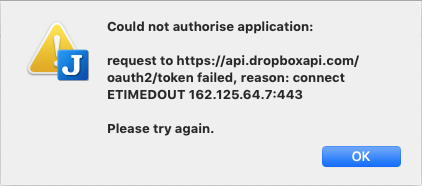
the error message received when trying to sync joplin with dropbox on a mac is:
Could not authorise application:

request to https://api.dropboxapi.com/oauth2/token failed, reason: connect ETIMEDOUT 170.135.66.9:443

Please try again.
 kenden
on 9 May 2019
kenden
on 9 May 2019
Hi, thanks for the app :-)
Also missing the proxy feature.
As a workaround I use sockscap64 on Windows. It has also a portable version
 g4c
on 15 May 2019
g4c
on 15 May 2019
I also have this problem at my office when working behind a corporate proxy.
I thought I could bypass the problem by using instead the filesystem sync on the joplin folder in my nextcloud folder, but my Joplin instances don't seem to be synced.
 jmleroy
on 24 Jun 2019
jmleroy
on 24 Jun 2019
@jmleroy I made a similar experience with syncing on the Filesystem, mainly when you use another device that syncs normally.
@g4c Are you behind a Corporate socks proxy? I mean, I know Sockscap, but it didn't work on HTTP Proxies (at least not for me).
0x7878
on 24 Jun 2019
OK. If sync doesn't work through a proxy, how well does Joplin work with epically delayed sync?
e.g. If I use Joplin at work (with a proxy, and sync fails) one day, and I use Joplin at home the next day (and sync works), what sorts of problems am I going to run into:
- With no concurrent updates to the same file?
- With concurrent updates to the same file?
 kleinfelter
on 26 Jun 2019
kleinfelter
on 26 Jun 2019
@0x7878 Yes, corporate http proxy on port 80, no authorisation. Will give you more details how to configure once in the office.
g4c
on 26 Jun 2019
@0x7878 Ok, that's easy. I did it long time ago and completely forgot - just using daily and that's it.
You just need to click Proxy to start Proxy Manager. Then just insert row and fill Proxy Address, Port (80), SOCKS Type (choose HTTP). Good luck!
g4c
on 27 Jun 2019
Hey there, it looks like there has been no activity on this issue recently. Has the issue been fixed, or does it still require the community's attention? This issue may be closed if no further activity occurs. You may also label this issue as "backlog" and I will leave it open. Thank you for your contributions.
![stale[bot] picture](https://avatars3.githubusercontent.com/in/1724?v=4&s=40) stale[bot]
on 25 Sep 2019
stale[bot]
on 25 Sep 2019
Nope, it has not been fixed and I'm still waiting for a solution not requiring workarounds (using third party software)
Regards
GC
g4c
on 25 Sep 2019
Related/duplicate: https://github.com/laurent22/joplin/issues/1117
Edit: fixed the link
kenden
on 26 Sep 2019
Again for another duckduckgo.com (or google) search result, my error message:
FetchError: request to https://public.dm.files.1drv.com failed, reason: unable to get local issuer certificate
at ClientRequest.
 indirection
on 2 Nov 2019
indirection
on 2 Nov 2019
Thank you for Joplin!
I've tried every work around that I could find.
Completed: 2020-04-06 8:27 PM
Last error: FetchError: request to https://public.dm.files.1drv.com/-snip-/version.txt failed, reason: unable to get local issuer certificate
This example is behind the Cisco Umbrella proxy.
Spotify and Signal work without issue.
indirection
on 7 Apr 2020
As far as I know the code to work with proxy has not been implemented yet.
I posted some suggedtions and someone has succeded to do it in a kludgy
way. The promlem is that node.js is not too friendly with proxies.
Bogdan
On Mon., Apr. 6, 2020, 8:33 p.m. indirection, notifications@github.com
wrote:
Thank you for Joplin!
I've tried every work around that I could find.
Completed: 2020-04-06 8:27 PM
Last error: FetchError: request to https://public.dm.files.1drv.com//version.txt
failed, reason: unable to get local issuer certificateThis example is behind the Cisco Umbrella proxy.
—
You are receiving this because you commented.
Reply to this email directly, view it on GitHub
https://github.com/laurent22/joplin/issues/164#issuecomment-610107194,
or unsubscribe
https://github.com/notifications/unsubscribe-auth/AABMRXVSACWZSHKTRXCQGM3RLJYGXANCNFSM4ELZVYSA
.
bhlevca
on 7 Apr 2020
Hey there, it looks like there has been no activity on this issue recently. Has the issue been fixed, or does it still require the community's attention? This issue may be closed if no further activity occurs. You may comment on the issue and I will leave it open. Thank you for your contributions.
stale[bot]
on 22 May 2020
Hey there, it looks like there has been no activity on this issue recently. Has the issue been fixed, or does it still require the community's attention? This issue may be closed if no further activity occurs. You may comment on the issue and I will leave it open. Thank you for your contributions.
As far as I know no work has been done on this. I think that it needs a fix not a closure.
bhlevca
on 22 May 2020
I have the same problem on MacOS. Joplin seems not respect system proxy setting when sync to Dropbox or checking update. This problem make Joplin hard to use in some country.
 wangyongcong
on 6 Jun 2020
wangyongcong
on 6 Jun 2020
If you use Nextcloud for the note sync, an easy solution that bypasses the proxy problem is to install the Nextcloud Desktop client and synchronize a Nextcloud folder to your local drive, then use the Joplin local filesystem synchronization mode.
 zicklag
on 10 Jul 2020
zicklag
on 10 Jul 2020
Hey there, it looks like there has been no activity on this issue recently. Has the issue been fixed, or does it still require the community's attention? This issue may be closed if no further activity occurs. You may comment on the issue and I will leave it open. Thank you for your contributions.
stale[bot]
on 9 Aug 2020
This needs a proper fix.
Lack of proxy support prevented me using Joplin so I had to move on and use other editors for note taking. But I hope this is some day fixed so I could use it again.
gibboni
on 9 Aug 2020
Hey there, it looks like there has been no activity on this issue recently. Has the issue been fixed, or does it still require the community's attention? This issue may be closed if no further activity occurs. You may comment on the issue and I will leave it open. Thank you for your contributions.
stale[bot]
on 9 Sep 2020
Still hoping for a fix ...
bhlevca
on 9 Sep 2020
Actually it's even worse. I installed the new version (portable) yesterday and the nasty workaround with sockscap64 stopped working. Joplin just hangs and that's it. I cannot move to the previous version as the db has been migrated to the new format 😭
When I disconnect vpn works ok.
Guys, please upvote or advise how to raise priority of this issue...
g4c
on 9 Sep 2020
@g4c argh I wanted to try also sockscap on Monday at work !
This feature is really missing, it make me very difficult to sync when I’m at work; I have to switch network several times a day to make it work and to always have an alternative WiFi network working in parallel of my enterprise WiFi network !! It’s really annoying.
And the « local sync + nextcloud folder » alternative doesn’t work : the sync is partial, it’s explained somewhere else in the forum ; local sync is not compatible with multi device sync.
I hope this feature can be implement even in alpha state if it can work on some situations
 nokoa77
on 12 Sep 2020
nokoa77
on 12 Sep 2020
@gibboni as the OP, could you please rename the issue « sync fails when behind a proxy » ? As it is true for at least Nextcloud also ? Thanks
nokoa77
on 12 Sep 2020
@nokoa77 Thanks for saving me stress with local sync I was planning to test. Now I know it's poinless 🙁
g4c
on 12 Sep 2020
@gibboni yes, @nokoa77 is right, I use nextloud. Also add windows 10 please. Maybe this will make this thread more visible for @laurent22. It's over 2.5 years old 😭
g4c
on 12 Sep 2020
I use nextloud.
@g4c I am behind a proxy and I use Nextcloud's desktop client to synchronize the files to the local filesystem and then tell Joplin to use the Nextcloud-synced dir. It works really well, and Nextcloud sync supports the proxy. Definitely agree that this is in the workaround category and it only works with nextcloud which is unfortunate.
zicklag
on 12 Sep 2020
Hi @zicklag thank your testimonial, and sorry @g4c if I misinformed you by ignorance. In fact I tried for several weeks to sync using "local sync + nextcloud folder", and I counldn't make it work. I remember I saw in the joplin forum that it was a known bug, but apparently I was mistaken, maybe my conf was bad. I will try again. If @g4c you are more successfull than me, I'm interested !!
nokoa77
on 12 Sep 2020
@nokoa77 no problem. I will let you know if any progress. But, honestly, I'm a bit tired by this waiting for any feedback with some kind of info and preferably deadline. I appreciate all the work invested in this app, really. But maybe it's time to search for some other solution. I've never faced any app having this kind of network problem. Keeping nextcloud folder synced locally opens new opportunities for using other apps.
g4c
on 12 Sep 2020
Hey there, it looks like there has been no activity on this issue recently. Has the issue been fixed, or does it still require the community's attention? This issue may be closed if no further activity occurs. You may comment on the issue and I will leave it open. Thank you for your contributions.
stale[bot]
on 13 Oct 2020
Thank you kind @stale bot, but we'd rather keep replying to this issue than let it get closed. :wink:
Edit: Oops, apparently the bot isn't actually an account you can @ mention. Sorry whoever I pinged!
zicklag
on 13 Oct 2020
Hi, I confirm this feature is still an open issue for Joplin to work properly on all configurations, including when one is using it "at work" in a corporate company where proxy is the standard. There seems to be workarounds (like 1/ sync on file and 2/ sync this file with nextcloud or dropbox...) but it is not very efficient : I tried for several weeks and had to stop because of too many sync errors and fails.
nokoa77
on 13 Oct 2020
Hey guys, I appreciate the efforts put into Joplin, I truly do! But at the same time I can't believe how proxy support can be dismissed for so long. I believe you're underestimating the amount of people who direly needs proxy support. This is a major hurdle for some (including me.)
 onatbas
on 21 Oct 2020
onatbas
on 21 Oct 2020
It's not a ignored, I've spent quite a bit of time tried to get it working but failed. I'd gladly accept a pull request for it but it would have to be rock solid or supported by a company or very motivated contributor, because I won't be able to fix any issue with it (setting up a proxy is too much hassle and when things don't work it's very hard to debug).
laurent22
on 21 Oct 2020
@laurent22 Thanks for the answer and all your work! I believed it should be more about getting new customers or companies. From my perspective this is basic functionally for every bigger company and there is also some competition on the market. Just don't understand why a company should insist on adding proxy? They just evaluate what's on the market and how it suits their needs. If they consider Joplin among others and find out it cannot work in their environment/infrastructure they just give up and choose something different instead. This is how it works based on my experience. But, of course, this is your business and your decision.
g4c
on 21 Oct 2020
@laurent22, have you tested global-agent? It works transparently to tunnel modules that use node's default http.request() method as well as the request module. It was made to replace the older global-tunnel library.
gibboni
on 21 Oct 2020
Related issues
 Dharmesh-Poddar
·
3Comments
Dharmesh-Poddar
·
3Comments
 jacobgonzales20
·
3Comments
jacobgonzales20
·
3Comments
 Cybernemo
·
3Comments
Cybernemo
·
3Comments
 GingerPapa
·
3Comments
GingerPapa
·
3Comments
 jmcastagnetto
·
3Comments
jmcastagnetto
·
3Comments
Most helpful comment
It seems Node indeed does not use the system proxy settings by default - https://stackoverflow.com/a/27825729/561309 So this will need to be implemented