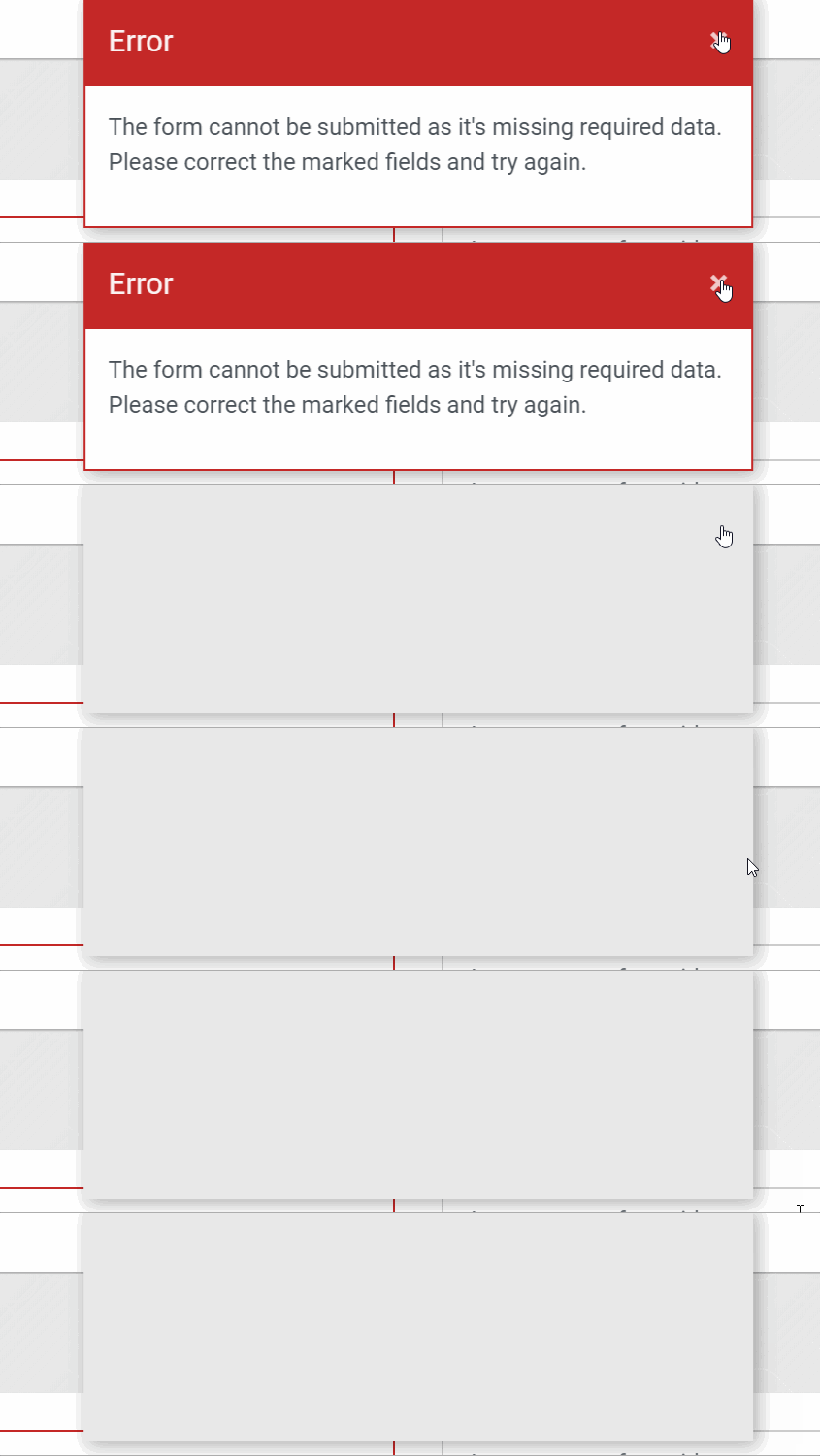
Since the merge of the new template there is a bug when you dismiss a notice eg the joomla statistics message on the first load of a new site or an article save
When you click on dismiss the content of the notice goes but the background remains

 brianteeman
All 36 comments
Is it just me that's having this problem?
brianteeman
on 23 Aug 2019
Can't confirm, brian. Test after change Username and installed new languages.
System Information
Setting | Value
-- | --
PHP Built On | Linux lamp129.cloudaccess.net 3.10.0-962.3.2.lve1.5.24.5.el6h.x86_64 #1 SMP Thu Nov 22 10:07:47 EST 2018 x86_64
Database Type | mysql
Database Version | 5.7.23-cll-lve
Database Collation | utf8_general_ci
Database Connection Collation | utf8mb4_general_ci
PHP Version | 7.3.7
Web Server | Apache
WebServer to PHP Interface | cgi-fcgi
Joomla! Version | Joomla! 4.0.0-alpha11-dev Development [ Amani ] 29-June-2019 11:27 GMT
User Agent | Mozilla/5.0 (Macintosh; Intel Mac OS X 10.13; rv:68.0) Gecko/20100101 Firefox/68.0
Multilanguage | Yes: French, German, Persian
 ghost
on 23 Aug 2019
ghost
on 23 Aug 2019
Which browser
brianteeman
on 23 Aug 2019

ghost
on 23 Aug 2019
I get this error with both chrome and Firefox for Windows. Edge works fine
brianteeman
on 23 Aug 2019
Can't reproduce on the following plattforms:
Windows 7:
- Chrome 75.0.3770.142
- Chrome 76.0.3809.100
- Firefox 68.0.2 (64-Bit)
- Vivaldi 2.6.1566.49
- Vivaldi 2.7.1628.30
Windows 10
- Edge 44.18362.267.0
Ubuntu 1804
- Vivaldi 2.6.1566.51
- Chrome 76.0.3809.100
- Firefox 68.0.2 (64-bit)
MacOS 10.14.5
- Safari 12.1.1
- FireFox 68.0.2
- Chrome 76.0.3809.100
Does this also happens on the backend login page if you use a wrong password?
 HLeithner
on 23 Aug 2019
HLeithner
on 23 Aug 2019
On Windows 10 Home, OK with Microsoft Edge 44.18362.267.0, but not with:
- Firefox 68.0.2 (64-bit)
- Chrome Version 76.0.3809.100
 Quy
on 23 Aug 2019
Quy
on 23 Aug 2019
Yes its the same on the login page

brianteeman
on 23 Aug 2019
Ok, last thing could you test it on http://max.verlauf.at/joomla-cms/administrator/ ?
HLeithner
on 24 Aug 2019
Ok, last thing could you test it on http://max.verlauf.at/joomla-cms/administrator/ ?
Chrome - error
Firefox - error
Edge - ok
So that means the issue is browser/os based
brianteeman
on 24 Aug 2019
If you don't have a different version then me this maybe the browser language, even I can't believe this. Mine and I think Franz too is german.
Maybe a browser extension? How is it in. Private or safe mode without plugins?
HLeithner
on 24 Aug 2019
@HLeithner Browser Language is English (UK), OS is german (AT)
ghost
on 24 Aug 2019
Already tested with both failing browsers without any plugins
@HLeithner In your list of tests that you performed you didnt test these failing browsers on windows 10
brianteeman
on 24 Aug 2019
There was no other browser installed ... I will test tonight
HLeithner
on 24 Aug 2019
bizaarely I have seen it working on another windows computer
Pretty sure its something to do with how the alert webcomponent is dismissed but cant track it down
brianteeman
on 24 Aug 2019
I have the problem now on a windows server 2011 with firefox 66.0.3 and firefox 68.0.2... didn't tested on win 10 but it seams if the joomla-alert element did get hidden or removed. may @dgrammatiko can help here?
HLeithner
on 24 Aug 2019
That was my conclusion as well
brianteeman
on 24 Aug 2019
Someone that can replicate this should check the parent element and the associated styles. I pretty sure has nothing to do with the custom element part, some css is messing up there.
 dgrammatiko
on 24 Aug 2019
dgrammatiko
on 24 Aug 2019
Also, this is utterly stupid!!!! Instead of overriding the Custome element css (it's baked in functionality) people thought that would be a good idea to roll their one css ontop of the already loaded from the vendor...
Basically this file needs to be moved to scss/vendor/whatever-the-name-of-the-ce/alerts/alerts.scss or something similar (not in front of an IDE right now)
I guess the same goes for the tabs... https://github.com/joomla/joomla-cms/blob/921913f51ca54dbc6ba26a150938841f5fb09cb9/administrator/templates/atum/scss/blocks/_tabs.scss#L8
Well YCFS...
dgrammatiko
on 24 Aug 2019
check #26014
dgrammatiko
on 24 Aug 2019
Closed as having Pull Request #26014
ghost
on 24 Aug 2019
Set to "open" on behalf of @alikon by The JTracker Application at issues.joomla.org/joomla-cms/25850
 joomla-cms-bot
on 25 Aug 2019
joomla-cms-bot
on 25 Aug 2019
re-opened as requested
This comment was created with the J!Tracker Application at issues.joomla.org/tracker/joomla-cms/25850.
 alikon
on 25 Aug 2019
alikon
on 25 Aug 2019
Really happy to say that I have found the cause of the problem and why other users could not replicate it.
@dgt41 was correct in realising that it was to do with the javascript that was adding the "fade-in" animation.
On my system I have the windows accessibility setting for Show Animations to off

When I change that to the default of on then the dismiss alerts problem goes away.
Before saying that this should be closed as a non-joomla issue let me explain further.
This operating system setting (also available in iphone and android) is important for accessibility.
It has the effect of setting "prefers-reduced-motion" which is a new media-query essential for accessibility
It is now supported on most browsers https://caniuse.com/#feat=prefers-reduced-motion
One place where it can be seen in action in Joomla is with the bootstrap candy bar stripe you see when you install sample data. When a user has "prefers-reduced-motion" set then the animation on the candy bar stripe is disabled. (This is something I am happy to say I raised the issue for at bootstrap as the result of some work I was doing with drupal accessibility team)
While I have identified what causes the issue both on the OS and in Joomla and it is repeatable at the moment I dont have a fix. Maybe someone better than me at js can create a media query that disables the fade-in animations when prefers-reduced-motion is set.
brianteeman
on 26 Aug 2019
More detailed information on "prefers-reduced-motion" https://css-tricks.com/revisiting-prefers-reduced-motion-the-reduced-motion-media-query/
brianteeman
on 26 Aug 2019
FWIW the original alert animation supports already that: https://github.com/joomla-projects/custom-elements/blob/57742d291e7e906f29f82f71505dcd33e2acf5b2/src/scss/alert/alert.scss#L76
Not sure I can say the same for the template animations
dgrammatiko
on 26 Aug 2019
As this is a serious accessibility issue please can this get a Release Blocker tag
brianteeman
on 25 Oct 2019
Thanks to #27394 this is no longer an issue
One more release blocker bites the dust
brianteeman
on 10 Jan 2020
Re-opening
You can't see a gray box anymore but there is still something on top of the buttons preventing them being used
Please put release blocker label back
brianteeman
on 15 Jan 2020
@brianteeman add after https://github.com/joomla/joomla-cms/blob/d670b9f225036b6213d08fceca14c5b7d3d284e0/build/media_source/system/js/core.es6.js#L545
messageContainer.style.removeProperty('width');
messageContainer.style.removeProperty('height');

// Or if that doesn't work apply the same thing from J3
// Fix Chrome bug not updating element height
messageContainer.style.display = 'none';
messageContainer.offsetHeight;
messageContainer.style.display = '';
no luck with that BUT
If I remove the z-index from the containing div that has the class notify-alerts it looks like it works - just no idea how to do the js
brianteeman
on 15 Jan 2020
messageContainer.style.removeProperty('zIndex');
dgrammatiko
on 15 Jan 2020
from the containing div that has the class notify-alerts
Not from the messageContainer
brianteeman
on 15 Jan 2020
I'm wondering what's the logic in having the alert always displayed. It should be either destroyed or at least hidden. The demo looks weird to me https://joomla-projects.github.io/custom-elements/#/alert?id=alerts-demo.
 SharkyKZ
on 4 Mar 2020
SharkyKZ
on 4 Mar 2020
I have fixed this - see https://github.com/joomla-projects/custom-elements/pull/138
It is easy to test
brianteeman
on 4 Mar 2020
Closed as resolved upstream - just waiting on a new release
brianteeman
on 4 Mar 2020
Related issues
brianteeman
·
5Comments
brianteeman
·
6Comments
 ghazal
·
4Comments
ghazal
·
4Comments
 wilsonge
·
4Comments
brianteeman
·
4Comments
wilsonge
·
4Comments
brianteeman
·
4Comments
Most helpful comment
FWIW the original alert animation supports already that: https://github.com/joomla-projects/custom-elements/blob/57742d291e7e906f29f82f71505dcd33e2acf5b2/src/scss/alert/alert.scss#L76
Not sure I can say the same for the template animations