Johnny-five: DC Motors on RPi turn on and off randomly
This is my first issue on github, so I'm sorry if this isn't how it's done.
I'm making a robot with a Raspberry Pi 3 B+ and 3 Sparkfun DRV8871's. They work properly when I test them with an arduino, but with I use them with any Raspberry Pi, the motors turn on and off randomly, and I am rather confused. When the motors are commanded to run, they do so at the proper speeds, but 3-5 seconds later, the motors change direction randomly, change speeds to full power, and behave erratically.
My GPIO wiring is correct, I've checked it many times, and all of the driver chips are grounded to both the external power supply and the RPi.
var five = require("johnny-five");
var keypress = require("keypress");
var Raspi = require("raspi-io");
var board = new five.Board({io: new Raspi(
  { enableSoftPwm: true, includePins: ['GPIO4', 'GPIO17', 'GPIO27', 'GPIO22', 'GPIO9', 'GPIO11'] }
)});

board.on("ready", function() {
  var motors = new five.Motors([
    {pins: {pwm: "GPIO4", dir: "GPIO17"}, invertPWM: true, enableSoftPwm: true},
    {pins: {pwm: "GPIO27", dir: "GPIO22"}, invertPWM: true, enableSoftPwm: true},
    {pins: {pwm: "GPIO9", dir: "GPIO11"}, invertPWM: true, enableSoftPwm: true},
  ]);

  function stop() {
    motors[0].stop();
    motors[1].stop();
    motors[2].stop();
  }

  stop();
  process.stdin.on("keypress", function(ch, key) {
    console.log(key.name);
    if(key.name === "up") {
      stop();
      motors[1].forward(125);
      motors[2].reverse(125);
    } else if (key.name === "down") {
      stop();
      motors[1].reverse(125);
      motors[2].forward(125);
    } else if (key.name === 'right') {
      stop();
      motors[0].forward(125);
      motors[1].forward(125);
      motors[2].forward(125);
    } else if (key.name === 'left') {
      stop()
      motors[0].reverse(125);
      motors[1].reverse(125);
      motors[2].reverse(125);
    } else {
      stop();
    }
  });
});
My code is fairly simple, and I'm wondering why the motors are responding this way. The motors are programmed to move at about half speed, and the erratic behavior is always at full power to the motors. Any thoughts?
 ntatko
All 11 comments
Only one tip on the subission of your issue, if you surround your code with three tickmarks instead of one, it will make a nice little codeblock. You could even write "```js" and it will add color to your code. It's really nice:
const five = require("johnny-five");
Otherwise your submission is perfect.
I know motor really well, but since this is a Raspberry Pi I'm going to loop in @nebrius because he is the expert on that topic.
First I'd like to isolate out keypress so could you try this code:
var five = require("johnny-five");
var Raspi = require("raspi-io");

var board = new five.Board({io: new Raspi(
  { enableSoftPwm: true, includePins: ['GPIO4', 'GPIO17', 'GPIO27', 'GPIO22', 'GPIO9', 'GPIO11'] }
)});

board.on("ready", function() {
  var motors = new five.Motors([
    {pins: {pwm: "GPIO4", dir: "GPIO17"}, invertPWM: true},
    {pins: {pwm: "GPIO27", dir: "GPIO22"}, invertPWM: true},
    {pins: {pwm: "GPIO9", dir: "GPIO11"}, invertPWM: true},
  ]);

  function stop() {
    motors[0].stop();
    motors[1].stop();
    motors[2].stop();
  }

  stop();
  console.log("Forward");
  motors[1].forward(125);
  motors[2].reverse(125);

  setTimeout(() => {
    console.log("Reverse");
    stop();
    motors[1].reverse(125);
    motors[2].forward(125);
  }, 5000);

  setTimeout(() => {
    console.log("Right");
    stop();
    motors[0].forward(125);
    motors[1].forward(125);
    motors[2].forward(125);
  }, 10000);

  setTimeout(() => {
    console.log("Left");
    stop();
    motors[0].reverse(125);
    motors[1].reverse(125);
    motors[2].reverse(125);
  }, 15000);

  setTimeout(() => {
    console.log("Stop");
    stop();
  }, 20000);

});
 dtex
on 15 Oct 2018
dtex
on 15 Oct 2018
Can you link to the specific device you're using to drive the motors? I searched on Sparkfun, but couldn't find a DRV8871 device there.
I'm wondering if this has something to do with switching from 5V logic of the Arduino to the 3.3V logic on the Raspberry Pi, but I'll need to see the details of this board to tell.
And yes, I'd also recommend trying @dtex's suggestion above too.
 nebrius
on 16 Oct 2018
nebrius
on 16 Oct 2018
A quick note on your code: the enableSoftPwm flag is only supported on the Raspi IO constructor, so you can remove it from your new five.Motors([ ... ]) call.
Also, is there a reason you're using the includePins option in the constructor?
nebrius
on 16 Oct 2018
Sorry, @nebrius, I was wrong, it's Adafruit DRV8871. The link is here. I decided to use includePins to try and hard-code everything I could in case it was some arbitrary, ill-defined constructor. I've just been trying a bunch of stuff to see if it helped.
I ran the above code, @dtex, and it seems like the commands all work, as in, when the motor speeds are set, each of them move in that direction, but given 2 or 3 seconds, occasionally a motor will change direction or kick up to full speed. As far as I can tell, it's seemingly random.
They also turn on when the Pi boots. I have everything powering up at the same time. The motors spin then, as well, but I figure that's just a GPIO test sequence running on the Pi, or something. Also, when the program starts ($ sudo node programName.js), motor[0] starts spinning. Dunno if that means anything.
ntatko
on 18 Oct 2018
I decided to use includePins to try and hard-code everything I could in case it was some arbitrary, ill-defined constructor.
FYI if you leave includePins out, it includes _everything_. It's there in case there's something you want to _exclude_, and is something of a twin to excludePins. Think of it like this: includePins is a white list filter, excludePints is a black list filter, and specifying neither means no filter.
Sorry, @nebrius, I was wrong, it's Adafruit DRV8871
Thanks. Looking at the datasheet, the RPi _should_ be able to drive it fine, even though it's a 3.3v device (compared to the 5v Arduino).
They also turn on when the Pi boots. I have everything powering up at the same time. The motors spin then, as well, but I figure that's just a GPIO test sequence running on the Pi, or something.
I'm about 99% certain it's not a test sequence. What's more likely is that this is caused by changing pin modes throughout the lifecycle of the startup sequence. When the RPi first boots up, the pins are in input mode, meaning you have to worry about floating pins. Then, when Johnny-Five starts up, the pin is switched to output mode, which could in theory cause the signal to go from logic high to logic low, which the controller may read as a PWM pulse (causing the spin). Then, once the code is fully running, it's switched to PWM mode and all is well.
To fix this, I'd recommend adding a ~10k pull-down resistor to your control signals heading to the motor controller.
Let's see what happens after adding the pull down resistor and go from there.
nebrius
on 19 Oct 2018
Just ordered those resistors; I'll update you then. Thanks so much for all the help!
ntatko
on 25 Oct 2018
Thanks, I'll keep an eye out for your response. We'll figure it out yet!
nebrius
on 26 Oct 2018
So, here's the update. The pull-down resistors didn't seem to make a whole lot of difference. I re-wrote the code to try it on an Arduino in both Johnny Five and Arduino-C, and I have the same issue, but this time, only on one of the three motors. I'm guessing that the issue lies more in my voltage regulation and less in the control code. It seems as though this is no longer a Johnny-Five issue, and thanks for your help!
ntatko
on 1 Nov 2018
I'm glad you got it working @ntatko!
nebrius
on 14 Nov 2018
Thanks everyone.
@ntatko if something else comes up, feel free to re-open this or open a new issue.
dtex
on 14 Nov 2018
Got it working! I drove the motors with an arduino, and was having a similar problem as this, but removed some arduino controls. She's working now.
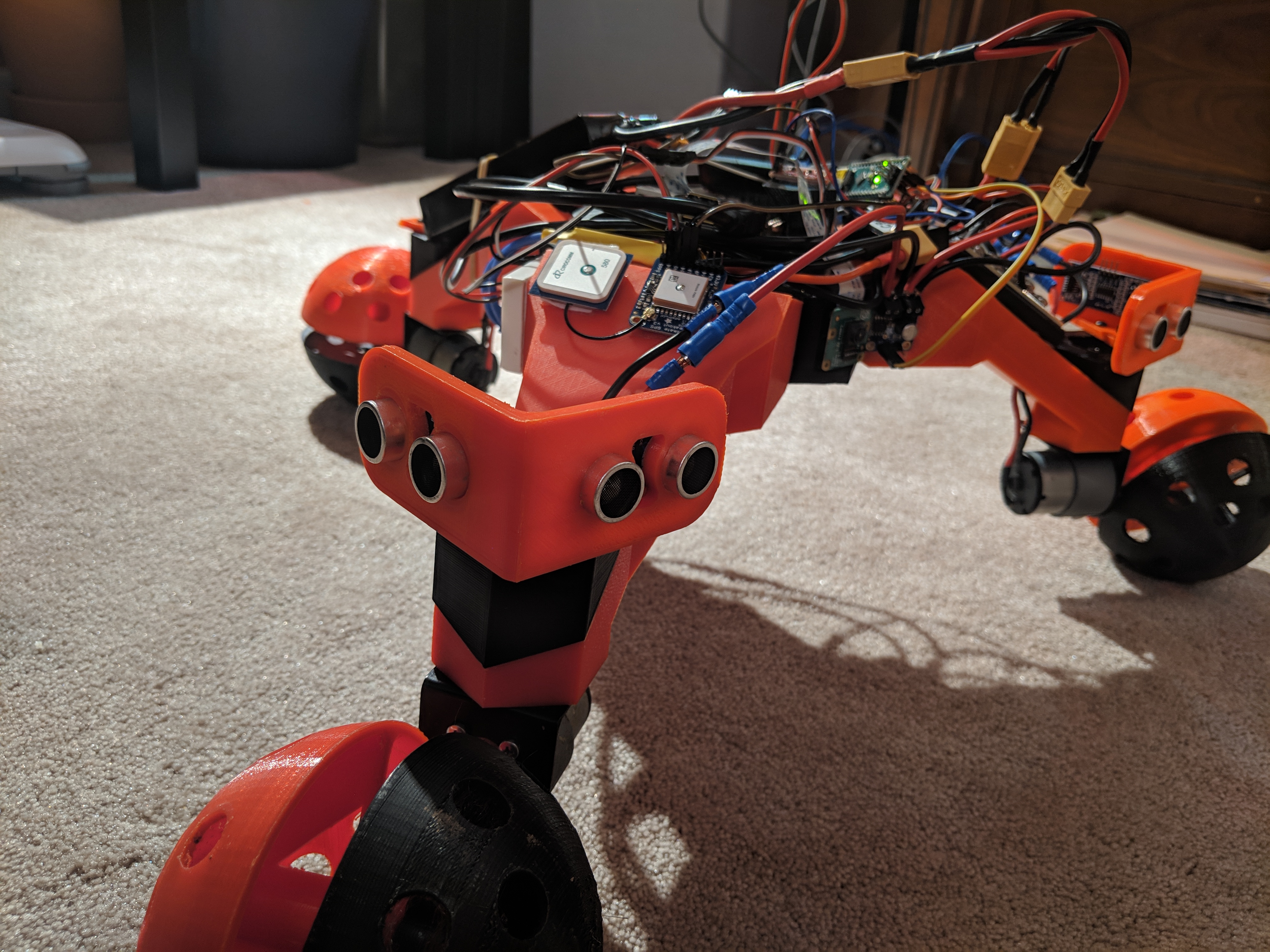
Thanks for all y'all's help!
ntatko
on 2 Dec 2018
Related issues
 cannehag
·
12Comments
cannehag
·
12Comments
 TheBekker
·
6Comments
TheBekker
·
6Comments
 lezabour
·
12Comments
lezabour
·
12Comments
 hxlnt
·
6Comments
hxlnt
·
6Comments
 peetj
·
7Comments
peetj
·
7Comments