I know this question has been asked some times back, i would just want to confirm if the library provides support for DHT11 now? or is it HTU21D alone?
 roboflank
All 16 comments
Sorry, there is currently no support for the DHT11. There are many other temperature sensors that are supported:
- LM35
- TMP36
- TMP102
- DS18B20 (requires ConfigurableFirmata)
- MPU6050
- Grove Thermometer
- BMP180
- MPL115A2
- MPL3115A2
- HTU21D
- MCP9808
- SI7020
- MS5611
- TH02
 rwaldron
on 24 Mar 2016
rwaldron
on 24 Mar 2016
@rwaldron i needed a hygrometer sensor apart form HTU21D
roboflank
on 24 Mar 2016
All of the supported components are listed on each API page, so for Hygrometer, there are currently two http://johnny-five.io/api/hygrometer/
I will look around for others that can be added for more device diversity
rwaldron
on 24 Mar 2016
The best I can do for now is to provide support via an I2C backpack, which means you'll need another microcontroller, any arduino will do the trick.
rwaldron
on 24 Mar 2016
In v0.9.35...
- https://github.com/rwaldron/johnny-five/blob/master/docs/multi-DHT11_I2C_NANO_BACKPACK.md
- https://github.com/rwaldron/johnny-five/blob/master/docs/hygrometer-DHT11_I2C_NANO_BACKPACK.md
- https://github.com/rwaldron/johnny-five/blob/master/docs/temperature-DHT11_I2C_NANO_BACKPACK.md
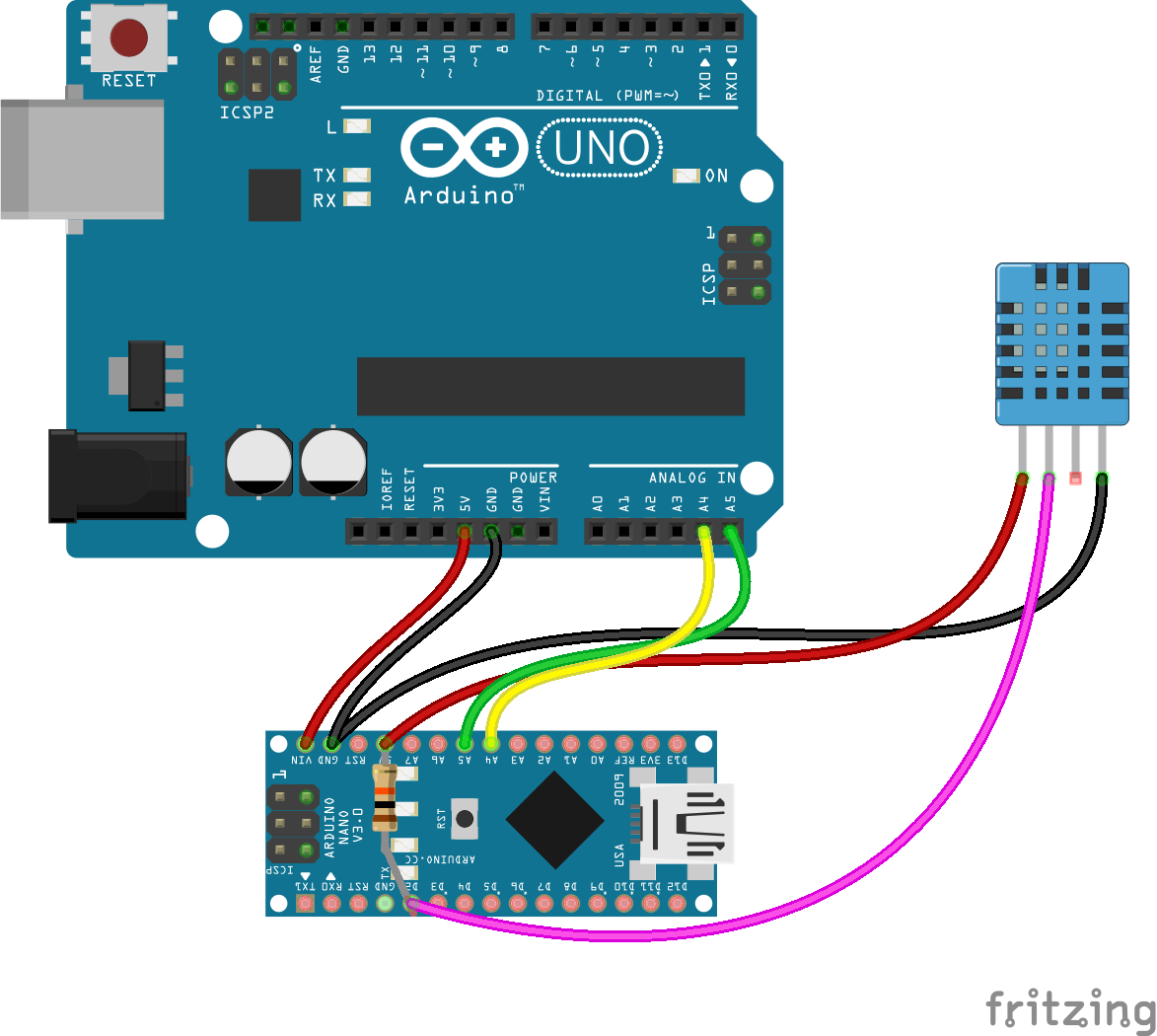
var five = require("johnny-five");
var board = new five.Board();

board.on("ready", function() {
  var hygrometer = new five.Hygrometer({
    controller: "DHT11_I2C_NANO_BACKPACK"
  });

  hygrometer.on("change", function() {
    console.log("Hygrometer");
    console.log("  relative humidity : ", this.relativeHumidity);
    console.log("--------------------------------------");
  });
});
nice! especially considering the odd timing delays the DHT11 requires. Offloading it all to I2C keeps things unblocked in the main processor.
 soundanalogous
on 24 Mar 2016
soundanalogous
on 24 Mar 2016
Yeah, I figured it was about time I addressed this sensor ;)
My next iteration will be to allow specifying either the DHT11 or DHT22
rwaldron
on 24 Mar 2016
Great, just what I needed 🙌.
roboflank
on 25 Mar 2016
For the meantime I will close the issue, let me try to implement it, will reopen the issue incase of anything.
roboflank
on 25 Mar 2016
@denzelwamburu sounds good!
rwaldron
on 25 Mar 2016
hello! Please, i'm working on an automatic systèm for greenhouse. it's my project in order to obtain my bachelor and i face to certain difficulty with johnny five. My DHT22 sensor returns 0 as result and i d'int know what's happened. help me pls
 eugenebessan225
on 28 Aug 2020
eugenebessan225
on 28 Aug 2020
It's hard to help without more information. Can you share code and a picture of your wiring?
 dtex
on 28 Aug 2020
dtex
on 28 Aug 2020
````js
const { Board, Thermometer } = require("johnny-five");
const board = new Board();
board.on("ready", () => {
const thermometer = new Thermometer({
controller: "DHT22_I2C_NANO_BACKPACK"
});
thermometer.on("change", () => {
const {celsius, fahrenheit, kelvin} = thermometer;
console.log("Thermometer");
console.log(" celsius : ", celsius);
console.log(" fahrenheit : ", fahrenheit);
console.log(" kelvin : ", kelvin);
console.log("--------------------------------------");
});
});
````
Here is my code
eugenebessan225
on 28 Aug 2020
i've just copy this here. And in arduino, i'he televerse the standard firmata code.
It's hard to help without more information. Can you share code and a picture of your wiring?
eugenebessan225
on 28 Aug 2020
i'm trying to upload the wiring but i can't.
eugenebessan225
on 28 Aug 2020
returns 0 as result
For Celsius only right? You're getting 32 and 273 for the others?
Also, I just want to make sure that you've uploaded the backpack sketch to the second board.
dtex
on 28 Aug 2020
Related issues
 IainIsCreative
·
10Comments
IainIsCreative
·
10Comments
 yuanhaoliang
·
7Comments
yuanhaoliang
·
7Comments
 overflowz
·
9Comments
overflowz
·
9Comments
 ZacB
·
8Comments
ZacB
·
8Comments
 moeinrahimi
·
4Comments
moeinrahimi
·
4Comments
Most helpful comment
@denzelwamburu sounds good!