Jitsi-meet: Can't build JitsiMeet after upgrading to iOS 13.4 and XCode 11.4
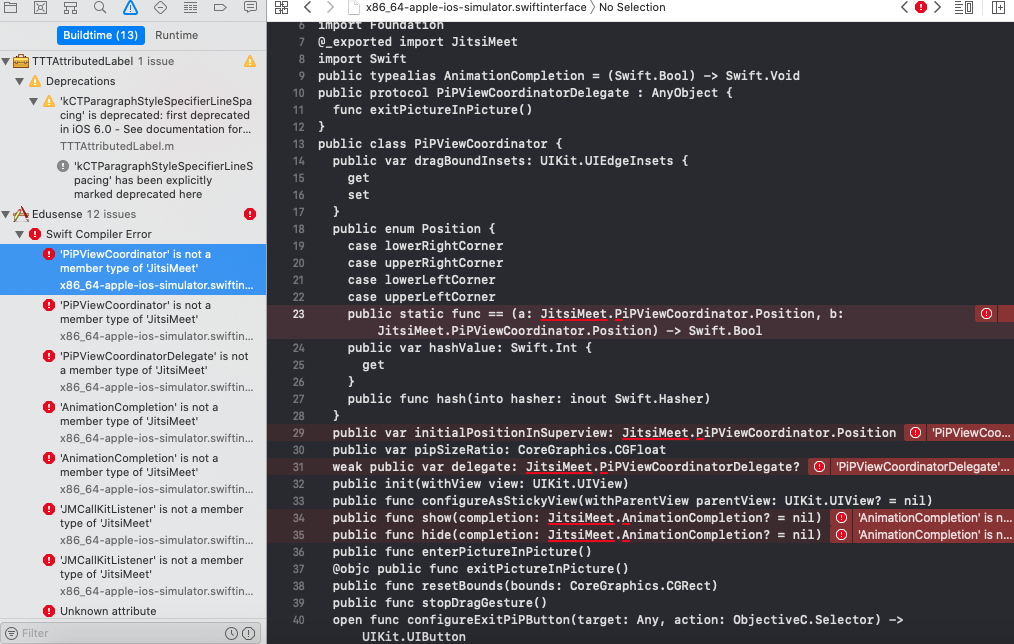
After upgrading JitsiMeetSDK for iOS to the latest one and upgrading XCode to 11.4 i'm receiving this build error.
'PiPViewCoordinator' is not a member type of 'JitsiMeet'
'AnimationCompletion' is not a member type of 'JitsiMeet'
'JMCallKitListener' is not a member type of 'JitsiMeet'
placed in arm64-apple-ios.swiftinterface file
 SlavcoPetkovski
All 27 comments
Any update on this?
SlavcoPetkovski
on 1 Apr 2020
No, sorry, we are very busy these days. 11.4 requires Catalina, which means I'd need to update my operating system to test it.
 saghul
on 1 Apr 2020
saghul
on 1 Apr 2020
More importantly, what is it you needd from 11.4?
saghul
on 1 Apr 2020
Well nothing, I just update XCode more often, no special need.
https://user-images.githubusercontent.com/852767/77588490-dea0d280-6ee1-11ea-84c2-f546d82caa84.png
Here is a screenshot. Maybe I can do something locally to fix it?
SlavcoPetkovski
on 1 Apr 2020
More importantly, what is it you needd from 11.4?
Support for 13.4 ios
Any help would be much appreciated
 hzorr
on 1 Apr 2020
hzorr
on 1 Apr 2020
You can support 13.4 without Xcode 11.4. All you need it to copy the DeviceSupport files over tto Xcodee 11.3...
saghul
on 1 Apr 2020
@SlavcoPetkovski Did you found the solution for the above error?
If not follow the below steps to generate the framework again with XCode 11.4.
I have the same error for XCode 11.0
Step 1: Download the repository from here
Step 2: Follow the steps for the readme file for ios here. (Once you completed the pod installation process mentioned on the above step & successfully run the application. Either by XCode or CLI.)
Step 3: Navigate to the ios directory and run the following command on terminal
xcodebuild -workspace ios/jitsi-meet.xcworkspace -scheme JitsiMeet -destination='generic/platform=iOS, generic/platform=iOS Simulator' -configuration Release archive
Get the framework from the derived data and put it into your project it will work. I managed this error in this way.
 codal-hardik
on 15 Apr 2020
codal-hardik
on 15 Apr 2020
@codal-hardik I still haven't resolved them, so I need your help here. Currently I'm using CocoaPods and my app is native iOS. When I try to install "npm install -g ios-deploy" the npm command is not found... Any help here?
SlavcoPetkovski
on 15 Apr 2020
@SlavcoPetkovski install node https://stackoverflow.com/questions/31472755/sudo-npm-command-not-found
Pod will not work as we don't know through which XCode version the pod Jitsi framwork was created. The only way I can able to succeed here by doing manually creating the JitsiMeet.framework.
Even I am also working on native applications. Previously I have tried with pod only but after spending lots of time on it I switch to manual integration.
codal-hardik
on 15 Apr 2020
Pod will not work as we don't know through which XCode version the pod Jitsi framwork was created
It was built with Xcode 11.2.1
saghul
on 15 Apr 2020
Nice!! That worked :) Thanks.
I'm just concerned about the WebRTC size (it is around 950MB).
SlavcoPetkovski
on 15 Apr 2020
@SlavcoPetkovski Can you please let us know how did you solve the problem so if anyone else face this problem they don't need to find the solution by themself.
codal-hardik
on 16 Apr 2020
Step 1: Download the repo
Step 2: Follow the steps for the readme file for ios here.
Step 3: Run "xcodebuild -workspace ios/jitsi-meet.xcworkspace -scheme JitsiMeet -destination='generic/platform=iOS' -configuration Release archive"
Step 4: You will get 2 frameworks (JitsiMeet and WebRTC). Their size is very big, so in order to decrease it, you have to strip bitcode using this command. "xcrun bitcode_strip -r JitsiMeet.framework/JitsiMeet -o JitsiMeet.framework/JitsiMeet" (for example on your Desktop)
Step 5: Drag & drop them in your project and in General tab for both of them select "Embed and Sign" option.
Step 6: If you want to publish your app, you have to add this script in "Run script" phases with "Run script only when installing" option set to ON.
SlavcoPetkovski
on 16 Apr 2020
@SlavcoPetkovski Don't you think this is the same as what I have posted except the drag & drop step. Step 5 & 6. That is quite understandable after creating the framework what we need to do for adding them to the project.
codal-hardik
on 16 Apr 2020
I followed your steps but it was like 70-80% of what have I done. I just added the extra steps. No need to thumbdown, just wanted to help.
SlavcoPetkovski
on 17 Apr 2020
Hello anyone has solved compilation error of Xcode I am using Xcode 11.3.1
showing error " Failed to load module ‘JitsiMeet’
 SmartAkashNara
on 11 May 2020
SmartAkashNara
on 11 May 2020
That seems to be an Xcode bug. If you use 11.4 it should just work. You can make it work by deleting "JitsiMeet" from those lines, as a stopgap. It will compile.
saghul
on 11 May 2020
Any news on making the build work out-of-the-box on Xcode 11.4?
 rrlevy
on 15 May 2020
rrlevy
on 15 May 2020
Any news on making the build work out-of-the-box on Xcode 11.4?
I am waiting too.
 immortalsantee
on 16 May 2020
immortalsantee
on 16 May 2020
@rrlevy @immortalsantee It already does. Do you get any problems?
saghul
on 16 May 2020
Ops. sorry. Once, updating pod fixed it. New version is available. Thanks.
immortalsantee
on 16 May 2020
5645
this will solve the issues :)
 Boby
on 17 May 2020
Boby
on 17 May 2020
New Xcode 11.5 - same problems. Waiting for updates. Thanks for your work.
 Denismih
on 29 May 2020
Denismih
on 29 May 2020
New Xcode 11.5 - same problems. Waiting for updates. Thanks for your work.
hey, you just add "platform :ios, '11.0'" in the head of podfile :)))
 hacnguyen1412
on 14 Nov 2020
hacnguyen1412
on 14 Nov 2020
That seems to be an Xcode bug. If you use 11.4 it should just work. You can make it work by deleting "JitsiMeet" from those lines, as a stopgap. It will compile.
works for me, thank you
 dashvlas
on 7 Dec 2020
dashvlas
on 7 Dec 2020
That seems to be an Xcode bug. If you use 11.4 it should just work. You can make it work by deleting "JitsiMeet" from those lines, as a stopgap. It will compile.
works for me, thank you
Can you please help me on it. I'm facing same problem
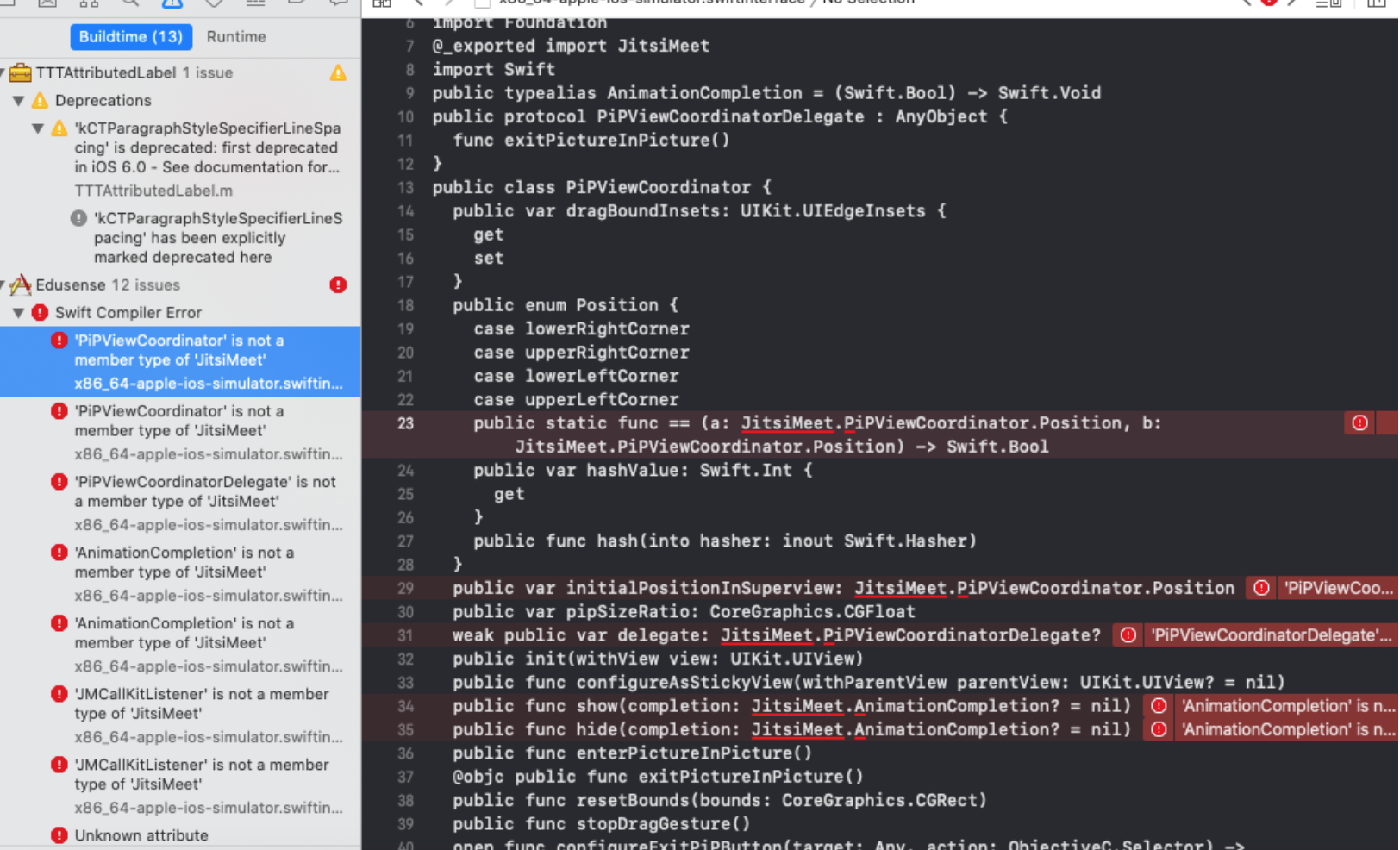
how you fixed that ? @dashvlas
 naeemAkee
on 9 Dec 2020
naeemAkee
on 9 Dec 2020
Please update to Xcode 12.2, that's the version the latest SDK was built with.
saghul
on 9 Dec 2020
Related issues
 532910
·
3Comments
532910
·
3Comments
 VogtAI
·
3Comments
VogtAI
·
3Comments
 mdosch
·
3Comments
mdosch
·
3Comments
 rcidt
·
4Comments
rcidt
·
4Comments
 mfts
·
3Comments
mfts
·
3Comments
Most helpful comment
Support for 13.4 ios
Any help would be much appreciated