Jitsi-meet: Video shoudn't start automatically when joining a meeting.
Is your feature request related to a problem you are facing?
When you join a Jitsi meeting the video from your webcam is started automatically, this can be pretty annoying if you're not using a web cam cover.
Describe the solution you'd like
I'd like Jitsi to have video disabled by default when joining a meeting so users can enable it manually in case the users want to share video from their webcams, this would also be helpful as on all the meeting I join I need to disable my video and most users do.
Describe alternatives you've considered
Covering the webcam (I already do that but not all users do).
 da-edra
All 19 comments
Hi there @da-edra ! Thanks for your feedback! Your concern is valid and shared by some, and we have plams to address this in the short term.
The plan is to add a "hair check" screen where you could decide if you want video / audio / etc before joining the meeting.
If you are using your own Jitsi Meet deployment, here is what you can do in the interim: set this option to true, so all participants join the conference with the video muted by default. https://github.com/jitsi/jitsi-meet/blob/9855fac8059091c9863c5075cf1fd057dea33ded/config.js#L139
If you are using a public instance like meet.jit.si, you can enfore this locally by appending #config.startWithVideoMuted=true to the URL, like so: https://meet.jit.si/test123#config.startWithVideoMuted=true I know it's not ideal, but you can think of it as a stopgap while we implement the aforementioned feature.
 saghul
on 6 Feb 2020
saghul
on 6 Feb 2020
Hello @saghul , thanks for the quick reply.
I'm sadly not using my one Jitsi Meet deployment so resorting to the URL seems like the only option to me.
I'm not sure if we should let this issue open until the feature is implemented or closing it as there's a workaround, but I'll let it up to you.
Thanks! :smile:
da-edra
on 6 Feb 2020
Let's keep it open until the feautre is implemented, as a reminder. Cheers!
saghul
on 6 Feb 2020
If you are using your own Jitsi Meet deployment, here is what you can do in the interim: set this option to
true, so all participants join the conference with the video muted by default.https://github.com/jitsi/jitsi-meet/blob/9855fac8059091c9863c5075cf1fd057dea33ded/config.js#L139
Hey @saghul,
may it be possible that startWithVideoMuted: true is overwritten by the corresponding app setting when joining a conference via Jitsi Meet app? I have made the experience that the video is just muted on start when joining via browser.
What is really confusing here: When opening a conference and choosing option "Everyone starts hidden" in the conference settings window then also participant joining via Jitsi Meet app are video muted - even if "join without video" is disabled.
Do you have any suggestions here?
 siku4
on 1 Apr 2020
siku4
on 1 Apr 2020
may it be possible that
startWithVideoMuted: trueis overwritten by the corresponding app setting when joining a conference via Jitsi Meet app? I have made the experience that the video is just muted on start when joining via browser.
Might be... we do have a setting for it, but IIRC it shoud only apply when we set to to yes, that is, to mute.
When opening a conference and choosing option "Everyone starts hidden" in the conference settings window then also participant joining via Jitsi Meet app are video muted - even if "join without video" is disabled.
I'm confused. Are all participants joining with video muted or now, when you enable "Everyone starts hidden"? Note that it will only apply to new participants.
saghul
on 1 Apr 2020
I'm confused. Are all participants joining with video muted or now, when you enable "Everyone starts hidden"? Note that it will only apply to new participants.
All participants have configured their app to join with video enabled (join without video = false). When I (as moderator) create a new conference room via browser, go to settings and enable "Everyone starts hidden", all participants join - as I expect - without video. Exactly this is the behavior I would like to configure for all new conferences with startWithVideoMuted: true globally in the config file.
siku4
on 1 Apr 2020
Got it. Mobile devices should honor startWithVideoMuted: true if set in your server config. If not it's a bug we should address.
saghul
on 1 Apr 2020
Got it. Mobile devices should honor
startWithVideoMuted: trueif set in your server config. If not it's a bug we should address.
It should be a bug. Tested it on three iOS devices with Jitsi Meet 20.1.0 build 63. Unfortunately I don‘t have a Android device for testing. On server side anything should be correctly configured: Verified the config has been applied by opening server-url/config.json and via web client (chrome) participants successfully join without video.
siku4
on 2 Apr 2020
same issue here. in both ios and android. @siku4 any fix?
 hasgardee
on 8 May 2020
hasgardee
on 8 May 2020
No fix yet @hasgar. I will create a separate issue for that.
siku4
on 9 May 2020
Thanks for testing and creating an issue, we’ll take a look ASAP.
saghul
on 10 May 2020
Linking this to #2737, as the issue is quite similar.
 l3d00m
on 16 May 2020
l3d00m
on 16 May 2020
And also this: make "start audio/video muted" web setting configurable in user's browser side preferences (like name and email) #4913
I think this is a duplicate of the mentioned one.
 Echolon
on 22 May 2020
Echolon
on 22 May 2020
See the last linked issues for more details.
l3d00m
on 17 Jun 2020
Hi,
I think my issue is related to this case:
I saw that very recently (like this week), jitisi api was updated and now we have a screen before video with "join button" as showed on image attached.
I want to return the original: I am dealing with lots of people who are not used with technology (they are on their 50s or 60s). Also I am in Brazil and jitisi api is not in portuguese. So any click is very hard for people to understand and get it. A new screen makes things harder for user experience.
Also, especially in my case it is not good to show invitation link since my system it is not supposed to add people using invitation link (i know i cannot prevent it on main talking screen using api only but again displaying kind of gets things worse).
My question is: is there a way for api to open video directly without this "join button" screen? (I mean skip this screen and go straght to talking part as before). It would be awesome a way to simply return to old version which was awesome in my application.
Also this screen does not have a close button like the "end call" which my code triggered to close the that "jitisi balloon" (which is a div). Today if user wants wants to give up this call, he/she needs to refresh whole page.
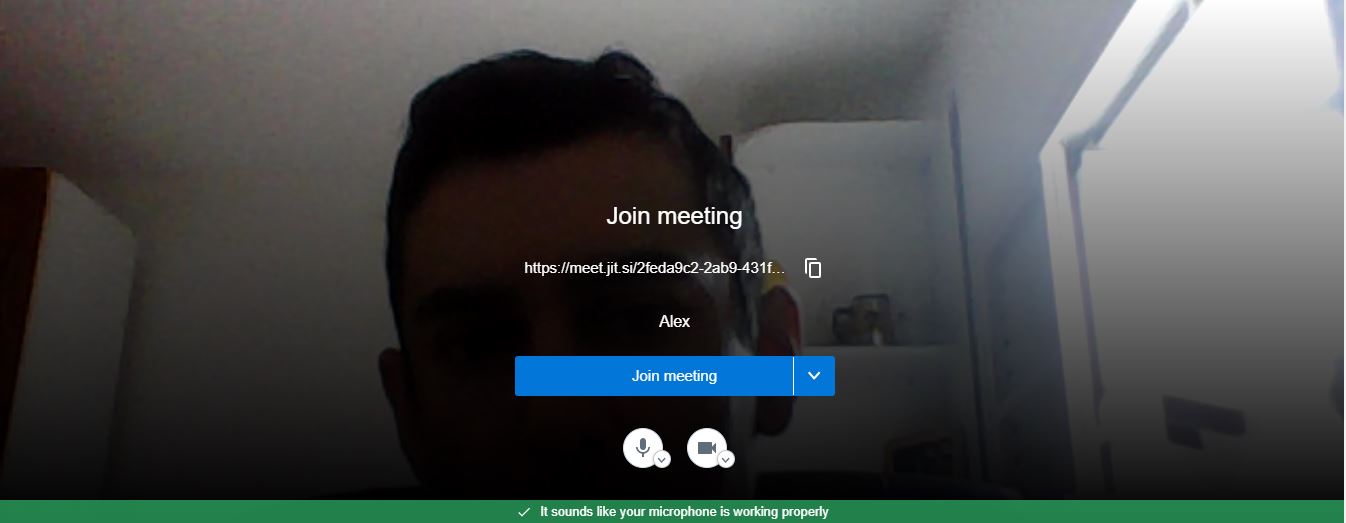
Thanks in advance
Alex
 alexandredoein
on 14 Jul 2020
alexandredoein
on 14 Jul 2020
You can override the prejoinPageEnabled config option to disable that screen.
PS: The app is translated to Brazilian Portuguese. We used to have some bug matching the user's browser locale to select it automatically, but AFAIK that was resolved.
saghul
on 14 Jul 2020
@saghul thanks for the quick answer.
I tried to make a quick search on google but i couldn't find a coded example of how to set prejoinPageEnabled using jitsi api. Do you have some piece of code as example?
The way I see I was expecting to change something on "const options" parameters as below. I tried to insert prejoinPageEnabled
as another parameter (but unfortunatelly it did not work):
const domain = 'meet.jit.si';
const options = {
roomName: 'b66540d0-9565-11ea-bb37-0242ac130002',
width: 600,
height: 600,
prejoinPageEnabled: true, //also tried: prejoinPageEnabled //also tried: prejoinPage: 'Enabled'
parentNode: document.querySelector(objName)
};
const api = new JitsiMeetExternalAPI(domain, options);
Do you have any ideas?
(Also, my browser is in Portuguese but jitsi is still in English. Please, if possible, let me know if I need to set something)
alexandredoein
on 14 Jul 2020
https://jitsi.github.io/handbook/docs/dev-guide/dev-guide-iframe is your documentation link.
You need to pass it in configOverwrite.
const options = {
....
configOverwrite: { prejoinPageEnabled: false }
...
 damencho
on 14 Jul 2020
damencho
on 14 Jul 2020
@damencho thanks for the quick and precise answer.
It worked perfectly.
Also thanks for the docs!
alexandredoein
on 14 Jul 2020
Related issues
 galvaniccoffee
·
3Comments
galvaniccoffee
·
3Comments
 xiefangzhenz
·
3Comments
xiefangzhenz
·
3Comments
 TopheC
·
3Comments
TopheC
·
3Comments
 wilddylan
·
4Comments
wilddylan
·
4Comments
 ranjithrajv
·
3Comments
ranjithrajv
·
3Comments
Most helpful comment
Hi there @da-edra ! Thanks for your feedback! Your concern is valid and shared by some, and we have plams to address this in the short term.
The plan is to add a "hair check" screen where you could decide if you want video / audio / etc before joining the meeting.
If you are using your own Jitsi Meet deployment, here is what you can do in the interim: set this option to
true, so all participants join the conference with the video muted by default. https://github.com/jitsi/jitsi-meet/blob/9855fac8059091c9863c5075cf1fd057dea33ded/config.js#L139If you are using a public instance like meet.jit.si, you can enfore this locally by appending
#config.startWithVideoMuted=trueto the URL, like so:https://meet.jit.si/test123#config.startWithVideoMuted=trueI know it's not ideal, but you can think of it as a stopgap while we implement the aforementioned feature.