Jimp: Loading fonts from a CDN throws Unsupported MIME application/xml
Expected Behavior
Font will load correctly using Jimp.loadFont('url-to-font'). Specifically when that URL references a file that is on Google Cloud Storage / Firebase Storage.
Current Behavior
Application crashes throwing the error:
Error: Unsupported MIME type: application/xml
    at Jimp.throwError (/Users/jeroenc/dev/ribbon/node_modules/@jimp/utils/src/index.js:15:13)
    at Jimp.call (/Users/jeroenc/dev/ribbon/node_modules/@jimp/core/src/utils/image-bitmap.js:84:25)
    at Jimp.call [as parseBitmap] (/Users/jeroenc/dev/ribbon/node_modules/@jimp/core/src/index.js:395:17)
    at parseBitmap (/Users/jeroenc/dev/ribbon/node_modules/@jimp/core/src/index.js:339:14)
    at cb (/Users/jeroenc/dev/ribbon/node_modules/@jimp/core/src/index.js:68:14)
    at cb (/Users/jeroenc/dev/ribbon/node_modules/@jimp/core/src/request.js:47:9)
    at IncomingMessage.<anonymous> (/Users/jeroenc/dev/ribbon/node_modules/phin/lib/phin.compiled.js:1:2100)
    at IncomingMessage.emit (events.js:194:15)
    at IncomingMessage.EventEmitter.emit (domain.js:441:20)
    at endReadableNT (_stream_readable.js:1107:12)
Failure Information (for bugs)
Steps to Reproduce
Example code based on README for @jimp/plugin-print
import Jimp from 'jimp';

async function main() {
  const ASSET_BASE_PATH = 'https://storage.googleapis.com/data-sunlight-146313.appspot.com';
  const font = await Jimp.loadFont(`${ASSET_BASE_PATH}/ribbon/fonts/roboto-large.fnt`);
  const image = await Jimp.read(1000, 1000, 0x0000ffff);

  image.print(font, 10, 10, 'Hello World!');
}

main();
The fnt file references this image as its file: https://storage.googleapis.com/data-sunlight-146313.appspot.com/ribbon/fonts/roboto-large.png
The fnt file can be downloaded by going to: https://storage.googleapis.com/data-sunlight-146313.appspot.com/ribbon/fonts/roboto-large.fnt
Context
- Jimp Version: 0.6.0
- Operating System: MacOS Mojave
- Node version: 11.4.0
Note that the code was run in a TypeScript based project, however this should hardly matter in the grand scheme of things.
Failure Logs
See above
 Favna
Favna
All 4 comments
Commenting to check if this is still going to be looked into. It's been a long while since the label was assigned.
Would give it a shot myself but despite my JS knowledge I just cannot wrap my head around the font loading code :\
Favna
on 14 Feb 2019
I'll try to take a look this week! Being the only maintainer on this project is lonely 😢
 hipstersmoothie
on 15 Feb 2019
hipstersmoothie
on 15 Feb 2019
Haven't really looked into this since the last bump but I assume it hasn't been resolved so bumping it again
Favna
on 9 Jun 2019
Hello, I was trying to import a custom font when it gave me this same problem, after a while trying I got it solved by removing this line from the beginning of the file:
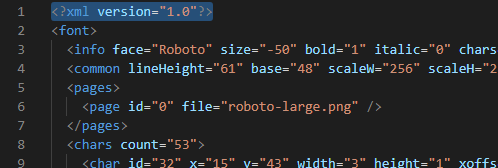
I tried with your font and the problem seems to be the same...
I hope this helps you to solve this issue...
 4nt0n10M4
on 27 Dec 2019
4nt0n10M4
on 27 Dec 2019
Related issues
 master-of-null
·
3Comments
master-of-null
·
3Comments
 DylanPiercey
·
4Comments
DylanPiercey
·
4Comments
 Yimiprod
·
5Comments
Yimiprod
·
5Comments
 kolbma
·
6Comments
kolbma
·
6Comments
 jBernavaPrah
·
4Comments
jBernavaPrah
·
4Comments
Most helpful comment
Haven't really looked into this since the last bump but I assume it hasn't been resolved so bumping it again