Jfoenix: import com.sun.javafx.scene.control.skin.TextFieldSkinAndroid;
Hi, I can't run the demo app from source code, the inspector analyzer throws me error in the com.sun.javafx.scene.control.skin.TextFieldSkinAndroid; package isn't present on my javafx library, I working with jre and jdk 1.8.0_131 version, I need another version of java?
 leolr02
All 7 comments
Hello,
Well this class is part of Dalvik javafx for android, you can either run the main demo using gradle, or you have to install the dalvik sdk and import the jfxrt.jar in your project (if you don't want to use gradle).
Regards,
 jfoenixadmin
on 2 May 2017
jfoenixadmin
on 2 May 2017
hmm if you import this repo as a gradle project it should show both demo and jfoenix as available projects in which case you should be able to run the demo main class as an application from the IDE
 Sashie
on 2 May 2017
Sashie
on 2 May 2017
then the project has two demos? one for android and other for desktops applications?, I tryed to run the demo app using gradle, but I was unnable to run the demo because i cant get the data from one repository, I'm so confused, but I will check the project thanks for the quick answers
leolr02
on 3 May 2017
No it has only one demo, the Android files are used to in JFoenix android build.
jfoenixadmin
on 3 May 2017
Yeah, I already run the demo, thanks for the help 👍
leolr02
on 4 May 2017
For anyone else left wondering like I was:
If your IDE doesn't seem to want to run it, it's because you need to build and run it using gradle.
From the command line try,
gradlew build
and then once that's done do,
gradlew run
 TurekBot
on 22 Dec 2017
TurekBot
on 22 Dec 2017
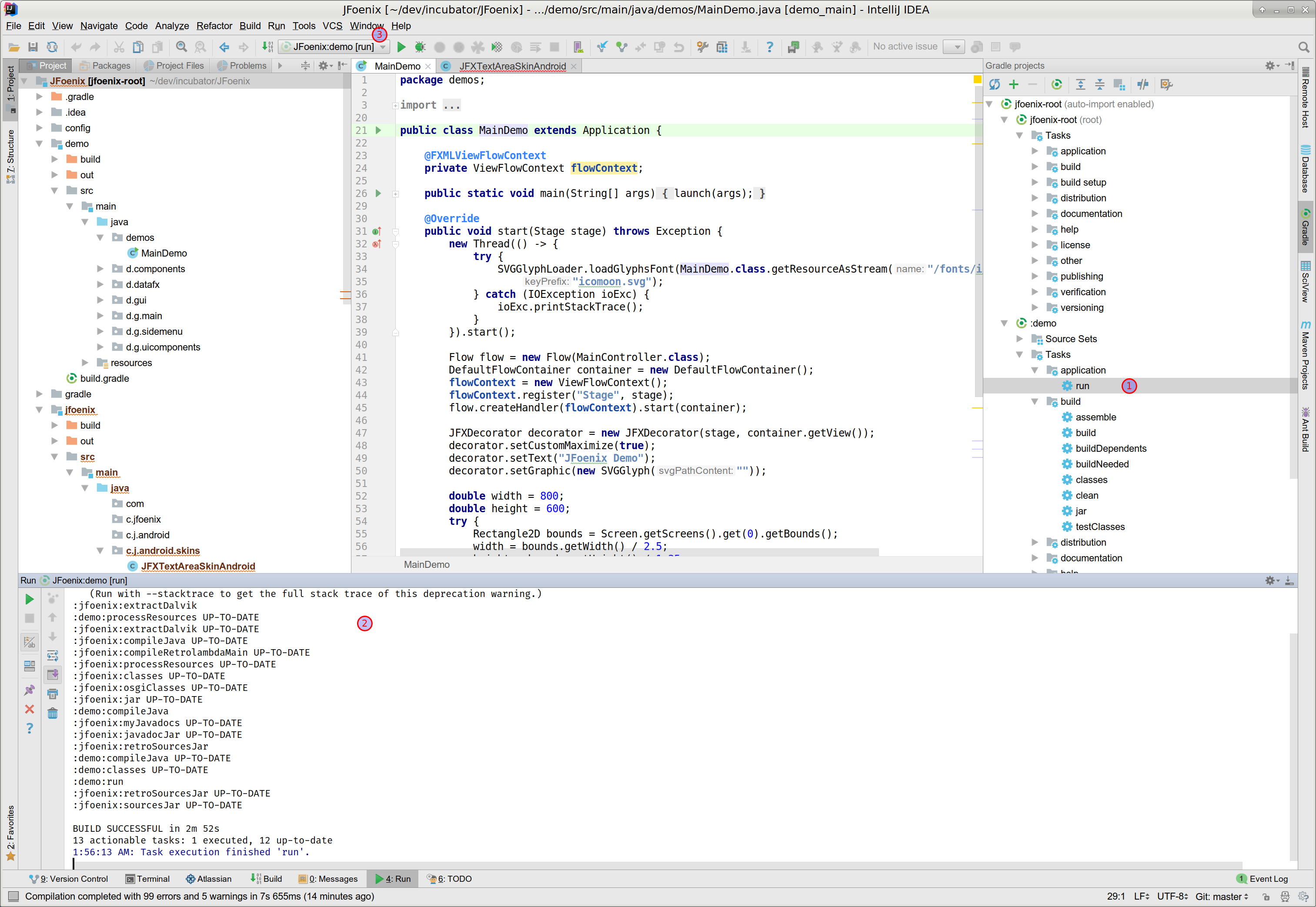
Attached is a short example how to run in Idea. Of course the project must have been cloned and imported as Gradle before. After this:
- Expand the Gradle tab and open the tasks tree, right click on the run leaf to get the context menu for starting the task
- This is the output window
- After this a run target is created in Idea for faster accessing
 thhart
on 3 Jan 2018
thhart
on 3 Jan 2018
Related issues
 RodrigoSantiago
·
3Comments
RodrigoSantiago
·
3Comments
 alittwin
·
4Comments
alittwin
·
4Comments
 orochies
·
5Comments
orochies
·
5Comments
 Natreve
·
4Comments
Natreve
·
4Comments
 SkaaRJik
·
4Comments
SkaaRJik
·
4Comments
Most helpful comment
hmm if you import this repo as a gradle project it should show both
demoandjfoenixas available projects in which case you should be able to run the demo main class as an application from the IDE