Jetpack: Security: Threats Found button has formatting issue
Steps to reproduce the issue
- Create security issue for site.
- Go to Jetpack -> Settings.
- Look at warning for Backups and security scanning, button on upper right.
Text shows Threats Found!FIX.
Screenshots

 ChaosExAnima
All 8 comments
@Automattic/jetpack-design, what should this look like?
ChaosExAnima
on 11 Feb 2020
@ChaosExAnima Is that a clickable button? If so, how does this sound:
Fix threats now
But also, are we sure they are able to fix the existing threats on the following step? If not we should be more careful about the wording, to avoid setting the wrong expectation.
 keoshi
on 11 Feb 2020
keoshi
on 11 Feb 2020
It seems a notice("Threat found!") with button ("FIX"):
https://wpcalypso.wordpress.com/devdocs/design/notice
Should look like this:
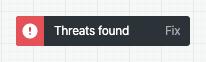
Granted, it's not great... shouldn't probably be a Notice, and the whole thing should be clickable, but as a quick fix it would probably do.
 folletto
on 11 Feb 2020
folletto
on 11 Feb 2020
@keoshi - Clicking that button takes the user to the VaultPress dashboard page, it does not fix anything.
ChaosExAnima
on 11 Feb 2020
@folletto Yeah I suppose you're right, but that design pattern tho... I wonder how effective it is.
 jeffgolenski
on 11 Feb 2020
jeffgolenski
on 11 Feb 2020
@ChaosExAnima I'd go for See threats then.
keoshi
on 11 Feb 2020
@keoshi - Sounds good. Would we replace all the text with that, or just FIX?
ChaosExAnima
on 11 Feb 2020
I'd replace the entire thing like so:
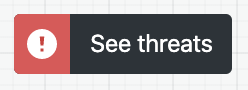
The label itself and the icon (as well as the card's content) already provide enough context for a customer to know that there are active threats.
keoshi
on 11 Feb 2020
Related issues
 Viper007Bond
·
3Comments
Viper007Bond
·
3Comments
 htdat
·
3Comments
htdat
·
3Comments
 kraftbj
·
3Comments
kraftbj
·
3Comments
 ockham
·
3Comments
ockham
·
3Comments
 NicktheGeek
·
3Comments
NicktheGeek
·
3Comments
Most helpful comment
I'd replace the entire thing like so:
The label itself and the icon (as well as the card's content) already provide enough context for a customer to know that there are active threats.