Jetpack: Contact & Info Widget: Hours field not showing text input
Steps to reproduce the issue
- Go to gwenatomic.wpcomstaging.com
- Scroll down to footer to see the contact widget
- See that the hours do not show up
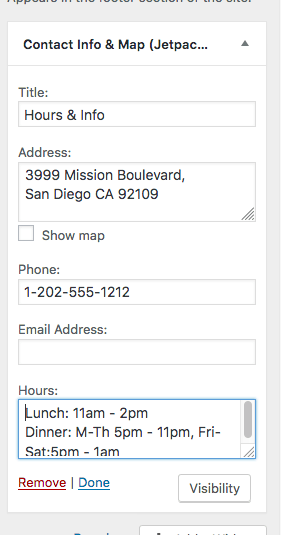
Here is a screenshot of the widget with the filled in hours on my dashboard:
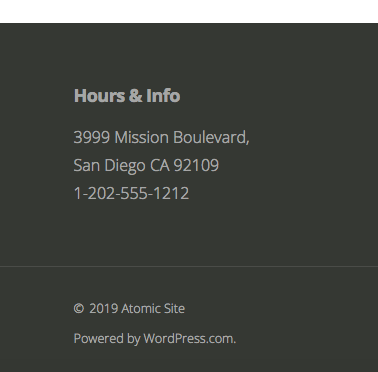
And here is what shows up on the front-end:
What I expected
I expected to see the hours I filled out and published in the widget.
What happened instead
No hours in the text field. No text shows at all (I tried changing the text as well)
What We Tried:
- deactivating all plugins and switching to default theme
- could not replicate on my other test site: attestsitegwen.com (also AT site)
Please see original convo in jpop-support: p1573083426075600
This seems to be related to sites with the new Jetpack version - 7.9
My other AT site that I could not replicate that on is on 7.7 Alpha
Original Issue: 9950570-hc / 2474838-zd (follow-up)
 gwensmithx
All 11 comments
Another issue here: 16331389-hc
gwensmithx
on 7 Nov 2019
Another report of this here: 2474811-hc
 eamcgill90
on 7 Nov 2019
eamcgill90
on 7 Nov 2019
@gwensmithx -
This seems to be related to sites with the new Jetpack version - 7.9
My other AT site that I could not replicate that on is on 7.7 Alpha
Thanks so much for this! I was able to find the bug very quickly using this info.
 kbrown9
on 7 Nov 2019
kbrown9
on 7 Nov 2019
Another one in #15515880-hc
 Robertght
on 7 Nov 2019
Robertght
on 7 Nov 2019
And here - #16498523-hc
 rickmgithub
on 7 Nov 2019
rickmgithub
on 7 Nov 2019
I noticed this issue was closed since the fix was merged at https://github.com/Automattic/jetpack/pull/13984.
But the site in the original issue (at 2474838-zd) still doesn't show the hours. I can verify that the hours are listed in the Contact Info widget, and I tried re-publishing the customizer, but they still don't appear on the site.
I tried on Firefox, Chrome, and Safari.
 desnum
on 10 Nov 2019
desnum
on 10 Nov 2019
Another report in #12963934-hc
Mac OSX 10.15.1 (19B88)
Chrome 78.0.3904.97 (Official Build) (64-bit)
Jetpack 7.9
 nielslange
on 10 Nov 2019
nielslange
on 10 Nov 2019
@kraftbj I see that you closed this issue two days ago, but it seems that some sites are still using Jetpack 7.9 instead of Jetpack 7.9.1. WP CLI does not show any available update either. How can Jetpack be updated in such a case?
nielslange
on 10 Nov 2019
The issue was closed because the bug is fixed in the development version of Jetpack. The fix will be available in the next version of Jetpack, which may be 7.9.1 or 8.0.
Jetpack's latest stable is currently 7.9, as you can see here:
https://wordpress.org/plugins/jetpack/
Until a new version of Jetpack is released, if you need to apply the fix on a site, you can install Jetpack's Beta plugin and pick the "Release Candidate" option.
As noted on the Beta plugin's page, by their nature, Beta releases could be unstable and should not be used on a site where your data is important. If you decide to install this on a live site, please backup your WordPress database before installing the Jetpack Beta Tester plugin or upgrading to a new Beta release.
 jeherve
on 11 Nov 2019
jeherve
on 11 Nov 2019
Thanks for clarifying this, @jeherve!
nielslange
on 11 Nov 2019
Another one here: #316692938-hc
Shared the Beta version workaround too.
 galakhyati
on 16 Nov 2019
galakhyati
on 16 Nov 2019
Related issues
 crunnells
·
3Comments
crunnells
·
3Comments
 dougaitken
·
3Comments
dougaitken
·
3Comments
 htdat
·
3Comments
htdat
·
3Comments
 kevinlisota
·
3Comments
kevinlisota
·
3Comments
 ockham
·
3Comments
ockham
·
3Comments
Most helpful comment
The issue was closed because the bug is fixed in the development version of Jetpack. The fix will be available in the next version of Jetpack, which may be 7.9.1 or 8.0.
Jetpack's latest stable is currently 7.9, as you can see here:
https://wordpress.org/plugins/jetpack/
Until a new version of Jetpack is released, if you need to apply the fix on a site, you can install Jetpack's Beta plugin and pick the "Release Candidate" option.
As noted on the Beta plugin's page, by their nature, Beta releases could be unstable and should not be used on a site where your data is important. If you decide to install this on a live site, please backup your WordPress database before installing the Jetpack Beta Tester plugin or upgrading to a new Beta release.