Jetpack: "Notify me of new posts via email." still appears even after subscription module disabled.
Steps to reproduce the issue
- Go to Jetpack > Settings > Discussions
- Disable
- Show a "follow blog" option in the comment form
- Show a "follow comments" option in the comment form
- Allow users to subscribe to your posts and comments and receive notifications via email
What I expected
The comments form should hide the follow options depending on settings.
What happened instead
The following blog and comments checkbox still shows after disabling the option.
The follow comment checkbox only disappears if subscription module is disabled. However, the follow blog option is still shown.
 dericleeyy
All 25 comments
Issue also reported in #13684175-hc
Follow-up here: #2140373-zen
 edequalsawesome
on 30 Jun 2019
edequalsawesome
on 30 Jun 2019
I believe this is a duplicate of #10047.
Could you test and confirm that the toggles in fact revert to their previous state, and that using the old checkboxes under Settings > Discussion works?
 jeherve
on 3 Jul 2019
jeherve
on 3 Jul 2019
@jeherve On my self-hosted test site, I've turned off the option to subscribe to post updates in WP Admin > Jetpack > Settings > Discussion:
But the option to follow the site by email is still appearing under the comment form:
The setting for my test site on WordPress.com match the settings in WP Admin -- I don't think there's another spot that I need to check to deactivate it, but if there is, let me know and I'll give it a look!
edequalsawesome
on 3 Jul 2019
Thank you, that's helpful! It seems to be an issue with the Comment module, that overwrites the default comment form and does not appear to respect the site's module status.
To reproduce, one must:
- Disable the Subscriptions module on a Jetpack site.
- Enable the Comments module.
- Visit a post with a comment form.
- Expand the comment form.
@lancewillett It looks like you recently made some changes in D28395-code that may have caused this regression.
For a Jetpack site with the Subscriptions module disabled, stb_enabled is set to a boolean, false. If the module is enabled, once that setting is synchronized back to wpcom it will be set to a string 1.
jeherve
on 3 Jul 2019
To confirm, is this only an issue when managing settings in Calypso for a Jetpack site?
 lancewillett
on 10 Jul 2019
lancewillett
on 10 Jul 2019
@lancewillett I had made the changes through WP Admin on my self-hosted test site -- the changes then synced back to Calypso, but I didn't touch anything there directly.
edequalsawesome
on 10 Jul 2019
Also reported in 14571431-hc.
When I replicated the problem on my test site it didn't matter if I toggled the comment options in Calypso or Jetpack's WP Admin settings. I also had the subscriptions module for Jetpack enabled contrary to @jeherve steps above.
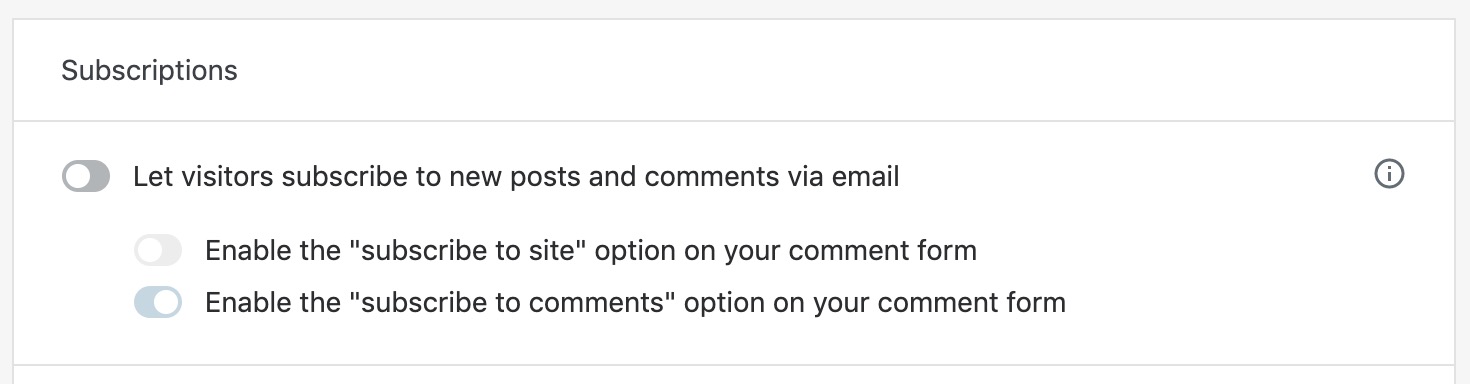
I'll also note that even if we disable the _parent_ option of "Let visitors subscribe to new posts and comments via email" we still get a checkbox to subscribe to new posts:
 xpurichan
on 14 Aug 2019
xpurichan
on 14 Aug 2019
Reported in 2296011-zen
 julsyd
on 23 Aug 2019
julsyd
on 23 Aug 2019
Reported in 2410393-zen
 mbhthompson
on 10 Oct 2019
mbhthompson
on 10 Oct 2019
Reported in 2477894-zen, and duplicated on my test site.
Toggling off the Subscribe to Blog option via Calypso does change the stb_enabled option from 1 to an empty value (similar to the Subscribe to Comment option) but the form doesn't seem to respect the option on the front end.
 katiebethbrown
on 14 Nov 2019
katiebethbrown
on 14 Nov 2019
2581814-zen
 bikedorkjon
on 24 Dec 2019
bikedorkjon
on 24 Dec 2019
Customer above is still having an issue with this and the CSS we are providing them is not working which I believe is due to us loading comments in an iframe.
bikedorkjon
on 21 Jan 2020
2638309-zen
 joendotcom
on 22 Jan 2020
joendotcom
on 22 Jan 2020
2646412-zen
Just to clarify for those coming across this since the comment form loads in an iframe you cannot use CSS to hide the checkbox option in the form.
bikedorkjon
on 23 Jan 2020
18248829-hc
xpurichan
on 7 Feb 2020
I'm having this problem on my site as well. Of the three options:
- Let visitors subscribe to new posts and comments via email
- Enable the “subscribe to site” option on your comment form
- Enable the “subscribe to comments” option on your comment form
I've tried these settings combinations in wp-admin, with the following results:
- All three options disabled = "Notify me of new posts via email" displays.
- First option enabled = "Notify me of new posts via email" displays.
- First & second option enabled = "Notify me of new posts via email" displays.
- First & third option enabled = " Notify me of new comments via email" & "Notify me of new posts via email" display.
- All three options enabled = " Notify me of new comments via email" & "Notify me of new posts via email" display.
Similar changes in Calypso had identical results.
"Let visitors use a WordPress.com, Twitter, Facebook, or Google account to comment" is enabled.
 gamebits
on 30 Apr 2020
gamebits
on 30 Apr 2020
20756655-hc
 CompChris
on 1 May 2020
CompChris
on 1 May 2020
The same user as Chris came back after 22 days asking for a fix
21332436-hc
 rahul020691
on 23 May 2020
rahul020691
on 23 May 2020
Same problem on a newly installed site. Jetpack comments enabled, all subscription settings disabled. All configured from local install's WordPress admin area.
Very surprised this has not been fixed in (almost) a year. It's not earth shattering, but it's mis-leading to visitors and the option can't be hidden via css due to the form being loaded via iframe.
 codi0
on 20 Jun 2020
codi0
on 20 Jun 2020
Ok, bringing some light to this. The problem only happens when you click "Let visitors use Wordpress......" as soon as that is unchecked, the form goes back to normal and the notify via email is not there. I hope that helps. I turned off all features one at a time to find when it happens. I also dug through the plugin code and have not yet found "notify me" in there.
 mattptodd
on 28 Jul 2020
mattptodd
on 28 Jul 2020
 KokkieH
on 3 Sep 2020
KokkieH
on 3 Sep 2020
3481609-hc looking for a fix, I will suggest turning off the comments feature.
 griersongithub
on 12 Nov 2020
griersongithub
on 12 Nov 2020
another report: 3556550-zen
 kbrown9
on 8 Dec 2020
kbrown9
on 8 Dec 2020
I have a proposed solution for this bug ready for review in D54065-code.
kbrown9
on 15 Dec 2020
The solution I mentioned above is now live, and this bug should be fixed. I'm closing this issue. If anyone notices problems, let us know.
kbrown9
on 28 Dec 2020
Related issues
 htdat
·
3Comments
htdat
·
3Comments
 kevinlisota
·
3Comments
jeherve
·
3Comments
kevinlisota
·
3Comments
jeherve
·
3Comments
 NicktheGeek
·
3Comments
jeherve
·
3Comments
NicktheGeek
·
3Comments
jeherve
·
3Comments
Most helpful comment
The solution I mentioned above is now live, and this bug should be fixed. I'm closing this issue. If anyone notices problems, let us know.