Jetpack: Carousel: support Gutenberg Gallery block
When using Core's Gallery block, Jetpack's Carousel can be triggered but there are no links between the images in the gallery:
It seems in Gutenberg 3.9 the Carousel is triggered when clicking on an image in the current Gutenberg Gallery Block, provided one selects "Attachment page" under "Link to" parameter. However, the Carousel doesn't have any next/previous navigation. http://recordit.co/41vNUeUrE5
Related: #8527
Originally reported by @bph
 jeherve
All 9 comments
Good to test this will work out also with our internal Tiled-gallery block since it's largely a copy of core gallery block.
Latest version here: https://github.com/Automattic/wp-calypso/pull/27458
 simison
on 1 Nov 2018
simison
on 1 Nov 2018
This seems to be related to the issue that I've been seeing with jQuery. A lot of Jetpack functionality depends on jQuery, but it does not seem to be enqueued in the WordPress core anymore.
This may be related to this paragraph from the changelog:
MediaElement.js upgraded to 4.2.6
WordPress 4.9 includes an upgraded version of MediaElement.js, which removes dependencies on jQuery, improves accessibility, modernizes the UI, and fixes many bugs.
I still find it strange that wp_enqueue_script( 'jquery' ); was removed altogether from wp-admin. But $ is undefined, so it must be!
 aldavigdis
on 7 Nov 2018
aldavigdis
on 7 Nov 2018
The gallery seems to be functional up to the level that is described in this ticket. However, in my local Jetpack development environment.
On my side, I'm getting "h is undefined" in my JS console when adding the Jetpack gallery block.
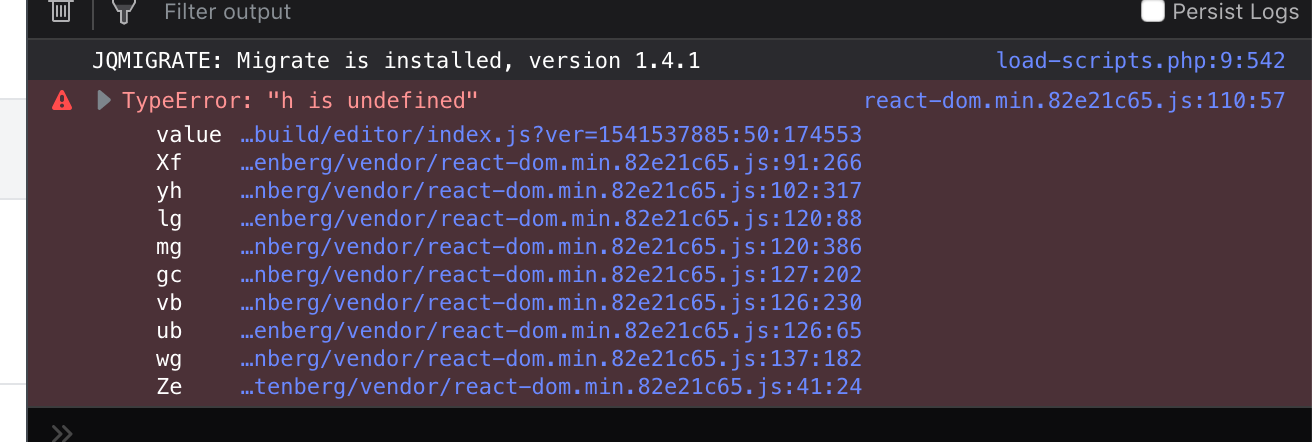
@gititon is getting "property length is undefined" when attempting to load thew block in wp-admin. So, that's may be related, but it's not the same one!
aldavigdis
on 8 Nov 2018
On my side, I'm getting "h is undefined" in my JS console when adding the Jetpack gallery block.
With the one currently in Calypso or with the one from the PR I linked above? New version isn't merged yet.
simison
on 8 Nov 2018
To clarify, this is not about Jetpack's Tiled Gallery block. That block is still being worked on (see https://github.com/Automattic/wp-calypso/pull/27458 ), and will not be included in the Jetpack point release that will ship next week. We are looking at the Core Gallery block here, and how the galleries it creates are not compatible with the Carousel feature.
Carousel is a frontend feature, it does not appear in the post editor at all. jQuery in wp-admin consequently does not matter here.
There are 2 distinct issues at the moment:
1. Carousel is not triggered by default
If you add a Gallery to a post using WP 4.9.8, it will look like this:

You'll notice that regardless of the "Link to" settings you pick in the sidebar there, Carousel will work on the frontend. This is done on purpose. Carousel effectively takes over the default link behaviour of images in a gallery: if you have activated the Carousel feature, clicking on an image will trigger the Carousel modal.
When using the Gallery block, this does not work:
https://videopress.com/v/PrdGLcNb
(let's ignore the terrible user experience of entering captions that disappear as the image gets uploaded here...)
It does not work because the gallery settings were set to Link to none, and Carousel now respects that setting. You can see me discovering that problem in the following video:
https://videopress.com/v/PBBA9UyY
As soon as I change the gallery settings, Carousel gets triggered.
But as you can see in the video, there is another problem:
2. There are no options to move from image to image within the gallery.
Arrows to move from one image to the next are missing. This is because the HTML output of the gallery is now different, and Carousel views those gallery images as multiple single images, and not images within a gallery.
I hope this clarifies things a bit.
jeherve
on 8 Nov 2018
Last night, we traced it to the gutenburg editor applying different css classes to the gallery, which causes carousel scripts to break.
We will investigate a bit further today to see if we can fix the scripts to work well with both the classic editor and the gutenberg editor.
 roccotripaldi
on 8 Nov 2018
roccotripaldi
on 8 Nov 2018
I will do a proper write-up about this later today. We seem to have encountered a separate issue while attempting to replicate this locally and I'm going to see if it has already been documented.
aldavigdis
on 8 Nov 2018
1236223-hc
I had a user reporting this Carousel feature missing, their Gallery was set to Link To: Media File. Tested it on my site and confirmed that even after setting Link To: Attachment Page in the Gallery Block's Settings there are no arrows to slide through the images (as expected for a Gallery as here https://en.support.wordpress.com/gallery/#examples-of-gallery-styles). In other words, there are no options to move from image to image within the gallery as @jeherve explained above.
 zdenys
on 15 Nov 2018
zdenys
on 15 Nov 2018
So this is breaking because of how we hook into core galleries. With core galleries, we use this filter:
via
to detect that a gallery is being rendered. That is in the core shortcode, but not used in the core block.
The Gutenblock markup saves like this:
<!-- wp:gallery -->
<ul class="wp-block-gallery columns-2 is-cropped"><li class="blocks-gallery-item"><figure><img src="http://src.wordpress-develop.test/wp-content/uploads/2018/10/xqHMjwh.gif" alt="" data-id="237" data-link="http://src.wordpress-develop.test/?attachment_id=237" class="wp-image-237"/></figure></li><li class="blocks-gallery-item"><figure><img src="http://src.wordpress-develop.test/wp-content/uploads/2018/10/kaepernick_nike_campaign.jpg" alt="" data-id="234" data-link="http://src.wordpress-develop.test/?attachment_id=234" class="wp-image-234"/></figure></li></ul>
<!-- /wp:gallery -->
Still digging, more thoughts to follow.
 georgestephanis
on 16 Nov 2018
georgestephanis
on 16 Nov 2018
Related issues
jeherve
·
3Comments
 crunnells
·
3Comments
crunnells
·
3Comments
 chrisaldrich
·
3Comments
chrisaldrich
·
3Comments
 tyxla
·
3Comments
tyxla
·
3Comments
 abidhahmed
·
3Comments
abidhahmed
·
3Comments