Jest: --testNamePattern doesn't work as expected -- runs all tests under the file
Expected Behavior
command
npm test -t="needsCheckInOrOut"
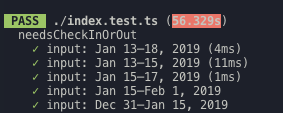
should filter out describe blocks having title doesn't start with needsCheckInOrOut, ie. runs single describe block like below.
Current Behavior
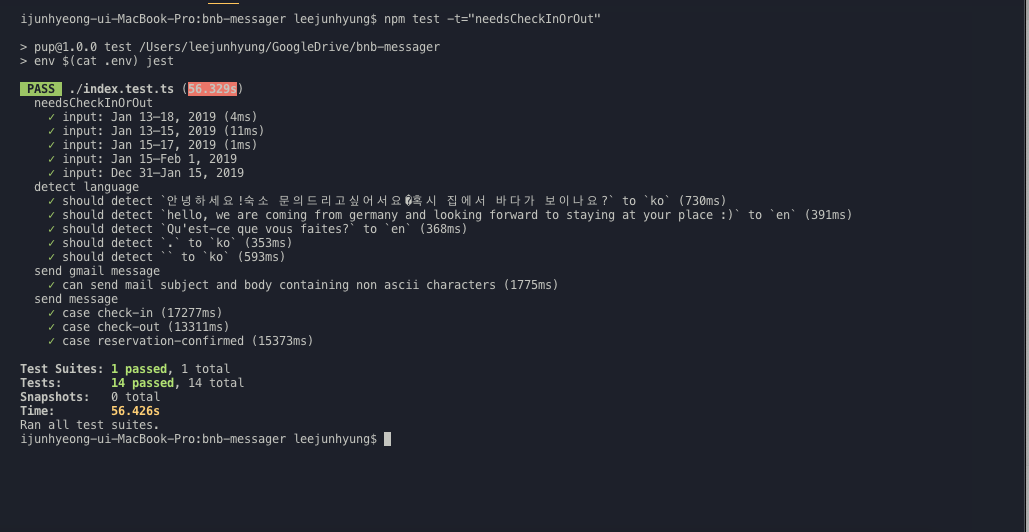
Runs all describe blocks under the file.
Context
I have a single test file named index.test.ts and it has some describe blocks that takes longer time to execute. So I want to run certain describe blocks by specifying their title via -t option.
Is that possible through -t option? Or if it's not, is there any alternative for specifying certain describe block under the test file via CLI?
For example, I have those test cases.
    ✓ input: Jan 13–18, 2019 (4ms)
    ✓ input: Jan 13–15, 2019 (11ms)
    ✓ input: Jan 15–17, 2019 (1ms)
    ✓ input: Jan 15–Feb 1, 2019
    ✓ input: Dec 31–Jan 15, 2019
  detect language
    ✓ should detect `안녕하세요!숙소 문의드리고싶어서요�혹시 집에서 바다가 보이나요?` to `ko` (730ms)
    ✓ should detect `hello, we are coming from germany and looking forward to staying at your place :)` to `en` (391ms)
    ✓ should detect `Qu'est-ce que vous faites?` to `en` (368ms)
    ✓ should detect `.` to `ko` (353ms)
    ✓ should detect `` to `ko` (593ms)
  send gmail message
    ✓ can send mail subject and body containing non ascii characters (1775ms)
  send message
    ✓ case check-in (17277ms)
    ✓ case check-out (13311ms)
    ✓ case reservation-confirmed (15373ms)
And if I want to test only detect language describe block, then I can to use
npm test -t="detect language"
As a result, only one describe block that has matching title would be tested.
  detect language
    ✓ should detect `안녕하세요!숙소 문의드리고싶어서요�혹시 집에서 바다가 보이나요?` to `ko` (730ms)
    ✓ should detect `hello, we are coming from germany and looking forward to staying at your place :)` to `en` (391ms)
    ✓ should detect `Qu'est-ce que vous faites?` to `en` (368ms)
    ✓ should detect `.` to `ko` (353ms)
    ✓ should detect `` to `ko` (593ms)
npx envinfo --preset jest
  System:
    OS: macOS 10.14.3
    CPU: (4) x64 Intel(R) Core(TM) i5-6360U CPU @ 2.00GHz
  Binaries:
    Node: 10.15.1 - ~/.nvm/versions/node/v10.15.1/bin/node
    npm: 6.8.0 - ~/.nvm/versions/node/v10.15.1/bin/npm
  npmPackages:
    jest: ^23.6.0 => 23.6.0
 leejh3224
All 2 comments
Try running the command like this:
npm test -- -t="needsCheckInOrOut"
As it is stated on the documentation:
Using with npm scripts
If you run Jest via npm test, you can still use the command line arguments by inserting a -- between npm test and the Jest arguments.
 Luanf
on 4 Mar 2019
Luanf
on 4 Mar 2019
Closing this issue as Luanf's answer works.
leejh3224
on 4 Mar 2019
Related issues
 samzhang111
·
3Comments
samzhang111
·
3Comments
 ianp
·
3Comments
ianp
·
3Comments
 kgowru
·
3Comments
kgowru
·
3Comments
 withinboredom
·
3Comments
withinboredom
·
3Comments
 nsand
·
3Comments
nsand
·
3Comments
Most helpful comment
Try running the command like this:
npm test -- -t="needsCheckInOrOut"As it is stated on the documentation: