Jest: Cannot read property 'coverageData' of null when trying to generate code coverage
🐛 Bug Report
See reproduction repo for better understanding
When trying to generate a coverage with jest, the tests run as they should, but no coverage data is collected and there's a 'Cannot read property 'coverageData' of null' error in the console. This is likely because jest right now can't work with the unique folder structure that we have on our project (see the reproduction repo).
The folder where the package.json and node_modules are right next to the folder where all the source files are.
When the file to test and the test itself is in the same folder as the node_modules the coverage data is collected perfectly, however when it is in the folder next to the folder with the node_modules, it display the error mentioned in the first paragraph.
Feel free to close this if it's not a bug with jest, but at this point I cannot think of anything else that could be wrong here (other than our legacy folder structure).
To Reproduce
Steps to reproduce the behavior:
checkout this repo
run the commands in the project's README
see the console for the error message
Expected behavior
Expected the coverage data to be collected and put out to the console.
Link to repl or repo (highly encouraged)
Run npx envinfo --preset jest
Paste the results here:
System:
    OS: macOS 10.14.1
    CPU: (4) x64 Intel(R) Core(TM) i5-7360U CPU @ 2.30GHz
  Binaries:
    Node: 10.15.1 - ~/.nvm/versions/node/v10.15.1/bin/node
    Yarn: 1.12.3 - /usr/local/bin/yarn
    npm: 6.7.0 - ~/.nvm/versions/node/v10.15.1/bin/npm
  npmPackages:
    jest: ^24.1.0 => 24.1.0
 simonxabris
All 8 comments
Perhaps related to #7758, except here it can't be because of a jest/babel-jest version mismatch
 jeysal
on 11 Feb 2019
jeysal
on 11 Feb 2019
Yes I have looked at that issue, but as far as I can tell here the error is caused by something else, but sadly I can't really figure out what.
simonxabris
on 11 Feb 2019
Thanks for the reproduction!
This is due to us ignoring files for coverage outside of rootDir: https://github.com/facebook/jest/blob/780c838e72eda7798d512adef12683d2d67de36b/packages/babel-jest/src/index.js#L112-L113 and https://github.com/facebook/jest/blob/780c838e72eda7798d512adef12683d2d67de36b/packages/jest-runtime/src/ScriptTransformer.js#L188-L189
When we call readInitialCoverage:
https://github.com/facebook/jest/blob/780c838e72eda7798d512adef12683d2d67de36b/packages/jest-cli/src/generateEmptyCoverage.js#L41
it can return null: https://github.com/istanbuljs/istanbuljs/blob/f1fb6886cb35093c1a2647c2d602a3dc1fb2fef5/packages/istanbul-lib-instrument/src/read-coverage.js#L48-L50
We should make sure to handle extracted being null as that's valid. However, I'd say that's just a symptom of the real issue, which is that the source code is not instrumented.
Manually setting cwd to path.resolve(config.rootDir, '..') (which is the actual root of your project) fixes it:
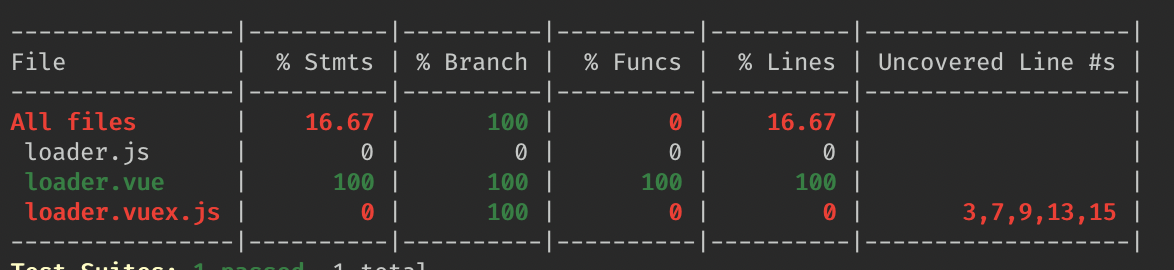
 SimenB
on 11 Feb 2019
SimenB
on 11 Feb 2019
Thanks for the quick answer!! I wasted so many hours on this. I have a question though, could you show me how/where can i set the cwd to the right path? I can't figure it out myself.
Should I close this issue or do you plan on addressing it later?
Thanks again for the quick help.
simonxabris
on 11 Feb 2019
Looks we are also facing this in a project that's structured as a monorepo. I tried hoisting Jest’s rootDir from the package dir to the repo dir, played around with testMatch paths etc., but could not come up a working solution. Either I see the exception reported in this issue, or the test coverage contains no files, or duplicate mocks are reported.
We'll have to stick with Jest 23 for now and keep using console.log('\n\n\n\n\n\n\n something \n\n\n\n\n\n\n') instead of just console.log('something') 😅
 kachkaev
on 26 Feb 2019
kachkaev
on 26 Feb 2019
Is there any workaround while we wait for an official fix for this?
 wfortin
on 27 Feb 2019
wfortin
on 27 Feb 2019
@wfortin As a short term and quick solution, I rolled back to [email protected] and I am able to see coverage on all files and run tests as per normal. Once there is a fix, I will update Jest to v24. Note that if you do rollback, make sure to use setupTestFrameworkScriptFile (deprecated in v24) instead of setupFilesAfterEnv for your jest setup file location. See https://github.com/facebook/jest/issues/7758#issuecomment-459052457
 apoorvkk
on 3 Mar 2019
apoorvkk
on 3 Mar 2019
Duplicate of #7758
SimenB
on 20 Mar 2019
Related issues
 jardakotesovec
·
3Comments
jardakotesovec
·
3Comments
 withinboredom
·
3Comments
withinboredom
·
3Comments
 hramos
·
3Comments
hramos
·
3Comments
 StephanBijzitter
·
3Comments
StephanBijzitter
·
3Comments
 gustavjf
·
3Comments
gustavjf
·
3Comments
Most helpful comment
@wfortin As a short term and quick solution, I rolled back to [email protected] and I am able to see coverage on all files and run tests as per normal. Once there is a fix, I will update Jest to v24. Note that if you do rollback, make sure to use
setupTestFrameworkScriptFile(deprecated in v24) instead ofsetupFilesAfterEnvfor your jest setup file location. See https://github.com/facebook/jest/issues/7758#issuecomment-459052457