Jest: Re-run test in v23 is slower than v22 on Windows
💥 Regression Report
Re-run test in version 23 is significantly slower than version 22 on Windows
Last working version
Worked up to version: 22.4.4
Stopped working in version: 23.0.0
To Reproduce
repo: testjest22
repo: testjest23
These two repos only contains a test file jest.test.js and install different jest version.
test('foo', () => {
  expect('foo').toBe('foo')
})
run yarn test --watchAll --env=node
then, press Enter to trigger a test run
In v22, it takes about 0.05s, but over 2s in v23
When editing test file to trigger re-run,
v22 can finish in 0.5s but v23 usually takes close to 3s
Run npx envinfo --preset jest
  System:
    OS: Windows 10
    CPU: x64 Intel(R) Core(TM) i5-5250U CPU @ 1.60GHz
  Binaries:
    Yarn: 1.7.0 - C:\Program Files (x86)\Yarn\bin\yarn.CMD
    npm: 5.6.0 - C:\Program Files\nodejs\npm.CMD
Update: It is an issue only on Windows, test it on Linux, just a little bit slower but acceptable.
 Isaddo
All 45 comments
Anyone would like to help finding which commit might be responsible for the slowdown?
 thymikee
on 31 Jul 2018
thymikee
on 31 Jul 2018
yes, I experienced this as well. Also console.log messages are not showing up consistently compared to v22. I suspect it is being overwritten by jest messages.
 ckwong90
on 3 Aug 2018
ckwong90
on 3 Aug 2018
I can confirm the problem.. on this test suite,, though not as pronounced.
The problem seems to be down to startup ;- for me, on a large test suite I didn't notice a significant change.
Jest 23 - 1.6s (real 3.7s), 1.25s (real 3.074s), 1.24s (real 3.06s)
Jest 22 - 1.1s (real 3.0s), 0.52s (real 2.12s), 0.52s (real 2.12s)
 lukeapage
on 3 Aug 2018
lukeapage
on 3 Aug 2018
I wasn't running in watch mode. with watch all after already warmed up
jest 23 - 0.5s pre-warmed first run, 0.8 after changing file
jest 22 - 1.8s pre-warmed first run, 2.3s after changing file
lukeapage
on 3 Aug 2018
I did a bisect and it looks like the problem was introduced with a deps upgrade in https://github.com/facebook/jest/commit/d1ce3cd0135b5a8b64f84998fd5f36be4afb2bef. The upgrade to micromatch was reverted later but it's still slow in master so it must be something else.
 gsteacy
on 3 Aug 2018
gsteacy
on 3 Aug 2018
Are you sure? Besides micromatch, the only deps that changed were dev ones
thymikee
on 3 Aug 2018
Actually I think there might be something else involved too. The deps upgrade definitely increased the watch mode runs on file change from ~0.46s to ~1-1.1s. However, reverting micromatch (e930c705d6d1b77f762fa65ad24eaf80d68c7b3f) didn't resolve the problem. In fact it's actually slower than when micromatch was upgraded. I think some other change in between is contributing to the problem. I'll do another bisect to see if I can find it.
gsteacy
on 3 Aug 2018
Ah, it looks like a significant contributor is 664681a57e4e034bfb80bd34218625cd0cceed08. I don't think it's the only issue but it certainly hurts _this_ particular repo, as it only has one test. There's overhead spinning up a worker. Reverting that commit on master brings it down from 2.5-3.3s to 0.7-0.8s. That's still more than 0.46s, but it's better. Not sure what the impact would be on a larger battery of tests.
gsteacy
on 3 Aug 2018
I tested on a larger (but by no means large) codebase and found that a6aa304d505c0688456a323f587a81e6f4363479 decreased performance measurably on my machine as well.
- Watch: 21.2s
- Non-watch: 12.5s
For reference:
22.4.2
- Watch: 17.5s
- Non-watch: 11.2s
master
- Watch: 24.4s
- Non-watch: 14.6s
I haven't been able to determine what else is slowing down test runs between 22.4.2 and master. Performance goes up and down between the two revisions so it's hard to really find a cause. I don't think it's any single commit, but rather the cumulative effect of multiple changes.
gsteacy
on 3 Aug 2018
Can confirm 23 is much slower than 22 on re-running tests on Windows using Typescript and ts-jest.
23.4.1 adds ~3 seconds to a 3ms noop test
22.4.4 runs test re-runs as fast as expected
 mpseidel
on 7 Aug 2018
mpseidel
on 7 Aug 2018
I confirm --watch problems on Windows using Typescript and ts-jest:
v23: >13s
v22: >8s
v21: >2s
 test('------1------', () => {
    expect(1).toEqual(1);
  });
 Lazarencjusz
on 8 Aug 2018
Lazarencjusz
on 8 Aug 2018
It is actual for MacOS too "jest 23.4.2" is slower than "jest 22.1.4" at most 80%
 deerares
on 10 Aug 2018
deerares
on 10 Aug 2018
Is there any update with this? It seems like the slowness is also on Linux as well. My team has been experiencing the same issues with slowness to the point where a dev is looking into porting back to mocha? Would love to not have to switch from Jest :heart: if this is something that may be addressed in a later release.
 ZachStoltz
on 5 Sep 2018
ZachStoltz
on 5 Sep 2018
This _may_ help https://github.com/facebook/jest/pull/6925.
thymikee
on 7 Sep 2018
I tested 23.6.0 and run times are identical to 23.5.0.
gsteacy
on 11 Sep 2018
We noticed a significant slow down (~12s to ~19s) in our test suite when upgrading from jest 22.4.4 to 23.5.0. The latest version as of this post, 23.6.0, did not improve the speed.
We're using node 8.2, yarn 1.9.4, and macOS Sierra 10.12.6.
There are 371 test suites and 1790 tests. While doing a git bisect to identify when the slowdown happened, I noted how long jest took to finish. The following table lists the median duration of the runs for each jest version.
|jest version | median duration in seconds|
-- | --
23.6.0 | 19.1
23.5.0 | 18.7
22.4.4 | 12.2
Edit: The fast version of jest was _22.4.4_.
 deleteme
on 12 Sep 2018
deleteme
on 12 Sep 2018
It would be awesome if someone would take the time to bisect Jest itself; building it and test against a repo showing the slowdown. I don't have Windows readily available (would have to be through virtualbox, which I think might give misleading results)
 SimenB
on 13 Sep 2018
SimenB
on 13 Sep 2018
@SimenB The slowdown happens on OS X too.
deleteme
on 13 Sep 2018
This issue is for windows, if you can put together a reproduction that reproduces on more OS-es that would be great as a separate issue! 🙂
SimenB
on 13 Sep 2018
It would be awesome if someone would take the time to bisect Jest itself; building it and test against a repo showing the slowdown.
I did that earlier with a private repo and attributed most of the performance impact to a6aa304. I have not bisected with a public repo other than the one in the issue description, which was also impacted by 664681a, as the overhead of spinning up a worker is significantly longer than the time to run the tests.
gsteacy
on 13 Sep 2018
Ok, thanks. Too bad #6925 didn't help, then :(
SimenB
on 14 Sep 2018
Similar experience when trying to upgrade jest on OS X.
To test the performance, we run jest --watch then a option
Using 22.4.4, this takes 20 seconds
Using 23.0.0, this takes 58 seconds
So the slowdown happens with the version 23 major release.
In both cases, we make sure snapshots are updated and all changes are committed (git status is clean).
Will try to create a minimal reproducible repo if I have time.
 paradite
on 25 Sep 2018
paradite
on 25 Sep 2018
This may not be at all surprising, but running Jest in WSL is significantly faster than in "bare metal" Windows, despite the atrocious I/O performance of WSL. I tested with Jest 22 (which all of my team's projects are using if they use Jest at all) and found it to be roughly 3-4x faster on average. I haven't tested Jest 23 yet but I imagine it will be at least that much faster as well.
gsteacy
on 1 Oct 2018
This looks like it might be cache related, as running @Isaddo's test23 repo with:
yarn test --watchAll --env=node --no-cache
has almost instantaneous re-runs.
 benhamlin
on 29 Oct 2018
benhamlin
on 29 Oct 2018
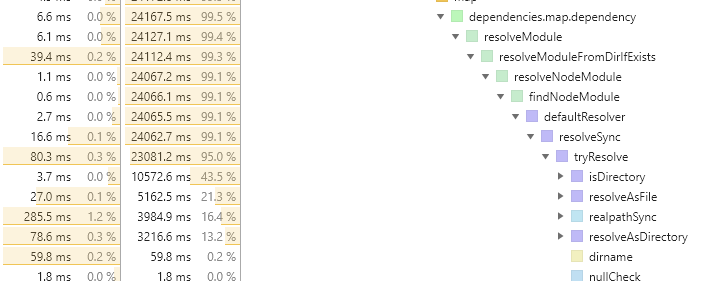
I'm not sure if this is the right place, but we're running into --watch performance issues as well. Our issues however are not during the run itself, but during the changed-file lookup.
- Windows 10, node 10.12.0, jest 23.6.0
- Git repo with 3100 files
- 56 test suites containing around 280 unit tests total
The "Determining test suites to run..." step gets stuck for 12-15 seconds (on a high-end M.2 drive), on both initial --watch run and reruns, even it there's only 1 changed file.
I captured a CPU profile that demonstrates the problem, but I'm not the best at interpreting these. Seems to be coming mostly from the module resolver:
 pleunv
on 26 Nov 2018
pleunv
on 26 Nov 2018
@pleunv what did you use to profile performance here? I've been experiencing issues and am trying to profile with node --inspect and Chrome, but I'm mostly only seeing (program) (i.e. non-JS) time. Possible that it's accurate in my case, but just curious what you did exactly to capture your profile.
 JKillian
on 27 Nov 2018
JKillian
on 27 Nov 2018
@pleunv would be interesting if you tried with watchman: https://facebook.github.io/watchman/
SimenB
on 28 Nov 2018
@JKillian simply npx -n --inspect jest if I'm not mistaken (might or might not have been jest --runInBand, can't remember).
@SimenB I'm not sure what you mean, isn't Jest using watchman by default?
--watchman
Whether to use watchman for file crawling. Defaults to true. Disable using --no-watchman.
pleunv
on 28 Nov 2018
Only if you have it installed. We should probably specify that in the docs... And you can see in your stack trace that it uses the node crawler.
SimenB
on 28 Nov 2018
note:
do not focus on 23.6.0 or 23.5.0 i tracked down the problem in 23.0.0 as @paradite mentionned also.
I have the same problem (Windows10)
Playground: https://github.com/nasreddineskandrani/full-example-angular/tree/jestperf
with this command:
npm run testjest -- --runTestsByPath src\app\game\game-a.service.spec.ts --runInBand --watch
The test:
// game-a.service.spec.ts only one test
describe('game-a.service', () => {
  it('should be able to play', () => {
    expect(131).toBe(1249731);
  });
});
with this setup:
collectCoverage: true
testEnvironment: 'node'
jest 22.4.4
ts-jest 22.4.6
jest-preset-angular": "^5.2.2"
i get:~0.574s each time i change/save the test file in watch mode
with this setup:
collectCoverage: true
testEnvironment: 'node'
jest 23.0.0
ts-jest 22.4.6
jest-preset-angular": "^5.2.2"
i get ~2.161s each time i change/save the test file in watch mode
and if i add --no-cache
i get ~0.605s each time i change/save the test file in watch mode
(@benhamlin good catch for the no-cache -> much much better but not as good as )jest 22.4.4
=> So mainly a cache problem :) but probably something else also.
we need to find the commit between 22.4.4 and the release 23.0.0 that causes the problem.
I am hunting down this each time i have time :) (top priority out of my job)
 nasreddineskandrani
on 9 Dec 2018
nasreddineskandrani
on 9 Dec 2018
The slowdown with a single test file is primarily caused by 664681a57e4e034bfb80bd34218625cd0cceed08. I assume --no-cache throws away previous test run timings which mitigates the problem by running the test in-band (as it always does in Jest 22 when there's one test file). This is not the cause of slowdown for multiple test files though.
gsteacy
on 9 Dec 2018
@gsteacy
your commit is dated mjesun committed on Jul 6
i am testing with release 23.0.0 that was out before this commit.
nasreddineskandrani
on 9 Dec 2018
Ah yes, sorry, that was in 23.4.0. a6aa304d505c0688456a323f587a81e6f4363479 was in 23.0.0 and definitely hurts performance as well, though I'm not sure why discarding the cache would help.
gsteacy
on 10 Dec 2018
@thymikee
for the problem i mentioned on top, it is coming from the package jest-cli
TEST 1 (what i did to know)
yarn install with jest 22.4.4
i went to node_modules backuped the jest-cli package folder
then i installed jest 23.0.0-alpha.1 (problem present) went to node_modules, erased jest-cli folder and replace it with the one from 22.4.4 => the performance issue gone (completely)
TEST 2 (i dont replace the whole folder but i try just to rollback TestScheduler.js)
Rollbacking from v22.4.4 -> rename and add TestScheduler.js
i got errors to run the test and had to readd from v22.4.4 the files reporter_dispatcher.js and test_result_helpers.js
now the test works, i went from 2s rerun to 0.6s => performance issue gone (completely)
if not clear enof you can use gitter to reach me.
I am pretty new to jest code base. I am not running it locally yet so not able to debug. Just playing around in node_modules files. *(I'll continue investigating when i'll find more time. In the meantime i invite anyone to participate to solve this annoying slowness issue since now the problem is isolated).
nasreddineskandrani
on 10 Dec 2018
@gsteacy 👍
you were right it's exactly the code in this commit https://github.com/facebook/jest/commit/664681a57e4e034bfb80bd34218625cd0cceed08 (i found the code in 23.0.0-alpha.1 o O) that creates the problem i mentionned. I rollbacked this code and it's working fine.
~@mjesun @rickhanlonii can you help with this one?~
~We should test if runInBand mode inforced by args and do not try to override it if available.~
~If not inforced => you apply this logic to calculate runInBand value (not sure if the logic needs~
~revision also).~
~What do you think?~
edit: solved in https://github.com/facebook/jest/issues/7110#issuecomment-445898260
nasreddineskandrani
on 11 Dec 2018
I am in vacations. I stated working (slowly) on the original issue of this thread https://github.com/facebook/jest/issues/6783#issue-346031046
I'll open a PR during the next week.
nasreddineskandrani
on 24 Dec 2018
I did the test with the repo.s from the guy that opened this issue:
https://github.com/Isaddo/testjest22 and https://github.com/Isaddo/testjest23
When i tested => no problem in my machine because my first run was < 1sec
Explanation
=> Running in band in the case of the issue will make the tests run faster as wanted.
in v22 jest the condition to run in band was:
tests.length <= 1
and in v23 jest the condition to run in band became:
tests.length <= 1 && timings.every(timing => timing < SLOW_TEST_TIME)
where SLOW_TEST_TIME = 1 sec
the condition was changed to fullfill the need of https://github.com/facebook/jest/issues/6599
but it breaks the scenario of the dev that opened this issue since in his machine the first run was > 1sec and with the UI for workers between runs it'll never comeback under 1sec.
note:
with --no-cache arg the timings array is always empty so .every( ) return true and it run in band that's why the --no-cache was solving the problem.
Possible Solutions
I need your input about which direction for a fix we want to take. I see multiple options:
Solution1: (That's the best option in my opinion)
tell devs if you want a fast test run on a single file as in v22 then pass --runInBand arg (i always did it this way with my team)
edited: 2019-01-26 jest v24 contain a fix so use --runInBand it ll be fast as v22
Solution2: (not a robust solution in my opinion but it may work to close this issue)
change the SLOW_TEST_TIME from 1sec to 3sec as it was before and keep the condition with the timing even for one single test file
Solution3: (not ideal since the dev needs to set manually as opposite to now where it's auto)
Remove the timing concept and keep only the condition tests.length <= 1 and make runInBand arg a boolean that can be set to false eventually.
=> which if set to false if i am not wrong will fulfill @gaearon needs mentionned here: https://github.com/facebook/jest/issues/6599#issue-337531475.
@thymikee waiting for feedback :) if you see other solutions let me know
nasreddineskandrani
on 29 Dec 2018
The problem with SLOW_TEST_TIME is that it doesn't depend on warm vs cold cache. I think a nice update to the algorithm would be to make it depend – e.g. 20s on cold cache and 3s on warm cache. The big number for the first one is to mitigate the cost of transforming the code that's gonna be cached in following runs. It's really hard to predict the first vs second run time.
thymikee
on 29 Dec 2018
@thymikee
If you use more than one test file the condition tests.length <= 1 is falsy so the timing doesn't matter anymore.
Are we still in the scenario of this issue about a single file run?
(why the 20sec for this scenario? no matter what i do i am inside 6sec for the test run v22 or v23)
I need to visualize what you have in mind :). Can you provide more details? (maybe an example)
nasreddineskandrani
on 30 Dec 2018
Ah yea, my answer was pretty generic and not really relevant for this use case, but still valid :D. Since the problem is with Node being slow with spawning workers, what do you think about experimental threads added in https://github.com/facebook/jest/pull/7408?
thymikee
on 30 Dec 2018
o O
with latest master and node 10.5 using:
yarn run jest --watchAll --runTestsByPath C:\XXXXXX\jest-improvement\jest\packages\jest-cli\src\__tests__\TestScheduler.test.js
I see no changes on the result timing on rerun.
the timing array on multiple rerun gives me these:
timings========== [ 1638 ]
timings========== [ 2307 ]
timings========== [ 1736 ]
timings========== [ 1766 ]
So it's not working. I followed the PR of worker threads they said it's fall backing by default to it if available and there is no config to enable it
(it's internal and wanted https://github.com/facebook/jest/pull/7408/files#r238745997).
=> a flag to enable log of the strategy used by jest-worker will be welcomed :) since now i am not sure if it's not improving or not using the new strategy (need debug).
So how experimental threads could help in the issue? you mean if the total workers time go under 1sec it will re fallback to inBand ?
nasreddineskandrani
on 30 Dec 2018
You need to run node with --experimental-worker for it to be available.
$ node --version
v10.14.1
$ node -p "require('worker_threads')"
internal/modules/cjs/loader.js:582
    throw err;
    ^

Error: Cannot find module 'worker_threads'
    at Function.Module._resolveFilename (internal/modules/cjs/loader.js:580:15)
    at Function.Module._load (internal/modules/cjs/loader.js:506:25)
    at Module.require (internal/modules/cjs/loader.js:636:17)
    at require (internal/modules/cjs/helpers.js:20:18)
    at [eval]:1:1
    at Script.runInThisContext (vm.js:96:20)
    at Object.runInThisContext (vm.js:303:38)
    at Object.<anonymous> ([eval]-wrapper:6:22)
    at Module._compile (internal/modules/cjs/loader.js:688:30)
    at evalScript (internal/bootstrap/node.js:582:27)
$ node --experimental-worker -p "require('worker_threads')"
{ isMainThread: true,
  MessagePort: [Function: MessagePort],
  MessageChannel: [Function: MessageChannel],
  threadId: 0,
  Worker: [Function: Worker],
  parentPort: null }
a flag to enable log of the strategy used by jest-worker will be welcomed
It might make sense for us to use debug or something and sprinkle them around. That should be discussed in a separate issue, though
SimenB
on 30 Dec 2018
if someone hit this issue i edited my previous comment: https://github.com/facebook/jest/issues/6783#issuecomment-450509214
so solution 1 is now a nice workaround (when jest v24 is released) => for those that are running in intellij, webstorm, vscode, command-line test for one file just add --runInBand
I am really busy these dayz so when i have time i'll continue with --experimental-worker investigation if no one solve it before.
nasreddineskandrani
on 26 Jan 2019
followup: @jeysal did the test with workers and it's not the cause.
Read here: https://github.com/facebook/jest/issues/7963#issuecomment-469024335
micromatch4 and jest 25 will be an answer to this problem probably. Let's wait.
nasreddineskandrani
on 17 Apr 2019
Related issues
 ticky
·
3Comments
ticky
·
3Comments
 kentor
·
3Comments
kentor
·
3Comments
 stephenlautier
·
3Comments
stephenlautier
·
3Comments
 kgowru
·
3Comments
kgowru
·
3Comments
 paularmstrong
·
3Comments
paularmstrong
·
3Comments
Most helpful comment
@SimenB The slowdown happens on OS X too.