Jest-styled-components: toHaveStyleRule not finding property
I resorted to testing out the color example from the README and it couldn't find the color property.
package.json
  "jest": {
    "globals": {
      "NODE_ENV": "test"
    },
    "setupFiles": [
      "./jest.setup.js"
    ],
    "moduleFileExtensions": [
      "js"
    ],
    "moduleDirectories": [
      "node_modules"
    ],
    "modulePathIgnorePatterns": [
      "<rootDir>/packages/rtl/dist"
    ],
    "moduleNameMapper": {
      "^@scope/(.*)": "<rootDir>/packages/$1/dist"
    },
    "collectCoverageFrom": [
      "packages/**/*.{js,jsx}",
      "!packages/**/*.test.{js,jsx}",
      "!packages/**/dist/*.{js,jsx}",
      "!**/node_modules/**"
    ],
    "coverageThreshold": {
      "global": {
        "statements": 98,
        "branches": 91,
        "functions": 98,
        "lines": 98
      }
    },
    "snapshotSerializers": [
      "enzyme-to-json/serializer"
    ],
    "testRegex": "tests/.*\\.test\\.js$"
  },
  "devDependencies": {
    "babel-cli": "^6.26.0",
    "babel-core": "^6.26.0",
    "babel-eslint": "^7.2.3",
    "babel-loader": "^7.1.2",
    "babel-plugin-styled-components": "^1.3.0",
    "babel-plugin-transform-object-rest-spread": "^6.23.0",
    "babel-preset-es2015": "^6.22.0",
    "babel-preset-react": "^6.24.1",
    "enzyme": "^3.2.0",
    "enzyme-adapter-react-16": "^1.1.0",
    "enzyme-to-json": "^3.2.2",
    "eslint-config-airbnb": "^15.0.2",
    "eslint-config-prettier": "^2.3.0",
    "eslint-plugin-import": "^2.7.0",
    "eslint-plugin-jsx-a11y": "^5.1.1",
    "eslint-plugin-react": "^7.1.0",
    "file-loader": "^1.1.5",
    "html-webpack-plugin": "^2.30.1",
    "image-webpack-loader": "^3.4.2",
    "jest-cli": "^21.2.1",
    "jest-styled-components": "^4.9.0",
    "lerna": "^2.0.0-rc.5",
    "lint-staged": "^5.0.0",
    "path": "^0.12.7",
    "pre-commit": "^1.2.2",
    "prettier": "^1.5.3",
    "raf": "^3.4.0",
    "raw-loader": "^0.5.1",
    "react-docgen": "^2.20.0",
    "react-styleguidist": "^6.0.33",
    "react-test-renderer": "^16.1.1",
    "rimraf": "^2.6.2",
    "webpack": "^3.8.1",
    "webpack-dev-server": "^2.5.1"
  },
  "dependencies": {
    "cross-env": "^5.1.1",
    "eslint": "^3.19.0",
    "prop-types": "^15.6.0",
    "react": "^16.1.1",
    "react-dom": "^16.1.1",
    "styled-components": "^2.2.3"
  }
functions.test.js
import React from 'react'
import styled from 'styled-components'
import renderer from 'react-test-renderer'
import 'jest-styled-components';

export function ListDetailSize(size) {
  return css`
    height: ${size}px;
    width: ${size}px;
  `;
}

export function ListStartDetailSize(size) {
  const textOffset = 72;
  const sidePadding = 16;
  const marginValue = textOffset - sidePadding - size;

  return css`
    ${ListDetailSize(size)};
  `;
}

const Size = 8;

const ListDetail = styled.div`
  ${ListDetailSize(Size)};
`;

describe('ListDetailSize', () => {
  it('should return width and height', () => {
    const tree = renderer.create(<ListDetail />).toJSON();
    expect(tree).toHaveStyleRule('height', `${Size}px`);
    expect(tree).toHaveStyleRule('width', `${Size}px`);
  });
});
console
 FAIL  packages/list/tests/functions.test.js
  ● ListDetailSize › should return width and height

    Property not found: "height"

      at Object.<anonymous> (packages/list/tests/functions.test.js:24:18)
          at new Promise (<anonymous>)
          at <anonymous>
      at process._tickCallback (internal/process/next_tick.js:188:7)
 stephenway
All 14 comments
Hello @stephenway, thanks for opening the issue.
Unfortunately, I won't be able to help without seeing the implementation of ListDetailSize.
Would you be able to provide it?
Thanks!
 MicheleBertoli
on 25 Nov 2017
MicheleBertoli
on 25 Nov 2017
@MicheleBertoli Updated the example with ListDetailSize Thanks
stephenway
on 27 Nov 2017
I can't use toHaveStyleRule, same problem。 i use example for website https://www.styled-components.com/docs/tooling#test-utilities
code:
import React from 'react'
import styled from 'styled-components'
import renderer from 'react-test-renderer'
import 'jest-styled-components'

const Button = styled.button`
  color: red;
  @media (max-width: 640px) {
    &:hover {
      color: green;
    }
  }
`

test('it works', () => {
  const tree = renderer.create(<Button />).toJSON()
  expect(tree).toHaveStyleRule('color', 'red')
  expect(tree).toHaveStyleRule('color', 'green', {
    media: '(max-width: 640px)',
    modifier: ':hover',
  })
})
result:
Error: Property not found: "color"
 AntoninSorrento
on 28 Nov 2017
AntoninSorrento
on 28 Nov 2017
@AntoninSorrento try to remove space after 'max-width:' in 'media: '(max-width: 640px)',
and add one before "':hover '" in "modifier: ':hover',"
 TymchenkoOleksandr
on 28 Nov 2017
TymchenkoOleksandr
on 28 Nov 2017
Adding a space before :hover would change how it appears in the selector. Is this a problem with the parser then?
I've resorted to just using .toContain('color: red') for now.
stephenway
on 28 Nov 2017
@TymchenkoOleksandr Thanks a lot ,I can test now
AntoninSorrento
on 30 Nov 2017
This is a pretty interesting issue, @stephenway @AntoninSorrento.
I just copy/pasted your tests and they work.
// test/issue98.spec.js

import React from 'react'
import styled, { css } from 'styled-components'
import renderer from 'react-test-renderer'
import '../src'

export function ListDetailSize(size) {
  return css`
    height: ${size}px;
    width: ${size}px;
  `
}

export function ListStartDetailSize(size) {
  const textOffset = 72
  const sidePadding = 16
  const marginValue = textOffset - sidePadding - size

  return css`
    ${ListDetailSize(size)};
  `
}

const Size = 8

const ListDetail = styled.div`
  ${ListDetailSize(Size)};
`

describe('ListDetailSize', () => {
  it('should return width and height', () => {
    const tree = renderer.create(<ListDetail />).toJSON()
    expect(tree).toHaveStyleRule('height', `${Size}px`)
    expect(tree).toHaveStyleRule('width', `${Size}px`)
  })
})

const Button = styled.button`
  color: red;
  @media (max-width: 640px) {
    &:hover {
      color: green;
    }
  }
`

test('it works', () => {
  const tree = renderer.create(<Button />).toJSON()
  expect(tree).toHaveStyleRule('color', 'red')
  expect(tree).toHaveStyleRule('color', 'green', {
    media: '(max-width: 640px)',
    modifier: ':hover',
  })
})
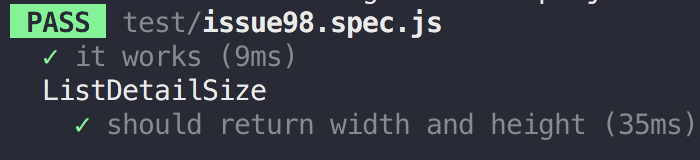
Then, I updated the styled-components dependencies:
[email protected]
[email protected]
And the "it works" doesn't work anymore (unless I remove the space in the media modifier, as @TymchenkoOleksandr suggested).
I'll investigate further and try to normalize the CSS strings.
Thank you very much!
MicheleBertoli
on 2 Dec 2017
Hi!
Any update on this?
 waclawlabuda
on 16 Jan 2018
waclawlabuda
on 16 Jan 2018
I just ran headfirst into this too, the first time I tried to write a toHaveStyleRule based test, naturally. :)
 caffodian
on 16 Jan 2018
caffodian
on 16 Jan 2018
Hello everyone, I'm sorry this issue is affecting you.
Unfortunately, I won't have time to fix it soon - but I'll be more than happy to review a PR.
Basically, the problem is that the at-rule processed by the styled-components (through stylis) generates a different output from the string provided in the matcher option.
For example, the following expectation fails:
expect(tree).toHaveStyleRule('color', 'red', {
  media: '(max-width: 640px)',
  modifier: ':hover',
})
because the output of the following component:
const Button = styled.button`
  @media (max-width: 640px) {
    &:hover {
      color: red;
    }
  }
`
is:
@media (max-width:640px) {
  .c0:hover {
    color: red;
  }
}
(Please notice there's no space between max-width: and 640px)
Now, solving this issue is not as easy as removing the space for two reasons:
- the space issue appeared in the past, and it might show up again depending on how the spaces are rendered in stylis
- in the case of
@supportthe output is totally different (e.g.@supports (display: flex)is transformed into@supports (display:-webkit-box) or (display:-webkit-flex) or (display:-ms-flexbox) or (display:flex)
Possible solutions:
- parsing the string passed within the options using the same pipeline
styled-componentsuse - abstracting the at-rule using some sort of AST (as we do with CSS) in order to avoid string comparison
- magic
Who's going to take this?
Thank you very much!
MicheleBertoli
on 16 Jan 2018
Just a note for a future person who is picking this up, please don’t get burned and implement this yourself :wink: Use stylis and stylis-rule-sheer which conveniently matches up with what styled-components uses, or I could talk about alternatives. But the risk in implementing this from scratch is too high :(
 kitten
on 11 Mar 2018
kitten
on 11 Mar 2018
I added a PR which possibly resolves this. It worked for us at any rate: https://github.com/styled-components/jest-styled-components/pull/137
 csvan
on 17 Apr 2018
csvan
on 17 Apr 2018
Hi guys. Can you please check if this https://github.com/styled-components/jest-styled-components/pull/141/commits/2d60307fd217ec81a3eb216357c74b8da2cfea95 fixes the problem?
 karolisgrinkevicius
on 3 May 2018
karolisgrinkevicius
on 3 May 2018
Hi guys. I tested out the following component and it couldn't find the color: red property.
const Button = styled.div`
  .my-class {
    color: yellow
  }
  &.my-class {
    color: red;
  }
`;
I expect this to pass.
  const wrapper = shallow(<Button className="my-class" />);
  expect(wrapper).toHaveStyleRule('color', 'yellow', {
    modifier: ' .my-class', // matches css syntax by adding extra space before
  });
  expect(wrapper).toHaveStyleRule('color', 'red', {
    modifier: '.my-class',
  });
Result of getModifiedClassName method in both test cases is ${generatedClassName} .my-class which causes the second expect statement to fail. The reason is that at first the extra space is trimmed from modifier. Next, because the first char of modifier became ., an extra space is appended to prefix (which in this case is a generated class name).
The following implementation could be a possible fix.
const getModifiedClassName = (className, modifier = '') => {
  const classNameSelector = `.${className}`
  let prefix = ''

  modifier = modifier.replace(/\s\s+/g, ' ')
  if (modifier.includes('&')) {
    modifier = modifier.replace(/&/g, classNameSelector)
  } else {
    prefix += classNameSelector
  }

  return `${prefix}${modifier}`.trim()
}
 Tomisiak
on 4 Sep 2018
Tomisiak
on 4 Sep 2018
Related issues
 terrencewwong
·
6Comments
terrencewwong
·
6Comments
 basslagter
·
3Comments
basslagter
·
3Comments
 BenLorantfy
·
3Comments
BenLorantfy
·
3Comments
 pragmaticivan
·
7Comments
pragmaticivan
·
7Comments
 dlebedynskyi
·
8Comments
dlebedynskyi
·
8Comments
Most helpful comment
I can't use toHaveStyleRule, same problem。 i use example for website https://www.styled-components.com/docs/tooling#test-utilities
code:
result:
Error: Property not found: "color"