Jellyfin: Connection Failure Error message at login screen, Jellyfin 10.3.0 through Nginx (Docker)
Describe the bug
After updating docker container Jellyfin to 10.3.0, I can no longer login remote through Nginx reverse proxy. Worked in 10.2.x. Works just fine If I login on my local network. http://192.168.1.7:8096
I know there have been changes in authentication.
I get this message when attempting to log in
"We're unable to connect to the selected server right now. Please ensure it is running and try again."
My Nginx config:
server {
listen 443 ssl;
listen [::]:443 ssl;
server_name jellly.*;

include /config/nginx/ssl.conf;

client_max_body_size 0;

location / {
    include /config/nginx/proxy.conf;
    resolver 127.0.0.11 valid=30s;
    set $upstream_jelly jellyfin;
    proxy_pass http://192.168.1.7:8096;
    proxy_set_header Range $http_range;
    proxy_set_header If-Range $http_if_range;
    proxy_set_header Upgrade $http_upgrade;
    proxy_set_header Connection "upgrade";
}
}
To Reproduce
Setup Nginx reverse proxy server and try to login.
Expected behavior
Expect to login as Jellyfin 10.2.x
Logs
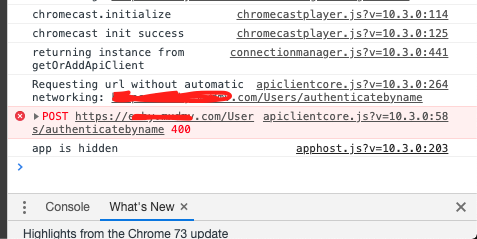
Console Logs from Chrome
Screenshots
System (please complete the following information):
- OS: Docker
- Browser: Chrome, Firefox
- Jellyfin Version: 10.3.0
- Reverse proxy: nginx
Additional context
 triDcontrols
All 3 comments
RTFM People:
https://jellyfin.readthedocs.io/en/latest/administrator-docs/reverse-proxy/#nginx
Sorry for my unnecessary bug report.
My new nginx config for others per the docs.
server {
listen 443 ssl;
listen [::]:443 ssl;

server_name jelly.*;

include /config/nginx/ssl.conf;

client_max_body_size 0;

location / {
    proxy_pass http://192.168.1.7:8096;
    proxy_redirect off;
    proxy_set_header Host $host;
    proxy_set_header Upgrade $http_upgrade;
    proxy_set_header Connection $http_connection;
    proxy_set_header X-Real-IP $remote_addr;
    proxy_set_header X-Forwarded-For $proxy_add_x_forwarded_for;
    proxy_set_header X-Forwarded-Proto $remote_addr;
    proxy_set_header X-Forwarded-Protocol $scheme;
    proxy_set_header X-Forwarded-Host $http_host;

}
}
triDcontrols
on 20 Apr 2019
Not a worry man! We changed those docs shortly after release when it became apparent there was an nginx config issue with the move to Kestrel as the HTTP server.
It def is a bug of sorts, we just found and addressed it properly very quickly :)
 sparky8251
on 20 Apr 2019
sparky8251
on 20 Apr 2019
totally not an unneccessary bug report, this saved me lots of headaches thanks :D
 darkralts
on 30 Oct 2020
darkralts
on 30 Oct 2020
Related issues
 nvllsvm
·
3Comments
nvllsvm
·
3Comments
 w1kl4s
·
3Comments
w1kl4s
·
3Comments
 maemigh
·
3Comments
maemigh
·
3Comments
 cvium
·
3Comments
cvium
·
3Comments
 chickenandpork
·
3Comments
chickenandpork
·
3Comments