Jedi: Specifc relative import statement causing issues with VSC highlighting and 'jumping' functionality.
Hi! This is an issue that I've forwarded over from https://github.com/microsoft/vscode-python/issues/13198, following advice. For the full discussion so far, please check the issue above.
Environment data
- VS Code version: 1.47.3 x64 , although also tested on 1.48.0 Insider
- Extension version (available under the Extensions sidebar): v2020.7.96456
- OS and version: Windows 10 Pro Verision 1909 64-bit
- Python version (& distribution if applicable, e.g. Anaconda): Python 3.8.5 64-bit
- Type of virtual environment used (N/A | venv | virtualenv | conda | ...): N/A
- Relevant/affected Python packages and their versions: N/A
- Relevant/affected Python-related VS Code extensions and their versions: N/A
- Value of the
python.languageServersetting: Jedi
Steps to reproduce:
Example Directory:
VSC_behaviour.zip
- Have the 'Python' extension installed.
- Download the Example Directory above, unzip, and open it with Visual Studio Code. You should arrive at this tree:
- This is the set-up for the testing for 'Actual behaviour' and 'Expected behaviour'.
project
├── directory1
│   ├── __init__.py
│   ├── file2.py
│   └── file3.py
├── file1.py
├── run.py
Expected behaviour
I will describe the highlighting as 'blue-highlighting', as that's what's shown in my screenshots due to my theme, but presumably, there will be different colours for others.
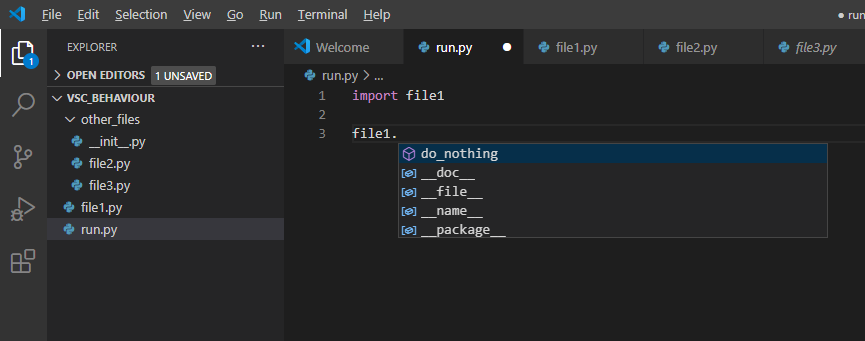
1.1. Navigate to run.py. Assuming default keybindings, hover your mouse over the file1 part of import file1. It should highlight and underline in blue, shown below, and you should be able to left-click and 'jump' to file1.

1.2. Type file1. inside run.py, as if you were calling a function from file1. You should be auto-suggested the do_nothing() function, the behaviour of which I believe comes from the Python extension.
Now navigate to
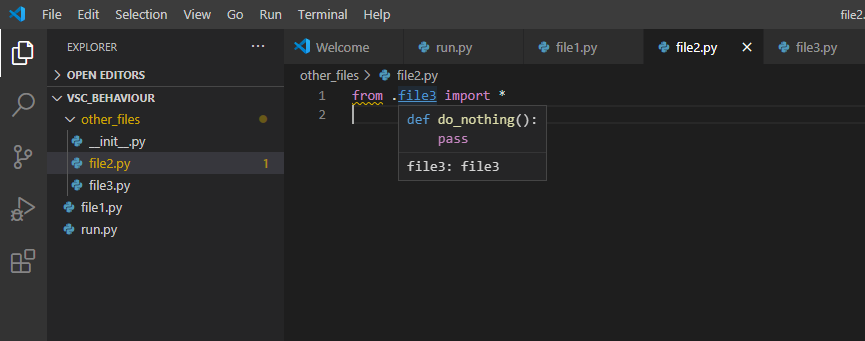
file2.py. Notice thefrom . import file3. Hovering your mouse over file3 should result in highlighting/underlining/jumping (but it doesn't - see Actual Behaviour). Moreover, writingfile3.infile2.pyshould suggest thedo_nothing()function.Replacing
from . import file3infile2.pywith an alternative syntax should also have blue-highlighting/underlining/jumping/function suggestions. For instance,from .file3 import *should have this behaviour, as well asimport file3, although the latter throws an editor error, but still has that highlighting/underlining and 'jumping'.
Actual behaviour
Steps 1.1 and 1.2 show the expected behaviour (see images above). There is the expected blue-highlighting/underlining/jumping/function suggestions.
However, Step 2 does not show the expected behaviour. There is no blue-highlighting/underlining/jumping/function suggestions.

Perhaps this behaviour is due to my syntax, but my project appears to run fine with this step 2 syntax. This seems frustrating to me, as this syntax seems to be 'legal'. Furthermore, if I manually write file3.do_nothing(), the function can run perfectly normally at execution, provided the function is ultimately called from run.py, the Python file that's ran for the project. You can see an example of this expected behaviour here. You should see the text 'I'm working!' on terminal.
VSC_Behaviour_run.zip
One possible theory I have is that the highlighting/etc. is being missed out due to the nature of the relative import. However, the highlighting/etc. work for another relative imports method, as shown in Step 3 below. Hence, I think that this specific relative import syntax could be causing conflicts with the Python extension for some reason, but I'm not sure why this might be occurring.
As mentioned above, the alternative import syntaxes in Step 3 do show the expected behaviour. There is highlighting/etc.
Furthermore, within __init__.py specifically, I found Step 2 to indeed meet the expected behaviour. Writing: from . import file3 showed the blue-highlighting/underlining/jumping/function suggestions. This makes me confused. Now this syntax apparently does show support, but only within that __init__.py file, not within file2.py, for instance.

However, as I mentioned above, the relative import that's missing that highlighting/etc. still runs in the project with expected output, with the relative imports working, as can be seen in VSC_Behaviour_run.zip above.
I was recommended to post the issue here, just to let jedi, but apparently it could be due to the Python extension's use of the Jedi API. The original issue is here: https://github.com/microsoft/vscode-python/issues/13198
Thank you!
 NootNootEliot
All 20 comments
This looks indeed like a bug, will do some further digging.
However, I doubt that this will help you. VSCode is already a few versions behind the current Jedi version, so it might take you quite a while until you actually get this fixed.
 davidhalter
on 18 Aug 2020
davidhalter
on 18 Aug 2020
However, I doubt that this will help you. VSCode is already a few versions behind the current Jedi version, so it might take you quite a while until you actually get this fixed.
Not sure that's quite right -- vscode-python is using 0.17.2. Agree it's a little bit laggy due to the release cycles not being quite in sync though.
As noted on the original issue though it is still using an older API so that may have an impact, depending on exactly what the issue is.
 PeterJCLaw
on 18 Aug 2020
PeterJCLaw
on 18 Aug 2020
Oh, did I not notice the upgrade? I thought they were still on 0.15.2. Where did you find this information?
davidhalter
on 18 Aug 2020
Oh, just checked and looks like you did the work: https://github.com/microsoft/vscode-python/pull/11252 Thanks! :)
davidhalter
on 18 Aug 2020
@PeterJCLaw Feel free to tackle this issue. I'm working on my understanding of Rust :). If I ever get to work on this ticket, I will just self-assign.
davidhalter
on 18 Aug 2020
hi @NootNootEliot, I've just had a look at this and I'm struggling to reproduce it.
I've extracted the demo source you've provided and am opening the files in the order as described, however for me the information regarding file3 from within file2 is present and working as one would expect.
I'm launching the editor by cding to the extracted directory (the equivalent of project in your tree outline) and launching with code ..
I've tried a fresh instance of the editor both with run.py clean from the archive and with it having been edited as described.
There are a couple of differences with my setup than yours though:
- I have a more recent version of the extension installed -- 2020.8.103604
- I'm on Ubuntu 18.04
Could you try this with the latest version of the extension? Alternatively, are there any other steps which are needed or settings you have locally which affect the python environment?
PeterJCLaw
on 23 Aug 2020
Hi @PeterJCLaw
Thank you for taking a look.
I first tested this on Windows. I cd'd to the extracted directory, and launched with code . . I also reinstalled the Python extension (v2020.8.103604) and double-checked that I was using Jedi as my language server. I still had the same issue (i.e. that from . import file3 was missing the highlighting/etc.).
However, I then opened a Virtual Machine (Ubuntu 20.04) and cd'd to the extractred directory, and launched with code . . The Python extension version was 2020.8.103604, and I was using the Jedi language server. I no longer had the issue, i.e. the highlighting/etc. was working as expected.
With regards to settings I might have affecting the python environment, I don't think there should be any.
NootNootEliot
on 23 Aug 2020
Ok, this is looking like it's a platform thing.
I can reproduce this on Windows 10 and even cut this down a little further -- you don't need any of the files in the root, just the files in other_files. You can also go straight to other_files/file2.py rather than looking in run.py first. These files can also be directly in the root of the project, rather than a subdirectory.
To me this suggests there's something about this directory structure which is creating this, rather than the ordering of the files being opened, which hopefully will make this easier to chase down.
PeterJCLaw
on 23 Aug 2020
@PeterJCLaw - Cool! I think it is to do with the directory structure as well, rather than the ordering of files. Cheers!
NootNootEliot
on 23 Aug 2020
I'm currently working using a cut-down which has __init__.py, file2.py and file3.py in the root of the project.
It seems that the presence (or lack) of the __init__.py _doesn't_ seem to affect this issue; I had expected it would. It's possible that this would have an impact if the cut-down stayed in a subdirectory, we should include that test case when fixing this.
Running sith.py against this _does_ produce completions for both spellings of the import (from . import file3 and import file3).
python sith.py run complete %temp%\...\file3.py <line> <col>
for line & col which are after having added file3. on its own line.
This suggests to me that this is an interaction with the VSCode extension, possibly around the determination of the (Jedi) project directory (which is a distinct concept than the VSCode project directory).
I'm out of time for tonight, but may have time to pick this up an evening during the week.
PeterJCLaw
on 23 Aug 2020
Okay cool, thank you! To clarify, does 'VSCode extension' refer to the VSCode Python extension?
NootNootEliot
on 24 Aug 2020
@PeterJCLaw Strange, I thought I was able to reproduce this on Ubuntu. I will recheck.
davidhalter
on 24 Aug 2020
Ok, so pinning down exactly what combination of things doesn't work here is a bit difficult as it seems to vary by platform. I'm not sure quite why that is, however I'm pretty sure that this is an issue with the VSCode Python extension rather than Jedi itself.
This is because the issue seems to stem from the way that the extension's completion.py sets up the paths it passes to Jedi, leading to weirdness around import handling. Specifically it looks like Jedi ends up being given the parent directory (i.e: the directory which itself contains project in your original example tree) as the Jedi Project directory, which is surely wrong.
PeterJCLaw
on 29 Aug 2020
Mostly for myself/posterity:
Here's my repro with separate files for each of the variants, with inline comments about what works on Windows (Win 7): jedi-issue-1655.zip
The difference I get on Ubuntu is that the from . import file3 style from within other_files/from__import_file3.py file _does_ work, which it doesn't on Windows.
PeterJCLaw
on 29 Aug 2020
This is because the issue seems to stem from the way that the extension's
completion.pysets up the paths it passes to Jedi, leading to weirdness around import handling. Specifically it looks like Jedi ends up being given the parent directory (i.e: the directory which itself containsprojectin your original example tree) as the Jedi Project directory, which is surely wrong.
Hrm, this is true when doing completions in files within the root of the project, but not true for files in the other_files directory.
PeterJCLaw
on 29 Aug 2020
Hrm, this is true when doing completions in files within the root of the project, but not true for files in the other_files directory.
I just remembered that I think there are different ways to generate import paths in case of completions vs. goto. But I'm not 100% sure anymore. I'm pretty sure that completions are more forgiving and give you more, where goto is more precise (and better respects the sys path).
davidhalter
on 29 Aug 2020
Ok, so I think I've found the source of the ~ticking noise~ issue here. From what I can tell it boils down to case sensitivity in path comparisons.
I think I've also found cases where this is hit if the user has their code the other side of a windows mount point, which was causing me issues for a while, but I can reproduce this without that.
Essentially when Jedi is working out the paths for the import in _level_to_base_import_path it does == comparison between the current part of the path to the file and the project directory. However somewhere along the line, the VSCode extension has lowercased the drive letter, meaning that this comparison will never succeed. As a result Jedi walks all the way up to the drive root trying to find a match before eventually giving up.
The lowercasing happens somewhere in the JS part of the VSCode extension -- the drive letters are already in lowercase when they reach the Python completion.py.
Certainly if I reply a case-respecting request to the extension's completion.py then this works just fine, while it fails if I replay the exact dict I get from the extension.
I suspect that Jedi _could_ fix this by using Path here rather than str for these paths, so that it respects case sensitivity of the host platform, however I think a quicker fix could be found in the extension by not doing the lowercasing of the path (if we can work out where that's happening).
PeterJCLaw
on 29 Aug 2020
I suspect that Jedi _could_ fix this by using
Pathhere rather thanstrfor these paths, so that it respects case sensitivity of the host platform.
Just tested this specifically in that function and this does indeed fix the issue for me.
PeterJCLaw
on 29 Aug 2020
So, now that 0.18 is released, is this issue fixed? #1684 in already integrated into 0.18, but should we wait for #1662?
 skrech
on 8 Mar 2021
skrech
on 8 Mar 2021
This issue should be fixed. At least my tests should make it a lot better. I'll keep #1662 open, but I guess this issue can be closed.
davidhalter
on 9 Mar 2021
Related issues
 tim-win
·
8Comments
tim-win
·
8Comments
 maxnordlund
·
5Comments
maxnordlund
·
5Comments
 dpavlic
·
7Comments
dpavlic
·
7Comments
 pwaller
·
9Comments
pwaller
·
9Comments
 DonJayamanne
·
6Comments
DonJayamanne
·
6Comments