Javascriptservices: Angular-CLI-Based-Template: Published App Can't Reference Bundles
I published a new Angular app using the CLI template via Visual Studio to a sub-directory on my IIS server: domain.com/directory. When I browse out to the published app (at https://domain.com/directory) I get the following errors:

The path does not include .com/directory/resource.bundle.js. If I manually take one of resource URLs that couldn't be found and include the directory: .com/directory/main.61d9e41ffdad589ea580.bundle.js, it finds the resource. Do I need to modify something in my project or is this a bug?
 ryanbuening
All 14 comments
Hi @ryanbuening . Are you getting the same when trying to deploy the project in a vanilla state?
 mkArtakMSFT
on 7 Dec 2017
mkArtakMSFT
on 7 Dec 2017
@mkArtakMSFT can you define what you mean when you say vanilla state?
ryanbuening
on 7 Dec 2017
This will be because you also need to update the <base href> in your index.html. I'll post full instructions later when I have chance.
 SteveSandersonMS
on 7 Dec 2017
SteveSandersonMS
on 7 Dec 2017
@ryanbuening , I meant in a state, where you've changed nothing yet in the project after its creation. Looks like @SteveSandersonMS is on top of this already. Thanks @SteveSandersonMS !
mkArtakMSFT
on 7 Dec 2017
@SteveSanderson I tried doing <base href="/directory"> but that didn't work so I'm curious to see the solution. Thanks.
ryanbuening
on 7 Dec 2017
@SteveSandersonMS are there instructions for this yet?
ryanbuening
on 11 Dec 2017
--deploy-url /directory/
 Alex-Torres
on 12 Dec 2017
Alex-Torres
on 12 Dec 2017
I tried doing
but that didn't work so I'm curious to see the solution. Thanks.
It needs a trailing slash, e.g., <base href="/directory/">. I just verified this is the only required change.
--deploy-url /directory/
You don't need that, because the <base href> takes care of making the browser fetch bundles from the correct URL (e.g., /directory/somebundle.js). Also, adding --deploy-url /directory/ would break it, because and when development app.UseSpa proxies to the underlying Angular CLI server, it strips off the PathBase from the URLs (so the URLs do not include this prefix as far as Angular CLI is concerned).
SteveSandersonMS
on 13 Dec 2017
@SteveSandersonMS do you have any ideas for conditionally setting the base href value depending on when the app is running on localhost (where it needs to be set to <base href="/"> and when the app is running on the web server (where it needs to be set to <base href="/directory/">)?
ryanbuening
on 13 Dec 2017
@ryanbuening I'm afraid not. But instead, I'd strongly recommend that you set up your dev environment so that it behaves the same as your prod environment. If it's going to be under /directory in production, then it's wise to have it under /directory in development too so that you don't get tripped up by unexpected changes of behaviour when you deploy.
SteveSandersonMS
on 2 Jan 2018
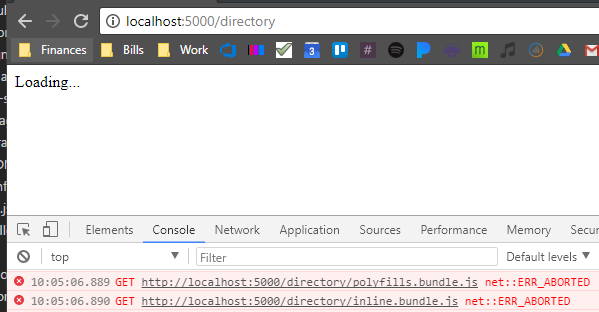
@SteveSandersonMS I agree. However, when I change index.html to include <base href="/directory/">, Angular cannot find any of the JavaScript bundles when developing on localhost - http://localhost:5000/directory. Is there another setting/option I need to change to make this work?
ryanbuening
on 5 Jan 2018
@SteveSandersonMS is there a better place for me to ask my question above?
ryanbuening
on 10 Jan 2018
It's really an Angular question (as in, it's the same if you're using Angular CLI standalone and trying to host in a non-root location - ASP.NET doesn't come into it) so you'll get a more authoritative answer by raising it with the Angular community. Hope that's OK.
SteveSandersonMS
on 24 Jan 2018
Possible solution below for anyone else that comes across this:
<script type="text/javascript">
    if (window.location.hostname == "localhost") {
        document.write('<base href="/" />');
    } else {
        var baseHref = "/directory/";
        document.write('<base href="' + baseHref + '" />');
    }
</script>
Related issues
 uNkNowN92-git
·
3Comments
uNkNowN92-git
·
3Comments
 LovedByTheLord
·
3Comments
LovedByTheLord
·
3Comments
 asadsahi
·
3Comments
asadsahi
·
3Comments
 tmedanovic
·
4Comments
tmedanovic
·
4Comments
 dantheman999301
·
4Comments
dantheman999301
·
4Comments