Javascriptservices: Code coverage for Angular 2 and webpack 2
Does anyone have suggestions how to implement the code coverage for webpack2?
I tried https://github.com/aspnet/JavaScriptServices/wiki/Angular2SpaCodeCoverage, with some fixes:
var path = require('path');
var webpackConfig = require('../../webpack.config.js')().filter(config => config.target !== 'node')[0];
webpackConfig.module.loaders = [{
test: /.ts$/,
include: [path.resolve(__dirname, "../app/")],
loader: 'sourcemap-istanbul-instrumenter-loader?force-sourcemap=true',
exclude: [/.spec.ts$/],
enforce: 'post'
}];
but I was not able to produce the coverage report. The report is empty. Any suggestions or recommendations? Thank you.
 aaltotsky
All 13 comments
Hi Alexander,
I have code coverage working in a setup similar than yours. Apart from the instructions from Angular2SpaCodeCoverage, we also had to replace the old module.loaders with the new module.rules from Webpack 2. Here's the relevant passage from our code base:
~javascript
var webpackConfig = require('../../webpack.config.js')().filter(config => config.target !== 'node');
webpackConfig[0].module.rules = [...webpackConfig[0].module.rules, {
/* loader settings here */
}]
~
I hope that helps.
Best,
E
 etimesg
on 3 Apr 2017
etimesg
on 3 Apr 2017
Hi @etimesg,
Thank you for your comments. I added your suggested changes, but still - no result (empty) in my cover report. Here is my karma.conf.js:
var path = require('path');
var webpackConfig = require('../../webpack.config.js')().filter(config => config.target !== 'node');
webpackConfig[0].module.loaders = [...webpackConfig[0].module.rules, {
    test: /.ts$/,
    include: [path.resolve(__dirname, "../app/")],
    loader: 'sourcemap-istanbul-instrumenter-loader?force-sourcemap=true',
    exclude: [/.spec.ts$/],
    enforce: 'post'
}];

module.exports = function (config) {
    config.set({
        basePath: '.',
        frameworks: ['jasmine'],
        files: [
            '../../wwwroot/dist/vendor.js',
            './boot-tests.ts'
        ],
        preprocessors: {
            './boot-tests.ts': ['webpack']
        },
        reporters: ['progress'],
        port: 9876,
        colors: true,
        logLevel: config.LOG_INFO,
        autoWatch: true,
        browsers: ['Chrome'],
        mime: { 'application/javascript': ['ts','tsx'] },
        singleRun: false,
        webpackMiddleware: { stats: 'errors-only' },
        webpack: webpackConfig,
        reporters: ['progress', 'karma-remap-istanbul'],
        remapIstanbulReporter: {
            reports: {
                html: 'ClientApp/test/coverage'
            }
        }
    });
};
Also, I upgraded some components to the latest in my package.config:
  "devDependencies": {
    "@types/chai": "^3.4.34",
    "@types/jasmine": "^2.5.37",
    "chai": "^3.5.0",
    "jasmine-core": "^2.5.2",
    "karma": "^1.3.0",
    "karma-chai": "^0.1.0",
    "karma-chrome-launcher": "^2.0.0",
    "karma-cli": "^1.0.1",
    "karma-jasmine": "^1.0.2",
    "karma-webpack": "^1.8.0",
    "http-server": "^0.9.0",
    "karma-remap-istanbul": "^0.6.0",
    "sourcemap-istanbul-instrumenter-loader": "^0.2.0"
  }
All tests are working fine (no errors).
Thanks.
aaltotsky
on 4 Apr 2017
@aaltotsky I think you are still referring the old _module.loaders_. Could you please try to replace webpackConfig[0].module.loaders = [...webpackConfig[0].module.rules, { with webpackConfig[0].module.rules = [...webpackConfig[0].module.rules, { and see if that works?
The rest of our karma config and package.json are the same, with the exception of "@types/jasmine": "^2.5.40" and "karma-remap-istanbul": "^0.2.1"
etimesg
on 4 Apr 2017
@etimesg Aha. That's it. The code coverage is working now. Here are my final changes:
var path = require('path');
var webpackConfig = require('../../webpack.config.js')().filter(config => config.target !== 'node');
webpackConfig[0].module.rules = [...webpackConfig[0].module.rules, {
    test: /.ts$/,
    include: [path.resolve(__dirname, "../app/")],
    loader: 'sourcemap-istanbul-instrumenter-loader?force-sourcemap=true',
    exclude: [/.spec.ts$/],
    enforce: 'post'
}];
I lest the "karma-remap-istanbul": "^0.6.0" as it is working with this version. Thanks a lot.
This issue can be close.
aaltotsky
on 4 Apr 2017
Thanks everyone!
 SteveSandersonMS
on 7 Apr 2017
SteveSandersonMS
on 7 Apr 2017
How exactly is "show-coverage" supposed to work? I do npm run show-coverage it fires up Chrome (http://127.0.0.1:9875) and never generates a HTML file in client/tests?
 aherrick
on 17 Apr 2017
aherrick
on 17 Apr 2017
Looks like I was just missing:
reporters: ['progress', 'karma-remap-istanbul']
Seems to be working now!
aherrick
on 17 Apr 2017
I am attempting to follow the instructions here and I am getting:
webpack: wait until bundle finished:
Failed to parse file: C:Usersadam.greenesourcereposWebApplication2WebApplication2ClientAppappapp.module.browser.ts
Failed to parse file: C:Usersadam.greenesourcereposWebApplication2WebApplication2ClientAppappapp.module.browser.ts
Failed to parse file: C:Usersadam.greenesourcereposWebApplication2WebApplication2ClientAppappapp.module.server.ts
Failed to parse file: C:Usersadam.greenesourcereposWebApplication2WebApplication2ClientAppappapp.module.shared.ts
Failed to parse file: C:Usersadam.greenesourcereposWebApplication2WebApplication2ClientAppappcomponentsappapp.component.ts
Failed to parse file: C:Usersadam.greenesourcereposWebApplication2WebApplication2ClientAppappcomponentscountercounter.component.ts
Failed to parse file: C:Usersadam.greenesourcereposWebApplication2WebApplication2ClientAppappcomponentshomehome.component.ts
Failed to parse file: C:Usersadam.greenesourcereposWebApplication2WebApplication2ClientAppappcomponentsfetchdatafetchdata.component.ts
Failed to parse file: C:Usersadam.greenesourcereposWebApplication2WebApplication2ClientAppappcomponentsnavmenumenuitem.component.ts
Failed to parse file: C:Usersadam.greenesourcereposWebApplication2WebApplication2ClientAppappcomponentsnavmenunavmenu.component.ts
WARNING in ./ClientApp/app/app.module.server.ts
Module build failed: Error: Line 7: Unexpected token
at constructError (C:Usersadam.greenesourcereposWebApplication2WebApplication2node_modulesesprimaesprima.js:2407:21)
at createError (C:Usersadam.greenesourcereposWebApplication2WebApplication2node_modulesesprimaesprima.js:2426:17)
at unexpectedTokenError (C:Usersadam.greenesourcereposWebApplication2WebApplication2node_modulesesprimaesprima.js:2500:13)
at tolerateUnexpectedToken (C:Usersadam.greenesourcereposWebApplication2WebApplication2node_modulesesprimaesprima.js:2509:21)
at parseStatementListItem (C:Usersadam.greenesourcereposWebApplication2WebApplication2node_modulesesprimaesprima.js:3973:21)
at parseScriptBody (C:Usersadam.greenesourcereposWebApplication2WebApplication2node_modulesesprimaesprima.js:5490:25)
at parseProgram (C:Usersadam.greenesourcereposWebApplication2WebApplication2node_modulesesprimaesprima.js:5506:16)
at Object.parse (C:Usersadam.greenesourcereposWebApplication2WebApplication2node_modulesesprimaesprima.js:5690:23)
at Object.instrumentSync (C:Usersadam.greenesourcereposWebApplication2WebApplication2node_modulesistanbullibinstrumenter.js:459:31)
at Object.module.exports (C:Usersadam.greenesourcereposWebApplication2WebApplication2node_modulessourcemap-istanbul-instrumenter-loaderindex.js:41:25)
@ ./ClientApp .ts$
@ ./ClientApp/test/boot-tests.ts
the stack trace is repeated for each file that failed to parse with basically the same message.
My karma.conf.js is:
// Karma configuration file, see link for more information
// https://karma-runner.github.io/0.13/config/configuration-file.html

module.exports = function (config) {
    var path = require('path');
    var webpackConfig = require('../../webpack.config.js')().filter(config => config.target !== 'node')[0];
    webpackConfig.module.rules = [...webpackConfig.module.rules, {
        test: /.ts$/,
        include: [path.resolve(__dirname, "../app/")],
        loader: 'sourcemap-istanbul-instrumenter-loader?force-sourcemap=true',
        exclude: [/.spec.ts$/],
        enforce: 'post'
    }];


    config.set({
        basePath: '.',
        frameworks: ['jasmine'],
        files: [
            '../../wwwroot/dist/vendor.js',
            './boot-tests.ts'
        ],
        preprocessors: {
            './boot-tests.ts': ['webpack']
        },
        reporters: ['progress', 'karma-remap-istanbul'],
        port: 9876,
        colors: true,
        logLevel: config.LOG_INFO,
        autoWatch: true,
        browsers: ['Chrome'],
        mime: { 'application/javascript': ['ts', 'tsx'] },
        singleRun: false,
        webpack: webpackConfig,
        webpackMiddleware: { stats: 'errors-only' },
        remapIstanbulReporter: {
            reports: {
                html: 'ClientApp/test/coverage'
            }
        }
    });
};
 kadamgreene
on 21 Sep 2017
kadamgreene
on 21 Sep 2017
I am getting the same errors as @kadamgreene
 lucipacurar
on 4 Oct 2017
lucipacurar
on 4 Oct 2017
I really need this solved for a project at work. Any help would be greatly appreciated.
kadamgreene
on 21 Oct 2017
I'm also interested in seeing if this was solved. I've scoured the internet trying to find solutions and these resources are the closest I've come.
Thanks for any help!
 ThomasOrtiz
on 23 Oct 2017
ThomasOrtiz
on 23 Oct 2017
@kadamgreene @lucassp : I fixed the issue with failure to parse by adding the following line marked in the picture. Now I get a coverage report and I CAN view it BUT I can't drill into files because my mapping is messing up :(
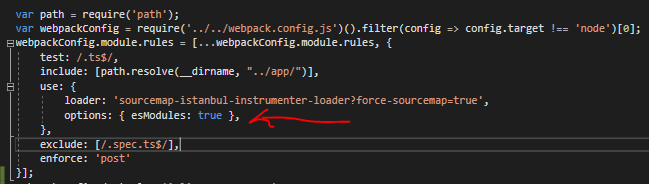
I can't drill into each file to see what lines are hit/not hit. So this is as far as I can really go.
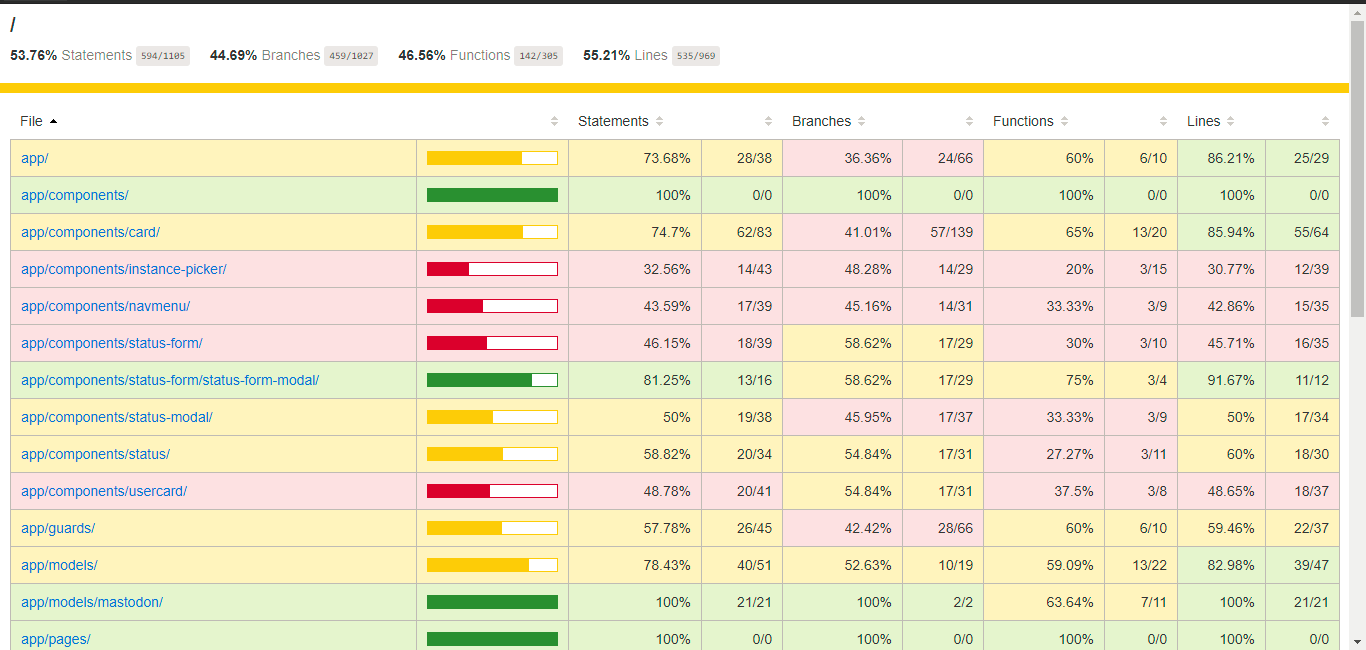
If you all figure out how to map files appropriately tell me!
ThomasOrtiz
on 23 Oct 2017
I changed my loader from sourcemap-istanbul-instrumenter-loader to istanbul-instrumenter-loader and now the coverage is working perfectly and I can view my files in the output html :D
ThomasOrtiz
on 23 Oct 2017
Related issues
 ZeekoZhu
·
3Comments
ZeekoZhu
·
3Comments
 asadsahi
·
3Comments
asadsahi
·
3Comments
 dantheman999301
·
4Comments
dantheman999301
·
4Comments
 Sampath-Lokuge
·
4Comments
Sampath-Lokuge
·
4Comments
 LovedByTheLord
·
3Comments
LovedByTheLord
·
3Comments
Most helpful comment
I changed my loader from
sourcemap-istanbul-instrumenter-loadertoistanbul-instrumenter-loaderand now the coverage is working perfectly and I can view my files in the output html :D