Javacv: Encoding of same source video with same encoding options produces different frames
Hi @saudet ,
I hope you are fine.
There is some interesting issue. What I really do: I take some video and encode it into first file. Then, I do the same for second file. After that, I open those two videos and compare their keyframe pictures.
I've found,** that sometimes those pictures are different a bit (it might be almost invisible changes for eyes). To be sure, I've made pixel diff between two pictures.
See pictures comparison below:

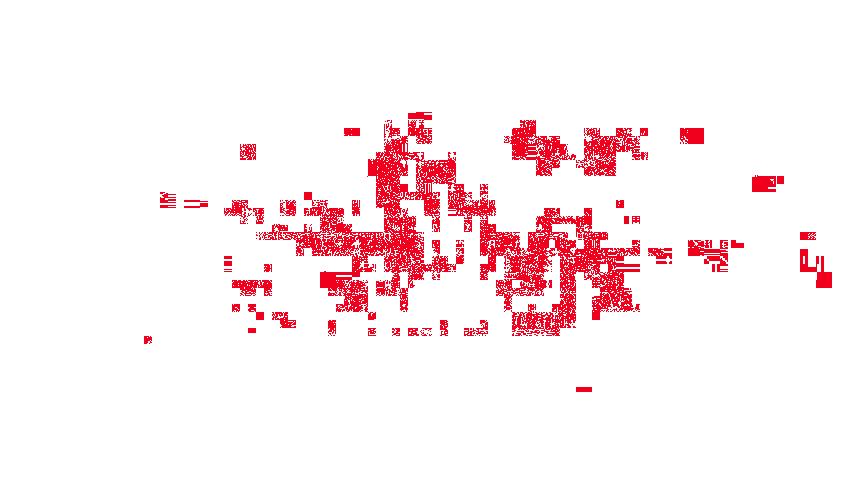
Here is my test code. It stops if one keyframe pair is different. By the way, sometimes bug reproduces in a few cycles:
import java.awt.image.BufferedImage;
import java.io.File;
import java.io.IOException;
import java.util.Arrays;

import javax.imageio.ImageIO;

import org.bytedeco.javacv.FFmpegFrameGrabber;
import org.bytedeco.javacv.FFmpegFrameRecorder;
import org.bytedeco.javacv.Frame;
import org.bytedeco.javacv.Java2DFrameConverter;

public class VideoEncodingTest {

    private static final String VIDEO_EXAMPLE = "https://www.dropbox.com/s/gilbbjjhft4tzxn/00A8.mp4?dl=1";

    public static void main(String[] args) throws Exception {
        boolean equals = true;
        while (equals) {
            File firstVideo = encodeVideo(VIDEO_EXAMPLE);
            File secondVideo = encodeVideo(VIDEO_EXAMPLE);

            equals = compareKeyFrames(firstVideo, secondVideo);

            firstVideo.delete();
            secondVideo.delete();
        }
        System.out.println("Different video files");
    }

    private static File encodeVideo(String filePath) throws IOException {
        File outputFile = File.createTempFile("video_" + System.currentTimeMillis(), ".mp4");
        try (FFmpegFrameGrabber video = new FFmpegFrameGrabber(filePath)) {
            video.start();
            try (FFmpegFrameRecorder rec = new FFmpegFrameRecorder(outputFile, video.getImageWidth(),
                    video.getImageHeight(), video.getAudioChannels())) {
                initializeEncoder(video, rec);
                rec.start();
                Frame frame;
                while ((frame = video.grab()) != null) {
                    rec.record(frame);
                }
            }
        }
        return outputFile;
    }

    private static void initializeEncoder(FFmpegFrameGrabber grabber, FFmpegFrameRecorder recorder) {
        // video
        recorder.setVideoCodecName("libx264");
        recorder.setVideoOption("profile", "main");
        recorder.setVideoOption("level", "40");

        recorder.setFrameRate(grabber.getFrameRate());
        recorder.setVideoBitrate(grabber.getVideoBitrate());
        recorder.setVideoOption("threads", "8");
        // audio
        recorder.setSampleRate(grabber.getSampleRate());
        recorder.setAudioBitrate(grabber.getAudioBitrate());
        recorder.setAudioCodecName("aac");

        // general
        recorder.setOption("movflags", "faststart");
        recorder.setVideoOption("g", "75");
        recorder.setVideoOption("sc_threshold", "40");
        recorder.setVideoOption("maxrate", "8.5M");
        recorder.setVideoOption("bufsize", "17M");

        recorder.setAudioOption("flags", "+qscale");
        recorder.setAudioOption("global_quality", "500");
    }

    private static boolean compareKeyFrames(File firstVideo, File secondVideo) throws Exception {
        boolean retVal = true;

        try (FFmpegFrameGrabber firstGrabber = new FFmpegFrameGrabber(firstVideo)) {
            firstGrabber.start();
            Frame firstFrame;

            try (FFmpegFrameGrabber secondGrabber = new FFmpegFrameGrabber(secondVideo)) {
                secondGrabber.start();
                Frame secondFrame;

                while ((firstFrame = firstGrabber.grabKeyFrame()) != null
                        && (secondFrame = secondGrabber.grabKeyFrame()) != null) {

                    int frameNumber = firstGrabber.getFrameNumber();

                    if (firstFrame.image != null && secondFrame.image != null) {
                        if (!Arrays.equals(firstFrame.image, secondFrame.image)) {
                            writeFrameToFile(firstFrame, frameNumber + "_firstFrame_" + System.currentTimeMillis());
                            writeFrameToFile(secondFrame, frameNumber + "_secondFrame_" + System.currentTimeMillis());
                            retVal = false;
                        }
                    }

                }
            }
        }
        return retVal;
    }

    private static File writeFrameToFile(Frame frame, String fileNamePrefix) throws IOException {
        File frameFile = File.createTempFile(fileNamePrefix, ".jpg");
        BufferedImage image = new Java2DFrameConverter().convert(frame);
        ImageIO.write(image, "jpg", frameFile);
        return frameFile;
    }

}
How to compare frames:
$ sudo apt-get install imagemagick imagemagick-doc
$ compare -compose src /tmp/115_firstFrame_15676717833946141193480370686428.jpg /tmp/115_secondFrame_1567671783410883061795184664543.jpg /tmp/115_diff.jpg
Additional info:
- reproduced on JavaCV versions 1.4.4, 1.5.1
- as far as I tested command line ffmpeg there was no such bug
- JavaCV options for each encoded file look equal:
[libx264 @ 0x7f2a38916e00] 264 - core 157 - H.264/MPEG-4 AVC codec - Copyleft 2003-2018 - http://www.videolan.org/x264.html - options: cabac=1 ref=3 deblock=1:0:0 analyse=0x1:0x111 me=hex subme=7 psy=1 psy_rd=1.00:0.00 mixed_ref=1 me_range=16 chroma_me=1 trellis=1 8x8dct=0 cqm=0 deadzone=21,11 fast_pskip=1 chroma_qp_offset=-2 threads=8 lookahead_threads=1 sliced_threads=0 nr=0 decimate=1 interlaced=0 bluray_compat=0 constrained_intra=0 bframes=3 b_pyramid=2 b_adapt=1 b_bias=0 direct=1 weightb=1 open_gop=0 weightp=2 keyint=75 keyint_min=7 scenecut=40 intra_refresh=0 rc_lookahead=40 rc=abr mbtree=1 bitrate=988 ratetol=1.0 qcomp=0.60 qpmin=0 qpmax=69 qpstep=4 vbv_maxrate=8500 vbv_bufsize=17000 nal_hrd=none filler=0 ip_ratio=1.40 aq=1:1.00

[libx264 @ 0x7f2a388c9ec0] 264 - core 157 - H.264/MPEG-4 AVC codec - Copyleft 2003-2018 - http://www.videolan.org/x264.html - options: cabac=1 ref=3 deblock=1:0:0 analyse=0x1:0x111 me=hex subme=7 psy=1 psy_rd=1.00:0.00 mixed_ref=1 me_range=16 chroma_me=1 trellis=1 8x8dct=0 cqm=0 deadzone=21,11 fast_pskip=1 chroma_qp_offset=-2 threads=8 lookahead_threads=1 sliced_threads=0 nr=0 decimate=1 interlaced=0 bluray_compat=0 constrained_intra=0 bframes=3 b_pyramid=2 b_adapt=1 b_bias=0 direct=1 weightb=1 open_gop=0 weightp=2 keyint=75 keyint_min=7 scenecut=40 intra_refresh=0 rc_lookahead=40 rc=abr mbtree=1 bitrate=988 ratetol=1.0 qcomp=0.60 qpmin=0 qpmax=69 qpstep=4 vbv_maxrate=8500 vbv_bufsize=17000 nal_hrd=none filler=0 ip_ratio=1.40 aq=1:1.00
- reproduced on codecs: libx264, libopenh264, libx264rgb
 egorapolonov
All 11 comments
Maybe that's a bug in ImageIO. Try to use something else to output images.
 saudet
on 5 Sep 2019
saudet
on 5 Sep 2019
Maybe that's a bug in ImageIO. Try to use something else to output images.
I have just checked. There are no differences if I write the same frame multiple times.
In my code above I do comparison between two Buffer[] arrays using java.util.Arrays class, and then if they aren't equal I write picture to file using ImageIO
egorapolonov
on 5 Sep 2019
Could you also check the debug log of FFmpeg for any differences between multiple runs?
saudet
on 5 Sep 2019
Sure,
I've enabled logging using avutil.av_log_set_level(avutil.AV_LOG_DEBUG);
Then, I executed grep "h264\|libx264" per each log file for skipping http/tcp info.
Also I replaced thread's hex with "NOISY_HEX" constant.
Finally I've called diff command in terminal. See comparison results
egorapolonov
on 5 Sep 2019
So, what can I see - the same frames in different runs have different measures.
< [libx264 @ NOISY_HEX] frame= 424 QP=18.60 NAL=2 Slice:P Poc:28  I:276  P:710  SKIP:634  size=5120 bytes
---
> [libx264 @ NOISY_HEX] frame= 424 QP=19.18 NAL=2 Slice:P Poc:28  I:266  P:706  SKIP:648  size=5102 bytes
That's okay or strange?
egorapolonov
on 5 Sep 2019
Ah, so this is about libx264. Its support for threading is known to be a bit wonky, so you should disable it with setVideoOption("threads", "1"), for example, as shown in issue #1163.
saudet
on 6 Sep 2019
Hi Samuel,
Thank you for the suggestion! Looks like it works with single thread.
I'm going to do more tests of console ffmpeg tool, cause it worked with 6
threads and had same result.
Should we close this ticket? What do yo think?
пт, 6 сент. 2019 г., 4:19 Samuel Audet [email protected]:
Ah, so this is about libx264. Its support for threading is known to be a
bit wonky, so you should disable it with setVideoOption("threads", "1"),
for example, as shown in issue #1163
egorapolonov
on 6 Sep 2019
To make sure it's using the same version of libx264, did you try the ffmpeg program here?
http://bytedeco.org/javacpp-presets/ffmpeg/apidocs/org/bytedeco/ffmpeg/ffmpeg.html
saudet
on 7 Sep 2019
I'm not sure why the ffmpeg program is behaving differently, maybe the JIT compiler from the JVM is introducing additional jitter, affecting libx264 more greatly. In any case, it is not supposed to be deterministic: https://mailman.videolan.org/pipermail/x264-devel/2015-April/011036.html
saudet
on 7 Sep 2019
Thank you for your help!
egorapolonov
on 7 Sep 2019
Hi @saudet ,
I'm sorry for off-top, but I'd like to share solution for this issue.
Main difference was in rate control mode. See javacv output above
rc=abr
Everything looks fine with CRF mode, so in this case you need to specify crf value using
setVideoOption("crf", "23")
It is default setup of ffmpeg console tool.
One more point: in case of this issue #845 right side bar was different time to time, therefore it also affected output.
Bottom line: since javacv 1.5.1 using CRF you would get equal output videos every run.
egorapolonov
on 11 Nov 2019
Related issues
 Maleandr
·
3Comments
Maleandr
·
3Comments
 iamazy
·
4Comments
iamazy
·
4Comments
 kongqw
·
4Comments
kongqw
·
4Comments
 SenudaJayalath
·
3Comments
SenudaJayalath
·
3Comments
 cansik
·
4Comments
cansik
·
4Comments