Javacv: Couldn't find "libjniopencv_core.so" and "libopencv_imgproc.so"
I am using the following code in the gradle file of my android app - which is currently a simple clone of https://github.com/bytedeco/sample-projects/blob/master/javacv-android-recognize/
Like in the app/build.gradle file there I use the following code to import javacv:
    compile group: 'org.bytedeco', name: 'javacv', version: '1.3.2'
    compile group: 'org.bytedeco.javacpp-presets', name: 'opencv', version: '3.2.0-1.3', classifier: 'android-arm'
    compile group: 'org.bytedeco.javacpp-presets', name: 'opencv', version: '3.2.0-1.3', classifier: 'android-x86'
    compile group: 'org.bytedeco.javacpp-presets', name: 'ffmpeg', version: '3.2.1-1.3', classifier: 'android-arm'
    compile group: 'org.bytedeco.javacpp-presets', name: 'ffmpeg', version: '3.2.1-1.3', classifier: 'android-x86'
I want to use the current release as Android Studio detects there are newer versions available, but if I use those
    compile group: 'org.bytedeco', name: 'javacv', version: '1.4'
    compile group: 'org.bytedeco.javacpp-presets', name: 'opencv', version: '3.4.0-1.4', classifier: 'android-arm'
    compile group: 'org.bytedeco.javacpp-presets', name: 'opencv', version: '3.4.0-1.4', classifier: 'android-x86'
    compile group: 'org.bytedeco.javacpp-presets', name: 'ffmpeg', version: '3.4.1-1.4', classifier: 'android-arm'
    compile group: 'org.bytedeco.javacpp-presets', name: 'ffmpeg', version: '3.4.1-1.4', classifier: 'android-x86'
my App crashes with
E/linker: library "/vendor/lib/libavutil.so" ("/system/vendor/lib/libavutil.so") needed or dlopened by "/system/lib/libnativeloader.so" is not accessible for the namespace: [name="classloader-namespace", ld_library_paths="", default_library_paths="", permitted_paths="/data:/mnt/expand:/data/data/org.example.test"]

I/art: Rejecting re-init on previously-failed class java.lang.Class<org.bytedeco.javacpp.avutil>: java.lang.UnsatisfiedLinkError: dalvik.system.PathClassLoader[DexPathList[[zip file "/data/app/org.example.test-2/base.apk", zip file "/data/app/org.example.test-2/split_lib_dependencies_apk.apk", zip file "/data/app/org.example.test-2/split_lib_slice_0_apk.apk", zip file "/data/app/org.example.test-2/split_lib_slice_1_apk.apk", zip file "/data/app/org.example.test-2/split_lib_slice_2_apk.apk", zip file "/data/app/org.example.test-2/split_lib_slice_3_apk.apk", zip file "/data/app/org.example.test-2/split_lib_slice_4_apk.apk", zip file "/data/app/org.example.test-2/split_lib_slice_5_apk.apk", zip file "/data/app/org.example.test-2/split_lib_slice_6_apk.apk", zip file "/data/app/org.example.test-2/split_lib_slice_7_apk.apk", zip file "/data/app/org.example.test
I/art:     at void java.lang.Runtime.loadLibrary0(java.lang.ClassLoader, java.lang.String) (Runtime.java:984)
I/art:     at void java.lang.System.loadLibrary(java.lang.String) (System.java:1562)
I/art:     at java.lang.String org.bytedeco.javacpp.Loader.loadLibrary(java.net.URL[], java.lang.String, java.lang.String[]) (Loader.java:1191)
I/art:     at java.lang.String org.bytedeco.javacpp.Loader.load(java.lang.Class, java.util.Properties, boolean) (Loader.java:953)
I/art:     at java.lang.String org.bytedeco.javacpp.Loader.load() (Loader.java:854)
I/art:     at void org.bytedeco.javacpp.avutil.<clinit>() (avutil.java:10)
I/art:     at java.lang.Class java.lang.Class.classForName!(java.lang.String, boolean, java.lang.ClassLoader) (Class.java:-2)
I/art:     at java.lang.Class java.lang.Class.forName(java.lang.String, boolean, java.lang.ClassLoader) (Class.java:400)
I/art:     at java.lang.String org.bytedeco.javacpp.Loader.load(java.lang.Class, java.util.Properties, boolean) (Loader.java:913)
I/art:     at java.lang.String org.bytedeco.javacpp.Loader.load(java.lang.Class) (Loader.java:870)
I/art:     at void org.bytedeco.javacv.FFmpegFrameFilter.tryLoad() (FFmpegFrameFilter.java:80)
I/art:     at void org.bytedeco.javacv.FFmpegFrameFilter.<clinit>() (FFmpegFrameFilter.java:102)
This seems to be a problem with org.bytedeco.javacv.FFmpegFrameFilter, which depends on /vendor/lib/libavutil.so which is not found.
Is there somewhere a documentation available to check whether I need to change something in the presets?
 sgrossberndt
All 6 comments
There shouldn't be any difference between 1.3 and 1.4, but we can set the java.library.path system property to the empty string "" to work around issues like that on some devices.
 saudet
on 9 Feb 2018
saudet
on 9 Feb 2018
I changed back to JavaCV 1.3.2, here I have the same output about "/vendor/lib/libavutil.so" but the app works and does not crash, so this is not the problem.
Back to JavaCV 1.4 I tried again, the exception causing the crash actually happens at another place:
Caused by: java.lang.UnsatisfiedLinkError: dalvik.system.PathClassLoader[DexPathList[[zip file "/data/app/org.example.test-1/base.apk", zip file "/data/app/org.example.test-1/split_lib_dependencies_apk.apk", zip file "/data/app/org.example.test-1/split_lib_slice_0_apk.apk", zip file "/data/app/org.example.test-1/split_lib_slice_1_apk.apk", zip file "/data/app/org.example.test-1/split_lib_slice_2_apk.apk", zip file "/data/app/org.example.test-1/split_lib_slice_3_apk.apk", zip file "/data/app/org.example.test-1/split_lib_slice_4_apk.apk", zip file "/data/app/org.example.test-1/split_lib_slice_5_apk.apk", zip file "/data/app/org.example.test-1/split_lib_slice_6_apk.apk", zip file "/data/app/org.example.test-1/split_lib_slice_7_apk.apk", zip file "/data/app/org.example.test-1/split_lib_slice_8_apk.apk", zip file "/data/app/org.example.test-1/split_lib_slice_9_apk.apk"],nativeLibraryDirectories=[/data/app/org.example.test-1/lib/arm, /system/lib, /vendor/lib]]]
couldn't find "libjniopencv_core.so"
    at java.lang.Runtime.loadLibrary0(Runtime.java:984)
    at java.lang.System.loadLibrary(System.java:1562)
    at org.bytedeco.javacpp.Loader.loadLibrary(Loader.java:1191)
    at org.bytedeco.javacpp.Loader.load(Loader.java:953)
    at org.bytedeco.javacpp.Loader.load(Loader.java:854)
    at org.bytedeco.javacpp.opencv_core.<clinit>(opencv_core.java:10)
    at java.lang.Class.classForName(Native Method)
    at java.lang.Class.forName(Class.java:400)
    at org.bytedeco.javacpp.Loader.load(Loader.java:913)
    at org.bytedeco.javacpp.Loader.load(Loader.java:854)
    at org.bytedeco.javacpp.opencv_objdetect$CascadeClassifier.<clinit>(opencv_objdetect.java:661)
    at org.example.test.SchilderScanActivity$LoadDetectorsTask.loadClassifierCascade(SchilderScanActivity.java:142)
    at org.example.test.SchilderScanActivity$LoadDetectorsTask.doInBackground(SchilderScanActivity.java:78)
    at org.example.test.SchilderScanActivity$LoadDetectorsTask.doInBackground(SchilderScanActivity.java:65)
    at android.os.AsyncTask$2.call(AsyncTask.java:305)
    at java.util.concurrent.FutureTask.run(FutureTask.java:237)
    at android.os.AsyncTask$SerialExecutor$1.run(AsyncTask.java:243)
    at java.util.concurrent.ThreadPoolExecutor.runWorker(ThreadPoolExecutor.java:1133)
    at java.util.concurrent.ThreadPoolExecutor$Worker.run(ThreadPoolExecutor.java:607)
    at java.lang.Thread.run(Thread.java:761)
Caused by: java.lang.UnsatisfiedLinkError: dalvik.system.PathClassLoader[DexPathList[[zip file "/data/app/org.example.test-1/base.apk", zip file "/data/app/org.example.test-1/split_lib_dependencies_apk.apk", zip file "/data/app/org.example.test-1/split_lib_slice_0_apk.apk", zip file "/data/app/org.example.test-1/split_lib_slice_1_apk.apk", zip file "/data/app/org.example.test-1/split_lib_slice_2_apk.apk", zip file "/data/app/org.example.test-1/split_lib_slice_3_apk.apk", zip file "/data/app/org.example.test-1/split_lib_slice_4_apk.apk", zip file "/data/app/org.example.test-1/split_lib_slice_5_apk.apk", zip file "/data/app/org.example.test-1/split_lib_slice_6_apk.apk", zip file "/data/app/org.example.test-1/split_lib_slice_7_apk.apk", zip file "/data/app/org.example.test-1/split_lib_slice_8_apk.apk", zip file "/data/app/org.example.test-1/split_lib_slice_9_apk.apk"],nativeLibraryDirectories=[/data/app/org.example.test-1/lib/arm, /system/lib, /vendor/lib]]]
couldn't find "libopencv_imgproc.so"
    at java.lang.Runtime.loadLibrary0(Runtime.java:984)
    at java.lang.System.loadLibrary(System.java:1562)
    at org.bytedeco.javacpp.Loader.loadLibrary(Loader.java:1191)
    at org.bytedeco.javacpp.Loader.load(Loader.java:940)
So causing the problems are couldn't find "libjniopencv_core.so" and couldn't find "libopencv_imgproc.so"
The only difference I can spot between

and
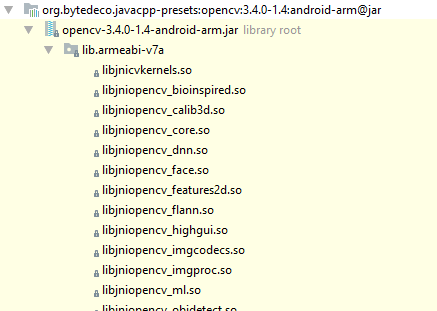
apart from the version numbers is the path changed from lib.armeabi to lib.armeabi-v7a. Could this be causing the issue?
sgrossberndt
on 9 Feb 2018
If the project is configured to remove the lib/armeabi-v7a directory, then yes that won't work.
saudet
on 9 Feb 2018
Thanks a lot, that was the correct pointer!
As I wrote I used https://github.com/bytedeco/sample-projects/blob/master/javacv-android-recognize/ where https://github.com/bytedeco/sample-projects/blob/master/javacv-android-recognize/app/build.gradle#L24 defines
    splits {
        abi {
            enable true
            reset()
            include 'x86', 'armeabi'
            universalApk false
        }
    }
so changing
include 'x86', 'armeabi'
to
include 'x86', 'armeabi', 'armeabi-v7a'
made that error vanish.
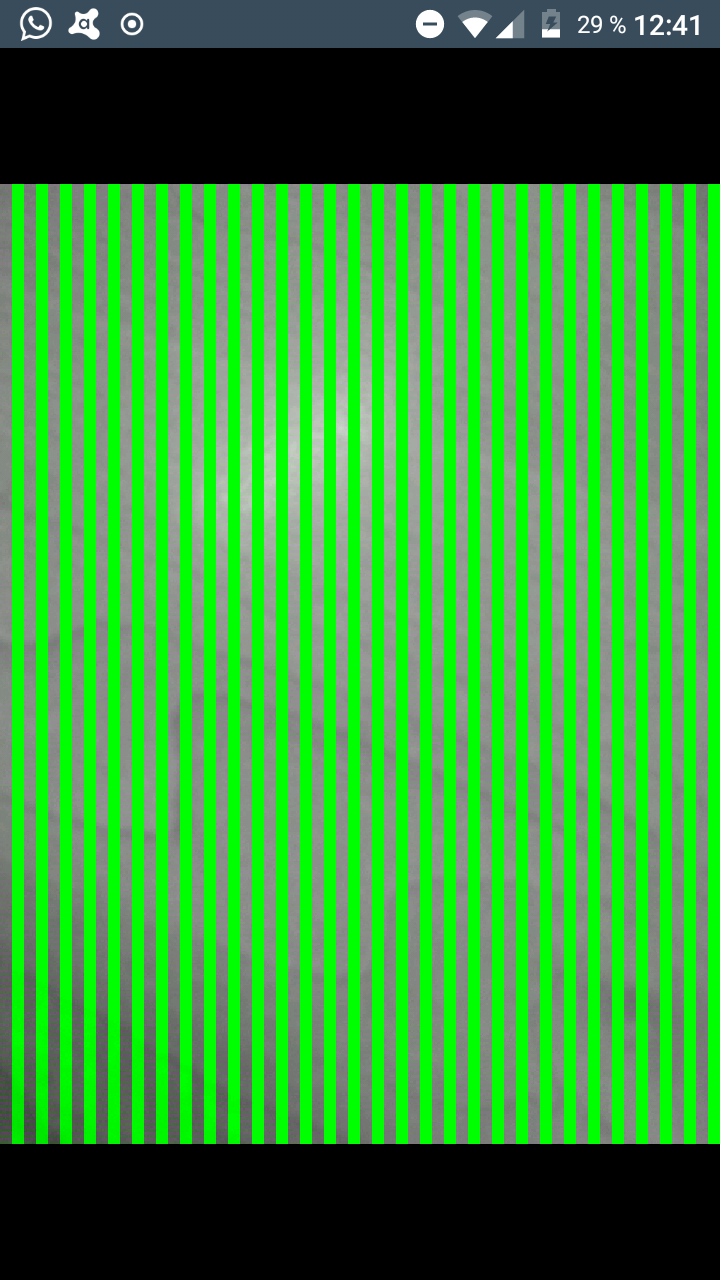
Now I have lots of green lines in the Camera View where there were none in 1.3.2, but thats a different issue...
sgrossberndt
on 9 Feb 2018
Addendum:
Using JavaCV 1.3.2 it must be
include 'x86', 'armeabi'Using JavaCV 1.4 it must be
include 'x86', 'armeabi', 'armeabi-v7a'
as otherwise crashes due to missing files appear
sgrossberndt
on 9 Feb 2018
Make sure you're using the right pixel format, see issue https://github.com/bytedeco/javacv/issues/887.
saudet
on 9 Feb 2018
Related issues
 nghiepvth
·
3Comments
nghiepvth
·
3Comments
 cansik
·
4Comments
cansik
·
4Comments
 myScoopAndroidCamera
·
4Comments
myScoopAndroidCamera
·
4Comments
 eldhosengeorge
·
3Comments
eldhosengeorge
·
3Comments
 UpAndDownAgain
·
3Comments
UpAndDownAgain
·
3Comments