Javacpp-presets: VideoInput ACCESS_VIOLATION with Java 9+ and Windows 10
I'm experiencing a memory access violation under a specific environment and am having issues debugging it. I'm hoping someone recognizes a pattern here or can point me in a better direction to resolve this issue.
Some brief background is that we're using the VideoInput preset within an application for capturing from a Unibrain firewire camera. Our platform was previously Java 11 on Windows 7 64-bit. We're in the process of upgrading to Windows 10 and now the JVM crashes with an EXCEPTION_ACCESS_VIOLATION within the Unibrain firewire driver. If we use Java 8 on Windows 10, the application works and we're able to capture video. I will also note that the application works with Java 11 and Windows 10 against my laptop's integrated usb webcam. I know this provides a wrinkle for allowing others to reproduce this crash.
I am able to reproduce the above scenario using the ExampleUsage application provided in the VideoInput preset. From my debugging the issue arises during the CaptureGraph RenderStream call. The JVM dump always looks the same in that it's trying to write to an address 16 bytes above the content of the RCX register. Below is a table of different combinations I have tried to isolate the issue. All of my testing have used Azul's Zulu builds and javacpp 1.5.2. Everything is 64-bit.
Java Version | Win7 | Win10
------------ | ------------------ | ---------------------
Java 8 | Works | Works
Java 9 | Works | EXCEPTION_ACCESS_VIOLATION
Java 11 | Works | EXCEPTION_ACCESS_VIOLATION
Java 11 (with EpsilonGC to rule out scoping issues) | Works | EXCEPTION_ACCESS_VIOLATION
Java 13 | Works | EXCEPTION_ACCESS_VIOLATION
So far my best guess is that something about JNI changed with Java 9 and how it interacts with Windows 10. The only JNI change I could find mentioned is adding a method for querying a module. The javacpp mapping code for VideoInput is pretty limited but does anyone have an idea of changes with Windows 10 that would affect these? It feels weird to me that C++ longs are being mapped to Java ints. I did try adjusting that mapping to long, LongPointer, LongBuffer and long[] but it did not change the results.
 mborger
All 15 comments
videoInput has some knobs that we can use to probe for more details. Could you try to call other functions than setupDevice() to see what other kind of information we can get?
It might also be related to the C++ runtimes, although that doesn't usually cause problems on Windows, as long as they are all linked statically. You could try to build videoInput using the exact same version of MSVC that is used to build the JDK. That might help.
 saudet
on 21 Feb 2020
saudet
on 21 Feb 2020
Zulu11 is built with MSVC 2015 and I am able to build the videoinput-preset with 2015. I modified the example to dump many of the getters. One interesting point is that devicesFound() returns 0 after listDevices() returns 1. This output is the same between java 8 and 11 on Windows 10.
public class ExampleUsage {
    public static void main(String[] args) {
        //create a videoInput object
        videoInput VI = new videoInput();

        //Prints out a list of available devices and returns num of devices found
        int numDevices = videoInput.listDevices();
        System.err.println(String.format("numDevices: %d", numDevices));
        BytePointer deviceName = videoInput.getDeviceName(0);
        System.err.println(String.format("Device 0 name: %s", deviceName.getString()));
        System.err.println(String.format("Device 0 setup? %s", VI.isDeviceSetup(0)));
        System.err.println(String.format("VI.devicesFound: %d", VI.devicesFound()));
        System.err.println(String.format("propBrightness: %d", VI.propBrightness()));
        System.err.println(String.format("propContrast: %d", VI.propContrast()));
        System.err.println(String.format("propHue: %d", VI.propHue()));
        System.err.println(String.format("propSaturation: %d", VI.propSaturation()));
        System.err.println(String.format("propSharpness: %d", VI.propSharpness()));
        System.err.println(String.format("propGamma: %d", VI.propGamma()));
        System.err.println(String.format("propColorEnable: %d", VI.propColorEnable()));
        System.err.println(String.format("propWhiteBalance: %d", VI.propWhiteBalance()));
        System.err.println(String.format("propBacklightCompensation: %d", VI.propBacklightCompensation()));
        System.err.println(String.format("propGain: %d", VI.propGain()));
        System.err.println(String.format("propPan: %d", VI.propPan()));
        System.err.println(String.format("propTilt: %d", VI.propTilt()));
        System.err.println(String.format("propRoll: %d", VI.propRoll()));
        System.err.println(String.format("propZoom: %d", VI.propZoom()));
        System.err.println(String.format("propExposure: %d", VI.propExposure()));
        System.err.println(String.format("propIris: %d", VI.propIris()));
        System.err.println(String.format("propFocus: %d", VI.propFocus()));
    }
}
Output:
***** VIDEOINPUT LIBRARY - 0.2000 - TFW2013 *****


VIDEOINPUT SPY MODE!

SETUP: Looking For Capture Devices
SETUP: 0) Unibrain Fire-i driver / Unibrain Fire-i Board BW
SETUP: 1 Device(s) found

numDevices: 1
Device 0 name: Unibrain Fire-i driver / Unibrain Fire-i Board BW
Device 0 setup? false
VI.devicesFound: 0
propBrightness: 0
propContrast: 1
propHue: 2
propSaturation: 3
propSharpness: 4
propGamma: 5
propColorEnable: 6
propWhiteBalance: 7
propBacklightCompensation: 8
propGain: 9
propPan: 0
propTilt: 1
propRoll: 2
propZoom: 3
propExposure: 4
propIris: 5
propFocus: 6
BTW, since this is a DC1394 camera, you might want to use libdc1394 instead:
https://github.com/bytedeco/javacpp-presets/tree/master/libdc1394
saudet
on 21 Feb 2020
As another data point, below is the output from my laptop with a USB camera. It also has the device count discrepancy although setting up the device works.
***** VIDEOINPUT LIBRARY - 0.2000 - TFW2013 *****


VIDEOINPUT SPY MODE!

SETUP: Looking For Capture Devices
SETUP: 0) Integrated Webcam
SETUP: 1 Device(s) found

numDevices: 1
Device 0 name: Integrated Webcam
Device 0 setup? false
VI.devicesFound: 0
propBrightness: 0
propContrast: 1
propHue: 2
propSaturation: 3
propSharpness: 4
propGamma: 5
propColorEnable: 6
propWhiteBalance: 7
propBacklightCompensation: 8
propGain: 9
propPan: 0
propTilt: 1
propRoll: 2
propZoom: 3
propExposure: 4
propIris: 5
propFocus: 6
BTW, since this is a DC1394 camera, you might want to use libdc1394 instead:
https://github.com/bytedeco/javacpp-presets/tree/master/libdc1394
I did see this preset. Sadly the example isn't working out of the box for me, I'm getting errors about finding the dependent libraries for jnidc1394.dll. I haven't spent much effort looking into it yet.
mborger
on 21 Feb 2020
That's strange. It works fine here. When you get the chance, please let me know what the Dependencies tool says is missing as dependency:
https://github.com/bytedeco/javacpp-presets/wiki/Debugging-UnsatisfiedLinkError-on-Windows
saudet
on 22 Feb 2020
Ok, this is probably a different issue but here's what I'm seeing on my Win10 laptop, same output with Java 8 and 11.
libdc1394 example unmodified produces this exception:
Caused by: java.lang.UnsatisfiedLinkError: C:\Users\mborger\.javacpp\cache\libdc1394-2.2.6-1.5.2-windows-x86_64.jar\org\bytedeco\libdc1394\windows-x86_64\jnidc1394.dll: Can't find dependent libraries
    at java.lang.ClassLoader$NativeLibrary.load (Native Method)
    at java.lang.ClassLoader.loadLibrary0 (ClassLoader.java:1941)
    at java.lang.ClassLoader.loadLibrary (ClassLoader.java:1824)
    at java.lang.Runtime.load0 (Runtime.java:810)
    at java.lang.System.load (System.java:1086)
    at org.bytedeco.javacpp.Loader.loadLibrary (Loader.java:1493)
    at org.bytedeco.javacpp.Loader.load (Loader.java:1192)
    at org.bytedeco.javacpp.Loader.load (Loader.java:1042)
    at org.bytedeco.libdc1394.global.dc1394.<clinit> (dc1394.java:12)
    at java.lang.Class.forName0 (Native Method)
    at java.lang.Class.forName (Class.java:348)
    at org.bytedeco.javacpp.Loader.load (Loader.java:1109)
    at org.bytedeco.javacpp.Loader.load (Loader.java:1042)
    at org.bytedeco.libdc1394.dc1394video_frame_t.<clinit> (dc1394video_frame_t.java:23)
    at GrabColorImage.main (GrabColorImage.java:52)
    at sun.reflect.NativeMethodAccessorImpl.invoke0 (Native Method)
    at sun.reflect.NativeMethodAccessorImpl.invoke (NativeMethodAccessorImpl.java:62)
    at sun.reflect.DelegatingMethodAccessorImpl.invoke (DelegatingMethodAccessorImpl.java:43)
    at java.lang.reflect.Method.invoke (Method.java:498)
    at org.codehaus.mojo.exec.ExecJavaMojo$1.run (ExecJavaMojo.java:282)
    at java.lang.Thread.run (Thread.java:748)
Now I modified the example as described on the wiki to the following:
    public static void main(String[] args) throws IOException, InterruptedException {
        Class<?> clazz = org.bytedeco.libdc1394.presets.dc1394.class;
        try {
            Loader.load(clazz);
        } catch (UnsatisfiedLinkError e) {
            String path = Loader.cacheResource(clazz, "windows-x86_64/jnidc1394.dll").getPath();
            new ProcessBuilder("C:/Dev/Dependencies/DependenciesGui.exe", path).start().waitFor();
        }
Dependencies opens and doesn't show any issues (unless I'm reading the output wrong).
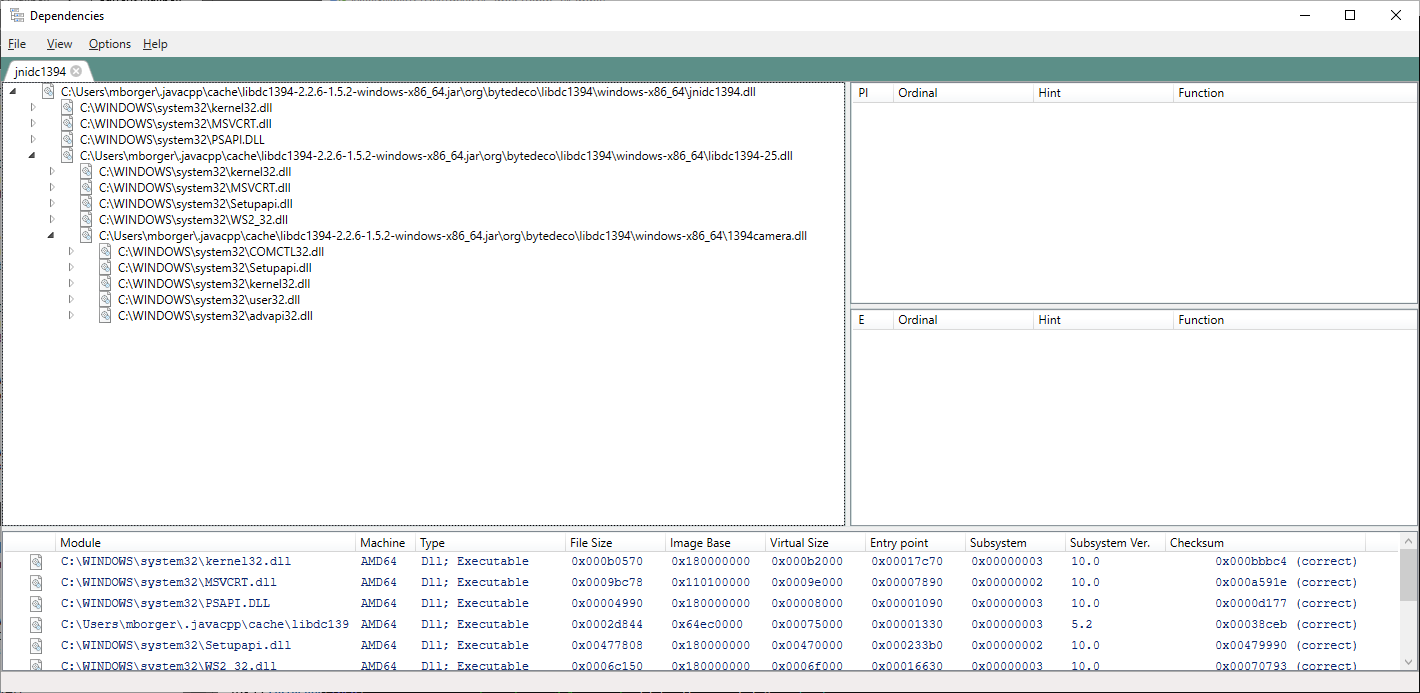
After closing Dependencies I get the following exception about the dc1394 class missing.
Caused by: java.lang.NoClassDefFoundError: Could not initialize class org.bytedeco.libdc1394.global.dc1394
    at java.lang.Class.forName0 (Native Method)
    at java.lang.Class.forName (Class.java:398)
    at org.bytedeco.javacpp.Loader.load (Loader.java:1109)
    at org.bytedeco.javacpp.Loader.load (Loader.java:1042)
    at org.bytedeco.libdc1394.dc1394video_frame_t.<clinit> (dc1394video_frame_t.java:23)
    at GrabColorImage.main (GrabColorImage.java:52)
    at jdk.internal.reflect.NativeMethodAccessorImpl.invoke0 (Native Method)
    at jdk.internal.reflect.NativeMethodAccessorImpl.invoke (NativeMethodAccessorImpl.java:62)
    at jdk.internal.reflect.DelegatingMethodAccessorImpl.invoke (DelegatingMethodAccessorImpl.java:43)
    at java.lang.reflect.Method.invoke (Method.java:566)
    at org.codehaus.mojo.exec.ExecJavaMojo$1.run (ExecJavaMojo.java:282)
    at java.lang.Thread.run (Thread.java:834)
I also tried modifying which class gets loaded during initialization to org.bytedeco.libdc1394.global.dc1394 but I get the same result which seems odd since Loader.load is using the class loading mechanism which is then failing later?
mborger
on 24 Feb 2020
I don't think so, it's most likely due to missing dependencies. I've seen the Dependencies tool fail in finding missing symbols, where Dependency Walker succeeded, so it's also worth trying that one:
https://github.com/bytedeco/javacpp-presets/wiki/Debugging-UnsatisfiedLinkError-on-Windows/fa7b2efc05ff9006ce13b36ddeb96fab7ab8616a
saudet
on 24 Feb 2020
Here's what what Dependency Walker reports.
Error: At least one required implicit or forwarded dependency was not found.
Error: At least one module has an unresolved import due to a missing export function in an implicitly dependent module.
Error: A circular dependency was detected.
Warning: At least one delay-load dependency module was not found.
Warning: At least one module has an unresolved import due to a missing export function in a delay-load dependent module.
Missing dlls
From a little searching these dlls seem to be api redirections and are expected to not be found.
mborger
on 24 Feb 2020
You can ignore those api-ms and ext-ms ones. That's just Dependency Walker
not supporting this feature of Windows 10. Look for other things missing,
or just export the whole report and let me take a look.
saudet
on 25 Feb 2020
The report is in the zip archive to keep github happy. I really appreciate your time looking into this.
jnidc1394.zip
mborger
on 25 Feb 2020
Yes, I don't see anything missing indeed. The DLLs also don't have any strange dependencies either. I suppose it's possible that 1394camera.dll could fail hard without any error messages if it doesn't find its driver though: https://www.cs.cmu.edu/~iwan/1394/downloads/index.html
saudet
on 25 Feb 2020
Yup that was it. I did not have the CMU driver installed. Of course it doesn't recognize this unibrain camera. I think I might just have to write my own jni wrapper. Is there a way to dump the generated c++ source before it's statically linked to the videoinput dll? At least I can inspect it more closely and compare to what I would write by hand.
mborger
on 25 Feb 2020
For JavaCPP? Sure, there is this parameter:
http://bytedeco.org/javacpp/apidocs/org/bytedeco/javacpp/tools/BuildMojo.html#deleteJniFiles
saudet
on 26 Feb 2020
I have another plot twist for you. The videoinput example works using a 32 bit Java 9 & 11 on Windows 10 64-bit. I also created my own JNI "bridge" which just involved a single void call from java to c++ where I interacted with videoinput exclusively. It failed under the exact same conditions as I described at the start of this issue. I'm leaning much more towards something weird with the Unibrain driver and less that there might be an issue with the javacpp generated bindings.
mborger
on 28 Feb 2020
Related issues
 nanguantong
·
25Comments
nanguantong
·
25Comments
 archenroot
·
29Comments
archenroot
·
29Comments
 blueberry
·
34Comments
blueberry
·
26Comments
blueberry
·
34Comments
blueberry
·
26Comments
 ryantheseer
·
43Comments
ryantheseer
·
43Comments