Java-client: screenrecording can be used?
Description
screenrecording can be used?I do not find a example.
Environment
- real device
 zhaoxusun
All 27 comments
 SrinivasanTarget
on 22 Mar 2018
SrinivasanTarget
on 22 Mar 2018
I tried ,but failed in stopRecordingScreen method, the error log is following:
org.openqa.selenium.WebDriverException: An unknown server-side error occurred while processing the command. Original error: Could not proxy. Proxy error: Could not proxy command to remote server. Original error: 404 - undefined (WARNING: The server did not provide any stacktrace information)
Command duration or timeout: 0 milliseconds
Build info: version: '3.9.1', revision: '63f7b50', time: '2018-02-07T22:25:02.294Z'
System info: host: 'zhaoxudeMacBook-Pro.local', ip: 'fe80:0:0:0:4ee:11e4:347b:f70a%en0', os.name: 'Mac OS X', os.arch: 'x86_64', os.version: '10.12.6', java.version: '1.8.0_121'
Driver info: io.appium.java_client.android.AndroidDriver
Capabilities {appActivity: .activity.MainActivity, appPackage: com.sankuai.meituan, autoAcceptAlerts: true, automationName: uiautomator2, deviceName: XIAOMI 5s, javascriptEnabled: true, noReset: true, platform: ANDROID, platformName: ANDROID, platformVersion: 7.0.1, resetKeyboard: True, udid: APU0216901000863, unicodeKeyboard: True}
Session ID: 16372f52-4c05-40b2-80f7-296e65b8b651
at sun.reflect.NativeConstructorAccessorImpl.newInstance0(Native Method)
at sun.reflect.NativeConstructorAccessorImpl.newInstance(NativeConstructorAccessorImpl.java:62)
at sun.reflect.DelegatingConstructorAccessorImpl.newInstance(DelegatingConstructorAccessorImpl.java:45)
at java.lang.reflect.Constructor.newInstance(Constructor.java:423)
at org.openqa.selenium.remote.ErrorHandler.createThrowable(ErrorHandler.java:214)
at org.openqa.selenium.remote.ErrorHandler.throwIfResponseFailed(ErrorHandler.java:166)
at org.openqa.selenium.remote.http.JsonHttpResponseCodec.reconstructValue(JsonHttpResponseCodec.java:40)
at org.openqa.selenium.remote.http.AbstractHttpResponseCodec.decode(AbstractHttpResponseCodec.java:80)
at org.openqa.selenium.remote.http.AbstractHttpResponseCodec.decode(AbstractHttpResponseCodec.java:44)
at org.openqa.selenium.remote.HttpCommandExecutor.execute(HttpCommandExecutor.java:160)
at io.appium.java_client.remote.AppiumCommandExecutor.execute(AppiumCommandExecutor.java:129)
at org.openqa.selenium.remote.RemoteWebDriver.execute(RemoteWebDriver.java:601)
at io.appium.java_client.DefaultGenericMobileDriver.execute(DefaultGenericMobileDriver.java:46)
at io.appium.java_client.AppiumDriver.execute(AppiumDriver.java:1)
at io.appium.java_client.android.AndroidDriver.execute(AndroidDriver.java:1)
at io.appium.java_client.screenrecording.CanRecordScreen.stopRecordingScreen(CanRecordScreen.java:69)
at cases.DemoCase.testRecord(DemoCase.java:51)
at sun.reflect.NativeMethodAccessorImpl.invoke0(Native Method)
at sun.reflect.NativeMethodAccessorImpl.invoke(NativeMethodAccessorImpl.java:62)
at sun.reflect.DelegatingMethodAccessorImpl.invoke(DelegatingMethodAccessorImpl.java:43)
at java.lang.reflect.Method.invoke(Method.java:498)
at org.testng.internal.MethodInvocationHelper.invokeMethod(MethodInvocationHelper.java:86)
at org.testng.internal.Invoker.invokeMethod(Invoker.java:643)
at org.testng.internal.Invoker.invokeTestMethod(Invoker.java:820)
at org.testng.internal.Invoker.invokeTestMethods(Invoker.java:1128)
at org.testng.internal.TestMethodWorker.invokeTestMethods(TestMethodWorker.java:129)
at org.testng.internal.TestMethodWorker.run(TestMethodWorker.java:112)
at org.testng.TestRunner.privateRun(TestRunner.java:782)
at org.testng.TestRunner.run(TestRunner.java:632)
at org.testng.SuiteRunner.runTest(SuiteRunner.java:366)
at org.testng.SuiteRunner.runSequentially(SuiteRunner.java:361)
at org.testng.SuiteRunner.privateRun(SuiteRunner.java:319)
at org.testng.SuiteRunner.run(SuiteRunner.java:268)
at org.testng.SuiteRunnerWorker.runSuite(SuiteRunnerWorker.java:52)
at org.testng.SuiteRunnerWorker.run(SuiteRunnerWorker.java:86)
at org.testng.TestNG.runSuitesSequentially(TestNG.java:1244)
at org.testng.TestNG.runSuitesLocally(TestNG.java:1169)
at org.testng.TestNG.run(TestNG.java:1064)
at org.testng.IDEARemoteTestNG.run(IDEARemoteTestNG.java:72)
at org.testng.RemoteTestNGStarter.main(RemoteTestNGStarter.java:127)
Environment
1.java-client 6.0.0-BETA4
2.appium 1.7.1
3.real device (Android 7)
zhaoxusun
on 22 Mar 2018
@zhaoxusun try in latest appium beta version...
SrinivasanTarget
on 22 Mar 2018
@SrinivasanTarget I am so sorry to say it does not work
I update appium-desktop and try again ,but failed again ,the server error log is following:
[MJSONWP] Bad parameters: BadParametersError: Parameters were incorrect. We wanted {"required":["filePath","videoSize","timeLimit","bitRate"]} and you sent ["options"]
What can I do?
zhaoxusun
on 22 Mar 2018
@zhaoxusun Install latest appium server using npm install -g appium@beta
SrinivasanTarget
on 22 Mar 2018
@SrinivasanTarget
Thanks,I update appium server,succeed!
It will be better if I can rename video
zhaoxusun
on 23 Mar 2018
@SrinivasanTarget I need you help .
Description
I try the screenRecord method and find some question:
The appium server two errors:
the first of all is:
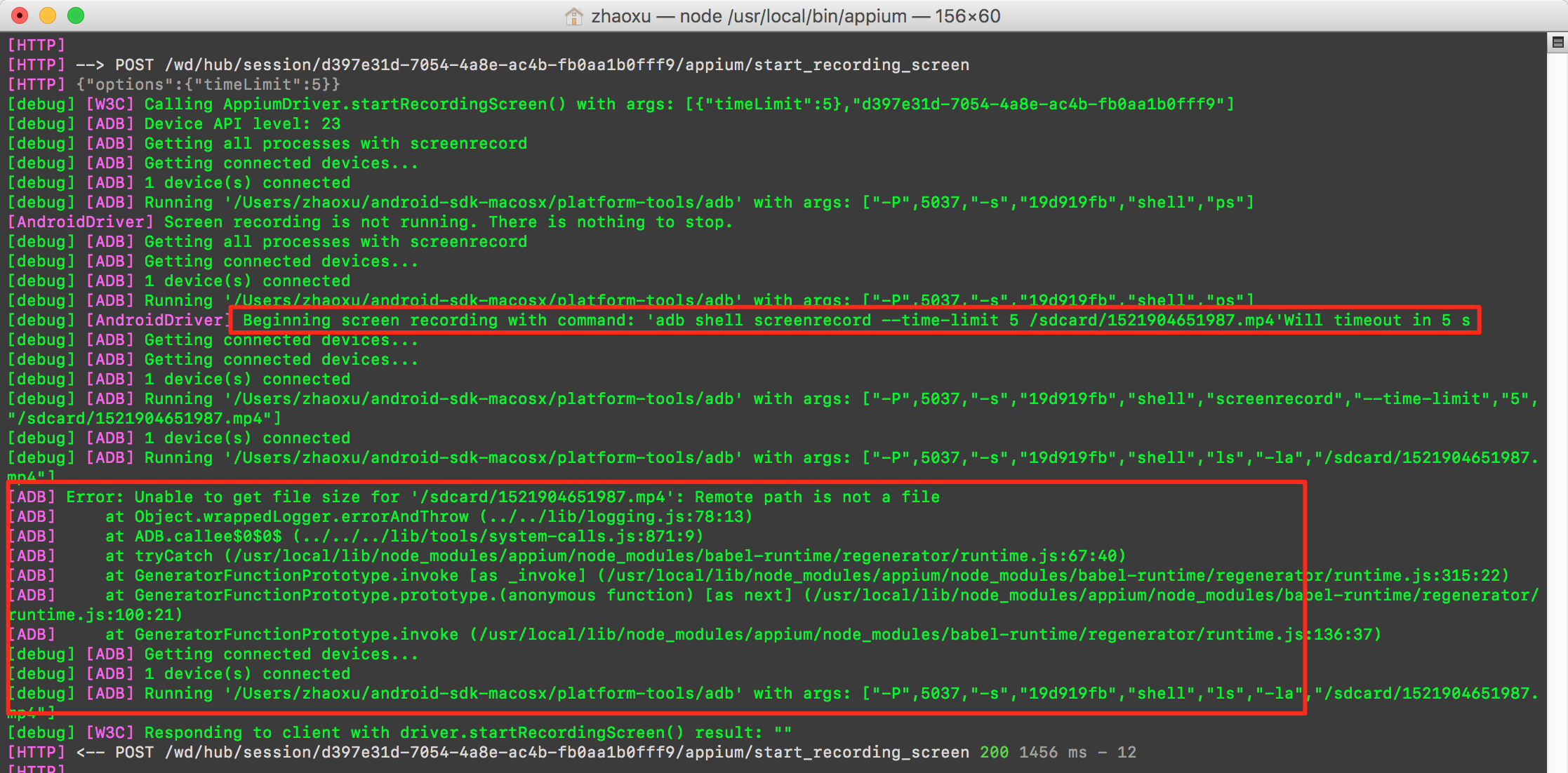
the next error is that I can not find the video in the path of the log described.
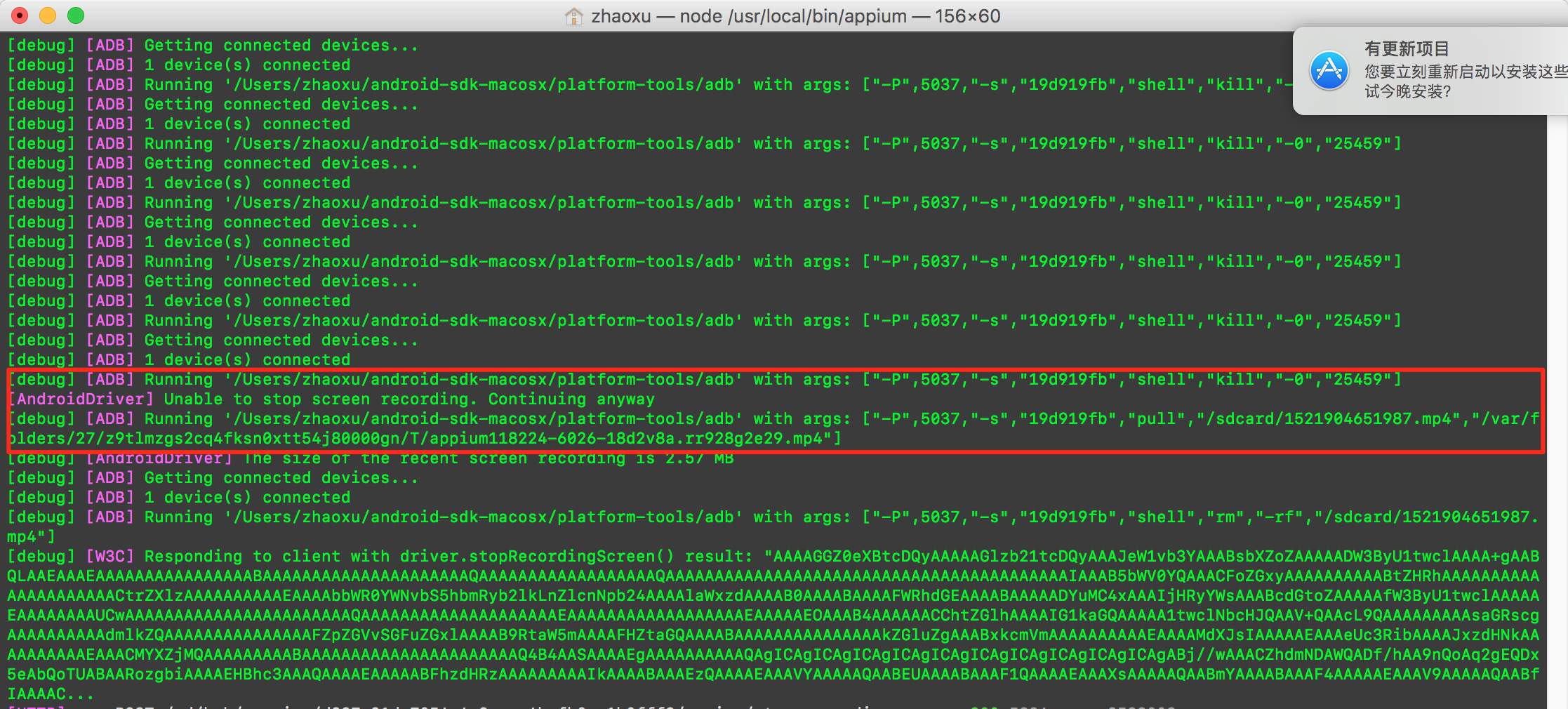
However, I try adb command 'adb pull /sdcard/demo.mp4 /Users/xxx' in terminal, I can set pull path for screen record.
I noticed these classes of AndroidStartScreenRecordingOptions and ScreenRecordingUploadOptions in java-client, but I do not know how to set screen record pull path?
If possible, can you describe it in more detail
Code
try {
driver.startRecordingScreen(
new AndroidStartScreenRecordingOptions()
.withTimeLimit(Duration.ofSeconds(5))
);
} catch (WebDriverException e) {
if (e.getMessage().toLowerCase().contains("emulator")) {
// screen recording only works on real devices
return;
}
}
Thread.sleep(5000);
String result = driver.stopRecordingScreen();
zhaoxusun
on 24 Mar 2018
@zhaoxusun What is the exit code of the process when you execute adb shell kill -0 12345678 on your device under test?
 mykola-mokhnach
on 24 Mar 2018
mykola-mokhnach
on 24 Mar 2018
@mykola-mokhnach
Operation not permitted

zhaoxusun
on 25 Mar 2018
Does it show the same message if you perform adb root before doing that?
mykola-mokhnach
on 25 Mar 2018
Should I root my device? I need to use many devices , it is impossible to root every device.
zhaoxusun
on 27 Mar 2018
No, not needed. I've already added some changes into the algorithm. Will let you know when these are published
mykola-mokhnach
on 27 Mar 2018
I try to use adb command and success ,but the style of code is not good, Waiting for your feature.
zhaoxusun
on 27 Mar 2018
The current implementation works properly. The first exception you saw is expected, since we are waiting until screenrecord creates a video file with given size. I've added a fix not to show the excpetion itself in logs.
The issue on the second screenshot is not so obvious. We send kill signal to the screensrecorder process and wait until it is finsihed. Previously we were checking process presence by sending it 0 signal and in my fix we do it by analyzing ps output.
Altogether the result of the method execution (e.g. the recorded video) is still the same.
mykola-mokhnach
on 27 Mar 2018
How does this work for iOS?
I tried this method:
startRecordingScreen(new IOSStartScreenRecordingOptions().withVideoQuality(VideoQuality.MEDIUM).
withVideoType(VideoType.MP4).withUploadOptions(ScreenRecordingUploadOptions.uploadOptions().
withRemotePath("Report/screenshots/record.mp4")).withTimeLimit(Duration.ofSeconds(20)));
But i am unable to see the video at mentioned remote path.
 Monal14
on 12 Dec 2018
Monal14
on 12 Dec 2018
I have tried it via appium source code but couldn't make run. Any though would be appreciated. Anyone tried it via rest request ?
By postman Post request
Url : http://localhost:4723/wd/hub/session/6e37f407-ef28-4cd9-9f00-37541926f58f/appium/start_recording_screen
Request Body: {"remotePath":"video2.mp4", "timeLimit":"5"}
Request Header: Host: localhost:4723
Connection: keep-alive
Content-Length: 64
Accept: application/json
Origin: http://localhost:3000
User-Agent: Mozilla/5.0 (Macintosh; Intel Mac OS X 10_13_6) AppleWebKit/537.36 (KHTML, like Gecko) Chrome/71.0.3578.98 Safari/537.36
Content-Type: application/json; charset=UTF-8
Referer: http://localhost:3000/device
Accept-Encoding: gzip, deflate, br
Accept-Language: tr-TR,tr;q=0.9,en-US;q=0.8,en;q=0.7
Appium give me this error : [HTTP] <-- POST /wd/hub/session/6e37f407-ef28-4cd9-9f00-37541926f58f/appium/start_recording_screen - - ms - -
[HTTP]
BadRequestError: request aborted
at IncomingMessage.onAborted (/Users/yusufu/Documents/Projects/appium/node_modules/raw-body/index.js:231:10)
at emitNone (events.js:106:13)
at IncomingMessage.emit (events.js:208:7)
at abortIncoming (_http_server.js:412:9)
at socketOnClose (_http_server.js:406:3)
at emitOne (events.js:121:20)
at Socket.emit (events.js:211:7)
at TCP._handle.close [as _onclose] (net.js:554:12)
 yusufunlumbvn
on 24 Jan 2019
yusufunlumbvn
on 24 Jan 2019
What about adding options like below? Clients send request as it.
{ "options": { "timeLimit":.... } }
 KazuCocoa
on 24 Jan 2019
KazuCocoa
on 24 Jan 2019
I am not able to find the screen recording files.
[ADB] Getting IDs of all 'screenrecord' processes
[ADB] Running '/Users/infotmt/Library/Android/sdk/platform-tools/adb -P 5037 -s 4200856de42a655b shell pgrep -f \^screenrecord\$'
[ADB] Running '/Users/infotmt/Library/Android/sdk/platform-tools/adb -P 5037 -s 4200856de42a655b pull /sdcard/1552904289199.mp4 /var/folders/yr/m43513sx0zl05qxm5_ccskwc0000gn/T/2019218-783-1cx2srg.yl5mh/1552904289199.mp4'
[ADB] Running '/Users/infotmt/Library/Android/sdk/platform-tools/adb -P 5037 -s 4200856de42a655b shell rm -rf /sdcard/1552904289199.mp4'
Can i set the output file to my desired path? Where can i find above mp4 file?
 Suban5
on 18 Mar 2019
Suban5
on 18 Mar 2019
@Suban5 same for me. There is no video file under /var/folders... after a test run on emulator
But if I just go ahead and run adb screenrecord followed by adb pull manually on a test run I can get a video of the emulator execution
Why this issue is closed? @zhaoxusun
Any updates on this? @mykola-mokhnach
Can we have maybe ScreenRecordingUploadOptions updated to accept not only remote path by local as well to be able to set target mp4 recording?
 arustamov
on 22 Mar 2019
arustamov
on 22 Mar 2019
The method returns base64 string when stop recording method is called.
Did you mean you were not able to get the string?
Remote path is for https /ftp.
KazuCocoa
on 26 Mar 2019
@KazuCocoa
Here is my code:
if (driver instanceof CanRecordScreen) {
            String video = ((CanRecordScreen) driver).stopRecordingScreen();
            byte[] decodedVideo = Base64.getMimeDecoder().decode(video);

            Path testVideoDir = Paths.get(environmentVariables.getProperty("test.video.dir"));
            Files.createDirectories(testVideoDir);
            Path testVideoFile = Paths.get(testVideoDir.toString(), String.format("%s-%d.%s", "test", System.currentTimeMillis(), "mp4"));
            Files.write(testVideoFile, decodedVideo);
}
Works fine with real device but not with emulator
arustamov
on 26 Mar 2019
Did you get an error message? Appium should have raised an error if your device was emulator && lower than 27
https://github.com/appium/appium-android-driver/blob/10b9bb970577809877a591589d58e82a1e31a8f3/lib/commands/recordscreen.js#L67-L71
KazuCocoa
on 26 Mar 2019
@KazuCocoa
I've been running against android 8.1 Pixel 2 emulator having API 27
Here is the output:
[HTTP] --> POST /wd/hub/session/aefc0437-117f-47a6-a630-026d32ca4e10/appium/stop_recording_screen
[HTTP] {}
[debug] [W3C (aefc0437)] Calling AppiumDriver.stopRecordingScreen() with args: [null,"aefc0437-117f-47a6-a630-026d32ca4e10"]
[debug] [ADB] Getting IDs of all 'screenrecord' processes
[debug] [ADB] Running '/Users/bright/Library/Android/sdk/platform-tools/adb -P 5037 -s emulator-5554 shell pgrep -f \^screenrecord\$'
[debug] [ADB] Running '/Users/bright/Library/Android/sdk/platform-tools/adb -P 5037 -s emulator-5554 pull /sdcard/1553704216538.mp4 /var/folders/bs/5_shqq8x1c35rh4qyd7yt2480000gq/T/2019227-13338-sd4m8p.k06kq/1553704216538.mp4'
[debug] [ADB] Running '/Users/bright/Library/Android/sdk/platform-tools/adb -P 5037 -s emulator-5554 shell rm -rf /sdcard/1553704216538.mp4'
[debug] [AndroidDriver] The size of the resulting screen recording is 8.80 MB
[debug] [W3C (aefc0437)] Responding to client with driver.stopRecordingScreen() result: "AAAAGGZ0eXBtcDQyAAAAAGlzb21tcDQyAAAMe2ZyZWUAAAAAAAAAAAAAAAAAAAAAAAAAAAAAAAAAAAAAAAAAAAAAAAAAAAAAAAAAAAAAAAAAAAAAAAAAAAAAAAAAAAAAAAAAAAAAAAAAAAAAAAAAAAAAAAAAAAAAAAAAAAAAAAAAAAAAAAAAAAAAAAAAAAAAAAAAAAAAAAAAAAAAAAAAAAAAAAAAAAAAAAAAAAAAAAAAAAAAAAAAAAAAAAAAAAAAAAAAAAAAAAAAAAAAAAAAAAAAAAAAAAAAAAAAAAAAAAAAAAAAAAAAAAAAAAAAAAAAAAAAAAAAAAAAAAAAAAAAAAAAAAAAAAAAAAAAAAAAAAAAAAAAAAAAAAAAAAAAAAAAAAAAAAAAAAAAAAAAAAAAAAAAAAAAAAAAAAAAAAAAAAAAAAAAAAAAAAAAAAAAAAAAAAAAAAAAAAAAAAAAAAAAAAAAAAAAAAAAAAAAAAAAAAAAAAAAAAAAAAAAAAAAAAAAAAAAAAAAAAAAAAAAAAAAAAAAAAAAAAAAAAAAAAAAAAAAAAAAAAAAAAAAAAAAAAAAAAAAAAAAAAAAAAAAAAAAAAAAAAAAAAAAAAAAAAAAAAAAAAAAAAAAAAAAAAAAAAAAAAAAAAAAAAAAAAAAAAAAAAAAAAAAAAAAAAAAAAAAAAAAAAAAAAAAAAAAAAAAAAAAAAAAAAAAAAAAAAAAAAAAAAAAAAAAAAAAAAAAAAAAAAAAAAAAAAAAAAAAAAAAAAAAAAAAAAAAAAAAAAAAAAAAAAAAAAAAAAAAAAAAAAAAAAAAAAAAAAAAAAAAAAAAAAAAAAAAAAAAAAAAAAAAAAAAAAAAAAAAAAAAAAAAAAAAAAAAAAAAAAAAAAAAAAAAAAAAAAAAAAAAAAAAAAAAAAAAAAAAAAAAAAAAAAAAAAAAAAAAAAAAAAAAAAAAAAAAAAAAAAAAAAAAAAAAAAAAAAAAAAAAAAAAAAAAAAAAAAAAAAAAAAAAAAAAAAAAAAAA...
[HTTP] <-- POST /wd/hub/session/aefc0437-117f-47a6-a630-026d32ca4e10/appium/stop_recording_screen 200 330 ms - 12302200
I can see the video file on the filesystem but it is not playable
Running the same on real device works fine
Running the same recording command sequence against emulator in shell works fine as well, so that I can see the issue is with appium itself
arustamov
on 27 Mar 2019
have you tried to record a video from the emulator manually using adb shell and screenrecord utility? did it work this way?
mykola-mokhnach
on 27 Mar 2019
@mykola-mokhnach
Yes, that is what I've mentioned earlier:
_But if I just go ahead and run adb screenrecord followed by adb pull manually on a test run I can get a video of the emulator execution_
arustamov
on 27 Mar 2019
Unfortunately I don't have time to do a deeper investigation there. Feel free to debug the source code and let me know if you find potential problems there.
Here you can find more info on how to run Appium from source
mykola-mokhnach
on 27 Mar 2019
I actually have one idea regarding of what may cause this problem. Try it again after https://github.com/appium/appium-adb/pull/434 is published
mykola-mokhnach
on 28 Mar 2019
Related issues
 amedvedjev
·
10Comments
amedvedjev
·
10Comments
 yavgel
·
6Comments
yavgel
·
6Comments
 romainlouvet
·
9Comments
romainlouvet
·
9Comments
 waitshang
·
4Comments
waitshang
·
4Comments
 fionazj
·
8Comments
fionazj
·
8Comments