Java-client: Switch between IOSDriver and RemoteWebDriver possible?
Description
The problem
Hello again!
When I want to input data into element with IOSDriver:
IOSDriver iosd = new IOSDriver(new URL("http://127.0.0.1:4723/wd/hub"), capabilities);
iosd.get("https://google.com");
iosd.findElement(By.id("lst-ib")).sendKeys("SOME DATA HERE"); // this is input for search box inside blank google site
-I got exception: NullPointerException
But when I start driver as RemoteWebDriver:
RemoteWebDriver rwd = new RemoteWebDriver (new URL("http://127.0.0.1:4723/wd/hub"), capabilities);
rwd.get("https://google.com");
rwd.findElement(By.id("lst-ib")).sendKeys("SOME DATA HERE");
everything looks good, box is filled with: SOME DATA HERE.
I really want to use IOSDriver to switch context from WebView to Native because further I need to use TouchAction. Need to tap on some element.
So there is a question:
Can I switch between IOSDriver and RemoteWebDriver?
What I've found out yet:
- Casting
IOSDriver iosd = (IOSDriver) new RemoteWebDriver (new URL("http://127.0.0.1:4723/wd/hub"), capabilities);
is impossible because of exception:
org.openqa.selenium.remote.RemoteWebDriver cannot be cast to io.appium.java_client.ios.IOSDriver - Debuging:
WebElement we = _iosd_.findElement(By.id("lst-ib")); gives me not null element but its parent is null
but when doing the same for RemoteWebDriver
WebElement we = rwd.findElement(By.id("lst-ib")); gives me not null element with parent with many informations inside. - Page source for both drivers are the same (when checked other site there where only change with tokens data but only with that. The html tree had the same 'levels'
Environment
-Appium version (or git revision) that exhibits the issue: v1.7.0-beta
-Last Appium version that did not exhibit the issue (if applicable): --------
-Desktop OS/version used to run Appium: OS X 10.12.6 Sierra
-Node.js version (unless using Appium.app|exe): v6.11.1
-Mobile platform/version under test: iOS 10.3
-Real device or emulator/simulator: Simulator
-Appium CLI or Appium.app|exe: Appium CLI
 Zaakupendrak
All 9 comments
@Zaakupendrak It seem I have answers except point 2. I need for sometime to reproduce it. @SrinivasanTarget could you try it on iOS too?
 TikhomirovSergey
on 14 Sep 2017
TikhomirovSergey
on 14 Sep 2017
Sure @TikhomirovSergey
 SrinivasanTarget
on 15 Sep 2017
SrinivasanTarget
on 15 Sep 2017
@TikhomirovSergey @SrinivasanTarget
I forgot that I'm trying to perform xcui-tests, here are my capabilities:
DesiredCapabilities capabilities = new DesiredCapabilities();
//iphone 7 iOS 10.3
capabilities.setCapability("deviceName", "iPhone 7");
capabilities.setCapability("udid", "BAC6D62C-A1A5-44D2-BC54-6F68DB02EF30");
capabilities.setCapability("platformVersion", "10.3");
capabilities.setCapability("browserName", "Safari");
capabilities.setCapability("automationName", "XCUITest");
capabilities.setCapability("platformName", "iOS");
capabilities.setCapability("autoWebview", true);
Zaakupendrak
on 15 Sep 2017
@Zaakupendrak what do you mean when you talk about the "parent"?
Debuging:
WebElement we = iosd.findElement(By.id("lst-ib")); gives me not null element but its parent is null
but when doing the same for RemoteWebDriver
WebElement we = iosd.findElement(By.id("lst-ib")); gives me not null element with parent with many informations inside.
TikhomirovSergey
on 16 Sep 2017
Ohh sorry. There is a mistake in last line. It swhould be
"WebElement we = iosd.findElement(By.id("lst-ib")); gives me not null element but its parent is null
but when doing the same for RemoteWebDriver
WebElement we = rwd.findElement(By.id("lst-ib")); gives me not null element with parent with many informations inside."
When I initialize _WebElement we_ with _rwd.findElement(By.id("lst-ib"))_ and I peep _we_ variable of WebElement type i got a lot of information about its parent. Can't give you now all needed information, I don't remember it. When I'll be back at work on Monday I can give you more information if needed.
Zaakupendrak
on 16 Sep 2017
I just can not understand what does happen. Do you use the getWrappedDriver or something else to get information about the _parent_?
@Zaakupendrak Yes please provide some code sample to reproduce. ...or screenshot.
TikhomirovSergey
on 17 Sep 2017
For IOSDriver and code like here:
https://gist.github.com/Zaakupendrak/9d7dd5af101a0daaa99fe3286f083595
when I debug my test, I got v WebElement ariable like this:
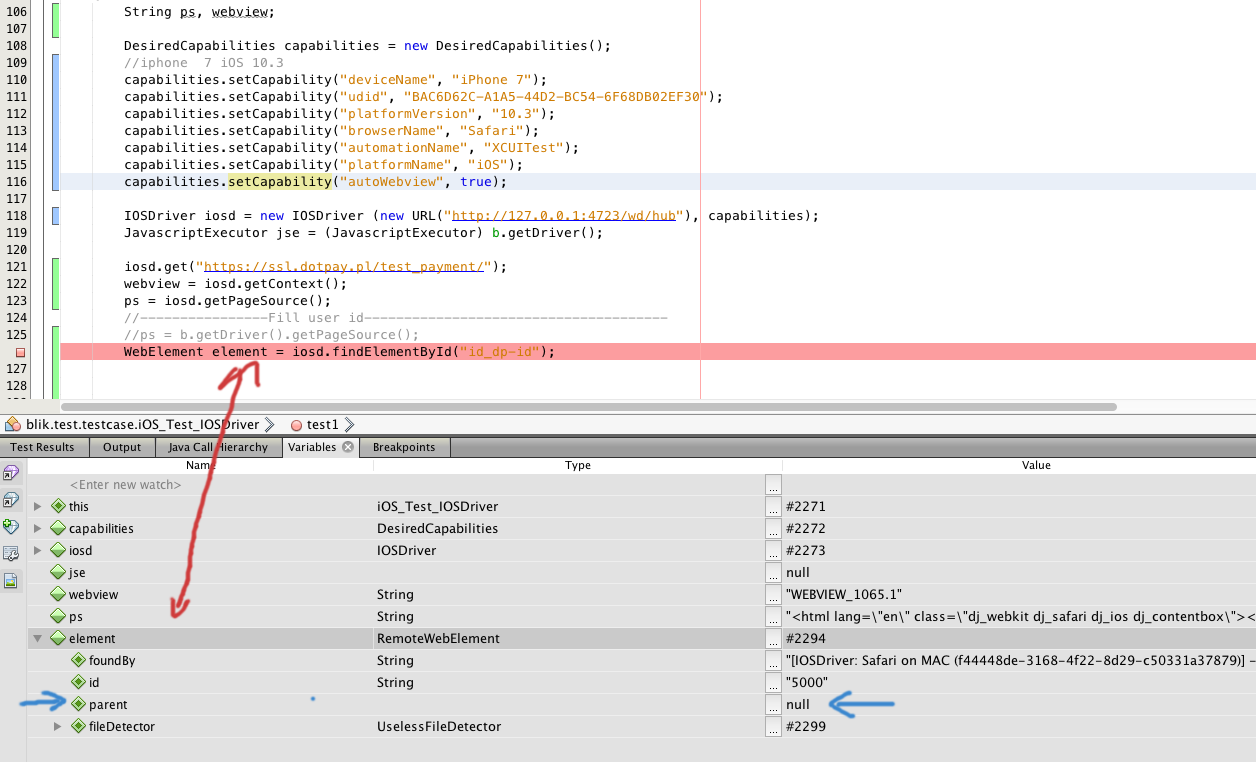
But for RemoteWebDriver with code:
https://gist.github.com/Zaakupendrak/dc08c1c6f1496b8f3ad8390598b6e4b2
with debug mode I got WebElement varaible like:
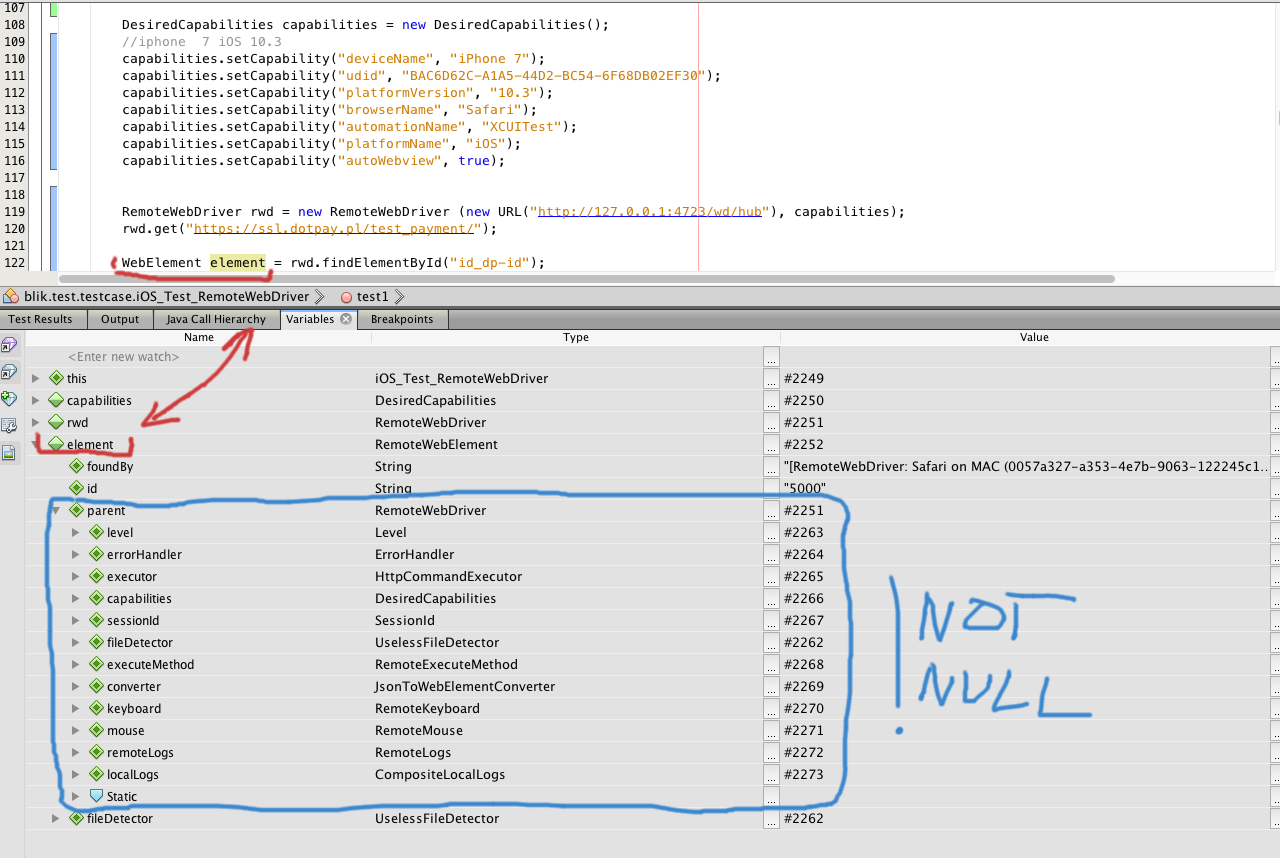
With RemoteWebDriver I can pick that WebElement and input some data inside input box when with IOSDriver with same methods (iosd.findElementById("id_dp-id") I get NullPointerException. And that's all the problem.
Zaakupendrak
on 18 Sep 2017
@Zaakupendrak Ok. I think it is the bug and I will try to reproduce it and fix it.
TikhomirovSergey
on 19 Sep 2017
@TikhomirovSergey may i know what is the answer for point number 1 and 3 ?
 ArikunthaTamil
on 8 Dec 2017
ArikunthaTamil
on 8 Dec 2017
Related issues
 vaibhav2701
·
5Comments
vaibhav2701
·
5Comments
 Hi-Fi
·
7Comments
Hi-Fi
·
7Comments
 ssynix
·
5Comments
ssynix
·
5Comments
 waitshang
·
4Comments
waitshang
·
4Comments
 amedvedjev
·
10Comments
amedvedjev
·
10Comments