Jamulus: Misaligned tracks in recording
Copied from here: https://sourceforge.net/p/llcon/discussion/software/thread/c0b75137b7
Vincenzo - 57 minutes ago
While my very first recording was (technically) perfect (not musically :) ), the last two had misaligned tracks. In the yesterday rehearsal, at least two tracks at some point were out of sync (and maybe 3); mine was out of many seconds. Any hint, except manually aligning, which is what I am doing now? By the way, there are a number of tracks named with _____ . Thanks. Server is 3.5.2 (and clients too, I suppose).
Vincenzo - 3 minutes ago
On a second thought, one difference I remember from the first one is that in the first there were more than one track per player (corresponding to the different .wav), while now there is just one.
 corrados
All 43 comments
I've noticed this happening too, but forgot to report it. I'll try to find a recording where this happens, maybe it can help diagnose the problem
 Snayler
on 16 May 2020
Snayler
on 16 May 2020
There was an issue with this when the short frames came in. I thought I'd fixed it but... I haven't really had much feedback or done exhaustive testing.
 pljones
on 16 May 2020
pljones
on 16 May 2020
@pljones found a recording where this happens, the recording was done by a 3.5.3 server. Would it be helpful to diagnose the problem?
Snayler
on 16 May 2020
I'd need to know the client configurations (versions and settings) for the duration of the recording, along with the server settings. That's why it's quite tricky to test.
pljones
on 16 May 2020
@pjones : One of the tracks is mine, using 3.5.2 on MacOSX; the others surely involved were too on MacOSX, and likely 3.5.2 (I can ask if they updated when I suggested to do). Settings (except device, which was different):
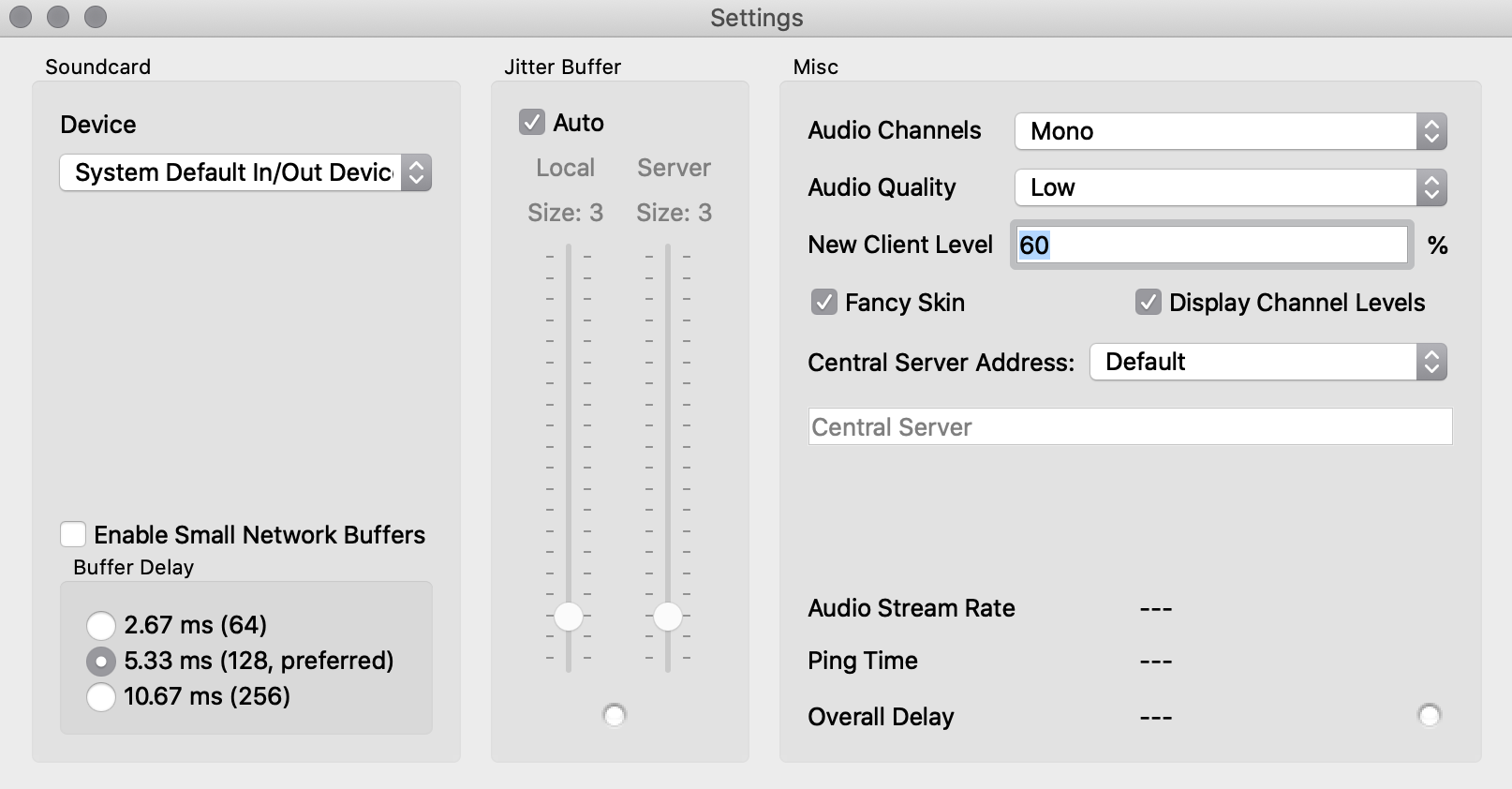
On the server, what do you need? Ubuntu 18.04 reatlime kernel, launched with sudo nohup nice --20 ionice -c1 -n0 Jamulus -s -n -w "blah" -R rec &
By the way, is your recover-recoding script able to recover also in this case? Apart that I am not able to launch it because of the missing init.d file... thanks.
 MITEL-UNIUD
on 16 May 2020
MITEL-UNIUD
on 16 May 2020
The important bits are:
- client -- enable small network buffers: off
- server -- not using fastupdate
I'd be most interested in know whether _any_ of the clients had "enable small network buffers" on.
pljones
on 16 May 2020
I played with small network buffers at the very beginning when I was alone, but since I did not find enhancements, I just went back to the settings you see in the screenshot. I just asked the others (2 tell "no", and I suppose this will be the answer). The server is run as above, no -F option.
MITEL-UNIUD
on 16 May 2020
I had enable small network buffers on and the server had fastupdate enabled. It's possible that my friend had small network buffers disabled. I'm not sure if small packets was always on, as sometimes I tend to switch it on and off to check if it solves dropout issues.
Snayler
on 17 May 2020
OK thanks both.
Is it something that can be reproduced with a short recording? I'll need the WAVE and RPP files for such a session.
pljones
on 17 May 2020
I will try to setup a "portable" version of jamulus and use a test server and two clients, along with a metronome through my microphone to check for misaligned tracks. Since everything is running on the same computer, I would expect the metronome to be always in sync, so it should be easy to test and see what settings produce the problem.
EDIT: Ok, I setup one client to use my external audio interface through Jack and connected the metronome with an audio jack. I had to connect it halfway through to allow the metronome's speaker to also output sound. On the other client, I'm using my computer's internal interface and capturing the metronome's speaker through a microphone. I'm trying to replicate the conditions where this happened, so I'm messing around with settings on both jamulus instances. I'll update this comment with my findings.
EDIT2: After checking the recording with bad timings I have, I've come to the conclusion that the misalignment happened on my track, when I went to check another server and came back to mine. I am able to replicate this on my setup now by simply disconnecting one client and reconnecting back. I'll start preparing to upload a sample. @MITEL-UNIUD, can you check if this is also the case with your recording? Or is it always out of sync since the beginning?
EDIT3: I found the issue is unrelated with fastupdate and small network buffers, as I've tried some combinations and this always happens. Whether it happens on the first, second or some other time we reconnect seems to vary. I'm attaching 5 recordings I made with this issue.
Test recording.zip
EDIT4: BTW don't mind the metronome voice, it's a Chinese metronome and the counting is in Chinese.
Snayler
on 17 May 2020
In my case, it's not from the beginning. At some point I disconnected and connected again to move the audio interface to a different port. However, I found also other tracks delayed. Of one, I am sure the player had to reconnect at some point. The others I do not know, likely not.
MITEL-UNIUD
on 17 May 2020
Ok, that's good, this means we're both probably experiencing the same issue.
When this problem occurs, you'll find that in the same channel, there are multiple tracks right next to each other (without a space between them, like we would expect to happen given the person disconnected and reconnected after some time). If those others you're unsure of present multiple tracks in their channel, where the delay starts happening right after the division between the tracks, then it should indicate they probably did reconnect at some point.
If this is not the case, we might have another issue on our hands. Hopefully not.
Snayler
on 17 May 2020
@Snayler : yes, we have multiple tracks. with no separation; at least 3 of us disconnected and reconnected (accidentally or not). There is also some super-short track (~0.02s), mostly at the end.
MITEL-UNIUD
on 17 May 2020
https://github.com/corrados/jamulus/issues/234#issuecomment-629826643
@Snayler Thanks for the file
Looking at the files for the client on port 22134, I see:
- a single frame in mono on initial connect before all details are sent to the server (normal)
- the main stereo recording for about 34 seconds with the click only on the left
- just under three second with both channels - possibly a change in client settings triggered the new file
All that looks normal in terms of the file names and the calculated timings in the project file. Reaper seems to display this correctly, too. I'm assuming the audio sounds correct.
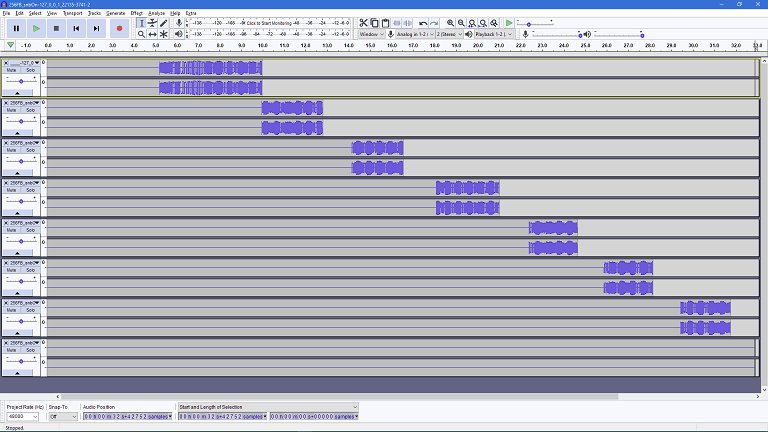
Looking at the files for the client on port 22135, I see:
- nothing for just over 5 seconds
- just under 5 seconds recording, ended by setting the client name
- just under 3 seconds recording, ended by loss of the client signal
- nothing for just over a second, taking us to about 14 seconds
- just under 2 seconds recording, ended by loss of the client signal
- nothing for just over a second
- just under 2.5 seconds recording, ended by loss of the client signal
- nothing for just over a second
- just over 2 seconds recording, ended by loss of the client signal
- nothing for about a second, taking us to nearly 26 seconds
- just over 2 seconds recording, ended by loss of the client signal
- nothing for nearly one and a half seconds
- just over 2 seconds recording,
- nothing for about a second
- a single frame, probably the client closing, ending at 33 seconds
Arranging in Audacity based on manually recalculating the timings I get this view of snbOff's audio:
The Reaper project view looks pretty much the same but with all the items arranged onto tracks based on name (which is intended), so you get three tracks - client 22134 before the client settings were received, client 22134 once the client was set up (establishing the session settings) and one for client 22135.
client
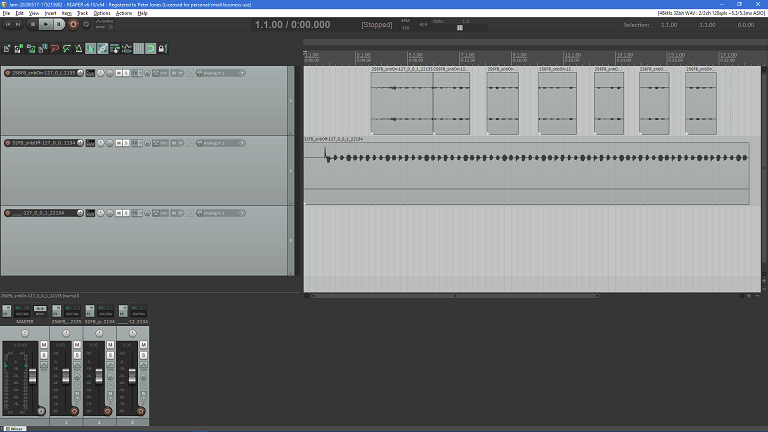
Can you highlight what's actually wrong here, please?
pljones
on 18 May 2020
@pljones Client 22134 is the one with the jack halfway connected to the metronome's jack output. This was done to prevent it from muting the metronome's speaker, and that's why you only hear it from one side. Disregard that as it was done for testing purposes
On client 22135:
just under 5 seconds recording, ended by setting the client name
That was actually a disconnect + reconnect, but instead of putting the corresponding pause, Jamulus put those tracks together wrongly. That's the issue here.
Both tracks should always be in sync, as both clients are capturing the same metronome at the same time, but instead, and in this recording, the 22135 channel starts synchronized but gets out of sync as soon as I disconnect and connect again to the server, due to the lack of spacing between the first and second tracks. Am I being clear in this explanation?
BTW, the names were chosen to reflect the settings on each client (32/256FB -> Frame Buffer; snbOn/Off -> Small Network Buffers On/Off), but since it always happen, I gather those are not the issue here.
Snayler
on 18 May 2020
Thanks - I see what you mean now.
Can I ask you go try r3_4_7 (commit 5431e23) of the server and repeat your test (same client version is okay), please? (r3_4_7 is the release before the recorder got changed for fastupdate in the server. You could go even back as far as r3_4_3, which was the original recorder release. Actually, it's probably of some use comparing those two as well, if it's not too much trouble.)
pljones
on 18 May 2020
Sure, I was thinking of doing that to track down where the problem originated. I'll update you once I have the results.
Snayler
on 18 May 2020
It happens in all versions from 3.4.7 to 3.4.5. On 3.4.4, I'm getting jamulus.exe: Unknown option '--recording'
EDIT: found it, it was --recordingdirectory back then. Problem still persists on 3.4.4
3.4.3 doesn't have a recording option on main.cpp. What more can I do to further help diagnosing the problem?
Snayler
on 18 May 2020
Thanks so much for that, it simplifies finding and fixing the problem -- it means it's always been wrong, not introduced by later changes. Just have to figure out why... Hmmm......
It'll probably be the coming weekend before I get a chance to start investigating, unfortunately.
pljones
on 18 May 2020
I have no experience in C++, but decided to have a go at it. I spent the last few hours studying the code and trying to figure out what everything does and what must be happening, I think I've reached a plausible theory.
First the facts:
- This seems to be happening randomly, we can connect and disconnect multiple times during a session and the problem will happen some times, it doesn't seem to follow any pattern.
- The filename of the incorrectly placed track refers to the correct time where the track is, so we can disregard the RPP creating code as it is functioning as expected.
- currentFrame is always rising during a recording session and there's no code that reverts it back, so each time a new file is created, it has the correct start frame in the filename.
- When a client disconnects, a very small frame (as a separate file) is added right at the end of the client recording. Let's call this a "Disconnection" file.
After thinking about it and experimenting a bit, considering points 1 and 4, I must conclude the problem lies in the way the server is handling "Disconnection" files. Instead of closing that file, it must be keeping it open. So, when a client reconnects, instead of creating a new file where the file name corresponds to the frame where the track recording should start, it's using the same "Disconnection" file to save the stream.
Now, since this doesn't always happen (otherwise there would never be spaces between each track), I must conclude there is a timing problem with how the server handles "Disconnection" file, meaning that, depending on when the client disconnects, the server can either correctly close the file or keep it open.
Hope this gets you closer to figure out what's happening.
Snayler
on 19 May 2020
I see what you're saying... But -- um... if I remember correctly... -- the frame count is per session, not per file - so the later files should be back in sync, on that basis?
Edit The count must be per session or it would keep starting at zero. Maybe it's sometimes just stopping, though...
Like I say, I'll try to check at the weekend.
pljones
on 19 May 2020
the frame count is per session, not per file - so the later files should be back in sync, on that basis?
Yes, frame count is per session, but the later files don't get back in sync .
I don't see anything wrong with frame counting. It shouldn't be possible for it to reset or stop while there's still a client connected, as every received frame will trigger it to raise.
Snayler
on 20 May 2020
If I understood, your point was:
- the file starts being written at frame 1, so gets called trackA-1 (shortened!)
- at frame 12345, the client disconnects
- at frame 13000, the client connects
and that sometimes, the recorder carries on writing to trackA-1 rather than starting a new file. But...
- at frame 14000, the client disconnects and trackA-1 gets closed
- at frame 15000, the client connects
If the frame count is still incrementing _correctly_, then the frame count is "15000" and the new recording gets called trackA-15000. When the RPP is created, the "15000" would be used to put the file in the right place.
As we've seen, the calculation from frame count to time is correct but you're saying the file is in the wrong place. That means the "15000" is some other number that causes the RPP to put it in the wrong place. For that to happen, the count must be wrong. I can't see any other logical conclusion.
So either it stops incrementing or, worse, has a random value added or subtracted...
In https://github.com/corrados/jamulus/issues/234#issuecomment-630321866, is the last file for the client on 22134 in the right place? (The "just under three seconds" one.)
pljones
on 20 May 2020
No, that's not exactly what I'm saying. I might not have expressed myself correctly, so let me try to explain with your example. Let's also assume there's an additional trackB which is another client that is always connected until the end of the session.
- the file starts being written at frame 1, so gets called trackA-1
- at frame 12345, the client disconnects
- a small single frame is saved in a new file at time of disconnection, trackA-12345 (this seems to always happen according to all my previous recordings)
- at frame 13000, the client connects and trackA-13000 gets created
All OK until now, everything is working as expected. Now watch what happens:
- at frame 14000, the client disconnects and trackA-13000 gets closed
- a small single frame is created in a new file at time of disconnection, trackA-14000, but doesn't get closed
- at frame 15000, the client connects, but since the last file didn't get closed, somehow the server continues writing to that file instead.
This is where we start having a problem. There should be a file called TrackA-15000, but instead the server writes the frames from 15000 into file trackA-14000. The frame count is still incrementing correctly, it just didn't create a new file for the frames to be saved in the correct file.
Now why do I say that the frame count is still incrementing correctly? Because client trackB is still connected and sending new frames, causing the frame count to keep incrementing
// If _any_ connected client frame steps past currentFrame, increase currentFrame
if (vecptrJamClients[iChID]->StartFrame() + vecptrJamClients[iChID]->FrameCount() > currentFrame)
{
currentFrame++;
}
Let's keep on with this example:
- at frame 16000, client disconnects and the file trackA-14000 gets closed
- a small single frame is created in a new file at time of disconnection, trackA-16000, but doesn't get closed
- at frame 17000, the client connects, but since the last file didn't get closed, the server continues writing to that file instead.
As you can see, after the first problem occurs, all subsequent tracks are affected. Let's now end the session and see what happens:
- at frame 18000, the client trackA disconnects, file trackA-16000 gets closed
- a small single frame is created in a new file at time of disconnection, trackA-18000, but doesn't get closed
- at frame 19000, client trackB disconnects, his file gets closed
- a small single frame is created in a new file at time of disconnection, trackB-19000
- all clients are disconnected so server cleans up and closes single frame file trackA-18000 (according to
CJamSession::End(), which callsDisconnectClient(iChID), which in turn callsvecptrJamClients[iChID]->Disconnect()which will close the file) - server creates RPP file.
Now, a simple way to verify this is what's happening is by moving the tracks around in a specific way (this method will also fix the recording, as every track will be exactly where it's supposed to be).
Let's take the Reaper Project "Jam-20200517-174235876 (256on)" on Test recording.zip. I'll simplify track names by using the frame position number.
On the channel with the problem (256FB_snbOn):
- Second track, track-7014, starts having a problem. He will need to move it to synchronize it.
- Now let's assume the start position of the third track, track-10010, corresponds to the exact position of the end of track-7014
- Using shift to allow fine adjustments, move track-7014 forward until the end of it is perfectly aligned with the beginning of the next track (you might need to zoom in to achieve perfect alignment)
- Repeat this process on all the next tracks (track-10010, track-13253 and track-16219)
- Play the recording and hear that everything is back in sync
I believe this is proof that the small frames created when a client disconnects are, sometimes, not being closed when they're supposed to. Maybe the recorder "thinks" the client is still connected and keeps the file open, I don't know. Anyway, sorry for the long comment.
Snayler
on 21 May 2020
No, I still don't follow. The moment any file gets closed, the next new one should get the right frame count.
If I've correctly counted 1,2,3,4 then carry on 5,6,7,8 but didn't notice for 5,6, if I start noticing again, the next number will be .... 9, right? Not 5 or 7.
I just pushed a possible fix if you'd like to give it a go:
https://github.com/pljones/jamulus/tree/bugfix/234-frame-count-can-be-wrong
(It's based on the above -- my previous code _was_ going "yeah, I got to 4... and now things have got past 4, so that makes it ... 5" rather than listening to what was the generally agreed highest number.)
pljones
on 21 May 2020
I'm having problems installing Qt Creator on my computer, seems like the repository server is throwing some errors. Is there any chance you can compile your version for me? I'm on Windows.
Snayler
on 21 May 2020
Try this - save your old .exe and drop the one in the zip in place.
Jamulus.zip
pljones
on 21 May 2020
It's still out of sync, the spacing between the tracks on the disconnected client now gets too great
Snayler
on 21 May 2020
Interesting. OK, as that didn't work, I'll have to spend some time trying to reproduce the issue here so I can debug it.
pljones
on 21 May 2020
Here's the result now, if it helps:
Jam-20200521-183457538.zip
Snayler
on 21 May 2020
Ok, I made a diagram to follow the code through every step of the way. The code as it is on master branch looks perfect, it should work flawlessly in perfect conditions. But UDP is far from perfect conditions so...
I thought, what if a UDP packet with a disconnect signal arrives before a UDP packet with a frame? I followed the code with this hypothesis and found that in this case, a new file would be created for that frame packet, but since the client already sent the disconnect signal, this new file wouldn't be closed.
So, when the client reconnects, CJamSession::Frame() will not create a new file (since vecptrJamClients[iChID] is already set with the information from the last UDP frame packet, instead of nullptr), and will write new frames into the wrong file.
I wanted to test this to make sure, so I changed the code in jamrecorder.cpp and jamrecorder.h to include a variable called justDisconnected. This would then be used to discard the first frame that arrives after a client disconnects.
Upon compiling and testing, the recording is perfect. I've tested it 3 times to make sure, not even once the misaligned track occurred.
You can check the changes here:
https://github.com/Snayler/jamulus/tree/fix_misaligned_tracks
And one sample recording with this fix:
Jam-20200521-214631261.zip
Remember, I'm not a C++ programmer, so this is an ugly fix. I'm sure there's a better implementation.
Snayler
on 21 May 2020
Thanks!! I'll take a look at the weekend.
pljones
on 22 May 2020
The idea looks okay. I've replaced my solution with it but tidied it up. (I need to spend time going through the recorder and making it comply with the Jamulus coding standards - mostly fixing the spacing.)
pljones
on 22 May 2020
There's just one very small problem with this implementation, which is if the orders of the packets is correct, the next time a client connects, his first frame will be disregarded. But in the worst case scenario (server without fastupdate enabled) that corresponds to about 3 milliseconds of lost sound, so I think it's OK.
Snayler
on 22 May 2020
https://github.com/corrados/jamulus/issues/234#issuecomment-632820321
Yeah... Maybe reset if a frame from _any other_ channel is received, too. Leave as is for now, though, I think, as it's working.
pljones
on 22 May 2020
Is this Issue solved now? Shall I close it?
corrados
on 23 May 2020
@MITEL-UNIUD - are you happy, too?
pljones
on 23 May 2020
@pljones , I am happy (and thankful ) but I did not personally try yet (waiting for a version that can be installed also by my bandmates to avoid any incompatibility issues between versions). I suppose it can be closed :) .
MITEL-UNIUD
on 23 May 2020
@mirabilos -- You don't need a new client version to use the new server. You do need to be running your own server, so you can install the updated version, though.
pljones
on 23 May 2020
@corrados We may need to re-open this and try to come up with a better fix. It is rare now (at least I couldn't replicate it on my server), but it still happens, as I have a recording with one misaligned track. My guess is that the server disregards the first frame, but if two or more frames come after the disconnect signal it would still make this happen.
It would be better to implement some control like "if after X frames, client doesn't send more frames, close file and assume client has disconnected". Should be a fairly simple fix now that the problem is nailed down.
Snayler
on 25 May 2020
So these are frames that somehow got delayed and the server got told "I've disconnected" by the client before the audio arrives and gets processed?
I'm tempted to push this back up into the server to resolve. I can't quite keep in my head the flow of how this happens. Is there a consecutive message serial number across all client messages (audio and non-audio), to identify message loss / delay? It might be nice to use that to say "No, you'd got to message 7 (disconnect), I'm not processing message 5 (delayed audio) now, you're too late."
Then the recorder wouldn't have to worry at all :).
pljones
on 25 May 2020
Is there a consecutive message serial number across all client messages (audio and non-audio), to identify message loss / delay? It might be nice to use that to say "No, you'd got to message 7 (disconnect), I'm not processing message 5 (delayed audio) now, you're too late."
This would be perfect.
Snayler
on 26 May 2020
A reminder to self. With the final batch of changes for #228, the way the jam recorder runs and interacts with the server main process will change. It will be worth coming back to this issue and confirming whether there are any of these remaining outlier occurrences.
pljones
on 17 Jun 2020
Related issues
 trebmuh
·
12Comments
Snayler
·
10Comments
trebmuh
·
12Comments
Snayler
·
10Comments
 kwindrem
·
8Comments
kwindrem
·
8Comments
 chrisrimple
·
8Comments
chrisrimple
·
8Comments
 ann0see
·
13Comments
ann0see
·
13Comments