Jamulus: Mute controls do not function as expected
If I understand correctly, the LEDs to the left side of the Jamulus client window reflect the levels going from my client UP to the server. The levels to the right side reflect the levels coming back from the server, and I can mix these, using the sliders. [Labels to this effect would be helpful!] So, if I am UNMUTED (check box on the right side, under my slider), we have levels on both UP and DOWN sides, and sound in the headphones.
However, if I MUTE MYSELF and I'm the only one connected to the server, then the levels going UP to the server should be zero, right? I'm muted. But they aren't. They're as high as before, only there isn't anything registered on the LEDs on the right side. AND I have sound in my headphones. This is super confusing because I believe that what I'm supposed to be hearing through the headphones is the output of the server.
If I click MUTE under my slider on the right side, then I expect that were there others connected to the server that they would be able to hear me fine, but I wouldn't be able to hear me in the mix coming down from the server. Yes. This works. BUT the levels on my slider look just like they did. It doesn't look like I'm muted. So this is confusing, too. They need to be lighter or something to cue me what's going on. Dim the container for the slider, maybe?
There seems to be another issue involving MUTE MYSELF causing an increase in delay times, but I will submit a separate ticket for it.
 Skeezixes
All 70 comments
The "LEDs" on the right reflect levels arriving from each client at the server, not the level the server is mixing to and sending to you to hear. So using the mixer doesn't affect those levels (they're "pre-fader" levels -- and _very_ approximate).
"Mute myself" might be better called "monitor only" (i.e. don't send, just listen to myself playing along). It bypasses the server - so, rather than hearing the mixed signal, with everyone's audio together, you hear yours immediately, then everyone else's coming back from the server when it arrives. There will clearly be perceptual differences.
 pljones
on 9 May 2020
pljones
on 9 May 2020
The mute controls are I think designed to handle the following main use cases:
Want to stop hearing that terrible loud noise coming from that person who has just joined? Mute them (their levels will continue to show you that they are making a terrible loud noise). You won't hear them any more (but others might want to).
Want to test your setup/sounds etc. without bothering other people (or mute your terrible loud noise)? Use "Mute Myself" (your levels will continue to show you how loud you would be were you to unmute). Nobody else will be able to hear you, apart from you.
The behaviour of the level "LEDs" and the mute buttons would seem to be correct in those cases, but it's hard to know what people's exact expectations are.
 gilgongo
on 9 May 2020
gilgongo
on 9 May 2020
I am trying to respond to the confusion that I and my fellow players and
some posts on the forum have shared. What do the different Mute buttons
actually do when they are functioning correctly? I understand now, but I
couldn't tell from the UI.
Here are some ideas:
Label the two sections of the UI "TO the server" and "FROM the server" (or
whatever language comes out of the scrum to decide)
Leave the level meters (right term?) the same for now.
If Mute Myself is checked, darken the background of the "TO the server"
level meter container a little (10%? 20%) Note that if the whole thing is
darkened, it will appear that the whole thing is disabled, which isn't what
we want, because then the user will expect he can't use the Mute Myself
checkbox. [I'd argue for putting the Chat and Settings controls somewhere
else but let's deal with that elsewhere.]
If Mute under a slider on the "FROM the server" side is checked, darken the
background of its container a little (10%? 20%)
On Sat, May 9, 2020 at 4:53 AM Jonathan notifications@github.com wrote:
The mute controls are I think designed to handle the following main use
cases:1.
Want to stop hearing that terrible loud noise coming from that person
who has just joined? Mute them (their levels will continue to show you that
they are making a terrible loud noise). You won't hear them any more
(but others might want to).
2.Want to test your setup/sounds etc. without bothering other people (or
mute your terrible loud noise)? Use "Mute Myself" (your levels will
continue to show you how loud you would be were you to unmute). Nobody
else will be able to hear you, apart from you.The behaviour of the level "LEDs" and the mute buttons would seem to be
correct in those cases, but it's hard to know what people's exact
expectations are.—
You are receiving this because you authored the thread.
Reply to this email directly, view it on GitHub
https://github.com/corrados/jamulus/issues/187#issuecomment-626164320,
or unsubscribe
https://github.com/notifications/unsubscribe-auth/APPMA2QDQCFYFBJ7RW4ZNCDRQU74FANCNFSM4M4N7YEQ
.
Skeezixes
on 9 May 2020
That doesn't make sense to me: if you use the "Mute myself" button, the level meter still shows your input level, it's not going to the server, though. So labelling it "TO the server" would be misleading, wouldn't it?
Also, the meters on the right are for the levels going to the server, so labelling that section "FROM the server" would also be misleading...
pljones
on 9 May 2020
@Skeezixes I think your suggestions make sense if you change "server" to "musician". For example when you say:
Label the two sections of the UI "TO the server" and "FROM the server"
If that was "To other players" and "From other players" then would that help? Would the issue of the active LEDs in the muted states make more sense?
BTW regarding the issue of the LEDs, when you hit mute on a channel on a real-world mixing desk, do the LEDs go to zero on that channel? In which case the current Jamulus behaviour would be hard to understand, seeing as it presents itself as a mixing desk. I've not got a big enough desk at home to test that though (I notice they do on Reaper though).
Also, can you describe what reason(s) you have for muting (both types)? It might make it a bit easier to understand your point of view on this.
gilgongo
on 10 May 2020
@gilgongo There are two ways of viewing levels: pre-fader and post-fader. The Reaper mixer defaults (may only, not checked) to showing post-fader levels, because that's what you're interested in seeing.
The levels in the Server view were added explicitly to meet the need of seeing what other musicians' levels were pre-fader. That is, whether any audio was reaching the server. So that's why they show what they show. They're not for use with the faders, they're just associated with the musician in that channel.
pljones
on 10 May 2020
@pljones
The Reaper mixer defaults ... to showing post-fader levels, because that's what you're interested in seeing
Yes, which is why I wondered about that in the context of what @Skeezixes is saying.
seeing what other musicians' levels were pre-fader. That is, whether any audio was reaching the server.
Which is also why I asked @Skeezixes what reason they have for muting. I can imagine that if the expectation is post-fader mute, then the issues of whether sound from a player is reaching the server would not be important. But if there's an advantage to knowing that a signal is there, then showing the levels pre-fader would be useful.
Without knowing why people want to mute, it's hard to know what the system's behaviour should really be though.
gilgongo
on 10 May 2020
The mute button state shows whether the signal is muted. The meter isn't relevant.
pljones
on 10 May 2020
Well it seems to be relevant @Skeezixes :-) I was merely trying to see his point of view.
gilgongo
on 10 May 2020
Post-fader level meters were already requested here: https://github.com/corrados/jamulus/issues/86
I don't think it is necessary. The idea behind the fader meters is to see if a musician is active or not or if he is making a lot of noise (which we want to mute). But this pljones already wrote.
 corrados
on 10 May 2020
corrados
on 10 May 2020
Is setting _MUTE_ on the right hand panel the same as moving the corresponding slider all the way down? If yes I'd suggest the slider moves too. Similar with _SOLO_
I think the main point to understand is that anything in the right hand panel does not affect what other people hear.
 Hk1020
on 11 May 2020
Hk1020
on 11 May 2020
From @gilgongo
@Skeezixes I think your suggestions make sense if you change "server" to "musician". . . .
If that was "To other players" and "From other players" then would that help? Would the issue of the active LEDs in the muted states make more sense?
Yes! definitely!
Also, can you describe what reason(s) you have for muting (both types)? It might make it a bit easier to understand your point of view on this.
I started out trying to understand what each of the Mute buttons did, because maybe they did the same thing, that one was redundant. I was all tangled up. Labels as @gilgongo suggests may be enough.
Skeezixes
on 11 May 2020
Basically, if you mute somebody in your "post fader" model, you would not know whether they are making any sound at their end after that, so do not know if you should unmute them. There is a supposed utility in knowing that (they might be talking to you, for example).
Interestingly, Jamulus does not show to the other players whether they have muted themselves explicitly. It only shows they are making no sound. Perhaps that would be nice to know in the same way as the current "pre-fader" model.
gilgongo
on 11 May 2020
Right now I show the server name as a title for the mixer board:

"From other players" then would that help? [...] Yes! definitely!
Ok, so how would that look like then? Shoud we show in the mixer title:
From other players connected to Central Server
But that would technically not be correct since you see your own fader there as well. So it is not purely "other players". Maybe it would better to just add the "From", so it would look like this:
From Central Server
What do you think?
corrados
on 12 May 2020
_My_ issue is the level meters are the level _to_ the server, not from. The Fader isn't "from", it's an instruction _to_ the server on how to do the mix. What you _hear_ is from...
But then, I talk to machines... (In programming languages, when I'm being nice.)
pljones
on 12 May 2020
Good points. Hmm, anyway it is a good idea to add some text to the header of the mixer board to make things clearer. So what would your proposal then?
corrados
on 12 May 2020
"Your mix at <server>" with some hover-text on the meters explaining they're pre-fader? (Maybe your original idea of "on / off" for the meters would have reduced confusion.)
pljones
on 12 May 2020
My suspicion (supported by the answer to my question to the OP about "from players") is that because Jamulus looks like a mixing desk, and that mute buttons on mixing desks are (usually) post fader, then we can't use the word "mute" without causing confusion. So perhaps "on" and "off" are better because they don't have the pre/post fader problem?
There might be more of an issue of "mode error" if we use on/off though as people can confuse the two states. But that depends a bit on the execution. I think you might have to have it so that the light was on in the On state and off in the Off state for it not to be confusing.
I wonder if "Mute myself" might then become clearer to people if the other musicians' LEDs had On/Off?
gilgongo
on 12 May 2020
I wonder if "Mute myself" might then become clearer to people if the other musicians' LEDs had On/Off?
Yes, I think. With the lights. Default of course is On.
Yeah, having two "mutes" is confusing. [I can mute myself twice? Huh?]
Skeezixes
on 12 May 2020
Mute on a DAW mixing desk mutes the channel, regardless of the fader.
Mute in Jamulus in the mixing desk mutes the channel, regardless of the fader.
"Mute myself" (which I never liked) is causing confusion, as it's not related to the mixing desk at all. It's "Monitor" or "Bypass" - i.e. don't send, just listen, bypassing the mixing desk entirely.
pljones
on 12 May 2020
The original Issue was this: https://github.com/corrados/jamulus/issues/75
Simon is a native speaker. In the title he wrote: "Mute button for own audio"
So he has used the "Mute" word ;-)
And here is another one from Sourceforge: https://sourceforge.net/p/llcon/feature-requests/61
Title: "Mute yourself" :-)
I never thought that such a button would result in so much confusion and so many opinions...
corrados
on 12 May 2020
_My_ issue is the level meters are the level _to_ the server, not from. The Fader isn't "from", it's an instruction _to_ the server on how to do the mix. What you _hear_ is from...
I see the fader as a local volume control - but I am not a band musician. So it isn't an instruction to the server at all but to the client. Right?
Though I don't have anything constructive to add I am afraid I see the main confusion is due to that the LEDs show something different than the fader. They seem to be the same thing but aren't. I like the on/off idea.
Hk1020
on 12 May 2020
Mute on a DAW mixing desk mutes the channel, regardless of the fader.
Mute in Jamulus in the mixing desk mutes the channel, regardless of the fader.
I don't think anyone's confused about the faders though as far as I know?
"Mute myself" (which I never liked) is causing confusion
Agreed, but that seems like a slightly different issue, because...
the main confusion is due to that the LEDs show something different than the fader
When you mute a channel on a DAW or a physical desk, the LEDs do not continue to show a signal (at least that's not my experience) because they are post-fader mutes. Jamulus is a pre-fader mute, and so is seen as unusual or confusing. I think that's right?
Simon is a native speaker. In the title he wrote: "Mute button for own audio"
Yes, but my point is that "mute" isn't the wrong (English) word, but it may have an _interpretation_ brought about by its presence in systems that _behave differently_. So it might apply to any language in fact. At least, if people are expressing confusion, that might be the reason why.
Incidentally, along with possibly clarifying "Mute Myself", the on/off label also means there is a way of indicating that somebody else has muted _themselves_, by using the word "Muted" in that case. Right now you don't know if somebody is making any sound or not. Obviously, that might be technically impossible to do, could cause added confusion, etc. :-)
gilgongo
on 12 May 2020
When you mute a channel on a DAW or a physical desk, the LEDs do not continue to show a signal (at least that's not my experience) because they are post-fader mutes. Jamulus is a pre-fader mute, and so is seen as unusual or confusing. I think that's right?
In a DAW, you can sometimes monitor either "pre-" or "post-" -- if you select "pre-", the level meter should behave the same way as it the LEDs do in Jamulus, reflecting the pre- fader/mute levels, as that's what you've asked to monitor.
That's what was asked for for the Jamulus level meters. The LEDs continue showing the level reaching the server independent of the mixer fader. The LEDs continue showing the level reaching the server independent of the mixer mute button.
The mixer fader and mute button are applied _at the same point_ in the signal flow - excepting that mute says "use minus infinity as the fader level" (ok, so bypassing that channel in the mix).
pljones
on 13 May 2020
Yes, and that's a very clear explanation. So the question then is:
If the existence of this ticket implies the way Jamulus currently works is confusing (if perfectly explainable) to some people, then:
What problem(s) does the current behaviour solve for the user?
Is/are those problems more important to solve than the problem(s) of confusion referred to in this ticket?
(For the record, I'm neutral on all this so far. I just want to get to the bottom of the debate if possible.)
gilgongo
on 13 May 2020
I think the key point being stated is:
However, if I MUTE MYSELF and I'm the only one connected to the server, then the levels going UP to the server should be zero, right? I'm muted. But they aren't. They're as high as before, only there isn't anything registered on the LEDs on the right side. AND I have sound in my headphones.
There's some mis-statement here -- the level going up to the server _is_ zero: as stated, the LEDs show it as zero, so there's nothing _shown_ incorrectly.
However, the word "mute" implies "make no sound" and when it's "mute myself" it implies "I shouldn't hear myself". So I can understand that it's confusing that what actually happens is that you still hear yourself, despite the server mix showing you're not sending.
That's why I'm suggesting perhaps "Bypass" alone would be a better label, or to be clearer "Bypass server", for the checkbox.
The mixer panel title could also be more clearly labelled (the best I can offer is "Client levels and server mix: [server name]"... which is a bit long).
pljones
on 13 May 2020
I think the key point being stated is:
However, if I MUTE MYSELF and I'm the only one connected to the server, then the levels going UP to the server should be zero, right? I'm muted. But they aren't. They're as high as before, only there isn't anything registered on the LEDs on the right side. AND I have sound in my headphones.
There's some mis-statement here -- the level going up to the server _is_ zero: as stated, the LEDs show it as zero, so there's nothing _shown_ incorrectly.
However, the word "mute" implies "make no sound" and when it's "mute myself" it implies "I shouldn't hear myself". So it's confusing that what actually happens is that you still hear yourself, despite the server mix showing you're not sending.
That's why I'm suggesting perhaps "Bypass" would be a better word, or to be clearer "Bypass server" for the checkbox.
Well, the most important part for me is to know when will other people hear me. Especially if I am using a microphone.
Hk1020
on 13 May 2020
I just came here, as I thought, the "mute myself" button is broken. For me, the right hand side mixer is perfect and works as intended (at least, it works like I had expected).
However, my interpretation of "mute myself" was, that my signal will not be sent to the server and thus, neither all the other nor me will be able to hear my signal. But my signal still was audible and I had thought it was due to a misconfiguration of my audio device, but did not expect, that this direct monitoring came from Jamulus.
For "mute myself", there might be different use cases and this single button is not able to do it all:
- mute: no signal to the server, no direct monitoring, just listen to others (e.g. when unplugging)
- soundcheck: no signal to the server, no signal from the server/have others muted, enable direct monitoring
- tune: no signal to the server, enable direct monitoring, listen to others to have their reference tone
As it is with the current implementation, direct monitoring might be enabled only, if no sound is being sent to server.
 Matzix
on 13 May 2020
Matzix
on 13 May 2020
But my signal still was audible and I had thought it was due to a misconfiguration
If you had seen your LEDs disappear when you hit "mute myself", would you have thought the same?
gilgongo
on 13 May 2020
If you had seen your LEDs disappear when you hit "mute myself", would you have thought the same?
If it's about the left hand side LEDs: Yes, for me it's a input signal check. After selecting "mute myself", my signal's LEDs in the mixer section were off, so it was clear, that my signal was not sent to the server (as the level was 0 in contrast to the input signal LEDs). But if direct monitoring is active within Jamulus (which I'd like to have switchable), an indicator light would help.
Matzix
on 13 May 2020
@pljones I disagree that the key point is about the "mute myself" label. It appears to me (and from the above comment by @Matzix ) that people who have described a confusion are confused about the _pre-fader behaviour_ of both "mute" and "mute myself".
They expect the action of clicking "mute" and "mute myself" to stop the LEDs and thereby indicate that sound from the musician has been cut in the former "mute" case, and sound is no longer going to the server in the latter "mute myself" case.
We might change "Mute myself" to "Bypass" or "Off" or something, but that would not help if people are puzzled as to why the LEDs are unaffected.
So that gets us back to my question again: why is the pre-fader mute model better than the post-fader one?
gilgongo
on 13 May 2020
So that gets us back to my question again: why is the pre-fader mute model better than the post-fader one?
Because that is the only one to stop being heard by the other people? I.e., mute myself?
Hk1020
on 14 May 2020
why is the pre-fader mute model better than the post-fader one?
Actually, i do prefer pre-fader LEDs both in the mixer/server and the input signal section, as you easily can see, if there is a signal and if it is well-adjusted at the origin. So, from a troubleshooting point of view, the _pre-fader LED behavior_ is fine, but I do understand, that some people prefer to see, what's in the mix (that's, what i use my headphones for ;-) ).
For mute, the indicator LED is sufficient for me, but then I do expect not to hear the corresponding signal any more.
(pljones) That's why I'm suggesting perhaps "Bypass" alone would be a better label, or to be clearer "Bypass server", for the checkbox.
Bypass would imply, that your own signal in the mixers section does not take the route via the server, but the direct way. That's not the case. The direct path is another path independent from fader, solo and mute button state in the mixer section. That's the reason, why I'm suggesting, that this direct path should have its own on/off switch and fader. What confused me is, that "mute myself" enables direct monitoring, which I did not expect.
A solution might be:
- change "mute myself" to "stream to server" with a green indicator light
- a "direct monitoring" button, which is disabled automatically, if "stream to server" is activated and a corresponding fader and solo button (for soundcheck, tuning, ...)
Matzix
on 14 May 2020
Seems like I'm probably as confused as everyone on this.
My understanding of "mute myself" is that the signal
does not take the route via the server, but the direct way
and that it's
independent from fader, solo and mute button state in the mixer section
However, if it were going to the server, then the LEDs would show it. So it can't both be going to the server and not going to the server at the same time.
pljones
on 14 May 2020
does not take the route via the server, but the direct way [...] and that it's
That is what I have implemented, yes.
corrados
on 14 May 2020
https://github.com/corrados/jamulus/issues/187#issuecomment-628291214 Matzix commented
Bypass would imply, that your own signal in the mixers section does not take the route via the server, but the direct way
https://github.com/corrados/jamulus/issues/187#issuecomment-628667369 corrados commented
That is what I have implemented, yes.
So it sounds like "Bypass" would do, @Matzix ?
pljones
on 14 May 2020
How about "Bypass Server"?
And what about the additional text for the mixer panel. pljones suggestion was: "Your mix at server"
We really have to come to a conclusion here...
I would like to do the changes soon, so that we can end this endless discussion.
corrados
on 15 May 2020
Neither "mute myself", nor "bypass server" completely describe, what's going on:
- with "mute myself" the question arises: "Why do I still hear me, although I've pressed _mute myself_?"
- with "Bypass Server" one might ask: "Ok, my signal is not delayed any more, but will the others still hear me?"
- for both solutions: "why do fader, mute and solo button of my mixer channel not work any more, when that button is pressed?". An average musician won't care about technical details and whether it is mixed on a server or locally, but be puzzled, if it does not behave as he expects.
Now, that I know (or at least think, that I know) how the signal flow diagram looks like, either text does it. But: For newbies it still won't be easy to comprehend, what's going on in every aspect. With web meetings software, a simple "mute" button does it: It's clear, what it is supposed to do and that's exactly, what it does. In Jamulus, it's 2 functions in one button: "Don't distribute my signal to the server (i.e. to other people) any more and play my signal locally at full volume".
Some enhancements to the signal flow diagram with additional switches, which should fit well into the existing structure (but only Volker can tell) might also solve this problem. There are some further ideas, I've not yet written about. Tomorrow, I will try to elaborate more on this.
Matzix
on 16 May 2020
...endless discussion
This has proven so challenging because the labeling has to be
understandable to:
- Users experienced with (physical) mixing decks, and with software with
mixers - Users who lack any experience with these and have only a vague idea of
what's going on in the software - Developers who know exactly what's going on in the software
Let's just "pick something" and keep an eye out for user feedback as to
whether the labels helped or confused them further.
I myself am inclined to "Bypass Server" and "Your Mix at Server".
On Fri, May 15, 2020 at 12:58 PM Volker Fischer notifications@github.com
wrote:
How about "Bypass Server"?
And what about the additional text for the mixer panel. pljones suggestion
was: "Your mix at server"We really have to come to a conclusion here...
I would like to do the changes soon, so that we can end this endless
discussion.—
You are receiving this because you were mentioned.
Reply to this email directly, view it on GitHub
https://github.com/corrados/jamulus/issues/187#issuecomment-629453541,
or unsubscribe
https://github.com/notifications/unsubscribe-auth/APPMA2SGOICJ34XTTOXX4XDRRWNFHANCNFSM4M4N7YEQ
.
Skeezixes
on 16 May 2020
play my signal locally at full volume
This is actually a bug and supposed to be so, see: https://github.com/corrados/jamulus/issues/148
Now, that I know (or at least think, that I know) how the signal flow diagram looks like, either text does it.
Let's just "pick something" and keep an eye out for user feedback as to
whether the labels helped or confused them further.
Ok, if I understand correctly: Let's keep Mute Myself. BTW: Each change of any text has to be modified in each translation file as well. So if we can keep a text, this is always better.
I myself am inclined to "Bypass Server" and "Your Mix at Server".
Ok, so I will implement the "Your Mix at Server" now, this should be easy.
corrados
on 16 May 2020
I am relieved that we are keeping the labelling the same for now :-)
gilgongo
on 16 May 2020
Least effort, and most sense made for me, would be to remove direct monitoring while in "Mute myself".
I mean, there isn't any direct monitoring in other cases (right?), and that seems to be confusing some. I use the button exclusively to visually check my input level, that's it.
I've had a case of someone muting oneself in the mix, and expecting we didn't hear them. "Mix from
 fleutot
on 16 May 2020
fleutot
on 16 May 2020
not a fan of "Your" in GUI, but that's my personal taste
what about "_personal mix at (server)_"? I don't want to start a new discussion, it's just my 2c.
Matzix
on 16 May 2020
gilgongo
on 16 May 2020
I just implemented this:

corrados
on 16 May 2020
This
Least effort, and most sense made for me, would be to remove direct monitoring while in "Mute myself".
I've been wondering the whole time. What's the point of monitoring?
Hk1020
on 16 May 2020
What's the point of monitoring?
What do you understand that it does? :-)
gilgongo
on 16 May 2020
If your soundcard supports direct monitoring, you might not need it in Jamulus. If it doesn't, you might want to have such a feature.
Matzix
on 17 May 2020
I'm a new user of Jamulus and my comment is this: your documentation says do not listen to yourself directly; great, but nowhere does it say HOW! That's why "mute myself" is so confusing; it looks like that's the way to do it. First priority: fix the documentation.
 rdtennent
on 20 Jun 2020
rdtennent
on 20 Jun 2020
Although that's the first time anyone has mentioned such a confusion, we can certainly clarify that (it depends on your hardware setup so we can't give specific instructions though).
But meanwhile, can you comment on the way Mute Myself is documented in the software manual? Its function has caused confusion in the past.
gilgongo
on 20 Jun 2020
Just to agree with @gilgongo,
your documentation says do not listen to yourself directly; great, but nowhere does it say HOW!
That's because it's not related to Jamulus. How you connect to Jamulus can vary a lot. How your get audio to your computer can vary a lot. What you need to do will, therefore, vary a lot. There is no way to document all the different ways you can connect to Jamulus and therefore no way to document all the different ways to avoid hearing yourself.
Basically it's down to this:
- Get your audio into your computer.
- Use an audio recording application on your computer to make sure you've got a good set up.
- Then make sure that if you mute your audio input inside the recording application, you can't hear yourself.
- Then close the recording application and run Jamulus.
- You should still not hear yourself.
- Connect to a server. Now you should hear yourself with the delay from the server.
So you can see, there's nothing in Jamulus about not hearing yourself. You don't do _anything_ in Jamulus to make that happen.
I _think_ "Mute myself" means, "Mute myself in everyone else's mix from the server". Which would be a rather long label. I _think_ that's what it means. So it only has meaning when connected.
pljones
on 20 Jun 2020
There seems to be some new text in Getting Started. which is great, though the "For the avoidance of doubt:" prefix doesn't help. Is it possible to provide some "generic" suggestions, emphasizing that this has to be done outside of Jamulus. The documentation of "Mute Myself" is okay; the problem is that new users won't be reading it; they will just click Mute Myself thinking that's what they need to do to mute their direct input if their configuration is allowing it.
rdtennent
on 20 Jun 2020
@pljones: Very helpful. Please add to Getting Started.
rdtennent
on 20 Jun 2020
Given the conversation about "Mute myself" in the context of this ticket, I wonder if step three can be confused with muting (ie zeroing the volume) on the computer's audio output? In which case you would still not hear yourself coming back from the server in step six, no? Is there a clearer way of wording it?
gilgongo
on 20 Jun 2020
I've edited point three - does that help? (This is part of the problem: there are so many different recording applications which work in so many different ways...)
pljones
on 20 Jun 2020
Can the necessary configuration be done in qjackctl? That is surely one important use-case. I'd rather not get into a separate "recording application" that has nothing to do with Jamulus.
rdtennent
on 20 Jun 2020
@pljones yes that feels less likely to be misinterpreted. I can incorporate it into the relevant parts of the wiki if you want.
gilgongo
on 20 Jun 2020
Can the necessary configuration be done in qjackctl? That is surely one important use-case. I'd rather not get into a separate "recording application" that has nothing to do with Jamulus.
Um, did you read the bit "Then close the recording application"? Down to that point is just one out of a countless number of ways to find out if you're set up right. How you do it is down to you. Windows and MacOS users probably couldn't care less about qJackCtl - using Audacity might be a more cross-platform example.
The point is, Jamulus _acts_ a lot like a recording application.
If you can't set up a recording application correctly, then you may have problems setting up Jamulus.
If you can set up a recording application, Jamulus is simpler.
But the recording application isn't needed. It's to help you diagnose problems.
pljones
on 20 Jun 2020
@pljones: Then for Windows and Mac users, give instructions for audacity, as an example. And in Installation for Linux, give instructions for qjackctl. Just try to be helpful instead of insisting on being perfect.
rdtennent
on 20 Jun 2020
Probably the best practice to document will be to get the local audio setup via jamulus in Mute myself / Local Monitor mode, and then proceed to revert it, connect to the server and enjoy the full online experience. That way the dispersion of using 3rd party apps may be reduced.
Mute myself is a breaking mode, maybe is there any way to make it bold in the UI when enabled to indicate is not a regular situation? (ie flash the text red, blinking contrasting background on the entry or something like that)
 WolfganP
on 20 Jun 2020
WolfganP
on 20 Jun 2020
Probably the best practice to document will be to get the local audio setup via jamulus in Mute myself / Local Monitor mode
Would that isolate the problem? You might be monitoring your own signal without knowing it while "Mute Myself" was on. This is why you need to verify that with another application.
maybe is there any way to make it bold in the UI when enabled to indicate is not a regular situation?
There are two issues here: whether the user understands the function of "Mute Myself", and whether it needs to be signalled more strongly when it's on. If the user _understands_ its function, then using a different indication of its mode from, say, Chat or Settings seems unnecessary, since the purpose of any indication is to show what state it's in (issues of mode error notwithstanding).
If they _don't_ understand, then they would also need to correctly interpret the meaning of red text or blinking, etc. While it's possible that they might take it as a cue to read the manual or think more about what it means, probably the only way that can be indicated effectively is textually, or by completely transforming the Jamulus UI as a high-level circuit diagram showing a "break" in the signal to the server in some way (both of these approaches have been discussed on this ticket).
We don't have much evidence that Jamulus users are routinely hitting "Mute Myself" in ignorance of what it does and wondering why others can't hear them. We do have evidence that people are confused between the two different uses of the word "mute", and whether/why they they should still hear themselves, and/or see their signal LEDs active when they use "Mute Myself". I'm not sure how this latter group would be helped by something like faster flashing or a more bold indication though. For the former group, perhaps putting a banner above your local mix saying "You have muted yourself: other musicians cannot year you."?
gilgongo
on 21 Jun 2020
We don't have much evidence that Jamulus users are routinely hitting "Mute Myself" in ignorance of what it does and wondering why others can't hear them. We do have evidence that people are confused between the two different uses of the word "mute", and whether/why they they should still hear themselves, and/or see their signal LEDs active when they use "Mute Myself". I'm not sure how this latter group would be helped by something like faster flashing or a more bold indication though. For the former group, perhaps putting a banner above your local mix saying "You have muted yourself: other musicians cannot year you."?
Then maybe avoiding using the word "Mute" in the myself control (as Mute is also being used more naturally in the fader section), and label it in the way of "Local audio loop / Bypass server" with a tooltip using a longer description as yours above? (ie With this setting activated, you're not sending audio to the server and other participants WON'T be able to hear you"
WolfganP
on 21 Jun 2020
I think if you read the conversations on this ticket about the wording of the function you'll see that the main issue with naming is the fact that nothing appears to happen when you press "Mute Myself". So "Bypass Server" or similar would presumably suffer the same problem. A tooltip (on a info icon perhaps) might help though.
gilgongo
on 21 Jun 2020
I think the ambiguity is caused by trying to do two things with one control.
1 disconnect audio being sent to server.
2 locally test audio loopback.
Can I suggest that the mute myself button no longer allows local audio to
be sent or heard, so that there is an immediate awareness that your audio
is not being processed, and another control be added (possibly on setting
dialog) for local audio loop back test.
Best regards
Stephen
On Sun 21 Jun 2020 at 19:56, Jonathan notifications@github.com wrote:
I think if you read the conversations on this ticket about the wording of
the function you'll see that the main issue with naming is the fact that
nothing appears to happen when you press "Mute Myself". So "Bypass Server"
or similar would presumably suffer the same problem. A tooltip (on a info
icon perhaps) might help though.—
You are receiving this because you are subscribed to this thread.
Reply to this email directly, view it on GitHub
https://github.com/corrados/jamulus/issues/187#issuecomment-647167051,
or unsubscribe
https://github.com/notifications/unsubscribe-auth/ABIJSQIQW7DICWEVDFJUL7LRXZJV3ANCNFSM4M4N7YEQ
.
 storeilly
on 21 Jun 2020
storeilly
on 21 Jun 2020
In #148 my suggestion was to to have a dedicated direct monitoring fader. I do understand, that a permanent fader is neither an elegant solution nor does it keep Jamulus simple. But maybe it would help to understand whats going on, if your own fader moves outside the "your personal mix at server" section, if "mute myself" is active...
Matzix
on 21 Jun 2020
The thing is, you do _not_ want to encourage people to avoid listening to themselves as part of the server audio. It's important they hear that as their primary source.
Any other method should be by exception and - ideally - _difficult_ to enable and _obvious_ that it's not intended to be "normal operation".
(Of course, Jamulus can only control this within the application itself. What people do outside it another matter.)
pljones
on 21 Jun 2020
In this comment you find a new idea to make it clearer what Mute Myself does:
https://github.com/corrados/jamulus/issues/476#issuecomment-671023028
corrados
on 9 Aug 2020
@Skeezixes There are a lot of messages in the Issue you created. Let's recap what was your initial request and what has changed so far:
However, if I MUTE MYSELF and I'm the only one connected to the server, then the levels going UP to the server should be zero, right? I'm muted. But they aren't. They're as high as before, only there isn't anything registered on the LEDs on the right side. AND I have sound in my headphones. This is super confusing because I believe that what I'm supposed to be hearing through the headphones is the output of the server.
The specification of Mute Myself is actually given here: https://github.com/corrados/jamulus/issues/75#issuecomment-614686896. Use case: You listen first to the ongoing session on the server and check which tune it is and try things out with your instrument until you are prepared and unmute your instrument so that other can hear it.
To improve the understanding, there is now a red label with descriptive text given when you switch on Mute Myself:
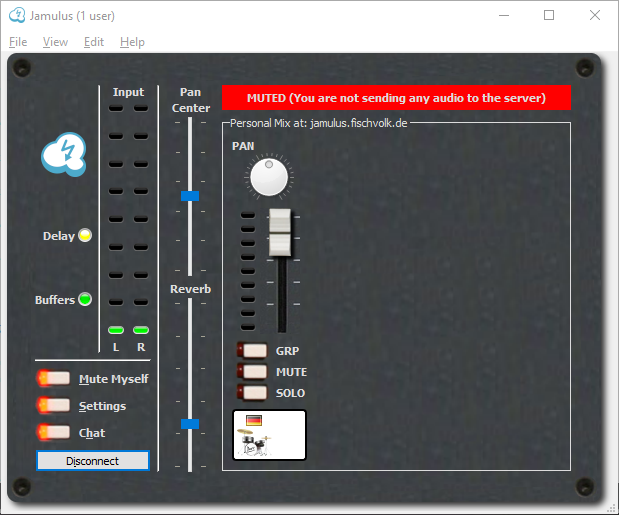
That should make clear that the LEDs on the left are still showing a level but the ones on the right not. And it is made clear that the others do not hear you since no audio is transmitted to the server (as stated in the new label).
As already witten above, to make it clear that the mixer on the right side is your personal mix, we already added:
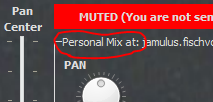
So this should also be clearer now.
If I click MUTE under my slider on the right side, then I expect that were there others connected to the server that they would be able to hear me fine, but I wouldn't be able to hear me in the mix coming down from the server. Yes. This works. BUT the levels on my slider look just like they did. It doesn't look like I'm muted. So this is confusing, too. They need to be lighter or something to cue me what's going on. Dim the container for the slider, maybe?
This was a design descision to show pre-fader levels. So I would not do modifications here.
I would like to start a discussion here if the implemented improvements are sufficient to close this Issue. For me personally it would be ok to close it.
corrados
on 9 Aug 2020
Yes, I think these changes are a big improvement. Why one should mute oneself in the “personal mix at the server” section isn’t obvious but I don’t know how to make it so.
On Aug 9, 2020, at 06:43, Volker Fischer notifications@github.com wrote:
@Skeezixes There are a lot of messages in the Issue you created. Let's recap what was your initial request and what has changed so far:However, if I MUTE MYSELF and I'm the only one connected to the server, then the levels going UP to the server should be zero, right? I'm muted. But they aren't. They're as high as before, only there isn't anything registered on the LEDs on the right side. AND I have sound in my headphones. This is super confusing because I believe that what I'm supposed to be hearing through the headphones is the output of the server.
The specification of Mute Myself is actually given here: #75 (comment). Use case: You listen first to the ongoing session on the server and check which tune it is and try things out with your instrument until you are prepared and unmute your instrument so that other can hear it.
To improve the understanding, there is now a red label with descriptive text given when you switch on Mute Myself:
That should make clear that the LEDs on the left are still showing a level but the ones on the right not. And it is made clear that the others do not hear you since no audio is transmitted to the server (as stated in the new label).
As already witten above, to make it clear that the mixer on the right side is your personal mix, we already added:
So this should also be clearer now.
If I click MUTE under my slider on the right side, then I expect that were there others connected to the server that they would be able to hear me fine, but I wouldn't be able to hear me in the mix coming down from the server. Yes. This works. BUT the levels on my slider look just like they did. It doesn't look like I'm muted. So this is confusing, too. They need to be lighter or something to cue me what's going on. Dim the container for the slider, maybe?
This was a design descision to show pre-fader levels. So I would not do modifications here.
I would like to start a discussion here if the implemented improvements are sufficient to close this Issue. For me personally it would be ok to close it.
—
You are receiving this because you were mentioned.
Reply to this email directly, view it on GitHub, or unsubscribe.
Skeezixes
on 9 Aug 2020
Yes, I think these changes are a big improvement.
Ok, thanks for the feedback. So I'll close this Issue now.
corrados
on 13 Aug 2020
Related issues
 Snayler
·
10Comments
Snayler
·
10Comments
 mawess
·
14Comments
mawess
·
14Comments
 lefty665
·
14Comments
corrados
·
5Comments
lefty665
·
14Comments
corrados
·
5Comments
 keepers305
·
7Comments
keepers305
·
7Comments