jaeger-query - failed to flush Jaeger spans to server: write udp 127.0.0.1:43326->127.0.0.1:6831: write: connection refused
Thank you for aweomse Jaeger project! 👋🎉
Problem - jaeger-query logs error on pressing "Find Traces" button from ui
{
  "level": "error",
  "ts": 1582537153.2097816,
  "caller": "zap/logger.go:33",
  "msg": "failed to flush Jaeger spans to server: write udp 127.0.0.1:43326->127.0.0.1:6831: write: connection refused",
  "stacktrace": "github.com/jaegertracing/jaeger/vendor/github.com/uber/jaeger-client-go/log/zap.(*Logger).Error
  github.com/jaegertracing/jaeger/vendor/github.com/uber/jaeger-client-go/log/zap/logger.go:33
  github.com/jaegertracing/jaeger/vendor/github.com/uber/jaeger-client-go.(*remoteReporter).processQueue.func1
  github.com/jaegertracing/jaeger/vendor/github.com/uber/jaeger-client-go/reporter.go:287
  github.com/jaegertracing/jaeger/vendor/github.com/uber/jaeger-client-go.(*remoteReporter).processQueue
  github.com/jaegertracing/jaeger/vendor/github.com/uber/jaeger-client-go/reporter.go:297"
}
Is there anything i am doing?
Docker-Compose.yml
version: "3.7"
services:
  elasticsearch:
    image: docker.elastic.co/elasticsearch/elasticsearch:7.6.0
    container_name: elasticsearch
    networks:
      - applogs
    ports:
      - "9200:9200"
      - "9300:9300"
    restart: on-failure
    environment:
      - node.name=elasticsearch
      - cluster.name=logging-prod
      - bootstrap.memory_lock=true
      - discovery.type=single-node
      - http.host=0.0.0.0
      - transport.host=127.0.0.1
      - ELASTIC_USERNAME=elastic
      - ELASTIC_PASSWORD=$ELASTIC_PASSWORD
      - ES_JAVA_OPTS=-Xms512m -Xmx512m
      - xpack.license.self_generated.type=basic
      - xpack.security.enabled=true
    volumes:
      - esdata:/usr/share/elasticsearch/data

  jaeger-collector:
    image: jaegertracing/jaeger-collector
    container_name: jaeger-collector
    networks:
      - applogs
    ports:
      - "14269:14269"
      - "14268:14268"
      - "14267:14267"
      - "9411:9411"
      - "14250:14250"
    environment:
      - SPAN_STORAGE_TYPE=elasticsearch
      - ELASTIC_PASSWORD=$ELASTIC_PASSWORD
    command:
      [
        "--es.server-urls=http://elasticsearch:9200",
        "--es.username=elastic",
        "--es.password=$ELASTIC_PASSWORD",
        "--es.num-shards=1",
        "--es.num-replicas=0",
        "--span-storage.type=elasticsearch",
        "--log-level=error",
      ]
    depends_on:
      - elasticsearch
    restart: on-failure

  jaeger-agent:
    image: jaegertracing/jaeger-agent
    container_name: jaeger-agent
    networks:
      - applogs
    hostname: jaeger-agent
    command: ["--collector.host-port=jaeger-collector:14267"]
    ports:
      - "5775:5775/udp"
      - "6831:6831/udp"
      - "6832:6832/udp"
      - "5778:5778"
    environment:
      - SPAN_STORAGE_TYPE=elasticsearch
      - ELASTIC_PASSWORD=$ELASTIC_PASSWORD
    depends_on:
      - jaeger-collector
    restart: on-failure

  jaeger-query:
    image: jaegertracing/jaeger-query
    container_name: jaeger-query
    networks:
      - applogs
    environment:
      - SPAN_STORAGE_TYPE=elasticsearch
      - no_proxy=localhost
    ports:
      - "16686:16686"
      - "16687:16687"
    command:
      [
        "--es.server-urls=http://elasticsearch:9200",
        "--span-storage.type=elasticsearch",
        "--log-level=debug",
        "--es.username=elastic",
        "--es.password=$ELASTIC_PASSWORD",
      ]
    depends_on:
      - jaeger-agent
    restart: on-failure

volumes:
  esdata:
    driver: local
networks:
  applogs:
    driver: bridge
This configuration is works properly
 pawarvijay
All 3 comments
Hi @pawarvijay, thanks for reporting this issue.
Jaeger query supports tracing itself, and the spans generated by this service need to be sent to the Jaeger Collector. According to your error message, the query service is trying to flush spans to the collector which it expects to be at 127.0.0.1:6831. Once you change this to the actual address of the collector it should work as expected.
This can be configured by adding the standard environment variables to the jaeger-query container -
JAEGER_AGENT_HOST=jaeger-collector
JAEGER_AGENT_PORT=6831
 annanay25
on 24 Feb 2020
annanay25
on 24 Feb 2020
+1 I will close this. As this is not an issue. It should be also possible to configure the tracer inside jaeger-query to send the data to jaeger-collector by using the HTTP sender.
Here are all the conf options https://www.jaegertracing.io/docs/1.16/client-features/
 pavolloffay
on 24 Feb 2020
pavolloffay
on 24 Feb 2020
@annanay25
some how JAEGER_AGENT_HOST & JAEGER_AGENT_PORT were not showing any effect.
so according to jaeger-client-go#environment-variables
i used JAEGER_ENDPOINT
and it started working and it does not throws any error
This is my working jaeger-query
```
jaeger-query:
image: jaegertracing/jaeger-query
container_name: jaeger-query
networks:
- applogs
environment:
- SPAN_STORAGE_TYPE=elasticsearch
- no_proxy=localhost
- JAEGER_ENDPOINT=http://jaeger-collector:14268/api/traces
ports:
- "16686:16686"
- "16687:16687"
command:
[
"--es.server-urls=http://elasticsearch:9200",
"--span-storage.type=elasticsearch",
"--log-level=debug",
"--es.username=elastic",
"--es.password=$ELASTIC_PASSWORD",
]
depends_on:
- jaeger-agent
restart: on-failure
```
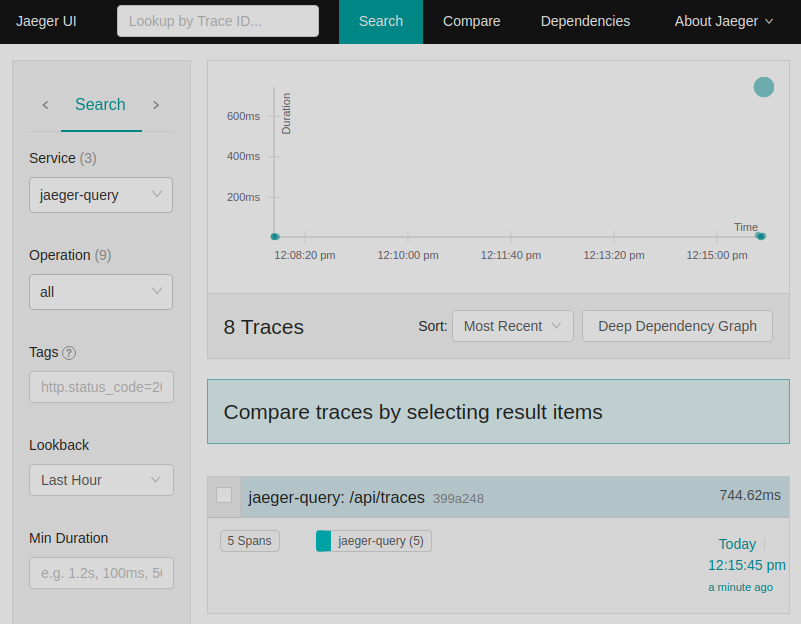
And Below image shows Jaeger query option in service dropdown
THANKS @annanay25
pawarvijay
on 25 Feb 2020
Related issues
 yurishkuro
·
4Comments
yurishkuro
·
4Comments
 rur0
·
4Comments
rur0
·
4Comments
 Siddhesh-Ghadi
·
4Comments
Siddhesh-Ghadi
·
4Comments
 jvans1
·
3Comments
jvans1
·
3Comments
 NeoCN
·
4Comments
NeoCN
·
4Comments
Most helpful comment
@annanay25
some how
JAEGER_AGENT_HOST & JAEGER_AGENT_PORTwere not showing any effect.so according to jaeger-client-go#environment-variables
i used
JAEGER_ENDPOINTand it started working and it does not throws any error
This is my working jaeger-query
```
jaeger-query:
image: jaegertracing/jaeger-query
container_name: jaeger-query
networks:
- applogs
environment:
- SPAN_STORAGE_TYPE=elasticsearch
- no_proxy=localhost
- JAEGER_ENDPOINT=http://jaeger-collector:14268/api/traces
ports:
- "16686:16686"
- "16687:16687"
command:
[
"--es.server-urls=http://elasticsearch:9200",
"--span-storage.type=elasticsearch",
"--log-level=debug",
"--es.username=elastic",
"--es.password=$ELASTIC_PASSWORD",
]
depends_on:
- jaeger-agent
restart: on-failure
```
And Below image shows Jaeger query option in service dropdown
THANKS @annanay25