Jabref: Improve responsiveness of library loading
When JabRef opens a library, it opens a file, runs the database parser, and after everything is done, creates a new tab in the frame with the contents of the open database.
An improvement would be to first create a tab in the frame, display a loading animation, and after the parser has finished, display all entries (or display every entry as soon as it is parsed).
 calixtus
All 21 comments
I am gonna check this.
 sustcstar
on 13 May 2020
sustcstar
on 13 May 2020
This is too complex for me...Sorry.
sustcstar
on 13 May 2020
It seems that the function "open a library" involves many classes and files without a top level file controlling them.
sustcstar
on 14 May 2020
There should be two entry points for this: JabRefGUI::openDatabases for autoloading in the startup process, and OpenDatabaseAction::openFiles for the menu command.
The basic idea would probably to move e.g. the OpenDatabaseAction::loadDatabase method into the BasePanel class, maybe called as a background process by a constructor, and bind the workDonePercentageProperty of the Task to some loading animation in the BasePanel...
calixtus
on 14 May 2020
Thanks for your suggestion, I will try it.
sustcstar
on 14 May 2020
@sustcstar Hi, do you still work on this issue? My teamate and I want to try this issue if you are not doing it now. ^_^
 Hollyqqqqq
on 29 May 2020
Hollyqqqqq
on 29 May 2020
Yeah, I have been doing this for two days.
If finally I give up, I will tell you.
sustcstar
on 29 May 2020
OK, best wishes!
Hollyqqqqq
on 29 May 2020
I give up on this issue, everyone please feel free to take it
sustcstar
on 2 Jun 2020
Is anyone actively working on this? I'd like to work on it but I don't want to step on anyones toes.
 tmrd993
on 26 Oct 2020
tmrd993
on 26 Oct 2020
Feel free to take this issue.
Be aware that recently part of our architecture changed.
BasePanel is now Library tab.
Have fun coding and don't hesitate to ask for help in the gitter chat, if you don't understand something.
calixtus
on 26 Oct 2020
I'd like to work on this, @tmrd993 If you're still working on it tell me
 HoussemNasri
on 14 Nov 2020
HoussemNasri
on 14 Nov 2020
Hi @HoussemNasri , have fun coding. Maybe @tmrd993 can show what he already did and you both can join forces?
Don't forget to ask, if you encounter a problem or need help in our gitter jabref developer chat https://gitter.im/JabRef/jabref
calixtus
on 14 Nov 2020
@tmrd993 If you're still working on it tell me
No, you can go ahead and work on it.
I only skimmed over the files but I am pretty sure you need to look at https://github.com/JabRef/jabref/blob/1dc91ca3083a25e69516a1d0c71fc876ddb665aa/src/main/java/org/jabref/gui/importer/actions/OpenDatabaseAction.java#L39
This is the action that gets executed when the user loads a database from the menu.
When a database wasn't closed, the program opens it on startup from here https://github.com/JabRef/jabref/blob/1dc91ca3083a25e69516a1d0c71fc876ddb665aa/src/main/java/org/jabref/gui/JabRefGUI.java#L121
tmrd993
on 16 Nov 2020
For now, I am trying to deal with opening the database using action and these are the steps I am following
- open a
empty tabplaceholder tab without starting the loading process yet - start loading the data on a background thread and with it a progress bar
- when data loaded stop the progress bar and
load data into the tab we openedclose the placeholder tab and start the real tab
My current issue is the following, with the current LibraryTab, opening an empty tab is challenging because you need to pass a BibDatabaseContext at initialization and it can't be null, I can create a BibDatabaseContext with no data by just passing an empty list of entries to Database and pass the context to LibraryTab, but this will leave us with no information about the database we are trying to open, I tried to change the title of the tab using setText() but for some reason, it gets back to "untitled"
I created an instance of BibDatabaseContext then i setDatabasePath() and it worked
My current task is to refactor LibraryTab so it's easy to create an empty tab while keeping the information of the database we're trying to open(name, path...) and define a method inside LibraryTab of the name for example loadData() that will load a list of entries into the tab and update the UI
Refactoring LibraryTab wasn't an easy job as i thought, I tried refactoring it so i can create a tab then feed data later but there was some edge cases where the sidebar doesn't update and random crashes.
Some Progress
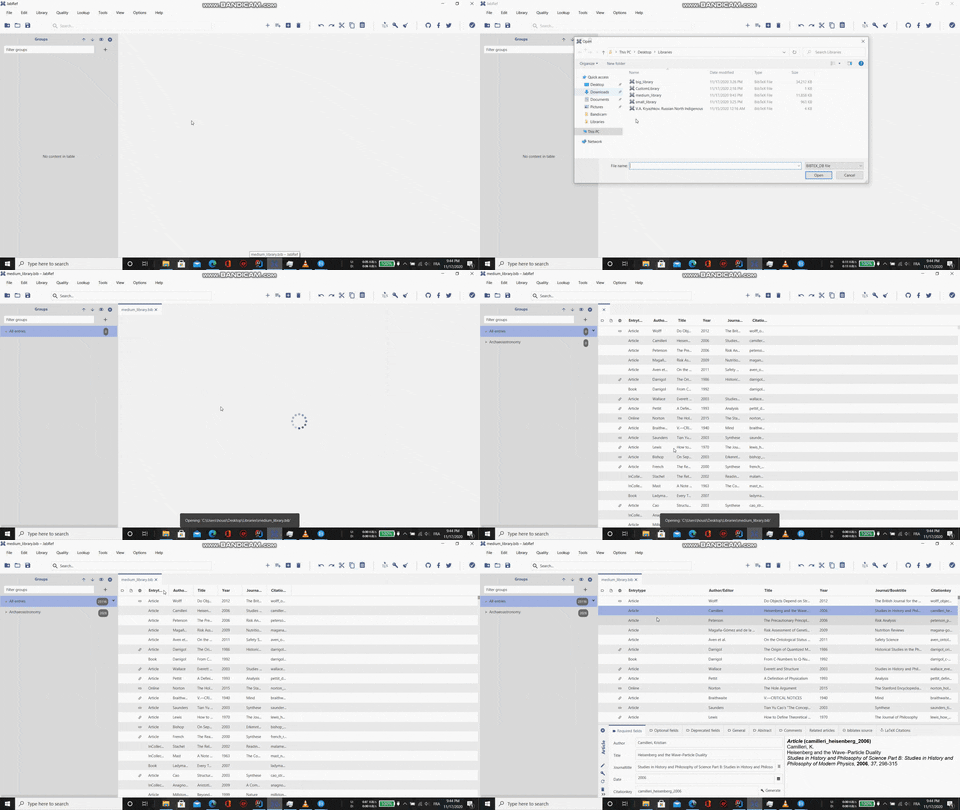
There was an issue when opening multiple databases simultaneously they will appear sorted by who loaded first, for example when you open database1 then database2, if database2 loaded before database1 you'll notice that database2 tab is before database1
- I fixed it with setting the position of each tab to their placeholder position, this way it doesn't matter when tab finishes loading it will reposition itself in the correct position.

Next step is to apply the same behavior on startup.
HoussemNasri
on 16 Nov 2020
Can anyone explain to me what this code is doing
https://github.com/JabRef/jabref/blob/0412684218478d90e0a41d2a3c4be0a84af2793c/src/main/java/org/jabref/gui/JabRefGUI.java#L149-L171
HoussemNasri
on 19 Nov 2020
This code should autoload the databases on startup.
First if block handles the shared databases (like Overleaf or some sql database), second if block handles, if someone uses the command line to merge some other database into the currently opened database, third block is the very simple autoload last opened files on startup.
calixtus
on 19 Nov 2020
@calixtus Thank you for responding, but I have another question, my code will close tabs automatically so to achieve this I copied this method from JabRefFrame and called it whenever I close a tab
https://github.com/JabRef/jabref/blob/b0af521e3173e4b55673cd27563ca981ad607e8b/src/main/java/org/jabref/gui/JabRefFrame.java#L1157-L1162
The tab disappear indeed, The problem is when I close the app it keeps running in the background, After some investigation, I found out this was happening because AutosaveManager and BackupManager still attached to the tab so to solve this I need to call
java
AutosaveManager.shutdown(context);
BackupManager.shutdown(context);
My question is it ok if I added this snippet into the cleanup() method in LibraryTab
https://github.com/JabRef/jabref/blob/b0af521e3173e4b55673cd27563ca981ad607e8b/src/main/java/org/jabref/gui/LibraryTab.java#L586-L588
HoussemNasri
on 22 Nov 2020
Can you make a pull request with your changes so far? Then we can discuss this more easily. About autosave: @Siedlerchr is most experienced with this part of the code.
calixtus
on 22 Nov 2020
@HoussemNasri The autosave / tab shutdown closing seems plausible and should be done.A tab has an attach bibdatabasecontext so this is correct
 Siedlerchr
on 22 Nov 2020
Siedlerchr
on 22 Nov 2020
I am trying a new approach by adding a new tab with 0 entries then when data is ready I call a method from LibraryTab to update BibdatabaseContext but the problem is that Groups Pane doesn't update and keep showing 0 entries although when I navigate away from the tab and come back it updates just fine.
This is the method in LibraryTab to update BibdatabaseContext
public void feedData(BibDatabaseContext bibDatabaseContext){
        cleanUp();

        this.bibDatabaseContext = Objects.requireNonNull(bibDatabaseContext);

        bibDatabaseContext.getDatabase().registerListener(this);
        bibDatabaseContext.getMetaData().registerListener(this);

        this.sidePaneManager = frame.getSidePaneManager();

        this.tableModel = new MainTableDataModel(getBibDatabaseContext(), preferencesService, Globals.stateManager);

        citationStyleCache = new CitationStyleCache(bibDatabaseContext);
        annotationCache = new FileAnnotationCache(bibDatabaseContext, preferencesService.getFilePreferences());

        setupMainPanel();
        setupAutoCompletion();

        this.getDatabase().registerListener(new SearchListener());
        this.getDatabase().registerListener(new EntriesRemovedListener());

        // ensure that at each addition of a new entry, the entry is added to the groups interface
        this.bibDatabaseContext.getDatabase().registerListener(new GroupTreeListener());
        // ensure that all entry changes mark the panel as changed
        this.bibDatabaseContext.getDatabase().registerListener(this);

        this.getDatabase().registerListener(new UpdateTimestampListener(preferencesService));

        this.entryEditor = new EntryEditor(this, externalFileTypes);

        Platform.runLater(() -> {
            EasyBind.subscribe(changedProperty, this::updateTabTitle);
            Globals.stateManager.getOpenDatabases().addListener((ListChangeListener<BibDatabaseContext>) c ->
                    updateTabTitle(changedProperty.getValue()));
        });

         //I took some code from add() method in JabRefFrame to reinitialize Backup and Autosave.
        if (readyForAutosave(bibDatabaseContext)) {
            AutosaveManager autosaver = AutosaveManager.start(bibDatabaseContext);
            autosaver.registerListener(new AutosaveUiManager(this));
        }

        BackupManager.start(this.bibDatabaseContext, Globals.entryTypesManager, Globals.prefs);

        trackOpenNewDatabase(this);

    }
Related issues
 lenhard
·
4Comments
lenhard
·
4Comments
 tobiasdiez
·
4Comments
Siedlerchr
·
3Comments
tobiasdiez
·
4Comments
Siedlerchr
·
3Comments
 humbleambition
·
3Comments
tobiasdiez
·
4Comments
humbleambition
·
3Comments
tobiasdiez
·
4Comments