Jabref: When saving: The libary has been modified by another program
JabRef 5.0-dev--snapshot--2019-04-09--master--0dd091f31
Linux 4.15.0-47-generic amd64
Java 1.8.0_201
Ubuntu 18.04
- [x] I have tested the latest development version from http://builds.jabref.org/master/ and the problem persists
Steps to reproduce the behavior: (same as #4810 )
- open .bib-file
- press "ctrl" & "s"
- Repeat step 2 till Bug appears.
- The message "The library has been modified by another program" appears
- DO NOT accept the changes, otherwise all entries will be doubled (click dismiss)


Log File
Opening: /home/jkalliau/Desktop/Jabrefissue/LargeFile.bib
Can only load style files: Preview
Vorschaustil geändert zu: Vorschau
Speichere Bibliothek...
Opening: /tmp/jabref2591679195168273738.bib
Opening: /home/jkalliau/Desktop/Jabrefissue/LargeFile.bib
Bibliothek gespeichert '/home/jkalliau/Desktop/Jabrefissue/LargeFile.bib'.
Terminal
16:45:54.405 [JavaFX Application Thread] INFO  org.jabref.logic.importer.OpenDatabase - Opening: /home/jkalliau/Desktop/Jabrefissue/LargeFile.bib
16:45:54.963 [JavaFX Application Thread] ERROR org.jabref.logic.citationstyle.CitationStyle - Can only load style files: Preview
16:45:55.220 [JavaFX Application Thread] INFO  org.jabref.gui.FXDialogService - Vorschaustil geändert zu: Vorschau
16:46:06.495 [JavaFX Application Thread] INFO  org.jabref.gui.FXDialogService - Speichere Bibliothek...
16:46:06.524 [pool-3-thread-2] INFO  org.jabref.logic.importer.OpenDatabase - Opening: /tmp/jabref2591679195168273738.bib
16:46:06.526 [pool-3-thread-2] INFO  org.jabref.logic.importer.OpenDatabase - Opening: /home/jkalliau/Desktop/Jabrefissue/LargeFile.bib
16:46:06.530 [JavaFX Application Thread] INFO  org.jabref.gui.FXDialogService - Bibliothek gespeichert '/home/jkalliau/Desktop/Jabrefissue/LargeFile.bib'.
16:53:39.039 [JavaFX Application Thread] INFO  org.jabref.gui.FXDialogService - In die Zwischenablage kopiert
 JoKalliauer
All 146 comments
This is most interesting since you work with Linux. Obviously the error is indepent of the operation system.
 bernhard-kleine
on 9 Apr 2019
bernhard-kleine
on 9 Apr 2019
Me too. :-(
 wujastyk
on 23 Apr 2019
wujastyk
on 23 Apr 2019
Could this be something to do with Dropbox? I guess the Dropbox application (nemo-dropbox in Linux Mint) runs some kind of file-checking background task, and maybe JabRef is sensing that?
Is anyone who sees this "library modified" popup behaviour _not_ run Dropbox?
wujastyk
on 11 May 2019
@wujastyk : I storred it locally on the desktop, therefore it is not reletated to any sync-program.
Please also read @bernhard-kleine : comment: https://github.com/JabRef/jabref/issues/4810#issuecomment-477078401
JoKalliauer
on 12 May 2019
I see. So it's not Dropbox. Thanks!
On Sun, 12 May 2019 at 01:49, Johannes Kalliauer notifications@github.com
wrote:
@wujastyk https://github.com/wujastyk : I storred it locally on the
desktop, therefore it is not reletated to any sync-program.
Please also read @bernhard-kleine https://github.com/bernhard-kleine :
comment: #4810 (comment)
https://github.com/JabRef/jabref/issues/4810#issuecomment-477078401—
You are receiving this because you were mentioned.
Reply to this email directly, view it on GitHub
https://github.com/JabRef/jabref/issues/4877#issuecomment-491573552, or mute
the thread
https://github.com/notifications/unsubscribe-auth/AAF2DBWFGGV2SY5NX2KCRB3PU7DZ7ANCNFSM4HES3FEQ
.
wujastyk
on 12 May 2019
I can confirm this issue. It appears for files outside Dropbox, as well as for files within Dropbox and paused synchronization.
For me, it is independent from timing. I have the files on SSD. After editing, no matter how long, I save the file and the message appears.
JabRef 5.0-dev--snapshot--2019-06-10--master--eb42850f7
Linux 4.4.0-150-generic amd64
Java 1.8.0_212
Ubuntu 16.04
 sfo
on 11 Jun 2019
sfo
on 11 Jun 2019
@sfo: How large is your libary? (filesize/entries)
JoKalliauer
on 12 Jun 2019
Over 4000
Sent from Android phone
On Wed, 12 Jun 2019, 00:41 Johannes Kalliauer, notifications@github.com
wrote:
@sfo https://github.com/sfo: How large is your libary?
(filesize/entries)—
You are receiving this because you were mentioned.
Reply to this email directly, view it on GitHub
https://github.com/JabRef/jabref/issues/4877?email_source=notifications&email_token=AAF2DBXIPMGGK4K4XISPDO3P2CLCPA5CNFSM4HES3FE2YY3PNVWWK3TUL52HS4DFVREXG43VMVBW63LNMVXHJKTDN5WW2ZLOORPWSZGODXPNDGI#issuecomment-501141913,
or mute the thread
https://github.com/notifications/unsubscribe-auth/AAF2DBUXPZFAO5457T7VPE3P2CLCPANCNFSM4HES3FEQ
.
wujastyk
on 12 Jun 2019
@JoKalliauer here is a minimum working example:
% Encoding: UTF-8
@Article{,
}
@Comment{jabref-meta: databaseType:biblatex;}
Same issue here (also using Jabref 5.0-dev). The message appears every time I save my library (even if no changes have been made). I do not have a big library, just about 100 entries. If I save the changes, all my entries are duplicated. My bib file is on a cloud folder (MEGA cloud, although that does not seem to be the issue). I am running Ubuntu Mate 19.04
 gicanzo
on 5 Sep 2019
gicanzo
on 5 Sep 2019
Please check if you any save actions (library properties) or autosave enabled (preferences)
 Siedlerchr
on 5 Sep 2019
Siedlerchr
on 5 Sep 2019
Please check if you any save actions (library properties) or autosave enabled (preferences)
Both save actions and autosave are disabled. The issue persists
gicanzo
on 5 Sep 2019
JabRef 5.0-dev
Linux 5.0.0-27-generic amd64
Java 1.8.0_222
Can confirm this issue using the minimum example provided here (https://github.com/JabRef/jabref/issues/4877#issuecomment-501544917) by @sfo
"Save actions" are NOT enabled. "Autosave" is also NOT enabled.
Since the minimum example contains just one entry and I have stored the database on a fast M.2 SSD, this issue does not seem to be related to the size of the database or slow hardware.
 AEgit
on 8 Sep 2019
AEgit
on 8 Sep 2019
JabRef 5.0-dev
Linux 5.0.0-27-generic amd64
Java 11.0.4
Can confirm that this is still an issue with the current --edge snap version using Java 11 (I am just reporting this in case someone thought the switch to Java 11 had solved the problem). The minimum working example of @sfo (https://github.com/JabRef/jabref/issues/4877#issuecomment-501544917) is enough to be able to trigger this problematic behaviour.
AEgit
on 13 Sep 2019
 koppor
on 20 Oct 2019
koppor
on 20 Oct 2019
JabRef 5.0.0-dev--2019-10-25----681d6aa6f
Linux 5.0.0-32-generic amd64
Java 12.0.2
I can also confirm the bug. Happens every time to me though. If I can help by providing more information, just state what you'd need :)
 Krzmbrzl
on 27 Oct 2019
Krzmbrzl
on 27 Oct 2019
@Krzmbrzl Thank you for the feedback and offer. I have a long-termin solution in my mind (see https://github.com/JabRef/jabref/issues/5257#issuecomment-532958631), but currently did not find the time to do it.
koppor
on 27 Oct 2019
@Krzmbrzl you have coding experience, right? This bug is a bit hard to fix for us since non of the core developers can reproduce it. So it would be nice if you could try to debug it and find the origin of the problem (and in the best case also provide a solution).
 tobiasdiez
on 27 Oct 2019
tobiasdiez
on 27 Oct 2019
I do. However I am very busy atm and I'm afraid won't find the time necessary to do so properly... Plus I think I can't even set it up on my machine as I don't have JDK 12 available on my system
Krzmbrzl
on 27 Oct 2019
Sure, no problem. In case you find bit of time, you find everything that you need to setup the build locally here: https://github.com/JabRef/jabref/wiki/Guidelines-for-setting-up-a-local-workspace
tobiasdiez
on 27 Oct 2019
I have this issue too:
JabRef 5.0.0-dev--2019-10-25----b8d00f2bd
Linux 5.2.0-3-amd64 amd64
Java 12.0.2
unfortunately I dont see any log output, as the debian package from the snapshots does not ship with log4j:
ERROR StatusLogger Log4j2 could not find a logging implementation. Please add log4j-core to the classpath. Using SimpleLogger to log to the console...
I suspected that maybe the noatime flag on my filesystem might causing this, but I verified on another filesystem with relatime that I get this message too.
 reox
on 28 Oct 2019
reox
on 28 Oct 2019
@Krzmbrzl you have coding experience, right? This bug is a bit hard to fix for us since non of the core developers can reproduce it. So it would be nice if you could try to debug it and find the origin of the problem (and in the best case also provide a solution).
As a provisional workaround you can just add a button in the preferences to dissable the changes-feature.
JoKalliauer
on 28 Oct 2019
Related:
00:03:19.723 [pool-9-thread-1] ERROR org.jabref.logic.autosaveandbackup.BackupManager - Error while saving to fileC:\TEMP\del.me.bib.sav
java.nio.file.FileSystemException: C:\TEMP\del.me.bib.sav -> C:\TEMP\del.me.bib.sav.bak: Der Prozess kann nicht auf die Datei zugreifen, da sie von einem anderen Prozess verwendet wird.
We should remove the sav and bak feature. This is so 2000. I forced to keep it in 2015, but I regret it now. Version control and backup feature are now common things.
Maybe, if we just remove bak and sav (and directly save to bib), all these change detection issues could be resolved.
koppor
on 29 Oct 2019
I think this issue is a direct consequence of #5257. The user saves the library, which changes the file, which leads JabRef to check for changes. Normally, there are none (as the user just saved) but due to the bug #5257 JabRef thinks that every entry changed. (This also explains why accepting the changes, all entries are duplicated.)
Concerning the backup feature, I agree the sav file is not needed and does not really add any value. I would replace it with a very simple minded backup strategy: whenever the user opens a bib file, create a copy of that file in the systems temporary folder. Keep at max 10 copies. In this way users that don't use version control / manual backup solutions still have the possibility to go back in time, at least a bit. The following might be helpful: https://github.com/bmc/javautil/blob/master/src/main/java/org/clapper/util/io/RollingFileWriter.java
tobiasdiez
on 21 Nov 2019
Note to self: We really need .bak because of AtomicFileOutputStream.
koppor
on 21 Nov 2019
Hopefully, this should be fixed in the latest development version. Could you please check the build from http://builds.jabref.org/master/. Thanks! Please remember to make a backup of your library before trying-out this version.
tobiasdiez
on 28 Nov 2019
Testing the new version I notices two errors:
What I did:
Opening the file;
Save it immediately by Ctrl-S
Adding Color to a group
Saving the file again.
The log is from the command line which still shows in a separate window with "ERROR StatusLogger Log4j2 could not find", the log event in HELP->View Event Log is empty.
`ERROR SaveDatabaseAction A problem occurred when trying to save the file K:\BuchprojektSpringer\VierteAuflage\Literatur\
EndokrinologieKunde20190320VS5.0.bib
org.jabref.logic.exporter.SaveException: Problems saving:
at org.jabref/org.jabref.gui.exporter.SaveDatabaseAction.saveDatabase(Unknown Source)
at org.jabref/org.jabref.gui.exporter.SaveDatabaseAction.doSave(Unknown Source)
at org.jabref/org.jabref.gui.exporter.SaveDatabaseAction.save(Unknown Source)
at org.jabref/org.jabref.gui.dialogs.AutosaveUIManager.listen(Unknown Source)
at java.base/jdk.internal.reflect.NativeMethodAccessorImpl.invoke0(Native Method)
at java.base/jdk.internal.reflect.NativeMethodAccessorImpl.invoke(Unknown Source)
at java.base/jdk.internal.reflect.DelegatingMethodAccessorImpl.invoke(Unknown Source)
at java.base/java.lang.reflect.Method.invoke(Unknown Source)
at org.jabref.merged.module/com.google.common.eventbus.Subscriber.invokeSubscriberMethod(Unknown Source)
at org.jabref.merged.module/com.google.common.eventbus.Subscriber$SynchronizedSubscriber.invokeSubscriberMethod(
Unknown Source)
at org.jabref.merged.module/com.google.common.eventbus.Subscriber$1.run(Unknown Source)
at org.jabref.merged.module/com.google.common.util.concurrent.DirectExecutor.execute(Unknown Source)
at org.jabref.merged.module/com.google.common.eventbus.Subscriber.dispatchEvent(Unknown Source)
at org.jabref.merged.module/com.google.common.eventbus.Dispatcher$PerThreadQueuedDispatcher.dispatch(Unknown Sou
rce)
at org.jabref.merged.module/com.google.common.eventbus.EventBus.post(Unknown Source)
at org.jabref/org.jabref.logic.autosaveandbackup.AutosaveManager.lambda$listen$0(Unknown Source)
at java.base/java.util.concurrent.Executors$RunnableAdapter.call(Unknown Source)
at java.base/java.util.concurrent.FutureTask.run(Unknown Source)
at java.base/java.util.concurrent.ThreadPoolExecutor.runWorker(Unknown Source)
at java.base/java.util.concurrent.ThreadPoolExecutor$Worker.run(Unknown Source)
at java.base/java.lang.Thread.run(Unknown Source)
Caused by: java.nio.file.AccessDeniedException: K:\BuchprojektSpringer\VierteAuflage\Literatur\EndokrinologieKunde201903
20VS5.0.bib.tmp -> K:\BuchprojektSpringer\VierteAuflage\Literatur\EndokrinologieKunde20190320VS5.0.bib
at java.base/sun.nio.fs.WindowsException.translateToIOException(Unknown Source)
at java.base/sun.nio.fs.WindowsException.rethrowAsIOException(Unknown Source)
at java.base/sun.nio.fs.WindowsFileCopy.move(Unknown Source)
at java.base/sun.nio.fs.WindowsFileSystemProvider.move(Unknown Source)
at java.base/java.nio.file.Files.move(Unknown Source)
at org.jabref/org.jabref.logic.exporter.AtomicFileOutputStream.close(Unknown Source)
at java.base/sun.nio.cs.StreamEncoder.implClose(Unknown Source)
at java.base/sun.nio.cs.StreamEncoder.close(Unknown Source)
at java.base/java.io.OutputStreamWriter.close(Unknown Source)
at org.jabref/org.jabref.logic.exporter.BibDatabaseWriter.savePartOfDatabase(Unknown Source)
at org.jabref/org.jabref.logic.exporter.BibDatabaseWriter.saveDatabase(Unknown Source)
... 21 more
ERROR AutosaveUIManager Problem occurred while saving.
java.lang.IllegalStateException: Not on FX application thread; currentThread = pool-5-thread-1
at org.jabref.merged.module/com.sun.javafx.tk.Toolkit.checkFxUserThread(Unknown Source)
at org.jabref.merged.module/com.sun.javafx.tk.quantum.QuantumToolkit.checkFxUserThread(Unknown Source)
at org.jabref.merged.module/javafx.stage.Stage.
at org.jabref.merged.module/javafx.stage.Stage.
at org.jabref.merged.module/javafx.scene.control.HeavyweightDialog$1.
at org.jabref.merged.module/javafx.scene.control.HeavyweightDialog.
at org.jabref.merged.module/javafx.scene.control.Dialog.
at org.jabref.merged.module/org.controlsfx.dialog.ExceptionDialog.
at org.jabref/org.jabref.gui.JabRefDialogService.showErrorDialogAndWait(Unknown Source)
at org.jabref/org.jabref.gui.exporter.SaveDatabaseAction.doSave(Unknown Source)
at org.jabref/org.jabref.gui.exporter.SaveDatabaseAction.save(Unknown Source)
at org.jabref/org.jabref.gui.dialogs.AutosaveUIManager.listen(Unknown Source)
at java.base/jdk.internal.reflect.NativeMethodAccessorImpl.invoke0(Native Method)
at java.base/jdk.internal.reflect.NativeMethodAccessorImpl.invoke(Unknown Source)
at java.base/jdk.internal.reflect.DelegatingMethodAccessorImpl.invoke(Unknown Source)
at java.base/java.lang.reflect.Method.invoke(Unknown Source)
at org.jabref.merged.module/com.google.common.eventbus.Subscriber.invokeSubscriberMethod(Unknown Source)
at org.jabref.merged.module/com.google.common.eventbus.Subscriber$SynchronizedSubscriber.invokeSubscriberMethod(
Unknown Source)
at org.jabref.merged.module/com.google.common.eventbus.Subscriber$1.run(Unknown Source)
at org.jabref.merged.module/com.google.common.util.concurrent.DirectExecutor.execute(Unknown Source)
at org.jabref.merged.module/com.google.common.eventbus.Subscriber.dispatchEvent(Unknown Source)
at org.jabref.merged.module/com.google.common.eventbus.Dispatcher$PerThreadQueuedDispatcher.dispatch(Unknown Sou
rce)
at org.jabref.merged.module/com.google.common.eventbus.EventBus.post(Unknown Source)
at org.jabref/org.jabref.logic.autosaveandbackup.AutosaveManager.lambda$listen$0(Unknown Source)
at java.base/java.util.concurrent.Executors$RunnableAdapter.call(Unknown Source)
at java.base/java.util.concurrent.FutureTask.run(Unknown Source)
at java.base/java.util.concurrent.ThreadPoolExecutor.runWorker(Unknown Source)
at java.base/java.util.concurrent.ThreadPoolExecutor$Worker.run(Unknown Source)
at java.base/java.lang.Thread.run(Unknown Source)
`
bernhard-kleine
on 28 Nov 2019
I just fetched
JabRef 5.0.0-dev--2019-11-28----ce0e8870c
Linux 5.3.0-23-generic amd64
Java 13.0.1
- from the master builds,
- made a small change
- hit "save"
- and still had the old error

But maybe I need to wait a little longer before fetching a new master build?
wujastyk
on 28 Nov 2019
JabRef 5.0.0-dev--2019-11-28----ce0e8870c
Windows 10 10.0 amd64
Java 13.0.1
Using the minimum example provided by @sfo in https://github.com/JabRef/jabref/issues/4877#issuecomment-501544917 I can confirm that this issue has been solved.
So far I have not been able to reproduce the issue reported by @wujastyk in https://github.com/JabRef/jabref/issues/4877#issuecomment-559610890
I was also not able to reproduce the behaviour that @bernhard-kleine mentioned in https://github.com/JabRef/jabref/issues/4877#issuecomment-559607391, but since this issue appears to be difficult to reproduce (you have to save "immediately") this might be to be expected. What I did notice, though, when trying to reproduce https://github.com/JabRef/jabref/issues/4877#issuecomment-559607391 was that the CPU usage shot up to 100% on a 6-core machine when modifying the colour of a group (database with nearly 20,000 entries; group contains several hundreds of entries) to the point that JabRef appeared to have crashed when trying to save. This problem however, might be more of a performance issue, and is possibly related to what has been reported here:
https://github.com/JabRef/jabref/issues/5071#issuecomment-554769666
AEgit
on 29 Nov 2019
JabRef 5.0.0-dev--2019-11-29----ea5e632e4
Linux 5.3.0-23-generic amd64
Java 13.0.1
Still getting it :-(
wujastyk
on 30 Nov 2019
@wujastyk Above you mentioned that you are using Dropbox to synchronize. Can you please check whether this problem is also happening in a folder that is not synced?
Thanks!
 matthiasgeiger
on 30 Nov 2019
matthiasgeiger
on 30 Nov 2019
@wujastyk Does it happen with your own database or can you reproduce the issue also with the minimum example provided in https://github.com/JabRef/jabref/issues/4877#issuecomment-501544917? If the former is the case, the problem might be related to the size of the database and/or the speed of your storage device. If the latter is the case, then the issue probably has not been solved.
AEgit
on 30 Nov 2019
JabRef 5.0.0-dev--2019-11-29----ea5e632e4
Linux 5.3.0-23-generic amd64
Java 13.0.1
Yes, I'm afraid it still happens even when I switch off Dropbox.
[image: image.png]
wujastyk
on 30 Nov 2019
I still have the same problem with my bib file (~850 entries, on ext4 (rw,noatime,nodiratime,discard) filesystem locally) but not with the minimal example.
JabRef 5.0.0-dev--2019-11-30----e251de5c5
Linux 5.3.0-2-amd64 amd64
Java 13.0.1
I should have said: I'm testing on a large database too. Ca. 4000. Does
size ever matter?
On Sat, 30 Nov 2019 at 07:55, reox notifications@github.com wrote:
I still have the same problem with my bib file (~850 entries) but not with
the minimal example.JabRef 5.0.0-dev--2019-11-30----e251de5c5
Linux 5.3.0-2-amd64 amd64
Java 13.0.1
wujastyk
on 30 Nov 2019
JabRef 5.0.0-dev--2019-11-28----ce0e8870c
Windows 7 6.1 amd64
Java 13.0.1
For me the error "the library has been changed" is gone. The actual library has 2800+ entries.
bernhard-kleine
on 2 Dec 2019
Maybe its a linux or filesystem thing?
on
JabRef 5.0.0-dev--2019-11-28----ce0e8870c
Linux 3.10.0-1062.1.1.el7.centos.plus.x86_64 amd64
Java 13.0.1
I still have the problem. Here the bib file is on NFS.
reox
on 2 Dec 2019
@reox Do you also have the problem with the minimum example file (https://github.com/JabRef/jabref/issues/4877#issuecomment-501544917)? Or is it your own (larger?) library?
AEgit
on 2 Dec 2019
@AEgit I tried on this PC also: No, with the minimal example I do not have the problem.
reox
on 2 Dec 2019
JabRef 5.0.0-dev--2019-12-02----9d620f18d
Linux 5.3.0-23-generic amd64
Java 13.0.1
Still there for me, unfortunately.
wujastyk
on 2 Dec 2019
My claim that the error is gone, was wrong: In the dark scheme it was not obvious, but is still there.
bernhard-kleine
on 2 Dec 2019
So let's be systematic about it (most of us are scientist, so why not try to actually apply what we teach students ;-) ). As this will involve a bit of playing around with your file, please make sure to make a backup before.
- Can you always replicate the bug with your database?
- With the minimal example above?
- On which OS? Linux or Windows? Or both?
- Does it matter where the database is saved?
- Does it also occur if you choose "Save as" and write the file to somewhere else?
- If you choose "Save as" but overwrite the original file?
- Are only entries concerned, or also other data in the library? (Try to add Strings, Preamble and change a few settings under Library properties. Save, close JabRef, open again and experiment now with saving).
- What kind of changes are exactly reported? (Screenshot of the dialag is best)
- Does the change detection work in principle (to test: open JabRef, open file in a text editor, change something and save there -> JabRef now should report only this single change).
Thanks for your help! Depending on the answers to these questions, I'll try to find the origin of the issue or at least add more debugging output that should pinpoint the exact location.
tobiasdiez
on 2 Dec 2019
I copied one entry of my library into a fresh library. I saved it as test.bib. I added a date and saved it again. The error appeared.
This is really a minimal example.
JabRef 5.0.0-dev--2019-11-28----ce0e8870c
Windows 7 6.1 amd64
Java 13.0.1
The article in question:
@Article{TW18,
  author          = {Tabuchi, Masashi and Wu, Mark N.},
  date            = {2019-09-03},
  year            = {2018},
  title           = {Sleep: Setting the 'Circadian' Alarm Clock.},
  abstract        = {How the circadian clock regulates downstream behaviors, such as sleep, remains poorly understood. A new study reveals that clock-dependent downscaling of GABA sensitivity of arousal neurons promotes wakefulness at dawn.},
  doi             = {10.1016/j.cub.2017.11.011},
  issn            = {1879-0445},
  issue           = {1},
  month           = jan,
  pages           = {R26--R28},
  volume          = {28},
  chemicals       = {Receptors, GABA-A},
  citation-subset = {IM},
  completed       = {2019-01-30},
  country         = {England},
  file            = {:CircadianClock/CurrBiol_28_R17_Tabuchi_Sleep__Setting the 'Circadian' Alarm Clock.pdf:PDF},
  issn-linking    = {0960-9822},
  journal         = {Current biology},
  keywords        = {Circadian Clocks; Circadian Rhythm; Receptors, GABA-A; Sleep; Wakefulness},
  nlm-id          = {9107782},
  owner           = {NLM},
  pii             = {S0960-9822(17)31456-2},
  pmid            = {29316417},
  pubmodel        = {Print},
  pubstatus       = {ppublish},
  revised         = {2019-01-30},
  timestamp       = {2019.04.15},
}
@bernhard-kleine can you please answer my questions above? None of the core developers can reproduce the problem, which makes this issue particularly difficult to fix (its like finding a needle in a haystack, but without looking). We want to fix it, but we really need your help for this!
tobiasdiez
on 2 Dec 2019
- no
- no
- on win7
- when I save the minimal file to another dir, it works without error. Upon resaving, the error reappears.
- no see 4)
- no
- I added a group, the error was gone, it is a chamaeleon,
- see screenshot.
- I changed the timestamp in the editor. Jabref informs about the change but does not pinpoint it in the dialog box

I hope this helps, I am not sure myself.
bernhard-kleine
on 2 Dec 2019
Thanks! How does the dialog look like when the bug occurs? Does it also says added and removed entry, both being empty?
tobiasdiez
on 2 Dec 2019
scarifice my .bib for the science :D
1. Can you always replicate the bug with your database?
yes. Both on CentOS and Debian. Pressing Ctrl+S triggers it. Also pressing like Alt+F8 triggers it. (Did not test others, but I'm pretty sure other actions do this as well)
2. With the minimal example above?
No, the empty database does nothing.
3. On which OS? Linux or Windows? Or both?
I only have CentOS and Debian machines here :(
4. Does it matter where the database is saved?
Currently the library is saved on a ext4 with the following options: rw,noatime,nodiratime,discard
Then, I created a ramdisk and opened the database there, same problem
(ext4 on /mnt/test type tmpfs (rw,relatime,size=4194304k))
I also tried another fs (xfs on /mnt/test2 type tmpfs (rw,relatime,size=4194304k)), same result.
5. Does it also occur if you choose "Save as" and write the file to somewhere else?
Saved library as foobar.bib. Save was successful. Press Ctrl+S, triggers the bug.
6. If you choose "Save as" but overwrite the original file?
Again, save is successful, but a Ctrl+S triggers.
7. Are only entries concerned, or also other data in the library? (Try to add Strings, Preamble and change a few settings under Library properties. Save, close JabRef, open again and experiment now with saving).
So, I created a empty new database. Pressed Ctrl+S and it shows the message...
Backuped all preferneces:
$ cd $HOME
$ mv .org.jabref.JabRefMain{,.BACKUP}
$ mv .java{,.BACKUP}
Opened up Jabref, created a new database, press Ctrl+S -> still triggers.
8. What kind of changes are exactly reported? (Screenshot of the dialag is best)
Tested on the freshly created library from above, with completely new configuration.
Actually, None:

9. Does the change detection work in principle (to test: open JabRef, open file in a text editor, change something and save there -> JabRef now should report only this single change).
Again on the same database:
Add the article from the comments (TW18)
Additionally to the Metadata change, I get a Added Entry. The Text is empty though. Should it show the article?

I accept the change and see the article in the list.
Interestingly, pressing now Ctrl+S does _not_ trigger the bug!
I can do whatever I want now and it does not trigger.
I also enabled autosave now, and it still does not trigger.
Now, I add a newline in the file - there is now warning of a changed file.
If I press Ctrl+S now, the file is simply overwritten.
I duplicated the article in the bib file, and changed just the biblatexkey - this triggers the change warning and will correctly show an added article - again without text.
Again, I can now do whatever I want - it will not trigger the warning.
Now, back to my library file. I have the portable config mode enabled, so I started it up from the directory with the config file and see my library. Pressing Ctrl+S triggers it and it shows me three changed entries:

even more weird, it shows me the change...
So in this case, I accept the three changes. Even more interestingly: the bib file is not changed (checked via git) AND pressing Ctrl+S now does not trigger the bug!
Hope that helps!
edit: wait, there is more.
I closed Jabref. removed the .bak file. Open it again. and press Ctrl+S. I again see the change warning with the _same_ entries from above with the _same_ changes.
I accept them again. The bib file is not changed... And again, the message will not re-appear.
I now had a look into my library:
In the case of Ferrari2019, the skimmed attribute is not in the keywords, maybe this is the problem?
[...]
  keywords     = {prio3, rank3},
  priority     = {prio3},
  publisher    = {Wiley},
  ranking      = {rank3},
  readstatus   = {skimmed},
  timestamp    = {2019-10-26 10:57},
[...]
For Kersh2013, the priority is not synced with the keywords - which is also the offending change
and for Chavassieux2019, it is indeed also the skimmed attribute which is not in the keywords.
So I disabled the syncing of the special fields, and indeed the problem went away :open_mouth:
edit edit: Oh no :disappointed: I just started a cleanup task and immediately got the warning.
Only two entries were changed in the cleanup, and even here only the comment field was reformatted. But all the "changes" are replaced chars:

reox
on 2 Dec 2019
@tobiasdiez I have never seen any data in this dialog box.
bernhard-kleine
on 2 Dec 2019
I also tested this now on the CentOS machine and can replicate the behaviour there as well:
- When I start up JabRef, it shows me the readstatus/priority changes, if I accept them, there are no further messages when manually saving
- But if I restart JabRef, it will complain about the same entries again.
- Or I can get rid of this message for ever by disabling the keyword sync
- If I start a cleanup on a entry where there is a
\&in some field (for example the journal), it will warn about the change (external:\&, current:&) - Even though I dismiss the change, JabRef will show me the "corrected" version
&in the UI, but will not write the change to the bib file. - If I accept the change, it will show
\&in the UI again
JabRef 5.0.0-dev--2019-11-28----ce0e8870c
Linux 3.10.0-1062.1.1.el7.centos.plus.x86_64 amd64
Java 13.0.1
Perfect, I think I know now the reason for this bug. Fix should be coming in the next few days!
tobiasdiez
on 3 Dec 2019
@bernhard-kleine @reox could you please try out the latest dev version from http://builds.jabref.org/master/. I made some improvements on the change detection code. This might fix at least some aspects of this bug.
If the bug still occurs, it would be imensively helpful if you could provide the following for the items that are claimed to have changed:
- Bibtex code before (copy before you press "Review changes") and wheather this coincides with what is in the bib file
- Screenshot of the claimed changes in the Change dialog
- Bibtex code after you accept code
- Bibtex code in the file after you save (with the accepted changes).
Thanks!
tobiasdiez
on 20 Dec 2019
Nice! So far, I did not saw the message popping up!
reox
on 20 Dec 2019
That's extra strange as my changes are not yet uploaded :-) The build takes about 0.5h...
tobiasdiez
on 20 Dec 2019
JabRef 5.0-beta.19--2019-12-20--9b0dd5d
Linux 5.3.0-24-generic amd64
Java 13.0.1
In some very superficial tests, I'm no longer getting the "library modified" message. These superficial tests (small mod to a single record, then save) did produce the erroneous behaviour before today's version. So it's looking promising! Thank you @tobiasdiez
wujastyk
on 20 Dec 2019
@tobiasdiez Looks also good from my side. When testing and debugging #5688 I noticed that there a actually three threads spawned for one change:
- Open bib file in JabRef
- Open bib file in Notepad++
- Modfiy one entry
- scanForchanges is called three times
Don't know if this is related to always reformat on save option or so (my preferences dialog is currently broken)

Siedlerchr
on 20 Dec 2019
Unfortunately, I cannot confirm that the behavior is gone. I typed hardcopy into the comment field and the message appeared. The console window does not show any error message, the event log is empty.
JabRef 5.0-beta.19--2019-12-20--9b0dd5d
Windows 7 6.1 amd64 Java 13.0.1

bernhard-kleine
on 20 Dec 2019
@bernhard-kleine Can you please provide the information outlined at https://github.com/JabRef/jabref/issues/4877#issuecomment-567914548
tobiasdiez
on 20 Dec 2019
JabRef 5.0-beta.20--2019-12-20--c19feb1
Linux 5.3.0-24-generic amd64
Java 13.0.1
Ah, schade. I now have the bad behaviour too. But after I took the screenshot, I couldn't reproduce it, so I haven't been able to do the before/after tests you ask for.
I have noticed a severe slowdown in keystroke reading.

wujastyk
on 20 Dec 2019
Can you always replicate the bug with your database?
no
With the minimal example above?
no
On which OS? Linux or Windows? Or both?
working only in Windows7
Does it matter where the database is saved?
AFAIK no
Does it also occur if you choose "Save as" and write the file to somewhere else?
no
If you choose "Save as" but overwrite the original file?
no
Are only entries concerned, or also other data in the library? (
Try to add Strings, Preamble: no
and change a few settings under Library properties. Save, close JabRef, open again and experiment now with saving) yes
What kind of changes are exactly reported? (Screenshot of the dialag is best)
Does the change detection work in principle (to test: open JabRef, open file in a text editor, change something and save there -> JabRef now should report only this single change).

Clicking metadata does not open anything
bernhard-kleine
on 21 Dec 2019
That's extra strange as my changes are not yet uploaded :-) The build takes about 0.5h...
LOL okay, maybe something else was patched in the meantime?
I'll test with the latest version now too...
btw: are the debian packages disabled for the snapshots?
edit: with the latest snapshot, the messages do not appear for me. So it seems like it is fixed at least for me
JabRef 5.0-beta.33--2019-12-24--dfe2d2d
Linux 5.3.0-3-amd64 amd64
Java 13.0.1
JabRef 5.0-beta.89--2020-01-02--1180dfc
Linux 5.3.0-24-generic amd64
Java 13.0.1
I am unable to reproduce this error in today's release. My testing is on a database of 4000 entries. The tests I've done were pretty minimal, I'm afraid. Just editing a couple of fields and saving.
However, today's release is unusable because editing is so slow. One waits seconds for a keystroke to be obeyed. Moving around menus, however, is fine.
--- added a day later:
JabRef 5.0-beta.94--2020-01-03--f11949f
Linux 5.3.0-24-generic amd64
Java 13.0.1
Nope, I saw the "library has been modified" message again this morning. Data entry keystrokes still slow, but not when editing the raw biblatex entry. I think it may have to do with updating the preview display. When the preview is not on screen, keystrokes are faster. Possibly?
wujastyk
on 2 Jan 2020
JabRef 5.0-beta.89--2020-01-02--1180dfc
Linux 4.15.0-74-generic amd64
Java 13.0.1
Answering on https://github.com/JabRef/jabref/issues/4877#issuecomment-567914548
If the bug still occurs, it would be imensively helpful if you could provide the following for the items that are claimed to have changed:
Bibtex code before (copy before you press "Review changes") and wheather this coincides with what is in the bib file
Screenshot of the claimed changes in the Change dialog

Bibtex code after you accept code
Bibtex code in the file after you save (with the accepted changes).
PS1 the bib file is kept unchanged
PS2 I did neither add or delete a rank in today's session (I did not change any rank within the last weeks/months, I do not use this field any more)
JoKalliauer
on 9 Jan 2020
This sounds really weird...
Can you please check whether there is a .bak or .sav file in the same folder as your .bib file?
Maybe these file is still containing same old rank information?
matthiasgeiger
on 9 Jan 2020
The *.bib.bak-file and the *.bib.sav-file (only exists if JabRef is opened) are currently identical. Before I checked and .bib.bak had an whole entry "hellmich2019ingenieurmechanik" less, but if I remember correctly the *.bib.sav-file was identical with the .bib-file.
I cannot reproduce the bug (it only occurs sometimes), that makes it difficult to report. In the earlier session it occurred three times after each other (whithout changes after the first save) then I closed JabRef. In the current session I tried three times and I wasn't able to reproduce the bug.
The suggested changes in the original bug, were different from the suggested changes now.
If the function makes problems, why not add a option in settings to disable the feature/bug?
JoKalliauer
on 9 Jan 2020
Could you please check the settings, if you have "Reformat the bib file on save" enabled?
Siedlerchr
on 9 Jan 2020
JabRef 5.0-beta.335--2020-01-09--93f47c9
Linux 5.3.0-24-generic amd64
Java 13.0.1
Still having the problem.
[image: Screenshot from 2020-01-09 12-12-24.png]

BibTeX file before pressing "dismiss" and after pressing "dismiss" are
identical:
[image: Screenshot from 2020-01-09 12-13-27.png]
Bibtex bib file appended.
biblio4-utf8.bib.txt
reformat is off:
[image: image.png]
My settings file, jabref.xml is attached.
 wujastyk
on 9 Jan 2020
wujastyk
on 9 Jan 2020
Could you please check the settings, if you have "Reformat the bib file on save" enabled?
It is disabled.

JoKalliauer
on 10 Jan 2020
I now enabled it and it suggests many changes such as "&" to "\&" and several linebreak-changes.

JoKalliauer
on 10 Jan 2020
I disabled it again (still in the same session), not it only reports the linebreaks (I also changed it form "\rn" to "n") but not the & any more. But accepting leaded to "Uncaught exeption occured in Tread"

JoKalliauer
on 10 Jan 2020
JabRef 5.0-beta.336--2020-01-10--5f2ffb2
Linux 5.3.0-24-generic amd64
Java 13.0.1
The keystroke slowdown I reported above has stopped being a problem in today's release.
wujastyk
on 10 Jan 2020
The key collision exception should be fixed now. Moreover, I added a more detailed view of the (claimed) metadata changes. So @wujastyk if you get the message again, please make a screenshot of the changes so than we can narrow down the real trigger. Thanks.
This leaves the following two problems:
- [ ] Claimed changes in ranking. I guess this goes back to how special fields are synced with the
keywordfield (in the screenshotrank4is inrankingas well as inkeywords) - [ ] Claimed changes in special characters like
&and new lines. I remember that there is a special encoding/decoding mechanism in place. @JabRef/developers do you know where exactly this is applied?
tobiasdiez
on 11 Jan 2020
I have in a library the "General and Comparative Endocrinology" change to the abbreviated form. In order to get Gen. Comp. Endocrinol. I pressed the button on the right side of "Journal" 3times. The error "library has been changed... appeared. working with the release of yesterday: JabRef 5.0-beta.336--2020-01-10--5f2ffb2; Windows 7 6.1 amd64 ; Java 13.0.1.

bernhard-kleine
on 11 Jan 2020
The error works on a library with one single entry of Gen.Comp.Endo. Error message in the start Screen says.
ERROR BackupManager Error while saving to fileK:\BuchprojektSpringer\VierteAuflage\Literatur\test6.bib.sav
java.nio.file.NoSuchFileException: K:\BuchprojektSpringer\VierteAuflage\Literatur\test6.bib.sav.tmp -> K:\BuchprojektSp
ringer\VierteAuflage\Literatur\test6.bib.sav
at java.base/sun.nio.fs.WindowsException.translateToIOException(Unknown Source)
at java.base/sun.nio.fs.WindowsException.rethrowAsIOException(Unknown Source)
at java.base/sun.nio.fs.WindowsFileCopy.move(Unknown Source)
at java.base/sun.nio.fs.WindowsFileSystemProvider.move(Unknown Source)
at java.base/java.nio.file.Files.move(Unknown Source)
at org.jabref/org.jabref.logic.exporter.AtomicFileOutputStream.close(Unknown Source)
at java.base/sun.nio.cs.StreamEncoder.implClose(Unknown Source)
at java.base/sun.nio.cs.StreamEncoder.close(Unknown Source)
at java.base/java.io.OutputStreamWriter.close(Unknown Source)
at org.jabref/org.jabref.logic.exporter.BibDatabaseWriter.savePartOfDatabase(Unknown Source)
at org.jabref/org.jabref.logic.exporter.BibDatabaseWriter.saveDatabase(Unknown Source)
at org.jabref/org.jabref.logic.autosaveandbackup.BackupManager.performBackup(Unknown Source)
at java.base/java.util.Optional.ifPresent(Unknown Source)
at org.jabref/org.jabref.logic.autosaveandbackup.BackupManager.lambda$new$0(Unknown Source)
at java.base/java.util.concurrent.Executors$RunnableAdapter.call(Unknown Source)
at java.base/java.util.concurrent.FutureTask.run(Unknown Source)
at java.base/java.util.concurrent.ThreadPoolExecutor.runWorker(Unknown Source)
at java.base/java.util.concurrent.ThreadPoolExecutor$Worker.run(Unknown Source)
at java.base/java.lang.Thread.run(Unknown Source)
The offending entry:
@Article{VDM+19,
  author          = {Valle, Shelley and Das, Chandrima and Meddle, Simone L. and Deviche, Pierre},
  year            = {2019},
  title           = {The effect of food restriction on the regulation of gonadotropin-releasing hormone in male house finches (Haemorhous mexicanus).},
  abstract        = {Seasonal activation of the vertebrate hypothalamic-pituitary-gonadal (HPG) axis and gonadal development is initiated by gonadotropin-releasing hormone-I (GnRH) release from the hypothalamus. In photoperiodic species, the consistent annual change in photoperiod is the primary environmental signal affecting GnRH cell activity, including changes in the synthesis and secretion of this neuropeptide. Non-photoperiodic environmental cues such as energy availability also influence HPG axis activity, but the mechanisms mediating this influence, in particular on the GnRH system, are unclear. Understanding how the neuroendocrine system integrates environmental information is critical in determining the plasticity and adaptability of physiological responses to changing environments. The primary objective of this study was to investigate GnRH-mediated changes in HPG axis activity and gonadal development in response to energy availability in a wild bird. We hypothesized that negative energy balance inhibits HPG axis activity by affecting GnRH secretion. Moderate food restriction for several weeks in male house finches, Haemorhous mexicanus, decreased body condition and inhibited photoinduced testicular growth compared to birds fed ad libitum. Food restriction did not affect plasma luteinizing hormone (LH; a correlate of GnRH release) or plasma testosterone, but it enhanced the plasma LH response to an injection of the glutamatergic agonist, N-methyl-D-aspartate (NMDA). Thus, food restriction may decrease photoinduced HPG axis activation by acting centrally, in particular by attenuating the release of accumulated GnRH stores.},
  doi             = {10.1016/j.ygcen.2019.05.021},
  issn            = {1095-6840},
  month           = oct,
  pages           = {113196},
  pubstate        = {ppublish},
  volume          = {282},
  citation-subset = {IM},
  country         = {United States},
  issn-linking    = {0016-6480},
  journal         = {General and Comparative Endocrinology},
  keywords        = {Food restriction; Gonadotropin-releasing hormone; Luteinizing hormone; Passerine; Seasonal breeding; Testosterone},
  nlm-id          = {0370735},
  owner           = {bk},
  pii             = {S0016-6480(18)30705-6},
  pmid            = {31163182},
  pubmodel        = {Print-Electronic},
  revised         = {2019-11-20},
  timestamp       = {2020.01.11},
}
@bernhard-kleine Thanks for the feedback. However, the analysis of the bug showed so far that not the data in the library (i.e the entries) itself is the origin of the problem but some post/preprocessing done during load/save. To track these down we need information of the claimed changes, that is, screenshots of the dialog that appears after clicking the "review changes" button. Could you please also provide these information. Thanks!
tobiasdiez
on 12 Jan 2020
JabRef 5.0-beta.334--2020-01-08--cafdb01
Linux 4.15.0-74-generic amd64
Java 13.0.1
New entry with BIB-export from https://pubs.acs.org/doi/10.1021/ja0654229 inserted into source-code-editor of JabRef
@Article{maye2006a,
author = {Maye, Mathew M. and Nykypanchuk, Dmytro and van der Lelie, Daniel and Gang, Oleg},
title = {A Simple Method for Kinetic Control of DNA-Induced Nanoparticle Assembly},
journal = {Journal of the American Chemical Society},
volume = {128},
number = {43},
pages = {14020-14021},
year = {2006},
doi = {10.1021/ja0654229},
    note ={PMID: 17061872},

URL = {
        https://doi.org/10.1021/ja0654229

},
eprint = {
        https://doi.org/10.1021/ja0654229

},
  owner     = {jkalliau},
  timestamp = {2020.01.13},
}
merged/completed entries with DOI-Data
added the pdf over GUI (Allgemein (german for "General")->File-->...)
pressed "Control" & "s" (Changeswarning)
clicked on check Changes

clicked on accept
pressed "Control" & "s" again (Changeswarning again)
clicked on check Changes

clicked on accept again
pressed "Control" & "s" again (Changeswarning again)

.bib and .bib.sav both the same (.bak dissabled)
@Article{maye2006a,
  author    = {Maye, Mathew M. and Nykypanchuk, Dmytro and van der Lelie, Daniel and Gang, Oleg},
  journal   = {Journal of the American Chemical Society},
  title     = {A Simple Method for Kinetic Control of {DNA}-Induced Nanoparticle Assembly},
  year      = {2006},
  month     = {nov},
  note      = {PMID: 17061872},
  number    = {43},
  pages     = {14020--14021},
  volume    = {128},
  doi       = {10.1021/ja0654229},
  eprint    = {https://doi.org/10.1021/ja0654229},
  file      = {:PhDJK/Literature/Rivetti_Walker_Bustamante_1998_JMolBiol_280.pdf:PDF},
  owner     = {jkalliau},
  publisher = {American Chemical Society ({ACS})},
  timestamp = {2020.01.13},
  url       = {https://doi.org/10.1021/ja0654229},
}
vimdiff did not report any changes between .bib and .bib.sav

Now I changed the option to the right choice (sorry forgot screenshot, but the same changes as before)
pressed "Control" & "s" again (now no warning?!)
.bib and .bib.sav both the same (seems to be identical as before)
@Article{maye2006a,
  author    = {Maye, Mathew M. and Nykypanchuk, Dmytro and van der Lelie, Daniel and Gang, Oleg},
  journal   = {Journal of the American Chemical Society},
  title     = {A Simple Method for Kinetic Control of {DNA}-Induced Nanoparticle Assembly},
  year      = {2006},
  month     = {nov},
  note      = {PMID: 17061872},
  number    = {43},
  pages     = {14020--14021},
  volume    = {128},
  doi       = {10.1021/ja0654229},
  eprint    = {https://doi.org/10.1021/ja0654229},
  file      = {:PhDJK/Literature/Rivetti_Walker_Bustamante_1998_JMolBiol_280.pdf:PDF},
  owner     = {jkalliau},
  publisher = {American Chemical Society ({ACS})},
  timestamp = {2020.01.13},
  url       = {https://doi.org/10.1021/ja0654229},
}
vimdiff reports again no changes between .bib and .bib.sav
Here are my settings:

closed JabRef
JoKalliauer
on 13 Jan 2020
Thanks a lot, @JoKalliauer. I think I know where this bug comes from now.
- When JabRef saves the database, it does a bit of elementary cleanup (like removing empty spaces or normalizing new lines)
- Thus, the saved database is slightly different to the current in-memory database.
- The change detection algorithm complains about these changes.
Proposed fix: the pre-save cleanup should be applied to the in-memory entries as well.
tobiasdiez
on 13 Jan 2020
@tobiasdiez
Sorry, to be late:
This is what I did:
I opened my standard library and a second, empty library. I copied an entry of Gen. Comp. Endocrinol. from the standard library to the empty one. I changed to the abbreviation of the journal several times in the not yet saved library without any error message. Then I saved the library and did the same to the journal title. Immediately the error message appeared. The review changes shows only the following:

Hope that helps.
bernhard-kleine
on 15 Jan 2020
with JabRef 5.0-beta.342--2020-01-15--58709e7 the review changes dialog is now:

bernhard-kleine
on 16 Jan 2020
@igorsteinmacher: please change your email settings away from bouncing!!!!
bernhard-kleine
on 16 Jan 2020
Sorry about that @bernhard-kleine, all.
 igorsteinmacher
on 16 Jan 2020
igorsteinmacher
on 16 Jan 2020
JabRef 5.0-beta.342--2020-01-15--58709e7
Linux 5.3.0-24-generic amd64
Java 13.0.2
SSD drive; Dropbox active.
I tried the MWE from @igorsteinmacher and got the error! Amazing, really. A single, empty, @article{} entry.

Here, @tobiasdiez , is the result of "Review changes":

I saved a copy of the original bib file and the one after accepting all changes, and they were identical.
Then, after making edits and saving again, the error did not repeat, even after half a dozen edit/save cycles.
wujastyk
on 16 Jan 2020
Thanks everybody for your feedback.
This bug should be finally fixed in the latest development version. Could you please check the build from http://builds.jabref.org/master/. Thanks! Please remember to make a backup of your library before trying-out this version.
tobiasdiez
on 18 Jan 2020
JabRef 5.0-beta.352--2020-01-18--49e8ee2
Linux 5.3.0-26-generic amd64
Java 13.0.2
So far so good! Thank you!
wujastyk
on 18 Jan 2020
JabRef 5.0-beta.354--2020-01-18--2612e22
Windows 10 10.0 amd64
Java 13.0.2
As far as I can tell, this bug has been fixed. Note, however, that JabRef will display the "Saving library..." message multiple times (and probably also carry out the save action multiple times?) if you press CTRL + S multiple times consecutively. Is this behaviour intended? Basically, if a user is impatient and tries to save the database multiple times, in a short period of time, JabRef will proceed doing so (or at least displays the respective actions) multiple times. Shouldn't JabRef just stop after the first time, let's say if the user triggers the "Save" action multiple times within 5 sec or so? I mean, technically it is correct, what JabRef is doing, but shouldn't it get around such user behaviour (known as "DAU" behaviour in German).
AEgit
on 18 Jan 2020
JabRef 5.0-beta.357--2020-01-18--6319d05
Windows 7 6.1 amd64
Java 13.0.2
Unfortunately I can not confirm, that the error message has been erased completely.
the example file, copying one entry of Gen. Comp. Endocrinol. into a fresh library, saving the library and changing the journal to the abbreviated form and back, does no longer raise the message.
saving of my standard library, however, raises the error as before. This library has long been fixed and saved. I donot understand why this error still exists. The screenshot (composed of two separate items) shows the review changes dialog. I could not see a single difference between the two versions. I could provide the library via my dropbox, but I need an email address. Mine is bernhard.kleine(at)gmx.net.

bernhard-kleine
on 19 Jan 2020
There is a difference in the keywords field (escaped vs unescaped ampersand).
tobiasdiez
on 19 Jan 2020
This difference is caused by Jabref, not by myself. The file on disk has the presumably correct escaped version, the one in memory not. Please explain this to me.
This morning no error arises. I think this is very strange.
This is complaining of a very level. At the moment I am very content with the actual dev version.
bernhard-kleine
on 20 Jan 2020
Have you tried to save the version that the new JabRef version provides at least once? If not, the following issue might be related:
https://github.com/JabRef/jabref/issues/5734#issuecomment-575885891
Note, that when I first open a JabRef database that has been created by an older version (either 3.8.2 or an older 5.0 version) it is displayed as having been subjected to changes (despite no user interaction). As far as I understand JabRef makes a few changes to these databases, the first time they are loaded. If you save those changes (by saving the database itself), the database should not longer be marked as having been subjected to changes. Otherwise, every time you open these databases (stored in an older format) will always show up as having been subjected to changes.
AEgit
on 20 Jan 2020
@AEgit: I have been opening and saving the library daily for the sake of testing the bug. In the past, the review changes dialog has only been showing "metadata have changed". This time with the comparison between file on disk and that in jabref was totally new. However, I can not reproduce the bug this morning since the error message does not occur any further.
bernhard-kleine
on 20 Jan 2020
Hmmm, a strange behaviour, indeed.
AEgit
on 20 Jan 2020
As said by @tobiasdiez in https://github.com/JabRef/jabref/issues/4877#issuecomment-576049547 I have changes between (escaped vs unescaped ampersand)
Differently to @bernhard-kleine I only use unescape ampersand in the file, otherwise afaik the url won't work, however I also have on the left (in JabRef) side the unescaped and on the right side (on disk) the escape version.
This bug does occur even without saving. (?!)


JoKalliauer
on 20 Jan 2020
With the recent version
JabRef 5.0-beta.357--2020-01-18--6319d05
Linux 3.10.0-1062.1.1.el7.centos.plus.x86_64 amd64
Java 13.0.2
I now get this error:

I changed the author's name from W. Roux to Roux, Wilhelm and had autosave enabled.
It looks like that the changes are somehow popping up while typing.
I have auto-saving enabled.
edit: same behavior with:
JabRef 5.0-beta.360--2020-01-21--7ddfd9f
Linux 3.10.0-1062.1.1.el7.centos.plus.x86_64 amd64
Java 13.0.2
JabRef 5.0-beta.357--2020-01-18--6319d05
Linux 4.15.0-76-generic amd64
Java 13.0.2
I added
@Article{doi:10.1080/15376494.2019.1647317,
author = {Patricia Kuttke and Aleš Kurfürst and Stefan Scheiner and Christian Hellmich},
title = {Sequential 1D/2D Finite Element analyses of tramway rails under bending and restrained torsion, based on the principle of virtual power},
journal = {Mechanics of Advanced Materials and Structures},
volume = {0},
number = {0},
pages = {1-23},
year = {2019},
publisher = {Taylor & Francis},
doi = {10.1080/15376494.2019.1647317},URL = {
https://doi.org/10.1080/15376494.2019.1647317},
eprintx = {
https://doi.org/10.1080/15376494.2019.1647317},
owner = {jkalliau},
timestamp = {2020.01.23},
}

I click on "Dissmiss", but however I get:
@Article{doi:10.1080/15376494.2019.1647317,
author = {Patricia Kuttke and Aleš Kurfürst and Stefan Scheiner and Christian Hellmich},
journal = {Mechanics of Advanced Materials and Structures},
title = {Sequential 1D/2D Finite Element analyses of tramway rails under bending and restrained torsion, based on the principle of virtual power},
year = {2019},
number = {0},
pages = {1-23},
volume = {0},
doi = {10.1080/15376494.2019.1647317},
eprintx = {https://doi.org/10.1080/15376494.2019.1647317},
owner = {jkalliau},
publisher = {Taylor \& Francis},
timestamp = {2020.01.23},
url = {https://doi.org/10.1080/15376494.2019.1647317},
}
I think escape vs. unescaped ampersand should only be changed when "Cleanup entries", but not by default.
JoKalliauer
on 23 Jan 2020
This problem with ampersand is obviously a cleaning up issue. In my opinion, there shoould be another ticker for ampersands since this has only accidentially to do with the original problem. If you save the library, close it and reopen it, the error is gone. Waiting for some time and then saving again does not always show the error. Furthermore there is not any apparent java error since the log trace in the separate command window remains empty, while with original error you got a java-error (missing source or the like). These are the reasons while a propose another ticket.
bernhard-kleine
on 23 Jan 2020
I've located the problematic piece in the code and will try to provide a fix this weekend. Stay tuned.
tobiasdiez
on 23 Jan 2020
The ampersand problem should be fixed now. In the hope that this finally fixes this issue, I'll close this one again.
If there should be further issues that are somehow related to this one here, please open a new issue.
tobiasdiez
on 25 Jan 2020
JabRef 5.0-beta.406--2020-02-05--6fda10a
Linux 5.3.0-28-generic amd64
Java 13.0.2
6 Feb: I'm still getting this "library has been modified by another program", even when I make no changes at all to the database, and just click on the "save library" icon.
This issue seems to be routine on one of my laptops, a Thinkpad 560, but now never happens on the other one, Thinkpad 580. Both machines are running identical Linux Mint versions, both are updated daily, both have plenty of space on their SSD drives (though the 560 has less space, but still many gigabytes). Both access the biblatex library in a folder that's mirrored by Dropbox.


wujastyk
on 6 Feb 2020
That is really weird. If they use the same operating system (same patch level), the same version of JabRef, and the same JabRef database, you would expect them to behave the same way. Hardware should not really matter.
To make sure things are exactly the same. Could you export your JabRef preferences (Options -> Preferences -> Export preferences) to check, whether they are exactly the same?
Maybe check also the library properties (Library -> Library properties): Are they exactly the same?
AEgit
on 6 Feb 2020
I recently read about that java uses inotify on Linux to check for directory changes and that under certain circumstances it could not work properly.
As you are on Linux, I think it really has to do with it.
https://blog.arkey.fr/2019/09/13/watchservice-and-bind-mount/
Siedlerchr
on 6 Feb 2020
Okay, but my bib file is not on a network drive. All my laptops have the
bib file locally. They're being synched by Dropbox, but they're definitely
on the local disk.
wujastyk
on 6 Feb 2020
Now I've had the "dismiss" problem reliably repeatable on my Thinkpad 580 (the one that wasn't giving the message this morning) on every single save, without any edits taking place. I have disabled Dropbox during this test. The bib file is local, on an SSD.
- Hit save,
- get the "dismiss" message.

Now I closed JR, reloaded Dropbox, restarted JR, and I never get the "dismiss" message.
Dammit. I can't isolate the conditions.
wujastyk
on 6 Feb 2020
Several years ago there was a problem involving Dropbox and inotify. I wrote the fix here:
This kludge hasn't been necessary any longer for a several years.
I think this may be a dead end because the "library has been modified" problem occurs even when Dropbox isn't running. But I thought I'd mention it.
wujastyk
on 7 Feb 2020
I think all issues that result from the file system (e.g. dropbox or the one @Siedlerchr mentions above etc) are fixed now. The only problem is that JabRef sometimes pre- or post-processes data, which leads to these change notifications although nothing actually changed. In your case, its the save actions and the library mode.
tobiasdiez
on 7 Feb 2020
Now I've had the "dismiss" problem reliably repeatable on my Thinkpad 580 (the one that wasn't giving the message this morning) on every single save, without any edits taking place. I have disabled Dropbox during this test. The bib file is local, on an SSD.
- Hit save,
- get the "dismiss" message.
Now I closed JR, reloaded Dropbox, restarted JR, and I never get the "dismiss" message.
Dammit. I can't isolate the conditions.
wujastyk
on 7 Feb 2020
Okay, but I'm getting the change notifications even though I have no save
actions. Library mode is biblatex, but does that cause pre- or
post-processing by itself? And even if it does, it's undesirable for this
to trigger a "another program has changed your data" type of message. It
should be a silent part of saving.
6 Feb JabRef 5 beta release:
[image: image.png]
On Fri, 7 Feb 2020 at 02:01, Tobias Diez notifications@github.com wrote:
I think all issues that result from the file system (e.g. dropbox or the
one @Siedlerchr https://github.com/Siedlerchr mentions above etc) are
fixed now. The only problem is that JabRef sometimes pre- or post-processes
data, which leads to these change notifications although nothing actually
changed. In your case, its the save actions and the library mode.
wujastyk
on 7 Feb 2020
Just out of curiosity: Have you tried copying your database to a folder, that is not part of Dropbox and access JUST that database (i. e. without touching any file stored within Dropbox). I know, you deactivated Dropbox, but maybe it is still performing some actions in the background (?).
Furthermore: If JabRef does some pre- or postprocessing of the data, that should be clear to the user. You do not want JabRef to modify your database without knowing about it - so a message appears fine (but maybe the wording would need changing?).
AEgit
on 7 Feb 2020
Just out of curiosity: Have you tried copying your database to a folder,
that is not part of Dropbox and access JUST that database (i. e. without
touching any file stored within Dropbox).
I just tried that out with yesterday's release (6 Feb) and I still got the
"dismiss /accept" popup.
wujastyk
on 7 Feb 2020
I found a stable condition where the "The library has been changed..." occurs:
- I imported from Nature https://doi.org/10.1038/s41586-019-1144-0.
- Since I have no acces to the PDF I remove the file links.
- Saving the library gives the error.
Snapshot of 09. February 2020. The error occurred also with other imported entries.
The error message:
ERROR BackupManager Error while saving to fileK:\BuchprojektSpringer\VierteAuflage\Literatur\test10.bib.sav
 ERROR BackupManager Error while saving to fileK:\BuchprojektSpringer\VierteAuflage\Literatur\test10.bib.sav
java.nio.file.FileSystemException: K:\BuchprojektSpringer\VierteAuflage\Literatur\test10.bib.sav.bak: Der Prozess kann nicht auf die Datei zugreifen, da sie von einem anderen Prozess verwendet wird.

        at java.base/sun.nio.fs.WindowsException.translateToIOException(Unknown Source)
        at java.base/sun.nio.fs.WindowsException.rethrowAsIOException(Unknown Source)
        at java.base/sun.nio.fs.WindowsException.rethrowAsIOException(Unknown Source)
        at java.base/sun.nio.fs.WindowsFileCopy.copy(Unknown Source)
        at java.base/sun.nio.fs.WindowsFileSystemProvider.copy(Unknown Source)
        at java.base/java.nio.file.Files.copy(Unknown Source)
        at org.jabref/org.jabref.logic.exporter.AtomicFileOutputStream.close(Unknown Source)
        at java.base/sun.nio.cs.StreamEncoder.implClose(Unknown Source)
        at java.base/sun.nio.cs.StreamEncoder.close(Unknown Source)
        at java.base/java.io.OutputStreamWriter.close(Unknown Source)
        at org.jabref/org.jabref.logic.exporter.BibDatabaseWriter.savePartOfDatabase(Unknown Source)
        at org.jabref/org.jabref.logic.exporter.BibDatabaseWriter.saveDatabase(Unknown Source)
        at org.jabref/org.jabref.logic.autosaveandbackup.BackupManager.performBackup(Unknown Source)
        at java.base/java.util.Optional.ifPresent(Unknown Source)
        at org.jabref/org.jabref.logic.autosaveandbackup.BackupManager.lambda$startBackupTask$2(Unknown Source)
        at java.base/java.util.concurrent.Executors$RunnableAdapter.call(Unknown Source)
        at java.base/java.util.concurrent.FutureTask.run(Unknown Source)
        at java.base/java.util.concurrent.ScheduledThreadPoolExecutor$ScheduledFutureTask.run(Unknown Source)
        at java.base/java.util.concurrent.ThreadPoolExecutor.runWorker(Unknown Source)
        at java.base/java.util.concurrent.ThreadPoolExecutor$Worker.run(Unknown Source)
        at java.base/java.lang.Thread.run(Unknown Source)
 java.nio.file.AccessDeniedException: K:\BuchprojektSpringer\VierteAuflage\Literatur\test10.bib.sav.tmp -> K:\BuchprojektSpringer\VierteAuflage\Literatur\test10.bib.sav
        at java.base/sun.nio.fs.WindowsException.translateToIOException(Unknown Source)
        at java.base/sun.nio.fs.WindowsException.rethrowAsIOException(Unknown Source)
        at java.base/sun.nio.fs.WindowsFileCopy.move(Unknown Source)
        at java.base/sun.nio.fs.WindowsFileSystemProvider.move(Unknown Source)
        at java.base/java.nio.file.Files.move(Unknown Source)
        at org.jabref/org.jabref.logic.exporter.AtomicFileOutputStream.close(Unknown Source)
        at java.base/sun.nio.cs.StreamEncoder.implClose(Unknown Source)
        at java.base/sun.nio.cs.StreamEncoder.close(Unknown Source)
        at java.base/java.io.OutputStreamWriter.close(Unknown Source)
        at org.jabref/org.jabref.logic.exporter.BibDatabaseWriter.savePartOfDatabase(Unknown Source)
        at org.jabref/org.jabref.logic.exporter.BibDatabaseWriter.saveDatabase(Unknown Source)
        at org.jabref/org.jabref.logic.autosaveandbackup.BackupManager.performBackup(Unknown Source)
        at java.base/java.util.Optional.ifPresent(Unknown Source)
        at org.jabref/org.jabref.logic.autosaveandbackup.BackupManager.lambda$startBackupTask$2(Unknown Source)
        at java.base/java.util.concurrent.Executors$RunnableAdapter.call(Unknown Source)
        at java.base/java.util.concurrent.FutureTask.run(Unknown Source)
        at java.base/java.util.concurrent.ScheduledThreadPoolExecutor$ScheduledFutureTask.run(Unknown Source)
        at java.base/java.util.concurrent.ThreadPoolExecutor.runWorker(Unknown Source)
        at java.base/java.util.concurrent.ThreadPoolExecutor$Worker.run(Unknown Source)
        at java.base/java.lang.Thread.run(Unknown Source)
JabRef 5.0-beta.409--2020-02-09--6a9c915
Linux 5.3.0-28-generic amd64
Java 13.0.2
I tried this, but did not get the offending "library has been changed"
message.
- loaded Jabref 5
- closed all libraries
- opened a new, empty library (biblatex)
- ctrl+N for a new entry, followed by your DOI. The melatonin reference
arrived. - I saved. No problem.
wujastyk
on 10 Feb 2020
This had been done with my standard library. With an empty, when I tried later, the error didnot appear. This is obviously a problem of timing, I guess.
With the standard, 2900+ entries library, the error occured any time a removed the file link(s).
bernhard-kleine
on 10 Feb 2020
@bernhard-kleine @wujastyk does this error still occurs in the released version 5.0 and in the current dev version? If yes, then please post screenshots of the "External changes" dialog that pops up after clicking "review changes". Thanks
tobiasdiez
on 12 Apr 2020
JabRef 5.1--2020-04-18--38e3aa7
Windows 10 10.0 amd64
Java 14.0.1
Sorry to be late:
I imported into Jabref 10.1073/pnas.1707310114 via Jabfox. Then I removed the links in General-File which for a long time raised the "Library has been modified by another program". This time there was no error. However, when I tried to save I got this error:
`org.jabref.logic.exporter.SaveException: Problems saving:
at org.jabref/org.jabref.gui.exporter.SaveDatabaseAction.saveDatabase(Unknown Source)
at org.jabref/org.jabref.gui.exporter.SaveDatabaseAction.save(Unknown Source)
at org.jabref/org.jabref.gui.exporter.SaveDatabaseAction.save(Unknown Source)
at org.jabref/org.jabref.gui.exporter.SaveDatabaseAction.save(Unknown Source)
at org.jabref/org.jabref.gui.exporter.SaveAction.execute(Unknown Source)
at org.jabref/org.jabref.gui.actions.JabRefAction.lambda$new$2(Unknown Source)
at org.jabref.merged.module/org.controlsfx.control.action.Action.handle(Unknown Source)
at org.jabref.merged.module/org.controlsfx.control.action.Action.handle(Unknown Source)
at org.jabref.merged.module/com.sun.javafx.event.CompositeEventHandler.dispatchBubblingEvent(Unknown Source)
at org.jabref.merged.module/com.sun.javafx.event.EventHandlerManager.dispatchBubblingEvent(Unknown Source)
at org.jabref.merged.module/com.sun.javafx.event.EventHandlerManager.dispatchBubblingEvent(Unknown Source)
at org.jabref.merged.module/com.sun.javafx.event.BasicEventDispatcher.dispatchEvent(Unknown Source)
at org.jabref.merged.module/com.sun.javafx.event.EventDispatchChainImpl.dispatchEvent(Unknown Source)
at org.jabref.merged.module/com.sun.javafx.event.EventUtil.fireEventImpl(Unknown Source)
at org.jabref.merged.module/com.sun.javafx.event.EventUtil.fireEvent(Unknown Source)
at org.jabref.merged.module/javafx.event.Event.fireEvent(Unknown Source)
at org.jabref.merged.module/javafx.scene.control.MenuItem.fire(Unknown Source)
at org.jabref.merged.module/com.sun.javafx.scene.control.ControlAcceleratorSupport.lambda$doAcceleratorInstall$1(Unknown Source)
at org.jabref.merged.module/com.sun.javafx.scene.KeyboardShortcutsHandler.processAccelerators(Unknown Source)
at org.jabref.merged.module/com.sun.javafx.scene.KeyboardShortcutsHandler.dispatchBubblingEvent(Unknown Source)
at org.jabref.merged.module/com.sun.javafx.event.CompositeEventDispatcher.dispatchBubblingEvent(Unknown Source)
at org.jabref.merged.module/com.sun.javafx.event.BasicEventDispatcher.dispatchEvent(Unknown Source)
at org.jabref.merged.module/com.sun.javafx.event.EventDispatchChainImpl.dispatchEvent(Unknown Source)
at org.jabref.merged.module/com.sun.javafx.event.BasicEventDispatcher.dispatchEvent(Unknown Source)
at org.jabref.merged.module/com.sun.javafx.event.EventDispatchChainImpl.dispatchEvent(Unknown Source)
at org.jabref.merged.module/com.sun.javafx.event.EventUtil.fireEventImpl(Unknown Source)
at org.jabref.merged.module/com.sun.javafx.event.EventUtil.fireEvent(Unknown Source)
at org.jabref.merged.module/javafx.event.Event.fireEvent(Unknown Source)
at org.jabref.merged.module/javafx.scene.Scene$KeyHandler.process(Unknown Source)
at org.jabref.merged.module/javafx.scene.Scene.processKeyEvent(Unknown Source)
at org.jabref.merged.module/javafx.scene.Scene$ScenePeerListener.keyEvent(Unknown Source)
at org.jabref.merged.module/com.sun.javafx.tk.quantum.GlassViewEventHandler$KeyEventNotification.run(Unknown Source)
at org.jabref.merged.module/com.sun.javafx.tk.quantum.GlassViewEventHandler$KeyEventNotification.run(Unknown Source)
at java.base/java.security.AccessController.doPrivileged(Unknown Source)
at org.jabref.merged.module/com.sun.javafx.tk.quantum.GlassViewEventHandler.lambda$handleKeyEvent$1(Unknown Source)
at org.jabref.merged.module/com.sun.javafx.tk.quantum.QuantumToolkit.runWithoutRenderLock(Unknown Source)
at org.jabref.merged.module/com.sun.javafx.tk.quantum.GlassViewEventHandler.handleKeyEvent(Unknown Source)
at org.jabref.merged.module/com.sun.glass.ui.View.handleKeyEvent(Unknown Source)
at org.jabref.merged.module/com.sun.glass.ui.View.notifyKey(Unknown Source)
at org.jabref.merged.module/com.sun.glass.ui.win.WinApplication._runLoop(Native Method)
at org.jabref.merged.module/com.sun.glass.ui.win.WinApplication.lambda$runLoop$3(Unknown Source)
at java.base/java.lang.Thread.run(Unknown Source)
Caused by: java.nio.file.AccessDeniedException: K:\BuchprojektSpringer\VierteAuflage\Literatur\EndokrinologieKunde20200310VS5.1.bib.tmp -> K:\BuchprojektSpringer\VierteAuflage\Literatur\EndokrinologieKunde20200310VS5.1.bib
at java.base/sun.nio.fs.WindowsException.translateToIOException(Unknown Source)
at java.base/sun.nio.fs.WindowsException.rethrowAsIOException(Unknown Source)
at java.base/sun.nio.fs.WindowsFileCopy.move(Unknown Source)
at java.base/sun.nio.fs.WindowsFileSystemProvider.move(Unknown Source)
at java.base/java.nio.file.Files.move(Unknown Source)
at org.jabref/org.jabref.logic.exporter.AtomicFileOutputStream.close(Unknown Source)
at java.base/sun.nio.cs.StreamEncoder.implClose(Unknown Source)
at java.base/sun.nio.cs.StreamEncoder.close(Unknown Source)
at java.base/java.io.OutputStreamWriter.close(Unknown Source)
at org.jabref/org.jabref.logic.exporter.BibDatabaseWriter.savePartOfDatabase(Unknown Source)
at org.jabref/org.jabref.logic.exporter.BibDatabaseWriter.saveDatabase(Unknown Source)
... 42 more`
bernhard-kleine
on 19 Apr 2020
Today I experienced the error message "the library has been changed ...
jabref snapshot version from 2020-04-18
I guess it is still a timing problem.

bernhard-kleine
on 20 Apr 2020
Today I experienced the error message "the library has been changed ...
jabref snapshot version from 2020-04-18
I guess it is still a timing problem.
Can you tell from which file-entry to which file-entry you changed?
Did it occour during saving?
It is not related to any external change (e.g. Dropbox)?
JoKalliauer
on 21 Apr 2020
Nothing of the things you ask: This is an import from PNAS via Jabfox. The only thing I do is saving the library.
bernhard-kleine
on 21 Apr 2020
I also face the issue of these modification notifications. Linux, SSD with a LVM cache. No dropbox involved.
 ilippert
on 25 Apr 2020
ilippert
on 25 Apr 2020
Same issue with v5.0. No dropbox involved.
And the "Review Changes" list is empty...
For me, it appeared in v4.0...
JabRef 5.0.0-dev--2019-11-19----ae02dcb46
Linux 4.9.0-11-amd64 amd64
Java 13.0.1
 ppernot
on 29 Apr 2020
ppernot
on 29 Apr 2020
@ppernot
Please update your JabRef to the current version https://builds.jabref.org/master/
There has been some fix in February 2020.
JoKalliauer
on 30 Apr 2020
@JoKalliauer
Thanks, problem solved ! I thought I had the latest version,
as indicated in https://www.jabref.org ...
ppernot
on 30 Apr 2020
@ppernot The 5.0 is the latest release version. The version from builds.jabref.org is always the latest development snapshot of the upcoming version 5.1 and you think of it as kind of "nightly" (It's updated when master branch changes).
Siedlerchr
on 30 Apr 2020
@Siedlerchr
OK, thanks !
ppernot
on 30 Apr 2020
JabRef 5.1--2020-05-11--754c7ee
Linux 5.3.0-51-generic amd64
Java 14.0.1
After not seeing this message for a while, I'm getting it again, routinely and repetitively. Almost on every save.

I cannot see where there's any diff:
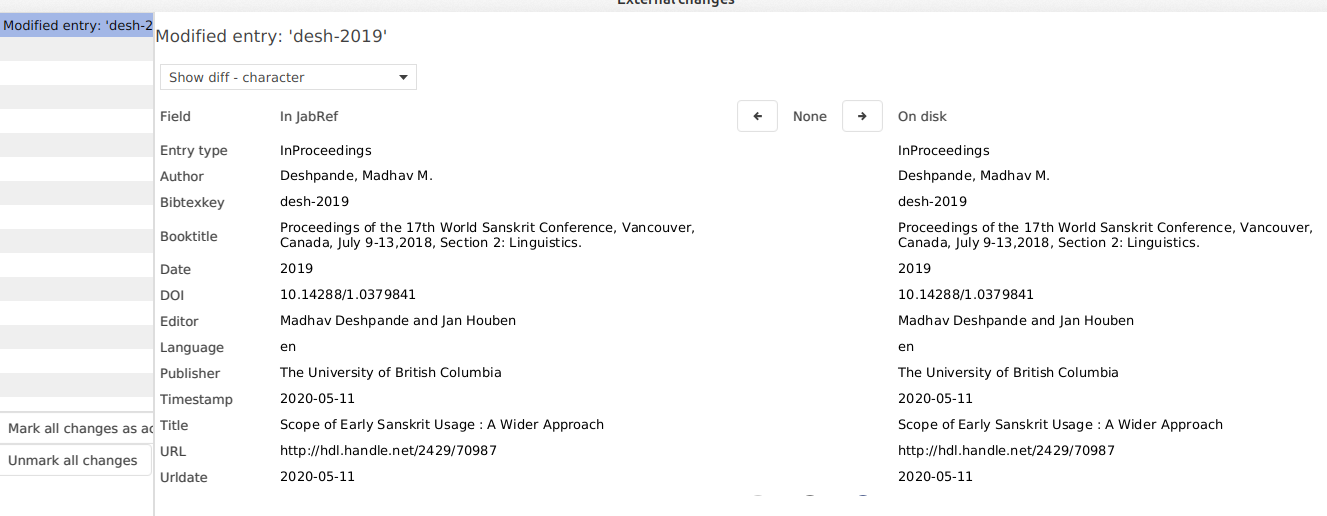
Whether I dismiss or accept, the popup comes again and again.
wujastyk
on 11 May 2020
@wujastyk
Can you make a screenshot of your settings at: file (sorry mine is german)
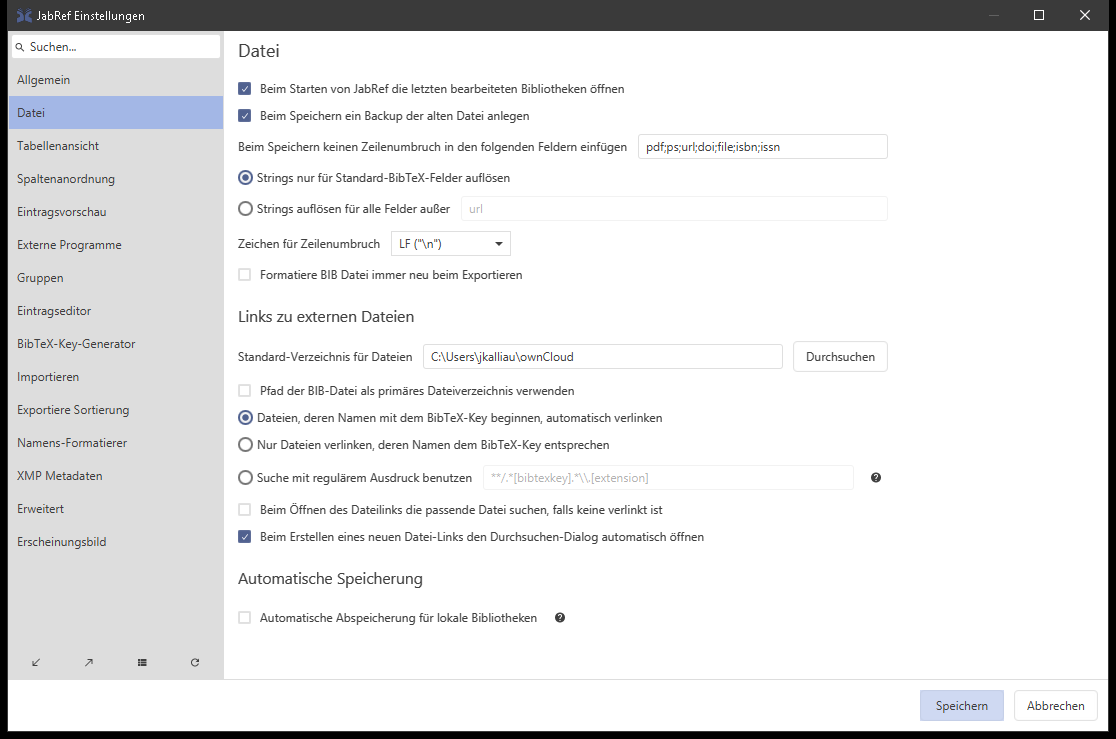
JoKalliauer
on 12 May 2020
[image: image.png]
Ich kann auch ein bisschen Deutsch lesen und schreiben :-)
On Tue, 12 May 2020 at 15:21, Johannes Kalliauer notifications@github.com
wrote:
@wujastyk https://github.com/wujastyk
Can you make a screenshot of your settings at: file (sorry mine is german)
[image: Screenshot 2020-05-12 23 19 42]
https://user-images.githubusercontent.com/15687581/81746653-2afe9c80-94a7-11ea-980d-1ffb5e01e4fd.png—
You are receiving this because you were mentioned.
Reply to this email directly, view it on GitHub
https://github.com/JabRef/jabref/issues/4877#issuecomment-627604627, or
unsubscribe
https://github.com/notifications/unsubscribe-auth/AAF2DBQYU3MCAP6RSQYXWALRRG4T5ANCNFSM4HES3FEQ
.
wujastyk
on 12 May 2020
I still get this in the latest snapshot:
JabRef 5.1--2020-05-16--cb50b50
Linux 5.6.0-1-amd64 amd64
Java 14.0.1
I got it when editing a comment. Suddenly, the message popped up (the difference shows some sentence in the comment) and also the cursor jumps to the front of the comment ( #5904). However, the JavaFX Error I usually got is gone for now (https://github.com/JabRef/jabref/issues/5658#issuecomment-577611790)
reox
on 16 May 2020
This issue will be closed in 7 days due to inactivity :zzz: Please provide the requested information if the problem persists.
![github-actions[bot] picture](https://avatars2.githubusercontent.com/in/15368?v=4&s=40) github-actions[bot]
on 16 Jun 2020
github-actions[bot]
on 16 Jun 2020
Were any efforts directed to this error? Should we test it with a newer snapshot?
bernhard-kleine
on 16 Jun 2020
Recently, I did not noticed it on saving however, there are still other occurrences - like in the linked issue regarding the comment field.
reox
on 16 Jun 2020
JabRef 5.1--2020-06-15--ed96faa
Linux 5.4.0-37-lowlatency amd64
Java 14.0.1
Just had this error on saving a single new mvBook entry this morning.
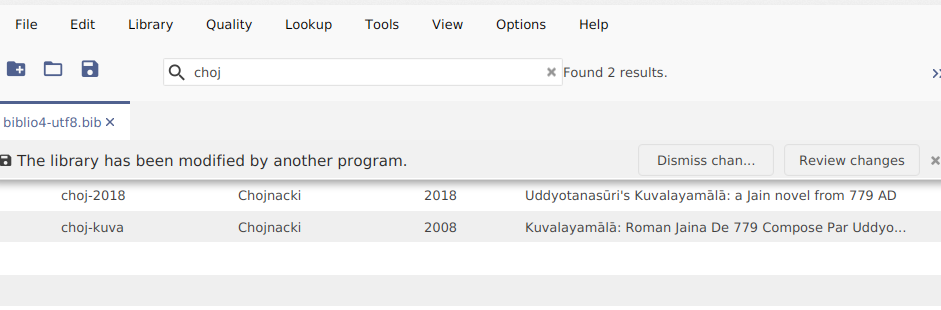
I clicked "review changes" but there were none. Just the text of the entry I had just typed.
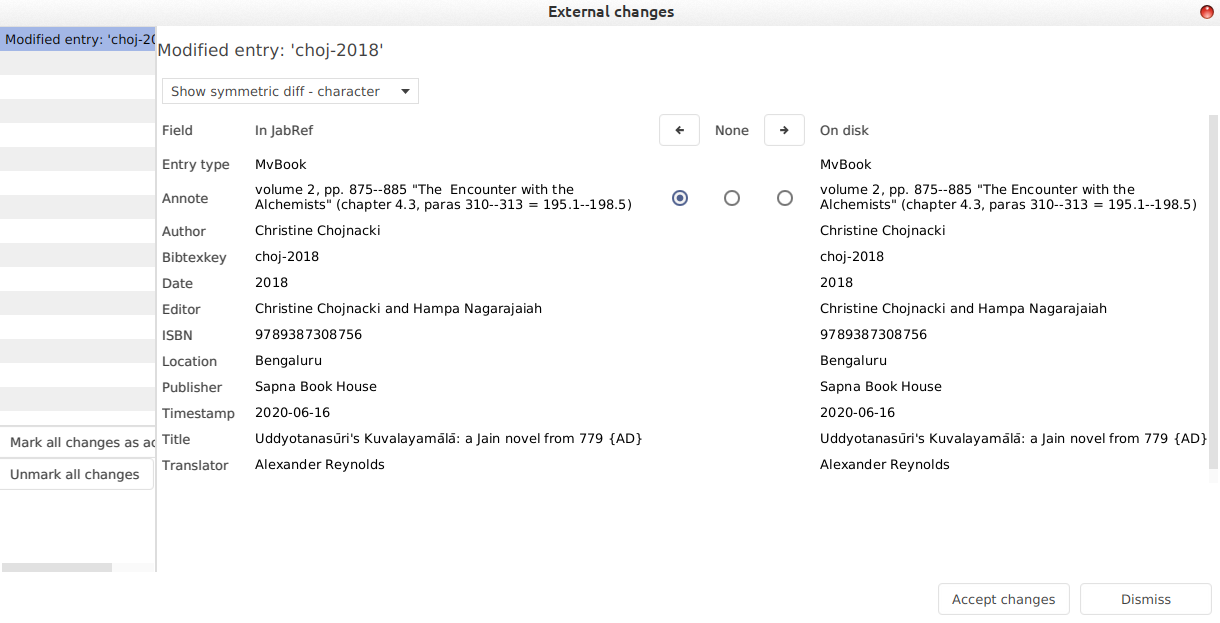
The event log is empty.
wujastyk
on 16 Jun 2020
I have the same problem. Every time I make any change, the dialog box comes up:
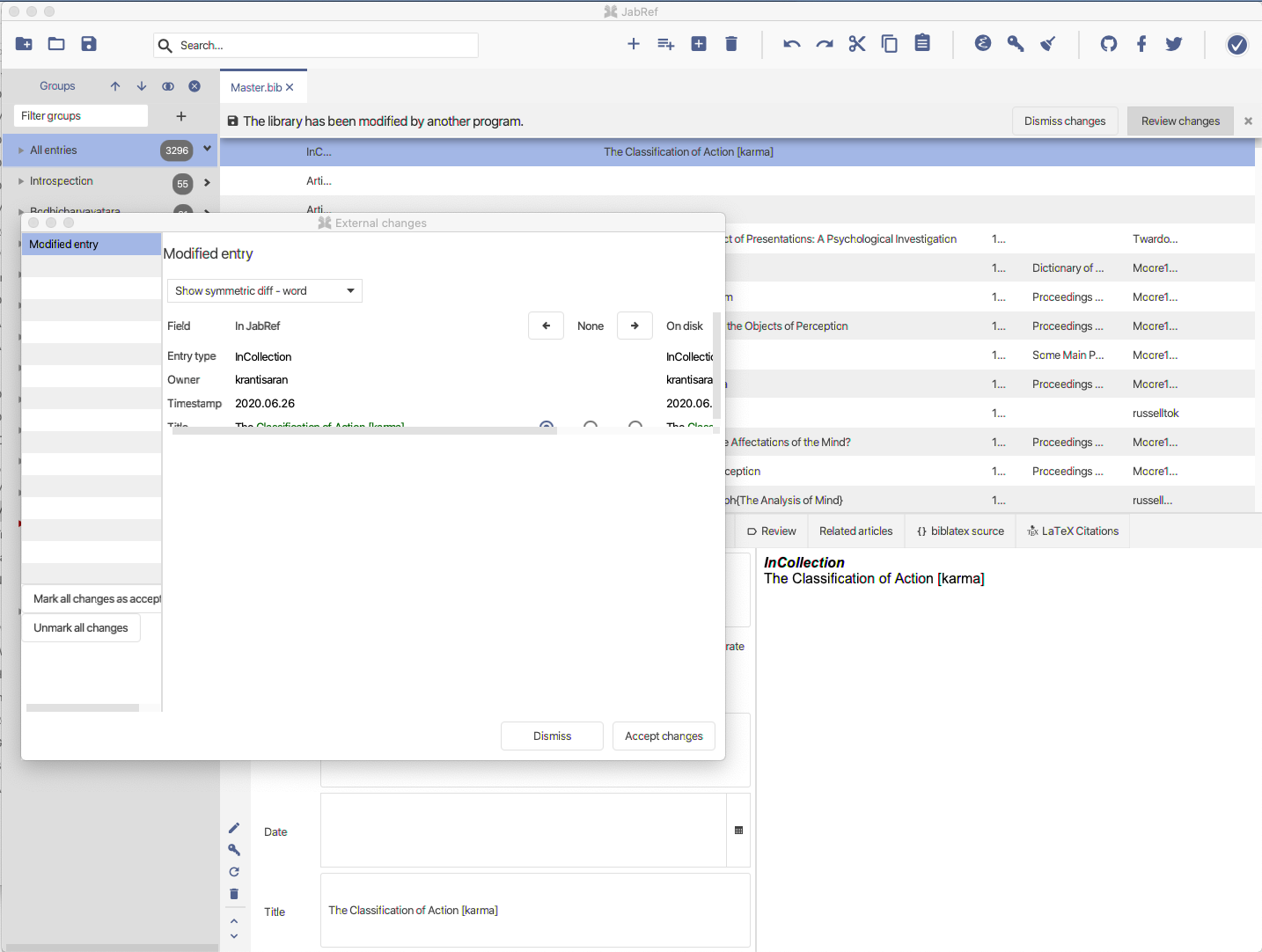
Here are my general File preferences:
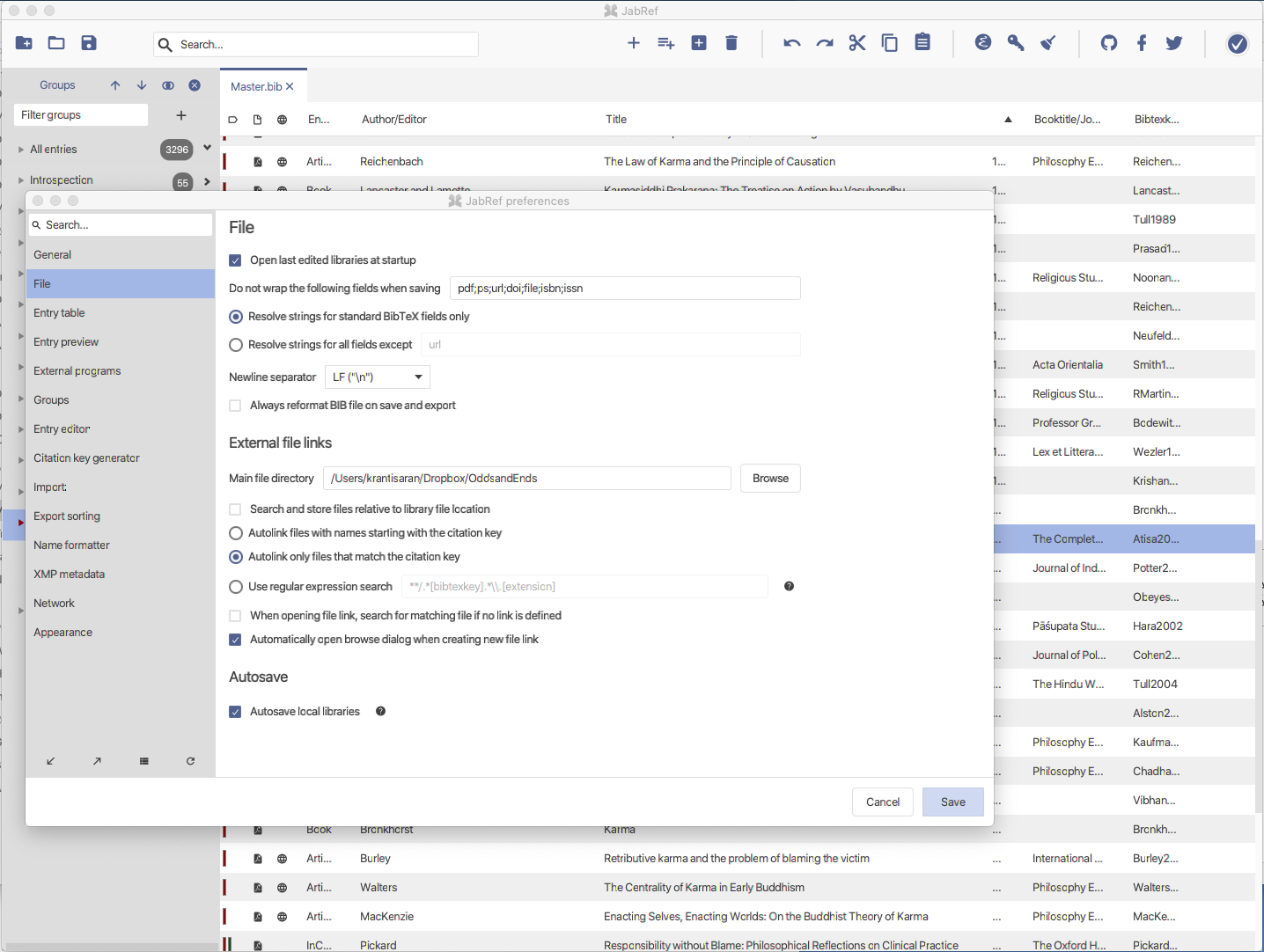
 krantisaran
on 26 Jun 2020
krantisaran
on 26 Jun 2020
@krantisaran
1)Can you show the differences in the suggested changes? It seems it sees changes in the Title.
2)Does the related entry contain any ampersand (&) ?
3)Can you open the bib-file in a text-exitor that shows the line-endings and ensure that it only contains LF ("n") but no CR ("\r")?
4)Do you use the current version (something like JabRef 5.1--2020-06) download: https://builds.jabref.org/master/
5)Which Operating System (Windows/Linux/Mac) do you use?
JoKalliauer
on 26 Jun 2020
Thanks for your questions.
@krantisaran
1)Can you show the differences in the suggested changes? It seems it sees changes in the Title.
The example was only for illustrative purposes. If I make changes in any field, then all those fields come up as suggested changes.
2)Does the related entry contain any ampersand (&) ?
As best as I can recall, the entries that trigger this error do not contain an amperstand.
3)Can you open the bib-file in a text-exitor that shows the line-endings and ensure that it only contains LF ("n") but no CR ("\r")?
I'm sorry, I don't understand what LF and CR endings are.
4)Do you use the current version (something like JabRef 5.1--2020-06) download: https://builds.jabref.org/master/
Yes, I was using the current build 5.1.
5)Which Operating System (Windows/Linux/Mac) do you use?
Mac.
Hope that helps! Thanks again for all your help.
krantisaran
on 28 Jun 2020
Thanks for your questions.
I'm not a developer, but I think they might be helpful
The example was only for illustrative purposes. If I make changes in any field, then all those fields come up as suggested changes.
That's a slightly differnet bug than reported originally.
My bug-report was about the message when saving the file, independet if you make changes or not.
Not shure if it should be disscussed here ore you should file a new bug-report. (I would go for a new one, since this one is way too long.)
I'm sorry, I don't understand what LF and CR endings are.
This are two different characters for starting a new line.
On typewriter you first push to the start of the line, and at the stop you push harder for moving into the next line.
On Windows this is implemented identically as for the typewriter: If you want to go to start a new line, you first go to the beginning of the line x=0 (carriage return), and then you go to the next line y=y_{old}+1 (line forward).
So windows always uses Carriage Return and line forward to go to the next line (two characters), some consider this as waste of bytes so unix uses line forward and (older) macs used carriage return, however both are somehow wrong.
Just a carriage return means going to the first letter of this line and overwriting it.
Just a line forward means keeping the x-position and jump at the same position to the next line, which would lead to huge indents.
A better/shorter explantation can be found here:
https://stackoverflow.com/a/12747850/6747994
In notepad++ you can enable showing line-edings as explained on https://superuser.com/q/409919
Mac.
Till now only Linux and Windows were reported here. (I think you are the first mac with this problem.)
Question:
1)does it always occour? (every time you change something)
2)does it also occour during saving the file?
3)I assume the problem persist, if you disable any syncronisation (eg. dropbox/onedrive/googledrive/owncloud/nextcloud/...).
4)Try
4a)Activate "Always reformat BIB-file on save and export".
4b)restart jabref
4c)save the file
4d)restart jabref
4e)Deactivate "Always reformat BIB-file on save and export"
4f)Check if the problem persists
JoKalliauer
on 28 Jun 2020
Thanks for your response! Your suggestion to activate and deactivate "Always reformat BIB-file on save and export." was very helpful. The prompt still occurs whenever I change an entry, but it now does not cycle endlessly. Progress!
I went through my bib file with a text editor and removed a number of characters that might have caused a problem. The most dramatic change -- and what has rendered JabRef useable again for me was this: I frequently write quite lengthy notes in the "annotations" field in the bib file using latex syntax (they're imported into a tex document to produce an annotated bibliography), for which I use a line break \\ to paragraph the material. However JabRef does not seem to like annotation fields that _end_ with \\}. Removing the \\ on all entries in which they were the last characters in the annotation field results in only a single prompt that the library has changed.
krantisaran
on 29 Jun 2020
JabRef 5.1--2020-06-25--d364ffb
Linux 5.4.0-39-lowlatency amd64
Java 14.0.1
In case this helps, I use "annote" and "annotate" fields a lot, including
with line breaks, "\". But I don't have any entries ending "\}"
wujastyk
on 30 Jun 2020
Could you please test this version? https://builds.jabref.org/pull/6528/merge/
Siedlerchr
on 12 Jul 2020
Firstly, I added a Journal name and immediately hit Ctrl-S, that worked, then I added at year to the next entry and that gave
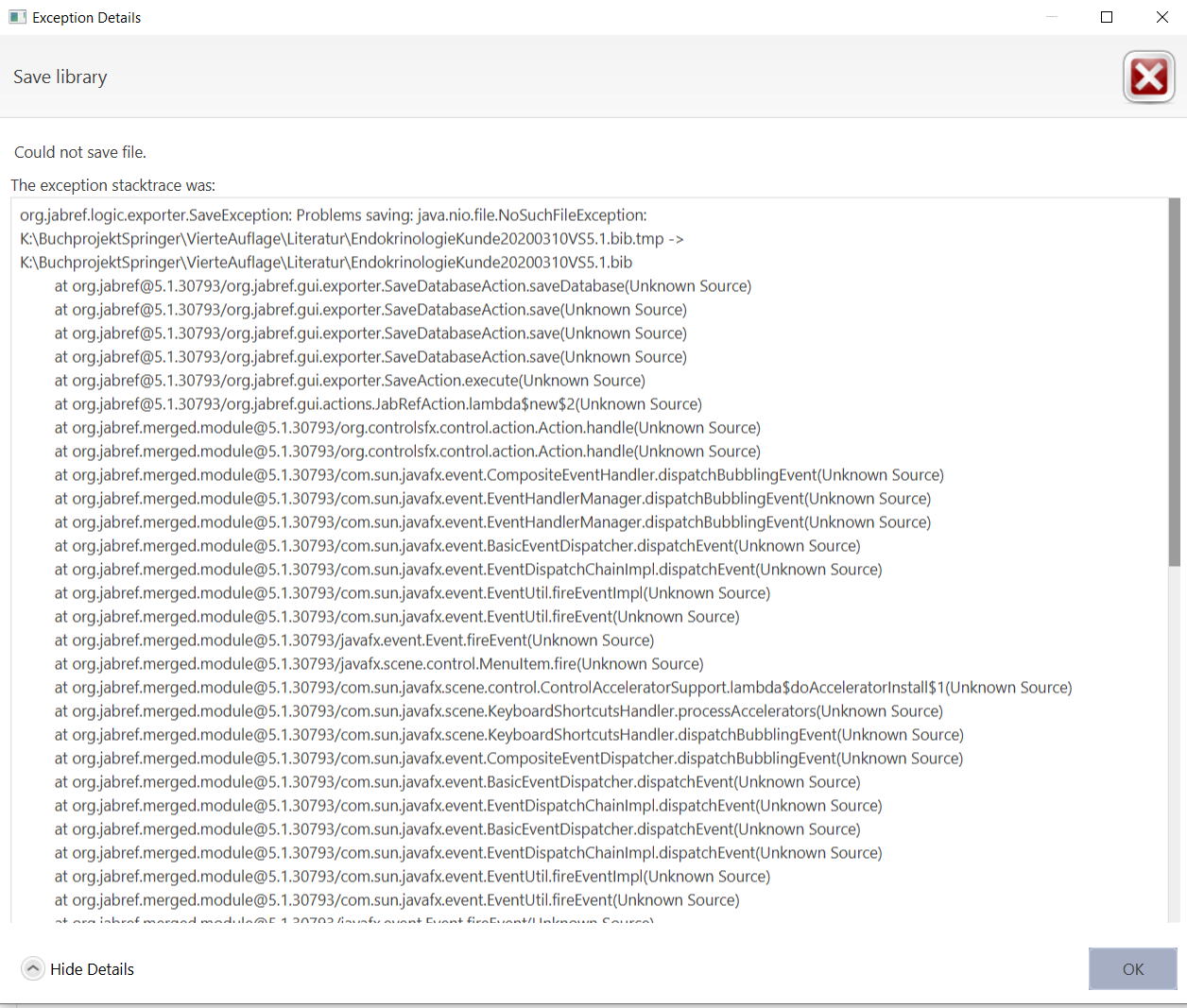
After having sent the comment I went back to Jabref and re-saved it, it worked supporting my assumption that it is a timing problem.
Regards.
bernhard-kleine
on 12 Jul 2020
JabRef 5.1-PullRequest6528.793--2020-07-11--93eaf4f
Linux 5.7.7-200.fc32.x86_64 amd64
Java 14.0.1
"The libary has been modified by another program" is still there.
ilippert
on 12 Jul 2020
just as a reminder / for info, a java.nio.file.NoSuchFileException "error" was also discussed at
https://github.com/JabRef/jabref/issues/6102
ilippert
on 12 Jul 2020
JabRef 5.1--2020-07-18--ee2c985
Mac OS X 10.15.6 x86_64
Java 14.0.2
The problem seems to have gotten worse.
Now, when I try and add an entry, JabRef for some reason wants to delete scores of entries for no apparent reason:
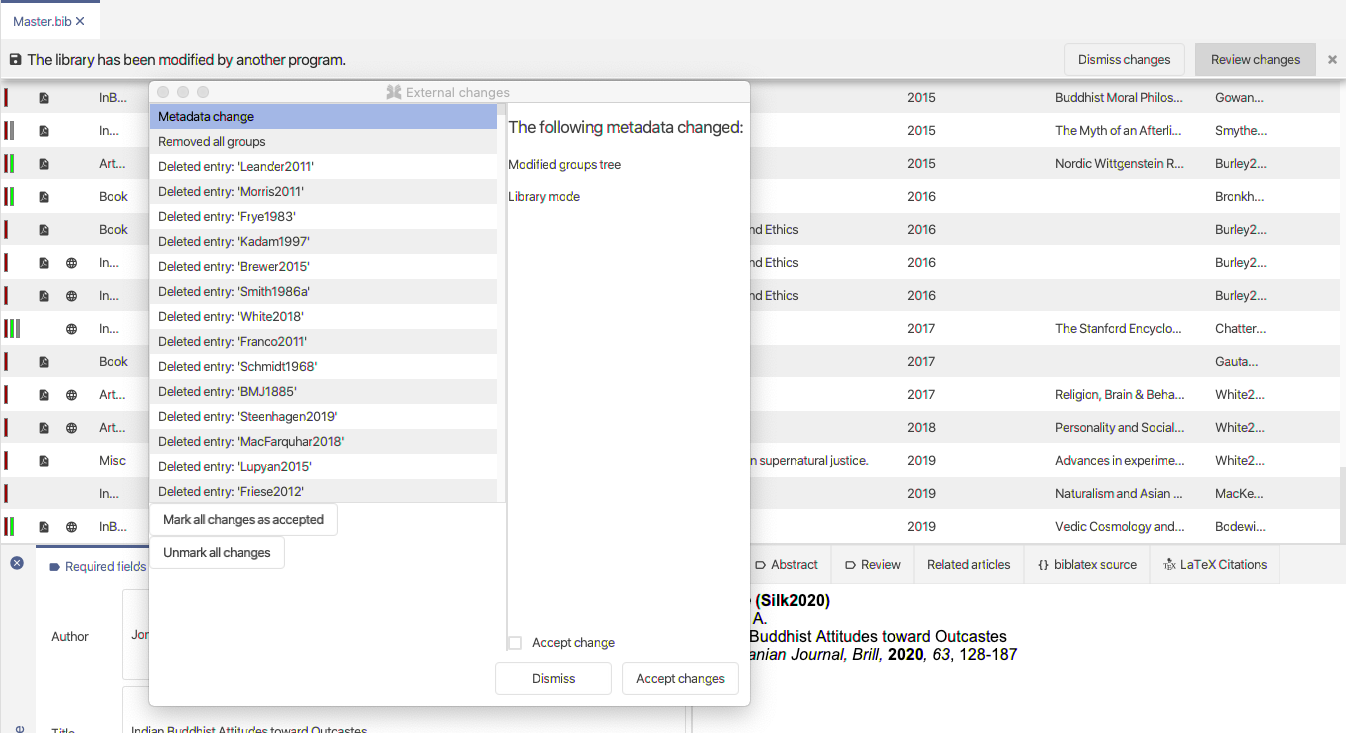
Opening this version of JabRef, I also noticed that all titles that had protective braces around them where the last character in the field is a brace now have an error, e.g. The Uses Of The Four Positions Of The ``{catu\{d}sko\{d#ti#
krantisaran
on 20 Jul 2020
And when I try and save the file having "unmark all changes" I get this error:
org.jabref.logic.exporter.SaveException: Problems saving: java.io.IOException: Error in field 'TITLE of entry Jackson1990a': Braces don't match. Field value: Luminous Mind Among the Logicians -- An Analysis of {P}ram\=a\{d}nav\=arttika
    at [email protected]/org.jabref.gui.exporter.SaveDatabaseAction.saveDatabase(Unknown Source)
    at [email protected]/org.jabref.gui.exporter.SaveDatabaseAction.save(Unknown Source)
    at [email protected]/org.jabref.gui.exporter.SaveDatabaseAction.save(Unknown Source)
    at [email protected]/org.jabref.gui.exporter.SaveDatabaseAction.save(Unknown Source)
    at [email protected]/org.jabref.gui.exporter.SaveAction.execute(Unknown Source)
    at [email protected]/org.jabref.gui.actions.JabRefAction.lambda$new$2(Unknown Source)
    at [email protected]/org.controlsfx.control.action.Action.handle(Unknown Source)
    at [email protected]/org.controlsfx.control.action.Action.handle(Unknown Source)
    at [email protected]/com.sun.javafx.event.CompositeEventHandler.dispatchBubblingEvent(Unknown Source)
    at [email protected]/com.sun.javafx.event.EventHandlerManager.dispatchBubblingEvent(Unknown Source)
    at [email protected]/com.sun.javafx.event.EventHandlerManager.dispatchBubblingEvent(Unknown Source)
    at [email protected]/com.sun.javafx.event.BasicEventDispatcher.dispatchEvent(Unknown Source)
    at [email protected]/com.sun.javafx.event.EventDispatchChainImpl.dispatchEvent(Unknown Source)
    at [email protected]/com.sun.javafx.event.EventUtil.fireEventImpl(Unknown Source)
    at [email protected]/com.sun.javafx.event.EventUtil.fireEvent(Unknown Source)
    at [email protected]/javafx.event.Event.fireEvent(Unknown Source)
    at [email protected]/javafx.scene.control.MenuItem.fire(Unknown Source)
    at [email protected]/com.sun.javafx.scene.control.GlobalMenuAdapter.lambda$bindMenuItemProperties$2(Unknown Source)
    at [email protected]/com.sun.javafx.event.CompositeEventHandler.dispatchBubblingEvent(Unknown Source)
    at [email protected]/com.sun.javafx.event.EventHandlerManager.dispatchBubblingEvent(Unknown Source)
    at [email protected]/com.sun.javafx.event.EventHandlerManager.dispatchBubblingEvent(Unknown Source)
    at [email protected]/com.sun.javafx.event.BasicEventDispatcher.dispatchEvent(Unknown Source)
    at [email protected]/com.sun.javafx.event.EventDispatchChainImpl.dispatchEvent(Unknown Source)
    at [email protected]/com.sun.javafx.event.EventUtil.fireEventImpl(Unknown Source)
    at [email protected]/com.sun.javafx.event.EventUtil.fireEvent(Unknown Source)
    at [email protected]/javafx.event.Event.fireEvent(Unknown Source)
    at [email protected]/javafx.scene.control.MenuItem.fire(Unknown Source)
    at [email protected]/com.sun.javafx.tk.quantum.GlassSystemMenu$1.action(Unknown Source)
Caused by: java.io.IOException: Error in field 'TITLE of entry Jackson1990a': Braces don't match. Field value: Luminous Mind Among the Logicians -- An Analysis of {P}ram\=a\{d}nav\=arttika
    at [email protected]/org.jabref.logic.bibtex.BibEntryWriter.writeField(Unknown Source)
    at [email protected]/org.jabref.logic.bibtex.BibEntryWriter.writeRequiredFieldsFirstRemainingFieldsSecond(Unknown Source)
    at [email protected]/org.jabref.logic.bibtex.BibEntryWriter.write(Unknown Source)
    at [email protected]/org.jabref.logic.exporter.BibtexDatabaseWriter.writeEntry(Unknown Source)
    at [email protected]/org.jabref.logic.exporter.BibDatabaseWriter.savePartOfDatabase(Unknown Source)
    at [email protected]/org.jabref.logic.exporter.BibDatabaseWriter.saveDatabase(Unknown Source)
    ... 28 more
Caused by: org.jabref.logic.bibtex.InvalidFieldValueException: Braces don't match. Field value: Luminous Mind Among the Logicians -- An Analysis of {P}ram\=a\{d}nav\=arttika
    at [email protected]/org.jabref.logic.bibtex.FieldWriter.checkBraces(Unknown Source)
    at [email protected]/org.jabref.logic.bibtex.FieldWriter.formatAndResolveStrings(Unknown Source)
    at [email protected]/org.jabref.logic.bibtex.FieldWriter.write(Unknown Source)
    ... 34 more
krantisaran
on 20 Jul 2020
Please try to delete the .bak file next to your jabref file and also hit dismiss when you encounter the library has changed
Siedlerchr
on 20 Jul 2020
Thanks. I deleted the .bak file (without closing and restarting JabRef) but it didn't allow me to do so:
org.jabref.logic.exporter.SaveException: Problems saving: java.io.IOException: Error in field 'TITLE of entry Jackson1990a': Braces don't match. Field value: Luminous Mind Among the Logicians -- An Analysis of {P}ram\=a\{d}nav\=arttika
    at [email protected]/org.jabref.gui.exporter.SaveDatabaseAction.saveDatabase(Unknown Source)
    at [email protected]/org.jabref.gui.exporter.SaveDatabaseAction.save(Unknown Source)
    at [email protected]/org.jabref.gui.exporter.SaveDatabaseAction.save(Unknown Source)
    at [email protected]/org.jabref.gui.exporter.SaveDatabaseAction.save(Unknown Source)
    at [email protected]/org.jabref.gui.exporter.SaveAction.execute(Unknown Source)
    at [email protected]/org.jabref.gui.actions.JabRefAction.lambda$new$2(Unknown Source)
    at [email protected]/org.controlsfx.control.action.Action.handle(Unknown Source)
    at [email protected]/org.controlsfx.control.action.Action.handle(Unknown Source)
    at [email protected]/com.sun.javafx.event.CompositeEventHandler.dispatchBubblingEvent(Unknown Source)
    at [email protected]/com.sun.javafx.event.EventHandlerManager.dispatchBubblingEvent(Unknown Source)
    at [email protected]/com.sun.javafx.event.EventHandlerManager.dispatchBubblingEvent(Unknown Source)
    at [email protected]/com.sun.javafx.event.BasicEventDispatcher.dispatchEvent(Unknown Source)
    at [email protected]/com.sun.javafx.event.EventDispatchChainImpl.dispatchEvent(Unknown Source)
    at [email protected]/com.sun.javafx.event.EventUtil.fireEventImpl(Unknown Source)
    at [email protected]/com.sun.javafx.event.EventUtil.fireEvent(Unknown Source)
    at [email protected]/javafx.event.Event.fireEvent(Unknown Source)
    at [email protected]/javafx.scene.control.MenuItem.fire(Unknown Source)
    at [email protected]/com.sun.javafx.scene.control.GlobalMenuAdapter.lambda$bindMenuItemProperties$2(Unknown Source)
    at [email protected]/com.sun.javafx.event.CompositeEventHandler.dispatchBubblingEvent(Unknown Source)
    at [email protected]/com.sun.javafx.event.EventHandlerManager.dispatchBubblingEvent(Unknown Source)
    at [email protected]/com.sun.javafx.event.EventHandlerManager.dispatchBubblingEvent(Unknown Source)
    at [email protected]/com.sun.javafx.event.BasicEventDispatcher.dispatchEvent(Unknown Source)
    at [email protected]/com.sun.javafx.event.EventDispatchChainImpl.dispatchEvent(Unknown Source)
    at [email protected]/com.sun.javafx.event.EventUtil.fireEventImpl(Unknown Source)
    at [email protected]/com.sun.javafx.event.EventUtil.fireEvent(Unknown Source)
    at [email protected]/javafx.event.Event.fireEvent(Unknown Source)
    at [email protected]/javafx.scene.control.MenuItem.fire(Unknown Source)
    at [email protected]/com.sun.javafx.tk.quantum.GlassSystemMenu$1.action(Unknown Source)
Caused by: java.io.IOException: Error in field 'TITLE of entry Jackson1990a': Braces don't match. Field value: Luminous Mind Among the Logicians -- An Analysis of {P}ram\=a\{d}nav\=arttika
    at [email protected]/org.jabref.logic.bibtex.BibEntryWriter.writeField(Unknown Source)
    at [email protected]/org.jabref.logic.bibtex.BibEntryWriter.writeRequiredFieldsFirstRemainingFieldsSecond(Unknown Source)
    at [email protected]/org.jabref.logic.bibtex.BibEntryWriter.write(Unknown Source)
    at [email protected]/org.jabref.logic.exporter.BibtexDatabaseWriter.writeEntry(Unknown Source)
    at [email protected]/org.jabref.logic.exporter.BibDatabaseWriter.savePartOfDatabase(Unknown Source)
    at [email protected]/org.jabref.logic.exporter.BibDatabaseWriter.saveDatabase(Unknown Source)
    ... 28 more
Caused by: org.jabref.logic.bibtex.InvalidFieldValueException: Braces don't match. Field value: Luminous Mind Among the Logicians -- An Analysis of {P}ram\=a\{d}nav\=arttika
    at [email protected]/org.jabref.logic.bibtex.FieldWriter.checkBraces(Unknown Source)
    at [email protected]/org.jabref.logic.bibtex.FieldWriter.formatAndResolveStrings(Unknown Source)
    at [email protected]/org.jabref.logic.bibtex.FieldWriter.write(Unknown Source)
    ... 34 more
krantisaran
on 21 Jul 2020
@krantisaran The error says it clear, you have a missing or wrong curly brace in the field:
TITLE of entry Jackson1990a': Braces don't match. Field value: Luminous Mind Among the Logicians -- An Analysis of {P}ram\=a\{d}nav\=arttika
Siedlerchr
on 21 Jul 2020
Thanks! Fixed now -- there was a duplicate entry I hadn't noticed (I had fixed it in one but not the other). Sorry, I should have caught that myself.
(Unfortunately, the library has been modified message continues).
krantisaran
on 21 Jul 2020
JabRef 5.2--2020-12-24--6a2a512
Linux 5.4.0-58-generic amd64
Java 15.0.1
I've been getting this again too. Driving me mad.
wujastyk
on 31 Dec 2020
Related issues
 diabl0w
·
3Comments
JoKalliauer
·
3Comments
diabl0w
·
3Comments
JoKalliauer
·
3Comments
 LinusDietz
·
3Comments
LinusDietz
·
3Comments
 a-torgovitsky
·
3Comments
a-torgovitsky
·
3Comments
 c3h899
·
3Comments
c3h899
·
3Comments
Most helpful comment
Related:
We should remove the
savandbakfeature. This is so 2000. I forced to keep it in 2015, but I regret it now. Version control and backup feature are now common things.Maybe, if we just remove
bakandsav(and directly save tobib), all these change detection issues could be resolved.