Jabref: Feature Request: Show what is sent to Mr Dlib
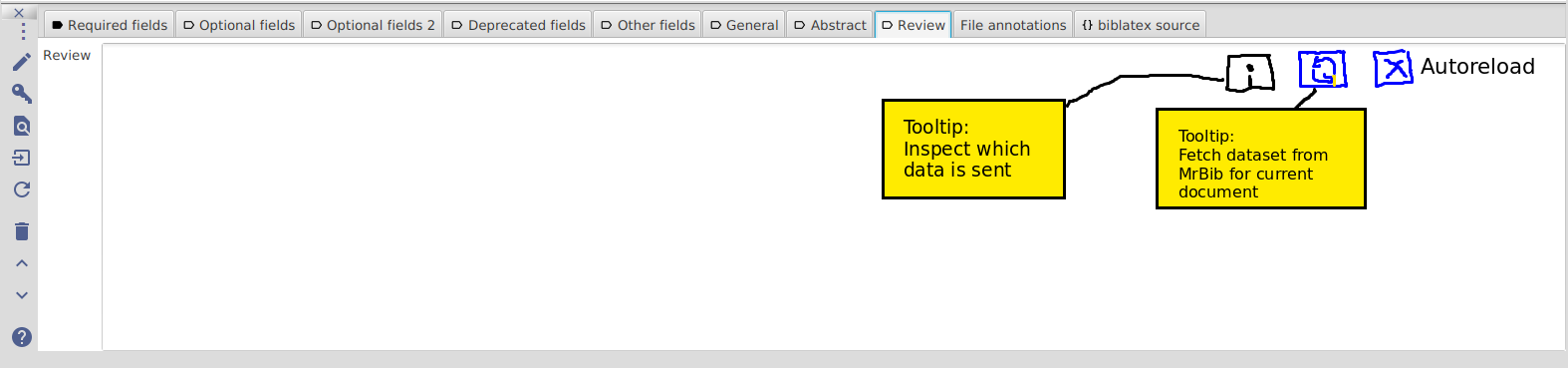
Feature Request: Jabref should show a inspect button in the Mr Dlib tab. By clicking on this one it shows the user, which dataset is sent to the server.
A journalist who organizes a critical paper with Jabref can get in danger (in some states) just because Jabref whispers...
One could add a "reload icon ↺" and a checkbox [x] autoreload in the corner of the tab. The user can manually request a data transfer, if autoreload is off, or enable autoreload. Besides that its always present where it happens and the user does not need to search in preferences.
Perhaps the user does not want to autoreload, when surfing via gsm, but when back in the wlan. So he/she can switch on and off easily.
 jonasstein
All 7 comments
I guess this is more than just MR DLib. Which are the services you trust? We have many features that communicate with external web services like dblp, google scholar, ACM, dx.doi, medline, IEEE, etc.. where do you draw the border?
 LinusDietz
on 3 Nov 2017
LinusDietz
on 3 Nov 2017
A service should never send data per default without user action. If a user looks up a doi, it is a manual action. The data which is sent is the data the user entered in the form field. Here it is clear for the user which data is sent when. The user should have the choice to decide. This is not the case, if a service is syncing automatically per default.
Of course a inspect which data will be sent button can be interesting for all other services too for debugging and the interested user.
jonasstein
on 3 Nov 2017
Another option might be the following:
- set the related articles tab to disabled by default
- on first startup for a new user, display a dialog that explains what it does and asks if the tab should be displayed
 lenhard
on 3 Nov 2017
lenhard
on 3 Nov 2017
Although I'm maybe in the minority here with my opinion, but I think the current version is totally fine.
- If I click on the tab, I suspect that JabRef shows me some recommendations...of course JabRef is not a magician and the information has to come from somewhere. That this somewhere is probably the internet should be self explanatory.
- The tab clearly shows you were the recommendations are coming from. This gives you enough information to do a quick search and see how reliable the service is / if you would trust it.
- If a user don't like the feature she can easily disable it in the preferences.
- If somebody is really interested what kind of data is send, then he can simply look at the code (isn't that one of the big advantages of open source systems?!)
I know data privacy is a sensitive area and shouldn't be taken lightly, but c'mon there is an end to everything.
 tobiasdiez
on 3 Nov 2017
tobiasdiez
on 3 Nov 2017
- [ ] Big fat "enable" button
 koppor
on 7 Nov 2017
koppor
on 7 Nov 2017
Devcall has decided that we go with @koppor's solution: before activating the mr.dlib there should be a high-level description of the feature and the data sent, then the user can decide to activate this feature or not.
LinusDietz
on 22 Nov 2017
Mr.Dlib is currently opt-out which is possible inside the preferences. Will will discuss and closely monitor if we make it opt-in and disabled by default in the future.
 stefan-kolb
on 6 Feb 2018
stefan-kolb
on 6 Feb 2018
Related issues
lenhard
·
4Comments
 simonharrer
·
3Comments
simonharrer
·
3Comments
 thorstenwagner
·
4Comments
LinusDietz
·
3Comments
thorstenwagner
·
4Comments
LinusDietz
·
3Comments
 JoKalliauer
·
3Comments
JoKalliauer
·
3Comments
Most helpful comment