Iview: [Bug Report]Col components are wrong in eslint-plugin-vue
Environment
vue 2.5.13/eslint-plugin-vue 4.0.0
Reproduction link
https://github.com/vuejs/eslint-plugin-vue/blob/master/docs/rules/no-parsing-error.md
Steps to reproduce
eslint-plugin-vue已经是正式版,在eslint的配置下,运行如下代码
<Col>
  <Button>test</Button>
</Col>
eslint检查报错
3:7 error Parsing error: x-invalid-end-tag vue/no-parsing-error
What is expected?
因为col是自闭合标签,希望有有效的方法解决vue/no-parsing-error的问题
What is actually happening?
error Parsing error: x-invalid-end-tag vue/no-parsing-error
 weihongyu12
All 17 comments
Translation of this issue:
Environment
Vue 2.5.13/eslint-plugin-vue 4.0.0
Reproduction link
https://github.com/vuejs/eslint-plugin-vue/blob/master/docs/rules/no-parsing-error.md
Steps to reproduce
Eslint-plugin-vue is the official version of the code that runs the following code under the configuration of eslint
.
.
Eslint check the mistake
.
3:7 error Parsing error: x-invalid-end-tag vue/no-parsing-error
.
What is expected?
Because col is a self closing tag, I hope there is an effective way to solve the problem of vue/no-parsing-error
What is actually happening?
Error Parsing error: x-invalid-end-tag vue/no-parsing-error
 iview-bot
on 16 Jan 2018
iview-bot
on 16 Jan 2018
The linter thinks its the HTML native <col> which is a empty element. Did you try using i-col in your template?
 SergioCrisostomo
on 16 Jan 2018
SergioCrisostomo
on 16 Jan 2018
you can use i-col
 icarusion
on 17 Jan 2018
icarusion
on 17 Jan 2018
https://github.com/vuejs/vetur/blob/master/docs/linting-error.md#linting-for-template
可以单独关闭标签检查,现在舒服多了~
 shilx
on 25 Jan 2018
shilx
on 25 Jan 2018
I have the same problem.
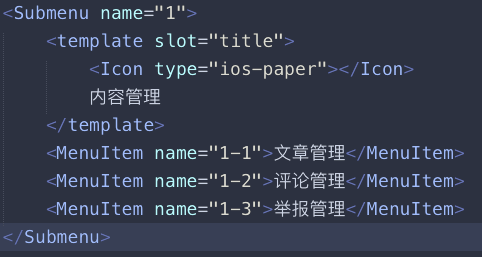
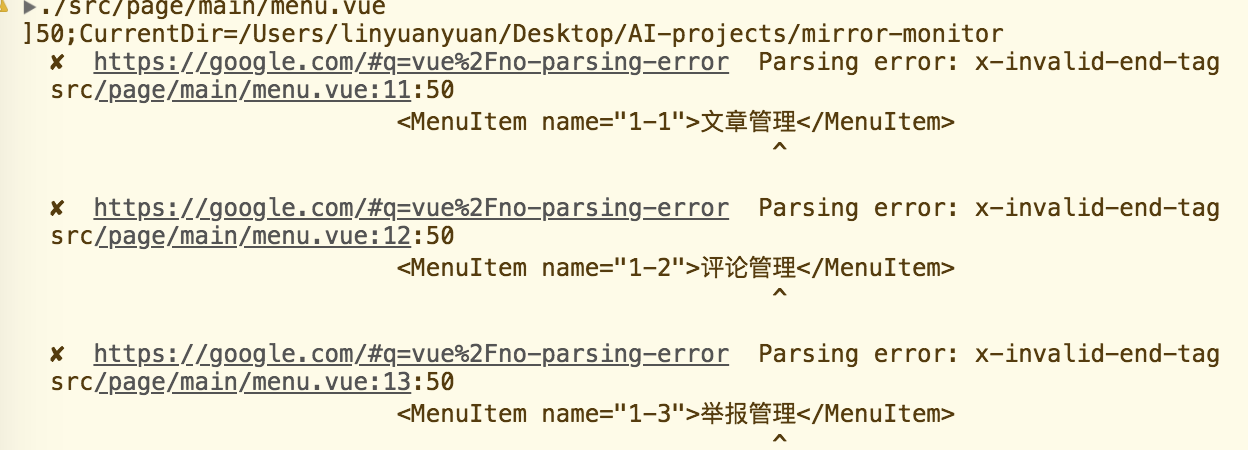
I have set vue/no-parsing-error, but it's not useful. So how to do next?
 LinXibei
on 29 Jan 2018
LinXibei
on 29 Jan 2018
.eslintrc.js 的 rules 加上
"vue/no-parsing-error": [2, {
       "x-invalid-end-tag": false
    }]
 jl1014171068
on 5 Feb 2018
jl1014171068
on 5 Feb 2018
来自:vs code 里面 如何 去掉 invalid-end-tag 的lint错误
//settings 里面的配置:
"vetur.validation.template": false
 chanwingwah
on 28 Feb 2018
chanwingwah
on 28 Feb 2018
@hua-cyh niubility,thanks!
 1990jtf
on 20 Apr 2018
1990jtf
on 20 Apr 2018
@hua-cyh 厉害了……
 13463736868
on 26 Apr 2018
13463736868
on 26 Apr 2018
webstorm 里面怎么搞啊,, 设置了"vue/no-parsing-error": [2, { "x-invalid-end-tag": false }]
编译没报错,,, 但是特么编辑器还是报错,心塞
 caryxiao
on 24 May 2018
caryxiao
on 24 May 2018
webstorm设置"vue/no-parsing-error": [2, { "x-invalid-end-tag": false }]没问题啊,得重启编译dev才能生效的
 Beats0
on 23 Jun 2018
Beats0
on 23 Jun 2018
@hua-cyh thx!
 ChenPt
on 28 Jun 2018
ChenPt
on 28 Jun 2018
设置了"vue/no-parsing-error": [2, { "x-invalid-end-tag": false }]之后不得行,在VSCode设置"vetur.validation.template": false还是不得行。编译没有报错, 但是vscode编译器老报错,看着我很难受啊,怎么解决?
 PDKSophia
on 21 Dec 2018
PDKSophia
on 21 Dec 2018
设置了"vue/no-parsing-error": [2, { "x-invalid-end-tag": false }]之后不得行,在VSCode设置"vetur.validation.template": false还是不得行。编译没有报错, 但是vscode编译器老报错,看着我很难受啊,怎么解决?
设置完vscode 需要重启一次vscode 试试。 我这里设置完不生效,重启后生效了。
 ghost
on 26 Dec 2018
ghost
on 26 Dec 2018
I'm getting a similar error

I added "vetur.validation.template": false, to my settings.json
And added custom rules to eslintrc.js
  rules: {
    "vue/no-parsing-error": [2, {
      "x-invalid-end-tag": false
    }]
  }
Nothing seems to be working....
 rlam3
on 21 Feb 2019
rlam3
on 21 Feb 2019
@ghost 重启vscode即可
 ZJH9Rondo
on 26 Mar 2019
ZJH9Rondo
on 26 Mar 2019
webstorm 里面怎么搞啊,, 设置了"vue/no-parsing-error": [2, { "x-invalid-end-tag": false }]
编译没报错,,, 但是特么编辑器还是报错,心塞
重启就没事了
 chengxuzhang
on 12 Apr 2019
chengxuzhang
on 12 Apr 2019
Related issues
 kengqiangxia
·
3Comments
kengqiangxia
·
3Comments
 no5no6
·
3Comments
no5no6
·
3Comments
 agileago
·
3Comments
agileago
·
3Comments
 animabear
·
3Comments
animabear
·
3Comments
 blankxf
·
3Comments
blankxf
·
3Comments
Most helpful comment
来自:vs code 里面 如何 去掉 invalid-end-tag 的lint错误
//settings 里面的配置:
"vetur.validation.template": false