Itlwm: [AirportItlwm] How to monitor Upload/Download speed?
Have You Read Our Docs
Yes
Are You Reporting A Bug
No (Asking for help)
Environment
- Kext Version: AirportItlwm_v1.0_Beta_Catalina.kext
- WiFi Card Model: AC 9560
- Product ID: 0xA370
- macOS Version: 10.15.6
Description
I have installed the beta version of AirportItlwm on Catalina (10.15.6). It's working great (for now), but I cannot monitor my network speed. I have tried iStat menu and Bandwidth+ apps to monitor my upload/download speed, but have failed. Realtime upload/download speed is not available (always showing 0MB/s).
I've read the doc FAQ and it only provides a solution for itlwm (by creating a bridge), but no solution for AirportItlwm is given. So I was asking, how can i monitor my realtime upload/download speed on AirportItlwm?
Kext Download Source
The 1.1.0 release.
 JyotiPRoy
All 39 comments
I don't use iStat or other similar software and I have no interest in them. Can someone else confirm this issue?
 williambj1
on 26 Sep 2020
williambj1
on 26 Sep 2020
I don't use iStat or other similar software and I have no interest in them. Can someone else confirm this issue?
I have the exact same issue. Even activity monitor does not register the WiFi speed for me.
 RaffaySajjad
on 26 Sep 2020
RaffaySajjad
on 26 Sep 2020
I don't use iStat or other similar software and I have no interest in them. Can someone else confirm this issue?
I have the exact same issue. Even activity monitor does not register the WiFi speed for me.
Yeah I forgot to mention that, Activity monitor also doesn't register my upload/download speed and the total data consumption.
JyotiPRoy
on 26 Sep 2020
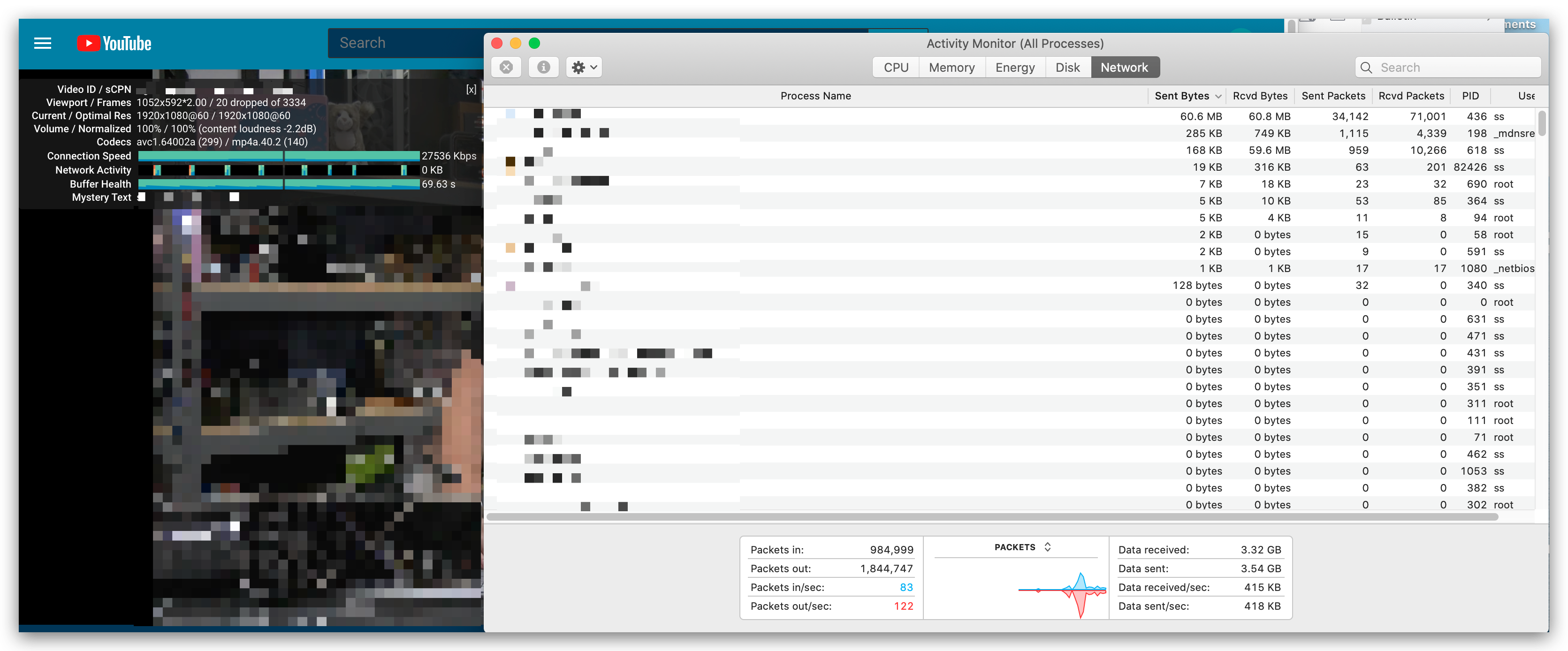
Weird, mine works fine.
williambj1
on 26 Sep 2020
Weird, mine works fine.
Its so strange. Only Data received/sec is stuck at 0 for me. Rest of the parameters are showing some values. Although I'm a bit skeptical about those, because I have Youtube video streaming at 1080p and Data received is only 98KB??

RaffaySajjad
on 26 Sep 2020
Hmmm, just rebooted into Big Sur, seem to work fine as well.

williambj1
on 26 Sep 2020
You can see below that youtube reports my network speed as 4-5 MB/s, while activity monitor reports 0. Interestingly the activity GoogleChromeHelper shows a data consumption of 169 MB, while the activity monitor summary shows total received data as 59 KB. It's Confusing!

JyotiPRoy
on 26 Sep 2020
Should be expected since Youtube uses UDP and has finished buffering.

williambj1
on 26 Sep 2020
Should be expected since Youtube uses UDP and has finished buffering.
But the data received is shown as 59 KB, it is not possible in case of a 1080p stream. Again I've tested this while opening websites, on video calls etc. It always shows 0 MB/s
JyotiPRoy
on 26 Sep 2020
Idk, if you need any logs to analyse the problem, I'll be happy to provide.
JyotiPRoy
on 26 Sep 2020
Same problem on Catalina. Just downloading an app from brew cask (Calibre, tens of megabytes) and activity monitor says the speed is zero and also zero downloaded bytes.
 igorkulman
on 26 Sep 2020
igorkulman
on 26 Sep 2020
Same problem. But using another kext call AppleIntelWifi can monitor the upload/download speed normally.
 LiuLiujie
on 1 Oct 2020
LiuLiujie
on 1 Oct 2020
It's because the input packet counter don't work.

But in the ioreg I see that the counter is actually working, so don't know why macOS ignores it.
 usr-sse2
on 2 Oct 2020
usr-sse2
on 2 Oct 2020
I found that macOS reports download packat as uploads.

- Apparently I'm using Intel AX201. Not Huawei (e8372). That's stats which is false-guessing inet interface.
Maybe some typo?
 phu54321
on 6 Oct 2020
phu54321
on 6 Oct 2020
Same happening for itlwm. (not airport version) seems like this bug isn't airport-only bug

phu54321
on 10 Oct 2020
Have You Read Our Docs
YesAre You Reporting A Bug
No (Asking for help)Environment
- Kext Version: AirportItlwm_v1.0_Beta_Catalina.kext
- WiFi Card Model: AC 9560
- Product ID: 0xA370
- macOS Version: 10.15.6
Description
I have installed the beta version of AirportItlwm on Catalina (10.15.6). It's working great (for now), but I cannot monitor my network speed. I have tried iStat menu and Bandwidth+ apps to monitor my upload/download speed, but have failed. Realtime upload/download speed is not available (always showing 0MB/s).
I've read the doc FAQ and it only provides a solution for itlwm (by creating a bridge), but no solution for AirportItlwm is given. So I was asking, how can i monitor my realtime upload/download speed on AirportItlwm?Kext Download Source
The 1.1.0 release.
could you help me with airportitlwm on Catalina? I don't know hot to set the config.plist
 davideakadudu
on 18 Oct 2020
davideakadudu
on 18 Oct 2020
First of all, thanks to the itlwm team for awesome work on the kext which is working great.
I am having the same issue using _AirportItlwm_v1.0_Beta_Catalina.kext_ on macOS 10.15.7:
- iStat->Network is showing Upload bandwidth usage only for interfaces but does correctly display network usage for processes
netstat -ib -I en0is also showing zeroes for everything incoming but for outgoing only byte counters (Obytes) and errors (Oerrs) are non-zero while packet counters (Opkts) are at zero.- Network Utility->Info is showing all zeroes in Transfer Statistics for Wi-Fi (en0) network interface. Actually, Send Errors counter shows 1, but I am not sure if there was an actual failure that got counted or it's the result of a bug. Since Network Utility->Info interface is not designed to display byte counters, so I wasn't able to compare byte stats with other sources. But since I observed the same single count of a send error, I would think that netstat and Network Utility obtain their counter data from the same source. The one being incorrectly (or partially rather) populated by the kext.
- Activity Monitor->Network seems to correctly report network usage for processes and total
All makes me think that there are multiple counter sources of network usage data, and AirportItlwm is populating only some of them.
 adeg
on 19 Oct 2020
adeg
on 19 Oct 2020
Same problem here. I am using Airportitlwm.kext, IntelBluetoothFirmware.kext and IntelBluetoothInjector.kext. My wifi and bluetooth work great. (mobo: Fatal1ty B450 Gaming-ITX/ac).
The only problem I have is that I cannot monitor the download speed. My reading is always 0.
Fyi, my wifi/BT card is 0x8087, 0x0aa7 and I run Catalina 10.15.7
Any fix/workaround for this?
 madvinegar
on 20 Oct 2020
madvinegar
on 20 Oct 2020
This seems like the code simply isn't yet implemented. Stats querys interface's upload/download speed with:
    private func getBytesInfo(_ pointer: UnsafeMutablePointer<ifaddrs>) -> (upload: Int64, download: Int64)? {
        let addr = pointer.pointee.ifa_addr.pointee

        guard addr.sa_family == UInt8(AF_LINK) else {
            return nil
        }

        let data: UnsafeMutablePointer<if_data>? = unsafeBitCast(pointer.pointee.ifa_data, to: UnsafeMutablePointer<if_data>.self)
        return (upload: Int64(data?.pointee.ifi_obytes ?? 0), download: Int64(data?.pointee.ifi_ibytes ?? 0))
    }
So, upload speed corresponds to ifi_obytes, and download speed corresponds to ifi_ibytes. Both fields originate from if_data struct.

And I don't see any sign of itlwm dealing with if_data field.
According to darwin-xnu code, if_data is managed by macOS kernel itself.
static void
dlil_input_stats_sync(struct ifnet *ifp, struct dlil_threading_info *inp)
{
    struct ifnet_stat_increment_param *s = &inp->stats;

    /*
     * Use of atomic operations is unavoidable here because
     * these stats may also be incremented elsewhere via KPIs.
     */
    if (s->packets_in != 0) {
        atomic_add_64(&ifp->if_data.ifi_ipackets, s->packets_in);
        s->packets_in = 0;
    }
    if (s->bytes_in != 0) {
        atomic_add_64(&ifp->if_data.ifi_ibytes, s->bytes_in);
        s->bytes_in = 0;
    }
    if (s->errors_in != 0) {
        atomic_add_64(&ifp->if_data.ifi_ierrors, s->errors_in);
        s->errors_in = 0;
    }

    if (s->packets_out != 0) {
        atomic_add_64(&ifp->if_data.ifi_opackets, s->packets_out);
        s->packets_out = 0;
    }
    if (s->bytes_out != 0) {
        atomic_add_64(&ifp->if_data.ifi_obytes, s->bytes_out);
        s->bytes_out = 0;
    }
    if (s->errors_out != 0) {
        atomic_add_64(&ifp->if_data.ifi_oerrors, s->errors_out);
        s->errors_out = 0;
    }

    if (s->collisions != 0) {
        atomic_add_64(&ifp->if_data.ifi_collisions, s->collisions);
        s->collisions = 0;
    }
    if (s->dropped != 0) {
        atomic_add_64(&ifp->if_data.ifi_iqdrops, s->dropped);
        s->dropped = 0;
    }

    if (ifp->if_data_threshold != 0) {
        lck_mtx_convert_spin(&inp->input_lck);
        ifnet_notify_data_threshold(ifp);
    }

    /*
     * No need for atomic operations as they are modified here
     * only from within the DLIL input thread context.
     */
    if (inp->tstats.packets != 0) {
        inp->pstats.ifi_poll_packets += inp->tstats.packets;
        inp->tstats.packets = 0;
    }
    if (inp->tstats.bytes != 0) {
        inp->pstats.ifi_poll_bytes += inp->tstats.bytes;
        inp->tstats.bytes = 0;
    }
}
where packets_in or things are managed by IONetworkInterface::pushInputPacket
phu54321
on 23 Oct 2020
@phu54321
thanks for your comment and investigation, if_data stat is updated correctly, but I don't know why it is show zero in user space while I am successfully count them in kernel space.
the stat pointer is come from here:
bool itlwm::configureInterface(IONetworkInterface *netif) {
    IONetworkData *nd;

    if (super::configureInterface(netif) == false) {
        XYLog("super failed\n");
        return false;
    }

    nd = netif->getParameter(kIONetworkStatsKey);
    if (!nd || !(fpNetStats = (IONetworkStats *)nd->getBuffer())) {
        XYLog("network statistics buffer unavailable?\n");
        return false;
    }
    fHalService->get80211Controller()->ic_ac.ac_if.netStat = fpNetStats;
    fHalService->get80211Controller()->ic_ac.ac_if.iface = OSDynamicCast(IOEthernetInterface, netif);
    fpNetStats->collisions = 0;

    return true;
}
and you can the input counter update in _if_input:
static IOReturn _if_input(OSObject *target, void *arg0, void *arg1, void *arg2, void *arg3)
{
    mbuf_t m;
    bool isEmpty = true;
    struct _ifnet *ifq = (struct _ifnet *)arg0;
    struct mbuf_list *ml = (struct mbuf_list *)arg1;

    MBUF_LIST_FOREACH(ml, m) {
        if (ifq->iface == NULL) {
            panic("%s ifq->iface == NULL!!!\n", __FUNCTION__);
            break;
        }
        if (m == NULL) {
            XYLog("%s m == NULL!!!\n", __FUNCTION__);
            continue;
        }
        //        XYLog("%s %d 啊啊啊啊 ifq->iface->inputPacket(m) hdr_len=%d len=%d\n", __FUNCTION__, __LINE__, mbuf_pkthdr_len(m), mbuf_len(m));
        isEmpty = false;
        ifq->iface->inputPacket(m, 0, IONetworkInterface::kInputOptionQueuePacket);
        if (ifq->netStat != NULL) {
            ifq->netStat->inputPackets++;
        }
    }
    if (!isEmpty) {
        ifq->iface->flushInputQueue();
    }
    return kIOReturnSuccess;
}
maybe I should configure the model as inputpullingmodel, and the value maybe correctly accept.
 zxystd
on 23 Oct 2020
zxystd
on 23 Oct 2020
Thanks :) This bug also occurs for Realtek USB wifi driver, so I guess this field isn't populated well by most 3rd-party drivers.
getifaddrs calls sysctl_iflist (or sysctl_iflist2, haven't verified)
... which calls if_data_internal_to_if_data, which formats if_data to exportable binary format.
https://github.com/apple/darwin-xnu/blob/a449c6a3b8014d9406c2ddbdc81795da24aa7443/bsd/net/if.c#L4714
So if_data seems to be unconditionally copied regardless of _configFlags I think?
I know IONetworkData key is updated. (as registered at fHalService->get80211Controller()->ic_ac.ac_if.netStat), but I'm not sure if if_data is updated. Will test with following mod:
```
UInt32 AirportItlwm::outputPacket(mbuf_t m, void *param)
{
// XYLog("%s\n", __FUNCTION__);
_ifnet *ifp = &fHalService->get80211Controller()->ic_ac.ac_if;
const auto& if_data = ifp->if_data;
IOLog("itlwm debug: %d %d %d %d",
if_data.ifi_ibytes,
if_data.ifi_ipackets,
if_data.ifi_obytes,
if_data.ifi_opackets
);
```
phu54321
on 23 Oct 2020
Couldn't get it to compile 👎 sys/queue.h or mach/mach_types.h not found...
maybe will try later
phu54321
on 23 Oct 2020
@phu54321 Make sure you've installed MacKernelSDK from Acidanthera
williambj1
on 23 Oct 2020
turn back to mojave, everything works fine, speed detect is ok.
zxystd
on 23 Oct 2020
not yet verified
if_data not being updated correctly. Tested with tweaked itlwm.kext.

So the issue is triggering update to this struct. Will need more debugging.
This doesnt seem to mean anything. struct _ifnet is unrelated to struct ifnet, so if_data is not that is updated by kernel.
phu54321
on 23 Oct 2020
They are the same object, you can print their addresses. when calling attachInterface, controller will internally call createInterface and then call configureInterface, finally call if_attach. so it is no problem.
bool itlwm::configureInterface(IONetworkInterface *netif) {
    IONetworkData *nd;

    if (super::configureInterface(netif) == false) {
        XYLog("super failed\n");
        return false;
    }

    nd = netif->getParameter(kIONetworkStatsKey);
    if (!nd || !(fpNetStats = (IONetworkStats *)nd->getBuffer())) {
        XYLog("network statistics buffer unavailable?\n");
        return false;
    }
    fHalService->get80211Controller()->ic_ac.ac_if.netStat = fpNetStats;
    fHalService->get80211Controller()->ic_ac.ac_if.iface = OSDynamicCast(IOEthernetInterface, netif);
    fpNetStats->collisions = 0;

    return true;
}

IONetworkInterface *itlwm::createInterface()
{
    itlwm_interface *netif = new itlwm_interface;
    if (!netif) {
        return NULL;
    }
    if (!netif->init(this)) {
        netif->release();
        return NULL;
    }
    return netif;
}
Knew that after investigating codes. Thanks for reply :)
phu54321
on 23 Oct 2020
Knew that after investigating codes. Thanks for reply :)
Also, netstat values are correctly updated, you can see them in ioreg. It seems that macOS(after Catalina) will not rely on input netstat counter for statistical calculation. I don't want to pay too much time on this kind of "displaying issue", but will pay some time on it tomorrow. If you have some investigation result, please let me know, PR will be more fine, Thanks.
zxystd
on 23 Oct 2020
Good day to you all. Has there been any solution/workaround for this problem...?
madvinegar
on 2 Nov 2020
you can use two function How to monitor Upload/Download speed.
IOReturn AppleIntelWiFi::outputStart(IONetworkInterface *interface, IOOptionBits options)
{
    mbuf_t m;
    while ((interface->dequeueOutputPackets(1, &m, NULL, NULL, NULL) == kIOReturnSuccess)) {
        IOReturn ret = this->outputPacket(m, NULL);
        if (ret != kIOReturnSuccess) {
            _ifp->if_oerrors++;
            return ret;
        }
    }

    return kIOReturnNoResources;
}

bool AppleIntelWiFi::configureInterface(IONetworkInterface * netif)
 {
     IONetworkData *data;
     if (super::configureInterface(netif) == false)
         return false;

     // Get the generic network statistics structure.
     data = netif->getParameter(kIONetworkStatsKey);
     if (!data || !(netStats = (IONetworkStats *)data->getBuffer())) {
         return false;
     }
     netStats->collisions = 0;

     netif->configureOutputPullModel(IFQ_MAXLEN, kIONetworkWorkLoopSynchronous);

     return true;
}
 a565109863
on 12 Nov 2020
a565109863
on 12 Nov 2020
@a565109863 Thanks for your sharing. I am not focusing on this side now, you know there are so many huge works we should do, I will try it this weekend. If you can make a PR that would be great. Thanks.
zxystd
on 12 Nov 2020
I am using the wonderful NUCintosh image. Wifi works flawless. Big Thanks to this community for making this work. So much appreciated!
If there is any workaround out there, I too would be very interested to know. It's not super important but sure be nice to have at some point.
 d9media
on 12 Nov 2020
d9media
on 12 Nov 2020
Seems this issue is resolved in latest release
 lsvih
on 15 Nov 2020
lsvih
on 15 Nov 2020
Seems this issue is resolved in latest release
+1
 M69W
on 15 Nov 2020
M69W
on 15 Nov 2020
Seems this issue is resolved in latest release
What do you mean? In Big Sur? Latest Airportltlwm.kext is still V1.0 beta.
madvinegar
on 15 Nov 2020
Seems this issue is resolved in latest release
What do you mean? In Big Sur? Latest Airportltlwm.kext is still V1.0 beta.
try this
https://github.com/OpenIntelWireless/itlwm/releases/tag/v1.2.0-alpha
davideakadudu
on 15 Nov 2020
Seems this issue is resolved in latest release
What do you mean? In Big Sur? Latest Airportltlwm.kext is still V1.0 beta.
try this
https://github.com/OpenIntelWireless/itlwm/releases/tag/v1.2.0-alpha
Thank you!
madvinegar
on 15 Nov 2020
wow thanks, for this feature i was waiting, works great!!!!
 ghost
on 15 Nov 2020
ghost
on 15 Nov 2020
I can confirm this works for me to on 10.15.7 NUCi5 8th gen. Kudos guys!
d9media
on 16 Nov 2020
Related issues
 Stevemoretz
·
8Comments
Stevemoretz
·
8Comments
 okexi
·
4Comments
okexi
·
4Comments
 abaza7
·
8Comments
abaza7
·
8Comments
 Dukro
·
4Comments
Dukro
·
4Comments
 alessiomatricardi
·
9Comments
alessiomatricardi
·
9Comments
Most helpful comment
@a565109863 Thanks for your sharing. I am not focusing on this side now, you know there are so many huge works we should do, I will try it this weekend. If you can make a PR that would be great. Thanks.