Itlwm: [Bug] When I use AirPods/AirPods Pro link with bluetooth, wi-fi signal break down
Describe the bug
When I use AirPods/AirPods Pro link with bluetooth, wi-fi signal break down. Is there any interference orcrosstalk between the Wi-Fi signal and Bluetooth signal (I'm a hackintosh user)?
To Reproduce
Steps to reproduce the behavior:
- linked wifi with heliport
- linked AirPods/AirPods Pro with bluetooth
- open up a music APP like Spotify
- the wifi signal break down
Expected behavior
can use airpods/AirPods Pro normally without the issue on wifi signal.
Screenshots
If applicable, add screenshots to help explain your problem.
Environment (please complete the following information):
- OS Version: Mac 10.15.5
- Software Version: intel 9560
Additional context
Add any other context about the problem here.
 jiaogger
All 18 comments
no airpods, anyone can help to test and reproduce?
 zxystd
on 24 Jul 2020
zxystd
on 24 Jul 2020
I will test it tonight.
what I focus on? just only wifi signal?
 M69W
on 24 Jul 2020
M69W
on 24 Jul 2020
No airpods, but blutooth headphones, same issue. Wifi becomes really slow or break down completely.
Catalina 10.15.6
Xiaomi Notebook Pro, intel 8260
Heli and itlwm version 0.7xxx?
 almenjonatan
on 24 Jul 2020
almenjonatan
on 24 Jul 2020
I have the same issue before, but when i used the new bluetooth firmware IntelBluetoothFirmware.kext version 1.1.1, it seems work fine now.
My laptop is Thinkpad T470 and intel 8260.
 challenger800
on 24 Jul 2020
challenger800
on 24 Jul 2020
My laptop is huawei matebook 13,network card series is Intel 9560.
heliport version is 1.0.0
jiaogger
on 24 Jul 2020
I will test it tonight.
what I focus on? just only wifi signal?
yep. The wifi signal always break down while the bluetooth device is working. I checked my bluetooth options at the same time and eventually find out that there is no issue on it.
jiaogger
on 24 Jul 2020
I will test it tonight.
what I focus on? just only wifi signal?
就是用蓝牙听歌的时候wifi就没了,但耳机还是正常连接的
jiaogger
on 24 Jul 2020
I can not reproduce this issue with
- 9560ac (A370)
- Air Pods 2
- https://github.com/OpenIntelWireless/HeliPort/commit/f621daed72560fd57d1a67ee0d7e98c57bcbaebb
- https://github.com/OpenIntelWireless/IntelBluetoothFirmware/commit/5b918bf63348fc8a761ddd091a41231ce0b9732e
- itlwm https://github.com/OpenIntelWireless/itlwm/commit/9e890928f3db6fef2545eb4f7547e582a31bf3a8
- MacOS Big Sur Developer Beta 1
- MacOS Catalina 10.15.6
Kext complied with Xcode 12 and Xcode 11, with SDK macosx10.16 and macosx10.15
WiFi works perfectly when I’m listening to music.
 williambj1
on 24 Jul 2020
williambj1
on 24 Jul 2020
I can not reproduce this issue with
- 9560ac (A370)
- Air Pods 2
- OpenIntelWireless/HeliPort@f621dae
- OpenIntelWireless/IntelBluetoothFirmware@5b918bf
- itlwm 9e89092
- MacOS Big Sur Developer Beta 1
- MacOS Catalina 10.15.6
Kext complied with Xcode 12 and Xcode 11, with SDK macosx10.16 and macosx10.15
WiFi works perfectly when I’m listening to music.
same
- Intel AX200
- 10.15.5 (19F96)
- AirPods Pro
- OpenIntelWireless/HeliPort@f621dae
- OpenIntelWireless/IntelBluetoothFirmware@5b918bf
- OpenIntelWireless/itlwm OpenIntelWireless/itlwm@1cf4a6b

M69W
on 24 Jul 2020
I can not reproduce this issue with
- 9560ac (A370)
- Air Pods 2
- OpenIntelWireless/HeliPort@f621dae
- OpenIntelWireless/IntelBluetoothFirmware@5b918bf
- itlwm 9e89092
- MacOS Big Sur Developer Beta 1
- MacOS Catalina 10.15.6
Kext complied with Xcode 12 and Xcode 11, with SDK macosx10.16 and macosx10.15
WiFi works perfectly when I’m listening to music.
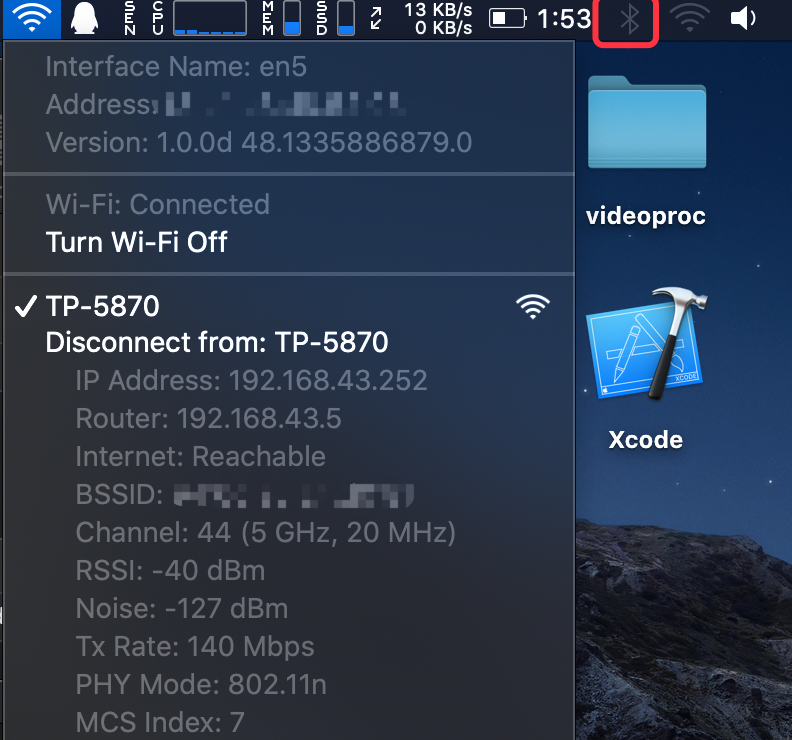
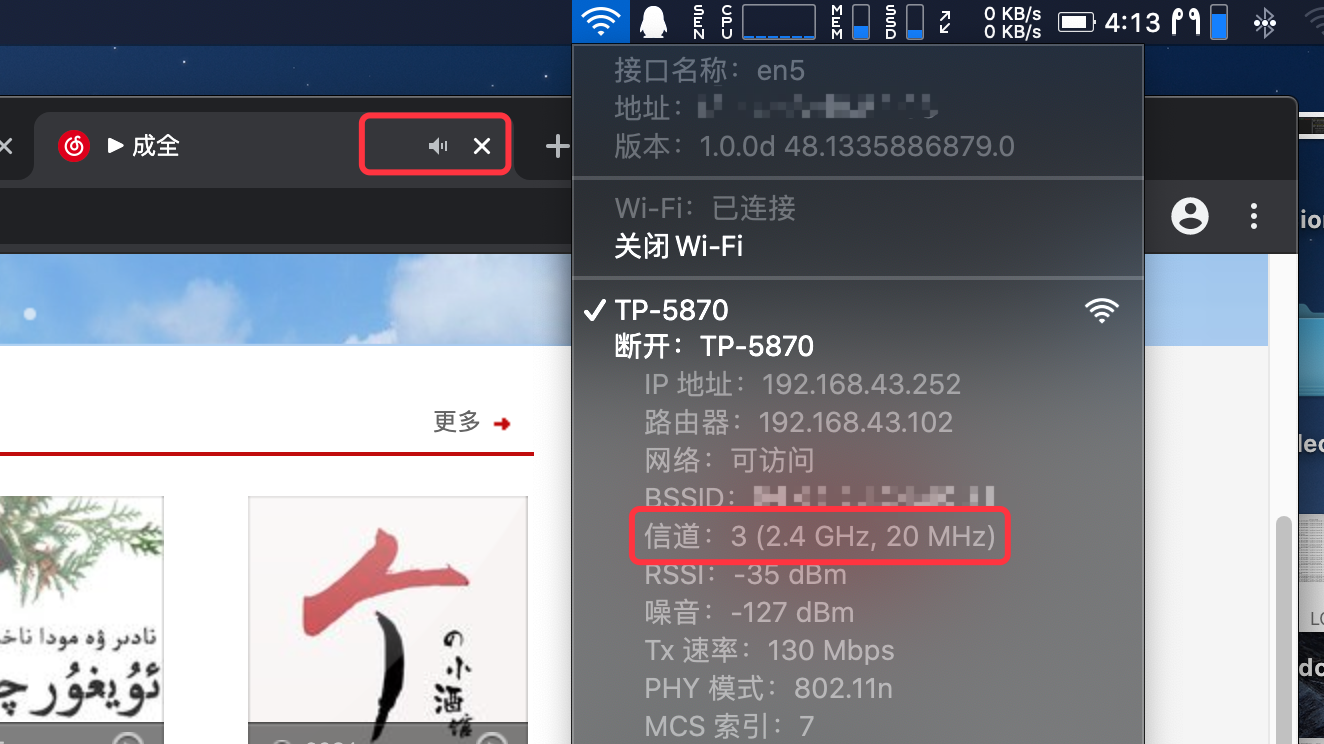
I find a possible reason for this issue, that is the frequency band the wi-fi use. 2.4ghz wi-fi might cause inter symbol interference with bluetooth. if you transform to 5ghz wi-fi, this problem can be solved automatically.
jiaogger
on 24 Jul 2020
stable running

M69W
on 24 Jul 2020
stable running
你是用的heliport吗
jiaogger
on 24 Jul 2020
Yes, you can see native client of the picture in right's.
M69W
on 24 Jul 2020
Yes, you can see native client of the picture in right's.
I‘m curious at how you find out the specific information of heliport and your current situation of wifi......
jiaogger
on 25 Jul 2020
Yes, you can see native client of the picture in right's.
I‘m curious at how you find out the specific information of heliport and your current situation of wifi......
press and hold the option key (windows key) and click the icon of the HeliPort.
M69W
on 25 Jul 2020
same here with intel 8265 when ever i connect bluetooth magic mouse speed drops from 1.1mb to 50kb
 9370User
on 26 Jul 2020
9370User
on 26 Jul 2020
Yes, you can see native client of the picture in right's.
I‘m curious at how you find out the specific information of heliport and your current situation of wifi......
press and hold the option key (windows key) and click the icon of the HeliPort.
I find a possible way to solve this issue, that is fixed the channel of 2.4GHz Wi-Fi at 13 (aka. located the work frequency as far as you can). This can commendably improve the performance of wifi. I guess the main reason of this issue is that MacOS doesn't have
the cooperative mode between wifi and bluetooth for intel network card. Anyway, really appreciate for your help!
jiaogger
on 26 Jul 2020
And caution: this method CAN'T perfectly solve this issue. If you want to throughly fix this problem, please buy a router that can work in 5GHz and linked with it. There is still accidentally stuck occurs, but it's in my comfort zone.
jiaogger
on 26 Jul 2020
Related issues
 stspdotname
·
6Comments
stspdotname
·
6Comments
 Mr-UFO
·
3Comments
Mr-UFO
·
3Comments
 abaza7
·
8Comments
abaza7
·
8Comments
 aaronleegit
·
5Comments
aaronleegit
·
5Comments
 okexi
·
4Comments
okexi
·
4Comments
Most helpful comment
And caution: this method CAN'T perfectly solve this issue. If you want to throughly fix this problem, please buy a router that can work in 5GHz and linked with it. There is still accidentally stuck occurs, but it's in my comfort zone.