There is something wrong with Tx that cause firmware crash when process a large traffic upload behavior, the problem of encryption and decryption can be excluded, because it is the same when connecting to a AP without encryption. Leading to slow upload speed/random disconnect etc
 zxystd
All 52 comments
Is there a specific size threshold above which the crash occurs or is it just random ?
 vasishath
on 16 May 2020
vasishath
on 16 May 2020
Is there a specific size threshold above which the crash occurs or is it just random ?
The upload speed is slow to 5kb/s. Basically useless.
 kai2ou
on 16 May 2020
kai2ou
on 16 May 2020
Is there a specific size threshold above which the crash occurs or is it just random ?
The upload speed is slow to 5kb/s. Basically useless.
No I am talking about the traffic upload size.
vasishath
on 16 May 2020
Could it be due to firmware version? Maybe getting last firmware or trying another one can fix the issue you are talking about.
 arch-dev
on 16 May 2020
arch-dev
on 16 May 2020
Could it be due to firmware version? Maybe getting last firmware or trying another one can fix the issue you are talking about.
I had tried to replace to newest and oldest version of firmware, but it remains.
zxystd
on 17 May 2020
AppleIntelWiFi.kext looks normal.
kai2ou
on 17 May 2020
AppleIntelWiFi.kext has no problem w/ upload speed. Max speed I get is 30Mbps both upload/download. I have 7260.
When I switch to itlwm.kext download speed remains same but upload speed has max of 0.2Mbps
 ferhatmeric
on 19 May 2020
ferhatmeric
on 19 May 2020
zxystd how's your progress going regarding the upload speed issue. Also Great Work By The Way I'm Impressed Not Many People Even Bother With Trying To Get Intel Wifi Working. When Your Done I'll See if I Can Donate.
 KratosAurion400
on 19 May 2020
KratosAurion400
on 19 May 2020
AppleIntelWiFi.kext has no problem w/ upload speed. Max speed I get is 30Mbps both upload/download. I have 7260.
When I switch to itlwm.kext download speed remains same but upload speed has max of 0.2Mbps
Can you share the appleIntelWiFi.kext? it has a network name and password hard coded?
 balenv
on 19 May 2020
balenv
on 19 May 2020
Oh come on, leave the guy alone, don't hijack the thread. If you have issues with compiling the kext, see other threads, there are a bunch of comments to help with that. Please keep in mind the kext is in development, think of it as POC for now, and don't use it for your daily driver.
 tvhung83
on 20 May 2020
tvhung83
on 20 May 2020
could it be Tx aggregation: https://man.openbsd.org/iwm#CAVEATS ? I have no experience at this low level, just a wild guess.
tvhung83
on 20 May 2020
This problem seems to have nothing to do with 80211 stack, because when I turn off the password authentication, the process of sending data is just to remove the Ethernet frame header from the network stack and convert it to 80211 frame and send it through the PCIE, That is all, but there is still the same upload problem, confused.
zxystd
on 20 May 2020
when no encryption WiFi , the sending data sequence functions are:
outputPacket()->_iwm_start_task()->ieee80211_encap()->iwm_tx()
zxystd
on 20 May 2020
I don't have any experience in driver writing. But I'm a professional programmer,so when I get a problem that I can't fix. I try to disable as many as things that are not related to isolate the problem.Then test it through different conditions putting logs and debugging to find out what is causing the issue.
 Stevemoretz
on 21 May 2020
Stevemoretz
on 21 May 2020
Posted this issue in couple of places so people come help
Stevemoretz
on 21 May 2020
Posted this issue in couple of places so people come help
 mehmetyukcell
on 21 May 2020
mehmetyukcell
on 21 May 2020
I don't have any experience in driver writing. But I'm a professional programmer,so when I get a problem that I can't fix. I try to disable as many as things that are not related to isolate the problem.Then test it through different conditions putting logs and debugging to find out what is causing the issue.
This. If I had the time to debug this, I would actually force the driver to send lesser number of bytes until I get to know the threshold above which the firmware starts to crash. Maybe that value should give an initial pointer to the real issue. IMO, this should be a stack or a heap overflow/corruption error.
vasishath
on 21 May 2020
I don't have any experience in driver writing. But I'm a professional programmer,so when I get a problem that I can't fix. I try to disable as many as things that are not related to isolate the problem.Then test it through different conditions putting logs and debugging to find out what is causing the issue.
This. If I had the time to debug this, I would actually force the driver to send lesser number of bytes until I get to know the threshold above which the firmware starts to crash. Maybe that value should give an initial pointer to the real issue. IMO, this should be a stack or a heap overflow/corruption error.
I agree with this assumption if the crash happens at exactly a point, better find that point.It doesn't want much time,if it is possible to implement an automatic test an example would be start from 0 and go up log it, goto 5 goto 10 and.... Till it crashes check your logs and find the latest value if it was 250 you get that 250 is okay but 255 is too much so now start from 250 and go up one by one 251,252,253 you'll see 253 is the last possible value before crash so 254 is the number that causes the crash.Now knowing this number could've give more clue about what's going wrong.maybe it reminds you somewhere you have defined a static size array with 254 size so yeah that's causing an overflow issue.It could be a case.The only thing can help is going from the begging to end and putting logs if debugging isn't so much possible I use log statements from begging to end of what I'm doing to make sure everything is going the way it should go.
Stevemoretz
on 21 May 2020
The crash packet size is changeable, sometimes more than 4096, sometimes smaller than it.
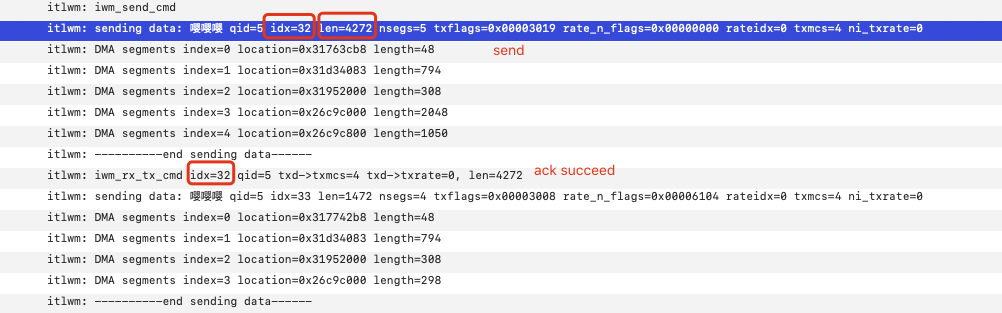

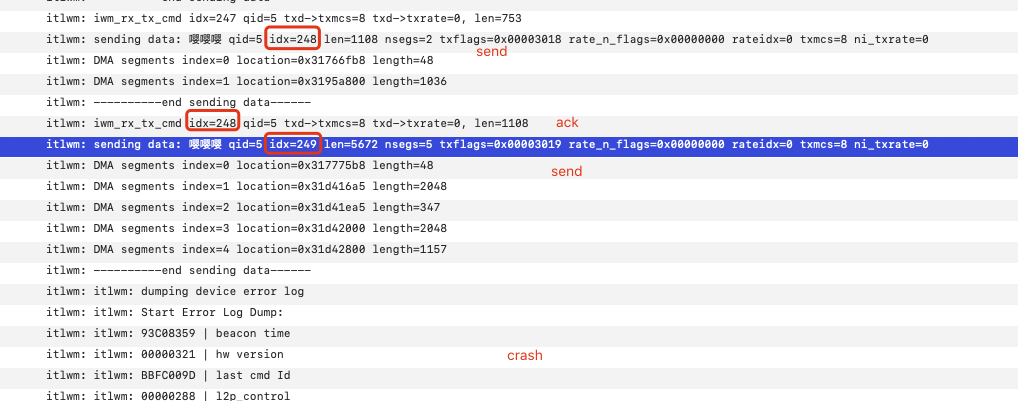
I have doubted the DMA alignment, but didn't make much progress.
zxystd
on 21 May 2020
The crash happens with an exception?Like a language exception error or something?Or it happens without any exception error?
By language exception I meant the exceptions that are defined in the programming language you are using
Stevemoretz
on 22 May 2020
The crash happens with an exception?Like a language exception error or something?Or it happens without any exception error?
By language exception I meant the exceptions that are defined in the programming language you are using
This is an in-firmware crash so probably no exception.
vasishath
on 22 May 2020
The crash packet size is changeable, sometimes more than 4096, sometimes smaller than it.
I have doubted the DMA alignment, but didn't make much progress.
Then there is one way but quite long though.. u may try using openbsd in a VM and passthru your wifi card. Then inside that u should be able to see how the wifi driver is operating and maybe print all headers of the packet being sent to the firmware.
vasishath
on 22 May 2020
What's the reason of crash?there is some sort of runtime exception that because it's not handled,it causes the firmware to crash?It may not be an obvious exception but the crash happens because of runtime exception?
I'm just asking these to clarify I'm not sure how firmware works.
Stevemoretz
on 22 May 2020
The crash packet size is changeable, sometimes more than 4096, sometimes smaller than it.
I have doubted the DMA alignment, but didn't make much progress.Then there is one way but quite long though.. u may try using openbsd in a VM and passthru your wifi card. Then inside that u should be able to see how the wifi driver is operating and maybe print all headers of the packet being sent to the firmware.
This sound like a smart debugging solution for drivers, nice idea 💡
Stevemoretz
on 22 May 2020
Firmware crash just a behavior that talks us that the packet transfer is wrong I think, because I found that sometings some routers crashed and restarted after receiving the packets sent by this driver, so amazing...
zxystd
on 22 May 2020
Firmware crash just a behavior that talks us that the packet transfer is wrong I think, because I found that sometings some routers crashed and restarted after receiving the packets sent by this driver, so amazing...
That technically sounds like a DoS attack lol
vasishath
on 22 May 2020
@zxystd you mean I can use this kext to crash my neighbor routers? Sweet! 😆
tvhung83
on 22 May 2020
Jokes aside, it still sounds like TX aggregation not implemented in firmware as I mentioned in previous comment: https://man.openbsd.org/iwm#CAVEATS
@zxystd you sure it's irrelevant?
tvhung83
on 22 May 2020
Jokes aside, it still sounds like TX aggregation not implemented in firmware as I mentioned in previous comment: https://man.openbsd.org/iwm#CAVEATS
@zxystd you sure it's irrelevant?
I am not sure, but unless openbsd works fine. @williambj1 is trying to install openbsd in VM to verify something.
zxystd
on 22 May 2020
Firmware crash just a behavior that talks us that the packet transfer is wrong I think, because I found that sometings some routers crashed and restarted after receiving the packets sent by this driver, so amazing...
Wow how's that even possible😂what have you created zxystd?
Just kidding,it happens to me some stuff like that sometimes as well, it's probably a little tiny bug you'll find very soon and laugh about how such a small mistake caused all these issues.
Stevemoretz
on 22 May 2020
Maybe. The download speed problem is just because I haven't zero the new allocated memory, yes, just a bzero function fix it.
zxystd
on 22 May 2020

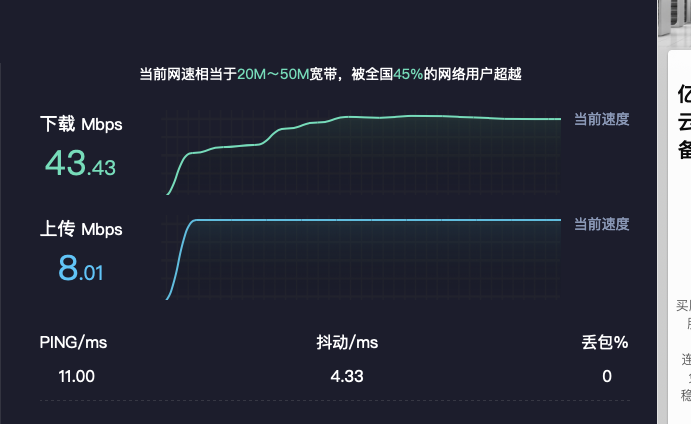
sometimes the upload speed is well.
zxystd
on 25 May 2020
sometimes the upload speed is well.
Great ! What was the issue ?
vasishath
on 25 May 2020
I don't know if this may be related to the TX issue, but the latest OpenBSD release (May 19, 2020, https://www.openbsd.org/67.html) fixed some problems with the iwm driver, concretely in the IEEE 802.11 wireless stack:
- Fixed a race condition in iwm(4) Rx interrupt handling.
- Implemented a workaround for missing Tx completion interrupts in iwm(4) which could lead to failures when roaming to another AP.
- Re-enabled firmware-based Tx retries at lower rates for iwm(4), reducing packet loss.
- Fixed automatic Tx rate control issues in iwn(4), and iwm(4).
 elnenez
on 25 May 2020
elnenez
on 25 May 2020
When the upload is well, I found that each of the maximum packet size is smaller than 1460, as we all know, ethernet has a packet threshold which call MTU, commonly the value is 1500, payload size is 1460, it is the same as the threshold. so I assumed that it is the packet comes from network stack is MSDU packet, which is larger than MTU, but our driver doesn't support Tx aggregation now, so it crash. If I am wrong, figure me out, thanks.
zxystd
on 26 May 2020
When the upload is well, I found that each of the maximum packet size is smaller than 1460, as we all know, ethernet has a packet threshold which call MTU, commonly the value is 1500, payload size is 1460, it is the same as the threshold. so I assumed that it is the packet comes from network stack is MSDU packet, which is larger than MTU, but our driver doesn't support Tx aggregation now, so it crash. If I am wrong, figure me out, thanks.
You sound correct but isn't that supposed to be handled by TCP down at the network layer ? And in case of UDP, it attempts to send that packet and fails. It's rather strange that firmware doesn't support this
vasishath
on 26 May 2020
It's not that the firmware doesn't support it, but due to the net80211 of OpenBSD doesn't support TX aggregation, so iwm disable this feature. So now I have two options. One is to find a way to let the network stack only give me a package within the MTU size or to split it myself. The other is to implement TX aggregation, which can double the speed.
zxystd
on 26 May 2020
It's not that the firmware doesn't support it, but due to the net80211 of OpenBSD doesn't support TX aggregation, so iwm disable this feature. So now I have two options. One is to find a way to let the network stack only give me a package within the MTU size or to split it myself. The other is to implement TX aggregation, which can double the speed.
I guess u can split the packet and loop over the remaining bytes to send it individually to the fw for now. For long term, we can look at Tx aggregation. Maybe refering to linux's 802.11 stack would help.
Edit: I don't know much about openbsd, but I found a link which says TX aggregation was added in openbsd 6.6 to net80211 and iwn driver.
https://www.safechina.org/66.html
vasishath
on 26 May 2020
Hi there, good news, I finally fix this issue, the speed looks so nice. I will push the code and publish the release soon.
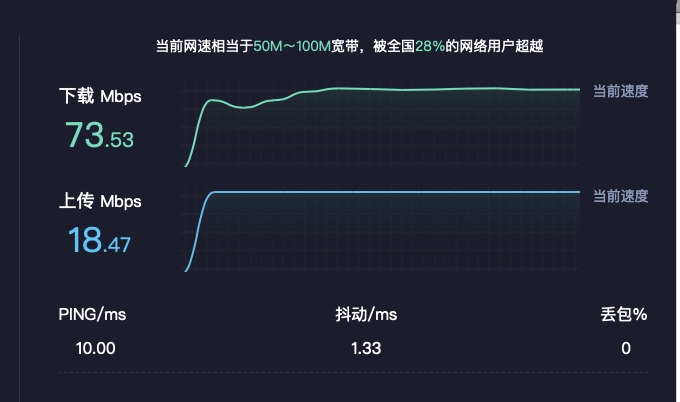
zxystd
on 26 May 2020
Wow, that was quick, superb news! Will try it first thing tomorrow, so excited, hehe 😁
tvhung83
on 26 May 2020
Hi there, good news, I finally fix this issue, the speed looks so nice. I will push the code and publish the release soon.
Wow.. so finally what was the issue ?
vasishath
on 26 May 2020
Wow.. so finally what was the issue ?
IOReturn itlwm::getMaxPacketSize(UInt32 *maxSize) const {
    *maxSize = 1500;
    return kIOReturnSuccess;
}
just override this function to tell network stack max packet size.
zxystd
on 26 May 2020
Wow.. so finally what was the issue ?
IOReturn itlwm::getMaxPacketSize(UInt32 *maxSize) const { *maxSize = 1500; return kIOReturnSuccess; }just override this function to tell network stack max packet size.
Lol. Small things matter too much sometimes.. it should've been mandatory to override this method so the kext wouldn't compile otherwise.
vasishath
on 26 May 2020
Actually, I was kinda hoping that TX aggregation was added, so that we can max out the speed, but that's fine, as long as it can run stable.
tvhung83
on 26 May 2020
sadly, this function didn't take effect each time, sometimes it is strange like before, I will find workaround tomorrow.
zxystd
on 26 May 2020
sadly, this function didn't take effect each time, sometimes it is strange like before, I will find workaround tomorrow.
Take your time, buddy. Thank you for your work, it was fun, pity that I can't help anything.
tvhung83
on 27 May 2020
So now the problem turns to how to configure interface to limit outputpacket size below 1500. I have tried to call setMaxTransferUnit method, but it can't take effect, the outputpacket still too large.
zxystd
on 28 May 2020
Maybe I have another way is that using IO80211Family to replace Ethernet interface, these configurations have been done there.
zxystd
on 28 May 2020
The other kext that works AppleIntelWifi.kext doesn't use Ethernet it uses wifi.Maybe some stuff are handled via the system there if you use wifi?
Stevemoretz
on 28 May 2020
Hi guys, I have the same tx issue on my 9560 adapter with the latest git commit 7eb758ecffb550ba8d5d65f619e74f5afeaa7024. AppleIntelWifi.kext works fine in both directions meanwhile. I measure throughput with iperf. Download speed is about 35 Mb/s, upload speed is about 30 Kb/s. Does this commit include fixes you wrote above?
 rdmitry0911
on 28 May 2020
rdmitry0911
on 28 May 2020
I think with commit 81 we can close this issue :)
 s0ullight
on 29 May 2020
s0ullight
on 29 May 2020
Yes, thanks for all your suggest.
zxystd
on 29 May 2020
Related issues
 nieaowei
·
3Comments
nieaowei
·
3Comments
 abaza7
·
8Comments
abaza7
·
8Comments
 epictgames
·
3Comments
epictgames
·
3Comments
 llkhs
·
6Comments
s0ullight
·
3Comments
llkhs
·
6Comments
s0ullight
·
3Comments
Most helpful comment
Hi there, good news, I finally fix this issue, the speed looks so nice. I will push the code and publish the release soon.