Would it be possible to get Intel WiFi chip AX200 working?
https://ark.intel.com/content/www/us/en/ark/products/189347/intel-wi-fi-6-ax200.html
Many systems (desktops, laptops) have M.2 WiFi slots, and this product is very cheap!
可以使用Intel AX200 吗?
很多电脑有M.2。 Intel AX200 设备价格便宜。
 Malumen
All 49 comments
If you want something cheap why not get a USB dongle wifi? The whole point of this project is to get the built in wifis work if you want to replace your wifi card why not replace it with a supported non Intel card.Cheap wifi cards aren't very high quality and I suggest you stay away from it anyway.
 Stevemoretz
on 19 Apr 2020
Stevemoretz
on 19 Apr 2020
I think most if not even all X570 Motherboards with Wifi 6/BT 5 I've looked at had the Intel AX200.
 aluveitie
on 19 Apr 2020
aluveitie
on 19 Apr 2020
Ax200 is supporting now..., now it can scan, auth, but remains some problems...
 zxystd
on 19 Apr 2020
zxystd
on 19 Apr 2020
@zxystd wow, that's great to hear. Thanks for your continuous hard work!
aluveitie
on 19 Apr 2020
@zxystd I'v compiled the latest version and added the kext to my OpenCore testing boot stick but it does not seem to work just yet:
log show --last boot | grep itlwm:
2020-04-19 15:22:35.587948+0200 0x136      Default     0x0                  0      0    kernel: (itlwm) _start(struct kmod_info*, void*) has been invoked
2020-04-19 15:22:35.588015+0200 0x136      Default     0x0                  0      0    kernel: (itlwm) itlwm: iwm_match
2020-04-19 15:22:35.588025+0200 0x136      Default     0x0                  0      0    kernel: (itlwm) itlwm: free
2020-04-19 15:22:35.591221+0200 0x16b      Default     0x0                  0      0    kernel: (itlwm) itlwm: iwm_match
2020-04-19 15:22:35.591239+0200 0x16b      Default     0x0                  0      0    kernel: (itlwm) itlwm: free
2020-04-19 15:22:35.591439+0200 0x16f      Default     0x0                  0      0    kernel: (itlwm) itlwm: iwm_match
2020-04-19 15:22:35.591480+0200 0x16f      Default     0x0                  0      0    kernel: (itlwm) itlwm: free
2020-04-19 15:22:43.791254+0200 0x5bc      Default     0x0                  0      0    kernel: (itlwm) itlwm: iwm_match
2020-04-19 15:22:43.791259+0200 0x5bc      Default     0x0                  0      0    kernel: (itlwm) itlwm: free
I have not push the newest code as it's problems...
zxystd
on 19 Apr 2020
@zxystd thanks for the update, I'll watch out and re-test once you've pushed it 👍
aluveitie
on 19 Apr 2020
It is a separate kext which call itlwmx, different from itlwm, it only support gen2 and future gen3 device.
zxystd
on 19 Apr 2020
Is intel AX 201 in the supporting card list?
 nujabse
on 19 Apr 2020
nujabse
on 19 Apr 2020
Yes in theory, but I don't have ax201 device for test. so just wait for the ax200 support.
zxystd
on 19 Apr 2020
@zxystd 现在能测试ax200了吗,我发现你推送了提交支持了ax200
 ghsssss
on 24 Apr 2020
ghsssss
on 24 Apr 2020
No, code is done, but not fully debug.
zxystd
on 24 Apr 2020
I just bought a AX200 card to test some of the progress here. Looks like authentication does not work correctly yet. last part of my log:
2020-05-09 22:32:24.458111+0200 0x18cb     Default     0x0                  0      0    kernel: (itlwmx) itlwm: tsleep_nsec iwxcmd
2020-05-09 22:32:24.458267+0200 0x70       Default     0x0                  0      0    kernel: (itlwmx) itlwm: Interrupt!!!
2020-05-09 22:32:24.458270+0200 0x70       Default     0x0                  0      0    kernel: (itlwmx) itlwm: iwx_notif_intr
2020-05-09 22:32:24.458272+0200 0x70       Default     0x0                  0      0    kernel: (itlwmx) itlwm: iwx_rx_pkt code=0x29
2020-05-09 22:32:24.458274+0200 0x70       Default     0x0                  0      0    kernel: (itlwmx) itlwm: wakeupOn
2020-05-09 22:32:24.458277+0200 0x70       Default     0x0                  0      0    kernel: (itlwmx) itlwm: iwx_cmd_done: command 0x29 done
2020-05-09 22:32:24.458296+0200 0x70       Default     0x0                  0      0    kernel: (itlwmx) itlwm: Interrupt!!!
2020-05-09 22:32:24.458298+0200 0x70       Default     0x0                  0      0    kernel: (itlwmx) itlwm: iwx_notif_intr
2020-05-09 22:32:24.458300+0200 0x70       Default     0x0                  0      0    kernel: (itlwmx) itlwm: iwx_rx_pkt code=0x2a
2020-05-09 22:32:24.458421+0200 0x18cb     Default     0x0                  0      0    kernel: (itlwmx) itlwm: : SCAN -> AUTH
2020-05-09 22:32:24.458424+0200 0x18cb     Default     0x0                  0      0    kernel: (itlwmx) itlwm: ieee80211_set_link_state nstate=2, old_state=2
2020-05-09 22:32:24.458431+0200 0x18cb     Default     0x0                  0      0    kernel: (itlwmx) itlwm: : sending auth to --:--:--:--:--:-- on channel 1 mode 11g
2020-05-09 22:32:24.458440+0200 0x18cb     Default     0x0                  0      0    kernel: (itlwmx) itlwm: iwx_start 6840
2020-05-09 22:32:24.458442+0200 0x18cb     Default     0x0                  0      0    kernel: (itlwmx) itlwm: iwx_start 6851
2020-05-09 22:32:24.458444+0200 0x18cb     Default     0x0                  0      0    kernel: (itlwmx) itlwm: iwx_tx
2020-05-09 22:32:24.463341+0200 0x70       Default     0x0                  0      0    kernel: (itlwmx) itlwm: Interrupt!!!
2020-05-09 22:32:24.463347+0200 0x70       Default     0x0                  0      0    kernel: (itlwmx) itlwm: iwx_notif_intr
2020-05-09 22:32:24.480639+0200 0x70       Default     0x0                  0      0    kernel: (itlwmx) itlwm: Interrupt!!!
2020-05-09 22:32:24.480647+0200 0x70       Default     0x0                  0      0    kernel: (itlwmx) itlwm: iwx_notif_intr
2020-05-09 22:32:24.480652+0200 0x70       Default     0x0                  0      0    kernel: (itlwmx) itlwm: iwx_rx_pkt code=0x1c
2020-05-09 22:32:24.480661+0200 0x70       Default     0x0                  0      0    kernel: (itlwmx) itlwm: iwx_start 6840
2020-05-09 22:38:46.830252+0200 0x2f0      Default     0x0                  0      0    kernel: (itlwmx) itlwm: outputPacket
As i understood i do not need the itl80211.kext correct? because it does not load for me anyway..
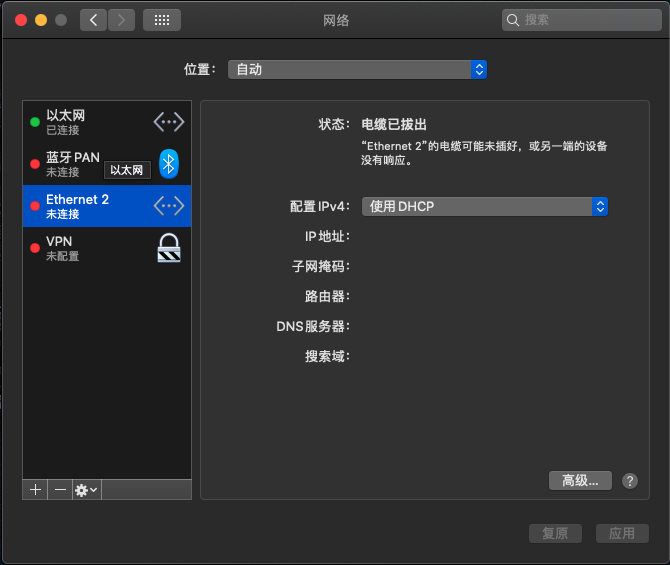
And status: Cable Unplugged Either the cable for Thunderbolt Ethernet Slot 2 is not plugged in or the device at the other end is not responding.
Running this on a Thunderbolt to PCIe box
I will try to invest some time in reading the source code and if i can get enough familiar with it contribute to this project.
 Floris497
on 9 May 2020
Floris497
on 9 May 2020
OpenBSD 6.7
Improved hardware support, including:
...
Introduced iwx(4), a driver for Intel AX200 WiFi devices.
 M69W
on 21 May 2020
M69W
on 21 May 2020
Could you also add the support of Killer ax1650? This card has the same hardware with AX200
 jianghaizhi
on 30 May 2020
jianghaizhi
on 30 May 2020
Built new itlwmx kext, loaded successfully and my AX200 appears as Ethernet 2 on Network preferences. Also, on Hackintool it shows Intel AX200 as well as Realtek Ethernet card. However, it doesn’t connect (says “Not connected”)
Please tell me what logs do you need, I can provide :)
However, thank you so much for all your effort!
 RGarrido03
on 30 May 2020
RGarrido03
on 30 May 2020
Yes, it it init done, and can scan, but exits problems:
- when output frame data, the firmware crash;
- scan crash randomly;
- didn't support active scan;
- didn't support backgroud scan.
I had try install openbsd and test, Confirm that these problems exists in openbsd, it is fully unstable. so, just wait for fix, I am going to do other things such as itlwm speed improvement and client development.
zxystd
on 31 May 2020
And maybe some devices can work. you can send me the log and I can see what happened.
log show --last boot | grep itlwm >itlwmx.log
zxystd
on 31 May 2020
And maybe some devices can work. you can send me the log and I can see what happened.
log show --last boot | grep itlwm >itlwmx.log
Hi! Here it is. Thank you so much!!
PS: Using AX200 and latest commit's itlwmx kext
itlwmx.log
RGarrido03
on 1 Jun 2020
Thanks for your test. According to the log, I can see the card is full init and begin scan and get scanned result.
MEO-64C990
MEO-64C991-5G
MEO-WiFi
MEO-WiFi
but when send auto to 'MEO-64C991-5G', the firmware crash. just the same as my device.
zxystd
on 1 Jun 2020
Seems that can not start to scan the ssid. the device is ax200(id 0x2723),original shipment on ASRock X570 Phontom Gaming-ITX/TB3.
here is the log. itlwmx.log
 fudaming
on 2 Jun 2020
fudaming
on 2 Jun 2020
能提供固件给我们测试吗?不太会打包
ghsssss
on 4 Jun 2020
itlwm.log
👆this is the log that rebuild the kext again, and bad news is when kextunload, the screen is black out, and system reboot.
the good news is the driver can find ssid all around.😂
fudaming
on 4 Jun 2020
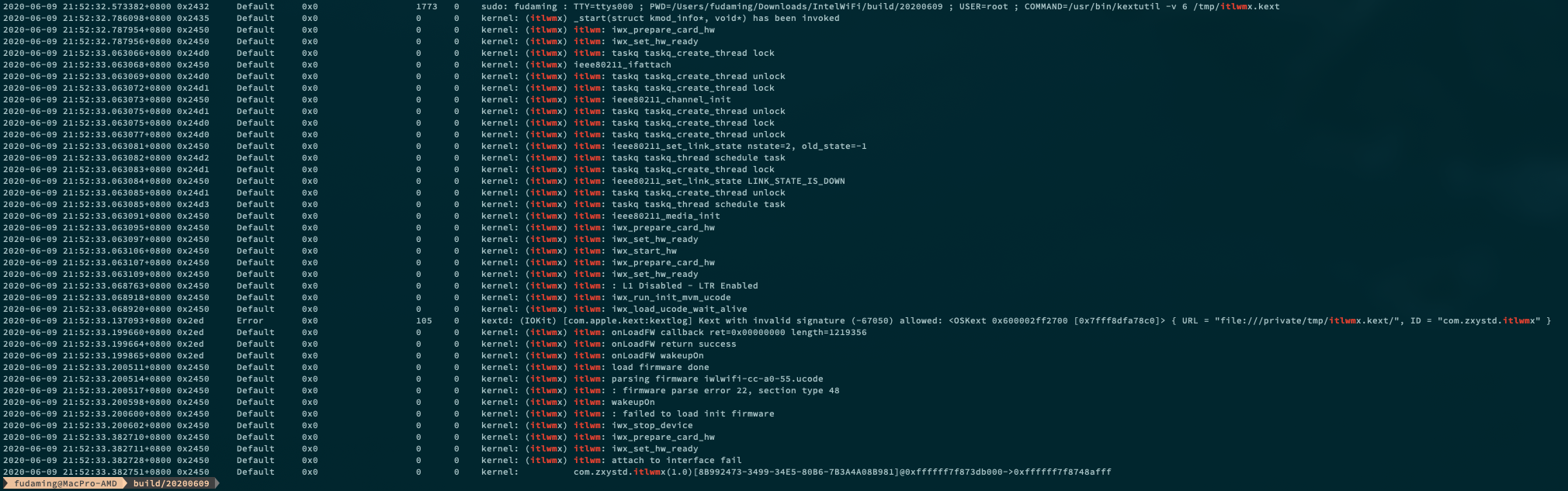
always spot "fatal fireware error" in log, try to do something with the newest firmware from intel official.
https://git.kernel.org/pub/scm/linux/kernel/git/firmware/linux-firmware.git/tree/

fudaming
on 9 Jun 2020
silly me. failed😆
fudaming
on 9 Jun 2020
Still failed on Intel 9560ac, productId 02F0. Had tried solution at #52 but it didn't work :(
 lsvih
on 11 Jun 2020
lsvih
on 11 Jun 2020
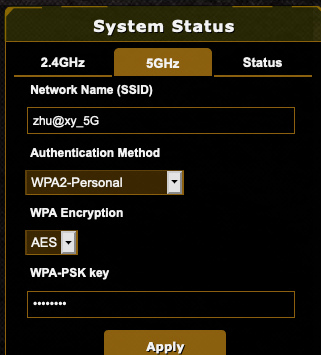
Greate news! start to scan ssid, but can not connect to my wireless.
here is the log itlwmx.log
and network setting below.
fudaming
on 12 Jun 2020
感谢,ax200已经工作,100m有20m的速度
ghsssss
on 12 Jun 2020
Greate news! start to scan ssid, but can not connect to my wireless.
here is the log itlwmx.log
and network setting below.
try it that build by @zxystd
itlwmx_ax200_0612.kext.zip
M69W
on 12 Jun 2020
非常感谢,Killer ax1650也能用了
jianghaizhi
on 12 Jun 2020
Greate news! start to scan ssid, but can not connect to my wireless.
here is the log itlwmx.log
and network setting below.
according to the log, the card working, scanning but not trigger auth, check your ssid and password configuration
zxystd
on 13 Jun 2020
Greate news! start to scan ssid, but can not connect to my wireless.
here is the log itlwmx.log
and network setting below.
try it that build by @zxystd
itlwmx_ax200_0612.kext.zip
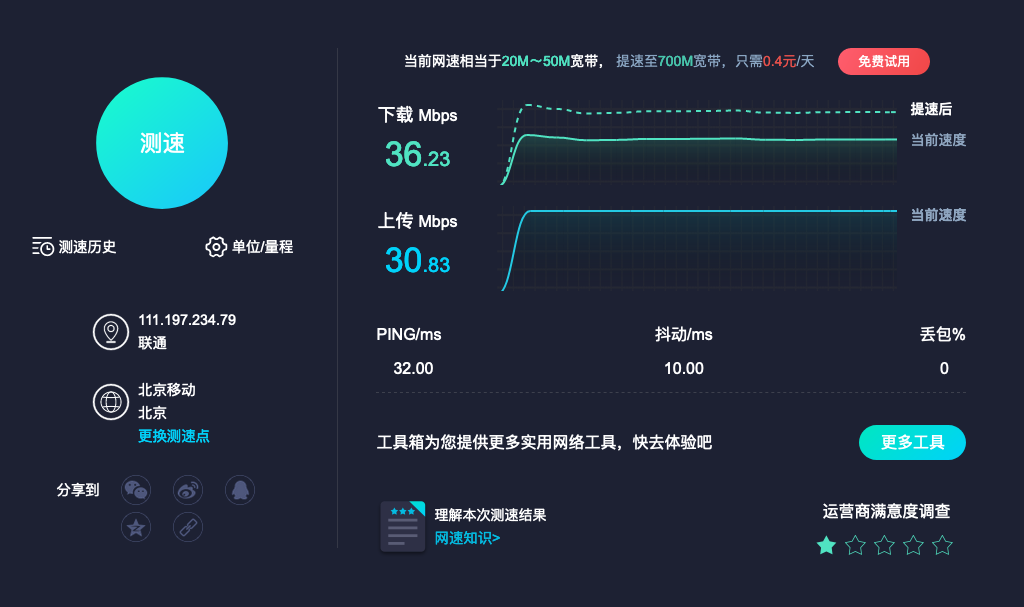
2.4G connected, ready to try 5G
fudaming
on 13 Jun 2020
@fudaming I can't get the Kext to load it gives me an authentication error even after doing sudo chown -R root:wheel itlwmx.kext did I do something wrong?
 KratosAurion400
on 13 Jun 2020
KratosAurion400
on 13 Jun 2020
ax200有时候工作,有时候不工作
ghsssss
on 13 Jun 2020
@fudaming I can't get the Kext to load it gives me an authentication error even after doing sudo chown -R root:wheel itlwmx.kext did I do something wrong?
Edit the info.plist, add your wifi ssid and password into it. and then put it in clover or opencore kext directory, reboot and enjoy.
zxystd
on 13 Jun 2020
ax200有时候工作,有时候不工作
more clearly?
zxystd
on 13 Jun 2020
Greate news! start to scan ssid, but can not connect to my wireless.
here is the log itlwmx.log
and network setting below.
try it that build by @zxystd
itlwmx_ax200_0612.kext.zip
2.4G connected, ready to try 5G
Is the upload speed problem solved?
Stevemoretz
on 13 Jun 2020
ax200有时候工作,有时候不工作
more clearly?
好像是win10重启进入系统就无法驱动
ghsssss
on 13 Jun 2020
ax200有时候工作,有时候不工作
more clearly?
好像是win10重启进入系统就无法驱动
嘤嘤嘤,我的windows系统炸了。不过这是个好消息啊,我终于有设备可以调试热启动的问题了。
zxystd
on 13 Jun 2020
@fudaming I can't get the Kext to load it gives me an authentication error even after doing sudo chown -R root:wheel itlwmx.kext did I do something wrong?
as you can find in my log, I run codesign and xattr before kextutil. you can try these command below. If it is not work, please check your Info.plist as @zxystd told.
codesign --force --deep --sign - ./itlwmx.kext
xattr -c -r ./itlwmx.kext
chown -R root:wheel ./itlwmx.kext
cp -r ./itlwmx.kext /tmp/
kextutil -v 6 /tmp/itlwmx.kext
fudaming
on 14 Jun 2020
@Stevemoretz
Is the upload speed problem solved?
I don' know the upload issues, it seem very stable when I browse the page.
fudaming
on 14 Jun 2020
I remove the 2.4G SSID in Info.plist, force it connect to my 5G ssid, turns out it will work under the 11n mode. 😂
Anyway, I can remove the Ethernet cable from my computer now.🤪🎉 , thx @zxystd and all the people make it happen.

fudaming
on 14 Jun 2020
最近能很好的工作,不管是从win10切换启动还是直接启动,都没有不加载的问题,版本是002淘宝版本,下载速度到不了满速,最多30Mb/s,反馈完毕
ghsssss
on 16 Jun 2020
I got this working, and am grateful! Is it possible to get this to show up as a WiFi adapter? I wanted to get this working, so I could use my Apple Watch to unlock my Hackintosh. I am thinking that is the reason why the option to unlock with Apple Watch is not showing up.

 frankstallone
on 28 Jun 2020
frankstallone
on 28 Jun 2020
I'll take that as a no. 🤣
frankstallone
on 8 Jul 2020
非常感谢,Killer ax1650也能用了
Can you confirm AX1650 is supported? (I cannot find it here https://openintelwireless.github.io/itlwm/Compat.html).
Is AX1650 considered as AX200?
 BenDevelopment
on 27 Aug 2020
BenDevelopment
on 27 Aug 2020
@BenDevelopment It's basically a special OEM version of Intel cards with a fancy proprietary driver in Windows. Could you please provide your card's PCI ID?
 williambj1
on 27 Aug 2020
williambj1
on 27 Aug 2020
@williambj1 My PCI ID is :
PCI\VEN_8086&DEV_06F0&SUBSYS_16511A56&REV_00\3&11583659&0&A3
EDIT:
According to this site: https://devicehunt.com/view/type/pci/vendor/8086/device/06F0
It is considered as ax201. Am I right?
BenDevelopment
on 27 Aug 2020
Yes and it's supported
williambj1
on 27 Aug 2020
Related issues
 moutorde
·
3Comments
moutorde
·
3Comments
 antoniomcr96
·
5Comments
antoniomcr96
·
5Comments
 MarshalX
·
3Comments
MarshalX
·
3Comments
 okexi
·
4Comments
okexi
·
4Comments
 nieaowei
·
3Comments
nieaowei
·
3Comments
Most helpful comment
Ax200 is supporting now..., now it can scan, auth, but remains some problems...