Hello,
I built this kext (target itlwm) in xcode and loaded the kext succesfully. However, it didnt connect to my hotspot named "Redmi". My wifi card is 8265.
The Readme says this card works.
Am I missing anything ?
Thanks :)
 vasishath
All 42 comments
Known issue, seems 3 serials and 7 serials now can work, I don't have 8 series cards to verify, but I will fix it these days.
 zxystd
on 17 Mar 2020
zxystd
on 17 Mar 2020
Known issue, seems 3 serials and 7 serials now can work, I don't have 8 series cards to verify, but I will fix it these days.
Can we help you somehow? Provide any logs? I have Intel(R) Dual Band Wireless AC 8260
 MarshalX
on 17 Mar 2020
MarshalX
on 17 Mar 2020
Maybe I know where is the problem, but if you can provide the log can help me more, run command "log show --last boot | grep itlwm" to get the whole log.
zxystd
on 17 Mar 2020
I have Intel(R) Dual Band Wireless AC 8265.
log.txt
 vladdenisov
on 17 Mar 2020
vladdenisov
on 17 Mar 2020
Maybe I know where is the problem, but if you can provide the log can help me more, run command "log show --last boot | grep itlwm" to get the whole log.
Intel(R) Dual Band Wireless AC 8260
log-1.txt
log-2.txt
log-3.txt
MarshalX
on 17 Mar 2020
Here are logs from my system
log.txt
vasishath
on 17 Mar 2020
With latest commit 7ce262f710493ca82da2428016a3aa14423c4ba7 I was able to connect to network and use wifi.
Thanks!
Intel(R) Dual Band Wireless AC 8265
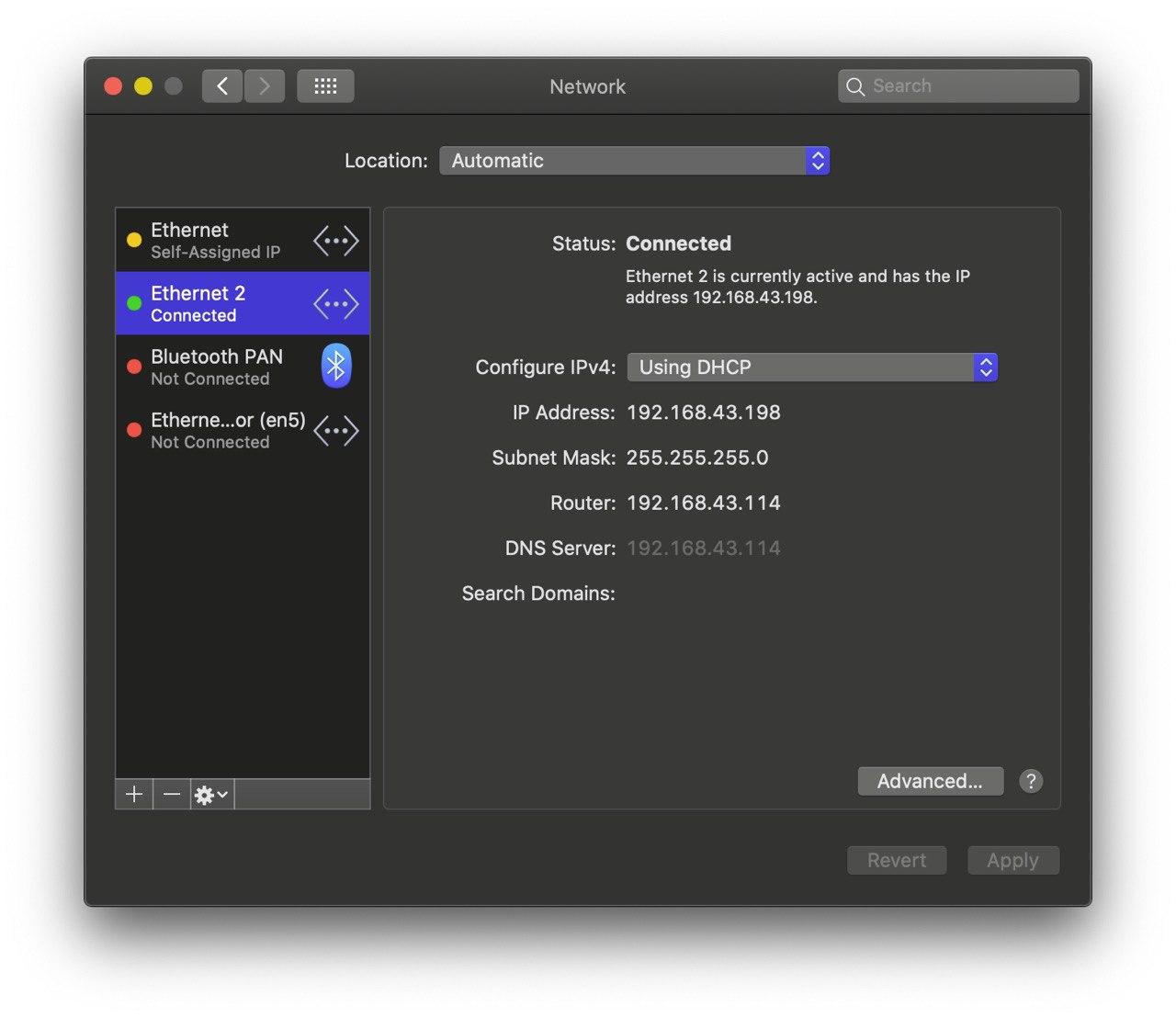
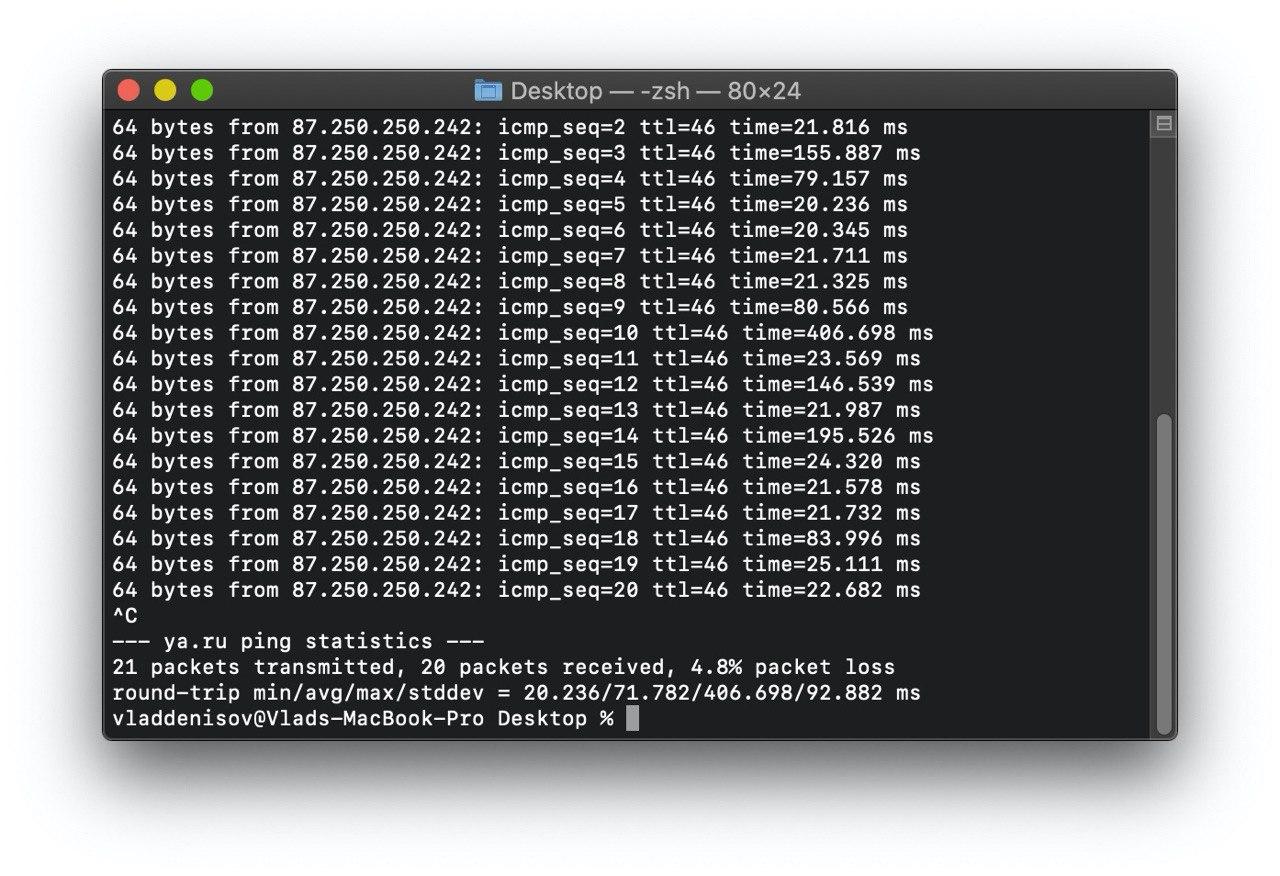
vladdenisov
on 17 Mar 2020
Newer log from _feature-openbsd-newest_ branch
Intel(R) Dual Band Wireless AC 8260
log.txt
MarshalX
on 17 Mar 2020
Thanks for your test.
zxystd
on 18 Mar 2020
on feature-openbsd-newest branch.ac9560 still no ok. stop on iwm_load_firmware
log.txt
 sixian
on 18 Mar 2020
sixian
on 18 Mar 2020
on feature-openbsd-newest branch.ac9560 still no ok. stop on iwm_load_firmware
log.txt
try more times and see if the log is same, thanks.
zxystd
on 18 Mar 2020
try more times and see if the log is same, thanks.
yes, i tried many times and add some logs...stop in "iwm_firmware_load_chunk"
sixian
on 18 Mar 2020
how to use in mojave? Please help me?
 khanhbui96
on 18 Mar 2020
khanhbui96
on 18 Mar 2020
how to use in mojave? Please help me?
use xcode to build, before build, change the target sdk 10.15 to 10.14, and change dedpendencies to your current os Library version.
zxystd
on 18 Mar 2020
Successfully connect and send msg in Telegram by build https://github.com/zxystd/itlwm/commit/45313158d8b19b717716a34f624338b51389d972 on Intel(R) Dual Band Wireless AC 8260
log.txt
Thanks!
MarshalX
on 18 Mar 2020
The speed at which the development of this kext is progressing is very impressive.
Now only issue is slow speed and then we would be in a position to use it with atleast an open wifi network. Even this is unprecented in such small time. Kudos to the dev.
vasishath
on 18 Mar 2020
Now only issue is slow speed
But what about kernel panic by wathing video on youtube in 1080p?)
MarshalX
on 18 Mar 2020
If kernel panic occured, provide the kp log to me and attach more description will help me a lot, thanks.
zxystd
on 19 Mar 2020
I opened YouTube 1080p video and started Speedtest.
Not sure, if these logs are what you needed, but I'm ready to test more times.
kernel-log.txt
Kernel_2020-03-19-130426.zip
vladdenisov
on 19 Mar 2020
I'm using this kext since a log period, seems it doesn't want to crash :) I attach some log. (8265 Intel WiFI)
log3.txt
log2.txt
log1.txt
log0.txt
I have full log (10 min of connection 113 MB txt file size) that I will provide if needed.
It is kind of stable but speed is lower than normal.
with usb wifi i get 55 Mbps/20Mbps on speedtest, with this kext I get 5Mbps/300kbps
 soffyo
on 19 Mar 2020
soffyo
on 19 Mar 2020
`panic(cpu 0 caller 0xffffff800ec652fa): Kernel trap at 0xffffff800e998082, type 14=page fault, registers:
CR0: 0x0000000080010033, CR2: 0xffffff8044d85000, CR3: 0x000000016191f139, CR4: 0x00000000003626e0
RAX: 0xfffffffffe699398, RBX: 0xffffff8034a62780, RCX: 0x0000000000000008, RDX: 0x0000000000000020
RSP: 0xffffff81255abbe8, RBP: 0xffffff81255abc20, RSI: 0xffffff8044d85000, RDI: 0xffffff804341e398
R8: 0xffffff80349c2600, R9: 0x0000000000000002, R10: 0x0000000000000000, R11: 0xffffff8039bf3481
R12: 0xffffff8034a62780, R13: 0x0000000000000100, R14: 0xffffff804348c880, R15: 0xffffff803464ff80
RFL: 0x0000000000010286, RIP: 0xffffff800e998082, CS: 0x0000000000000008, SS: 0x0000000000000010
Fault CR2: 0xffffff8044d85000, Error code: 0x0000000000000000, Fault CPU: 0x0, PL: 0, VF: 1
Backtrace (CPU 0), Frame : Return Address
0xffffff81255ab640 : 0xffffff800eb3bb2b mach_kernel : _handle_debugger_trap + 0x47b
0xffffff81255ab690 : 0xffffff800ec734d5 mach_kernel : _kdp_i386_trap + 0x155
0xffffff81255ab6d0 : 0xffffff800ec64f4e mach_kernel : _kernel_trap + 0x4ee
0xffffff81255ab720 : 0xffffff800eae2a40 mach_kernel : _return_from_trap + 0xe0
0xffffff81255ab740 : 0xffffff800eb3b217 mach_kernel : _DebuggerTrapWithState + 0x17
0xffffff81255ab840 : 0xffffff800eb3b5fb mach_kernel : _panic_trap_to_debugger + 0x21b
0xffffff81255ab890 : 0xffffff800f2d2aa9 mach_kernel : _panic + 0x61
0xffffff81255ab900 : 0xffffff800ec652fa mach_kernel : _sync_iss_to_iks + 0x2aa
0xffffff81255aba80 : 0xffffff800ec64ff8 mach_kernel : _kernel_trap + 0x598
0xffffff81255abad0 : 0xffffff800eae2a40 mach_kernel : _return_from_trap + 0xe0
0xffffff81255abaf0 : 0xffffff800e998082
0xffffff81255abc20 : 0xffffff800f1afa11 mach_kernel : __ZN12OSDictionary14copyCollectionEPS_ + 0x121
0xffffff81255abc80 : 0xffffff800f1afa8f mach_kernel : __ZN12OSDictionary14copyCollectionEPS_ + 0x19f
0xffffff81255abce0 : 0xffffff800f20d55e mach_kernel : __ZNK15IORegistryEntry19serializePropertiesEP11OSSerialize + 0x4e
0xffffff81255abd10 : 0xffffff800f26e903 mach_kernel : _is_io_registry_entry_get_properties_bin_buf + 0xd3
0xffffff81255abd80 : 0xffffff800ec24fd3 mach_kernel : _iokit_server_routine + 0x7123
0xffffff81255abdb0 : 0xffffff800eb419d8 mach_kernel : _ipc_kobject_server + 0x238
0xffffff81255abe10 : 0xffffff800eb18635 mach_kernel : _ipc_kmsg_send + 0x135
0xffffff81255abe70 : 0xffffff800eb2f0e5 mach_kernel : _mach_msg_overwrite_trap + 0x2e5
0xffffff81255abf00 : 0xffffff800ec4b575 mach_kernel : _mach_call_munger64 + 0x205
0xffffff81255abfa0 : 0xffffff800eae3226 mach_kernel : _hndl_mach_scall64 + 0x16
BSD process name corresponding to current thread: system_profiler
Boot args: keepsyms=1 -cdfon -igfxmlr -v kext-dev-mode=1
Mac OS version:
19D76
Kernel version:
Darwin Kernel Version 19.3.0: Thu Jan 9 20:58:23 PST 2020; root:xnu-6153.81.5~1/RELEASE_X86_64
Kernel UUID: A8DDE75C-CD97-3C37-B35D-1070CC50D2CE
Kernel slide: 0x000000000e800000
Kernel text base: 0xffffff800ea00000
__HIB text base: 0xffffff800e900000
System model name: MacBookPro15,4 (Mac-53FDB3D8DB8CA971)
System shutdown begun: NO
Panic diags file available: YES (0x0)
System uptime in nanoseconds: 1048350435766
last loaded kext at 745323624512: >!A!ILpssI2C 3.0.60 (addr 0xffffff7f930f5000, size 40960)
last unloaded kext at 1005637371675: ru.joedm.SMCSuperIO 1.1.1 (addr 0xffffff7f91f47000, size 49152)
loaded kexts:
com.zxystd.itlwm 1`
kernel panic log
sixian
on 19 Mar 2020
I have made a log with errors and warnings only derived from normal use
errors-log.txt
, hope it can help.
soffyo
on 20 Mar 2020
As of latest update, I can confirm that WPA2 connections are working. Great job dev :)
vasishath
on 6 Apr 2020
@zxystd The Latest commit doesn't work for me.
Intel(R) Dual Band Wireless AC 8265
log.txt
BTW, i have usb wifi adapter plugged in.
vladdenisov
on 6 Apr 2020
As of latest update, I can confirm that WPA2 connections are working. Great job dev :)
I have built the kext from latest source but it doesn't connect to open Redmi anymore.. how did u get it to connect to wpa2?
soffyo
on 6 Apr 2020
@zxystd The Latest commit doesn't work for me.
Intel(R) Dual Band Wireless AC 8265
log.txt
BTW, i have usb wifi adapter plugged in.
UPD: d8daac03cd0c95ea6d43da8afb9828a35fa862f9 commit worked for me. Here's the new log:
log.txt
vladdenisov
on 7 Apr 2020
As of latest update, I can confirm that WPA2 connections are working. Great job dev :)
I have built the kext from latest source but it doesn't connect to open Redmi anymore.. how did u get it to connect to wpa2?
The ssid and password is hard-coded in the source code. I modified it to match my router's ssid and password
vasishath
on 7 Apr 2020
Compiled and tired it with my ax200 but it does not seem to work/show up: log.txt
 aluveitie
on 7 Apr 2020
aluveitie
on 7 Apr 2020
Compiled and tired it with my ax200 but it does not seem to work/show up: log.txt
ax200 is gen2 device, will support in the future.
zxystd
on 7 Apr 2020
My card (Dual Band 3165) works fine on a hotspot (wpa2, newest commits) without Internet connection (ping, local webserver, etc.) but as soon as the AP is connected to the internet, macOS crashes. Working on providing a log.
 Klingens13
on 7 Apr 2020
Klingens13
on 7 Apr 2020
My card (Dual Band 3165) works fine on a hotspot (wpa2, newest commits) without Internet connection (ping, local webserver, etc.) but as soon as the AP is connected to the internet, macOS crashes. Working on providing a log.
what is your WiFi encryptions? WPA2/TKIP ?
zxystd
on 7 Apr 2020
My card (Dual Band 3165) works fine on a hotspot (wpa2, newest commits) without Internet connection (ping, local webserver, etc.) but as soon as the AP is connected to the internet, macOS crashes. Working on providing a log.
what is your WiFi encryptions? WPA2/TKIP ?
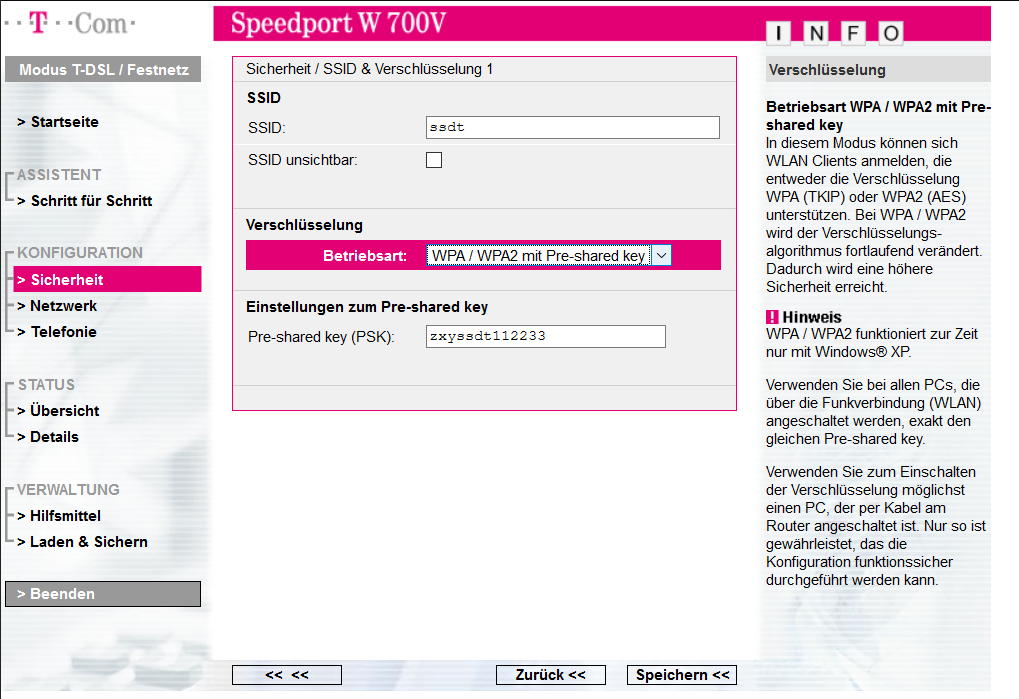
I'm using an old telekom speedport w 700v (de) as an AP. On the configuration page, it says :
WPA / WPA2 operating mode with pre-shared key

In this mode, WLAN clients can register that support either WPA (TKIP) or WPA2 (AES) encryption. With WPA / WPA2 the encryption algorithm is continuously changed. This increases security.
I have also the option to just set it to only WPA or WPA2.
I could also use an Fritz!Box 7490 if necessary. I was just using this old router I had lying around, because I didn't want to set my main router to host a unprotected wifi before. Now, I just changed the settings to the pre-hardcoded credentials on master.
Here a few screenshots of my config :

Klingens13
on 7 Apr 2020
maybe you can modify the hardcoded ssid and password with your main router WiFi and test agin. as for me, i also have 3165ngw and it works fine.
zxystd
on 7 Apr 2020
Looks like switching to a newer router did the trick! :)
Klingens13
on 7 Apr 2020
Now I believe I have fix this issue, would you like to pull the latest code and try with your old router again?
zxystd
on 7 Apr 2020
Now I believe I have fix this issue, would you like to pull the latest code and try with your old router again?
Btw what's the reason for slow internet speed ? Is it something like the transmission power and roaming aggressiveness configuration or something more complex ?
vasishath
on 7 Apr 2020
multi-thread handling, tx and rx. Maybe more.
 williambj1
on 7 Apr 2020
williambj1
on 7 Apr 2020
Hi - thanks so much for this kext! this is amazing work. My use case is a little different from most others. I'm trying to get an AX200/8265NGW (well just 8265 for now - but can't wait for AX200 support :) ) card working with a macbook pro through a thunderbolt3->PCIE card. It creates the interface and I see packets going back and forth, but when I try to unload the kext the computer freezes. @zxystd - any thoughts on how to gracefully unload the kext? Also - I had to add this to Info.plist to get it to accept the card
(@zxystd - can you add this or can I submit a pull request to add this to Info.Plist) so it can work for others trying something similar?
 arun719
on 8 Apr 2020
arun719
on 8 Apr 2020
Hi - thanks so much for this kext! this is amazing work. My use case is a little different from most others. I'm trying to get an AX200/8265NGW (well just 8265 for now - but can't wait for AX200 support :) ) card working with a macbook pro through a thunderbolt3->PCIE card. It creates the interface and I see packets going back and forth, but when I try to unload the kext the computer freezes. @zxystd - any thoughts on how to gracefully unload the kext? Also - I had to add this to Info.plist to get it to accept the card
IOPCITunnelCompatible(@zxystd - can you add this or can I submit a pull request to add this to Info.Plist) so it can work for others trying something similar?
Yes, I have not handle the unload routine, and it will not fully unload, thanks for your special test case and feedback, I will add it and repair unload soon.
zxystd
on 8 Apr 2020
I'm a newcomer and I don't use Xcode . Could you please export the kext file for me? Thank you very much!
 TonySturk
on 9 Apr 2020
TonySturk
on 9 Apr 2020
How can I use ?
when I use Xcode for using the kexts .... show error and it doesn't working ..

 MohammadtaghiFarkhondekar
on 9 Apr 2020
MohammadtaghiFarkhondekar
on 9 Apr 2020
Hi - thanks so much for this kext! this is amazing work. My use case is a little different from most others. I'm trying to get an AX200/8265NGW (well just 8265 for now - but can't wait for AX200 support :) ) card working with a macbook pro through a thunderbolt3->PCIE card. It creates the interface and I see packets going back and forth, but when I try to unload the kext the computer freezes. @zxystd - any thoughts on how to gracefully unload the kext? Also - I had to add this to Info.plist to get it to accept the card
IOPCITunnelCompatible
(@zxystd - can you add this or can I submit a pull request to add this to Info.Plist) so it can work for others trying something similar?Yes, I have not handle the unload routine, and it will not fully unload, thanks for your special test case and feedback, I will add it and repair unload soon.
I have built the kext clone from github which target for my Mojave (10.14.6) and it failed to load. I attached the log, please help.
log.txt
 quan3c10
on 10 Apr 2020
quan3c10
on 10 Apr 2020
Related issues
 JunkuiZhang
·
4Comments
MarshalX
·
3Comments
JunkuiZhang
·
4Comments
MarshalX
·
3Comments
 llkhs
·
6Comments
llkhs
·
6Comments
 stspdotname
·
6Comments
stspdotname
·
6Comments
 zdypk1994
·
5Comments
zdypk1994
·
5Comments
Most helpful comment
With latest commit 7ce262f710493ca82da2428016a3aa14423c4ba7 I was able to connect to network and use wifi.
Thanks!
Intel(R) Dual Band Wireless AC 8265