I would like to install numpy (as well as other python 2 and 3 modules). I tied the following:
pip3 install numpy
Traceback (most recent call last):
File "/usr/bin/pip3", line 6, in
from pip._internal import main
File "/usr/lib/python3.8/site-packages/pip/_internal/__init__.py", line 40, in
from pip._internal.cli.autocompletion import autocomplete
File "/usr/lib/python3.8/site-packages/pip/_internal/cli/autocompletion.py", line 8, in
from pip._internal.cli.main_parser import create_main_parser
File "/usr/lib/python3.8/site-packages/pip/_internal/cli/main_parser.py", line 11, in
from pip._internal.commands import (
File "/usr/lib/python3.8/site-packages/pip/_internal/commands/__init__.py", line 6, in
from pip._internal.commands.completion import CompletionCommand
File "/usr/lib/python3.8/site-packages/pip/_internal/commands/completion.py", line 6, in
from pip._internal.cli.base_command import Command
File "/usr/lib/python3.8/site-packages/pip/_internal/cli/base_command.py", line 26, in
from pip._internal.index import PackageFinder
ImportError: cannot import name 'PackageFinder' from 'pip._internal.index' (/usr/lib/python3.8/site-packages/pip/_internal/index/__init__.py)
I know this issue has been raised before (year ago) but I have not found a solution. How to add python modules?
 ifuchs
All 9 comments
Python 2 is obsolete, though.
 62f
on 22 Nov 2020
62f
on 22 Nov 2020
$ apk search numpy

py3-numpy-1.18.4-r0
py3-numpy-doc-1.18.4-r0
py3-numpy-dev-1.18.4-r0
py3-numpy-f2py-1.18.4-r0

$ apk add py3-numpy
then import numpy:

Got a warning but I guess it works!
I guess you need to install dependencies first if you want to install some python modules by using pip install. For example, libgfortran, openblas, etc.
pip install probably will never install those needed libraries for you.
Use the same method to install scipy:
$ apk search scipy
 anzhi0708
on 22 Nov 2020
anzhi0708
on 22 Nov 2020
I wouldn't use pip to install anything Alpine had already packaged into an apk anyway: Building wheels in iSH maybe takes forever, and then there's impending doom of duplicate binaries. In fact I've had very spotted success using pip beyond initially creating a (tutorial_env). Even pip installing updates to pip itself can be hit-&-miss, and seldom fixes anything. What's broken-pip usually stays pip-broken.
Now was never a better time to close this issue.
62f
on 22 Nov 2020
@anzhi0708 Thanks, that works! Unfortunately, Pandas is apparently not installable in the same way.
ifuchs
on 22 Nov 2020
@ifuchs Yeah, maybe we can try to build pandas from source code or something ;) I'll try to build it when I got home
anzhi0708
on 22 Nov 2020
Attempting to install numpy using pip, a very very verbose output states:
creating build/src.linux-i686-3.8/numpy/distutils
building library "npymath" sources
Could not locate executable gfortran
Could not locate executable f95
Could not locate executable ifort
Could not locate executable ifc
Could not locate executable lf95
Could not locate executable pgfortran
Could not locate executable nvfortran
Could not locate executable f90
Could not locate executable f77
Could not locate executable fort
Could not locate executable efort
Could not locate executable efc
Could not locate executable g77
Could not locate executable g95
Could not locate executable pathf95
Could not locate executable nagfor
don't know how to compile Fortran code on platform 'posix'
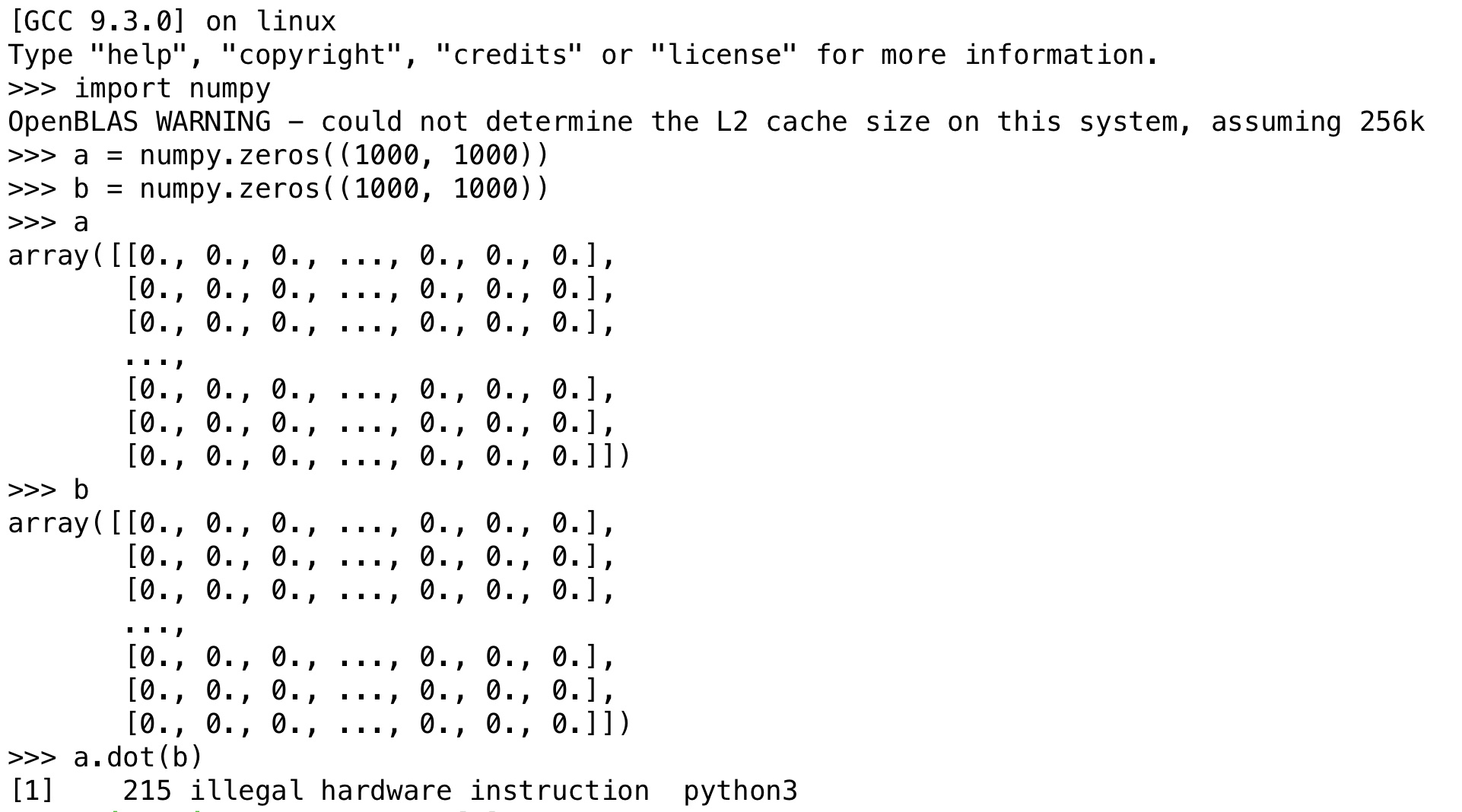
Follow up this thread. I installed bumpy, and run a simple matrix multiplication. I got this:
 were
on 23 Nov 2020
were
on 23 Nov 2020
@were Same error here
anzhi0708
on 23 Nov 2020
Original issue looks like a pip version mismatch or something. apk fix py3-pip may help.
Numpy does successfully install with apk add py3-pip.
For the error about not being able to compile fortran, try apk add gfortran.
@were This is #377.
 tbodt
on 24 Nov 2020
tbodt
on 24 Nov 2020
Related issues
 abraxxa
·
4Comments
abraxxa
·
4Comments
 fernandotcl
·
4Comments
fernandotcl
·
4Comments
 goerz
·
5Comments
goerz
·
5Comments
 cleverdevil
·
4Comments
cleverdevil
·
4Comments
 balboah
·
5Comments
balboah
·
5Comments