Ish: Feature Request: Copy to and paste from clipboard
Currently, it is possible to copy selected text to a clipboard by tapping “Copy” on the context menu, but it seems that it is impossible to paste from it on iSH.

I believe both of them are essential. Besides, keyboard shortcuts like CMD+V are also welcome if possible.
- [x] Custom popup menu
- [x] Paste button in toolbar
- [x] Hardware keyboard shortcut
 kkk669
All 18 comments
Pasting is indeed impossible, mostly because I'm not sure what the best UI would be for it. Long press maybe? Or a button in the toolbar?
 tbodt
on 3 Nov 2018
tbodt
on 3 Nov 2018
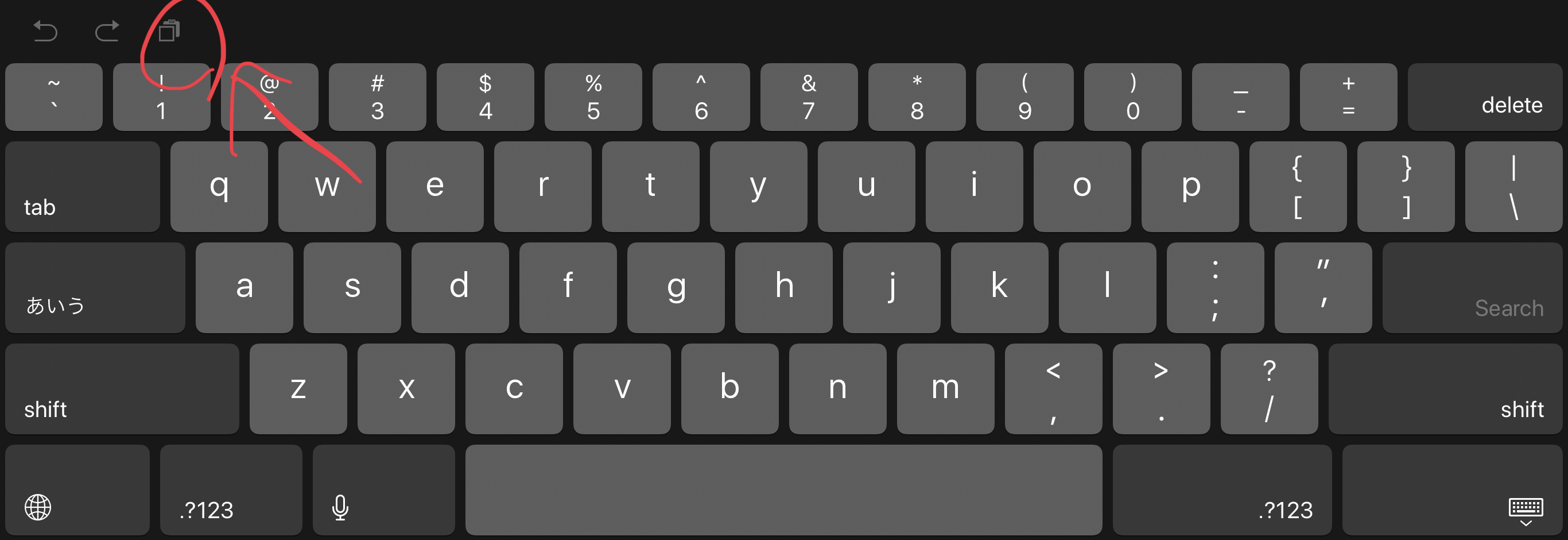
I prefer a button in inputAccessoryView or the standard keyboard’s paste button like the following image.
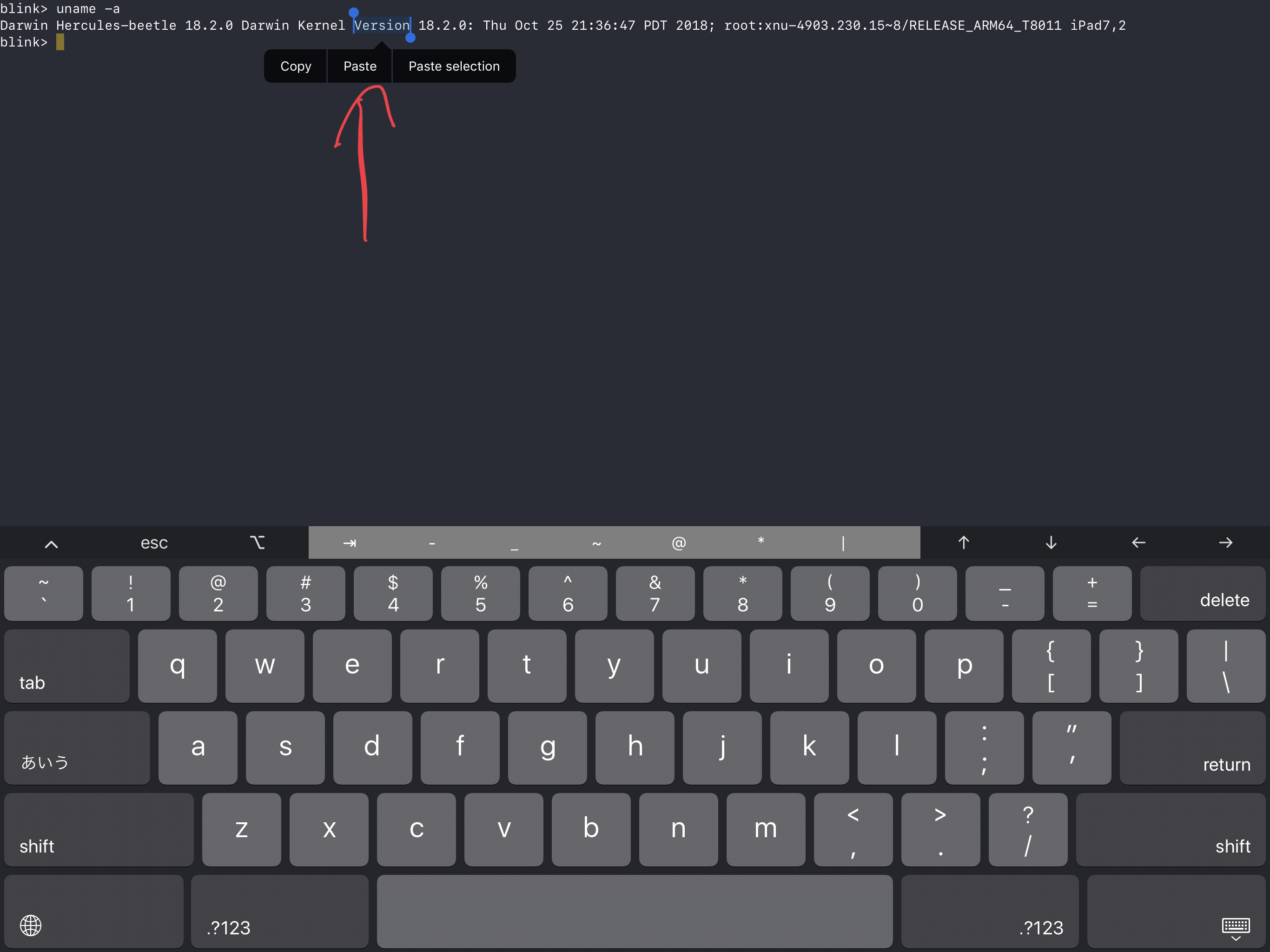
In the other hand, for instance, Blink has a “Paste” item in the context menu. It’s a little bit weird, but it works.
kkk669
on 3 Nov 2018
Looking at the blink source code, a custom popup menu doesn't seem too hard. I've added a task list to the issue.
tbodt
on 3 Nov 2018
I got the context menu working.
tbodt
on 18 Nov 2018
Hardware keyboard shortcut apparently comes for free with context menu support.
tbodt
on 28 Nov 2018
Context menu is great, though very difficult to bring up without a keyboard. I agree with what @kkk669 requested, if possible.
 BoxOfSnoo
on 1 Dec 2018
BoxOfSnoo
on 1 Dec 2018
In the latest beta I am no longer able to copy after selecting some text.
 tmm1
on 3 Dec 2018
tmm1
on 3 Dec 2018
I have the same issue, only a “paste” option appears.
 Mnpn03
on 3 Dec 2018
Mnpn03
on 3 Dec 2018
I guess because WebKit is no longer the first responder. I'll have to implement -copy myself, which shouldn't be hard.
tbodt
on 3 Dec 2018
In the latest TestFlight build 35, when I just long press text to select it on iSH, it will be copied into the pasteboard even if I don’t tap the “Copy” item. Is this a bug?
I’m using 3rd generation 12.9” iPad Pro with iOS 12.1.1.
Sent with GitHawk
kkk669
on 9 Dec 2018
@kkk669 I cannot reproduce it.. I am iOS 12.1 tho, it might be a small bug with iOS 12.1.1
 ELChris414
on 9 Dec 2018
ELChris414
on 9 Dec 2018
@ELChris414 I also reproduced it on iPad Air 2 w/ iOS 12.1 and iPhone XS with iOS 12.1.1. So, it’s not iOS 12.1.1 bug.
Sent with GitHawk
kkk669
on 9 Dec 2018
kkk669
on 9 Dec 2018
Saw the video, still cannot reproduce. This is weird. It just keeps pasting my last copied, it does not renew the copy
ELChris414
on 9 Dec 2018
I can replicate this on iOS 12.1.1. Please, create a new issue for this. Thanks
Mnpn03
on 9 Dec 2018
@Mnpn03 Thanks. I created #174.
kkk669
on 9 Dec 2018
There's now a paste button on the toolbar, so I'll close this.
tbodt
on 29 Dec 2018
Now that iOS 13.7 has introduced a copy/paste dialog within the touch-keyboardless full screen view of the scrollback, I totally forgot about iSH’s button and was absentmindedly trying to paste by using the floating dialog. It is possible, but very tricky; the kb has to stay hidden, which it thoroughly dislikes.
 62f
on 15 Sep 2020
62f
on 15 Sep 2020
Related issues
 MasonProtter
·
3Comments
MasonProtter
·
3Comments
 m4rkw
·
5Comments
m4rkw
·
5Comments
 abraxxa
·
4Comments
abraxxa
·
4Comments
 tommythorn
·
4Comments
tommythorn
·
4Comments
 travis-mark
·
5Comments
travis-mark
·
5Comments
Most helpful comment
Looking at the blink source code, a custom popup menu doesn't seem too hard. I've added a task list to the issue.