Irremoteesp8266: Problem turning off Samsung AC via the class interface.
Version/revision of the library used
2.7.5
Expected behavior
Shut down my Samsung AC correctly
Actual behavior
@80MHz same code works well 100% of the time.
@160Mhz sometimes the AC is not turned off by this code.
  #include <IRremoteESP8266.h>
  #include <IRsend.h>
  #include <ir_Samsung.h>
...
acir.off();
acir.sendOff();
Circuit diagram and hardware used (if applicable)
https://github.com/sblantipodi/smart_thermostat
I have followed the steps in the Troubleshooting Guide & read the FAQ
YES
Has this library/code previously worked as expected for you?
NO
 sblantipodi
All 85 comments
PS: love the lib, thanks for it and congratulations!
sblantipodi
on 30 Apr 2020
The main difference with this library and changing the clock frequency is the timing allowances in generating the software-based PWM signal for the IR message trasmission.
In theory, the correct default timing values should be set here:
https://github.com/crankyoldgit/IRremoteESP8266/blob/8e06cca94df0455e404244793a3c41cf9663ab9d/src/IRsend.h#L27-L30
However, the default might not be good enough in your particular case, hence I suggest you try the calibrate() function. This only needs to be run once (per boot obviously). It will try to programmatically calculate the value for you.
If you load IRMQTTServer.ino onto your ESP8266 @160Mhz then it should display in the info page what this value is too. (i.e. you can change it above in the library if needed.)
The calibrate() method is available in the IRsend class and in each AC class, as follows:
https://github.com/crankyoldgit/IRremoteESP8266/blob/8e06cca94df0455e404244793a3c41cf9663ab9d/src/IRsend.h#L165
and
https://github.com/crankyoldgit/IRremoteESP8266/blob/8e06cca94df0455e404244793a3c41cf9663ab9d/src/ir_Samsung.h#L102
That value (used in the library's software based PWM generator) is the most likely cause of your problem.
Can you let me know if it returns something other than -2 for you at 160MHz or if using .calibrate() fixes your problem? It might be time to re-tune the default depending on core-library versions etc.
 crankyoldgit
on 30 Apr 2020
crankyoldgit
on 30 Apr 2020
PS: love the lib, thanks for it and congratulations!
Thanks! It's a lot of work. ;-)
crankyoldgit
on 30 Apr 2020
That looks like a pretty neat & awesome project yourself!
I've added it to the list of related projects: https://github.com/crankyoldgit/IRremoteESP8266/wiki/Related-User-Projects#diy
crankyoldgit
on 30 Apr 2020
That looks like a pretty neat & awesome project yourself!
I've added it to the list of related projects: https://github.com/crankyoldgit/IRremoteESP8266/wiki/Related-User-Projects#diy
really thanks, I really appreciate it :)
sblantipodi
on 30 Apr 2020
Can you let me know if it returns something other than
-2for you at 160MHz or if using.calibrate()fixes your problem? It might be time to re-tune the default depending on core-library versions etc.
@160Mhz the calibrate() function returns
254
@80Mhz the calibrate() function returns
251
is this ok?
sblantipodi
on 30 Apr 2020
You're storing the value in an unsigned integer. It's a signed integer. 255 is -1, 254 is -2, and so on.
crankyoldgit
on 30 Apr 2020
You're storing the value in an unsigned integer. It's a signed integer. 255 is -1, 254 is -2, and so on.
ah ok, are those values correct?
I have not used the AC since last summer but since last summer it seems that I'm having some problems @80MHz too.
the only command that have problems is the turn off.
sometimes the AC, simply isn't turned off.
sblantipodi
on 30 Apr 2020
Oops. I'm returning it as an unsigned integer. That's a bug
crankyoldgit
on 30 Apr 2020
Oops. I'm returning it as an unsigned integer. That's a bug
I used uint8_t to make the test because I have seen that return type :)
it this bug the reason of my "problems"?
sblantipodi
on 30 Apr 2020
it this bug the reason of my "problems"?
Sadly no.
crankyoldgit
on 30 Apr 2020
ah ok, are those values correct?
Effectively, yes. -2 (254) is what I would expect.
crankyoldgit
on 30 Apr 2020
it this bug the reason of my "problems"?
Sadly no.
any idea on what could be the problem?
last summer it worked perfectly, I'm used to update all the libraries pretty often, since last summer the only things changed is the version of the libraries used.
thanks!
sblantipodi
on 30 Apr 2020
Do you know what version you used last that worked okay?
Here is the history for the file that contains the code for that class:
https://github.com/crankyoldgit/IRremoteESP8266/commits/master/src/ir_Samsung.cpp
We've always had problems with Samsung's "Off" function/message as it is not a typical one. i.e. it's an extended one which we've never been able to calculate, we've had to use a pre-recorded message just for it.
However, I didn't go down this path as you said it was working fine at 80 but only fails at 160. The logic/code for everything shouldn't change at 160MHz. The only part is the uSecond-level timing in the PWM generation.
crankyoldgit
on 30 Apr 2020
Do you know what version you used last that worked okay?
Here is the history for the file that contains the code for that class:https://github.com/crankyoldgit/IRremoteESP8266/commits/master/src/ir_Samsung.cpp
We've always had problems with Samsung's "Off" function/message as it is not a typical one. i.e. it's an extended one which we've never been able to calculate, we've had to use a pre-recorded message just for it.
However, I didn't go down this path as you said it was working fine at 80 but only fails at 160. The logic/code for everything shouldn't change at 160MHz. The only part is the uSecond-level timing in the PWM generation.
I correct my sentence, the only things I changed (over the libraries version) since last summer was the ESP running from 80 to 160MHz, so I tought that 160MHz was the culprit of the problem.
a more accurate test revealed that I have the same problem even at 80MHz now.
sblantipodi
on 30 Apr 2020
Okay .. so it's a "turn off" problem for Samsung then.
Looking back at your (pseudo) code:
  #include <IRremoteESP8266.h>
  #include <IRsend.h>
  #include <ir_Samsung.h>
...
acir.off();
acir.sendOff();
I think you might be using sendOff(), when you should just call acir.send().
IRSamsungAc::send() got an update a while back to try to do the right thing for users instead of having to manually know to call sendOff()
i.e.
https://github.com/crankyoldgit/IRremoteESP8266/blob/8e06cca94df0455e404244793a3c41cf9663ab9d/src/ir_Samsung.cpp#L355-L370
Try that, it might work, but I wouldn't hold my breath.
crankyoldgit
on 30 Apr 2020
Okay .. so it's a "turn off" problem for Samsung then.
Looking back at your (pseudo) code:
  #include <IRremoteESP8266.h>
  #include <IRsend.h>
  #include <ir_Samsung.h>
...
acir.off();
acir.sendOff();
I think you might be using
sendOff(), when you should just callacir.send().
IRSamsungAc::send()got an update a while back to try to do the right thing for users instead of having to manually know to callsendOff()
i.e.
https://github.com/crankyoldgit/IRremoteESP8266/blob/8e06cca94df0455e404244793a3c41cf9663ab9d/src/ir_Samsung.cpp#L355-L370Try that, it might work, but I wouldn't hold my breath.
I have tried it several times and I can tell you for sure that
acir.off();
acir.sendOff();
shut down the AC pretty often,
acir.off();
acir.send();
never shut down my AC.
sblantipodi
on 30 Apr 2020
I have tried it several times and I can tell you for sure that
acir.off();
acir.sendOff();shut down the AC pretty often,
acir.off();
acir.send();never shut down my AC.
hope there is some logical explanations to this.
I add that setting the AC to Quiet or Power makes easyer to turn it off with acir.sendOff()
does this have any sense?
are the "turn off ir commands" different if the AC is set to Auto, Quiet or Power?
sblantipodi
on 30 Apr 2020
hope there is some logical explanations to this.
I add that setting the AC to Quiet or Power makes easyer to turn it off with acir.sendOff()
does this have any sense?
are the "turn off ir commands" different if the AC is set to Auto, Quiet or Power?
Frankly, nothing about Samsung's "Power off" (extended) messages surprises me a lot anymore. The canned "off" message is a horrible kludge.
Can you capture your AC's "real" power off, from the actual remote? We could try replacing the extended state we send with that and see how it behaves.
crankyoldgit
on 1 May 2020
BTW, this is the Extended State "Off" message we send.
https://github.com/crankyoldgit/IRremoteESP8266/blob/8e06cca94df0455e404244793a3c41cf9663ab9d/src/ir_Samsung.cpp#L408-L411
crankyoldgit
on 1 May 2020
this is all the captures I registered from the genuine remote:
I registered two times the same "remote configuration" just to be sure that it's ok.
OFF commands are on top of the list, I attach even other recording, don't know if it can help. :)
thanks for your work.
sblantipodi
on 1 May 2020
don't tell me why but if I set quiet or power, than the acir.sendOff() works pretty always.
if I set auto mode, acir.sendOff() works 60% of the time,
if I call acir.off() and then acir.send() it never works.
sblantipodi
on 1 May 2020
this is all the captures I registered from the genuine remote:
If you use the IRrecvDumpV2 prog, it will tell you a lot more about the messages (and confirm the library understands them)
crankyoldgit
on 1 May 2020
this is all the captures I registered from the genuine remote:
If you use the
IRrecvDumpV2prog, it will tell you a lot more about the messages (and confirm the library understands them)
I need to "reassemble" the ir receiver, now I can only send IR, not receiving it with the current ESP I'm using :)
tomorrow I will give you the output of the IRrecvDumpV2
thanks
sblantipodi
on 1 May 2020
No rush. I'm trying to take the raw data you've provided (from Tasmota?) and see if I can emulate it.
crankyoldgit
on 1 May 2020
don't remember, probably tasmota,
but I'm sure that I have used that codes with your lib and that it worked.
obviously raw code is not the way to go for me, too complex and too many codes to manage.
I will provide fresh and more accurate infos if needed.
sblantipodi
on 1 May 2020
I decoded the samsung extended state from the raw "Off" message in your text file.
It's:
uint8_t state[21] = {
      0x02, 0xB2, 0x0F, 0x00, 0x00, 0x00, 0xC0,
      0x01, 0xD2, 0x0F, 0x00, 0x00, 0x00, 0x00,
      0x01, 0x02, 0xFF, 0x71, 0x00, 0x15, 0xC0};
The _default_ Off message is as previously linked.
Yours differs from the standard "Off" message in state[18] from (lib) 0x80 to (yours) 0x00, and state[19] from (lib) 0x11 to (yours) 0x15
So try using those values in the library maybe?
crankyoldgit
on 1 May 2020
Ideally we want a way to convert a normal (14 byte) state message into an extended (21 byte) state message. The problem is (IIRC) calculating the checksum for the extended message. We haven't been able to successfully calculate it for all "extended" messages.
crankyoldgit
on 1 May 2020
So try using those values in the library maybe?
I can test it if you want to try.
sblantipodi
on 1 May 2020
Feel free.
crankyoldgit
on 1 May 2020
I have tried it several times and I can tell you for sure that
acir.off();
acir.sendOff();shut down the AC pretty often,
acir.off();
acir.send();never shut down my AC.
acir.off(); acir.send(); won't send a proper (extended) "Off" message, if the class already thinks the device is already off.
When the AC class is instantiated it calls stateReset() without any args.
See:
https://github.com/crankyoldgit/IRremoteESP8266/blob/8e06cca94df0455e404244793a3c41cf9663ab9d/src/ir_Samsung.cpp#L297-L307
Without any args, it assumes the initial state is "on".
This internal state (_lastsentpowerstate) controls whether it needs to send the extended power on/off message to make the device behave correctly. It keeps track via the .send() invocations.
So, if you've previously sent an "off" message and then try to send another "off" state/message (without having sent an "on" message), it won't/shouldn't send the special "off" message again. Vice-versa for "on" too.
Could that be the case with your programs logic?
crankyoldgit
on 1 May 2020
Could that be the case with your programs logic?
no I don't think so
sblantipodi
on 1 May 2020
Oh well. Worth the through. How did you go with the different power off code?
crankyoldgit
on 1 May 2020
Feel free.
tried the 0x00, 0x15 state and it doesn't helped.
the only things that seems to works ok 100% of the time is to set the power or quiet state before turning off the AC. don't know why.
sblantipodi
on 1 May 2020
setPowerful() or setQuiet()? Bizarre!
crankyoldgit
on 1 May 2020
Can you on your actual remote, duplicate the same mode you think you've set up the class too, and record the IR remote's off message? If that "works", that's a truly odd/weird approach from samsung to require a matching config etc on the device and the remote for an off command to work.
crankyoldgit
on 1 May 2020
if I use setPowerful() or setQuiet() it works well.
this is the recording of the remote OFF command that works pretty always, if not always.
Remote is in this state before the off cmnd even if the recording does not say the same thing
- COOL mode
- 16°C
- quiet mode
- fan auto
Protocol : SAMSUNG_AC
Code : 0x02B20F000000C001D20F000000000112FF710011C0 (168 Bits)
Mesg Desc.: Power: Off, Mode: 1 (Cool), Temp: 16C, Fan: 0 (Auto), Swing: Off, Beep: Off, Clean: Off, Quiet: Off, Powerful: Off, Breeze: Off, Light: On, Ion: Off
uint16_t rawData[349] = {596, 17872, 3018, 8968, 510, 488, 510, 1480, 512, 510, 486, 486, 510, 486, 510, 508, 488, 484, 512, 508, 486, 510, 486, 1486, 506, 512, 484, 536, 460, 1508, 484, 1508, 508, 490, 508, 1482, 512, 1480, 512, 1480, 512, 1480, 512, 1482, 512, 510, 486, 510, 486, 510, 484, 490, 506, 512, 484, 512, 484, 510, 484, 536, 480, 492, 506, 488, 508, 488, 510, 486, 510, 486, 510, 508, 486, 486, 510, 508, 488, 508, 488, 508, 488, 508, 486, 490, 506, 510, 486, 512, 484, 492, 504, 536, 460, 512, 482, 536, 480, 494, 504, 514, 484, 512, 486, 486, 510, 484, 512, 508, 486, 486, 510, 486, 510, 1482, 512, 1484, 538, 2958, 2994, 8972, 508, 1486, 506, 512, 482, 514, 480, 514, 504, 516, 482, 514, 484, 488, 510, 510, 486, 484, 512, 1480, 514, 484, 512, 486, 510, 1482, 512, 510, 486, 1484, 508, 1486, 508, 1508, 482,1508, 506, 1488, 510, 1484, 512, 488, 510, 510, 486, 484, 512, 510, 486, 510, 486, 510, 486, 510, 486, 510, 486, 510, 484, 510, 486, 490, 506, 512, 484, 536, 516, 458, 482, 538, 480, 492, 508, 512, 486, 510, 486, 510, 486, 486, 510, 510, 486, 486, 510, 484, 510, 486, 510, 510, 486, 510, 486, 510, 484, 512, 484, 492, 504, 512, 484, 512, 482, 538, 458, 538, 478, 494, 506, 488, 510, 512, 486, 2966, 3016, 8966, 514, 1480, 512, 486, 510, 486, 510, 486, 510, 510, 486, 510, 486, 510, 486, 512, 484, 514, 482, 1508, 484, 512, 502, 494, 504, 1486, 510, 488, 510, 510, 486, 508, 488, 1480, 512, 1480, 512, 1482, 512, 1484, 508, 1486, 506, 1508, 486, 1508, 484, 1510, 506, 1486, 510, 512, 486, 508, 486, 486, 510, 1480, 512, 1480, 512, 1482, 512, 510, 486, 510, 486, 510, 486, 512, 484, 536, 460, 512, 514, 482, 484, 536, 480, 492, 508, 1484, 512, 488, 510, 508, 486, 486, 510, 1480, 512, 510, 486, 510, 488, 510, 486, 510, 486, 510, 486, 492, 504, 512, 484, 510, 484, 536, 458, 1508, 506, 1486, 514}; // SAMSUNG_AC
uint8_t state[21] = {0x02, 0xB2, 0x0F, 0x00, 0x00, 0x00, 0xC0, 0x01, 0xD2, 0x0F, 0x00, 0x00, 0x00, 0x00, 0x01, 0x12, 0xFF, 0x71, 0x00, 0x11, 0xC0};
sblantipodi
on 1 May 2020
@sblantipodi I've adjust the power off value to match what you've just provided. Can you please test out the following branch and let me know if it behaves "better".
https://github.com/crankyoldgit/IRremoteESP8266/tree/Issue1093
crankyoldgit
on 2 May 2020
@crankyoldgit just tested it. it does not help at all, it's even worse.
can't explain it.
sblantipodi
on 2 May 2020
the real question is, why it works better if I setPowerful() or setQuiet() to true?
does something change in the message sent or in the IR object instance?
sblantipodi
on 2 May 2020
I'm using the wemos ir sender/receiver shield for the lolin d1 mini board with a lolin d1 mini board.
If I send and receive at the same time, the sent message from the shield is different from the expected one, your reveiver code does not even recognize the Samsung protocol.
is this a test that can help?
I mixed the send/receive code to see what is sent and what is received in the same shield and the received message is not a samsung one, is unknown.
sblantipodi
on 2 May 2020
the real question is, why it works better if I setPowerful() or setQuiet() to true?
It's got me baffled too.
Nothing special that I can immediately see happens in setQuiet():
https://github.com/crankyoldgit/IRremoteESP8266/blob/15d2232717d4436d916cd17c23d4e2a44048dee7/src/ir_Samsung.cpp#L541-L549
& setPowerful():
https://github.com/crankyoldgit/IRremoteESP8266/blob/15d2232717d4436d916cd17c23d4e2a44048dee7/src/ir_Samsung.cpp#L558-L572
Can I suggest we(you) try to narrow this down to something small, simple, and repeatable that clearly breaks or fails etc.
e.g. Use the example code ControlSamsungAC.ino and pair out anything/everything that isn't needed, yet still reproduces the problem.
If I send and receive at the same time, the sent message from the shield is different from the expected one, your reveiver code does not even recognize the Samsung protocol.
Can you provide the rawData for the ones that are not being decoded successfully. With it I can try to see what the problem might be.
i.e. See https://github.com/crankyoldgit/IRremoteESP8266/wiki/Troubleshooting-Guide#reporting-an-issue
Points 1, 3 to 5, 8, 11, & 12! ;-)
crankyoldgit
on 2 May 2020
the real question is, why it works better if I setPowerful() or setQuiet() to true?
does something change in the message sent or in the IR object instance?
I correct this sentence, turn off is never reliable even with quiet or power mode.
sblantipodi
on 2 May 2020
@crankyoldgit the code I'm using is here:
https://github.com/sblantipodi/smart_thermostat/blob/master/src/Smartostat.cpp
it's pretty long but if you narrow the parts where I use
acir.off(), acir.something() it will be easily readable.
at the moment I'm not able to narrow the problem, it is so random,
same code, same condition, sometimes it works, sometimes not.
here some readings from that code:
This is a reading of a command that correctly turned off the AC.
(ACIR object is set to COOL, FAN AUTO, 28°C, POWER ON, QUIET OFF)
Protocol : UNKNOWN
Code : 0xCF66BF78 (175 Bits)
uint16_t rawData[349] = {146, 20896, 148, 9322, 146, 878, 146, 1874, 146, 878, 146, 878, 146, 878, 146, 878, 146, 878, 146, 878, 146, 878, 146, 1872, 146, 878, 146, 878, 146, 1874, 146, 1874, 146, 876, 146, 1874, 146, 1874, 146, 1874, 146, 1874, 146, 1874, 146, 878, 146, 878, 146, 878, 146, 878, 146, 878, 146, 876, 146, 878, 146, 878, 146, 876, 146, 878, 146, 878, 146, 878, 146, 876, 146, 878, 146, 878, 146, 876, 146, 878, 146, 878, 146, 876, 146, 878, 146, 878, 146, 876, 146, 878, 146, 878, 146, 876, 146, 878, 146, 878, 146, 878, 146, 878, 146, 876, 146, 878, 146, 878, 146, 878, 146, 878, 146, 1872, 146, 1874, 146, 5838, 148, 9302, 146, 1874, 146, 878, 144, 878, 146, 878, 146, 878, 146, 878, 146, 878, 146, 878, 146, 878, 146, 1874, 146, 878, 146, 878, 146, 1874, 146, 878, 146, 1874, 146, 1874, 146, 1874, 146, 1874, 146, 1874, 146, 1874, 146, 878, 146, 878, 146, 878, 146, 878, 146, 878, 146, 878, 146, 878, 146, 878, 146, 878, 146, 878, 146, 878, 146, 878, 146, 878, 146, 878, 146, 878, 146, 878, 146, 878, 146, 876, 146, 878, 146, 878, 146, 878, 146, 878, 146, 878, 146, 878, 146, 878, 146, 876, 146, 878, 146, 878, 146, 876, 146, 878, 146, 878, 146, 878, 146, 878, 146, 878, 146, 878, 146, 878, 146, 5834, 148, 9302, 146, 1874, 146, 878, 146, 878, 146, 878, 146, 878, 146, 878, 146, 876, 146, 878, 146, 876, 146, 1874, 146, 878, 146, 878, 146, 878, 146, 878, 146, 878, 146, 878, 146, 1874, 146, 1874, 146, 1874, 146, 1874, 146, 1874, 146, 1874, 146, 1874, 146, 1874, 146, 1874, 146, 878, 146, 878, 146, 878, 146, 1874, 146, 1874, 146, 1874, 146, 878, 146, 878, 146, 878, 146, 878, 146, 878, 146, 878, 146, 878, 146, 878, 146, 1874, 146, 1874, 146, 878, 146, 878, 146, 876, 146, 1874, 146, 878, 146, 878, 146, 878, 144, 878, 146, 878, 146, 878, 146, 878, 146, 878, 144, 878, 146, 1874, 146, 1874, 144}; // UNKNOWN CF66BF78
This is a reading of a command that failed to turn off the AC.
(ACIR object is set to COOL, FAN AUTO, 28°C, POWER OFF, QUIET OFF)
Protocol : UNKNOWN
Code : 0xCF66BF78 (175 Bits)
uint16_t rawData[349] = {146, 20876, 150, 9328, 148, 876, 146, 1872, 146, 876, 146, 878, 146, 876, 146, 878, 146, 876, 146, 878, 146, 876, 146, 1874, 146, 878, 146, 876, 146, 1872, 148, 1872, 146, 878, 146, 1874, 146, 1874, 146, 1872, 146, 1872, 146, 1874, 146, 876, 146, 876, 146, 878, 146, 878, 146, 876, 146, 876, 146, 878, 146, 876, 146, 876, 146, 878, 146, 876, 146, 878, 146, 876, 146, 878, 146, 876, 146, 876, 148, 876, 146, 876, 146, 878, 146, 878, 146, 878, 146, 876, 146, 878, 146, 876, 146, 876, 146, 878, 146, 878, 146, 878, 146, 878, 146, 876, 148, 876, 146, 876, 146, 878, 146, 876, 146, 1874, 146, 1874, 144, 5838, 150, 9300, 146, 1872, 146, 878, 146, 876, 146, 876, 146, 878, 146, 876, 146, 878, 146, 876, 146, 878, 146, 1874, 146, 876, 148, 876, 146, 1872, 146, 878, 146, 1874, 146, 1874, 146, 1872, 146, 1874, 146, 1874, 146, 1872, 146, 878, 146, 876, 146, 878, 146, 876, 146, 876, 148, 876, 146, 876, 146, 878, 146, 876, 146, 876, 146, 878, 146, 878, 146, 876, 146, 876, 146, 876, 148, 876, 146, 876, 148, 876, 146, 876, 146, 878, 146, 876, 146, 878, 146, 876, 146, 876, 148, 876, 146, 876, 146, 878, 146, 878, 146, 878, 146, 876, 146, 878, 146, 878, 146, 876, 146, 878, 146, 878, 146, 878, 146, 5832, 150, 9302, 146, 1874, 146, 876, 146, 878, 146, 878, 146, 876, 146, 878, 146, 876, 146, 876, 148, 876, 146, 1872, 146, 878, 146, 878, 146, 878, 146, 878, 146, 876, 146, 878, 146, 1874, 146, 1874, 146, 1872, 146, 1874, 146, 1872, 146, 1872, 146, 1874, 146, 1874, 146, 1874, 146, 878, 146, 878, 146, 878, 146, 1872, 146, 1872, 148, 1872, 146, 878, 146, 876, 146, 876, 146, 878, 146, 876, 146, 878, 146, 878, 146, 880, 146, 1872, 146, 1872, 146, 878, 146, 878, 146, 876, 146, 1872, 146, 878, 146, 876, 146, 878, 146, 876, 146, 878, 146, 876, 146, 876, 146, 878, 146, 876, 146, 1874, 146, 1874, 146}; // UNKNOWN CF66BF78
sblantipodi
on 2 May 2020
Why don't you give me the entire "class" steps you (would) use to set and turn off the unit to/from a given state, plus record those messages with another ESP running DumpV2 etc.
and then the same steps with your actual remote (recording it as well), and I can try to compare the two to see and the results and try to see what might be going wrong.
crankyoldgit
on 2 May 2020
Why don't you give me the entire "class" steps you (would) use to set and turn off the unit to/from a given state, plus record those messages with another ESP running DumpV2 etc.
and then the same steps with your actual remote (recording it as well), and I can try to compare the two to see and the results and try to see what might be going wrong.
Unfortunantly I don't have so many receivers, I will buy them but it will take weeks before arriving here.
the steps to reproduce is:
1) turn on the AC with this settings, COOL mode, FAN auto, QUIET off, POWER off, WINGS off at 28°C.
2) try to turn off the AC with the same settings.
recording from the code I sent you with the genuine remote:
Turn on GENUINE REMOTE, COOL mode, FAN auto, QUIET off, POWER off, WINGS off at 28°C.
Protocol : SAMSUNG_AC
Code : 0x02920F000000F001D20F0000000001D2FE71C011F0 (168 Bits)
Mesg Desc.: Power: On, Mode: 1 (Cool), Temp: 28C, Fan: 0 (Auto), Swing: Off, Beep: Off, Clean: Off, Quiet: Off, Powerful: Off, Breeze: Off, Light: On, Ion: Off
uint16_t rawData[349] = {592, 15624, 3016, 8972, 504, 494, 504, 1486, 510, 490, 510, 510, 486, 486, 510, 510, 486, 510, 486, 510, 486, 510, 486, 1484, 508, 512, 484, 512, 484, 1508, 484, 514, 482, 538, 458, 1508, 504, 1490, 508, 1484, 512, 1482, 510, 1480, 512, 510, 486, 486, 510, 512, 484, 512, 484, 510, 486, 512, 482, 514, 482, 514, 482, 538, 460, 536, 458, 538, 478, 518, 480, 492, 508, 488, 510, 488, 508, 510, 486, 510, 486, 486, 510, 486, 508, 488, 508, 488, 508, 512, 484, 510, 486, 512, 482, 492, 504, 512, 484, 514, 484, 514, 482, 536, 478, 496, 502, 494, 506, 490, 508, 1482, 512, 1480, 512, 1482, 512, 1482, 512, 2988, 2994, 8974, 508, 1488, 504, 514, 482, 538, 458, 514, 508, 512, 458, 538, 454, 516, 506, 516, 482, 514, 484, 1482, 512, 510, 486, 510, 484, 1482, 512, 486, 508, 1484, 508, 1486, 506, 1488, 504, 1510, 510, 1482, 502, 1490, 508, 490, 508, 514, 484, 486, 510, 486, 510, 488, 508, 510, 484, 488, 508, 488, 508, 512, 484, 512, 484, 512, 484, 514, 482, 538, 458, 538, 458, 538, 460, 536, 454, 540, 478, 494, 504, 492, 506, 490, 508, 486, 510, 486, 510, 486, 508, 488, 510, 486, 508, 512, 484, 512, 484, 512, 484, 512, 484, 514, 482, 516, 480, 516, 510, 510, 460, 512, 480, 516, 480, 540, 486, 2968, 3014, 8970, 510, 1484, 510, 512, 484, 512, 484, 512, 484, 488, 508, 512, 484, 512, 484, 512, 484, 514, 482, 1508, 484, 514, 510, 510, 460, 1506, 482, 516, 506, 1486, 510, 1482, 510, 488, 508, 1482, 510, 1484, 510, 1486, 508, 1508, 484, 1488, 504, 1510, 512, 1480, 480, 1512, 504, 494, 508, 490, 508, 510, 484, 1482, 510, 1482, 512, 1482, 510, 512, 484, 512, 484, 512, 484, 514, 482, 514, 480, 538, 458, 514, 510, 1480, 482, 1510, 508, 1484, 512, 486, 510, 488, 506, 488, 508, 1482, 510, 488, 508, 512, 484, 512, 484, 512, 484, 514, 482, 514, 482, 538, 456, 1510, 510, 1482, 480, 1512, 506, 1486, 510}; // SAMSUNG_AC
uint8_t state[21] = {0x02, 0x92, 0x0F, 0x00, 0x00, 0x00, 0xF0, 0x01, 0xD2, 0x0F, 0x00, 0x00, 0x00, 0x00, 0x01, 0xD2, 0xFE, 0x71, 0xC0, 0x11, 0xF0};
Turn off GENUINE REMOTE, COOL mode, FAN auto, QUIET off, POWER off, WINGS off at 28°C.
Protocol : SAMSUNG_AC
Code : 0x02B20F000000C001D20F0000000001F2FE71C011C0 (168 Bits)
Mesg Desc.: Power: Off, Mode: 1 (Cool), Temp: 28C, Fan: 0 (Auto), Swing: Off, Beep: Off, Clean: Off, Quiet: Off, Powerful: Off, Breeze: Off, Light: On, Ion: Off
uint16_t rawData[349] = {592, 17874, 3016, 8970, 504, 494, 506, 1486, 512, 510, 486, 510, 484, 488, 508, 510, 486, 486, 510, 510, 486, 510, 486, 1486, 506, 510, 484, 514, 482, 1508, 484, 1508, 480, 518, 478, 1512, 508, 1484, 512, 1482, 510, 1480, 512, 1480, 512, 486, 510, 510, 486, 512, 484, 510, 486, 512, 482, 538, 458, 514, 482, 538, 484, 490, 478, 542, 478, 518, 480, 516, 482, 514, 484, 486, 510, 512, 484, 486, 510, 486, 510, 486, 510, 510, 486, 488, 508, 512, 484, 512, 484, 514, 482, 492, 504, 514, 482, 538, 460, 512, 478, 516, 502, 496, 504, 516, 482, 490, 508, 488, 508, 510, 484, 488, 508, 1482, 510, 1484, 510, 2990, 2994, 8972, 508, 1488, 504, 514, 482, 538, 458, 538, 460, 512, 478, 542, 456, 516, 506, 490, 506, 490, 510, 1482, 510, 512, 484, 488, 508, 1482, 510, 510, 484, 1488, 506, 1488, 504, 1508, 484, 1510, 486, 1506, 480, 1512, 506, 492, 506, 490, 508, 488, 508, 488, 508, 486, 510, 488, 508, 488, 508, 488, 508, 512, 484, 512, 484, 512, 484, 514, 482, 514, 482, 514, 516, 480, 484, 514, 478, 518, 502, 518, 480, 516, 482, 490, 508, 488, 508, 512, 484, 488, 508, 486, 510, 488, 508, 512, 484, 512, 484, 512, 484, 514, 482, 514, 482, 514, 480, 538, 492, 480, 486, 510, 478, 542, 456, 540, 484, 2970, 3012, 8970, 510, 1482, 510, 510, 484, 512, 484, 488, 508, 490, 506, 512, 484, 512, 484, 512, 484, 514, 482, 1510, 482, 538, 484, 488, 476, 1512, 482, 1510, 508, 1484, 510, 1482, 510, 488, 508, 1482, 510, 1486, 508, 1486, 506, 1490, 504, 1510, 484, 1512, 508, 1482, 482, 1512, 506, 514, 484, 512, 484, 512, 484, 1482, 510, 1482, 510, 1486, 508, 512, 484, 512, 484, 512, 482, 516, 480, 516, 480, 516, 510, 486, 484, 1508, 480, 1512, 508, 1486, 510, 512, 484, 490, 506, 512, 484, 1482, 510, 512, 484, 512, 484, 512, 484, 514, 482, 516, 480, 516, 482, 514, 544, 452, 510, 486, 478, 1512, 484, 1510, 510}; // SAMSUNG_AC
uint8_t state[21] = {0x02, 0xB2, 0x0F, 0x00, 0x00, 0x00, 0xC0, 0x01, 0xD2, 0x0F, 0x00, 0x00, 0x00, 0x00, 0x01, 0xF2, 0xFE, 0x71, 0xC0, 0x11, 0xC0};
Turn on Wemos Receiver (emitting and receiving), COOL mode, FAN auto, QUIET off, POWER off, WINGS off at 28°C. Worked well.
Protocol : UNKNOWN
Code : 0x4CD81148 (175 Bits)
uint16_t rawData[349] = {144, 20948, 150, 9340, 152, 878, 150, 1874, 150, 878, 152, 876, 150, 878, 150, 878, 150, 878, 150, 878, 150, 878, 152, 1872, 150, 878, 150, 876, 152, 1874, 150, 878, 152, 876, 150, 1874, 152, 1874, 150, 1874, 152, 1872, 152, 1874, 150, 878, 150, 878, 150, 878, 150, 878, 152, 878, 150, 878, 150, 878, 150, 878, 150, 878, 150, 878, 152, 878, 150, 878, 152, 878, 150, 878, 152, 878, 150, 878, 150, 878, 150, 878, 150, 878, 150, 878, 150, 878, 150, 878, 150, 878, 150, 878, 152, 878, 150, 878, 150, 878, 150, 878, 152, 876, 152, 876, 150, 878, 152, 876, 152, 1872, 152, 1874, 150, 1874, 150, 1874, 152, 5830, 150, 9312, 152, 1872, 152, 878, 150, 878, 150, 878, 150, 878, 152, 876, 150, 878, 152, 878, 150, 878, 152, 1874, 150, 876, 152, 878, 150, 1872, 150, 878, 150, 1872, 152, 1874, 150, 1872, 152, 1874, 150, 1874, 150, 1874, 152, 876, 152, 878, 150, 878, 150, 878, 152, 878, 150, 878, 150, 878, 150, 878, 150, 878, 150, 878, 150, 878, 150, 880, 150, 878, 152, 876, 152, 876, 152, 878, 150, 876, 152, 878, 150, 876, 152, 878, 150, 876, 152, 876, 152, 876, 152, 876, 152, 876, 152, 878, 150, 878, 150, 878, 150, 878, 150, 878, 152, 878, 150, 878, 150, 878, 150, 878, 150, 876, 152, 876, 152, 5826, 150, 9312, 152, 1872, 152, 876, 152, 878, 150, 876, 150, 878, 150, 878, 150, 878, 150, 878, 152, 878, 150, 1872, 152, 878, 150, 878, 150, 1874, 150, 876, 152, 1874, 150, 1874, 152, 876, 152, 1874, 150, 1874, 150, 1874, 150, 1874, 150, 1874, 150, 1874, 152, 1874, 150, 1874, 152, 878, 150, 876, 178, 850, 152, 1872, 178, 1846, 152, 1872, 178, 852, 150, 876, 152, 876, 152, 878, 150, 878, 152, 876, 152, 878, 150, 1874, 150, 880, 178, 1846, 152, 878, 150, 1874, 152, 876, 152, 1874, 152, 878, 150, 878, 150, 878, 150, 876, 180, 848, 178, 852, 150, 878, 152, 1874, 152, 1872, 152, 1872, 152, 1872, 152}; // UNKNOWN 4CD81148
Turn off Wemos Receiver (emitting and receiving), COOL mode, FAN auto, QUIET off, POWER off, WINGS off at 28°C. failed to turn off the ac.
Protocol : UNKNOWN
Code : 0x83F638C0 (175 Bits)
uint16_t rawData[349] = {148, 20908, 150, 9338, 152, 878, 152, 1872, 152, 876, 150, 878, 152, 876, 150, 876, 152, 876, 150, 878, 152, 876, 150, 1874, 152, 876, 152, 876, 152, 1872, 152, 1872, 150, 878, 150, 1874, 150, 1874, 150, 1874, 150, 1874, 150, 1874, 204, 824, 152, 876, 150, 878, 150, 878, 150, 878, 178, 850, 152, 876, 152, 876, 152, 878, 150, 878, 150, 878, 152, 878, 152, 878, 150, 878, 150, 878, 150, 878, 152, 876, 152, 876, 152, 876, 152, 878, 152, 878, 150, 876, 152, 876, 150, 878, 152, 876, 150, 878, 150, 878, 152, 876, 152, 876, 152, 876, 152, 876, 152, 876, 152, 876, 152, 878, 150, 1874, 152, 1874, 150, 5830, 152, 9312, 152, 1872, 152, 878, 150, 878, 150, 878, 150, 878, 150, 878, 150, 878, 152, 878, 152, 876, 152, 1872, 150, 876, 178, 850, 150, 1874, 152, 876, 152, 1872, 152, 1874, 152, 1872, 152, 1872, 150, 1874, 152, 1872, 150, 878, 152, 876, 152, 876, 152, 878, 152, 876, 152, 876, 152, 876, 150, 878, 152, 876, 152, 876, 152, 876, 150, 878, 152, 876, 152, 876, 152, 876, 150, 878, 152, 876, 152, 878, 152, 876, 150, 878, 152, 876, 152, 876, 152, 876, 150, 878, 152, 878, 152, 876, 152, 876, 180, 850, 150, 878, 152, 876, 152, 876, 150, 878, 152, 878, 152, 878, 150, 878, 152, 878, 152, 5826, 150, 9312, 150, 1874, 152, 876, 152, 876, 198, 830, 152, 876, 152, 876, 152, 876, 152, 878, 152, 876, 152, 1872, 152, 876, 152, 878, 150, 878, 152, 876, 152, 876, 152, 878, 152, 1872, 152, 1872, 178, 1846, 152, 1874, 150, 1874, 152, 1874, 150, 1874, 152, 1874, 152, 1872, 152, 876, 152, 876, 152, 876, 152, 1872, 152, 1872, 152, 1872, 152, 878, 152, 876, 152, 876, 150, 876, 152, 876, 152, 878, 152, 876, 152, 876, 180, 1846, 152, 1872, 152, 876, 152, 878, 150, 878, 152, 1872, 152, 876, 152, 876, 152, 878, 152, 876, 152, 876, 152, 876, 154, 876, 152, 876, 152, 876, 152, 1874, 150, 1872, 152}; // UNKNOWN 83F638C0
sblantipodi
on 2 May 2020
Okay, looking at that data, I can immediately see the "short" mark values are all very very wrong.
e.g. the values of ~146 usecs should be around ~580 usecs.
How certain are you that everything is fine hardware-wise? or that there isn't IR interference? e.g. sunlight etc
If you are getting "some" messages successfully decoded, and other like this one, with very different mark values (the odd numbered ones) then this is probably something environmental etc.
crankyoldgit
on 2 May 2020
Can you try sending something very boring like an NEC message and see if your IR transmission is okay from the sending unit?
It's clear the hardware IR decoding module & circuit is fine as it accepts the real IR remote.
crankyoldgit
on 2 May 2020
This is the circuit I'm using, it should be ok, I uses genuine Lolin/Wemos products and the ir receiver/emitter is from bought in the lolin official store.
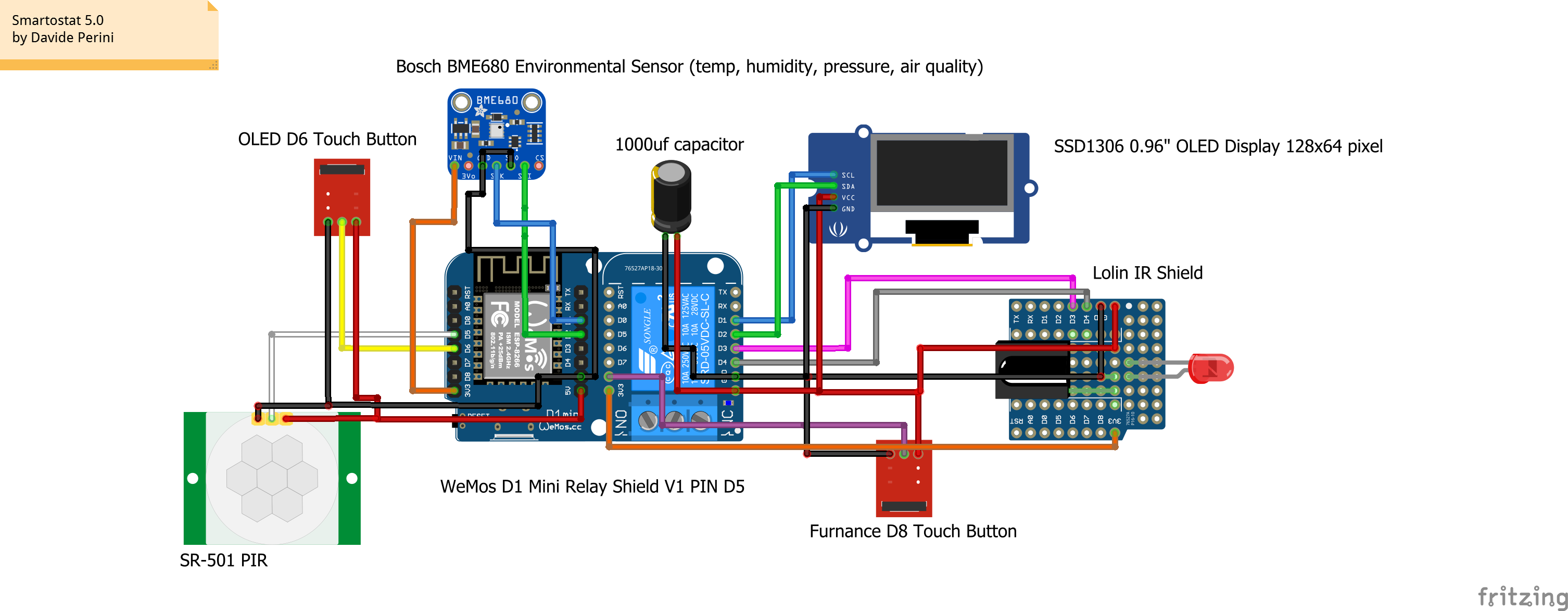
I had the same behaviour with another ir receiver/emitter that I tought it was problematic and I thrown it in the trash.
I have the same behaviour even in the dark room, if this can be useful.
sblantipodi
on 2 May 2020
Can you try sending something very boring like an NEC message and see if your IR transmission is okay from the sending unit?
It's clear the hardware IR decoding module & circuit is fine as it accepts the real IR remote.
I don't find a nec send/recev example.
how can I initialize my
IRSamsungAc acir(kIrLed);
for NEC?
sblantipodi
on 2 May 2020
Oh dear, I should have thought to ask this/thought of this sooner. A LOT of the IR modules you buy are absolute crap Transmission-power-wise. See: https://tasmota.github.io/docs/IR-Remote/
Also, I can't see it on your circuit, but I don't see a NPN transistor switching the power for the IR led.
If you are powering the IR led directly from the GPIO pin, you are severely current limited. i.e. You can't power an IR led for crap. You'll get about 30cm of reliable range.
However, the "official" circuit diagram for it says it uses a BSS138 N-channel FET, so it should be okay.
(https://docs.wemos.cc/en/latest/_static/files/sch_ir_v1.0.0.pdf)
See: https://github.com/crankyoldgit/IRremoteESP8266/wiki#ir-sending
Alternatively, you may have blown/damaged the IR led too. They can turn up their heels at a moments notice if not treated correctly.
crankyoldgit
on 2 May 2020
I don't find a nec send/recev example.
See: https://github.com/crankyoldgit/IRremoteESP8266/blob/master/examples/IRsendDemo/IRsendDemo.ino
crankyoldgit
on 2 May 2020
Alternatively, what could be happening is that there is some other background process running on the ESP8266 for one of the other libraries you're using and that is causing timing delays to be wrong. But at this stage, that's a long shot, and easy to test by reducing the code to one of the simple examples.
Also, if you're powering the devices from the 3v3 pin on the D1 mini, you are subject to the current limit on it's tiny linear voltage regulator. You're much better powering it from the 5V pin (which is directly connected to the USB port, as then you have full current capacity from your "power supply".
i.e. Your IR LEDs are probably current-starved.
I run my IR LEDs via an NPN transistor switched via a GPIO pin (see diagram I linked earlier), and the NPN collector/emitter is connected via a resister to the +5V pin and GND. That's so I can give them full power.
crankyoldgit
on 2 May 2020
I don't find a nec send/recev example.
See: https://github.com/crankyoldgit/IRremoteESP8266/blob/master/examples/IRsendDemo/IRsendDemo.ino
this is what I receive if I send using that code.
acir.sendNEC(0x00FFE01FUL);
Protocol : UNKNOWN
Code : 0x930FE02 (34 Bits)
uint16_t rawData[67] = {190, 4894, 158, 948, 158, 962, 158, 966, 156, 966, 158, 962, 158, 964, 158, 962, 184, 938, 158, 2082, 158, 2084, 158, 2084, 158, 2104, 182, 2040, 158, 2082, 158, 2082, 158, 2084, 158, 2084, 158, 2104, 184, 2038, 158, 962, 158, 984, 186, 916, 158, 962, 184, 938, 158, 964, 182, 938, 158, 984, 184, 2038, 158, 2082, 158, 2104, 158, 2064, 182, 2058, 158}; // UNKNOWN 930FE02
sblantipodi
on 2 May 2020
Alternatively, what could be happening is that there is some other background process running on the ESP8266 for one of the other libraries you're using and that is causing timing delays to be wrong. But at this stage, that's a long shot, and easy to test by reducing the code to one of the simple examples.
Also, if you're powering the devices from the
3v3pin on the D1 mini, you are subject to the current limit on it's tiny linear voltage regulator. You're much better powering it from the 5V pin (which is directly connected to the USB port, as then you have full current capacity from your "power supply".
i.e. Your IR LEDs are probably current-starved.I run my IR LEDs via an NPN transistor switched via a GPIO pin (see diagram I linked earlier), and the NPN collector/emitter is connected via a resister to the +5V pin and GND. That's so I can give them full power.
I'm powering the shield from the 5V PIN
sblantipodi
on 2 May 2020
I correct the previous senteces, the shield is connected at both PIN,
5V and 3.3V PIN. it's a shield, it should know how to power itself :)
sblantipodi
on 2 May 2020
The only things left for you to try is:
a) Run just the plain "IRsendDemo.ino" on your existing hardware setup (set the appropriate GPIO of course)
If that works & is decoded properly, then it's a software issue with something else interfering.
If it doesn't, then it's a hardware issue in your setup.
b) Remove the IR shield and put it on a different ESP, and try the above. (or remove everything else from the existing circuit. ;-)
I really think you have a hardware/circuit level transmission problem.
e.g. Follow https://github.com/crankyoldgit/IRremoteESP8266/wiki/Troubleshooting-Guide#sending-an-ir-signal
P.S. I recommend reverting back to the normal clock freq, just in case when doing these tests. I really doubt that could be the problem but ya never know.
5V and 3.3V PIN. it's a shield, it should know how to power itself :)
You just "ass-u-me'd". I've had heaps of "Issues" raised over sending problems when people were using Aliexpress/Ebay IR modules. You are far better off rolling your own.
Per that circuit diagram for the IR module, it's powered from the 3v3 line. So, you've got the ESP, the temp/humidity/module, and the IR leds trying to suck down what ever it can from the linear regulator. i.e. 150mA on some cheaper D1 minis, up to 300mA on the good ones.
That shield is driving 4 IR leds. LEDs typically draw 20mA each, (80mA total) so your're close to half half the max current draw on some boards, that before powering anything else, like say, the ESP8266, let alone your BME680 (12mA peak) and 12mA peak for each output GPIO.
I just looked up the specs for the IR led's used in that schematic, they use 20mA each typically.
"Good" IR leds (eg. https://www.vishay.com/docs/81011/tsal6400.pdf) use about 100mA.
If you want reliability and range, you'll need better IR leds IMHO, and you want to give them sufficient power. The typical IR shield/module ones are "technically" IR leds but you can't do "useful" stuff with them.
I suggest you try putting the receiver closer to the IR leds, and see if things improve.
crankyoldgit
on 2 May 2020
Um, as you've got an IR recv module on the same board. Have you enabled it in the library at all?
If so, I recommend you disable it during "sending" so as not to pick up the signal you are currently sending. It shouldn't cause the problem you are having, but it could cause loops/confusion etc.
Oh, FYI, the "odd index numbered values" for the Raw Data are the "mark" signals. They are when the IR led is being pulsed at 38kHz. Those time values for NEC are typically ~9000 for the first one, and ~500 for each subsequent one. Values of ~150ish indicate there is something VERY wrong with powering/controlling the IR leds given we know receiving works from "normal" IR leds in the remote. The even ones are "spaces" or a gap when there is no message being detected. The "spaces" in your IR message are roughly correctly sized. Not good, but in the ballpark.
crankyoldgit
on 2 May 2020
yes, when in "normal operation mode" the receiving feature is disabled and only the emitting one is enabled.
thanks for your support man, I appreciate it, you are the IR expert, it seems that the problem is in my code/hardware and not in the library so I will stop bother :)
thanks anyway, I will try to get rid of the problem with new hardware and some code trials and errors.:)
sblantipodi
on 2 May 2020
the strange things is that ON, and all other commands works every single time,
the only comand that works often but not always is the off one.
sblantipodi
on 2 May 2020
the strange things is that ON, and all other commands works every single time,
the only comand that works often but not always is the off one.
I honestly don't know, Man! All I can see is the data/evidence, and it points to "something is rotten in the state of Denmark" with your setup. Simplify and reduce your code/hardware till you find out what it is. (Then for fork's sake tell me when you find it! :-)
I've added even more verbose tests/confirmations that sendOff() etc is doing what we think it is doing. If you have a look at the code diff here: https://github.com/crankyoldgit/IRremoteESP8266/commit/9096e5f5a2dde8f0f950dfbebed69e87afd8a9dd
You'll see all I'm doing is doing a sendOff(), and via horrible methods, I'm capturing it in software, decoding it, checking it decodes correctly as the right protocol, with the correct length/size & value, and then give detailed "debugging/dumping" info of what it thinks it generated/saw.
e.g. f is the freq. d is the duty cycle for the PWM signal. m is a Mark signal, and s is a Space signal.
The m & s numbers should roughly match what you see/expect in the rawData[]
The library is generating the message, it's just your "system" isn't transmitting it correctly.
crankyoldgit
on 2 May 2020
Anyway, almost 3am down here. Time to Zzzzz ... Good luck.
crankyoldgit
on 2 May 2020
Just for the sake of curiosity, but can this lib work ok on a single esp8266 with the WiFi stack enabled, pibsubclient lib for Mqtt connection and a receiver and a sender in one esp8266?
Have you ever tried it? Can the receiver correctly receive the message from sender in this situation?
sblantipodi
on 5 May 2020
Yep, yes, and yes. See https://github.com/crankyoldgit/IRremoteESP8266/blob/master/examples/IRMQTTServer/IRMQTTServer.ino
Many people use this every day.
crankyoldgit
on 5 May 2020
Also, it's used in Tasmota and ESPeasy too. They do all of that and more.
crankyoldgit
on 5 May 2020
Any luck with your hardware/software?
crankyoldgit
on 7 May 2020
I'm waiting LEDs as per your suggestion but with COVID I doubt that I will see them before some weeks.
I inspected my code once again and (the code I linked you previsouly) and sincerely I don't see any error in that code, I use standard libs like ArduinoJson, Pubsubclient and an adafruit one for sensors and display.
So I'm pretty sure that I can exclude a software issue.
Hardware side, I'm using the Lolin modules
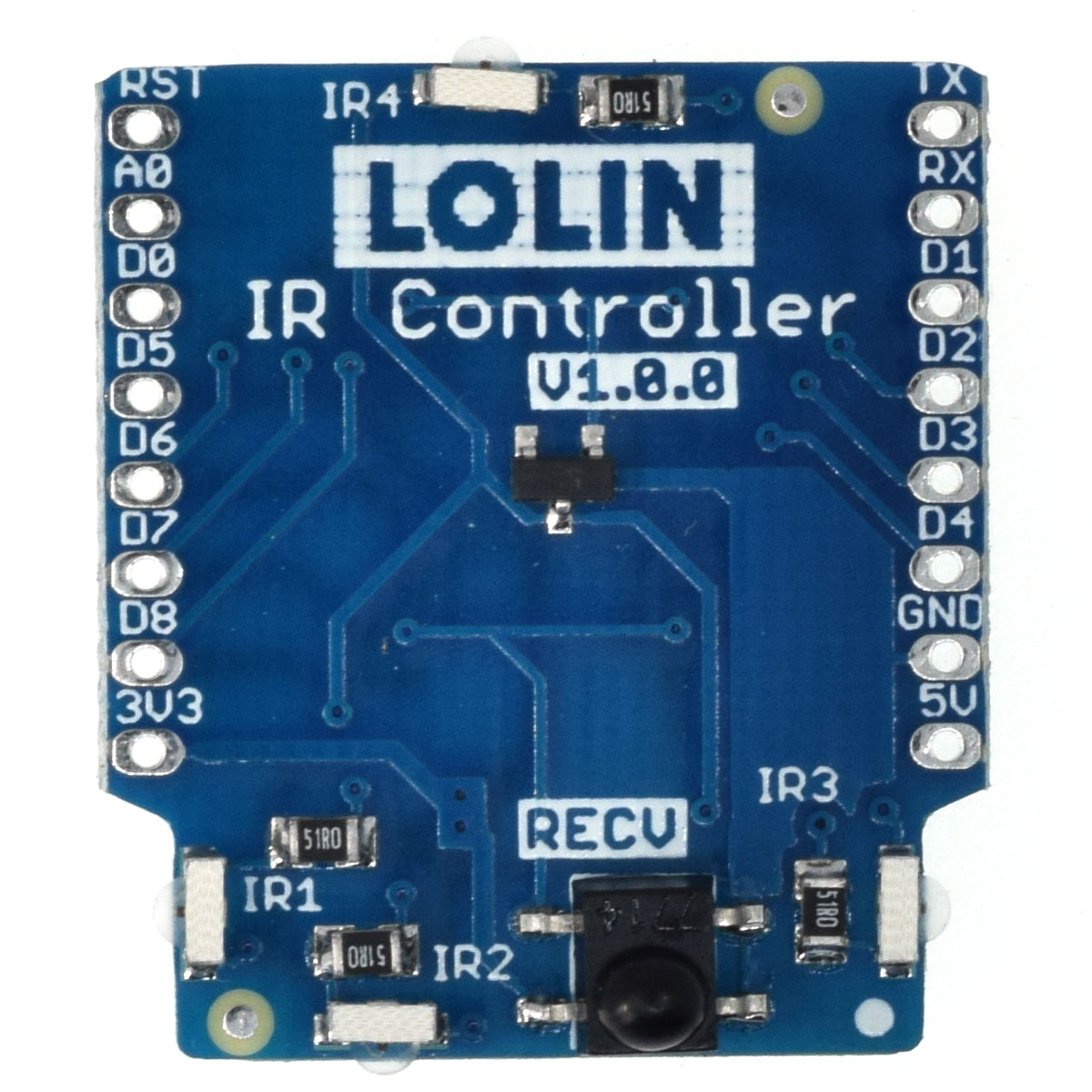
as you can see here, the shield have 4 LEDs,
LOLIN/WEMOS generally produce the best in class shields, since they are the "inventor" of the D1 Mini board.
The strange thing is that the receiver led is near to the emitter led, 4 millimeters or so,
and the received input is not the one I expect if I use the emitter on the shield.
If you have tested the SEND/RECV feature in the same esp8266 board with the receiver/sender working at the same time (like in my test case) and it works for you,
my only hope is that the problem is in the shield.
sblantipodi
on 7 May 2020
I can't remember, but did you test/try running the (sending) example code programs as-is on your custom hardware configuration? What was the result?
crankyoldgit
on 7 May 2020
the result is that it sometimes turn off the AC and sometimes not
sblantipodi
on 8 May 2020
Well, I guess that rules out the rest of your software or how you use the library then and any possible interference with other libs as the possible cause of the problem.
I guess all you've got left is to try to just have the D1 mini + the IR shield + the IRsendDemo example code and run IRrecvDumpV2 on a second ESP. If that fails, then we are sure it's the IR transmitting hardware that is defective or insufficient.
At least you can try that while you wait for delivery.
The fact you say it works for everything but "off" still has me puzzled, but the data doesn't lie .. so ... shrug.
crankyoldgit
on 8 May 2020
I will keep you informed as soon as I can make this test :)
thanks for the help, I appreciate it.
sblantipodi
on 9 May 2020
FYI, the .calibrate() changes mentioned above have now been included in the latest release (v2.7.7) of the library.
crankyoldgit
on 20 May 2020
I really appreciate the update.
Thanks for the great project :)
sblantipodi
on 20 May 2020
Well, I guess that rules out the rest of your software or how you use the library then and any possible interference with other libs as the possible cause of the problem.
I guess all you've got left is to try to just have the D1 mini + the IR shield + the
IRsendDemoexample code and runIRrecvDumpV2on a second ESP. If that fails, then we are sure it's the IR transmitting hardware that is defective or insufficient.At least you can try that while you wait for delivery.
The fact you say it works for everything but "off" still has me puzzled, but the data doesn't lie .. so ... shrug.
Did you get around to trying any of these?
crankyoldgit
on 23 May 2020
@sblantipodi Friendly ping/chase up. Did you get around to trying the suggestions?
crankyoldgit
on 3 Jun 2020
I don't have a D1 Mini + IR Shield for the test, only devices I have is in production inside my wall. :)
Shields and ESPs are arrived in my country, I will not forget to do the test and to keep you informed as soon as I can :)
Thanks!
sblantipodi
on 3 Jun 2020
inside my wall
That's a very good reason to wait for the extra device. ;-)
crankyoldgit
on 4 Jun 2020
but the ir emitter is "outside the wall" :)
sblantipodi
on 4 Jun 2020
Shields and ESPs are arrived in my country, I will not forget to do the test and to keep you informed as soon as I can :)
How goes the slow boat/truck?
crankyoldgit
on 25 Jun 2020
Shields and ESPs are arrived in my country, I will not forget to do the test and to keep you informed as soon as I can :)
How goes the slow boat/truck?
boards and leds arrived since few days, I need to solder it and test it.
smartworking is killing me, I work more from home than from the office xD
I will find the time to do the test. If you don't want to leave the issue open, please close it, I will be back as soon as I have more info.
sblantipodi
on 26 Jun 2020
I'll leave it open for a few more weeks. As an incentive ;-)
crankyoldgit
on 28 Jun 2020
@sblantipodi Reminder ping. ;-)
crankyoldgit
on 14 Jul 2020
@crankyoldgit I have some good news but I haven't understood the reasons of the good news.
I don't know if it's your last update or if its the update of other libs that made it work.
There was even a NonOS SDK update recently on my ESP8266 (using platoformio here and I manage the platform via platformio).
I haven't changed anything in my code apart some "external lib update" but now the same hardware, with the same code with updated libs works 100% of the time.
Never had a missed turn off since two weeks I am using the AC.
Can't explain it but glad that I can use your wonderful lib without problem.
Do you fixed something in your lib since the last time I said that it was not working?
Does the .calibrate() function you added fixed the problem?
Don't know but now it works.
sblantipodi
on 14 Jul 2020
Nothing I can immediately think of has changed in the library that would have effected this. Perhaps the change in season or something else environmental maybe? Or some change in the core.
Who knows. Regardless, I'm glad it's working for you!
I'll mark this resolved. Fingers crossed it remains that way for you.
crankyoldgit
on 14 Jul 2020
thank you for the support and for the great work, I really appreciate it.
sblantipodi
on 14 Jul 2020
Related issues
 bwint
·
4Comments
bwint
·
4Comments
 andreimos
·
3Comments
crankyoldgit
·
3Comments
andreimos
·
3Comments
crankyoldgit
·
3Comments
 jlhavens
·
7Comments
jlhavens
·
7Comments
 alwashe
·
5Comments
alwashe
·
5Comments
Most helpful comment
PS: love the lib, thanks for it and congratulations!