Irremoteesp8266: Sharp AC continuation
This is a continuation of #638. @crankyoldgit implemented some limited support in #696.
While it works, there are some features that are not yet implemented (Swing, Turbo, Ionizer, etc). I would like to share some of my capture including those features.
As the documentation here is no longer available, I am creating a new document
https://docs.google.com/spreadsheets/d/1otzVFM5_tegrZ4ROCLgQ_jvJaWCDlZs1vC-YuR1FFXM/edit?usp=sharing
 EvansJahja
All 45 comments
Hey @Charon77 thanks for the data.
I need more info before I can proceed.
e.g. "Swing" (https://docs.google.com/spreadsheets/d/1otzVFM5_tegrZ4ROCLgQ_jvJaWCDlZs1vC-YuR1FFXM/edit#gid=0&range=D33)
You say it's a toggle. But I can't tell from your data/analysis if it is an "entire" special command, or if there are "bits" of the message which do the toggle. Can you do more analysis/documentation to make that clear?
Ditto for Ion (https://docs.google.com/spreadsheets/d/1otzVFM5_tegrZ4ROCLgQ_jvJaWCDlZs1vC-YuR1FFXM/edit#gid=0&range=D83:D84)
The "value" changes in multiply bytes. You need to explain/detail/isolate what those changes are.
e.g.
0xAA5ACF10C6617208088000F4_71_
0xAA5ACF10C6717208088000F0_21_
The last byte (_italics_) is understandably changed, but the bold stuff needs to be explained/confirmed that it isn't used elsewhere.
Turbo (https://docs.google.com/spreadsheets/d/1otzVFM5_tegrZ4ROCLgQ_jvJaWCDlZs1vC-YuR1FFXM/edit#gid=0&range=D25:D26) is self evident, as only one bit changes.
e.g.
0xAA5ACF10C6617200088001F4 _E1_
0xAA5ACF10C6717200088001F4 _F1_
Looking forward to your updates
 crankyoldgit
on 28 Apr 2020
crankyoldgit
on 28 Apr 2020
Um, when I went to code up "Turbo" based on your data, I found that "Turbo" bit is the same bit as the "Power" bit.
I think your data is wrong, or there is something very different about your A/C to the supported Sharp A/Cs we've come across so far ... Or, we have something very wrong going on with how we understand this message structure works.
e.g.
0xAA5ACF10C6617200088001F4E1 is:
Power: Off, Previous Power: On, Mode: 2 (Cool), Temp: 21C, Fan: 7 (High)
and 0xAA5ACF10C6717200088001F4F1 is:
Power: On, Previous Power: On, Mode: 2 (Cool), Temp: 21C, Fan: 7 (High)
Calling in @juliussin as a fellow Sharp A/C owner.
crankyoldgit
on 28 Apr 2020
Hi! I'll dump more data with my remote to compare it with @Charon77, but as the limitation, my remote doesn't have ion and power safe mode.
 juliussin
on 28 Apr 2020
juliussin
on 28 Apr 2020
@juliussin I've updated the Google Spreadsheet, and it's publicly editable, so feel free to put in your data as well
@crankyoldgit I've just added more sequences of operation related to Ion, Turbo, and Swing, so it should be easier to spot which bits actually encodes the message we need. Please check Sheet 2
Turbo is a bit weird, as you said. It looks like "Turbo On" and "Turbo Off" would always mean that the AC is on, so it's impossible for "Turbo On" and "Turbo Off" to be set, while the AC is off (preventing invalid states). If i'm correct, then "Power Off" and "Power On" state is determined from multiple bits (or even the whole byte), not just a single bit like we thought
as for ions, I would guess that multiple bits are being used for backwards compatibility.
EvansJahja
on 28 Apr 2020
I'll take a deeper look in a few mins. When you are adding data to the spreadsheet, rather than using the "long" (0xabcdef etc) code, can you please use the uint8_t state[13] = {0xab, 0xcd, 0xef, ...}; value(s) instead.
It makes my life a LOT easier.
crankyoldgit
on 28 Apr 2020
@Charon77 Another useful tip to help other people analyse your data, is to record ALL the settings the remote is in, not just which button was pressed. At the very least for the first one in the sequence.
e.g. https://docs.google.com/spreadsheets/d/1otzVFM5_tegrZ4ROCLgQ_jvJaWCDlZs1vC-YuR1FFXM/edit#gid=1057982086&range=B12:D12
Is/was "Ion" on for this sequence? I think it might be, but I can't be sure.
crankyoldgit
on 28 Apr 2020
Um, when I went to code up "Turbo" based on your data, I found that "Turbo" bit is the same bit as the "Power" bit.
I think your data is wrong, or there is something very different about your A/C to the supported Sharp A/Cs we've come across so far ... Or, we have something very wrong going on with how we understand this message structure works.
e.g.
0xAA5ACF10C6617200088001F4E1 is:Power: Off, Previous Power: On, Mode: 2 (Cool), Temp: 21C, Fan: 7 (High)and 0xAA5ACF10C6717200088001F4F1 is:
Power: On, Previous Power: On, Mode: 2 (Cool), Temp: 21C, Fan: 7 (High)Calling in @juliussin as a fellow Sharp A/C owner.
@crankyoldgit Well, that's weird. I'll compare the data with mine.
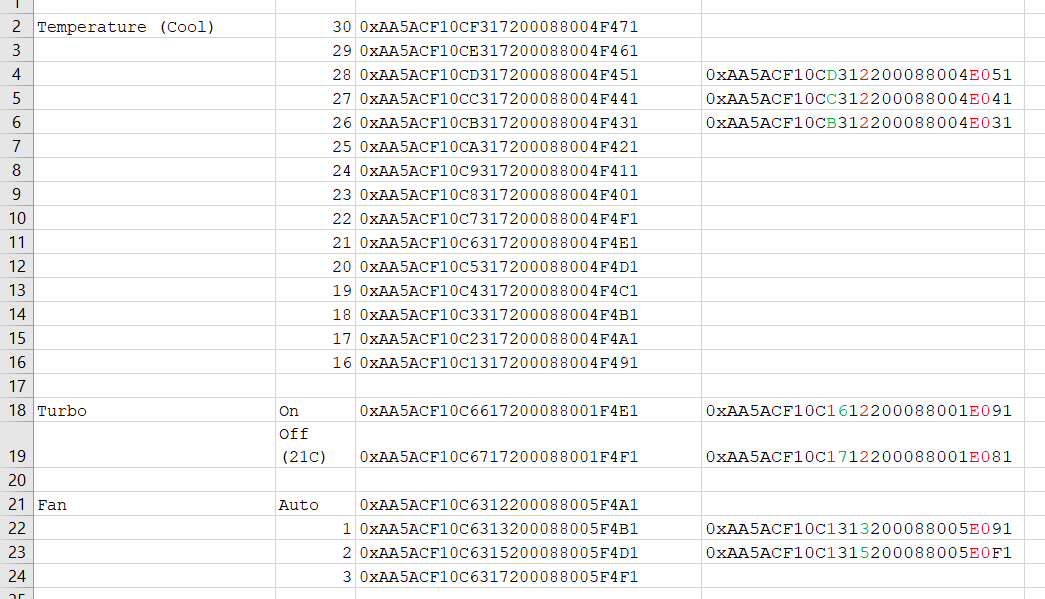
The red numbers are numbers that differ from @Charon77
First the temperature. byte[4] is temperature byte, as before. byte[6] lower nibble the fan. I don't know about byte[11], as the default is 0xE0 since the beginning. But a wild guess, it is about the remote type (maybe?).
The turbo mode. On my remote, it is called JET. We'll take a look at byte[5] upper nibble. The bit 0 (of the upper nibble of course) is Power Bit. The bit 1 is Previous Power Bit. Lets see if the turbo (or JET) is ON, its value is 0110. That's weird because the bit 0 should be 1. And when the turbo (or JET) is OFF, its value is 0111. I can't think about the possibility, the maker's logic is really strange. Maybe we should check the power state by doing bit 0 OR bit 2?
Update: About the timer, the ON TIMER, OFF TIMER, and CANCEL TIMER, all of them have byte[5] 0x81 or upper nibble: 1000. That will make bit 3 (of upper nibble) related to TIMER function, and also proved that power bit is totally useless...
I'll take a deeper look in a few mins. When you are adding data to the spreadsheet, rather than using the "long" (0xabcdef etc) code, can you please use the
uint8_t state[13] = {0xab, 0xcd, 0xef, ...};value(s) instead.
It makes my life a LOT easier.
HAHAHA, I totally agree.
juliussin
on 28 Apr 2020
I'll take a deeper look in a few mins. When you are adding data to the spreadsheet, rather than using the "long" (0xabcdef etc) code, can you please use the
uint8_t state[13] = {0xab, 0xcd, 0xef, ...};value(s) instead.
It makes my life a LOT easier.
I would love to, but for some reason, both resultToTimingInfo and resultToSourceCode does not work on my ESP8266. (Prints nothing), only resultToHumanReadableBasic works.
EvansJahja
on 28 Apr 2020
I would love to, but for some reason, both
resultToTimingInfoandresultToSourceCodedoes not work on my ESP8266. (Prints nothing), onlyresultToHumanReadableBasicworks.
You are probably using them incorrectly.
Try using the IRrecvDumpV2 example code.
crankyoldgit
on 28 Apr 2020
Update: About the timer, the ON TIMER, OFF TIMER, and CANCEL TIMER, all of them have
byte[5]0x81or upper nibble:1000. That will makebit 3(of upper nibble) related to TIMER function, and also proved thatpower bitis totally useless...
I iz C0nFu$3d! :-(
crankyoldgit
on 28 Apr 2020
I'm far from 100%, but I think I've got the swing mode toggle worked out.
Can you please test it? (i.e. download and use branch: https://github.com/crankyoldgit/IRremoteESP8266/tree/Issue1091)
It should decode messages correctly. I'm more concerned about if the constructed synthetic messages actually control the real A/C unit correctly.
crankyoldgit
on 28 Apr 2020
Yep, can confirm swing toggle works on actual AC!
EvansJahja
on 28 Apr 2020
I think I've got something that _might_ work for Ion. Not sure how or if you can tell if it is working or not on the actual A/C. Please re-download the branch and let me know.
And for Turbo., currently you've got testing of:
AC Off
AC ON (Mode Cool, Temp 23, Ion ON, Fan 3)
Turbo On
Turbo Off
Fan Auto
Turbo On
Turbo Off
Could you please do a similar sequence, but add some temperature changes between the Turbo On & Turbo Off presses. Also, with the Ion off please.
e.g.
AC ON (Mode Cool, Temp 23, Ion OFF, Fan 3)
Temp Down (22)
Turbo On
Temp Up (23)
Turbo Off
Temp Up (24)
Turbo On
Temp Up (25)
Turbo Off
Temp Up (26)
It just for a lame theory I have.
crankyoldgit
on 28 Apr 2020
Maybe we should check the
power stateby doingbit 0 OR bit 2?
@juliussin Can I get you to re-explore the whole state[5] power bit saga with your remote and IRrecvDumpV2 (or what ever)?
i.e. Can you try to brute force all the possible states of state[5] via your REAL remote?
This is so we can nail down the logic of the power bit(s).
e.g.
- Is Previous Power really the "power" bit that controls the unit?
- Is there ever a real case that "Power" is On, and "Previous Power" is Off? e.g. 0x1 (0b0001)
- Is there a real case when "Power" is Off, and "Previous Power" is On? (and none of the Jet/turbo/etc stuff has been activated etc) e.g. 0x2 (0b0010)
ref:
const uint8_t kSharpAcBytePower = 5;
const uint8_t kSharpAcBitPowerOffset = 4;          // 0b000x0000
const uint8_t kSharpAcBitPreviousPowerOffset = 5;  // 0b00x00000
Maybe we should check the
power stateby doingbit 0 OR bit 2?@juliussin Can I get you to re-explore the whole
state[5]power bit saga with your remote and IRrecvDumpV2 (or what ever)?i.e. Can you try to brute force all the possible states of
state[5]via your REAL remote?
This is so we can nail down the logic of the power bit(s).
e.g.1. Is Previous Power really the "power" bit that controls the unit? 2. Is there ever a real case that "Power" is On, and "Previous Power" is Off? e.g. 0x1 (0b0001) 3. Is there a real case when "Power" is Off, and "Previous Power" is On? (and none of the Jet/turbo/etc stuff has been activated etc) e.g. 0x2 (0b0010)ref:
const uint8_t kSharpAcBytePower = 5; const uint8_t kSharpAcBitPowerOffset = 4; // 0b000x0000 const uint8_t kSharpAcBitPreviousPowerOffset = 5; // 0b00x00000
I'll work on it. But I a bit confuse with your e.g. Of course there is a real case that power is on and previous power is off. It is when you're turning on the A/C. From my real remote dump, The state[5] is 0x11. When I change the temp for example, or the fan, or the swing (I'm not talking about jet or turbo, I never use it before) the state[5] is 0x31. When I turn off my A/C, it is 0x21. It was the reason why we came up with previous conclusion. Now that I already tried jet / turbo and timer, I'll look again for patterns in all the possibilities that exist in my real remote (a.k.a. push all the button 👍 )
juliussin
on 28 Apr 2020
Of course there is a real case that power is on and previous power is off. It is when you're turning on the A/C. From my real remote dump, The
state[5]is0x11.
Cool. I just wanted to re-check everything. i.e. No assumptions.
So, that confirms that 0b00010000 (1 << 4) (4th bit counting from 0)
Or .. that if the 4th bit is 1 and the 5th bit is 0 is "Power the unit on"
We've seen values of 6 (0b0110) and 7 (0b0111) in that nibble too.
We know that a value of 3 (0b0011) is "on" as well.
I wonder if there is something in the higher two bits of that nibble (0bxx00) then the AC assumes "power on" as well.
Or if "Power off" is always 0x2, and anything else in that nibble is "Power on + something else potentially"
(a.k.a. push all the button 👍 )
Stand back, @juliussin is Trying Science! ;-)
crankyoldgit
on 28 Apr 2020
@crankyoldgit
Only 60% confident this will work (Ion)
You're terrible at making estimates because it works flawlessly :laughing:
setIon(true) and setIon(false) works as expected
EvansJahja
on 28 Apr 2020
But how do you know it worked? i.e. How does the A/C tell you it is that mode?
crankyoldgit
on 28 Apr 2020
But how do you know it worked? i.e. How does the A/C tell you it is that mode?
There's a blue LED on the unit for the Ion mode
EvansJahja
on 28 Apr 2020
There's a blue LED on the unit for the Ion mode
Awesome!
crankyoldgit
on 28 Apr 2020
@Charon77 Oh. for "Power safe" mode. Is that "Power Save" as in economy mode?
Your sheet has it being a single code, is that it is always the same for all three "modes". i.e. a toggle of sorts?
Can you also do similar expanded data collection for that setting please? i.e. throw some more descriptions and other commands in there so we can be certain what changes or doesn't change etc.
crankyoldgit
on 28 Apr 2020
@Charon77 Oh. for "Power safe" mode. Is that "Power Save" as in economy mode?
Your sheet has it being a single code, is that it is always the same for all three "modes". i.e. a toggle of sorts?Can you also do similar expanded data collection for that setting please? i.e. throw some more descriptions and other commands in there so we can be certain what changes or doesn't change etc.
Yes, it's an economy mode, and it's a toggle only (normal, 400W, 600W) similar to swing. The remote does not hold the state. This mode is independent of the other modes, so you can have Cool + 400W.
Okay, I'll put some more data for the economy mode
EvansJahja
on 28 Apr 2020
I think I've got something that _might_ work for Ion. Not sure how or if you can tell if it is working or not on the actual A/C. Please re-download the branch and let me know.
And for Turbo., currently you've got testing of:
AC Off
AC ON (Mode Cool, Temp 23, Ion ON, Fan 3)
Turbo On
Turbo Off
Fan Auto
Turbo On
Turbo Off
Could you please do a similar sequence, but add some temperature changes between the Turbo On & Turbo Off presses. Also, with the Ion off please.
e.g.AC ON (Mode Cool, Temp 23, Ion OFF, Fan 3) Temp Down (22) Turbo On Temp Up (23) Turbo Off Temp Up (24) Turbo On Temp Up (25) Turbo Off Temp Up (26)It just for a lame theory I have.
Regarding this, this is not possible, because while in Turbo Mode, you couldn't change the temperature. You could change mode, but that will disable turbo.
EDIT:
By the way, if I press Turbo on my remote, with my hand blocking the remote, and I change Ion ON / OFF, the AC will not have Turbo on, even though the remote shows that Turbo is active. Likewise for Timer off, Timer on, etc.
EvansJahja
on 28 Apr 2020
Regarding this, this is not possible, because while in Turbo Mode, you couldn't change the temperature. You _could_ change mode, but that will disable turbo.
Ah .. that's information that wasn't clear to me.
Is there anything you can change in "Turbo" mode that won't drop it out of Turbo mode?
crankyoldgit
on 28 Apr 2020
I added info for Power Safe and Turbo.
For the changes in turbo, I can change the "Power safe", Ion, and timer.
EvansJahja
on 28 Apr 2020
By the way, if I press Turbo on my remote, with my hand blocking the remote, and I change Ion ON / OFF, the AC will not have Turbo on, even though the remote shows that Turbo is active. Likewise for Timer off, Timer on, etc.
If you don't cover the remote, does changing timers or Ion drop the ac out of turbo mode?
And on the topic of timers, can the on timer & the off timer be set simultaneously?
crankyoldgit
on 28 Apr 2020
By the way, if I press Turbo on my remote, with my hand blocking the remote, and I change Ion ON / OFF, the AC will not have Turbo on, even though the remote shows that Turbo is active. Likewise for Timer off, Timer on, etc.
If you don't cover the remote, does changing timers or Ion drop the ac out of turbo mode?
Changing Timers and Ion keeps the Turbo. Changing Mode drops out of Turbo.
And on the topic of timers, can the on timer & the off timer be set simultaneously?
No, they can't be set simulateneously
EvansJahja
on 28 Apr 2020
Next question/action, Does any of the actions that sets the high nibble of state[5] to something other than 1, 2, or 3 also turn on the device?
e.g. Turbo on(6)/off(7), timers(8), Ion on(6)/off(7), power safe(6), etc.
To test, power off the A/C. Then block the remote until you can get it to the correct settings to test, then unblock the remote to transmit the message with a 6, 7, or 8 in that nibble.
e.g.
Power Off
(Block remote)
Power on
(Unblock remote)
Turbo on
Doing that for all of the above should confirm if anything other than a 2 in that position will cause the unit to be "on".
Dumb [q]: Does swing mode cause Turbo to be turned off too?
crankyoldgit
on 28 Apr 2020
So I did turning the AC Off, then I block the remote, followed by power on, and I unblock. The Unit is still off while the remote shows on.
I press Turbo on and off and the unit does not respond, neither does Ion On / Off, nor Power Safe. ( no beeps in all case).
Setting timers (both timer off and timer on) causes the timer LED in the AC unit to be on, indicating a timer has been set, but the unit remains off.
So I can't turn the units on with any of the above methods.
Pressing swing while the AC is in turbo toggles the Swing function on/off. The turbo mode remains on.
EvansJahja
on 29 Apr 2020
Thanks. Damn. I was hoping those modes/messages would turn on the device. It means a chunk of my coding this morning was for nothing. :-( Oh well. More data == More Knowledge == better.
crankyoldgit
on 29 Apr 2020
Thanks. Damn. I was hoping those modes/messages would turn on the device. It means a chunk of my coding this morning was for nothing. :-( Oh well. More data == More Knowledge == better.
Ouch. Let me know if there's anything you want to test on the device.
By the way, I really appreciate how fast you went since the beginning of this issue until now, as well as how quickly you reply. Very much appreciated 😁
EvansJahja
on 29 Apr 2020
@Charon77 Please download and test the branch again. I've significantly changed how it handles power and these special modes. I _think_ power detection (via IRrecvDumpV2) should display correctly-ish. Turbo should work via the class & the IRac class. Note: setTurbo(true); will need to be set immediately before send(); as other settings can override it. setEconoToggle() is also available in the sharp ac class, but there is no way to invoke it via IRac/common a/c api reliably, so it is disabled here.
I'll work on Timers next/while I wait for feedback.
crankyoldgit
on 29 Apr 2020
@Charon77 Can you please give me a sequence where you change the temp (or mode etc) while a Timer is currently set?
I want to see if the timer values are affected by other settings. e.g. Can I send it along with other settings or does it needs it's own special message like Turbo and "Power Safe" do.
crankyoldgit
on 29 Apr 2020
@Charon77 Please download and test the branch again. I've significantly changed how it handles power and these special modes. I _think_ power detection (via IRrecvDumpV2) should display correctly-ish. Turbo should work via the class & the IRac class. Note:
setTurbo(true);will need to be set immediately beforesend();as other settings can override it.setEconoToggle()is also available in the sharp ac class, but there is no way to invoke it via IRac/common a/c api reliably, so it is disabled here.I'll work on Timers next/while I wait for feedback.
both setTurbo (true, false) works properly. setEconoToggle works too.
I've wrote some extra info regarding timer in here
Oh, while looking at the code, I see that I forgot to mention that there's a Clean mode. The unit needs to be powered off, and this button can be pressed to start the cleanin mode (blows air with ionizers, without compressor running). I've put code here
EvansJahja
on 29 Apr 2020
both setTurbo (true, false) works properly. setEconoToggle works too.
Excellent. Thanks for the feedback and confirming/testing it.
I've wrote some extra info regarding timer in here
I've updated the branch, it should add timer support now. Let me know how it goes.
I see that I forgot to mention that there's a Clean mode.
I'll take a look at "clean" tomorrow.
crankyoldgit
on 29 Apr 2020
@Charon77 I've updated the branch to handle clean mode. Take a look at let me know how it goes.
I think that's the last of all the additional settings, correct?
crankyoldgit
on 30 Apr 2020
Hi,
setTimer (both on and off, and canceling) seems to work based on the Timer LED. I don't use this feature often, but I'd assume it to be correct.
Clean is problematic:
Expected:
- While AC is off, Turning on Clean should put AC in clean mode
- While AC is on, Clean shouldn't be able to be started
Observed:
- While AC is off, Turning on Clean makes a beep, but AC does not start cleaning (motor does not start, no LED)
- While AC is on, Turning on Clean sets the LED to show that is cleaning (Ion LED on, Operation LED off).
Minor enhancement
Is it possible to retain temperature when switching mode? such that, if the mode is in Cool, and Temp is currently 23, and I change the mode to Auto, then back to Cool, it will set the temp to 23 (instead of 15). This is the remote behavior (but not really that pressing)
EvansJahja
on 1 May 2020
Hi,
setTimer (both on and off, and canceling) seems to work based on the Timer LED. I don't use this feature often, but I'd assume it to be correct.
Clean is problematic:
Expected:
- While AC is off, Turning on Clean should put AC in clean mode
- While AC is on, Clean shouldn't be able to be started
Observed:
- While AC is off, Turning on Clean makes a beep, but AC does not start cleaning (motor does not start, no LED)
- While AC is on, Turning on Clean sets the LED to show that is cleaning (Ion LED on, Operation LED off).
That's very odd, as I'm using the data you had in the spreadsheet. I even verified byte-for-byte at one point that I was producing the exact same code.
Can you re-check your spreadsheet data for (or add some more) and I'll re-confirm the library is doing the same thing.
I assume you are using the IRSharpAc class to call all this stuff, not the IRac class. Correct?
Minor enhancement
Is it possible to retain temperature when switching mode? such that, if the mode is in Cool, and Temp is currently 23, and I change the mode to Auto, then back to Cool, it will set the temp to 23 (instead of 15). This is the remote behavior (but not really that pressing)
I'll look into it.
crankyoldgit
on 1 May 2020
Minor enhancement
Is it possible to retain temperature when switching mode? such that, if the mode is in Cool, and Temp is currently 23, and I change the mode to Auto, then back to Cool, it will set the temp to 23 (instead of 15). This is the remote behavior (but not really that pressing)I'll look into it.
@Charon77 Done.
crankyoldgit
on 1 May 2020
@crankyoldgit I found a bug with how setTurbo is being handled:
When I set turbo on, and I mess with the settings, such as changing temperature, ion, mode, etc, it'll all register as if I'm setting Economy / Power safe mode.
such that
Power On
Turbo On
Ion On (doesn't work, changes econo instead)
Turbo Off
Ion Off (doesn't work, changes econo instead)
Set Temperature (doesn't work, changes econo instead)
However, I'm able to recover from this by setting the power back to On:
Power On
Turbo On
Power On
Ion On (works as expected)
Turbo Off
Power On
Ion Off (works as expected)
Set Temperature (works as expected)
So, I guess that: while turbo messes with the power bits, the "power bits" go back to normal on the next keypress (that are not turbo on and turbo off)
I'll try to send more captures
EDIT:
Here are the captures
EvansJahja
on 3 May 2020
Thanks for the feedback and data.
I can probably easily fix it so it works, but "turbo" is going to have to be set "immediately" before being sent, as it will only work then.
That's not the best solution,
The actual remote has the luxury of sending a message every time the settings are changed. The class doesn't have that so it has to play-well-with-others when multiple settings are changed at once (between send()s).
I'm not sure how best to handle that, so I'll think about it for a bit to see if I can come up with a nice solution. Sharp's A/C's setting structure is horrid. I'd like to yell some choice words at some of their engineers ! :-P
crankyoldgit
on 3 May 2020
Another update to the branch. I think I better handle Turbo, but as I said, it has limitations due to their implementation of the setting.
I think I've fixed/improved "clean" mode. It appears to match your captured states now.
As usual, please test and give feedback.
crankyoldgit
on 3 May 2020
All good here! Clean works well. Turbo works well. I think this Issue is indeed resolved. Thank you very much for your amazing work :smile:
There are some stuffs that misbehaves, for instance:
Turbo ON followed by Ion OFF turns off the unit, instead of turning just the Ion OFF
And there are some weird behaviours with Clean, when I mess up with Ion while Clean is set, I think.
I will probably make a separate issue later on, after sufficient amount of data gathered, as these issues are minor and won't probably happen in majority of cases
EvansJahja
on 5 May 2020
Excellent news. Yes, a new issue would be best once you have more data.
crankyoldgit
on 5 May 2020
FYI, the changes mentioned above have now been included in the latest release (v2.7.7) of the library.
crankyoldgit
on 20 May 2020
Related issues
 direk
·
6Comments
direk
·
6Comments
 bwint
·
4Comments
crankyoldgit
·
3Comments
bwint
·
4Comments
crankyoldgit
·
3Comments
 ayavilevich
·
7Comments
ayavilevich
·
7Comments
 the-mentor
·
5Comments
the-mentor
·
5Comments
Most helpful comment
I'll work on it. But I a bit confuse with your e.g. Of course there is a real case that power is on and previous power is off. It is when you're turning on the A/C. From my real remote dump, The
state[5]is0x11. When I change the temp for example, or the fan, or the swing (I'm not talking about jet or turbo, I never use it before) thestate[5]is0x31. When I turn off my A/C, it is0x21. It was the reason why we came up with previous conclusion. Now that I already tried jet / turbo and timer, I'll look again for patterns in all the possibilities that exist in my real remote (a.k.a. push all the button 👍 )