Hey, a few weeks ago I got a pretty awesome idea: would it be possible to hack this iron into having USB-C PD input?
The USB-C specs allows for 3A at 20V, or even 5A. This would mean that it would be able to power the iron from like any common available charger. Sadly I don't have the knowledge nor the skills to pull this off .
Wouldn't that be pretty awesome? :D
I did some research and fount out that the STM32F0 devices can be used for USB-C PD. The STM32 in this TS100 is a STM32F1 and seems currently not supported. But my knowledge about STM32's and USB PD is very limited, maybe someone out there is able to tell us more.
 daling
All 130 comments
USB-C QC is not that intelligent. It simply reacts to data lines voltage:
| D+ | D- | VCC |
| ------------- |:-------------:| -----:|
| 0.6V | GND | 5V |
| 3.3V | 0.6V | 9V |
| 0.6V | 0.6V | 12V |
| 3.3V | 3.3V | 20V |

See Qualcomm Quick Charge 2.0 protocol specification and support.
So 20 volts is actually very simple to get, except there are very few Class B (20v capable) devices on the market, most of them are 12v max. If you feed both data lines +3.3v, the power source will switch to the maximal voltage it's capable of.
Sadly USB Type-C is much larger than microusb and probably won't fit inside.
For starters you can get power from the QC-capable device using Quick Charge Adapter.
It actually works:


 joric
on 14 Jul 2017
joric
on 14 Jul 2017
Wow, I expected it to be a lot less simple.
So if I understand this Quick Charge Adapter correctly, the only thing it is doing is giving different voltages over the data lines. That's something the STM32 should be able to do as well.
I can see that the USB-C connector is too big, but we can make USB-C to DC5525 + MicroUSB adapter cables. Or MicroUSB to DC5525 + MicroUSB for QC3.0 devices.
Here's my actual feature request:
Add a mode where it sends max. voltage (3.3) over D+ and D- on the MicroUSB connector.
daling
on 14 Jul 2017
Hi,
You are talking about two different things here: QC2.0 chargers and USB-C.
QC2.0 uses the data pins to signal higher voltages by looking at what value is present on the data pins.
USB-C requires the device to identify itself and actually ask for the higher voltages.
Working with QC2.0 chargers can be done entirely without the microcontroller using any of the available intermediate boards or by setting up a voltage regulator and resistors inline to the unit (since you would need to make a custom power cable anyway).
USB-C is completely out of the question for the STM32f1 inside to implement as the pins are just not routed in a way to make it easy to do. It would be far easier to use an external module to perform the negotiation to ask the power adapter to supply the max voltage. This could be done in a similar fashion to this article.
 Ralim
on 14 Jul 2017
Ralim
on 14 Jul 2017
Someone did it using Hakko handle and custom controller board.
http://hackaday.com/2017/02/24/60-watt-usb-soldering-iron-does-it-with-type-c/
I think this setup also works for TS100 iron.
 perillamint
on 14 Jul 2017
perillamint
on 14 Jul 2017
I think @perillamint is on the right track.
Using an external converter board that also houses the USB-C connector would make the most sense given the already compact design of the ts100 iron. Would also allow you to power other devices with the same converter board.
Ralim
on 14 Jul 2017
@Ralim a small improvement (board with QC USB) and USB-C connectors :-D
 gordio
on 23 Jul 2017
gordio
on 23 Jul 2017
I'm currently a little bit too busy to design a dedicated pcb at this point in time. But ill come back to this when im less busy to see where the market is at for this kind of option :)
Ralim
on 23 Jul 2017
I was looking for the simplest way to power TS-100 or charge my laptop out of a USB PD enabled charger, and I've just stumbled upon this guy: https://www.aliexpress.com/item/USB-PD-trap-TYPE-C-Fast-Flip-Flop-pollinpg-device-detector-trigger/32830872838.html. I've just got one and it seems to work flawlessly.
 qoobaa
on 21 Nov 2017
qoobaa
on 21 Nov 2017
@qoobaa yeah cool but one I was referring to (and already posted a link above) costs just $3 (well, $4 with shipping), not $13. Just for clarity, longer link without a caption: https://www.aliexpress.com/item/1PCS-QC2-0-qc3-0-Tester-Automatically-Detects-Phone-Quick-Charge-Voltage-Meter-Simulator-Trigger-9V/32771660912.html
joric
on 4 Dec 2017
@joric I bought this one too, but it's not USB-C PD.
qoobaa
on 4 Dec 2017
@qoobaa ah ok it's quickcharge. Different standards.
joric
on 4 Dec 2017
It'd be nice if there was a simple USB-C PD (20V) -> 5.5mm dongle adapter.
There are some batteries now that support 30W output, which is probably enough for many jobs?
 RRAlex
on 4 Feb 2018
RRAlex
on 4 Feb 2018
It will be nice to put this port in TS100 - USB-C Port, and use Power Bank like this (12V/1.5A) - Tronsmart-Presto USB-C
P.S. MA5887? Datasheet
gordio
on 4 Feb 2018
I would love to see USB C implementation directly on the next TS 100 - it is the elegant solution. Data + power all in one and many new laptops support this connector.
 clowrey
on 17 Feb 2018
clowrey
on 17 Feb 2018
The next generation (TS200) will use Quick Charge 2.0 over USB-C. Sadly it looks to be limited in power to a low power (~20W). Specs haven't been confirmed just yet though. Just looking at marketing material.
I'm personally going to stick to the TS100 for now. But will update here if I hear any more information.
Ralim
on 26 Feb 2018
Why use QC2 (which has a maximum output of 20W), when USB-PD could provide all the way up to a 100W. Guess they just thought there are more QC2 compatible chargers around?
I couldn't find any info on the T200, mind providing a link? I'd be interested to see what they've come up with.
 JohnEdwa
on 28 Feb 2018
JohnEdwa
on 28 Feb 2018
Im guessing so? Havent really heard the reasoning, but 20W is just too little power for most things if you ask me. PD would be much nicer.
I dont have any links online im afraid :(
Ralim
on 28 Feb 2018
@qoobaa Does that Ali board automatically try to pull the max voltage from USB-PD devices? I'm thinking about getting one and a DC5525 to make my own USB C adapter.
Does it also pass data through the 4 through-holes on the board as well?
 Adrian-at-CrimsonAuzre
on 1 Mar 2018
Adrian-at-CrimsonAuzre
on 1 Mar 2018
@Adrian-at-CrimsonAuzre it does not. It requires to push the button several times after connecting, sometimes it doesn't allow to choose the highest profile (randomly). I gave it up and ordered PD Buddy from Tindie - it works perfectly, but it's quite pricey compared to the Ali board. No idea about passing the data lines (I'd bet it does not pass anything).
qoobaa
on 1 Mar 2018
Might end up getting one of those or making my own.
If I can cram the circuitry into a small enough board I'd probably replace the 5.5mm plug with a daughter board.
Adrian-at-CrimsonAuzre
on 2 Mar 2018
@Ralim IMHO, whatever the name of the technology is (PD or Quick Charge 2.0-3.0), everyone here wish to get possibility to make some smart battery pack, supporting higher voltage and currencies to output at least 12V with adding minimal additional external hardware for TS100. Not adding USB-Type C (it is useless, and will not give a required result). Here a man did something same with a few lines of code for ATTiny85: http://blog.rnix.de/12v-from-a-usb-powerbank/ The question is: Is it possible to add a few lines in the firmware of TS100, so, that it will be capable of giving corresponding signals through it's microUSB, for instance, selecting some menuitem or just with a press of a key, like it is described in the link, given before? Or not?
 alexnif007
on 11 Mar 2018
alexnif007
on 11 Mar 2018
@alexnif007
You need the resistors in the datalines to be able to pull them to 3.3V for the QC identification (which I'm pretty sure the TS100 lacks), so you would at the least need to make a special cable for it.
Doing the USB-PD thing with a 5.5mm jack in the end would be much better, as it can actually provide enough power to do stuff. QC is limited to 20W absolute max, because the micro-usb connector can't handle much more.
JohnEdwa
on 11 Mar 2018
@alexnif007
I wouldn't recommend anyone designing for QC 2/3 as its being strongly pushed out in favour of USB-PD which is available on USB-C. As well as USB-PD supporting higher voltages and higher power.
However all of these require some form of negotiation, either resistors(QC) or active messages(USB-PD).
For all of these you are going to need to make up a special cable of some kind to :
- Connect the power output through to the barrel jack (you cannot supply heater from USB)
- Interface to the standard using resistors / communications
- Adapt to plug in the case of USB-PD
It would be possible to put some of this inside the iron, sure, but the vast majority needs to be added externally which is why most people just purchase adapters and call it done.
I would happily support someone making a USB-C to barrel jack USB-PD cable which would be awesome, but is not really something that can be done in the iron itself.
The 20W limit on QC is a joke for a soldering iron that is going to be used for anything large.
20W is workable for low powered use (small assembly), but as soon as you try and solder a larger connection you really want the higher power available in USB-PD.
Ralim
on 11 Mar 2018
@Ralim While the months pass - still on the market I see only QC chargers, so while here discussion continues already half a year - it started 17 Jul 2017, this half year already people could use it "on the road" with the pocket battery. The TS100 itself is - not serious - it's handle getting extremely hot in a few minutes, and it has no secure stop for a hand not to slide to the heating element, so it cannot be used for something large whatsoever, but only few pinches "in the field", for which is needed portability, also of a battery, which is being in use, in this case mostly present QC on the market, if take something more powerful - TS100 losing it's main advantage - PORTABILITY, because of giantic battery, which someone has to carry to use it. For "anything large" I prefer to use butane Dremel or portasol - offering the same portability with more power on the field. Anyway, I am going to do QC bit bang with Arduino which power the TS100 using barrel, for connection of Arduino to the battery use USB. Just before didn't want another external element adding clumsines to the TS100 construction.
alexnif007
on 11 Mar 2018
IMO, for this kind of application, USB-PD is more suitable then QC2 or 3(reverse engineered recently). QC 2 or 3 only provide power up to 18 Watt, which doesn't enough for this kind of application. In contrast, some popular USB-PD adapters like Apple USB-PD power brick product line starts from 29W max power and Nintendo Switch power brick provides up to 39 W, which will definitely do its job.
perillamint
on 13 Mar 2018
@perillamint If talking about usage of 110V or 220V power adapter - there's no need to make it this complicated way, you can choose any even more powerful notebook charger, even 3.75A or 4A, just select needed barrel size from wide selection of chargers for some Dell, ASUS, Acer notebooks, it will be even cheaper. Here we are talking about usage of some POCKET BATTERY!
alexnif007
on 13 Mar 2018
@perillamint I agree that QC is not worth touching, and the growing market of the usb pd is worth working towards using as it works well for portable battery supplies as well as wall adapters that are available.
What would be nice is to create an add on that decodes the usb-c pd and communicates to the iron the available power so it can scale to the available power.
I agree @alexnif007 about this being a discussion about portable batteries, but it's important to also look at the wider use case of people who use their ts100's at a desk and like to use mains power.
Ralim
on 13 Mar 2018
I use a tiny 19V @ 2.1A (40W) laptop charger, it has the perfect balance of size and power for me, and the lower power means the cable is thin and extremely flexible. Just slightly ruined by the gigantic EU plug (I've since swapped the travel adapter plug to a regular 0.5m cable), but there's not much I can do about that :)
If I really need to take it to the field, a 4S lipo works fine.
@Ralim
What would be nice is to create an add on that decodes the usb-c pd and communicates to the iron the available power so it can scale to the available power.
AFAIK implementing proper USB-PD is not easy to DIY, but there are plenty of dirt cheap manager chips one could use, like the FUSB302 (the chip is ~$0.35 in quantity). Here's a project/breakout board that can basically do what the second post QC adapter, but for USB-PD.
I guess why no-one has really done anything like this is the danger of having a regular USB port that is configured to output 20V@5A to anything you plug in it, which is why I'd much rather just skip that part and just make a device with a USB3-A plug in one end, the USB-PD chip in the middle with a switch to select between a few voltages, and a 5.5mm barrel jack in the other.
JohnEdwa
on 13 Mar 2018
I would only do usb-pd using an interface ic such as the one you mentioned. Your proposed is basically what I was thinking.
I think either an inline cable that provides a barrel output or a new iron entirely are the two ways we are most likely to see this.
Ralim
on 14 Mar 2018
👍 to USB C PD built into the iron... (a new model) imagine just connecting your USB C PD adapter straight from laptop to the iron.. Ideal solution.
My phone and laptop are now USB C PD - why not my soldering iron :)
My use case is portable soldering or while traveling - for desktop use I have a nice Hakko iron that works fine already (and better handles)
clowrey
on 14 Mar 2018
I Bought this https://www.aliexpress.com/item/USB-PD-trap-TYPE-C-Fast-Flip-Flop-pollinpg-device-detector-trigger/32830872838.html and I can confirm that:
- It works with a USB-C PD 40W ZMI (Xiaomi) 20000mah powerbank just as many of you wanted.
- It actually switches automatically to the highest Voltage the USB-C PD can delivery. So if you plug it then it takes 20V right the way. And then, you can push the button to switch to another voltage.
I bet for the combo and It is just the best investment i couldn't be done in years.
 moracabanas
on 29 Mar 2018
moracabanas
on 29 Mar 2018
@moracabanas I'm guessing that when you press the button, it goes to Level 1>2>3>...?
I was going to make a board for this (PD Buddy is a bit bulky), but this will work perfectly.
Adrian-at-CrimsonAuzre
on 30 Mar 2018
I also bought that "USB PD trap". My version definitely didn't switch to the highest voltage automatically, sometimes prevented to choose the highest voltage profile manually too (possibly a bug) - so I had to disconnect it and connect it again to do so. I replaced it with PD Buddy board eventually - it works flawlessly now.
qoobaa
on 30 Mar 2018
@Ralim yeah there is not so much information about TS200. Are there any pics? I only got a few from the forum here https://mysku.ru/blog/china-stores/60248.html they say it's from some chinese chat. Any other source?
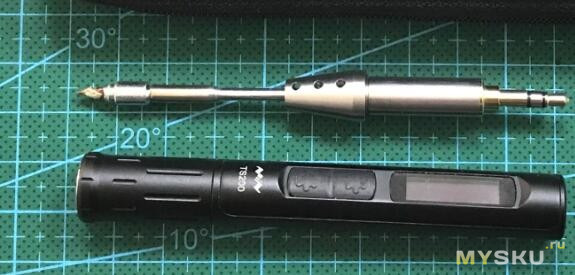
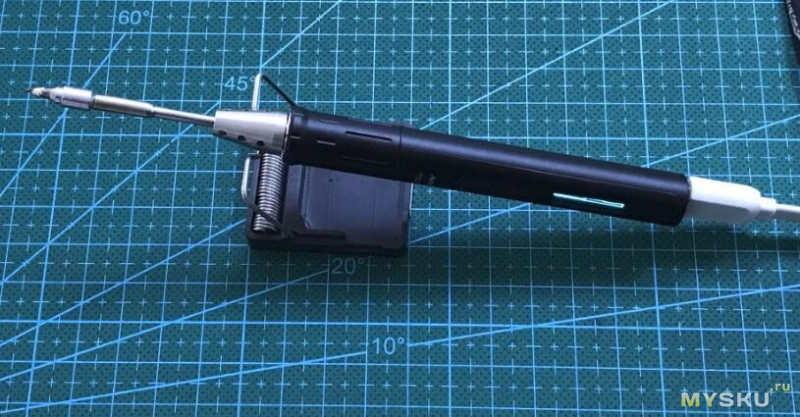
joric
on 31 Mar 2018
@Ralim I bought this cable once: https://www.tabletcovers.dk/products/macbook-usb-c-til-dc-5-5-mm-forlaenger-opladerkabel-2-m-sort
Is it possible to use this cable to pull 12V or more from a PSU or powerbank with QuickCharge or Power Delivery?
 KarmusDK
on 7 Apr 2018
KarmusDK
on 7 Apr 2018
@KarmusDK Not really, as there are no active electronics in the cable to tell the PSU how much power it wants, and the iron has no data connections to the barrel jack (all it can do is turn it on or off through a mosfet). You connect it to a regular powerbank, and the best it should do according to the USB specs is 5V 100mA (though you most likely can get as much current as it can offer)
But if you get a device to output enough power out of a USB-C port without active communication from the iron (like using one of the QC or USB-PD spoofing boards discussed in this thread), then sure.
JohnEdwa
on 8 Apr 2018
@JohnEdwa Thanks for replying so fast. I looked a bit into different trigger boards, although they all seem to have the same connector standards: USB-A and USB-A or USB-A and none (holes for wire soldering). However, I stumbled across this advanced measuring tool. It seems to have trigger functions as well, and even a USB-C OUT port. Does anyone have experience with this module? It would be expensive to buy, just to find out that it cannot be applied to my instance.
KarmusDK
on 8 Apr 2018
@KarmusDK I don't think that module will do what you want I'm afraid.
I have the @ReclaimerLabs breakout board on my desk to play with. It combined with a microcontroller would do what you want, but stand alone it wouldnt really do much else. @ReclaimerLabs does make a nice board that has a microcontroller combined with it that could be programmed to automatically request the max available and that would do what you wanted. But still a pricy option :/
Ralim
on 13 Apr 2018
It works! The module has options to choose from and apparently is able to manipulate both QC2.0, QC3.0, USB PD and various other protocols. I succeeded in running a UDOO X86 Ultra-microcomputer off a QuickCharge-capable (unsure about Power Delivery though, but apparently it's a feature) power bank with both USB-A and USB-C outputs with the 12V/3A profile on a 2.1mm/5.5mm DC barrel jack. I have yet to test it with the TS-100 and its 2.5mm/5.5mm, but since this is also an analog device, I expect a great possibility of instant success.

KarmusDK
on 28 Apr 2018
So I bought https://www.aliexpress.com/item/USB-PD-trap-TYPE-C-Fast-Flip-Flop-pollinpg-device-detector-trigger/32830872838.html and it will not select the highest profile. It will also jump down to 5V after a few minutes of use, turning off the iron.
Adrian-at-CrimsonAuzre
on 30 Apr 2018
The TS-100 soldering iron works with a USB-C to DC 2.5mm/5.5mm plug and the Power-Z KM-001 module's on either QC (QuickCharge) or USB PD (Power Delivery) test functionality. It heats up quite fast on 20V.
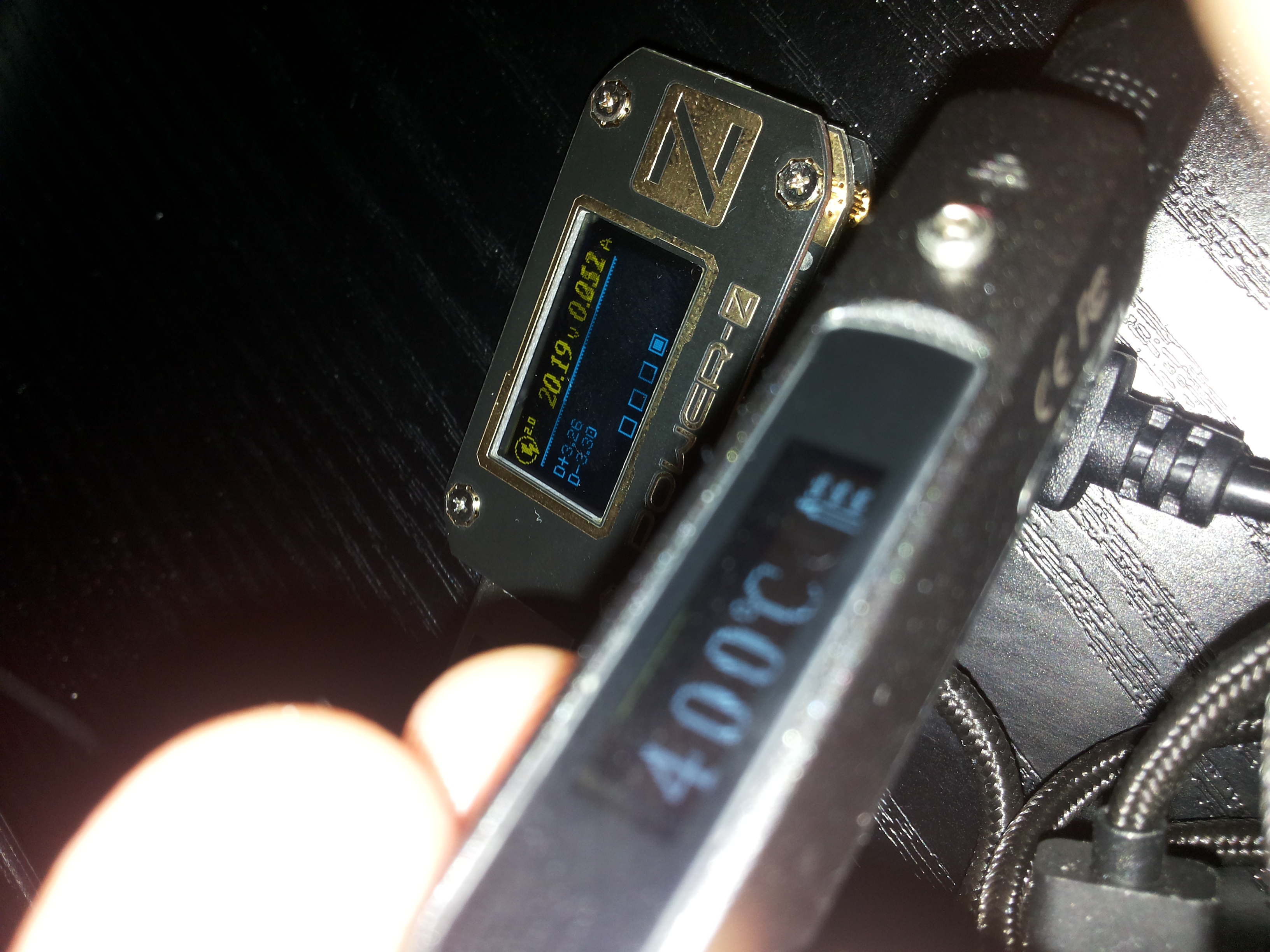

It is absolutely crucial to have a portable soldering iron with an attached battery bank if you're a technician on the go, but be sure to buy one with an immense capacity - alternatively you can go for a gas-powered iron.
KarmusDK
on 5 May 2018
Great work, thanks for confirming this!
Where did you find the USB to DC adapter?
RRAlex
on 7 May 2018
Great work, thanks for confirming this!
Where did you find the USB to DC adapter?
https://www.tabletcovers.dk/products/macbook-usb-c-til-dc-5-5-mm-forlaenger-opladerkabel-2-m-sort
KarmusDK
on 7 May 2018
Not quite USB-C, but for the record if you are into FPV drones and have spare (4S?) batteries with XT60 connectors, you could try this cheap adapter.
RRAlex
on 27 May 2018
I actually bought this adapter and modified it to use with the PD Buddy.
It's a really nice and flexible silicone lead.
On Sun, May 27, 2018, 12:57 PM Alexandre Guédon notifications@github.com
wrote:
Not quite USB-C, but for the record if you are into FPV drones and have
spare (4S?) batteries with XT60 connectors, you could try this cheap
adapter
https://www.banggood.com/XT60-Male-Bullet-Connector-to-Male-DC-DC5525-Power-Cable-for-TS100-Electronic-Soldering-Iron-p-1219960.html
.—
You are receiving this because you were mentioned.
Reply to this email directly, view it on GitHub
https://github.com/Ralim/ts100/issues/24#issuecomment-392347198, or mute
the thread
https://github.com/notifications/unsubscribe-auth/ABo8pZpICWv-ZkFHIo9YGvSb49IlL6LFks5t2trggaJpZM4OXeqj
.
Adrian-at-CrimsonAuzre
on 27 May 2018
TS80 is selling now on banggood and aliexpress for $72.99.
joric
on 4 Aug 2018
Shame it isn't USB PD compatible but Qc 3.0 instead.
On 4 Aug 2018, at 18:43, joric <[email protected]notifications@github.com> wrote:
TS80 is selling now on banggood and aliexpress for $72.99.
—
You are receiving this because you are subscribed to this thread.
Reply to this email directly, view it on GitHubhttps://github.com/Ralim/ts100/issues/24#issuecomment-410461994, or mute the threadhttps://github.com/notifications/unsubscribe-auth/AEebjNtg6vUGk_SryOvizT6Uuobb596Hks5uNc8qgaJpZM4OXeqj.
 xavkno
on 4 Aug 2018
xavkno
on 4 Aug 2018
@xavkno yep. Doesn't power on with 65W laptop PD adapter (CDQ07ZM) https://youtu.be/xc-yIq0m54o
Regarding TS100 and Type-C it's probably possible to fit a $0.19 16pin Type-C connector like this one used in TS80, but the footprint is totally incompatible, probably would need a flex cable or a riser board.

joric
on 22 Sep 2018
The PD buddy and one of these from wherever you choose to get it is the best option if you want USB C. It's all but guaranteed to work, and it's easy to solder together and setup.
Adrian-at-CrimsonAuzre
on 18 Oct 2018
You chop the battery end off the connector and solder it to the USB C board. Then configure the board to request the max power from the USB C source
Adrian-at-CrimsonAuzre
on 18 Oct 2018
Take a look at ZY12PDS on Aliexpress. It's much better than the previous board. I used it to make an adapter for Thinkpad, and it works flawlessly. It costs $12, allows to select voltage by soldering pads on the PCB (no buttons). It's also very tiny - can be easily wrapped in using a heat shrink tube.

qoobaa
on 18 Oct 2018
@qoobaa Hey that looks awesome! How do you choose the voltage? I can't seem to understand the instructions.

Like how do I set it to 20v for the TS100?
I'm also thinking of getting the version with the USB-A port and the button so I can cycle thru the voltages and just use a USB to DC cable.

By the way, does the ZY12PDS support both PD and QC3.0?
 mptp24
on 18 Oct 2018
mptp24
on 18 Oct 2018
It's 20V by default, (XX means no connections). If I understand correctly, you just need to solder these pads according to the description below them (I haven't tried), X means no connection, O means the pads are soldered.

qoobaa
on 18 Oct 2018
So for your cable you didn't solder any of the pads and your using 20v? This might be the cheapest way to have USB PD on the TS100. Based on the product description ZY12PDS might support QC3.0 as well but I can't be certain because the translation is pretty bad. The other PCB versions that have a button also have an LED indicator that can change color to indicate which voltage is set.
mptp24
on 18 Oct 2018
Yes - it's 20V without soldering any pads. I use it with an Anker power adapter with PD support only (no QC), works perfectly.
qoobaa
on 18 Oct 2018
That is awesome! I bought the model from YZXStudio with button - but if wired directly to the TS100 it will enter into USB programming mode when powering up on 5V - so it never goes to soldering mode even after 20V... You could avoid this if you use an adapter cable, but I wanted to permanently solder the USB-C-PD board to the TS100 so it will be always connected. But this model that does 20V always hopefully avoids this problem? Has anyone tested yet?
clowrey
on 18 Oct 2018
I've got two spare modules atm, I'll test it when I find some time.
qoobaa
on 18 Oct 2018
Maybe I'll wait for your test before I order. Just to see if there are issues like jumping to a lower voltage
mptp24
on 18 Oct 2018
On second thought there is really no way it could not supply 5v when first connected as that is always the default of the cable.. so probably have to modify the firmware of the TS100 to behave like I want. Or put a mosfet to only supply power once 20v is reached. Both modules should work you just have to power up the USB-C-PD module before it is connected to the soldering iron.
clowrey
on 18 Oct 2018
@clowrey starting it on 5V should not enter the iron into USB mode unless you are using miniware firmware. My firmware does not do this. (Which would be one easy solution around this)
Ralim
on 19 Oct 2018
Thanks @Ralim I will try change the firmware.. Mine is still on the default firmware it came with, not sure what that is.
clowrey
on 19 Oct 2018
I suddenly realised, can I actually get the full 20V with the ZY12PDS that has a USB Type A port? I ready somewhere that PD is only for USB C to USB C. Is that accurate or it doesn't matter? What if I connect the ZY12PDS using USB Type A to DC 5.5 2.5 will the TS100 still get the 20v?

with

mptp24
on 21 Oct 2018
Yes I believe it will...not safe of course if you mistakenly plug anything else into that USB port when it's on the 20V mode but it should work. Be aware some of those USB to 5.5 will not fit the soldering iron which needs an extra large center pin connector. Also allot of them use like 24-28awg "copper" to save a few cents.. I had some that were really bad so try to get one with 18AWG or larger.
clowrey
on 21 Oct 2018
Thanks! What would be the issues when using 24-28 awg instead of a beefier 18 awg? I'm just starting out and not yet too familiar with electronics.
mptp24
on 21 Oct 2018
I have modified one ;) https://hilo90mhz.com/ts-100-usb-c-pd-mod-20v-via-internal-adapter/

clowrey
on 16 May 2019
Top, I just made myself a usb-c jack cable, as I use it as well in DC5525 and USB-C.
 provalinf
on 16 May 2019
provalinf
on 16 May 2019
@clowrey where are the technical details? It's not instagram. What's Type-C-20V adapter did you use? Is it custom made? Is it from Aliexpress?
joric
on 16 May 2019
I only use USB-C: my laptop + phone and now my soldering iron all use the same cable/adapter never thought that would happen but the day has come!
The PCB is called YZPDS by YZYStudio - same manufacturer as most of the others above, but new smaller model that defaults to 20V output.
Okay I have updated my page with real links to the products:
https://hilo90mhz.com/ts-100-usb-c-pd-mod-20v-via-internal-adapter/
clowrey
on 16 May 2019
It works! ... I expect a great possibility of instant success.
I'd slightly disagree. Portability is key for me too ... but a few things limit my enthusiasm. Walking round with a massive warhead being the first .. my aim is a single s4 pac per visit I carry 2 spares in a thermal box ... just in case. Massive powerbanks make big bangs!!! More importantly, it's all about redundancy. If you put all your eggs in 1 basket you end up losing when you need it most.
I carry a ts80 a couple of batteries and a gas iron for bigger stuff. The gas is the lighter than any of the other components - so easy to include. Its also about thermal mass - the TS irons are both pretty punchy but you can't expect them to defy physics - they do have limits that "just a few more volts" won't compensate. As someone said - the engines won't take it. However red the tip goes, sometimes that teeny weeny end can't deliver, you just need a bigger fire.
I was reading reviews on the latest batch of phones and a big chunk of them are qc4 so there will be a shedload of support now that "ordinary people" will be wanting to fill their drawers -
RIP qc3 can't say I'll miss you.
 whitehoose
on 16 May 2019
whitehoose
on 16 May 2019
@clowrey does it also support QC chargers? Just wondering. PD is pretty complicated maybe this controller supports QC protocol too? Just in case, as on mobile phones.
joric
on 16 May 2019
I really hope QC4 dies as well and we can have one standard to rule them all that being USB C PD - it makes sense.
The ZMI USB C PD Powerbank QB820 does 20V at 2A 20,000mAh at 3.6V or 72Wh and weights 405g - it can charge my laptop, cell phone, or soldering iron and I already carry it in my backpack everywhere.
If you need redundancy on a power source bring along your USB C PD AC wall power supply which is also in my backpack - I really like the Cable Matters 72W 4-Port USB C Power supply with 1 USB C PD and 3x USB A power supply - own 6 of them one in every location I might connect a laptop or cell phone.
clowrey
on 18 May 2019
@clowrey does it also support QC chargers? Just wondering. PD is pretty complicated maybe this controller supports QC protocol too? Just in case, as on mobile phones.
I doubt it supports QC protocol... Buy USB C PD power supplies ;)
clowrey
on 18 May 2019
If you need redundancy on a power source bring along your USB C PD AC wall power supply which is also in my backpack.
If I had access to mains I wouldn't be messing round with batteries or powerbanks at all!!!! Always look for the least tec answer - it's usually the most reliable. Unfortunately my needs changed and the easiest fix was the TS80 ... I've just about made my peace with that decision but one of these days we'll pay for the over engineered, indulgent, tech for tech's sake situation it's created.
By the way @c .... re Qualcomm's QC4
This latest generation brings a number of improvements, but perhaps the most remarkable change is that Quick Charge 4 is now compatible with the USB Type-C and USB Power Delivery (USB-PD) specifications set by the USB-IF standards body.
https://www.anandtech.com/show/10846/qualcomm-announces-quick-charge-4
whitehoose
on 18 May 2019
Hi guys.
Really interesting stuff in here!
One thing I can't really understand with the ZY12PDS, my charger has PD has for all voltages (5v/9v/12v/15v/20v), does this mean I can't use utilize 5v by bridging this chip (i.e always getting 12v)?
I was hoping to make myself a couple of cables with dedicated ZY12PDS chips for all these voltages so I can charge a phone, power my ts100 or a raspberry pi for instance.
Thanks!
 Roet-Ivar
on 4 Jun 2019
Roet-Ivar
on 4 Jun 2019
@Roet-Ivar As any voltages other than 5v are negotiated, seems logical that whatever the negotiation protocols/voltages the device uses/delivers, the default power on will be always be @5v Unless you include a dedicated boost to 5v<. It's always going to end in tears for low voltages if you overvolt a plug which as a set voltage as is the case with USB's current default of 5v. Where 5v is critical and If you have doubts about supply stability, I'd incorporate one of the many tiny 1-2a buck converters which usually have a wide input range in a dedicated 5v lead. Cost pennies - could save embarrassment.
whitehoose
on 6 Jun 2019
Got ZYPDS today from ebay here https://www.ebay.com/itm/233102637939 ($3.67, free shipping).
Stable 20V from laptop PD charger, but only 5V from QC charger. DISAPPONTED! But it's okay.
TS100 definitely wins over TS80 now, because I'd sure mostly carry PD charger (for the laptop), not QC.
joric
on 11 Jun 2019
There is a simple way to make USB type-c to DC jack cable:
1) Take something like this. It already has PD trap for 20v in the USB connector
2) Cut MagSafe and solder 5.5*2.5mm DC Power Male Plug Jack
3) ...
4) Profit
Would be great if someone finds same as (1) cable without MagSafe, or type-c connector bundled with ZY12PDS
 aotd1
on 17 Jun 2019
aotd1
on 17 Jun 2019
@aotd1
Thank you,
do all cable cords have a PD trap? Could I simply buy one from amazon and have a cable with PD trap, if not, how do I recognize one?
 bl4k1st
on 20 Jun 2019
bl4k1st
on 20 Jun 2019
@bl4k1st no, I choose this one with MagSafe connector because it has 2 hacks internally:
1) PD chip telling the charger that something wants raw 20V on one side
2) The chip that telling the MacBook is connected to original old MagSafe charger on another side
I think type-c connector bundled with ZY12PDS is a very specific thing and it's a problem to find it (I simply can't find correct keywords for search =)
Other guys get raw ZY12PDS and add the plug jack to it: https://www.thingiverse.com/thing:3384396
aotd1
on 20 Jun 2019
@aotd1 probably because it's no ZY12PDS it's just ZYPDS.
joric
on 28 Jun 2019
Finally, I found it
Not tested, but looks like it is what we need
aotd1
on 29 Jun 2019
Just to report: I am now using a (Aukey) Power Bank, putting out 18W on USB-A port, a Power-Z QuickCharge injector and a USB- round connector cable. It allows the TS100 to solder at about 14W portable. Using only QC2, because it ramps up stepwise quickly, QC3 is ramping continuously and takes way longer to ramp to 12V
The Power-Z injector was expensive though :(
bl4k1st
on 3 Aug 2019
I have modified one ;) https://hilo90mhz.com/ts-100-usb-c-pd-mod-20v-via-internal-adapter/
Your website isnt working, would love some more info on this.
 ToXIc-Dev
on 29 Aug 2019
ToXIc-Dev
on 29 Aug 2019
I have modified one ;) https://hilo90mhz.com/ts-100-usb-c-pd-mod-20v-via-internal-adapter/
](https://user-images.githubusercontent.com/6935928/63976371-e03e1100-ca4c-11e9-9b4b-5c30961e8f11.jpg)


clowrey
on 29 Aug 2019
I love the infos on this thread, however I lost the overview :D
I want to connect my TS80 to any USB-C PD enabled charger (laptop etc.).
So what kind of adapter do I need to get the 20 V USB-C to 20 9/12 V QC3?
So interesting stuff, if I use a C-C cable on my Mac and the TS80 it doesn't work, but a A-C cable with a small A-C Adapter works fine but very slow (guess it's limited to 15 W USB 3.0).
Can anybody clear things up and help me get the most out of the TS80?
 majuss
on 31 Aug 2019
majuss
on 31 Aug 2019
majuss
Depends just how you'd define "most"; most years, most good joints or most faults.
Ok I went for ralim's firmware and I bought a TS80 package which included a PSU.
The PSU is a stock qc3 unit that delivers 9v in "overdrive" and 5v most certainly isn't enough on it's own (my first reason for coming here was stock FW gave an error on 5v - Ralim's did eventually get to the melting lead point, but slooowly.
As far as I'm aware 5-9v is the design spec for the 80 - with every qc3 adapter I've tried, it negotiates 9v no more (despite qc3 being capable of more with the right devices).
It does everything I want within that range including big (enough for me) groundplanes and 4mm thick bus and power leads. I have different kit for handling bigger.
Any more than that, I honestly can't see that given the quite modest thermal mass of the tips that despite the quite astonishing capabilities of the iron which seems to keep up (or beat) the ts100 in most things - you're not going to get quality results just by overheating the tip - soldering is a chemical reaction that only works well with a heat transfer and cooling curve that's quite clearly defined.
You're likely to only get a pile of scrap by forcing the 80 to swallow 20v.
Your iron - your decision - but if you bought the kit to actually solder things - and those things are girders - you bought the wrong one, if not - mine works well within the limits. I don't see the point in killing the iron I'm pretty certain that it's been said that the tips are all specced at >450c and that the chips are for 12v max (although mine has never asked that from any power source I own.
I get the over clocking thing with PCs, but that's an accepted "sport" where the machines aren't really expected to work correctly in real life. Same with the HiFi guys and petrol heads. Their "best" is something else. But solder gets brittle if overheated and won't fuse if under cooked - so there isn't much point unless you just want 0-450c in as short a time as possible (and it seems neither temp control nor time management is accurate enough in the hardware to verify either).
whitehoose
on 31 Aug 2019
Yep sorry I ment 9/12 V QC 3.0 :)
So is there some kind of QC 3.0 Adapter with male C and female C?
Ralim mentioned something in august 2018: "Though, a really nice product if your up for it, that is on my to-build list but buried too far deep would be to make a small USB-c inline adapater that converts between USB-PD and Quick Charge 3.0."
This is exactly what I'am looking for and I wonder if something is out there already. If not I may produce it in the next months.
majuss
on 31 Aug 2019
USB4 combines pd and qc compatibility. Once the phone bunnys start using it the adaptors and other gadgets will be everywhere.
Problem at the moment is qc3 doesn't seem to support qc3 even from the same manufacturer let alone including PD. QC3 is good to 3A while PD is good to 12v bjt vs mosfet - I can't see an adapter being a practical option while they can't come up with a consistent qc format
whitehoose
on 31 Aug 2019
So after like 2 hours of plugging the TS80 into various devices I have lying around I can confirm something pretty interesting. These cables by the company Rampow have a QC3 Adapter built in, which means with the help of this cable I can plug the TS80 into virtually ANY USB-power source (every Powerbank works, MacBook Pro 2017, MacBook Pro 2010 with USB 2.0, MacBook Pro USB-C charger...) even my Mi 8 worked as a power source and it always drew 9 V and warmed up at a normal speed. A similiar C-C cable should also work fine.
I don't know if anybody said something about these cables already, so here are my infos.
majuss
on 4 Sep 2019
Yours has the advantage of being made for the job AND being red.
There are a couple of other options - not really straight alternatives
AOKoda Lipo to USB Power Converter QC3.0 Adapter Quick Charger (Phone or Tablet)
or
ISDT BattGo BG-8S Smart Battery Checker Balancer Receiver Signal Tester Quick Charge Function
both need 7-27v so are better suited to lipo 4s or above which gives you a quite robust power source although you might get away with some USB2 units.
The other other alternative is a <2A buck boost converter mine is a 3a / 3.2-28v -> 2-26v and while it will work from some USB2 powerbanks - on some cheaper banks either the 3.8-5v boost or the protection tends to pulse the supply on and off making it unusable - the answer there is to tap directly onto the cells(s) and insert one of the many stand alone 18650 protection boards which don't seem to interfere.
The downside with that is the double conversion from 3.8v ->5v ->qc3 ->9v rapidly further diminishes the already short battery life - even a mediocre 4s lipo will give you a good hours soldering. but in an emergency ...
whitehoose
on 5 Sep 2019
These cables by the company Rampow have a QC3 Adapter built in, which means with the help of this cable I can plug the TS80 into virtually ANY USB-power source (every Powerbank works, MacBook Pro 2017, MacBook Pro 2010 with USB 2.0, MacBook Pro USB-C charger...) even my Mi 8 worked as a power source and it always drew 9 V and warmed up at a normal speed.
@majuss That Rampow cable is USB 3.1-gen1 3A Type-C. Max power QC3.0 permits is 18W ([email protected], other voltages can use different amperage, but max is 18W over the wire). Whatever is used as power source needs to support QC, else you'll get typically [email protected] afaik(Maybe 3A or as low as 500/900mA depending on source). Nothing about the USB-C cable itself afaik really matters about supporting QC3.0, that's up to the power source and device, the Rampow cable page didn't seem to mention anything that indicated they had some chipset internally to force pull a certain current(which'd be undesirable in most cases).
What I did notice is their marketing images in the gallery show the wire breakdown and specify the gauge sizes of the wires as 24/32AWG, 32 would be for data which usually is 28AWG, no clue if that causes lower transfer performance(not that it matters here since it's all about power). 24AWG should be able to handle 2A fine apparently.
A similiar C-C cable should also work fine.
That is a basic USB-C cable, only handles USB 2.0 data and 3 amps(good for up to 60W with USB-PD iirc, need 5A cable for more). The product page oddly states 28W is the max the cable supports, while quoting some QC 3.0 voltages/amp combinations that equate to 18W(not a typo exactly as it also went into their marketing images).
Just thought I'd clarify this stuff for anyone following along. A lot of discussion on voltage here or amps separately, but they are both important for the amount of watts to be drawn. As are the cables, note some power banks also cap the output regardless of capability with voltage or amp output, my xiaomi mi powerbank for example will only permit 15W, so achieving 18W via QC is not possible there.
For those looking into cables that boost 5V, you'll take an efficiency loss(usually around 20%) from the final output current, and keep in mind that the amperage will decline as you increase the voltage in addition to that. Some of these products also restrict the amperage because of heat dissipation (another reason that AWG of the wires is important if you want to push more amps through without risk of melting the cable insulation and causing a fire, afaik 18-20AWG will handle 5A ok).
The Power-Z injector was expensive though
@bl4k1st , it also appears to be out of stock? Did you see it available somewhere?
Finally, I found it. Not tested, but looks like it is what we need.
@aotd1 Did you get to try it? Thanks for the link, that product sounds/looks very useful! I'll share the link again without the url shortener:
USB-C PD 2.0/3.0 to DC 5525/5521 barrel adapter cable - 15V/20V - $5USD. I'm a bit surprised that it doesn't have any notable change in size, it would be good to hear how well it works.
I had come across these which cost more and handle the USB-PD at fixed voltage with a ZY12PDS, which someone mentioned earlier I think. So if someone wanted a product with that already setup with the cabling, it seems that'd be it, but the product @aotd1 mentioned earlier seems better if it works(I've not tried either personally but would be happy to know if someone has).
 polarathene
on 9 Sep 2019
polarathene
on 9 Sep 2019
So the Iron shows 8.4 V when I plug the cable into a MacBook Pro 2010 with a USB2 port and warm up speed is fine. How do you explain this behavior? Other A-C cables don't work on any non QC3 power sources, but this cable works with EVERY USB power source. What other explenation is there if not a built in adapter.
majuss
on 9 Sep 2019
A frightening number of people seems not to appreciate that these things aren't made by harry potter - they follow electrical principles which are either cast in stone - or limited by design,
If you buy a gadget made for charging a device battery. Within the laws of physics there is plenty of wriggle room. Especially when they are made for a non tech audience who think it's all magic anyway. They are easily identified, they usually start any plea for advice by assuring everyone they are computer phobic, but like Beyoncé they own the latest iPhone (lolz!).
QC3 devices handle the business of fulfilling appropriate voltages as negotiated by the DEVICE in question. Just because a cable conforms to QCanything doesn't necessarily mean that it fulfils EVERY aspect of the standard and indiscriminately pumps out 12v@3A.... a microscopically small controller built into a pocket sized device physically can't dissipate 1KW of energy - so by design it will deliver (say) 9v but limited to (say again) 500ma - never the 12v @ 3A the spec makes provision for. Copper is quite expensive so on a £2 lead you are either going to get aluminium conductors or very thin poor quality copper. that may have the dimensions of 24awg but will have the resistance of stone.
My wife just bought a supermarket USB lead having run out of fleabay supplies. It's surprisingly good quality with a resistance 1/4 that of the fleabay and now performance means my wife's phone charges in 3 hours rather than 8.
If you possess basic electrical knowledge and can find a tech spec for the device you are interested in - it's very easy to explain why ... in this case - a charging lead that probably charges a device in twice the time the "official" kit does it also performs better than a sub-standard USB2 lead. Remember because it speaks qc3 it's still a win as a charger and delivers a little more oomph. However - when you ask the cable to deliver an army of pixies able to melt enough lead to cover a football pitch - it's not going to happen.
Anything that will fit inside a USB plug simply won't be able to handle the number of pixies you'd need to do serious work Fine for a 9v trickle charge that by the time it's struggled down a high resistance conductor arrives panting at only 8.4v but it will keep your phone online when plugged in to a single cell usb2 powerbank containing a 650mAh cell.
Physics however will stop that setup delivering your request for 12v@3A
whitehoose
on 9 Sep 2019
I got a gadget on Tindie called the PD Buddy Sink that's a wonderful
gadget. It negotiates with Power Delivery USB devices (Not QC) for voltage,
current, or power, or ranges thereof, to help work around the inadequacies
of the power device to negotiate the specific values you want. It's
programmable through a TTY connection. It's about an inch square, and you
can get it with bare solder pads or with screw terminals for output. I
found 3d printed cases on Thingiverse that lets you use wire leads to the
board, or put Andersen Power Pole connectors in the case.
I didn't get the things for my TS-100, though, I got it to power low-power
ham radio transceivers from a PD USB-C battery bank or a GaN USB-C charger.
Works like a total CHAMP. I can reliably get 12v at 2 to 3 amps, depending
on the power supply -- 2A from a Ravpower 26800mAh PD bank, 3A from a
Nekteck 45W GaN PD AC charger. The current is clean, no nasty RF birdies
anywhere that interferes with my gear, and it reduces the weight of
portable gear I carry and lets me substitute any unitasker power sources
for multitaskers. The PD bank I now use can charge my Chromebook, my phone,
or run a ham radio transmitting at 5 watts. I like it.
https://www.tindie.com/products/clarahobbs/pd-buddy-sink/
---Gwen
On Mon, Sep 9, 2019 at 3:06 PM whitehoose notifications@github.com wrote:
A frightening number of people seems not to appreciate that these things
aren't made by harry potter - they follow electrical principles which are
either cast in stone - or limited by design,
If you buy a gadget made for charging a device battery. Within the laws of
physics there is plenty of wriggle room. Especially when they are made for
a non tech audience who think it's all magic anyway. They are easily
identified, they usually start any plea for advice by assuring everyone
they are computer phobic, but like Beyoncé they own the latest iPhone
(lolz!).QC3 devices handle the business of fulfilling appropriate voltages as
negotiated by the DEVICE in question. Just because a cable conforms to
QCanything doesn't necessarily mean that it fulfils EVERY aspect of the
standard and indiscriminately pumps out 12v@3A.... a microscopically
small controller built into a pocket sized device physically can't
dissipate 1KW of energy - so by design it will deliver (say) 9v but limited
to (say again) 500ma - never the 12v @ 3A the spec makes provision for.
Copper is quite expensive so on a £2 lead you are either going to get
aluminium conductors or very thin poor quality copper. that may have the
dimensions of 24awg but will have the resistance of stone.My wife just bought a supermarket USB lead having run out of fleabay
supplies. It's surprisingly good quality with a resistance 1/4 that of the
fleabay and now performance means my wife's phone charges in 3 hours rather
than 8.If you possess basic electrical knowledge and can find a tech spec for the
device you are interested in - it's very easy to explain why ... in this
case - a charging lead that probably charges a device in twice the time the
"official" kit does it also performs better than a sub-standard USB2 lead.
Remember because it speaks qc3 it's still a win as a charger and delivers a
little more oomph. However - when you ask the cable to deliver an army of
pixies able to melt enough lead to cover a football pitch - it's not going
to happen.Anything that will fit inside a USB plug simply won't be able to handle
the number of pixies you'd need to do serious work Fine for a 9v trickle
charge that by the time it's struggled down a high resistance conductor
arrives panting at only 8.4v but it will keep your phone online when
plugged in to a single cell usb2 powerbank containing a 650mAh cell.
Physics however will stop that setup delivering your request for 12v@3A—
You are receiving this because you are subscribed to this thread.
Reply to this email directly, view it on GitHub
https://github.com/Ralim/ts100/issues/24?email_source=notifications&email_token=AENBU7PTGHA5ZOHHUQ53RILQI2NC3A5CNFSM4DS55KR2YY3PNVWWK3TUL52HS4DFVREXG43VMVBW63LNMVXHJKTDN5WW2ZLOORPWSZGOD6IWIVY#issuecomment-529622103,
or mute the thread
https://github.com/notifications/unsubscribe-auth/AENBU7IIOXGPPIKPRFPDP43QI2NC3ANCNFSM4DS55KRQ
.
--
-+-+-+-+-
Jenny Everywhere's Infinite: Quark Time
http://quarktime.net
 JennyEverywhere
on 9 Sep 2019
JennyEverywhere
on 9 Sep 2019
So Jenny have you tried putting your wonderful gizmo to actual work?
Looking at the proportions I'd guess about 11/2"x2" (40x50mm)
( _plug it into any USB PD power supply with a high enough power capability. It negotiates with the power supply and turns on its output, giving your project up to 3 A at 5, 9, or 15 V, and up to 5 A at 20 V_). I'm persuaded it maybe COULD deliver ... if only it could talk to the Iron .. the TS80 is QC3 only - so a non starter - have you found the magic word to get yours talking to your ts100?
There's lots of talk about VOLTS - but no mention in the blurb of them big strong AMP pixies. What sort of power output do you actually use in a sustained session? Normally I'd consider getting one to see - but at $30 per unit and postage to UK of $66 my laughter turned to hysteria before I could apply for a loan.
I got my ts80 as a hopeful tongue in cheek gadget. I really wanted it to work - but QC3 just seems determined to make things as awkward as possible That's why I ended up here - USB2 sort of works with ralim's firmware - it's a long walk - but it gets there eventually.
The stock PSU and cable does a passable job and at home within it's class it's a capable gadget that I can use for it's intended purpose. Take it out on a field trip - and it becomes a total agoraphobic mess!
I'm interested to know if any of the people proposing PD have actually got past the theory stage and are melting lead?
I've tried different batteries and powerbanks, I've been playing round with buck boost converters and just when you think we're off - QC3 slaps you round the head. At the mo my best efforts is a s4 lipo feeding an AOKoda qc3 controller. A little "lumpy" but it delivers a decent power to weight tradeoff and actually melts lead in a respectable way - if I get desperate I can plug a buck boost into my USB 5 PB to give 14v ish to again feed the AOKoda qc3 controller. It's a time limited option - but does work in a flap.
My last option is to use my MI pro qc3 powerbank which does the job ... but not for long
My old lead acid powered all my needs all day.
whitehoose
on 9 Sep 2019
No, I don't use it for soldering. But someone might find a way to use it
for that.
On Mon, Sep 9, 2019, 5:12 PM whitehoose notifications@github.com wrote:
So Jenny have you tried putting your wonderful gizmo to actual work?
Looking at the proportions I'd guess about 11/2"x2" (40x50mm)
( plug it into any USB PD power supply with a high enough power
capability. It negotiates with the power supply and turns on its output,
giving your project up to 3 A at 5, 9, or 15 V, and up to 5 A at 20 V).
I'm persuaded it maybe COULD deliver ... if only it could talk to the Iron
.. the TS80 is QC3 only - so a non starter - have you found the magic word
to get yours talking to your ts100?
There's lots of talk about VOLTS - but no mention in the blurb of them big
strong AMP pixies. What sort of power output do you actually use in a
sustained session? Normally I'd consider getting one to see - but at $30
per unit and postage to UK of $66 my laughter turned to hysteria before I
could apply for a loan.I got my ts80 as a hopeful tongue in cheek gadget. I really wanted it to
work - but QC3 just seems determined to make things as awkward as possible
That's why I ended up here - USB2 sort of works with ralim's firmware -
it's a long walk - but it gets there eventually.The stock PSU and cable does a passable job and at home within it's class
it's a capable gadget that I can use for it's intended purpose. Take it out
on a field trip - and it becomes a total agoraphobic mess!
I'm interested to know if any of the people proposing PD have actually got
past the theory stage and are melting lead?I've tried different batteries and powerbanks, I've been playing round
with buck boost converters and just when you think we're off - QC3 slaps
you round the head. At the mo my best efforts is a s4 lipo feeding an
AOKoda qc3 controller. A little "lumpy" but it delivers a decent power to
weight tradeoff and actually melts lead in a respectable way - if I get
desperate I can plug a buck boost into my USB 5 PB to give 14v ish to again
feed the AOKoda qc3 controller. It's a time limited option - but does work
in a flap.My last option is to use my MI pro qc3 powerbank which does the job ...
but not for long
My old lead acid powered all my needs all day.—
You are receiving this because you commented.
Reply to this email directly, view it on GitHub
https://github.com/Ralim/ts100/issues/24?email_source=notifications&email_token=AENBU7LHHXECTWP3D22DNVDQI233RA5CNFSM4DS55KR2YY3PNVWWK3TUL52HS4DFVREXG43VMVBW63LNMVXHJKTDN5WW2ZLOORPWSZGOD6JBXNY#issuecomment-529669047,
or mute the thread
https://github.com/notifications/unsubscribe-auth/AENBU7NZEYLY7UOMSKV2W6DQI233RANCNFSM4DS55KRQ
.
JennyEverywhere
on 10 Sep 2019
So the Iron shows 8.4 V when I plug the cable into a MacBook Pro 2010 with a USB2 port and warm up speed is fine. How do you explain this behavior?
@majuss No clue, the TS80 is QC3 capable, but the power source should also be QC3 capable, otherwise it's kind of dangerous to pull voltage higher than supported afaik. A-C cables themselves are actually against USB specifications. A USB 2 Type-A port should only support 5V and up to 1.5A.
If the cable is going to behave in such a dangerous way, it should be stated so on the product page. Have you actually measured the voltage/amps, or are you just going by what the iron claims on the display?
Physics however will stop that setup delivering your request for 12v@3A
@whitehoose your ramblings are a bit hard to follow sorry. My response earlier should have laid out some clear information about the concerns you talk about. If you have the appropriate cable along with compatible power source and device on each end, then 12V/3A can be negotiated no problem.
I'm not sure if 24AWG handles constant 3A well, but afaik 22AWG should? Actual wattage delivered from one end to the other will depend on voltage drop. The longer the cable, the more resistance(AWG wire size applies here too) which equates to a loss of voltage, decreasing the wattage on arrival to the device(like the 8.4V mentioned here).
If a voltage booster is used(rather than fast charge protocol), then as mentioned amperage will take a loss here(not only in the adjustment to the higher voltage, but in the loss of efficiency in doing so, via heat dissipation as you mention). So again, final wattage at the device takes a dive in amps as well as voltage, providing even less power.
Regarding the PD BuddySink, you seem to have misunderstood the product. The USB-C port is for input power from a power source, the board itself is negotiating the fixed power requirement you have with all the joys USB-PD 3.0 offers regarding that.
The output you can then connect the wires to a connector of your choice to route the power to a device, such as DC5525 for TS100 or I guess another USB-C cable/connector for TS80. Jenny doesn't use it with a TS80, and I myself am not sure if the TS80 would respond well to that, it might not be a suitable product for the TS80.
Just supply a QC compatible power source or some adapter(if one exists for the power source).
Regarding amps, that's really up to how you approach it. You need a power source that can output the amount of amps at the voltage you want, as well as a cable that can support it. The device itself will likely take whatever voltage(if accepting a variable voltage), and convert to the voltage the circuit wants to work with(possible efficiency loss), amps available will adjust accordingly with that, but the circuit will only draw as many amps as it requires(I don't know how the TS80/TS100 work in this regard as I don't use the products, I assume software/interface allows you to increase that demand or it draws a constant amperage at whatever voltage it receives?). Usually the amount of amps you're sending over the wire won't be all that high, 3-5A at highest for USB-C, voltage is a bigger player here(speed effectively), with the combination of the two giving a wattage output that is more meaningful as whole.
The TS100 at least takes 12-24VDC, the table I saw shows 12V/17W(~1.42A) with 40s to heat 30c to 300c, while 24V/65W(~2.7A) manages it in 11s.
polarathene
on 10 Sep 2019
polythene
Thanks for clearing that up, I hadn't realised the ts80 would adjust the voltages automatically to give the full 5 amp.
Thanks for making the situation clear.
whitehoose
on 10 Sep 2019
The Buddy Sink will give full PD power if the supply device negotiates
output according to spec. Many devices, most notably QC/PD devices that try
to do both, and fail to give proper support to either.
I don't think you were saying that I don't understand what the Buddy Sink
does. I do. I don't use it for a TS-80 because I don't own one, I own a
TS-100. Since the TS-100 has a coaxial socket, the cable I made for my
radios should fit, I'd just need to reprogram it for maximum voltage and
amperage, and use a PD source that can deliver it. The RAVpower bank I have
can deliver 20v, but I think amperage is lower than 5A. I could power the
TS-100, though, and probably as well as the laptop supply I use now.
Since this was originally a list for the TS-100, that's why I subscribed. I
have no need for a TS-80 at this time, and wouldn't want to have to re-buy
all of the tips I have to sweet one up comparably.
On Tue, Sep 10, 2019, 5:11 AM whitehoose notifications@github.com wrote:
polythene
Thanks for clearing that up, I hadn't realised the ts80 would adjust the
voltages automatically to give the full 5 amp.
Thanks for making the situation clear.—
You are receiving this because you commented.
Reply to this email directly, view it on GitHub
https://github.com/Ralim/ts100/issues/24?email_source=notifications&email_token=AENBU7J2HIIM73MWYPZKY73QI5QDXA5CNFSM4DS55KR2YY3PNVWWK3TUL52HS4DFVREXG43VMVBW63LNMVXHJKTDN5WW2ZLOORPWSZGOD6KNEUA#issuecomment-529846864,
or mute the thread
https://github.com/notifications/unsubscribe-auth/AENBU7LAYCDFZHXWZL7UU4LQI5QDXANCNFSM4DS55KRQ
.
JennyEverywhere
on 10 Sep 2019
@polarathene
I'am just trusting the iron on the voltage measurement. What's the easiest way to measure it?
majuss
on 10 Sep 2019
Jenny Not saying you don't, As I said I have a 80 not a 100 but as I understand it the 100 doesn't require a negotiating supply - just lots of magic pixies. The "more sophisticated" ts80 works to qc3 which does require a supply capable of negotiating voltages. As many of us found not every QC3 power bank or PSU works with the 80 - so any info backed by real hands on experience is of interest.
As far as I knew 9v was the max - ralim seems to be hinting that 12v is possible - although my typical use of the 80 has never found it lacking so long as 9v is available.
My main point was that some people seem to be under the impression that it's all a matter of personal preference and that the electrical values all work independently or are largely governed my software not physics. This leads some to expect woefully underrated gadgets to supply massive amounts of power.
Without an intermediary converter or dual standard device QC can't talk to PD so it's not an option.
On stock firmware the ts80 gives an error if plugged into a dumb usb2 powerbank because it needs that extra voltage boost to fire up. Anyone with any info on any device that adds versatility is of interest - but it has to be real world hands on use - not "afaik guesses"
I know someone here has added a QC controller to a ts100. I'm not familiar with the 100 so can't really add anything to that topic - However it's an interesting option. So when you mentioned a PD device I was hoping you may have some hard experience too - disappointing that you haven't.
majuss for my money the all round handiest USB measuring device would be the rui deng UM34c, a good all-rounder for £15ish,
slightly cheaper is The USB Safety tester j7-t (£4 or £5) - both support qc2 & 3 AVO +power and mAh with graphing and battery charging/ capacity measurement for powerbanks etc .
failing that you can get a bog standard usb avo for £2
If you already have a meter you could build a USB test rig for the cost of the solder and a few inches of wire
whitehoose
on 10 Sep 2019
@whitehoose I don't know how the TS80 works with QC3. AFAIK, QC3 is compatible with a variety of voltages for negotiating, but retains a maximum of 18W, so it doesn't really matter what voltage is negotiated for so long as it can pull enough amps/watts to get what it wants. If you get 9V/2A, that's 18W, if you get 12V/1.5A, that's again 18W. If the power source can deliver 12V at 1.5A, QC3 probably negotiates for that,otherwise it tries the next lowest voltage and amperage for trying to meet it's requirements to run. You will only get 5A over a cable if the cable and protocol support it(along with the power source), anything above 3A, tends to be at 20V afaik(at least with USB-PD).
Regarding the TS100, it is not clear. I assume it allows you to increase the heat manually if enough power is available? Or does it heat based on the power input? It takes any voltage between 12-24 via DC5525 jack, there's no negotiation stage there it's just power, no protocol. As mentioned earlier the product page I saw paired a wattage column beside the voltage one. Which gave a range of ~1.4 to ~2.7A to achieve the wattage with the given voltage. A user mentions here that they have used a 19V 6.5A PSU(~120W), but the heat up time was pretty much the same as 65W achieves, so going any higher than 65W probably has no benefit.
The TS80 on this product page shows the various QC3 inputs for power which are all ~18W or less with a varying voltage but fixed amperage for each range. The product itself states 9V/2A by the connector(based on the image there), so it probably prefers/expects that?
This issue/repo is for the ts100, where the topic of powering it with portable power source makes more sense than discussing ts80. Powering the ts100 via a power bank is less obvious/straightforward as you need a DC barrel connector and most power banks omit DC out(or have a fixed output voltage/amperage), so this topic is more about leveraging protocol/tech like USB-PD to draw more power from a compatible power bank to a device/cable that negotiates that and then outputs via DC5525 barrel plug. I don't own a soldering iron, but have been wanting similar functionality for powering a small computer(ODROID-N2) with similar issue.
@majuss I haven't done such myself, people often use multimeters, or there are some some small devices(at least for USB input/output) that can do this as well. Stuff like this one from Plugable, there are quite a few on amazon/aliexpress but quality varies, also need to make sure they support the fast-charge protocol like QC3 or USB-PD, or just passthrough, along with the voltage/amperage that you're interested in(QC3 at 9V would not be higher than 2A afaik).
I am still surprised that you're pulling more than 5V from the Macbook USB 2 port, I wouldn't expect that to work or be a good idea tbh.
polarathene
on 11 Sep 2019
@polarathene
ALL powerbanks are DC out - the shape of the connector doesn't dictate the shape of the output. I have adapters to convert most common outputs to fit most common inputs to plugging a usb powerbank onto an XT60 is simple enough. The stopper (if there is one) is that the TS80 requires a QC3 compatible power source while the ts100 only requires the correct voltage source with a potential to deliver sufficient power.
With qc3 you always creep up on a value then stop.
The whole point of all this is that irrespective of PD or QC - the device will initiate the negotiation for power the source controller will never "just" squirt out 20v@5A.
In the same way with an iron YOU set the temperature and it's the iron's job to maintain your chosen level. If the power isn't available you won't attain the requested value - it's not a lottery you don't just plug it in and see - imagine the consequences if on a good(?) day your iron got up to 1000c or your radio started transmitting at 100KW.
All devices are built to a spec.
In the case of PD that's mainly aimed at charging batteries or swapping power between gadgets some of those batteries are LiLon which are effectively a power black hole. You can pour masses of amps into them - so the 100w for PD is for charging a powerbank you can't pour those 100watts into a 1w LED and expect it to shine. You can have a psu with a potential to deliver - but (like a horse) you can't make the device drink it all.
Yes PD has a protocol and YES there is negotiation - it's known as "suck it and see" You start low and slowly up the game, but you have to be careful you don't exceed the capabilities of the device. So you can plug a PD into a device using a aaa cell - but whatever you do your 20v 100w device isn't going to work.
In the case of USB. On power up all the basic services work by default at a the USB1/2 5v level - but in the case of the ts80 you can't power the tip (on stock firmware) however the iron can use qc3 to negotiate with the power source for more power - if the power source doesn't understand - it maintains 5v ... if you increase the voltage manually - I'm not certain what will happen.... the ts80 won't be in the correct state to deal with 9v ... whether it can switch, compensate or what I'm interested to know.
(but not interested enough to try it!)
..... However because it's a closed loop the voltage increases to 9v. or possibly (depending on the device and bank) 12v, This isn't a maybe it's down to the spec of the device as well as the bank and needs a serious set of cells to deliver a meaningful power level @12v. I'd also expect a device that requires 12v to at least show some signs of life at 5 and 9v too.
Finally you can get a big lipo or similar - s4 or above and use a buck converter to limit what the battery is allowed to deliver to meet the spec.
In all cases you start safe (5v) and crawl through the options 20v@5A will simply fry an unprepared device
9v@5A will only consume 2a max (18w)
(or your example <65w isn't not effective) it's because at that voltage the circuit won't ..... no - CAN'T convert the amps to power because that's not how PHYSICS works!!!
back to the ts80 because the tip is 4.5v and Georg Simon Ohm (ohm's law) and James Prescott Joule decree that's what will happen (resistance trumps amps)
BUT if something shorts - it's not going to end well ... so in general your ower meets te needs of te device - rarely the other way round.
With safety in mind you'd also want some form of fuse or other limitation.
In a powerbank you have 2 config options a single 3.8v or a bank of cell(s) connected in parallel (able to deliver high current, but only a fixed 3.8 voltage) and a boost converter that makes a the designated output voltage(s) as per spec with a consequential reduction in current. so a 2000mAh cell delivers 1500mAh
The other way is a number of 3.8v cells connected in series (variable voltage 3.8, 7.2 etc , lower fixed max current) cell imbalance will have some effect - but under 20v it's not usually an issue
We now have a fixed resistance (4.5 ohm) and a variable voltage qc3 makes provision for 5-20v (20v=88.8w). That's physics. If we say watts are the ability to do work on a 4.5 ohm load 9v=18w, 12v=32w unless 18w is derived using devious means otherwise it requires a change in resistance (which in the ts80's tip isn't an option).
you can see the relationships here http://www.sengpielaudio.com/calculator-ohm.htm.
There are various sources for studying electrical theory - perhaps a 101 course would clear up a few of the many misconceptions you hold. Literally - it's not rocket science.
whitehoose
on 11 Sep 2019
@whitehoose That's ridiculous... That's like claiming my VGA/DVI only displays support HDMI because I can use an HDMI adapter to use HDMI from my GPU. They're not able to utilize any of the added benefits from HDMI though are they.
Yes... there are cables that will have a USB male connector on one end and a DC barrel male connector on the other end. Those are either passively sending 5V and whatever amperage(100mA?) that is sent when there is no negotiation. There are ones with converters to up the voltage and they negotiate for however much amps(I don't know how this works, perhaps they can just pull amps instead of requesting in load units like USB spec requires), which could be up to 2.4A at 5V from my power bank(12W), but going to 9 or 12 volts reduces the amperage output from that adjustment as well as additional efficiency loss, so now I end up with less than 1A/10W.
Proper DC out, allows for a higher voltage without that additional loss, it should be able to output the maximum 15W that the powerbank allows for(12V/1.25A), those few extra watts make all the difference for my requirements. With a TS100, that's not going to be sufficient either way. A more capable powerbank with DC out capable of higher wattage could work, or a USB-PD capable powerbank could utilize an adapter like PD-Buddy Sink and output to a DC barrel connector that way. Someone shared a product earlier though which is a USB-C cable that is preset to negotiate 15V or 20V and has a DC5525 output connector, I guess for amps they're just pulled as needed up to the 5A ampacity of the cable.
The whole point of all this is that irrespective of PD or QC - the device will initiate the negotiation for power the source controller will never "just" squirt out 20v@5A.
If the power isn't available you won't attain the requested value - it's not a lottery you don't just plug it in and see
As I said, I don't own a TS100, I've never even used a soldering iron, I don't know how they are working with the variable voltage and amps. I can only assume it's similar to the DC powered product I have, which supports a range of voltage input and has power requirements in watts, with some on-board circuitry to adjust the voltage to the boards operational needs and then use whatever amps are available/supported.
You can provide a direct source to TS100 of 20V/5A and it'll work with that just fine, no QC or USB-PD involved. AFAIK, it wouldn't be happy if given 10V or 30V though.
If you control the temperature through some interface on the iron, and that raises the amps drawn accordingly to get whatever wattage it needs to reach that temperature, great.
so the 100w for PD is for charging a powerbank you can't pour those 100watts into a 1w LED and expect it to shine. You can have a psu with a potential to deliver - but (like a horse) you can't make the device drink it all.
The LED just needs to receive the correct voltage and be able to draw the amps it needs. Have I said something earlier that suggests that I don't understand what you're saying here? I've only seen the specs for the TS100 that state ranges of 17W to 65W, others here seem to think that it might be possible to go beyond that limit, I linked to a discussion which confirms 65W was the limit. You or someone else were wanting 12V on QC3, even though that wouldn't really make any notable difference in wattage afaik as the max amperage is adjusted accordingly to achieve the same max wattage as you'd get with 9V.
So you can plug a PD into a device using a aaa cell - but whatever you do your 20v 100w device isn't going to work.
I never claimed such did I? If something supports USB-PD, the negotiation itself should handle what can be achieved, the device requesting the power doesn't have to be careful here. If it wants 80W via 20V/4A, but the USB-C cable only supports 3A, it already knows this and won't be able to successfully negotiate. If it was a 5A capable cable, then the e-marker will have expressed that capability and provided the power source can meet the request, the negotiation is successful and power is delivered.
In all cases you start safe (5v) and crawl through the options 20v@5A will simply fry an unprepared device
Only if the device cannot work with 20V. A device only draws amps that it needs, it could be 200 amps made available and it'd only sip in the amps it wants at 20V, the cable providing the 200 amps though would need to have the appropriate ampacity otherwise hello fire. USB-PD and QC cannot draw 20V immediately, they are drawing via USB and need to negotiate first otherwise it's not safe to try pull what can't be supplied.
9v@5A will only consume 2a max (18w) (or your example <65w isn't not effective) it's because at that voltage the circuit won't ..... no - CAN'T convert the amps to power because that's not how PHYSICS works!!!
Sorry, what? 9V/5A is 45W. If the power source can provide that, and the device can work with it, there isn't a problem. I'm not that great on physics knowledge, so feel free to link me to something that says otherwise. You can find power supplies of 9V/5A though. QC3 limits 9V to 2A due to the max 18W QC3 supports. Another reason for the lower amperage(and perhaps your physics reasoning) is the ampacity of the cable, you don't want to push 5A through a 28AWG wire for example. The TS100 won't take it because it has a min voltage requirement of 12V, the TS80 won't take more than 2A at 9V because it's exceeding QC3 protocol.
We now have a fixed resistance (4.5 ohm) and a variable voltage qc3 makes provision for 5-20v (20v=88.8w). That's physics.
At 20V with QC3, you'd probably be getting 900mA to cap at 18W. The variable voltage is being handled at the power source(power bank in this case). I'm vaguely famliar with the internals of such products, but regardless of their internals, they output currents at specific volts and amps. Those vary based on what protocols are supported and requested.
unless 18w is derived using devious means otherwise it requires a change in resistance (which in the ts80's tip isn't an option).
The TS80 negotiates for 18W over QC3 presumably not caring what the current voltage/amps are, so long as they're within that supported range, and can be adjusted through some regulator on-board if needed? I don't know how soldering irons work with electricity, but my understanding is that watts are often referred to when talking about heat dissipation from current, so if 18W is always the max supplied, then that's the maximum heat that is going to be generated for soldering?
There are various sources for studying electrical theory - perhaps a 101 course would clear up a few of the many misconceptions you hold. Literally - it's not rocket science.
It'd seem you have misconceptions of your own tbh. There's really nothing to discuss here about the T80 and it's honestly off-topic. It uses QC3, so use a capable QC3 power supply, you're not going to get more from it regardless, whatever your goal is, it's not clear. Use a QC3 capable power source that properly implements the spec and you should get your 18W that the iron needs. You cannot exceed that with QC3. Anything claiming higher will have multiple USB ports and is actually claiming total watts the product can output at once, not from a single QC3 port, or it's QC4/PD.
Some QC3 products cannot output the full 18W, such as my Xiaomi powerbank(not the latest) which has a 15W limit. Beyond that, the quality of your USB cable to provide the power is important, you want better AWG size(lower number is better), cheaper cables will be 28AWG or higher, these cannot support the amps you're likely wanting that well, try get 24AWG or lower. Beyond that, there is the cable length itself, which in addition to the AWG size affects the resistance of transferring power from one side to the other, and thus a voltage drop which can reduce the total wattage that makes it to the other end. A shorter cable or better AWG size will help reduce that loss.
So if you've been having any issues with QC3 power sources, it might be the power source itself being inadequate for your devices needs, and/or the cable used. Goodluck.
polarathene
on 12 Sep 2019
So I tried the UM34C with my TS80 and it always shows 5 V no matter the power Source (even with QC3 enabled source). But the iron shows 8.2 V. But still, the cable works with every USB power source available, which is quite nice. I thought about ordering one and cut it open to see if there is really a QC3 chip inside (and measure the voltage directly), there would be enough space.
majuss
on 18 Sep 2019
My UM34c shows 8.[email protected] standing on startup which rises or drops to 8.6v @1.87A when actively heating (values constantly fluctuate slightly until target achieved. Once target temp achieved voltage/current varies randomly to maintain temperature until thermal load applied to tip. USB Safety tester j7-t shows very similar readings as does my everyday meter. Didn't bother with Iron readout except to see which general direction temp was going. Touch soldered a couple of points just to prove the magic pixies were concentrating.
Can't explain the 5V other than the random nature of some realities appears to override the physical universe.
whitehoose
on 19 Sep 2019
So after like 2 hours of plugging the TS80 into various devices I have lying around I can confirm something pretty interesting. These cables by the company Rampow have a QC3 Adapter built in, which means with the help of this cable I can plug the TS80 into virtually ANY USB-power source (every Powerbank works, MacBook Pro 2017, MacBook Pro 2010 with USB 2.0, MacBook Pro USB-C charger...) even my Mi 8 worked as a power source and it always drew 9 V and warmed up at a normal speed. A similiar C-C cable should also work fine.
I don't know if anybody said something about these cables already, so here are my infos.
Hi this is very helpful, I was wondering if you tested the C-C cable you mentioned here? I am looking for such a cable, like you said no C-C cable is working. When I use a usb C-A adapter and use a generic A-C cable it does work, very weird.
Thanks!
 LianAarts
on 12 Feb 2020
LianAarts
on 12 Feb 2020
Nope I had no success with the aforementioned cable.
majuss
on 12 Feb 2020
I've been working on a solution for this that I would love to get feedback on
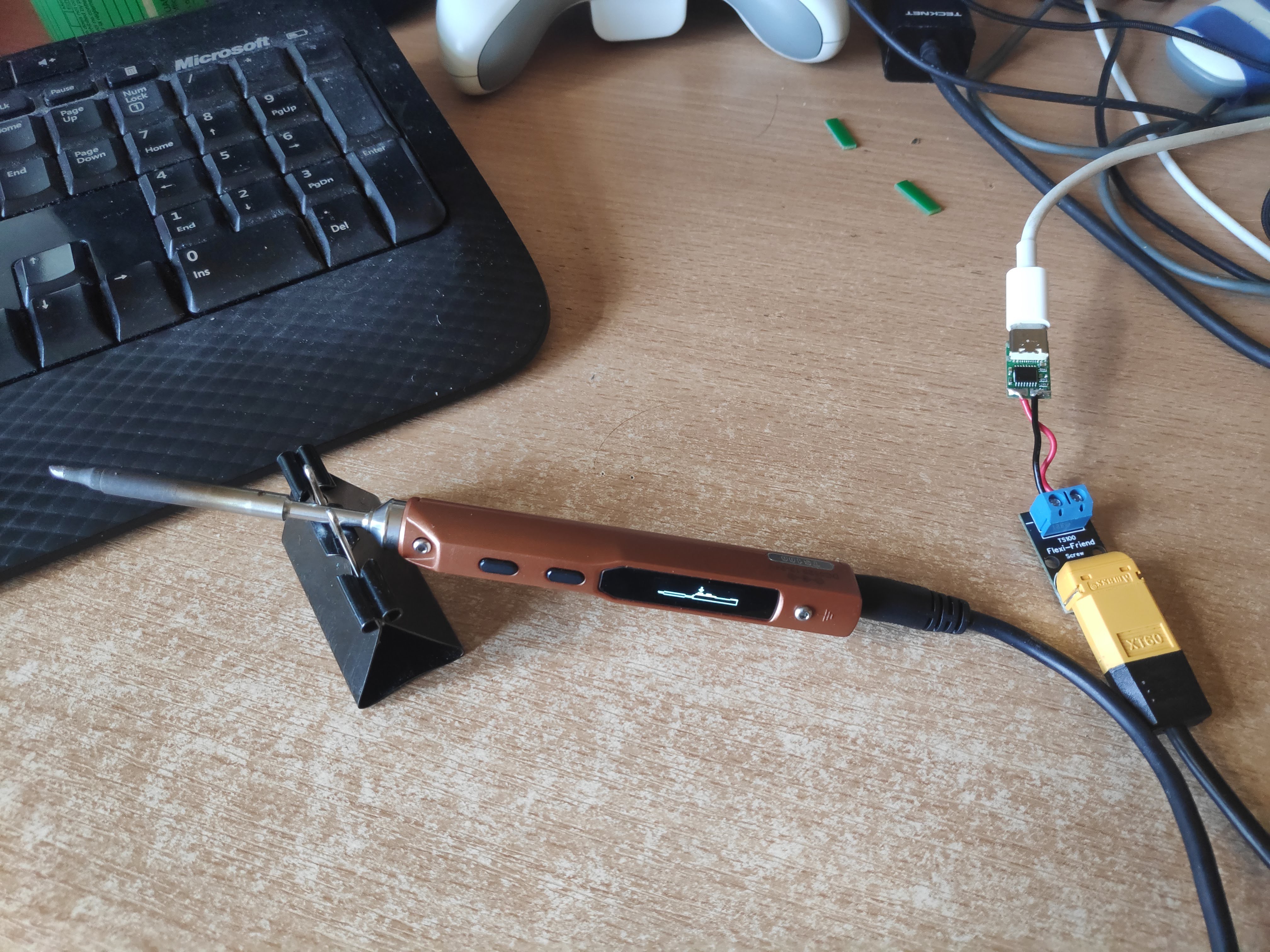
One of the main features of what I'll be doing is incorporating an XT60 connector into the PCB so it can be used with the existing battery cables available, I find them very flexible and good to work with compared to other power supply cables I've used.
I've been doing some prototyping with existing adapters and modules. I haven't power my TS100 from anything but USB-C in about 3 months! I didn't even unpack my regular supply when I moved.
The above picture above is using an IP2721 Module, and I was happy enough with how it worked, so I designed a PCB using it, but I figured shortly after ordering that I think it will have problems.
The IP2721 only negotiates voltage, which is fine if you have a big enough power supply. But even 45W power supplies are out of spec @20v, although I just received a 45W power bank today and it did work, but it pulled more than 45W (~48W) on heat-up.
I also bought a 30W supply to test which I assume is just going to trigger the over current protection of the supply.
To ensure compatibility with all PD PSUs, the sink IC that is used should also be able to negotiate the current a supply can do, so it can drop to lower voltages if needed. I'm after buying the reference board for the STUSB4500 so I can try that out. That should allow me to configure up to 3 voltage & current profiles, which would allow it to negotiate down to 15V or even 12V if the supply was out of spec.
If people had any comments or suggestions on the project I would really like to hear it!
 witnessmenow
on 4 Jun 2020
witnessmenow
on 4 Jun 2020
I use this device:
https://www.tindie.com/products/clarahobbs/pd-buddy-sink/
With Power Delivery chargers and power banks, to power low-power ham radio
transceivers.
I wrote it up here:
https://www.ng3p.com/2020/05/a-different-power-source-for-field-ham.html
Perhaps this will be of use. You've got part of what I did, but the Buddy
Sink at least also negotiates current and power.
-=-=-=-=-=-=-=-=-
73,
Gwen, NG3P
On Thu, Jun 4, 2020 at 5:09 PM Brian Lough notifications@github.com wrote:
I've been working on a solution for this that I would love to get feedback
onOne of the main features of what I'll be doing is incorporating an XT60
connector into the PCB so it can be used with the existing battery cables
available, I find them very flexible and good to work with compared to
other power supply cables I've used.I've been doing some prototyping with existing adapters and modules. I
haven't power my TS100 from anything but USB-C in about 3 months! I didn't
even unpack my regular supply when I moved.The above picture above is using an IP2721 Module, and I was happy enough
with how it worked, so I designed a PCB using it, but I figured shortly
after ordering that I think it will have problems.The IP2721 only negotiates voltage, which is fine if you have a big enough
power supply. But even 45W power supplies are out of spec @20V
https://github.com/20V, although I just received a 45W power bank today
and it did work, but it pulled more than 45W (~48W) on heat-up.I also bought a 30W supply to test which I assume is just going to trigger
the over current protection of the supply.To ensure compatibility with all PD PSUs, the sink IC that is used should
also be able to negotiate the current a supply can do, so it can drop to
lower voltages if needed. I'm after buying the reference board for the
STUSB4500 so I can try that out. That should allow me to configure up to 3
voltage & current profiles, which would allow it to negotiate down to 15V
or even 12V if the supply was out of spec.If people had any comments or suggestions on the project I would really
like to hear it!—
You are receiving this because you commented.
Reply to this email directly, view it on GitHub
https://github.com/Ralim/ts100/issues/24#issuecomment-639117553, or
unsubscribe
https://github.com/notifications/unsubscribe-auth/AENBU7NUJT2I63MTYK62GU3RVAEQPANCNFSM4DS55KRQ
.
JennyEverywhere
on 4 Jun 2020
At some point _soon_ I will be adding support for FUSB302 support for the TS80P (once mine arrives).
So one option is a build for the TS100 that has that IC also enabled could be possible. That way the iron can lookup by tip resistance the ideal voltage to negotiate for to ensure that power is within limits.
The STUSB4500 is also a chip i plan to support, but probably a little but further down the line as I havent yet dug into it much yet.
If it were me i would use XT30 over XT60 for this application :)
Ralim
on 5 Jun 2020
Thanks @JennyEverywhere , I'm not sure what chip the sink buddy uses, but the stusb4500 is configurable via i2c, so I'm hoping it will suit the needs. The nice thing about the reference board is a I can evaluate the functionality without designing a PCB for it!
Would you be planning to put the ic inside the housing then @Ralim ? I assume you have seen the otter iron project ? (it's on GitHub) it's a complete replacement PCB for the ts100 that enables PD on board.
That's interesting about measuring the resistance of tips, I was just going to base my profiles for the STUSB on a resistance of 8.5Ohm, but I guess there could be variations between tips. The adaptor I build using the STUSB (if it works out) will have the i2c pads exposed so users can change the profiles of they wish.
The XT60 is major overkill for sure, the only reason I'm using it is to take advantage of all the existing xt60 cables that are available for the ts100. Even when I was using my regular power supply I had built an adaptor to use one of these xt60 cables because of how flexible they are, I find them very nice to work with.
I have a ts80p on the way too, so I'm interested to hear about whatever progress you make with it!
witnessmenow
on 5 Jun 2020
@witnessmenow
The sink buddy actually uses the FUSB302 and its the firmware I'm using as an implementation reference for the support im adding now :)
I personally would mod the IC module inside of the enclosure, removing the usb-micro and trimming the board to fit there (the FUSB is _tiny_).
Indeed I do know about and love the OtterIron; getting mine running with this firmware is on my infinite to-do list :|
Oh, you can assume 8.5+-0.3ohms roughly; just meant more that since PD has PPS (continuous voltages); its possible _in theory_ to select the highest voltage that _just_ keeps below the power supply current limit worst case :)
I just lopped off the XT60 and put on some nice XT30 connectors 😆
TS80P will get there _soon_ but thats for the other thread 😂
Ralim
on 14 Jun 2020

I received my ip2721 version and all the parts and assembled it. After fixing a mistake I missed from the datasheet (a 100k between vcc and the SEL to set for 20v) it actually works quite well. Changing the SEL pin to floating negotiates 15v.
I did a live stream of assembling it and also testing out the stusb4500 and most of the viewers seemed happy enough with the ip2721 version, which would definitely be cheaper as the chip itself is 1/3 of the price, but the fact it doesn't need to be programmed is a huge time/cost saver.
So I fixed up my design for that and ordered a new version.
Even before I started testing the stUSB I figured that while it supports 3 profiles, which would be perfect for the ts100 as there are 3 pd voltages in the range, profile 1 is locked to 5v. I was able to configure it for 20v and 15v and it did as expected. I probably still will make up a design based on it though
I must look up the FUSB, thanks for mentioning it!
Slightly off topic, but I bought several different wattages of pd supplies for testing this board out. I have 6 of them, and only 2 out 6 (my two power banks) will power the TS80p, despite 5 of 6 being 30w or higher.
My 30w Amazon, my genuine ~60w Mac charger and my fake 87w Mac charger all meet the wattage requirements, but don't offer 12v. So it will be interesting to see how compatible it is with just random pd chargers people have lieing around
witnessmenow
on 14 Jun 2020
The sink buddy actually uses the FUSB302 and its the firmware I'm using as an implementation reference for the support im adding now :)
@Ralim it would be very useful if you could release your USB PD support for FS302 as standalone lib with MIT license. AFAIK currently there are no useable opensource libs to just ask PPS V/A and nothing more.
- Commercial have additional licence limits (OnSemi, Microchip, ST)
- Buddy Sink (Google-based?) is hard-pinned to ChibiOS (requirement for 1ms would be enough)
 puzrin
on 29 Jun 2020
puzrin
on 29 Jun 2020

V1.1 of the IP2721 version fixes the issue with the first version. I think I need to add some ESD protection before I release it though. It's exactly as the IP2721 sample schematic recommends, but it couldn't hurt.
@puzrin There is a board on tindie with source code for the FS302, it seems super complicated though (to me anyways)
witnessmenow
on 30 Jun 2020
There is a board on tindie with source code for the FS302, it seems super complicated though (to me anyways)
That board's FW is specific kludge of "buddy sink". OS is replaced with blocking delays instead of state machine. This may be acceptable for hobby project, but not acceptable for universal library.
puzrin
on 30 Jun 2020
Its not a kludge of buddy-sink; but more a port of the code from the chromebook kernel tree as far as I figured out.
I actually started with that firmware but boy was it a mess. It also barely worked.
I've been porting the buddy sink firmware across to FreeRTOS and most parts of it "look" to work; but still chasing around an issue that some messages are not being received within timeouts. Need to probe the I2C bus but soldering inside the TS80P to those wires is a pain in the ass so haven't committed the time to doing that just yet.
Ralim
on 30 Jun 2020
@puzrin My port will inherit a compatible license to the buddy sink since I've built off that code. But will decide more on that _once_ i get the damn thing working.
Ralim
on 30 Jun 2020
FreeRTOS is still "too much" for library. But if you succeed with battle-tested implementaion for TS80P, that will simplify next modifications significantly.
At first glance lib requirements can be reduced to 1ms timer (instead of RTOS), and use prototread-based approach. That will simplify integration into user apps.
Also (no sure 100%), it may be useful restrict support to PPS mode only. Most of modern chargers go with it. This will simplify lib api to trivial.
Need to probe the I2C bus but soldering inside the TS80P to those wires is a pain in the ass so haven't committed the time to doing that just yet.
AFAIK, this part can be done on devboard, instead of T80P. I could not find ON-FUSB3-STM32, but ZY12PDN triggers with STM32F072F4P6 are available on ali & amazon https://www.aliexpress.com/item/4000420377026.html.
Also found noname arduino board https://www.aliexpress.com/i/4001134933824.html
puzrin
on 1 Jul 2020
@puzrin
I agree that FreeRTOS may be overkill; however keep in mind that I'm not here to write universal libraries but instead to try and rollout something that functions well :)
PPS mode only is _not an option_ as far as I'm aware at this point in time. I own 8 USB-PD power sources at the moment, and of them only the two newest implement PPS. A lot of power banks still user older designs that only implement PD2.0 standard. So if anything is going to be cut it would be PPS as PD3.0 still includes the fixed voltages of PD 2.0.
I am well aware of the development boards and have ordered some. But seeing as shipping from china is anywhere from 2-12 weeks at the moment I'm not holding my breath waiting for them to arrive :joy:
Ralim
on 2 Jul 2020
@Ralim
I mean, if you roll stable code, it will be not difficult for me to rewrite it into lib. Buddy sink has Apache licence for folder with PD sack. If you keep it (if you don't push with GPL), that will be awesome.
You are right, i was a bit over-optimisic about PPS support. Most promissing is still Baseus 2C1A 65W GaN charger (35$). Many modern (GaN) chargers still may go with PD 3.0 but without PPS. I've ordered some alternate chargers to check if more cheap PPS alernatives available.
PS. I'd like to have working USB PD PPS for this micro reflow. It eats ~40W at 270C. In that case strict requirement for PPS will be reasonable.
puzrin
on 2 Jul 2020
@witnessmenow Any progress on the adapter? I need to upgrade my Power Supply for TS100 and have 2 spare 65w Mac chargers lying around, would love to just use them over buying another single use power supply.
 mattkerrison
on 9 Jul 2020
mattkerrison
on 9 Jul 2020
I've ordered a new design with ESD protection and the pcbs were shipped yesterday. I also am waiting on some parts too.
I would hope to have them available by the end of the month
I use my 65w Mac charger also and works great. But just to make sure it's clear (sorry if you already know this) using power delivery limits the power of the ts100 to ~50w. To draw 65w, the ts100 needs 24v, the max PD does is 20v
witnessmenow
on 9 Jul 2020
I've ordered a new design with ESD protection and the pcbs were shipped yesterday. I also am waiting on some parts too.
I would hope to have them available by the end of the month
I use my 65w Mac charger also and works great. But just to make sure it's clear (sorry if you already know this) using power delivery limits the power of the ts100 to ~50w. To draw 65w, the ts100 needs 24v, the max PD does is 20v
Yea, I'm just using a 12v supply currently as its all I have with the barrel jack, so it'll be a huge upgrade anyway. I did order the generic usb-c trigger board from aliexpress and a XT-60 silicone cable to splice together, but if your design has some ESD protection built in I'll probably still grab one.
mattkerrison
on 13 Jul 2020
I've ordered a new design with ESD protection and the pcbs were shipped yesterday. I also am waiting on some parts too.
I would hope to have them available by the end of the month
I use my 65w Mac charger also and works great. But just to make sure it's clear (sorry if you already know this) using power delivery limits the power of the ts100 to ~50w. To draw 65w, the ts100 needs 24v, the max PD does is 20vYea, I'm just using a 12v supply currently as its all I have with the barrel jack, so it'll be a huge upgrade anyway. I did order the generic usb-c trigger board from aliexpress and a XT-60 silicone cable to splice together, but if your design has some ESD protection built in I'll probably still grab one.
Ok cool! One of my first prototypes was pretty much exactly that, seemed to work fine!

If you buy a Female XT60 connector (which is kind of confusing as the pins are female but the plastic housing is male) you could save splicing the cable. My board will use that same style cable and it will save you some money not having to buy that again!
witnessmenow
on 13 Jul 2020
Just want to add a little bit here about TS80P and TS100 being powered by PD power source unit.
I'm using a cable which contains PD Sink PCB in the USB-C connector and has DC5525 connector on the other side and fits perfectly.

Cable a bit tough and gives stable 20V, peak consumption was 40~45W according to power indicator on the display.

By the way DC powered TS100 still has advantages over the TS80 and even TS80P, it is power, which is greater and the possibility to "eat" any power sources even DeWalt's batteries (tried 5Ah battery pack it works fine).
 arren-ru
on 21 Aug 2020
arren-ru
on 21 Aug 2020
I'm using a cable which contains PD Sink PCB in the USB-C connector and has DC5525 connector on the other side and fits perfectly.
@arren-ru Where might I find this cable? I have a PD-Buddy that I hard wired to a DC jack and this looks way more streamlined.
Adrian-at-CrimsonAuzre
on 21 Aug 2020
I'm using a cable which contains PD Sink PCB in the USB-C connector and has DC5525 connector on the other side and fits perfectly.
@arren-ru Where might I find this cable? I have a PD-Buddy that I hard wired to a DC jack and this looks way more streamlined.
Unfortunately this cable is not available for now, but you may find similar cables on AliExpress like this one OR this one
arren-ru
on 21 Aug 2020
@witnessmenow
The sink buddy actually uses the FUSB302 and its the firmware I'm using as an implementation reference for the support im adding now :)
I personally would mod the IC module inside of the enclosure, removing the usb-micro and trimming the board to fit there (the FUSB is _tiny_).
Indeed I do know about and love the OtterIron; getting mine running with this firmware is on my infinite to-do list :|
Oh, you can assume 8.5+-0.3ohms roughly; just meant more that since PD has PPS (continuous voltages); its possible _in theory_ to select the highest voltage that _just_ keeps below the power supply current limit worst case :)
I just lopped off the XT60 and put on some nice XT30 connectors laughing
TS80P will get there _soon_ but thats for the other thread joy
I'm looking at porting IronOS onto the Otter Iron now - have you looked into it at all? I wouldn't want to duplicate work.
 ElRoberto538
on 14 Feb 2021
ElRoberto538
on 14 Feb 2021
Related issues
 epigramx
·
5Comments
epigramx
·
5Comments
 Gregory1981
·
3Comments
Gregory1981
·
3Comments
 jonnieZG
·
4Comments
jonnieZG
·
4Comments
 dine909
·
4Comments
dine909
·
4Comments
 discip
·
8Comments
discip
·
8Comments
Most helpful comment
You're right.. I have to rebuild the server that website was hosted on.. Still have all the content but haven't found the time to fix it yet.. Here are the pictures which comprised the bulk of the content on that page.


