Iris: i18n -with subdirectories, like www.site.com/en
Hello!
I'm using i18n middleware for lang localization and currently my urls look like www.site.com/?lang=en-US. According to many sources (e.g. https://webmasters.stackexchange.com/questions/403/how-should-i-structure-my-urls-for-both-seo-and-localization) it's much better to use subdirectories instead of query params. So how to make
www.site.com/?lang=en-US -> www.site.com/en-US/
Thanks!
 hubba-bubba-776
All 7 comments
Hello @heyt0ny,
What i18n middleware are you using?
- https://github.com/kataras/iris/tree/master/middleware/i18n
- https://github.com/iris-contrib/middleware/tree/master/go-i18n
With both of them you can specify the way that a language is accepted.
See for example the kataras/iris/middleware/i18n will try to get the language first by language's context's key(can be customized too).
https://github.com/kataras/iris/blob/df882273e21952a316236174123fc09096b49aad/configuration.go#L717-L718
setLangMiddleware := func(ctx iris.Context){
    langKey := ctx.Application().ConfigurationReadOnly().GetTranslateLanguageContextKey()
    languageByPath := ctx.Params().Get("lang") // see {lang}
    ctx.Values().Set(langKey, languageByPath)
    ctx.Next()
}
// app or per group (routes := app.Party; routes.Use...)
app.Use(setLangMiddleware)
app.Use(theI18nMiddlewareInstance)
app.Get("/{lang}/path", yourHandler)
 kataras
on 1 Oct 2019
kataras
on 1 Oct 2019
Thank you.
I have 2 questions though:
1) How to apply {lang} to a lot of urls:
Imagine I have 2 type of urls (first A without locale and second B with local):
www.test.com/sitemap.xml (A) and www.test.com/en-US/some-page (B). If I create
A) appAssets := app.Party("/") and put A into it
B) appMultilang := app.Party("/{lang}") and put B into it
it won't understand A url and will think that {lang} = sitemap.xml. I don't think it's a good practice to check whether {lang} is one of locales, and if's not -> redirect to A. How to properly handle that?
2) if the user enters www.test.com/some-page - he will be assigned some {lang} based on some logic (that I define). How to do then this redirection (knowing {lang} value) in iris to make url look like www.test.com/{lang}/some-page?
hubba-bubba-776
on 1 Oct 2019
@heyt0ny You are welcome.You can do it understand by mapping the locale keys with the param and if it is NOT matching then redirect to the default (en-us or without param) otherwise handle the request with the specific locale. You can make use of ctx.Values() inside the app's middleware and call the necessary handlers.
However, you can describe us the net/http (or other framework at any language) way because it depends on what fits you the most, I can help you convert everything to Iris.
If you don't have any idea about it, give me time until tomorrow and I will provide such a feature (if necessary).
Please vote here as well whenever you have time.
kataras
on 4 Oct 2019
Hello @heyt0ny,
If I may understand, you need to
- register the routes once for all languages
- if the path is prefixed with one of the languages codes, e.g. (
zh-cnandel-groren-us) such ashttp://example.com/zh-cn/some-paththen "redirect to / execute handler(s) of "(local redirect to)/some-pathwith thelangset tozh-CN.
A new router wrapper for that task will be included on the next minor version of Iris 12.0.2.
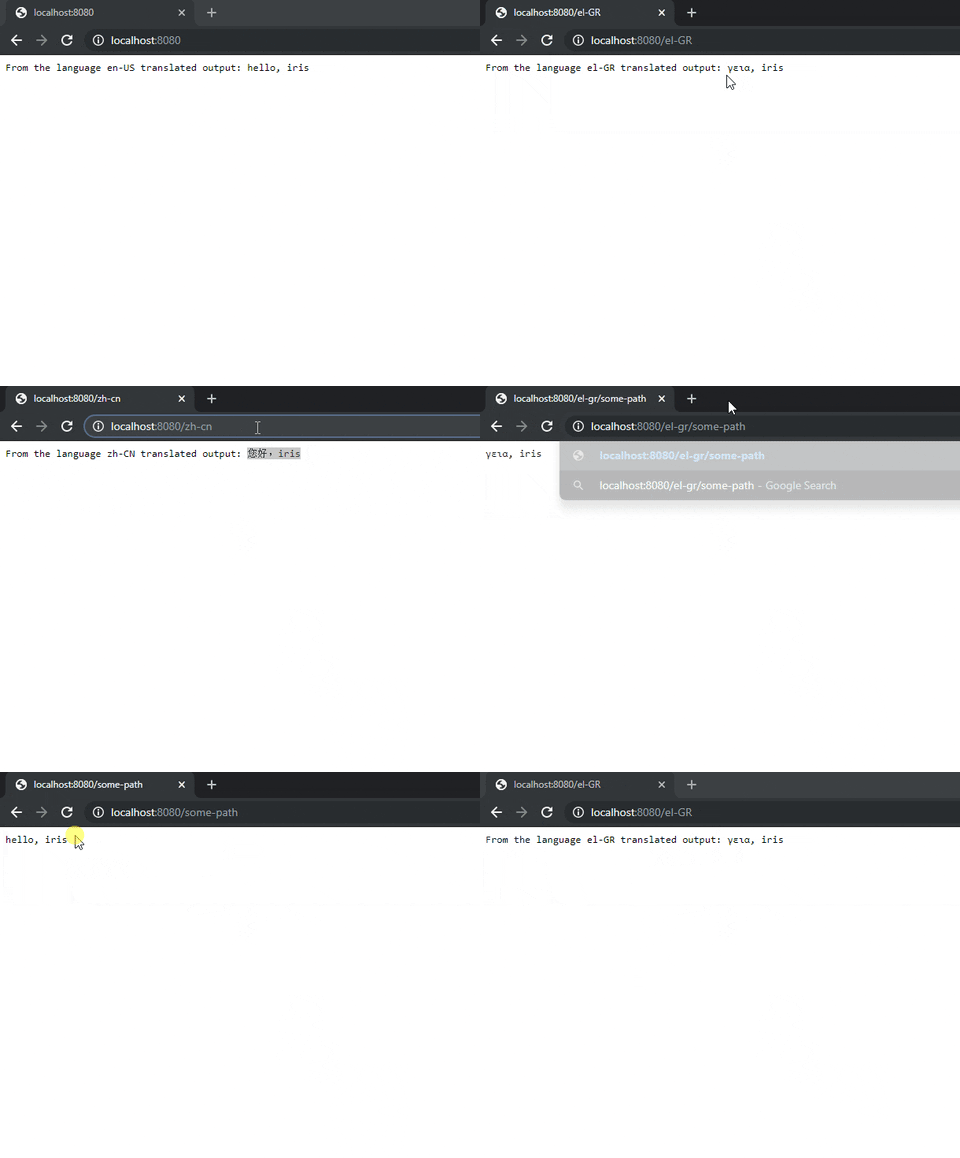
Please check it out and share your thoughts with us:
import (
    "net/http"

    "github.com/kataras/iris/v12/middleware/i18n"
)

// [...]

func NewWrapper(c i18n.Config) func(http.ResponseWriter, *http.Request, http.HandlerFunc) {
    return func(w http.ResponseWriter, r *http.Request, routerHandler http.HandlerFunc) {
        path := strings.ToLower(r.URL.Path[1:])

        if idx := strings.IndexRune(path, '/'); idx > 0 {
            path = path[:idx]
        }

        for lang := range c.Languages {
            if strings.ToLower(lang) == path {
                path = r.URL.Path[len(path)+1:]
                if path == "" {
                    path = "/"
                }
                r.RequestURI = path
                r.URL.Path = path
                r.Header.Set("Accept-Language", lang)
                                break
            }
        }

        routerHandler(w, r)
    }
}
And usage:
import (
    "github.com/kataras/iris/v12"
    "github.com/kataras/iris/v12/middleware/i18n"
)

// [...]

i18nConfig := i18n.Config{
    Default:       "en-US",
    URLParameter:  "lang",
    Languages: map[string]string{
        "en-US": "./locales/locale_en-US.ini",
        "el-GR": "./locales/locale_el-GR.ini",
        "zh-CN": "./locales/locale_zh-CN.ini",
    },
}
app.WrapRouter(NewWrapper(i18nConfig)) // <- HERE

i18nMiddleware := i18n.New(i18nConfig) // <- HERE
app.Use(i18nMiddleware)
app.Get("/", func(ctx iris.Context) {
    hi := ctx.Translate("hi", "iris")

    language := ctx.Values().GetString(
        // GetTranslateLanguageContextKey() == "language"
            ctx.Application().ConfigurationReadOnly().GetTranslateLanguageContextKey()
        )

    ctx.Writef("From the language %s translated output: %s", language, hi)
})

app.Get("/some-path", func(ctx iris.Context) {
    ctx.Writef("%s", ctx.Translate("hi", "iris"))
})
That's great! I think it's exactly what I was looking for. Thank you 🙏
hubba-bubba-776
on 19 Nov 2019
~OK, it's on v12 branch by this commit which will be released at 23 November under v12.0.2.~
~The above commit contains some fixes and improvements such as config.SetCookie, config.Alternatives, find and match "en" as"en-US", ctx.TranslateLang("zh-CN", "word" args...) which is a helper that translates a specific word by given locale(first parameter) - useful for things like language menu selection (we still have ctx.Translate("word", args...) for current locale translate that can be passed on templates too) and e.t.c.~
UPDATE: Version 12.1.0 released which has builtin support for localization, more control and more features, easier. Read more at: https://github.com/kataras/iris/blob/master/HISTORY.md#fr-13-december-2019--v1210
I am very grateful for your contribution and this feature request, it is quite unique @heyt0ny .
kataras
on 19 Nov 2019
Sounds cool! You are developing really great framework. Keep it up 👍
hubba-bubba-776
on 20 Nov 2019
Related issues
 fangli
·
3Comments
fangli
·
3Comments
 pipe01
·
3Comments
pipe01
·
3Comments
 BharathB23
·
3Comments
BharathB23
·
3Comments
 ZetDeveloper
·
3Comments
ZetDeveloper
·
3Comments
 yogeshlonkar
·
4Comments
yogeshlonkar
·
4Comments