Updated 21 September to consolidate notes below and OOB discussion.
The need
At present, UI upload drawer doesn't provide progressive feedback on file import until it gives notice at end whether import was successful or failed. This is particularly problematic for large files.
Solution
Let's mitigate this in two ways:
2. Import progress in drawer as originally proposed in https://github.com/ipfs-shipyard/ipfs-webui/pull/1495
Original plan in https://github.com/ipfs-shipyard/ipfs-webui/pull/1495 was to include a functional progress bar in the import drawer, as sketched out in Figma mockups here. When that wasn't technically possible at the time, we switched to an indefinite indicator. If we can now implement as originally planned, let's do so.

2. Inline, inactive display of in-progress imports in Files screen
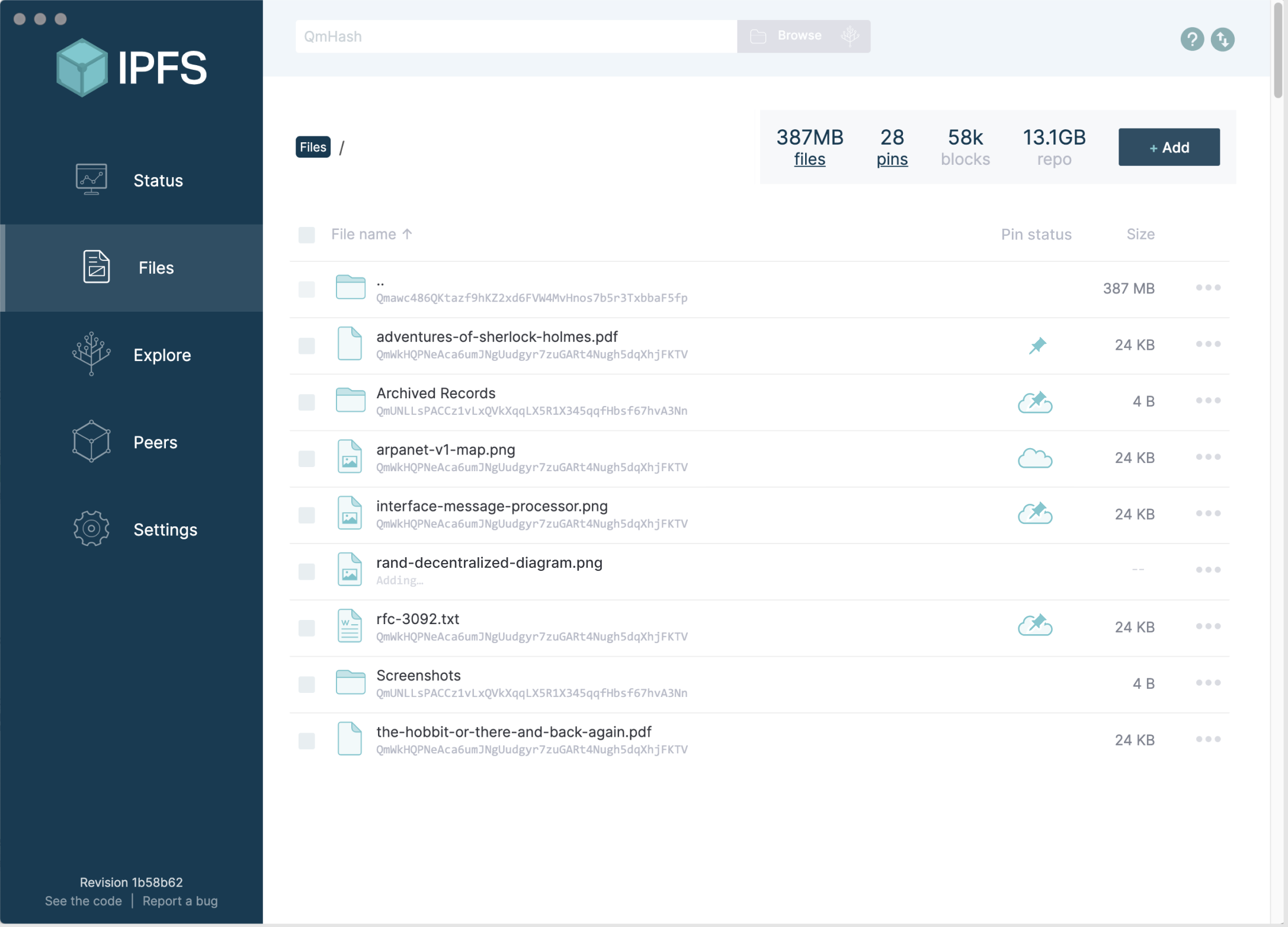
Let's also implement (as a separate issue/PR if need be) the mitigation originally planned in this issue for giving inline feedback that a file is being imported as a grayed-out row in the Files screen. Mockup below.

Original issue notes
At the moment UI provides no visual feedback on file(s) import, until the very end when it succeeds or fails. Which is not a big deal for small files where it's spontaneous, but no feedback on large files leaves an impression of nothing happening. As per measurements in #1534 importing 2gig size file takes somewhere between 10 to 12 seconds.
Plan was to introduce a progress animation once https://github.com/ipfs/js-ipfs-utils/issues/52 would be shipped, but it introduced regression and attempt to address it https://github.com/ipfs/js-ipfs-utils/pull/60 was rejected due to increased complexity.
Lets consider / discuss all the available options to address lack of visual feedback on file imports given existing constraints to figure out path forward.
 Gozala
All 14 comments
I am personally inclined to take inspiration from popular systems e.g. dropbox / icloud:
Icloud
Will be available on demand (in the cloud)

Available locally / uploading to cloud

Fully replicate (available locally and in the cloud)

Dropbox
Synchronizing / Available locally

In the systray

Synchronized / Available everywhere

Gozala
on 18 Aug 2020
The reason I like inline status indicator over approach we currently use is that it leaves an impression of fully functional directory, except it may not be fully synced / replicated.
Gozala
on 18 Aug 2020
Not proposing this as actual implementation -- but do want to get some visuals into this thread for the sake of discussion.
The iCloud approach of _not_ displaying an indicator when something is fully replicated seems to be the right one to use here: we indicate the exception, not the rule, because in this case exceptions are truly exceptional both in terms of how often and for how long they exist. This seems particularly valid given that we're going to be adding a column with persistent status iconography (see screenshot) once pinning services are fully integrated.
Screenshot below mocks up one approach: hijacking the file-type icon position to indicate that a file is in the process of being added (the arrow itself isn't great, just a piece of another ipfs-css icon in there as an example). Not sure if this is the right direction -- it may be replacing one thing with another thing that has too different of a meaning -- but wanted to include it here to illustrate that we've got a fairly limited amount of cognitive space available in the Files screen when it comes to adding indicators. Our options are either to add a new position/affordance for this indicator, or have it temporarily take the place of something else. Discuss?

 jessicaschilling
on 20 Aug 2020
jessicaschilling
on 20 Aug 2020
Thanks @jessicaschilling for the mock, it does help to visualize it. Few notes / questions
The iCloud approach of not displaying an indicator when something is fully replicated seems to be the right one to use here
Could not agree more! In comparison Dropbox demonstrating prominent indicators feels really noisy.
- Can "pin status" be generalized to "status" ?
- Seems like a natural place to indicate "importing in progress", which is also visually where icloud / dropbox place their indicators.
- Files that are being imported, can't be pinned, so it will not conflict.
- We don't know the CID of the file until it's is imported
- So we can't display it during import
- Maybe that some space for visual feedback.
- We don't know the size until it's done improted
Gozala
on 22 Aug 2020
- We don't know the CID of the file until it's is imported
- So we can't display it during import
- Maybe that some space for visual feedback.
- We don't know the size until it's done imported
Ah, right: I'd suggest this actually gives us an intuitive and dedicated affordance, particularly if the user can't actually click on the file until it's been fully imported. See below. (If it's possible to click/right-click the table row while it's importing, we can't fully gray out the row as indicated below, but I think the metaphor still holds even if the file name and icon were "full strength".)
If we wanted to be really fancy we could animate the ellipses for "Adding..."
jessicaschilling
on 24 Aug 2020
if the user can't actually click on the file until it's been fully imported
We could still technically allow to
- view
- rename
- move
Such files, but not the other actions.
Gozala
on 24 Aug 2020
If that's the case, then we probably shouldn't gray the whole row out (implying you can't take any actions at all), but the metaphor still works, especially if we animated the ellipses:
Another option would be to lighten the content in the row without graying it out entirely, but that starts getting a little fussy.
jessicaschilling
on 24 Aug 2020
Per chat with @lidel and @rafaelramalho19 - let's actually just gray the whole row out, and disable the dots. While you can technically rename a file, that all happens in userland and gets weird if you then close your window before import completes.
jessicaschilling
on 25 Aug 2020
Assigning to @rafaelramalho19 and @Gozala for next-steps talk in implementation!
jessicaschilling
on 25 Aug 2020
I was able to import 2GB file with v2.11, but it took a few moments – there is def. a need for some visual feedback.
@Gozala is this blocked by #1589? Are there any external PRs that need to land first?
 lidel
on 18 Sep 2020
lidel
on 18 Sep 2020
@Gozala is this blocked by #1589?
Not blocked on it, but landing that first would be my preference if possible.
Are there any external PRs that need to land first?
It is blocked on https://github.com/ipfs/js-ipfs-utils/pull/60
Which was in turn blocked by https://github.com/ipfs/go-ipfs-cmds/pull/201
I'll try to figure out if we could land the https://github.com/ipfs/js-ipfs-utils/pull/60 to unblock this.
Gozala
on 18 Sep 2020
Per our discussion today, updated this issue's original comment to include both the inactive "Adding..." row in the Files screen, and the original requirement for functional progress indicators in the import drawer as proposed but not implemented in https://github.com/ipfs-shipyard/ipfs-webui/pull/1495.
jessicaschilling
on 21 Sep 2020
IIRC progress reporting was implemented and closed by https://github.com/ipfs/ipfs-webui/pull/1495 :heart:
I just confirmed it works with 2GB file.
@jessicaschilling the implementation that landed does not include inactive "Adding..." row in the Files screen, however ongoing import is indicated via drawer at the bottom, with % progress bar. Is it good enough or should we fill issue for remaining work? (note, it won't happen any time soon)
lidel
on 14 Apr 2021
I think it's fine to leave as is. Would rather add a new issue if the need comes up later.
jessicaschilling
on 14 Apr 2021
Related issues
 mxdpeep
·
5Comments
mxdpeep
·
5Comments
 dsvi
·
5Comments
lidel
·
3Comments
dsvi
·
5Comments
lidel
·
3Comments
 olizilla
·
4Comments
olizilla
·
4Comments
 TitaniumCoder477
·
5Comments
TitaniumCoder477
·
5Comments
Most helpful comment
Ah, right: I'd suggest this actually gives us an intuitive and dedicated affordance, particularly if the user can't actually click on the file until it's been fully imported. See below. (If it's possible to click/right-click the table row while it's importing, we can't fully gray out the row as indicated below, but I think the metaphor still holds even if the file name and icon were "full strength".)
If we wanted to be really fancy we could animate the ellipses for "Adding..."