Ipfs-desktop: Changed the API address and can't reset ..
Hello,
Changed the API address and made a mistake.
Impossible to restart or reset IPFS Desktop now..
Tried ipfs config edit, but editor issue = impossible to change again the API..
How can I edit and change the API address ? Is there a json somewhere that would allow that ?
Thanks !
 SAMYEL06
All 15 comments
Hi @SAMYEL06, to clarify: can you still run the IPFS Desktop app itself, but you see "can't connect" errors?
If that's the case, I suspect you're running an older version of Desktop that doesn't include the ability to change the API in-app as easily. Try opening webui.ipfs.io in a browser while Desktop is still also running and see if you get an error on that page that gives you the option to change API.
If that doesn't work, will need more diagnostic info, like your OS, the version of Desktop you are on, and any screenshots.
You'll also get quicker assistance from the community as a whole if you ask support questions in discuss.ipfs.io - particularly on weekends. We really try to avoid using GitHub to discuss support questions. Thank you!
 jessicaschilling
on 10 Oct 2020
jessicaschilling
on 10 Oct 2020
As I started it here, I'll end it here but next times, I'll start it there (didn't know about it, kinda new to IPFS)
The app runs.
No way of editing the json part of the params in the software.
No way to edit from CLI..
I'm on Windows 10.. Basically I've put :
/ip4/[localip]tcp/5001
instead of
/ip4/[localip]/tcp/5001
I missed one "/" ... So the desktop app is accessible, runs, but I can't modify the API address :/
SAMYEL06
on 10 Oct 2020
Try opening webui.ipfs.io in your browser and looking for the api config option.
jessicaschilling
on 10 Oct 2020
Opening it gives me the same interface as the desktop app.
Issue is that the json editor under "Use CLI as tutorial" option isn't showing...
And since the /ip4/192.168.0.23tcp/5001 isn't valid, can't either put it in there
Hope it helps.. :(
PS : Sorry, the screens are in french ^^"
SAMYEL06
on 10 Oct 2020
You should be able to put the correct api address in that api box you screenshotted and get things running again.
jessicaschilling
on 10 Oct 2020
I've put the exact same address that "ipfs config show" in the cmd line tool says for API (the one I entered by mistake), but since the IP address is "glued" with tcp (missing the "/"), it's not a valid pattern I guess and validating won't change the screen (like it has no effects) :/
That's why i wondered if there was a json file to edit.. or at least, which folder does the ipfs desktop software store the config ? Maybe if I delete that, I can reinstall and it'll go back to default ?
SAMYEL06
on 10 Oct 2020
So are you saying that entering
/ip4/192.168.0.23/tcp/5001
(with correct slash) in that box still fails? The value entered in the box still updates custom api address even if you can't get to the config file. If there is an api available at /ip4/192.168.0.23/tcp/5001, it will connect to it if that value is entered in that box.
Default value for api is
/ip4/127.0.0.1/tcp/5001
so you may also want to try that rather than explicitly referring to your local host's address on your LAN. (Unless of course 192.168.0.23 is a different local machine you are trying to reach.)
jessicaschilling
on 10 Oct 2020
That's exactly what I'm saying..
I've entered the default value, validated and then restarted : still in error.
I've tried the one with the ipv4 of the machine that IPFS is running (192.168.0.23), validated, restarted and.. error as well :/
So kind of lost on how to fix that :/
SAMYEL06
on 10 Oct 2020
Ok, nevermind, found the solution :
I ran this in the cmd :
ipfs config --json Addresses.API "["""/ip4/127.0.0.1/tcp/5001"""]"
And then restarted, it's working ! ^^
Thanks for the help !!
SAMYEL06
on 10 Oct 2020
Glad you are up and running again! I'm concerned you weren't able to do that from webui, so will leave this issue open to investigate that we don't have a bug in there - I'm not on windows so will need someone else on the team to look more closely next week.
In any case happy your problem is solved!
jessicaschilling
on 10 Oct 2020
@SAMYEL06 I believe you didn't press ENTER after editing the API. I was looking at the code and it's required to press ENTER in order to actually change the API port.
@jessicaschilling maybe we could change the UI to reflect that the API port is not changed until the user "submits the input form", and maybe add a button too?
 rafaelramalho19
on 10 Oct 2020
rafaelramalho19
on 10 Oct 2020
@rafaelramalho19 there IS a button, this is why I'm concerned 😊
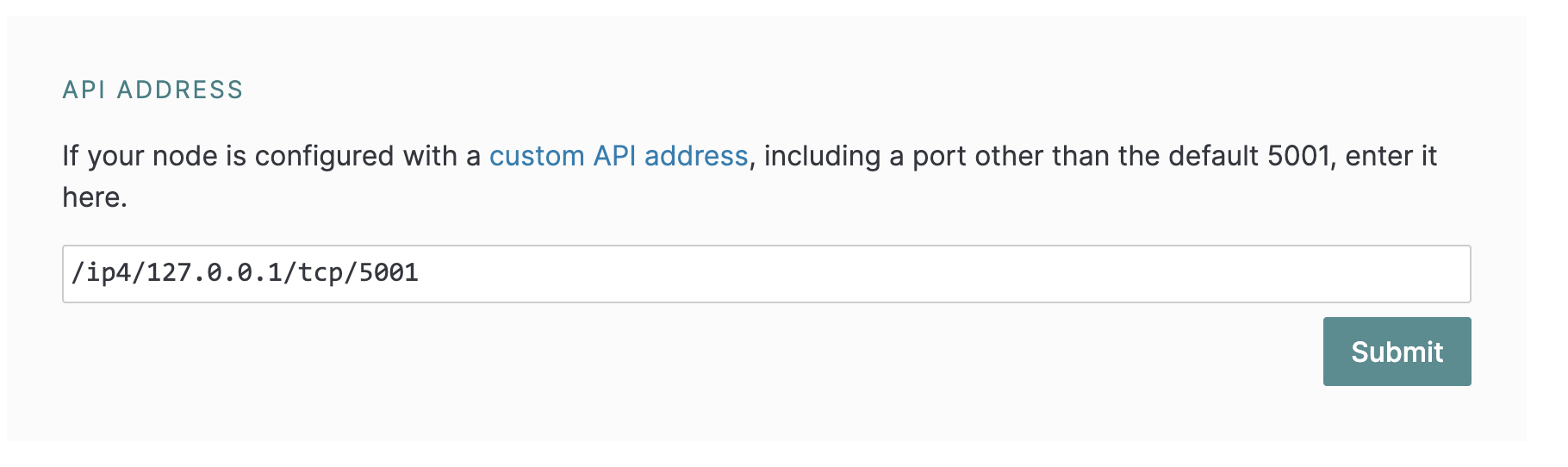
@SAMYEL06 Can you confirm that you hit the "Valider" button after entering a valid API address (such as /ip4/127.0.0.1/tcp/5001), but still didn't get things working?
jessicaschilling
on 10 Oct 2020
Yes, sorry, I mean reflect that the button needs to be clicked in order to be submitted*
rafaelramalho19
on 10 Oct 2020
Well I swear to you,
I added "/ip4/127.0.0.1/tcp/5001" in the Desktop app and the Webui, several times. I tried hitting enter, then clicking on Validate. I tried just with validate as well, and it never changed it ?
Anyway, the good point is that it's working again so no big deal ^^"
SAMYEL06
on 10 Oct 2020
@SAMYEL06 Thanks for the additional info 😊
@rafaelramalho19 I can't replicate a condition in which that API entry box doesn't "take" what I enter - that's my bigger concern.
I'm going to close this issue, but let's keep an eye out for anything that would suggest a recurrence.
jessicaschilling
on 10 Oct 2020
Related issues
 alanshaw
·
6Comments
alanshaw
·
6Comments
 NatoBoram
·
3Comments
NatoBoram
·
3Comments
 zerotrzy
·
4Comments
zerotrzy
·
4Comments
 bertrandfalguiere
·
3Comments
bertrandfalguiere
·
3Comments
 hacdias
·
6Comments
hacdias
·
6Comments
Most helpful comment
@SAMYEL06 Thanks for the additional info 😊
@rafaelramalho19 I can't replicate a condition in which that API entry box doesn't "take" what I enter - that's my bigger concern.
I'm going to close this issue, but let's keep an eye out for anything that would suggest a recurrence.