Ipfs-companion: Revamp Companion "sales" and overview materials
Chrome Web Store is the main user aquisition channel for this browser extension:
Current listing is pretty old. It consists of Overview text and screenshots.
There are also additional "promo tile" graphics displayed on the store listings (note resolutions):
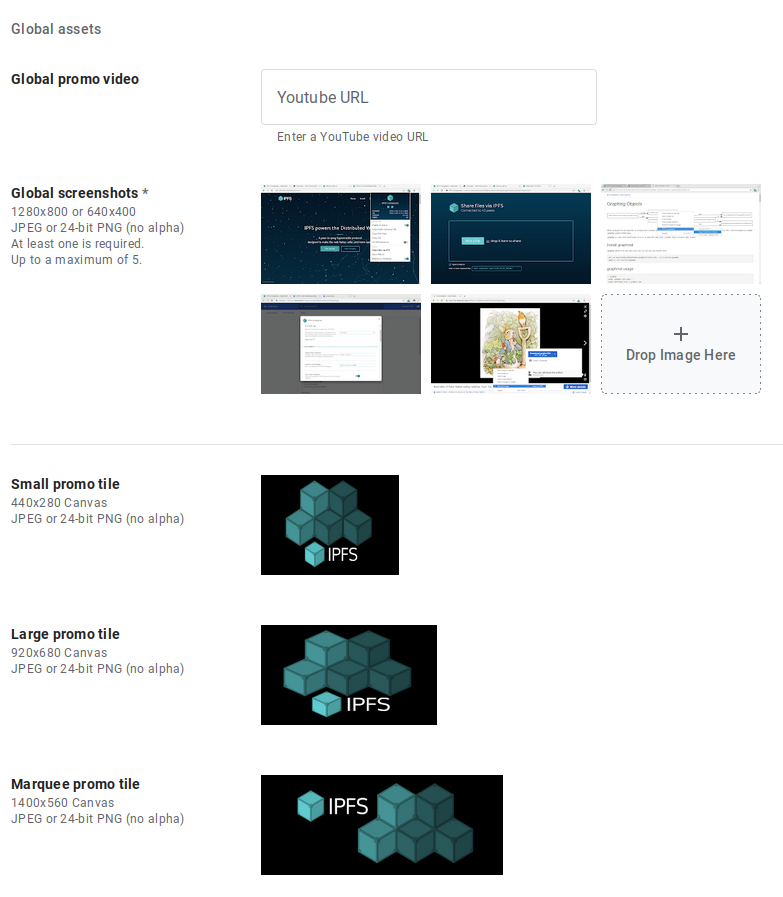
@jessicaschilling as you noted in IPFS GUI tools: June 2020 survey analysis, a big chunk of users does not feel like they understand what to expect when they install this extension. Perhaps rewriting Overview and producing better screenshots (macOS?) could take us 80% where we need to be?
 lidel
lidel
All 11 comments
@lidel I'm actually going to add two more closely related things to this effort:
- [x] [Same page, but for Firefox](https://addons.mozilla.org/en-US/firefox/addon/ipfs-companion/);
- [x] See what of these materials may want to be incorporated into the repo readme for consistency/clarity.
 jessicaschilling
on 18 Jun 2020
jessicaschilling
on 18 Jun 2020
First pass at Chrome Store text below — once we arrive at something more final, can amend/extrapolate for other channels.
@lidel -- initial thoughts?
TAGLINE (note this appears in big type at the bottom of the Chrome Store page in addition to higher up on the page):
Harness the power of IPFS in your browser
BODY:
IPFS Companion harnesses the power of your locally running IPFS node (either through the IPFS Desktop app or the command-line daemon) directly inside your favorite browser, enabling support for ipfs:// addresses, automatic IPFS gateway loading of websites and file paths, easy IPFS file import and sharing, and more.
IPFS is a peer-to-peer hypermedia protocol designed to make the web faster, safer, more resilient, and more open. It enables the creation and dissemination of completely distributed sites and applications that don’t rely on centralized hosting and stay true to the original vision of an open, flat web. Visit https://ipfs.io to learn more.
FEATURES
- Automatically use IPFS to retrieve sites, files, and other resources already stored on IPFS (including redirecting DNSLink hostnames to IPNS names via your choice of gateway)
- Support content-addressed IPFS paths (/ipfs/) and URIs (ipfs://) in your browser, and redirect them to the gateway of your choice
- Share files from your browser by importing them to your local IPFS node via right-click or drag-and-drop, including the option to preload files at a public gateway
- See how many peers you’re connected to at a glance from your browser’s menu bar
- Check gateway info and API status with a single click
- Common IPFS tasks — like pinning files, copying shareable links/paths/CIDs, and launching your IPFS Web UI dashboard — are available right in your browser
- Options to toggle IPFS redirects globally or per website
- Choose between connecting to your local IPFS node via the HTTP API or running a js-ipfs node directly in your browser
IMPORTANT NOTE
Because IPFS Companion (in its standard configuration) talks to your computer’s local IPFS node to work its browser magic, you’ll need to have IPFS running on your computer, too — either from your terminal or using the friendly, free IPFS Desktop app. Visit https://ipfs.io to learn more and install.
MORE INFO
- Learn about IPFS and how it’s changing the Internet at https://ipfs.io
- See the IPFS Companion privacy policy at https://ipfs.io/companion-privacy
jessicaschilling
on 18 Jun 2020
Made tiny tweaks in sentences where we mention "ipfs://" but overall looks good, thank you!
I realized that before we publish this, we need two things:
- [x]
https://ipfs.io/privacy/ipfs-companion (see PR https://github.com/ipfs/website/pull/386)https://ipfs.io/companion-privacy - [x] email alias
ipfs-companion (at) ipfs.iofor currently visible ugly one inAdditional Information
(asked IT, waiting for answer)
lidel
on 19 Jun 2020
@lidel Awesome idea on the Google groups email alias. Thank you for doing both of those things! I'll get some screenshots etc set up for the other elements on the Chrome store page.
jessicaschilling
on 19 Jun 2020
ETA: Hugo nonsense = privacy policy URL is now:
https://ipfs.io/companion-privacy
jessicaschilling
on 19 Jun 2020
Email alias is set up and confirmed to work as expected.
lidel
on 19 Jun 2020
@lidel Awesome -- looks like you've already updated the email address in the Chrome Store dashboard.
I've done the following for both the stable and beta listings, and saved as draft. If you're able to look the drafts over at your leisure and submit for review, that would be awesome:
- Replaced text per the above comment (note I had to PR https://github.com/ipfs-shipyard/ipfs-companion/pull/898 to get the tagline updated, as this is actually in the manifest)
- Updated screenshots
- Updated promo images
- Proofread and copy-edited the privacy messages for clarity
Feel free to submit for review if you think we're good and the time frame for review isn't going to collide with anything else.
Also, if you want to give me Firefox store access, I'll update there too.
jessicaschilling
on 20 Jun 2020
Thank you! LGTM, I've submitted Beta for review.
If it gets accepted without any problems, will do the same for Stable.
@jessicaschilling You should have access to Firefox store now too.
lidel
on 20 Jun 2020
Firefox updated: https://addons.mozilla.org/en-US/firefox/addon/ipfs-companion/
jessicaschilling
on 20 Jun 2020
Looks great!
In other news, updated Beta got approved by Google, I've submitted Stable.
lidel
on 20 Jun 2020
Repo readme is ready for @lidel review under https://github.com/ipfs-shipyard/ipfs-companion/pull/899 ... and then we can call this one cooked 😊
jessicaschilling
on 22 Jun 2020
Related issues
 Snawoot
·
4Comments
Snawoot
·
4Comments
 samuelmaddock
·
5Comments
lidel
·
3Comments
lidel
·
3Comments
samuelmaddock
·
5Comments
lidel
·
3Comments
lidel
·
3Comments
 SignpostMarv
·
4Comments
SignpostMarv
·
4Comments
Most helpful comment
ETA: Hugo nonsense = privacy policy URL is now:
https://ipfs.io/companion-privacy