Iotedge: The IoT Edge Module is in Backoff state on Raspberry Pi 4 with Raspbian OS
I have developed a module and built the image for arm64v8 architecture as my Edge device is running in Raspberry Pi 4. I got the file deployment.arm64v8.json in the config folder correctly. But when I right-click on the device in Visual Studio Code and select Create Deployment for Single Device, the modules are getting added, but one of the modules is showing Backoff state. What could be the problem here, and was strictly following this doc.

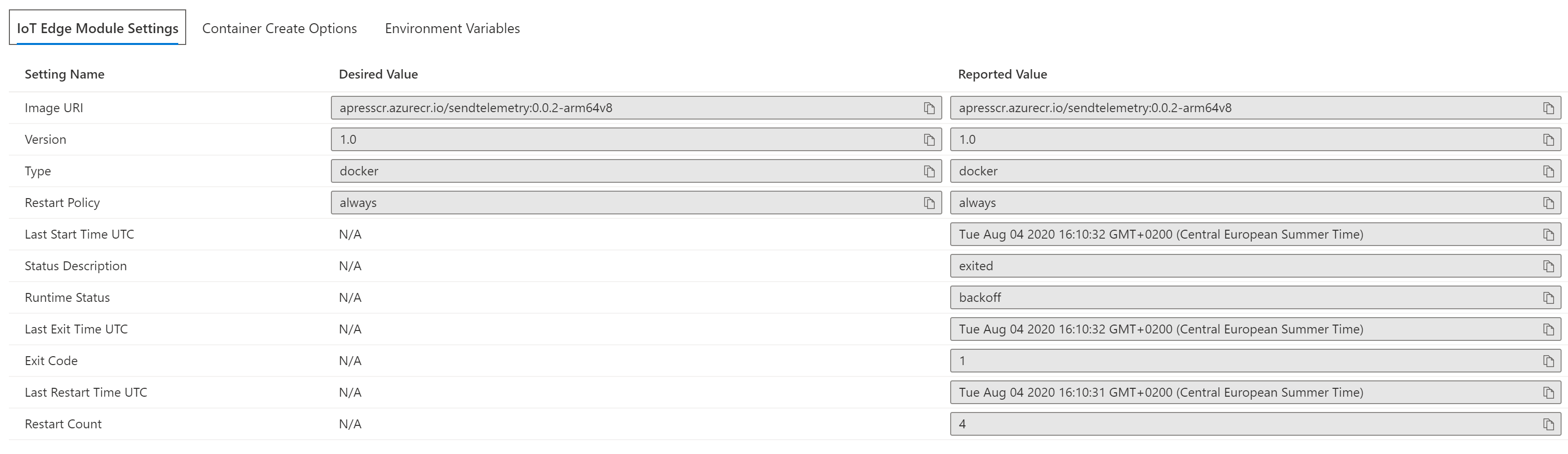
I also tried restarting the services.

Expected Behavior
The module should be running as other modules are
Current Behavior
Only one module "SendTelemetry" is in Backoff state.
Device Information
- Host OS: Raspberry OS
- Architecture: Arm64v8
- Container OS: Linux containers
Runtime Versions
- iotedged: iotedge 1.0.9.4
- Edge Agent [image tag (e.g. 1.0.0)]:
- Edge Hub [image tag (e.g. 1.0.0)]:
- Docker/Moby [run
docker version]:

 SibeeshVenu
All 21 comments
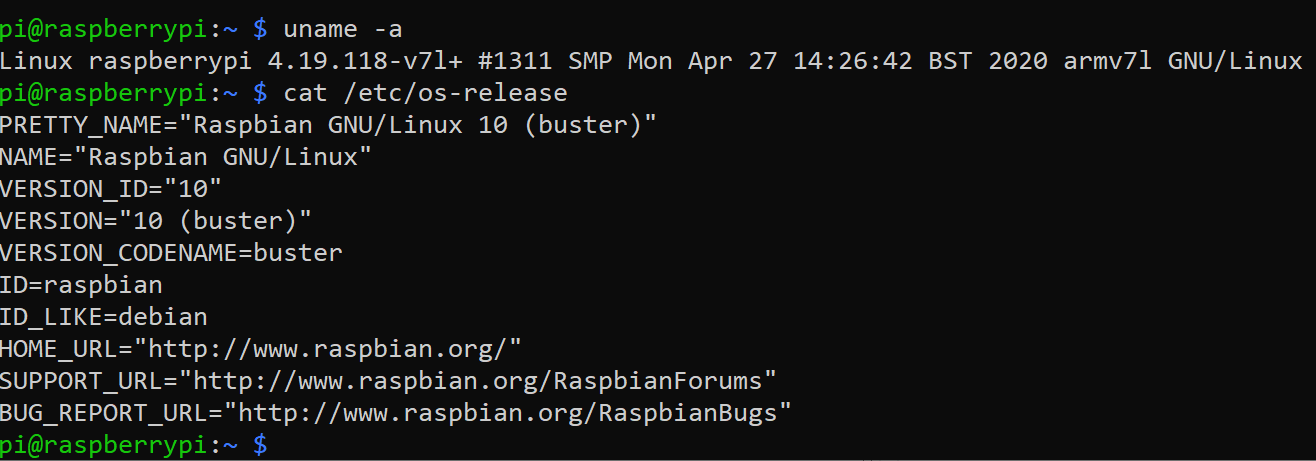
@SibeeshVenu Could you please confirm if your raspberry pi 4 has the following outputs. I think You are using Linux Distro.
uname -a
cat /etc/os-release
Is the OS version Raspbian 10 buster?

 SatishBoddu-MSFT
on 4 Aug 2020
SatishBoddu-MSFT
on 4 Aug 2020
@SibeeshVenu Please also confirm if you are running the Docker for Linux on your Dev machine.
And also please confirm what is your Dev Machine Architecture?
SatishBoddu-MSFT
on 4 Aug 2020
Please see the outputs of those commands.
I am running Docker for Linux.
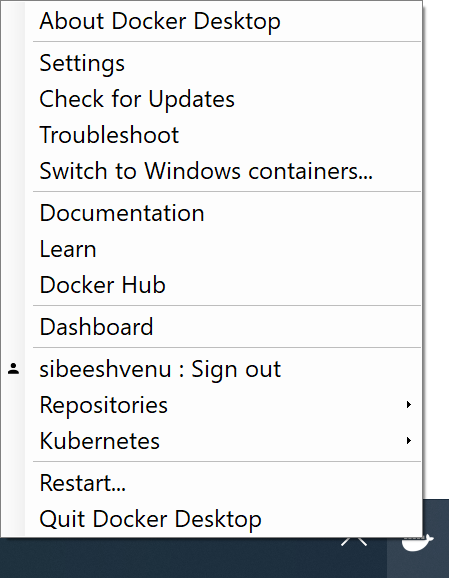
Dev Machine Architecture

SibeeshVenu
on 4 Aug 2020
@SibeeshVenu Are you able to debug your module on your Dev Machine before deploying?
SatishBoddu-MSFT
on 4 Aug 2020
@SatishBoddu-MSFT I have not checked that. Do you mind saying how can I do that, as my Edge device is running on Raspberry Pi?
SibeeshVenu
on 4 Aug 2020
Ok, So before we deploy our module, we make sure it is working properly, for this we have tools provided by Microsoft that need to be installed on VS2019 or VS Code.
Please follow this document, I always make use of this,
Use Visual Studio 2019 to develop and debug modules for Azure IoT Edge
Use Visual Studio Code to develop and debug modules for Azure IoT Edge
Below is my sample VS2019 IDE snap, where I have the SendTelemetry module, always do debug before deploying it on my Raspberry Pi 3.

SatishBoddu-MSFT
on 4 Aug 2020
Sure, I will debug locally. As I was following the doc, and as I didn't do anything extra from my end, I thought to deploy it without debugging.
SibeeshVenu
on 4 Aug 2020
@SibeeshVenu - Please follow the bug template and attach all logs for us to diagnose.
The tooling team generally supports the VS Code tooling on their gitter. As a first step, I would check the ACR credentials provided in your deployment template in VS Code - they are usually located in the .env file in your Edge solution.
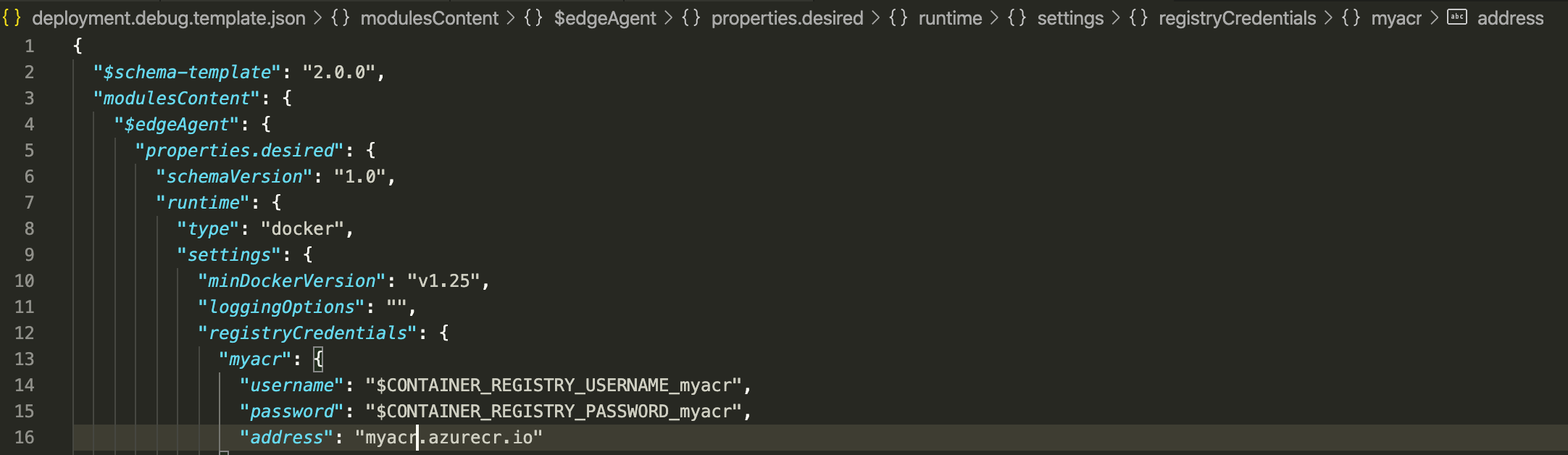

This should match the docker credentials in your portal, when you hit the Set Modules button on your Edge device page.
 massand
on 5 Aug 2020
massand
on 5 Aug 2020
@massand has a very good suggestion, but I'm fairly certain this is your problem:
Raspbian Buster is a 32 bit OS to maintain backward compatibility with other Raspberry Pi devices. If you are creating a container for a 64 bit architecture, this will not work. The docker logs for the container will say something like, "Exec format error." That error is what I received when I attempted to run an arm64 docker container on my pi3 with Raspbian OS.
You would either need to target the container for a 32-bit architecture, or change the Raspberry Pi's OS to a 64 bit OS.
 darobs
on 5 Aug 2020
darobs
on 5 Aug 2020
Closing the issue.
darobs
on 5 Aug 2020
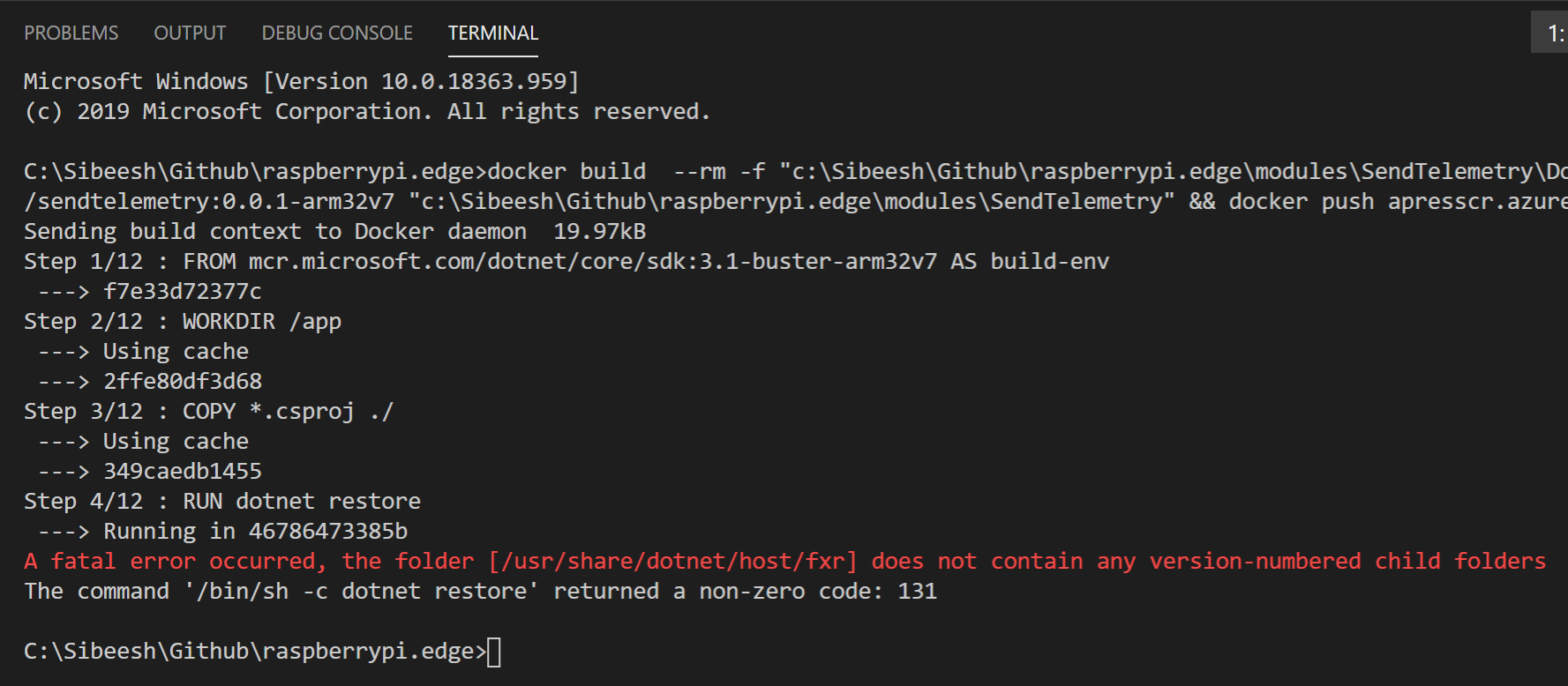
@SatishBoddu-MSFT Thanks for the info related to the debugging. @massand Thanks, I already verified that I am using correct credentials. @darobs Thanks for your hint, yes you are right. But now I have targeted to arm32v7 and I am getting the error "A fatal error occurred, the folder [/usr/share/dotnet/host/fxr] does not contain any version-numbered child folders". Any idea why?
SibeeshVenu
on 5 Aug 2020
I am trying to build arm32 image in my 64 bit Windows Dev Machine, I guess that is the reason why I am getting this issue. Now I have 3 options.
Install the
64 bit versionofRaspberry OSfrom hereSet up a
32 bitvirtual machine and use it as adev machineand build32 bit imagesI already have a
WSLrunning, maybe running the Visual Studio code solution there?
Could you please tell me what would be the better way?
SibeeshVenu
on 5 Aug 2020
Hi @SibeeshVenu,
Can you tell me more about how you are creating the container? Which tooling are you using? I'm a much more a "do it yourself" person, so there's the way I might do it vs. a normal person.
If you have a dev machine that is not the target architecture, you may want to consider using a build image to create the dotnet executables. This looks approximately like what the Dockerfile is doing -- I see dotnet core has guidance on building Arm images.
Found that via this issue, which might help. https://github.com/dotnet/dotnet-docker/issues/1537
darobs
on 6 Aug 2020
@darobs Thanks for your response. As there is no official document where it uses IoT Edge with Raspberry Pi 4 and Raspberry OS, many users may be facing this issue. So, in that case, this thread will be helpful for them in the future, if we share the workarounds here.
To answer your question, I am following this doc.
Dev Machine: Windows 10 64 bit
Dev Tool: Visual Studio Code with Azure IoT Tools
Docker Version: Docker version 19.03.12, build 48a66213fe
Container: Linux Container
This doc says that You can build ARM32 and ARM64 images on x64 machines, but you will not be able to run them, basically that is what I am also doing, I am building ARM32 images on my 64 bit Windows OS, and push that same to my Azure Container Registry.
Below is my Dockerfile.
FROM mcr.microsoft.com/dotnet/core/sdk:3.1-buster-arm32v7 AS build-env
WORKDIR /app

COPY *.csproj ./
RUN dotnet restore

COPY . ./
RUN dotnet publish -c Release -o out

FROM mcr.microsoft.com/dotnet/core/runtime:3.1-buster-slim-arm32v7
WORKDIR /app
COPY --from=build-env /app/out ./

RUN useradd -ms /bin/bash moduleuser
USER moduleuser

ENTRYPOINT ["dotnet", "SendTelemetry.dll"]
Suggested change (on 1st line):
FROM mcr.microsoft.com/dotnet/core/sdk:3.1-buster AS build-env
WORKDIR /app

COPY *.csproj ./
RUN dotnet restore

COPY . ./
RUN dotnet publish -c Release -o out

FROM mcr.microsoft.com/dotnet/core/runtime:3.1-buster-slim-arm32v7
WORKDIR /app
COPY --from=build-env /app/out ./

RUN useradd -ms /bin/bash moduleuser
USER moduleuser

ENTRYPOINT ["dotnet", "SendTelemetry.dll"]
The "build-env" image should be the same architecture as the host OS, the final image should be the target OS architecture.
darobs
on 6 Aug 2020
@darobs Thanks a lot. Now the image is getting built. But after pushing to my Raspberry Pi 4, my module still is in Backoff state. I also tried to run it in the simulator, But getting the error "SendTelemetry | A fatal error occurred, the folder [/usr/share/dotnet/host/fxr] does not contain any version-numbered child folders
SendTelemetry exited with code 131".

SibeeshVenu
on 6 Aug 2020
This is attempting to run on the pi?
If it's running on the pi, is the new container the same name and tag as the old one? Docker often won't pull a new container image unless you force it.
darobs
on 7 Aug 2020
@darobs Yes, I am running it on the Pi. I even restarted the services docker and iotedge in my Pi. I am assuming that at least after the restart it will fetch the new images. And moreover, the problem exists on the Simulator too. I am out of ideas now, so any help is really appreciated. Thanks.
SibeeshVenu
on 7 Aug 2020
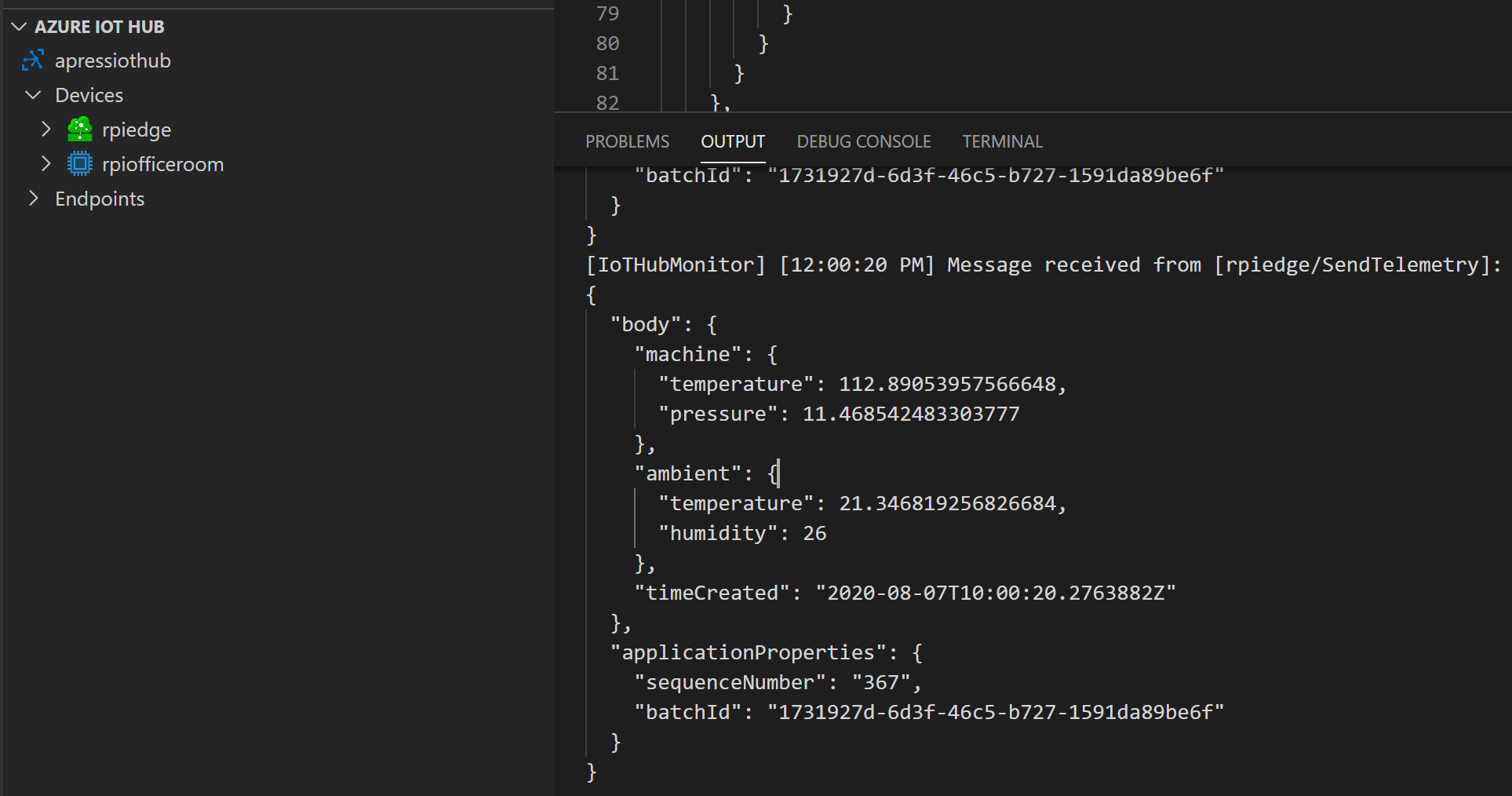
@darobs Finally, it worked, What I did is that I changed the version in the module.json file so that the new image with new tag will be added to the Container Registry, and then I used Create Deployment for Single Device option after right-clicking on the device name in Visual Studio Code. And then when I monitor the device (Start Monitoring Built-in Event Endpoint option), I am getting this output.
SibeeshVenu
on 7 Aug 2020
Thank you @darobs @veyalla @massand @SatishBoddu-MSFT It was good learning. Closing this issue.
SibeeshVenu
on 7 Aug 2020
I just posted the detailed answer to this issue on StackOverflow, feel free to check that.
SibeeshVenu
on 7 Aug 2020
Related issues
 ejectbutton
·
4Comments
ejectbutton
·
4Comments
 asergaz
·
4Comments
asergaz
·
4Comments
 HenrikBach1
·
4Comments
HenrikBach1
·
4Comments
 mill5james
·
3Comments
mill5james
·
3Comments
 rajatkumarsarma
·
4Comments
rajatkumarsarma
·
4Comments
Most helpful comment
I just posted the detailed answer to this issue on StackOverflow, feel free to check that.