Iotedge: Automatic provisioning with DPS using X.509 not working using iotedge v1.0.9.3
Expected Behavior
Device is automatically provisioned.
Current Behavior
iotedge fails to start (iotedge.service: Failed with result 'exit-code'.)
Steps to Reproduce
I have tried to follow https://docs.microsoft.com/en-us/azure/iot-edge/how-to-auto-provision-x509-certs to do a Group Enrollment using an Intermediate Certificate . I've use certGen.sh to create the certs (after having slightly modified some variables to have the data and expiry I'm looking for). Details below.
Context (Environment)
Output of iotedge check
sudo iotedge check --iothub-hostname my-iot-hub.azure-devices.net --verbose
user@my-device:~ $ sudo iotedge check --iothub-hostname my-iot-hub.azure-devices.net --verbose
Configuration checks
--------------------
√ config.yaml is well-formed - OK
√ config.yaml has well-formed connection string - OK
√ container engine is installed and functional - OK
√ config.yaml has correct hostname - OK
× config.yaml has correct URIs for daemon mgmt endpoint - Error
    Error: could not execute list-modules request: an error occurred trying to connect: Connection refused (os error 111)
        caused by: docker returned exit code: 1, stderr = Error: could not execute list-modules request: an error occurred trying to connect: Connection refused (os error 111)
‼ latest security daemon - Warning
    Installed IoT Edge daemon has version 1.0.9.3 but 1.0.9.4 is the latest stable version available.
    Please see https://aka.ms/iotedge-update-runtime for update instructions.
√ host time is close to real time - OK
√ container time is close to host time - OK
√ DNS server - OK
√ production readiness: identity certificates expiry - OK
√ production readiness: certificates - OK
√ production readiness: container engine - OK
‼ production readiness: logs policy - Warning
    Container engine is not configured to rotate module logs which may cause it run out of disk space.
    Please see https://aka.ms/iotedge-prod-checklist-logs for best practices.
    You can ignore this warning if you are setting log policy per module in the Edge deployment.
× production readiness: Edge Agent's storage directory is persisted on the host filesystem - Error
    Could not check current state of edgeAgent container
        caused by: docker returned exit code: 1, stderr = Error: No such object: edgeAgent
× production readiness: Edge Hub's storage directory is persisted on the host filesystem - Error
    Could not check current state of edgeHub container
        caused by: docker returned exit code: 1, stderr = Error: No such object: edgeHub

Connectivity checks
-------------------
√ host can connect to and perform TLS handshake with DPS endpoint - OK
√ host can connect to and perform TLS handshake with IoT Hub AMQP port - OK
√ host can connect to and perform TLS handshake with IoT Hub HTTPS / WebSockets port - OK
√ host can connect to and perform TLS handshake with IoT Hub MQTT port - OK
√ container on the default network can connect to IoT Hub AMQP port - OK
√ container on the default network can connect to IoT Hub HTTPS / WebSockets port - OK
√ container on the default network can connect to IoT Hub MQTT port - OK
× container on the IoT Edge module network can connect to IoT Hub AMQP port - Error
    Container on the azure-iot-edge network could not connect to my-iot-hub.azure-devices.net:5671
        caused by: docker returned exit code: 125, stderr = docker: Error response from daemon: network azure-iot-edge not found.
× container on the IoT Edge module network can connect to IoT Hub HTTPS / WebSockets port - Error
    Container on the azure-iot-edge network could not connect to my-iot-hub.azure-devices.net:443
        caused by: docker returned exit code: 125, stderr = docker: Error response from daemon: network azure-iot-edge not found.
× container on the IoT Edge module network can connect to IoT Hub MQTT port - Error
    Container on the azure-iot-edge network could not connect to my-iot-hub.azure-devices.net:8883
        caused by: docker returned exit code: 125, stderr = docker: Error response from daemon: network azure-iot-edge not found.

17 check(s) succeeded.
2 check(s) raised warnings.
6 check(s) raised errors.
Device Information
- Host OS: Raspian Buster
- Architecture: arm64
- Container OS: Linux containers
Runtime Versions
- iotedged [run
iotedge version]: iotedge 1.0.9.3 - Edge Agent [image tag (e.g. 1.0.0)]:
- Edge Hub [image tag (e.g. 1.0.0)]:
- Docker/Moby [run
docker version]: 3.0.13+azure
Logs
Attempting to use a chain cert and device key...
provisioning:
  source: "dps"
  global_endpoint: "https://global.azure-devices-provisioning.net"
  scope_id: "[redacted id]"
  attestation:
    method: "x509"
#     registration_id: "<OPTIONAL REGISTRATION ID. LEAVE COMMENTED OUT TO REGISTER WITH CN OF identity_cert>"
    identity_cert: "file:///home/pi/my-cert.chain.ca.cert.pem" # contains intermediate and device certs (in that order)
    identity_pk:   "file:///home/pi/new-edge-device.key.pem"
...results in...
user@my-device:~ $ journalctl -u iotedge
Jul 21 19:02:43 my-device systemd[1]: Started Azure IoT Edge daemon.
Jul 21 19:02:43 my-device iotedged[886]: 2020-07-21T18:02:43Z [INFO] - Starting Azure IoT Edge Security Daemon
Jul 21 19:02:43 my-device iotedged[886]: 2020-07-21T18:02:43Z [INFO] - Version - 1.0.9.3
Jul 21 19:02:43 my-device iotedged[886]: 2020-07-21T18:02:43Z [INFO] - Using config file: /etc/iotedge/config.yaml
Jul 21 19:02:43 my-device iotedged[886]: 2020-07-21T18:02:43Z [INFO] - Configuring /var/lib/iotedge as the home directory.
Jul 21 19:02:43 my-device iotedged[886]: 2020-07-21T18:02:43Z [INFO] - Configuring certificates...
Jul 21 19:02:43 my-device iotedged[886]: 2020-07-21T18:02:43Z [INFO] - Transparent gateway certificates not found, operating in quick start mode...
Jul 21 19:02:43 my-device iotedged[886]: 2020-07-21T18:02:43Z [INFO] - Finished configuring provisioning environment variables and certificates.
Jul 21 19:02:43 my-device iotedged[886]: 2020-07-21T18:02:43Z [INFO] - Initializing hsm...
Jul 21 19:02:43 my-device iotedged[886]: 2020-07-21T18:02:43Z [INFO] - Finished initializing hsm.
Jul 21 19:02:43 my-device iotedged[886]: 2020-07-21T18:02:43Z [INFO] - Initializing hsm X509 interface...
Jul 21 19:02:43 my-device iotedged[886]: 2020-07-21T18:02:43Z [ERR!] - The daemon could not start up successfully: Could not initialize HTTP client
Jul 21 19:02:43 my-device iotedged[886]: 2020-07-21T18:02:43Z [ERR!] -         caused by: Could not initialize
Jul 21 19:02:43 my-device iotedged[886]: 2020-07-21T18:02:43Z [ERR!] -         caused by: An error occurred obtaining the client identity certificate
Jul 21 19:02:43 my-device iotedged[886]: 2020-07-21T18:02:43Z [ERR!] -         caused by: error:0B080074:x509 certificate routines:X509_check_private_key:key values mismatch:../crypto/x509/x509_cmp.c:294:
Jul 21 19:02:43 my-device systemd[1]: iotedge.service: Main process exited, code=exited, status=1/FAILURE
Jul 21 19:02:43 my-device systemd[1]: iotedge.service: Failed with result 'exit-code'.
Attempting to use device cert and key...
provisioning:
  source: "dps"
  global_endpoint: "https://global.azure-devices-provisioning.net"
  scope_id: "[redacted id]"
  attestation:
    method: "x509"
#     registration_id: "<OPTIONAL REGISTRATION ID. LEAVE COMMENTED OUT TO REGISTER WITH CN OF identity_cert>"
    identity_cert: "file:///home/pi/new-edge-device.cert.pem"
    identity_pk:   "file:///home/pi/new-edge-device.key.pem"
...results in...
Jul 21 19:13:31 my-device systemd[1]: Started Azure IoT Edge daemon.
Jul 21 19:13:31 my-device iotedged[927]: 2020-07-21T18:13:31Z [INFO] - Starting Azure IoT Edge Security Daemon
Jul 21 19:13:31 my-device iotedged[927]: 2020-07-21T18:13:31Z [INFO] - Version - 1.0.9.3
Jul 21 19:13:31 my-device iotedged[927]: 2020-07-21T18:13:31Z [INFO] - Using config file: /etc/iotedge/config.yaml
Jul 21 19:13:31 my-device iotedged[927]: 2020-07-21T18:13:31Z [INFO] - Configuring /var/lib/iotedge as the home directory.
Jul 21 19:13:31 my-device iotedged[927]: 2020-07-21T18:13:31Z [INFO] - Configuring certificates...
Jul 21 19:13:31 my-device iotedged[927]: 2020-07-21T18:13:31Z [INFO] - Transparent gateway certificates not found, operating in quick start mode...
Jul 21 19:13:31 my-device iotedged[927]: 2020-07-21T18:13:31Z [INFO] - Finished configuring provisioning environment variables and certificates.
Jul 21 19:13:31 my-device iotedged[927]: 2020-07-21T18:13:31Z [INFO] - Initializing hsm...
Jul 21 19:13:31 my-device iotedged[927]: 2020-07-21T18:13:31Z [INFO] - Finished initializing hsm.
Jul 21 19:13:31 my-device iotedged[927]: 2020-07-21T18:13:31Z [INFO] - Initializing hsm X509 interface...
Jul 21 19:13:31 my-device iotedged[927]: 2020-07-21T18:13:31Z [INFO] - Finished initializing hsm X509 interface...
Jul 21 19:13:31 my-device iotedged[927]: 2020-07-21T18:13:31Z [INFO] - Provisioning edge device...
Jul 21 19:13:31 my-device iotedged[927]: 2020-07-21T18:13:31Z [INFO] - Starting provisioning edge device via X509 provisioning...
Jul 21 19:13:31 my-device iotedged[927]: 2020-07-21T18:13:31Z [INFO] - Starting DPS registration with scope_id "[redacted id]]", registration_id "[redacted-uuid].ca"
Jul 21 19:13:31 my-device iotedged[927]: 2020-07-21T18:13:31Z [WARN] - Could not provision device
Jul 21 19:13:31 my-device iotedged[927]: 2020-07-21T18:13:31Z [WARN] -         caused by: X509 certificate based registration failed
Jul 21 19:13:31 my-device iotedged[927]: 2020-07-21T18:13:31Z [WARN] -         caused by: HTTP request failed: [401 Unauthorized] {"errorCode":401002,"trackingId":"0e32a5e7-5214-4ef8-bf68-7620bcee1d5b","message":"Unauthorized","timestampUtc":"2020-07-21T18:13:31.7129299Z"}
Jul 21 19:13:31 my-device iotedged[927]: 2020-07-21T18:13:31Z [ERR!] - The daemon could not start up successfully: Could not initialize DPS provisioning client
Jul 21 19:13:31 my-device iotedged[927]: 2020-07-21T18:13:31Z [ERR!] -         caused by: Could not restore previous provisioning result
Jul 21 19:13:31 my-device iotedged[927]: 2020-07-21T18:13:31Z [ERR!] -         caused by: No such file or directory (os error 2)
Jul 21 19:13:31 my-device systemd[1]: iotedge.service: Main process exited, code=exited, status=1/FAILURE
Jul 21 19:13:31 my-device systemd[1]: iotedge.service: Failed with result 'exit-code'.
Additional Information
I have also tried to have the DPS set to use a "CA Certificate" Certificate Type, using a verified root cert as a primary cert.
I also tried adding the root cert into the my-cert.chain.ca.cert.pem.
 kpm-at-hfi
All 19 comments
I have also tried the permissions fix noted in #3220 but saw no difference
kpm-at-hfi
on 21 Jul 2020
Just went through the process again, following Create demo certificates to test IoT Edge device features as exactly as I could with a fresh clone and no modifications.
Still failing.
Here's the config.yaml:
provisioning:
  source: "dps"
  global_endpoint: "https://global.azure-devices-provisioning.net"
  scope_id: "[redacted]"
  attestation:
    method: "x509"
    identity_cert: "file:///home/pi/iot-edge-device-stanCA-full-chain.cert.pem"
    identity_pk:   "file:///home/pi/iot-edge-device-stanCA.key.pem"
Here's journalctl -u iotedge --no-pager --no-full:
Jul 22 00:45:53 my-device systemd[1]: Started Azure IoT Edge daemon.
Jul 22 00:45:53 my-device iotedged[960]: 2020-07-21T23:45:53Z [INFO] - Starting Azure IoT Edge Security Daemon
Jul 22 00:45:53 my-device iotedged[960]: 2020-07-21T23:45:53Z [INFO] - Version - 1.0.9.3
Jul 22 00:45:53 my-device iotedged[960]: 2020-07-21T23:45:53Z [INFO] - Using config file: /etc/iotedge/config.yaml
Jul 22 00:45:53 my-device iotedged[960]: 2020-07-21T23:45:53Z [INFO] - Configuring /var/lib/iotedge as the home directory.
Jul 22 00:45:53 my-device iotedged[960]: 2020-07-21T23:45:53Z [INFO] - Configuring certificates...
Jul 22 00:45:53 my-device iotedged[960]: 2020-07-21T23:45:53Z [INFO] - Transparent gateway certificates not found, operating in quick start mode...
Jul 22 00:45:53 my-device iotedged[960]: 2020-07-21T23:45:53Z [INFO] - Finished configuring provisioning environment variables and certificates.
Jul 22 00:45:53 my-device iotedged[960]: 2020-07-21T23:45:53Z [INFO] - Initializing hsm...
Jul 22 00:45:53 my-device iotedged[960]: 2020-07-21T23:45:53Z [INFO] - Finished initializing hsm.
Jul 22 00:45:53 my-device iotedged[960]: 2020-07-21T23:45:53Z [INFO] - Initializing hsm X509 interface...
Jul 22 00:45:53 my-device iotedged[960]: 2020-07-21T23:45:53Z [INFO] - Finished initializing hsm X509 interface...
Jul 22 00:45:53 my-device iotedged[960]: 2020-07-21T23:45:53Z [INFO] - Provisioning edge device...
Jul 22 00:45:53 my-device iotedged[960]: 2020-07-21T23:45:53Z [INFO] - Starting provisioning edge device via X509 provisioning...
Jul 22 00:45:53 my-device iotedged[960]: 2020-07-21T23:45:53Z [INFO] - Starting DPS registration with scope_id "[redacted]]", registration_id "stanCA.ca"
Jul 22 00:45:54 my-device iotedged[960]: 2020-07-21T23:45:54Z [WARN] - Could not provision device
Jul 22 00:45:54 my-device iotedged[960]: 2020-07-21T23:45:54Z [WARN] -         caused by: X509 certificate based registration failed
Jul 22 00:45:54 my-device iotedged[960]: 2020-07-21T23:45:54Z [WARN] -         caused by: HTTP request failed: [401 Unauthorized] {"errorCode":401002,"trackingId":"ffb081fa-c…5:54.0556505Z"}
Jul 22 00:45:54 my-device iotedged[960]: 2020-07-21T23:45:54Z [ERR!] - The daemon could not start up successfully: Could not initialize DPS provisioning client
Jul 22 00:45:54 my-device iotedged[960]: 2020-07-21T23:45:54Z [ERR!] -         caused by: Could not restore previous provisioning result
Jul 22 00:45:54 my-device iotedged[960]: 2020-07-21T23:45:54Z [ERR!] -         caused by: No such file or directory (os error 2)
Jul 22 00:45:54 my-device systemd[1]: iotedge.service: Main process exited, code=exited, status=1/FAILURE
Jul 22 00:45:54 my-device systemd[1]: iotedge.service: Failed with result 'exit-code'.
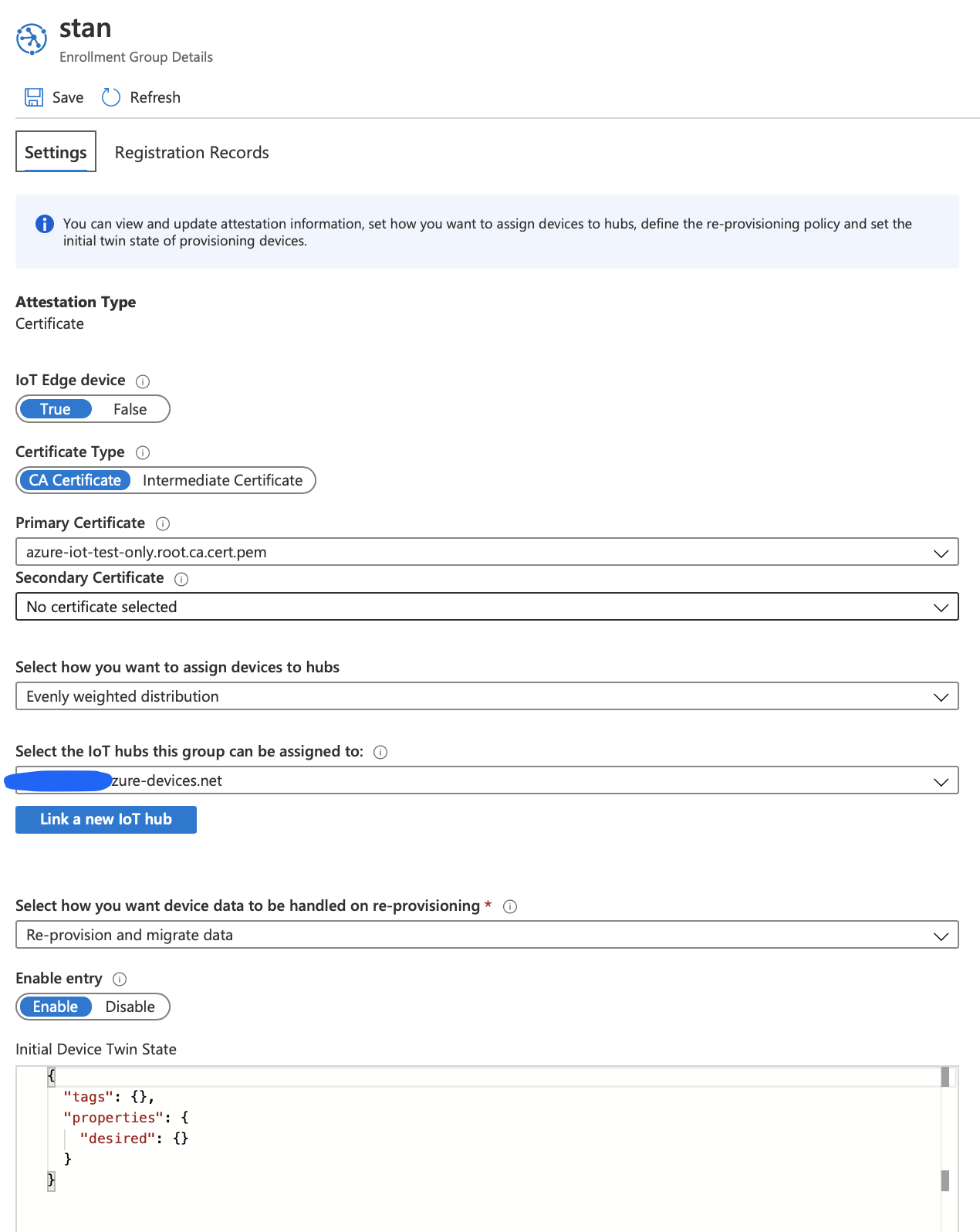
And here's what the enrollment group looks like (it's using a verified root CA):
Also, I chowned the .pem files to iotedge:iotedge in case there was some kind of permission issue.
8 -rw-r--r-- 1 iotedge iotedge 5879 Jul 22 00:31 iot-edge-device-stanCA-full-chain.cert.pem
4 -r--r--r-- 1 iotedge iotedge 3243 Jul 22 00:32 iot-edge-device-stanCA.key.pem
Also, I've been trying to tidy up before each reboot:
sudo rm /var/lib/iotedge/hsm/certs/*
sudo rm /var/lib/iotedge/hsm/cert_keys/*
Question: Is the device's hostname required to be identical to what's used as <name> in the following?
./certGen.sh create_edge_device_identity_certificate "<name>"
On the device I am trying, they are not the same.
kpm-at-hfi
on 22 Jul 2020
No it is not required to be the same. I am going to try out this scenario myself and will let you know when I find some useful information.
 and-rewsmith
on 22 Jul 2020
and-rewsmith
on 22 Jul 2020
Thanks, Andrew. I appreciate the help.
kpm-at-hfi
on 22 Jul 2020
You should be using these certs for the identity and key:
file:///<path>/identity_certificate_chain.pem
file:///<path>/identity_key.pem
This means the error under _"Attempting to use a chain cert and device key..."_ is what I will focus on. The error from this section means that you have a certificate misconfiguration issue:
Jul 21 19:02:43 my-device iotedged[886]: 2020-07-21T18:02:43Z [INFO] - Initializing hsm X509 interface...
Jul 21 19:02:43 my-device iotedged[886]: 2020-07-21T18:02:43Z [ERR!] - The daemon could not start up successfully: Could not initialize HTTP client
Jul 21 19:02:43 my-device iotedged[886]: 2020-07-21T18:02:43Z [ERR!] -         caused by: Could not initialize
Jul 21 19:02:43 my-device iotedged[886]: 2020-07-21T18:02:43Z [ERR!] -         caused by: An error occurred obtaining the client identity certificate
Jul 21 19:02:43 my-device iotedged[886]: 2020-07-21T18:02:43Z [ERR!] -         caused by: error:0B080074:x509 certificate routines:X509_check_private_key:key values mismatch:../crypto/x509/x509_cmp.c:294:
I am now curious as to why your certs under _"Attempting to use a chain cert and device key..."_ have mismatching names. Did you rename them:
identity_cert: "file:///home/pi/my-cert.chain.ca.cert.pem" # contains intermediate and device certs (in that order)
identity_pk:   "file:///home/pi/new-edge-device.key.pem"
In terms of what I would expect, when I generate root and edge device certs from the certGen.sh tool I get the following files in my certs/ and private/ output folder (notice the consistent naming):
```
Files under certs/:
azure-iot-test-only.intermediate.cert.pem
azure-iot-test-only.intermediate.cert.pfx
azure-iot-test-only.intermediate-full-chain.cert.pem
azure-iot-test-only.root.ca.cert.pem
iot-edge-device-MyEdgeDeviceCA.cert.pem
iot-edge-device-MyEdgeDeviceCA.cert.pfx
iot-edge-device-MyEdgeDeviceCA-full-chain.cert.pem
Files under private/
iot-edge-device-MyEdgeDeviceCA.key.pem
````
and-rewsmith
on 22 Jul 2020
Yeah, I did begin to suspect that I might have chosen the wrong keys or generated them poorly, so that's why I reworked the whole setup "by the book" this evening (above a few comments ago)... sadly I still wasn't getting joy.
Basically, the HTTP request failed: [401 Unauthorized] {"errorCode":401002... error in there is what I was seeing most. I suspect the other errors are self inflicted from various thrashing.
kpm-at-hfi
on 22 Jul 2020
Is there ay other info I could provide or anything I can try?
I _think_ I removed a lot of the user error noise when I ran through the demo process last night in https://github.com/Azure/iotedge/issues/3260#issuecomment-662165738
kpm-at-hfi
on 22 Jul 2020
Oh I misread your most recent attempt and thought you weren't using the chain there. I agree that your most recent attempt looks better. Can you double check the path to your certificates? Right now I am thinking that this error (no such file or dir) means that your certs are not in the location specified in the config.yaml:
Jul 22 00:45:54 my-device iotedged[960]: 2020-07-21T23:45:54Z [WARN] - Could not provision device
Jul 22 00:45:54 my-device iotedged[960]: 2020-07-21T23:45:54Z [WARN] -         caused by: X509 certificate based registration failed
Jul 22 00:45:54 my-device iotedged[960]: 2020-07-21T23:45:54Z [WARN] -         caused by: HTTP request failed: [401 Unauthorized] {"errorCode":401002,"trackingId":"ffb081fa-c…5:54.0556505Z"}
Jul 22 00:45:54 my-device iotedged[960]: 2020-07-21T23:45:54Z [ERR!] - The daemon could not start up successfully: Could not initialize DPS provisioning client
Jul 22 00:45:54 my-device iotedged[960]: 2020-07-21T23:45:54Z [ERR!] -         caused by: Could not restore previous provisioning result
Jul 22 00:45:54 my-device iotedged[960]: 2020-07-21T23:45:54Z [ERR!] -         caused by: No such file or directory (os error 2)
They _seem_ to be where they're expected. Here's the references in the config.yaml:
    identity_cert: "file:///home/pi/iot-edge-device-stanCA-full-chain.cert.pem"
    identity_pk:   "file:///home/pi/iot-edge-device-stanCA.key.pem"
And here's me being able to access them (they opened as expected in nano):
pi@my-device:~ $ sudo nano /etc/iotedge/config.yaml
pi@my-device:~ $ nano /home/pi/iot-edge-device-stanCA-full-chain.cert.pem
pi@my-device:~ $ nano /home/pi/iot-edge-device-stanCA.key.pem
pi@my-device:~ $ pwd
/home/pi
pi@my-device:~ $ ls -ltras
...
 8 -rwxrwxrwx 1 iotedge iotedge 5879 Jul 22 00:31 iot-edge-device-stanCA-full-chain.cert.pem
 4 -rwxrwxrwx 1 iotedge iotedge 3243 Jul 22 00:32 iot-edge-device-stanCA.key.pem
You can also see that I _tried_ to make the files widely readable (777 and iotedge:iotedge).
kpm-at-hfi
on 22 Jul 2020
I was able to reproduce your problem from my end following the tutorial. I have been talking to others on the team to get more context.
It is still possible this is a configuration issue on both our ends. Our DPS tests currently pass, so I'm trying to figure out what the difference is in the tutorial steps. Also this issue was opened, for which they were also using dps with group enrollment. He was at least able to get an edge device identity from dps so I doubt our problem is a Hub/DPS service issue.
and-rewsmith
on 22 Jul 2020
If there's anything I can do to help (provide more information, try things), I'm eager to.
kpm-at-hfi
on 23 Jul 2020
I was able to look into logs from iothub for my repro. It seems we both fell into the same trap and were not using _identity_ certificates. We were using the IoT Edge device CA. See docs here for how to generate the identity certs:
https://docs.microsoft.com/en-us/azure/iot-edge/how-to-create-test-certificates#create-iot-edge-device-identity-certificates
Be careful not to confuse with the instructions directly below regarding device CA certs:
https://docs.microsoft.com/en-us/azure/iot-edge/how-to-create-test-certificates#create-iot-edge-device-ca-certificates
Let me know if this fixes your issue.
and-rewsmith
on 24 Jul 2020
Thanks @and-rewsmith... I'll try that out. Did you mean both URLs to be identical?
kpm-at-hfi
on 24 Jul 2020
Oops. I have updated.
and-rewsmith
on 24 Jul 2020
Yep, that did it. Thank you for the help! I hate to think how long it would have taken me to spot that.
kpm-at-hfi
on 24 Jul 2020
Hi,
I have the same error as mentioned above with the not Unauthorized. I was testing with my own certificates an first everything was working and then wanted to test again with an other certificate but got the error. Now I also tried again with the certificates from the Test script and still the same error (I checked and really used the Identity certificate and not the Device CA certificates).
10/08/2020 17:35:26 info: iotedged::windows -- Initializing iotedged service.
10/08/2020 17:35:26 info: iotedged::app -- Version - 1.0.9.3 (ad04e23b1865211913282b918263700deafdccfa)
10/08/2020 17:35:26 info: iotedged::app -- Starting Azure IoT Edge Security Daemon
10/08/2020 17:35:26 info: iotedged::app -- Using config file: C:\ProgramData\iotedge\config.yaml
10/08/2020 17:35:26 info: iotedged::windows -- Starting iotedged service.
10/08/2020 17:35:26 info: iotedged -- Configuring certificates...
10/08/2020 17:35:26 info: iotedged -- Configuring C:\ProgramData\iotedge as the home directory.
10/08/2020 17:35:26 info: iotedged -- Initializing hsm...
10/08/2020 17:35:26 info: iotedged -- Finished configuring provisioning environment variables and certificates.
10/08/2020 17:35:26 info: iotedged -- Transparent gateway certificates not found, operating in quick start mode...
10/08/2020 17:35:26 info: iotedged -- Initializing hsm X509 interface...
10/08/2020 17:35:26 info: iotedged -- Finished initializing hsm.
10/08/2020 17:35:26 info: iotedged -- Starting provisioning edge device via X509 provisioning...
10/08/2020 17:35:26 info: dps::registration -- Starting DPS registration with scope_id "[Scope_ID]", registration_id "Test_device"
10/08/2020 17:35:26 info: iotedged -- Finished initializing hsm X509 interface...
10/08/2020 17:35:26 info: iotedged -- Provisioning edge device...
10/08/2020 17:35:26 warn: edgelet_utils::logging -- Could not provision device
10/08/2020 17:35:26 warn: edgelet_utils::logging --     caused by: HTTP request failed: [401 Unauthorized] {"errorCode":401002,"trackingId":"70a11531-8088-47a1-abb7-2d49e6192772","message":"Una
                    uthorized","timestampUtc":"2020-08-10T15:35:11.8055783Z"}
10/08/2020 17:35:26 warn: edgelet_utils::logging --     caused by: X509 certificate based registration failed
10/08/2020 17:35:26 error: edgelet_utils::logging --    caused by: Could not restore previous provisioning result
10/08/2020 17:35:26 error: edgelet_utils::logging --    caused by: The system cannot find the file specified. (os error 2)
10/08/2020 17:35:26 error: iotedged::windows -- Error while running service. Quitting.
10/08/2020 17:35:26 error: edgelet_utils::logging -- The daemon could not start up successfully: Could not initialize DPS provisioning client
Anybody any idea on the issue, really have tried almost everything.
 Sdelausnay
on 10 Aug 2020
Sdelausnay
on 10 Aug 2020
I have already reinstalled IoT Edge, tried with a new DPS, tried serveral certificates with different expiration times but all no luck.
Why can't I provision my device anymore? I have checked the Identity certificate and it is 100% an End-entity and not a CA.
Sdelausnay
on 11 Aug 2020
Related issues
 alaendle
·
5Comments
alaendle
·
5Comments
 mathiash98
·
4Comments
mathiash98
·
4Comments
 arabold
·
3Comments
arabold
·
3Comments
 HenrikBach1
·
4Comments
HenrikBach1
·
4Comments
 asergaz
·
4Comments
asergaz
·
4Comments