Iotedge: Unable to load the service index for source https://api.nuget.org/v3/index.json
Environment: Dev machine running supported version of Windows 10 IoT Enterprise, latest Docker CE switched to Windows containers, Visual Studio COde and IoT Edge plugin. IoT Edge is tested and running. There was known issue with DNS solved by adding fix DNS on OS level.
If we try to build custom C# module based using microsoft/dotnet:2.1-sdk base container we get this error
docker build --rm -f
"c:UsersstepanbDocumentsIoT Edge DomeEdgeSolution101modulesSampleModule101Dockerfile.windows-amd64" -t stepanb.azurecr.io/samplemodule101:0.0.1-amd64 "c:UsersstepanbDocumentsIoT Edge DomeEdgeSolution101modulesSampleModule101"
Sending build context to Docker daemon 17.41kB
Step 1/10 : FROM microsoft/dotnet:2.1-sdk AS build-env
2.1-sdk: Pulling from microsoft/dotnet
d0c6a1b3dba2: Pull complete
5da99380d93e: Pull complete
23add0d71b40: Pull complete
10c60d2f3305: Pull complete
467e8374427a: Pull complete
4df65c6b837f: Pull complete
eed65dfedd9a: Pull complete
Digest: sha256:3613ad07fc7c9abeb24fccef21de7b8a2d32efbd7299e4b91a5765bc48e3cda5
Status: Downloaded newer image for microsoft/dotnet:2.1-sdk
---> 3b323b0465ee
Step 2/10 : WORKDIR /app
---> Running in 3b098be2d38b
Removing intermediate container 3b098be2d38b
---> 9f6f6daf374f
Step 3/10 : COPY *.csproj ./
---> 9d9d8d3304dc
Step 4/10 : RUN dotnet restore
---> Running in 07145db12328
C:Program Filesdotnetsdk2.1.802NuGet.targets(123,5): error : Unable to load the service index for source https://api.nuget.org/v3/index.json. [C:appSampleModule101.csproj]
C:Program Filesdotnetsdk2.1.802NuGet.targets(123,5): error : No such host is known [C:appSampleModule101.csproj]
The command 'cmd /S /C dotnet restore' returned a non-zero code: 1
If we switch on same computer to Linux containers it works.
 bechynsky
All 30 comments
Hi @bechynsky, this seems like a docker with windows containers issue, and not related to IoT Edge as such. Did you try restarting the docker service? I read reports of that fixing it.
@adashen, @xinshiMSFT - any other pointers to help resolve this issue?
 varunpuranik
on 2 Dec 2019
varunpuranik
on 2 Dec 2019
Hi, I did all recommended steps to fix it. I have same issue on my dev laptop running Windows 10 Enterprise.
bechynsky
on 3 Dec 2019
Adding @shizn
 veyalla
on 3 Dec 2019
veyalla
on 3 Dec 2019
Thanks for looping me in. Please check this nuget issue https://github.com/NuGet/Home/issues/5358 to see if those workarounds work for you.
BTW, could you also share your version of Docker for Windows? is it 2.1.0.5?
 shizn
on 3 Dec 2019
shizn
on 3 Dec 2019
C:\Program Files\dotnet\sdk\2.1.802\NuGet.targets(123,5): error : No such host is known [C:\app\SampleModule101.csproj]
According to above logs, the ip address of api.nuget.org cannot be resolved in docker container.
Could you try command docker run microsoft/dotnet:2.1-sdk ping api.nuget.org to see whether the DNS resolution in docker container works well?
 blackchoey
on 4 Dec 2019
blackchoey
on 4 Dec 2019
Version of Docker is 2.1.0.1
Result of ping
docker run microsoft/dotnet:2.1-sdk ping api.nuget.org
Ping request could not find host api.nuget.org. Please check the name and try again.
After update to 2.1.0.5 is problem same.
bechynsky
on 6 Dec 2019
You mentioned some DNS issues fixed at the host level, you might be running into similar issues from within the container.
You can try the resolution from here.
You'll need to use the path C:\ProgramData\docker\config for daemon.json file (and restart docker service) since you're using Docker Desktop.
veyalla
on 7 Dec 2019
This is not working, I already tested it before I created issue here. I tried to setup DNS inside Docker container using this command
netsh interface ip set dns "Ethernet" static 8.8.8.8
Command completes with no effect to host find host. Interesting is that I can ping servers after running this.
bechynsky
on 8 Dec 2019
Here is test I did
Command:
docker run -it --user administrator microsoft/dotnet:2.1-sdk ping google.com
Output:
Ping request could not find host google.com. Please check the name and try again.
Command:
docker run -it --user administrator microsoft/dotnet:2.1-sdk netsh interface ip set dns "Ethernet" static 8.8.8.8 & ping google.com
Output:
Pinging google.com [172.217.20.238] with 32 bytes of data:
Reply from 172.217.20.238: bytes=32 time=25ms TTL=56
Reply from 172.217.20.238: bytes=32 time=40ms TTL=56
Reply from 172.217.20.238: bytes=32 time=2ms TTL=56
Reply from 172.217.20.238: bytes=32 time=5ms TTL=56

Ping statistics for 172.217.20.238:
    Packets: Sent = 4, Received = 4, Lost = 0 (0% loss),
Approximate round trip times in milli-seconds:
    Minimum = 2ms, Maximum = 40ms, Average = 18ms
Updated Docker file
FROM microsoft/dotnet:2.1-sdk AS build-env

USER administrator
RUN netsh interface ip set dns "Ethernet" static 8.8.8.8

USER ContainerUser
WORKDIR /app
COPY *.csproj ./
RUN dotnet restore

COPY . ./
RUN dotnet publish -c Release -o out

FROM microsoft/dotnet:2.1-runtime-nanoserver-1809
WORKDIR /app
COPY --from=build-env /app/out ./
ENTRYPOINT ["dotnet", "SampleModule101.dll"]
Same error
Step 7/13 : RUN dotnet restore
 ---> Running in 755ec223ffe5
C:\Program Files\dotnet\sdk\2.1.802\NuGet.targets(123,5): error : Unable to load the service index for source https://api.nuget.org/v3/index.json. [C:\app\SampleModule101.csproj]
C:\Program Files\dotnet\sdk\2.1.802\NuGet.targets(123,5): error :   No such host is known [C:\app\SampleModule101.csproj]
The command 'cmd /S /C dotnet restore' returned a non-zero code: 1
I got same result running all under _administrator_ user.
bechynsky
on 8 Dec 2019
The only valid admin user I know for Windows containers is ContainerAdministrator, so might want to try that.
Also this Moby issue/fix seems relevant: https://github.com/moby/moby/pull/30383
veyalla
on 8 Dec 2019
If you not use _administrator_ DNS setup is not working.
Command:
docker run -it microsoft/dotnet:2.1-sdk netsh interface ip set dns "Ethernet" static 8.8.8.8 & ping google.com
Output
The requested operation requires elevation (Run as administrator).
bechynsky
on 8 Dec 2019
@seanmcd-msft Can you help here please?
veyalla
on 10 Dec 2019
are you trying to run IotEdge-Moby and Docker CE at the same time? If so, that is not supported. They can both be installed simultaneously and thus maintain separate configurations. but, only one can be enabled at a time.
 seanmcd-msft
on 10 Dec 2019
seanmcd-msft
on 10 Dec 2019
Moby is not installed on computer.
bechynsky
on 11 Dec 2019
Earlier in the thread you said that iotedge was tested and running successfully after a DNS change. did I misunderstand that comment? The iotedge install includes the iotedge-moby service. Also, can you share the entire Dockerfile?
seanmcd-msft
on 11 Dec 2019
On one computer it was never installed on second we removed before we installed Docker.
Dockerfile (default from Visual Studio Code template)
FROM microsoft/dotnet:2.1-sdk AS build-env
WORKDIR /app

COPY *.csproj ./
RUN dotnet restore

COPY . ./
RUN dotnet publish -c Release -o out

FROM microsoft/dotnet:2.1-runtime-nanoserver-1809
WORKDIR /app
COPY --from=build-env /app/out ./
ENTRYPOINT ["dotnet", "SampleModule.dll"]
ok, so this doesn't appear to be an IoT Edge issue. if you replace the 'RUN dotnet restore' with 'RUN curl http://nuget.org' do you get back html from the nuget site?
seanmcd-msft
on 13 Dec 2019
Hi,
I have the same issue as bechynsky. I've made the replacement that seanmcd-msft said and the result is
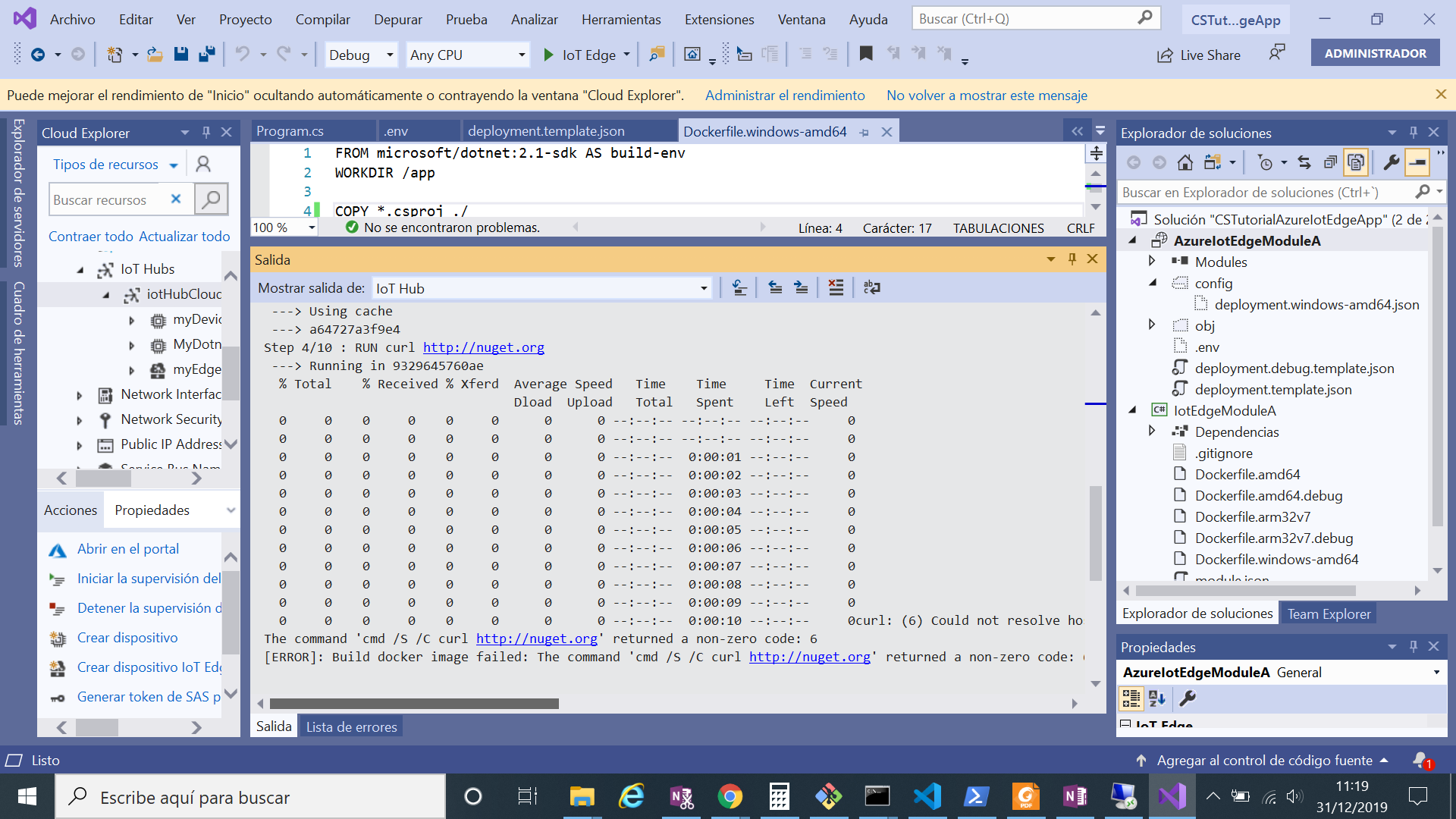
Do you have an idea about what the problem is?
 auroramo
on 31 Dec 2019
auroramo
on 31 Dec 2019
@seanmcd-msft Can you PTAL?
veyalla
on 7 Jan 2020
i'm not sure what's going on here. but, this doesn't look like an iot edge issue. it seems like some kind of local network configuration problem or a nuget issue. if you can't access the initial .html page from nuget.org then you're not going to be able to download any packages from there either. the result from that curl command should be a simple .html page that redirects you to www.nuget.org. You're likely to get better help from dotnet build or nuget folks.
seanmcd-msft
on 7 Jan 2020
it occurs to me that this could be another manifestation of the dual vnet problem as described here:
https://social.msdn.microsoft.com/Forums/en-US/dd2cf0b1-e5ac-4295-89e7-3d29893a3781/problem-of-experimenting-azure-iot-edge-offline-connectivity?forum=iotedge
does the output from 'ipconfig /all' show 2 vEthernet(nat) interfaces?
seanmcd-msft
on 7 Jan 2020
The output from 'ipconfig /all' shows only 1 vEthernet(nat) interface in my case: Hyper-V Virtual Ethernet Adapter #2
auroramo
on 8 Jan 2020
This issue is being marked as stale because it has been open for 30 days with no activity.
![github-actions[bot] picture](https://avatars.githubusercontent.com/in/15368?v=4&s=40) github-actions[bot]
on 8 Feb 2020
github-actions[bot]
on 8 Feb 2020
Can we please keep this issue alive? I'm running into the same problem, or at least the symptoms are all exactly the same. Any guidance would be appreciated. @bechynsky or @auroramo -- have either of you been able to resolve this for yourselves, and if so what did you have to do?
 LarsKemmann
on 12 Feb 2020
LarsKemmann
on 12 Feb 2020
Given that none of your containers can resolve hostnames, this is an issue with Docker for Windows rather than anything specific to IoT Edge. You likely want to open an issue at https://github.com/docker/for-win
FWIW, I'm confused by @bechynsky 's comment in https://github.com/Azure/iotedge/issues/2054#issuecomment-562965293
Command:
docker run -it --user administrator microsoft/dotnet:2.1-sdk netsh interface ip set dns "Ethernet" static 8.8.8.8 & ping google.com
Output:Pinging google.com [172.217.20.238] with 32 bytes of data: Reply from 172.217.20.238: bytes=32 time=25ms TTL=56
If this is actually what they ran, and assuming this is being run from cmd.exe, then cmd.exe would split the command at the & so that the ping google.com would run on the host, not inside the container. (I don't have cmd.exe on hand to check for myself.)
If that command really did run ping google.com inside the container, implying the netsh command fixed the issue, then I don't see a reason why the solution would work with docker run but not in a Dockerfile.
One possibility is that the Dockerfile splits the netsh command and the dotnet restore command into separate RUN steps. If netsh is only changing an unpersisted configuration then it might be lost by the time the dotnet restore step runs. So it might work to have a single RUN step that does netsh ... & dotnet ... (Of course this means both will need to run as Administrator, so maybe you can wrap the dotnet command in a runas or something. It also means that the actual runtime stage of the image will also need to run netsh ... instead of just running dotnet via ENTRYPOINT.)
If that doesn't help, or if the netsh command never actually helped even with docker run, then again you likely want to ask at https://github.com/docker/for-win
 arsing
on 17 Feb 2020
arsing
on 17 Feb 2020
I really would like this fixed. Just to help anybody else that came across this issue, here's what I did:
There's a file at the path C:\ProgramData\Docker\config\daemon.json. Add the line: "dns": ["8.8.8.8"] in the JSON object.
Ideally, replace it with your actual DNS server. 8.8.8.8 is just a well known DNS server, so it should work.
After adding that line, restart the Docker daemon. You can use the context menu from the system tray for that.
I hope this helps somebody.
 Type1JGB
on 15 Jun 2020
Type1JGB
on 15 Jun 2020
I really would like this fixed. Just to help anybody else that came across this issue, here's what I did:
There's a file at the path
C:\ProgramData\Docker\config\daemon.json. Add the line:"dns": ["8.8.8.8"]in the JSON object.Ideally, replace it with your actual DNS server. 8.8.8.8 is just a well known DNS server, so it should work.
After adding that line, restart the Docker daemon. You can use the context menu from the system tray for that.
I hope this helps somebody.
This solved the issue I had. Thanks @Type1JGB :)
 Vijay-Karthick
on 6 Jul 2020
Vijay-Karthick
on 6 Jul 2020
I had a similar issue. following is worked for me
I have added "bridge":"none" in C:ProgramDataDockerconfigdaemon.json for some testing and I forgot about this
,after removing this "bridge":"none" started to work for me.
 durairajasivam
on 13 Jul 2020
durairajasivam
on 13 Jul 2020
I really would like this fixed. Just to help anybody else that came across this issue, here's what I did:
There's a file at the pathC:\ProgramData\Docker\config\daemon.json. Add the line:"dns": ["8.8.8.8"]in the JSON object.
Ideally, replace it with your actual DNS server. 8.8.8.8 is just a well known DNS server, so it should work.
After adding that line, restart the Docker daemon. You can use the context menu from the system tray for that.
I hope this helps somebody.This solved the issue I had. Thanks @Type1JGB :)
This worked for me too
 piyaln
on 30 Aug 2020
piyaln
on 30 Aug 2020
I really would like this fixed. Just to help anybody else that came across this issue, here's what I did:
There's a file at the pathC:\ProgramData\Docker\config\daemon.json. Add the line:"dns": ["8.8.8.8"]in the JSON object.
Ideally, replace it with your actual DNS server. 8.8.8.8 is just a well known DNS server, so it should work.
After adding that line, restart the Docker daemon. You can use the context menu from the system tray for that.
I hope this helps somebody.This solved the issue I had. Thanks @Type1JGB :)
This worked for me too
Worked for me too ,Thanks so much
 RenganathanRennie
on 7 Oct 2020
RenganathanRennie
on 7 Oct 2020
Related issues
 has-taiar
·
6Comments
shizn
·
6Comments
has-taiar
·
6Comments
shizn
·
6Comments
 AndyLiTaiwan
·
5Comments
AndyLiTaiwan
·
5Comments
 alaendle
·
5Comments
alaendle
·
5Comments
 nhuurnink
·
6Comments
nhuurnink
·
6Comments
Most helpful comment
I really would like this fixed. Just to help anybody else that came across this issue, here's what I did:
There's a file at the path
C:\ProgramData\Docker\config\daemon.json. Add the line:"dns": ["8.8.8.8"]in the JSON object.Ideally, replace it with your actual DNS server. 8.8.8.8 is just a well known DNS server, so it should work.
After adding that line, restart the Docker daemon. You can use the context menu from the system tray for that.
I hope this helps somebody.