Iot: Ssd13xx SendMessage broken after upgrade
After upgrading System.Device.Gpio and Iot.Device.Bindings from 0.1.0-prerelease.19307.2 to 1.0.0, I noticed my Ssd1306 no longer resets the position correctly when attempting to use the SendMessage method like I was using before.
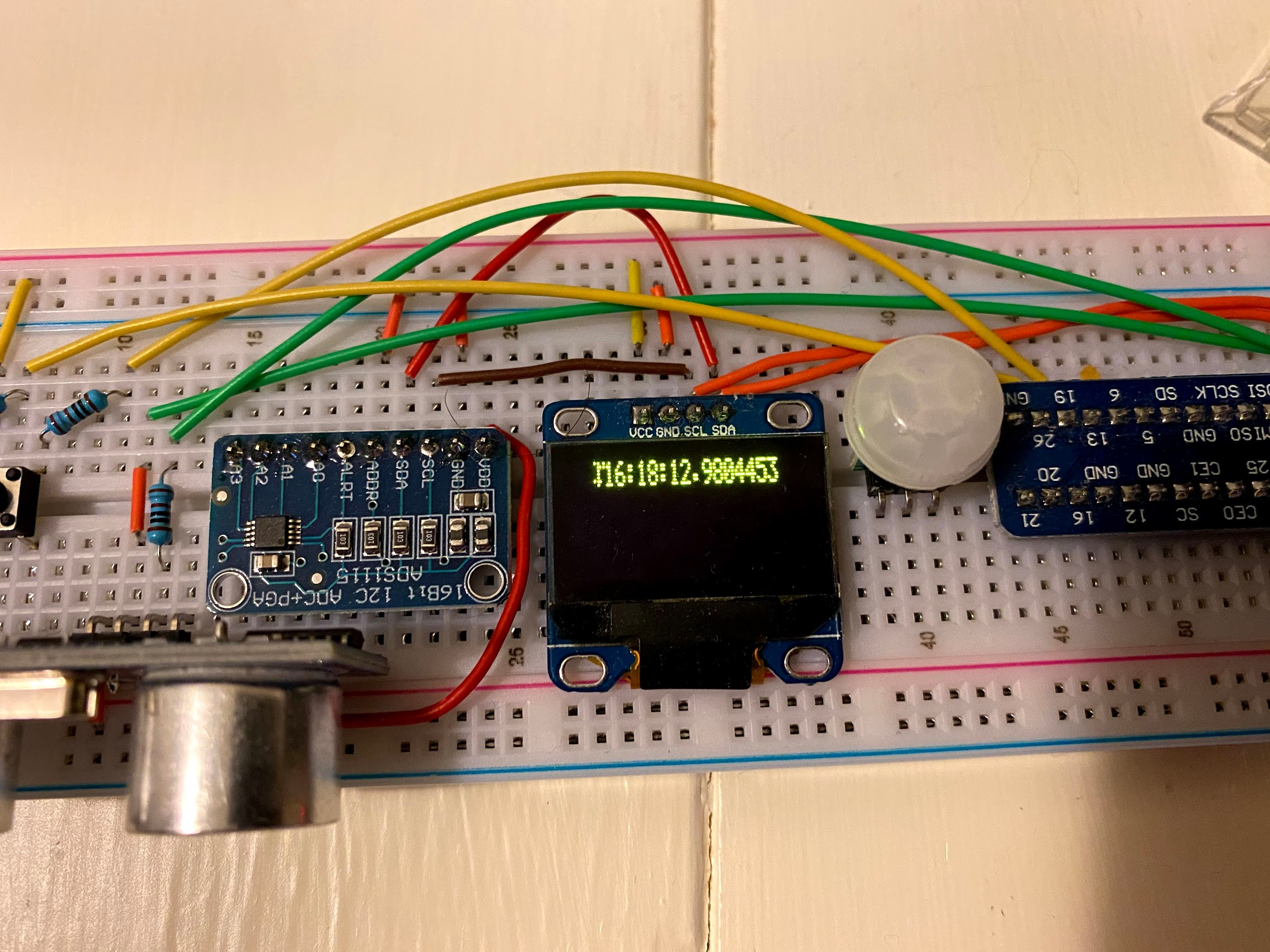
First call, should just be the time with milliseconds, but notice the odd leading character
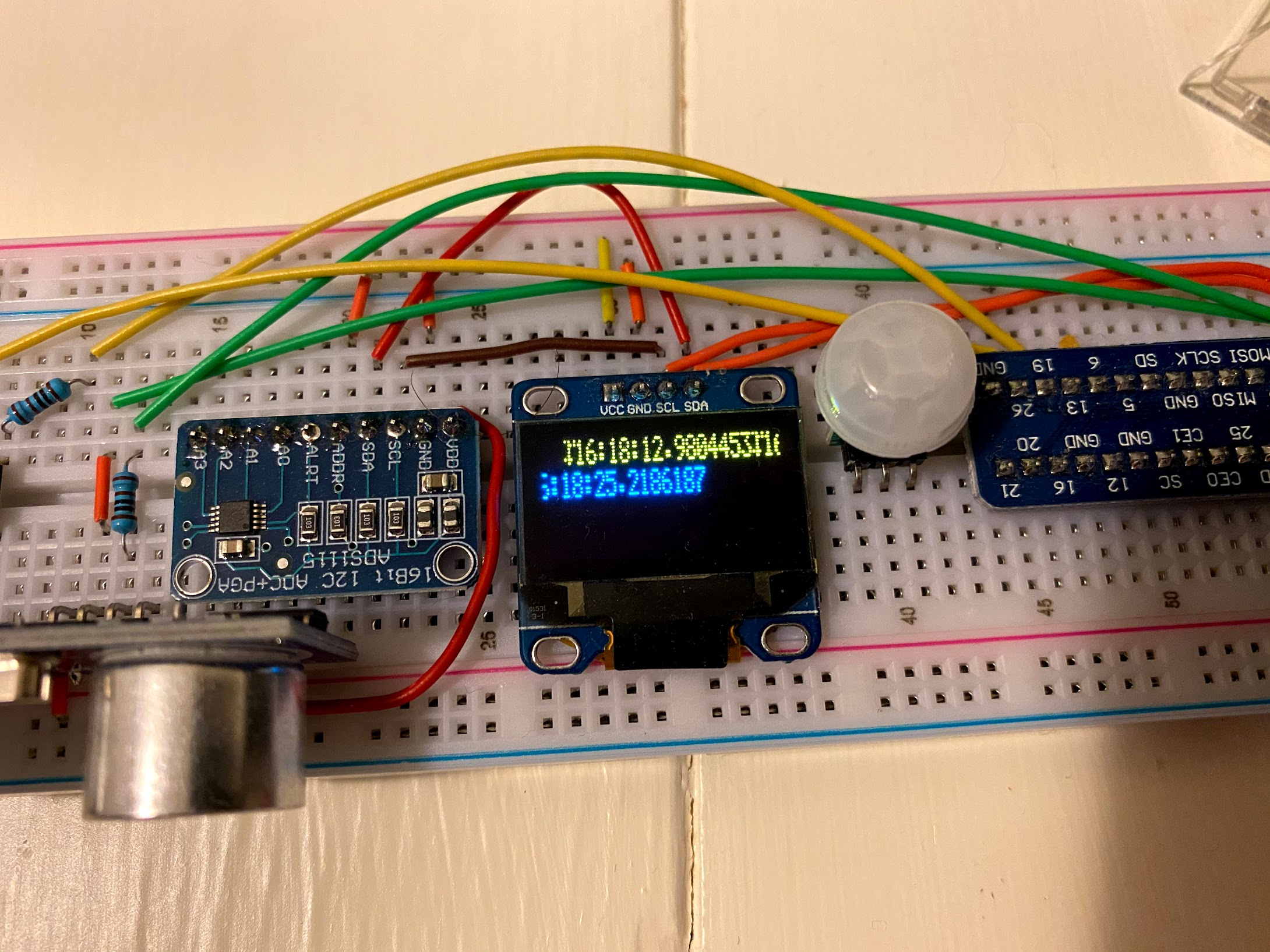
Second call, should have again just been the time with milliseconds "written over" the first call but it was instead "appended" (with an odd character prefix) even though Column and Page addresses were set.
Looking closer at the supplied sample, it appears the use of SendMessage has been commented out which leads me to the following questions:
- Will this be re-supported at some point? My assumption is this was broken when Ssd1327 support was added, but I could be wrong.
- I noticed DisplayClock uses
SixLabors.Fonts/SixLabors.ImageSharppackages to render with more than the basic font. While I'm not overly keen on using another package, is this the approach I should use now to rendering text to the OLED? It does enable more functionality (more fonts, graphics, etc)
Btw, I can run the full sample as is and get expected results, but if I uncomment the SendMessage calls, I get shifted results for the full demo (images, etc)
 techniq
All 2 comments
@techniq the sample geometry is only ready for the 128x32 OLED (you can notice that in your image the text has skipped pixels, the display memory is not mapped correctly). In fact the way it was written is kind of strange trying to always rewrite the page address and column address, which should only be done during initialization when using horizontal paging mode (debugging step by step you can see that this waste, that you call "odd character prefix", is thrown into memory during attempts to set addresses again). Here is an example that should work on OLED 128x64:
```csharp
using System;
using System.Threading;
using System.Device.I2c;
using Iot.Device.Ssd13xx;
using Iot.Device.Ssd13xx.Commands;
using Iot.Device.Ssd13xx.Samples;
using Ssd1306Cmnds = Iot.Device.Ssd13xx.Commands.Ssd1306Commands;
namespace i2cTest
{
class Program12864
{
private static I2cDevice GetI2CDevice()
{
Console.WriteLine("Using I2C protocol");
        var connectionSettings = new I2cConnectionSettings(0, 0x3C);
        return I2cDevice.Create(connectionSettings);
    }

    private static Ssd1306 GetSsd1306WithI2c()
    {
        return new Ssd1306(GetI2CDevice());
    }

    private static void Initialize(Ssd1306 device)
    {
        device.SendCommand(new SetDisplayOff());
        device.SendCommand(new Ssd1306Cmnds.SetDisplayClockDivideRatioOscillatorFrequency(0x00, 0x08));
        device.SendCommand(new SetMultiplexRatio(0x3F));
        device.SendCommand(new Ssd1306Cmnds.SetDisplayOffset(0x00));
        device.SendCommand(new Ssd1306Cmnds.SetDisplayStartLine(0x00));
        device.SendCommand(new Ssd1306Cmnds.SetChargePump(true));
        device.SendCommand(new Ssd1306Cmnds.SetMemoryAddressingMode(Ssd1306Cmnds.SetMemoryAddressingMode.AddressingMode.Horizontal));

        // OLED Model Geometry
        // OLED 128x64
        device.SendCommand(new Ssd1306Cmnds.SetSegmentReMap(true));
        // C0H
        device.SendCommand(new Ssd1306Cmnds.SetComOutputScanDirection(false));
        device.SendCommand(new Ssd1306Cmnds.SetComPinsHardwareConfiguration(true, false));

        device.SendCommand(new SetContrastControlForBank0(0x8F));
        device.SendCommand(new Ssd1306Cmnds.SetPreChargePeriod(0x01, 0x0F));
        device.SendCommand(new Ssd1306Cmnds.SetVcomhDeselectLevel(Ssd1306Cmnds.SetVcomhDeselectLevel.DeselectLevel.Vcc1_00));
        device.SendCommand(new Ssd1306Cmnds.EntireDisplayOn(false));
        device.SendCommand(new Ssd1306Cmnds.SetNormalDisplay());
        device.SendCommand(new SetDisplayOn());

        // OLED 128x64
        ResetPageColumnAddress(device);
        ClearScreen(device);
    }

    private static void ResetPageColumnAddress (Ssd1306 device)
    {
        device.SendCommand(new Ssd1306Cmnds.SetColumnAddress());
        device.SendCommand(new Ssd1306Cmnds.SetPageAddress(Ssd1306Cmnds.PageAddress.Page0, Ssd1306Cmnds.PageAddress.Page7));
    }

    private static void ClearScreen(Ssd1306 device)
    {
        // 128x64
        // for each page
        for (int i = 0; i < 8; i++)
        {
            device.SendData(new byte[64]);
        }
    }

    private static void SendMessage(Ssd1306 device, string message)
    {
        foreach (char character in message)
        {
            device.SendData(BasicFont.GetCharacterBytes(character));
        }
    }

    static void Main(string[] args)
    {
        Console.WriteLine("Hello World!");

        using (Ssd1306 device = GetSsd1306WithI2c())
        {
            Initialize(device);
            SendMessage(device, "Hello .NET IoT!!!");
        }
    }
}
}
````
"written over" the first call but it was instead "appended"
This is normal since the sample are using the horizontal paging mode (see page 35 section 10.1.3 "Horizontal addressing mode (A [1: 0] = 00b" for more information in the datasheet: https://cdn-shop.adafruit.com/datasheets/SSD1306.pdf)
To achieve the behavior you are looking for I think you will have to use the page addressing mode.
 microhobby
on 18 May 2020
microhobby
on 18 May 2020
Thanks @microhobby, I'll need to dust this off and give it a try. It's been a couple months since I had time to tinker around with it.
I think the last I was using it I decided to embrace using SixLabors.Fonts / SixLabors. ImageSharp` so I could change the font/size and send graphics.
```c#
public static void SendMessage(this Ssd1306 device, string message, float x = 0, float y = 0)
{
var fontSize = 14;
var font = "DejaVu Sans";
var fontsys = SystemFonts.CreateFont(font, fontSize, FontStyle.Regular);
        using (Image<Rgba32> image = new Image<Rgba32>(128, 64))
        {
            image.Mutate(ctx => ctx
                .Fill(Rgba32.Black)
                .DrawText(message, fontsys, Rgba32.White, new PointF(x, y))
            );

            using (Image<Gray16> image_t = image.CloneAs<Gray16>())
            {
                device.DisplayImage(image_t);
            }
        }
    }
// Port from https://github.com/adafruit/Adafruit_Python_SSD1306/blob/8819e2d203df49f2843059d981b7347d9881c82b/Adafruit_SSD1306/SSD1306.py#L184
public static void DisplayImage(this Ssd1306 device, Image
{
Int16 width = 128;
Int16 pages = 4;
// Int16 pages = 8;
        // Create full size canvas incase `image` is smaller (protect against out of bounds)
        var canvas = new Image<Gray16>(128, 32);
        canvas.Mutate(ctx => ctx.DrawImage(image, 1));

        var buffer = new List<byte>();
        for (int page = 0; page < pages; page++)
        {
            for (int x = 0; x < width; x++)
            {
                int bits = 0;
                for (byte bit = 0; bit < 8; bit++)
                {
                    bits = bits << 1;
                    bits |= canvas[x, page * 8 + 7 - bit].PackedValue > 0 ? 1 : 0;
                }

                buffer.Add((byte)bits);
            }
        }

        int chunk_size = 16;
        for (int i = 0; i < buffer.Count; i += chunk_size)
        {
            var data = buffer
                .Skip(i)
                .Take(chunk_size)
                .ToArray();

            device.SendData(data);
        }
    }
```
techniq
on 18 May 2020
Related issues
 shaggygi
·
22Comments
shaggygi
·
22Comments
 IVData
·
43Comments
IVData
·
43Comments
 JinShil
·
22Comments
JinShil
·
22Comments
 krwq
·
29Comments
krwq
·
51Comments
krwq
·
29Comments
krwq
·
51Comments